



AI reply suggestions can speed up customer support but also risk exposing sensitive information like passwords, API keys, and personal details. To ensure security and compliance, follow these key steps:
- Limit Data Exposure: Only share essential information with AI systems. Use placeholders for sensitive data like
[NAME]or[CARD]. - Choose Secure AI Tools: Prefer self-hosted or platform-native AI systems to avoid sending data to third-party providers.
- Protect Data in Processing: Tokenize sensitive details and sanitize logs to prevent leaks during AI operations.
- Control Access: Implement role-based access controls, restrict permissions, and use secure credentials.
- Monitor Outputs: Scan AI-generated responses for sensitive data and add human review for high-risk cases.
- Establish Governance: Define clear policies, maintain audit logs, and regularly test for vulnerabilities.
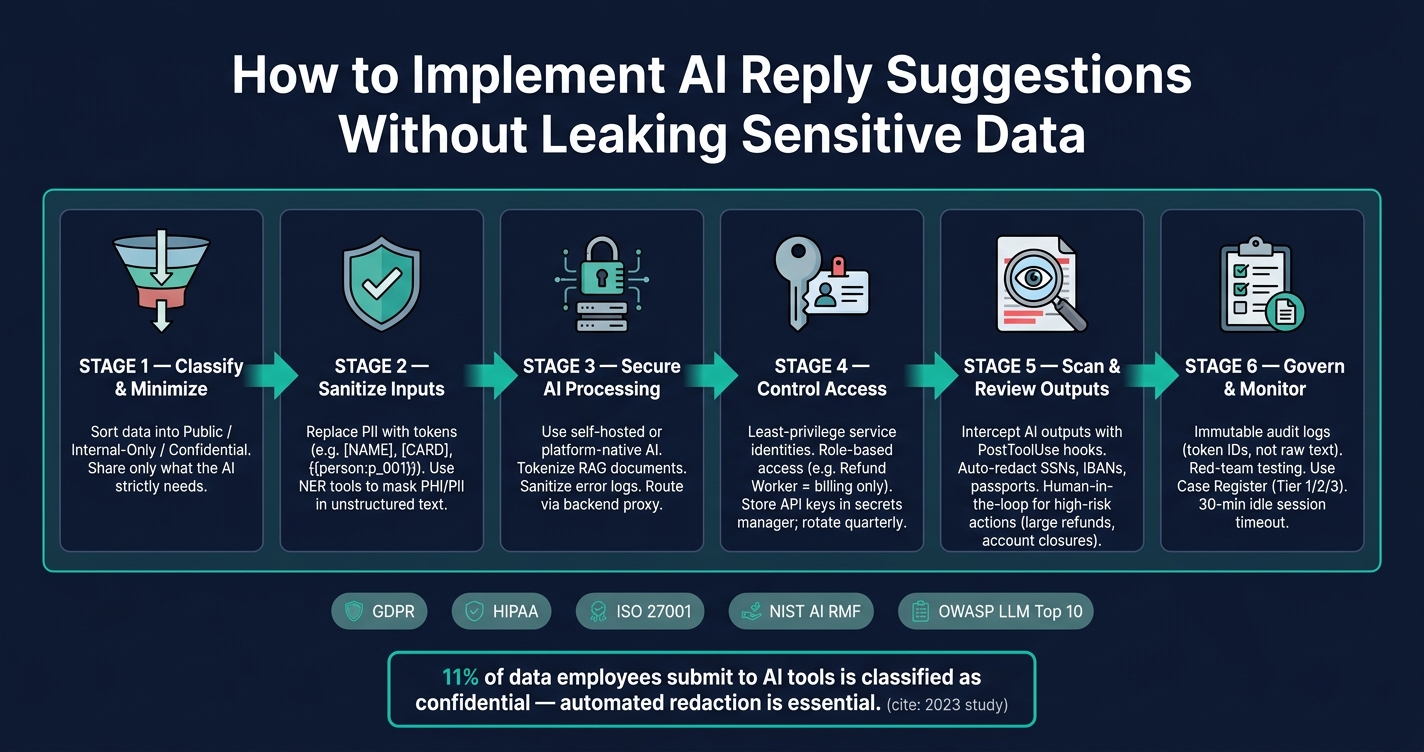
Secure AI Reply Suggestions: Data Protection Pipeline
Protecting sensitive data in AI apps
sbb-itb-e60d259
How AI Reply Suggestions Work and What Data They Touch
AI reply suggestion tools operate by gathering context from various sources – like open tickets, CRM profiles, case histories, and knowledge bases – and feeding this information into a language model to draft a response. Agents can then review, edit, or send the suggested reply. Behind the scenes, the data pipeline is intricate, and the risks aren’t limited to what agents input. They extend to all the data the AI processes, creating potential vulnerabilities in how information is handled. This complexity becomes even more apparent in specific support scenarios.
Common AI Reply Suggestion Use Cases in B2B Support
In B2B support, AI reply suggestions are applied in several key ways. One of the most frequent is inline drafting, where the AI generates a complete response based on the ticket’s content. Another common use is ticket summarization, which condenses lengthy case histories into a few lines to help agents quickly understand the issue. Additionally, next-best-action suggestions guide agents on what to do next – like escalating an issue, issuing a refund, or resetting credentials – based on the customer’s history and the current problem.
Some setups take it further by assigning specialized AI tools to specific tasks, such as refund processing, account access requests, or subscription updates. However, as Ameya Deshmukh from Everworker warns:
"The biggest risk is uncontrolled disclosure or action – either the AI reveals sensitive information in responses or it’s granted overly broad system permissions." [1]
Each use case introduces its own risks, emphasizing the importance of understanding how data moves through these systems.
Tracing Data Inputs and Outputs
To pinpoint where data leaks might occur, it’s essential to trace the flow of information from start to finish. Typically, the process begins with a ticket. The system pulls CRM details and case history, compiles them into a prompt, and sends this to the language model, which then generates a draft reply.
Sensitive information can enter the pipeline at almost any stage. For instance, a customer might include an API key in an error log or credentials in an internal note. On the output side, the AI might incorporate database details into its draft, even if the agent didn’t request them.
David Crowe from Agentic Control Plane highlights this issue:
"Leaks often occur between the tool’s output and the agent’s view – a gap many governance systems fail to monitor." [3]
Common types of data that flow through these systems include:
| Data Category | Specific Examples | Common Sources |
|---|---|---|
| Identity & Contact | Names, emails, phone numbers, IP addresses | CRM profiles, email headers |
| Financial | Credit card numbers (PAN), IBAN, billing history | Billing systems, payment notes |
| Government IDs | SSN, passport numbers, driver’s license numbers | Identity verification tickets, KYC workflows |
| Case Context | Support transcripts, internal notes, case history | Help desk software |
| Technical/Security | API keys, passwords, MFA codes, log files | Technical escalation tickets, error reports |
Classifying Data and Reducing What You Share
Mapping out how data flows through these systems highlights the importance of carefully classifying and limiting what’s shared. Only the necessary data should be included in the AI’s context. A good starting point is sorting your data into three categories: public (safe to share openly), internal-only (restricted to staff), and confidential (requires explicit authorization to use).
Once data is classified, the next step is to minimize what’s shared. For example, if the AI is drafting a reply about a shipping delay, there’s no reason to include the customer’s billing history or government ID. Reducing the data sent to the AI reduces the risk of leaks. As Ameya Deshmukh puts it:
"Support data is some of the most sensitive data your company touches: identity details, billing info, account access requests, health or financial context, and the full narrative of what went wrong." [1]
The key is to treat every piece of data shared with the AI as a deliberate decision, not an automatic inclusion.
Building a Secure Technical Setup for AI Reply Suggestions
Choosing Between Native AI and External LLM Integrations
One of the first decisions you’ll need to make is whether to use AI built directly into your support platform or connect to an external large language model (LLM) via API. Both options have their advantages, but they come with different security considerations.
External LLM APIs send prompts to third-party systems, which may retain data for up to 30 days [4]. On the other hand, native models keep everything internal. Open-source solutions like Llama can even run on private GPU instances or serverless environments, ensuring there’s no outbound data transfer [4].
As a general rule, if your support tickets contain sensitive details like financial information, government IDs, or health-related data, a self-hosted or platform-native AI setup provides much tighter control over where that data goes and how long it’s stored. Once you’ve decided on the setup, the next step is protecting the data during processing to avoid accidental leaks.
Protecting Data During AI Processing
Sensitive data needs more than encryption – it requires extra care during processing. When customer data is decrypted for prompt assembly, it becomes vulnerable to exposure through logs, vector stores, or memory caches [2].
To reduce these risks, replace raw personally identifiable information (PII) with structured tokens (e.g., {{person:p_001}}) before sending data to the AI. Additionally, sanitize error payloads to ensure logs don’t accidentally capture raw customer details [2]. This way, the AI only works with placeholders, and tools like Sentry or Datadog won’t inadvertently store sensitive data if something goes wrong.
If you’re using Retrieval-Augmented Generation (RAG), tokenize documents before embedding them. This step ensures that vector stores don’t encode semantic details about PII, even if the original text isn’t directly visible [2]. These precautions significantly reduce the chances of sensitive data leaking through AI workflows.
Access Controls and Data Retention
Once data processing is secure, implementing strict access controls and retention policies can further minimize risks.
Avoid using shared credentials. Instead, assign service identities with specific, limited roles. For instance, a "Refund Worker" should only access billing information, while an "Account Access Worker" should be restricted to authentication data [1]. Role-based access limits the damage if an account is compromised.
For logging, focus on auditability without exposing sensitive data. Log token IDs, event types, and confidence scores rather than raw text [2]. This approach aligns with GDPR and HIPAA requirements while keeping customer data safe.
To further secure your setup:
- Store API keys in a secure secrets manager and rotate them quarterly.
- Route all AI API requests through a backend proxy to maintain control [5].
| Control Category | Best Practice | Compliance Alignment |
|---|---|---|
| Access Control | Least-privilege service identities | HIPAA Technical Safeguards |
| Identity | SSO/MFA for management interfaces | ISO/IEC 27001 |
| Retention | Configurable auto-purge windows | GDPR Article 5 (Minimization) |
| Monitoring | Pseudonymized audit logging | NIST AI Risk Management Framework |
| Network | Backend API proxying | OWASP Top 10 for LLM Apps |
Finally, establish clear retention schedules for prompts and AI outputs. Define how long this data will be stored and automate purges to ensure timely deletion. Holding onto data longer than necessary increases compliance risks, especially under GDPR’s data minimization principle. Retention discipline is a critical piece of building a secure AI setup for reply suggestions.
How to Stop Sensitive Data From Leaking Through AI Suggestions
Filtering and Redacting Sensitive Inputs
To reduce the risk of sensitive data leaks, it’s essential to redact sensitive inputs before they are processed by AI systems. This approach aligns with the principle of limiting data exposure.
For structured fields, token-based masking works better than auto-detection. Replace specific fields, like names or card numbers, with consistent placeholders such as [NAME] or [CARD]. For unstructured data, use Named Entity Recognition (NER) tools to identify and mask sensitive information like Personally Identifiable Information (PII) or Protected Health Information (PHI). A 2023 study revealed that about 11% of data employees submit to AI tools is classified as confidential [6], highlighting the importance of automated redaction.
Here’s a quick reference for handling different types of sensitive data:
| Data Type | Redaction Best Practice |
|---|---|
| Payment Card Data | Completely mask; never share with AI [1] |
| Government IDs/SSNs | Use only the last four digits, and only when absolutely necessary [1] |
| Authentication Secrets | Mask passwords, API keys, and multi-factor authentication (MFA) codes in all contexts [1] |
| Medical Details | Mask unless explicitly required under HIPAA-compliant workflows [1] |
Once inputs are securely masked, the next step is crafting prompts to further protect sensitive information.
Writing AI Prompts That Avoid Exposing Sensitive Data
Even with redacted inputs, poorly designed prompts can still lead to sensitive data exposure. To minimize this risk, use a strategy called progressive disclosure. This means starting with fully redacted information and introducing sensitive details only at specific, validated steps – such as when an agent finalizes a response, not during the drafting phase. This method ensures sensitive data remains outside the AI’s active context.
Additionally, your system prompts should include explicit instructions to prevent leaks. For example, include "never reveal" directives to stop the AI from exposing internal notes, API keys, or flagged sensitive fields – even if prompted maliciously. This approach tackles prompt injection attacks, which are flagged as a major vulnerability in the 2025 OWASP guidance for LLM Applications [7].
"The real security question isn’t ‘Is AI safe?’ It’s ‘Is this AI implementation designed to prevent leakage, misuse, and unauthorized actions?’" – Ameya Deshmukh, Integrail Corp [1]
Scanning AI Outputs and Adding Human Review
After securing inputs and designing robust prompts, the final layer of protection involves verifying AI outputs through automated scanning and human review.
Use tools like a "PostToolUse" hook to intercept AI outputs before they reach users. These tools can automatically redact sensitive data by replacing it with markers such as [REDACTED:<type>] [3]. Modern PII scanners can detect patterns for common identifiers like Social Security Numbers (SSNs), International Bank Account Numbers (IBANs), and passport numbers [3], making automated scanning highly effective.
"The fix isn’t telling the agent to be more careful. The fix is making sure PII never reaches the agent’s context in the first place." – David Crowe, Agentic Control Plane [3]
For high-stakes scenarios, such as processing large refunds, changing account ownership, or handling legal escalations, automated scanning alone isn’t enough. These cases require human-in-the-loop review before any action is taken [1]. Pair this with daily quality checks on AI interactions to identify and correct policy deviations early. Together, these measures create a multi-layered defense system that keeps AI-generated replies secure, compliant, and efficient in B2B support workflows.
Governance and Ongoing Oversight of AI Reply Suggestions
Setting Policies and Assigning Responsibilities
Technical safeguards are just the starting point; maintaining secure and compliant AI reply suggestions requires a solid governance framework. Think of it as an ongoing process, not a one-time setup. Clear policies and team roles are essential. Just as new employees start with limited access, AI systems should operate under strict access controls.
"The fix is not to avoid AI. It’s to deploy AI the same way you deploy humans: with role-based access, training, supervision, and a paper trail." – Ameya Deshmukh, Integrail Corp [1]
A Use Case Register can serve as a practical tool to categorize AI tasks by their risk levels. For instance:
- Tier 1: General information requests
- Tier 2: Tasks involving account-level actions
- Tier 3: Tasks requiring access to sensitive data
Each tier should outline who can authorize actions, the data accessible to the AI, and when human intervention is mandatory. High-risk actions – like refunds over a specific amount, account closures, or address changes – should go through approval gates requiring supervisor sign-off [10].
Responsibilities need to be clearly divided:
- Support Operations: Design workflows
- Security and Compliance: Audit workflows
- Supervisors: Handle escalations
Every AI action must be logged, including timestamps, accessed systems, and the policy version in effect, but without storing raw conversation content. This approach minimizes data liabilities while allowing system behavior to be reconstructed for audits. As Paul Serban puts it: "Audit log minimalism: log enough to reconstruct the system’s behavior, but not so much that the log itself becomes a liability." [9]
| Policy Category | Key Requirement | Responsible Party |
|---|---|---|
| Disclosure | Notify customers of AI interaction (EU AI Act) | Support Operations |
| Data Retention | Define TTL for logs and session memory (GDPR) | Security/IT |
| Escalation | Set confidence thresholds for human handoff | Support Supervisors |
| Auditability | Append-only logs of all AI-driven actions | DevOps/Security |
Once these policies are in place, the next focus should be on rigorous testing and monitoring to detect and address deviations early.
Testing for Failures and Monitoring for Leaks
Defining roles and access is just the beginning – ongoing monitoring is critical to catch system drift and prevent data leaks. AI systems can degrade over time as products evolve, policies change, and edge cases pile up. The key is identifying these issues before they impact customers.
"The goal is catching drift before customers do. AI response quality degrades over time as products change, policies update, and edge cases accumulate." – Víctor Mollá, GuruSup [8]
Red-teaming is a powerful way to uncover vulnerabilities. Test your system with adversarial inputs designed to bypass standard patterns, such as phrases like "my card ends in four-two-seven-one" or "email me at john dot smith at gmail". These non-standard formats often expose gaps in regex-based redaction rules [9]. Combine this with:
- A secondary LLM for automated quality scoring
- Daily human reviews of flagged interactions
- Feedback loops from customers
Together, these create a robust monitoring system [8].
Develop an AI failure protocol that outlines notification steps, response times, and model rollback procedures. This plan should be documented, tested, and ready to go before any incidents occur [8].
Running Cost-Efficient AI Support Operations
Governance isn’t just about security – it also saves money. For example, a GDPR violation can cost up to 4% of global annual revenue, while the average HIPAA breach penalty is around $1.3 million [11]. Proactive measures are far less expensive than dealing with the fallout of a breach.
Two key strategies to manage both costs and risks are rate limiting and scoped retrieval. In Retrieval-Augmented Generation (RAG) systems, metadata filters ensure the AI only accesses relevant documents – like billing policies for billing queries – reducing unnecessary data exposure. Additionally, set a retrieval confidence threshold (usually a cosine similarity score between 0.75 and 0.80) to ensure the AI only includes context it’s confident about, avoiding guesses that could lead to errors or leaks [9].
Finally, implement a 30-minute idle session timeout to limit how long data remains in active memory. This aligns with GDPR’s data minimization requirements while enhancing security [9]. By combining these operational strategies with earlier safeguards, you ensure your AI support system remains secure, efficient, and reliable over time.
Conclusion: A Practical Path to Secure AI Reply Suggestions in B2B Support
Securing AI-generated reply suggestions is not a single decision but rather a series of intentional choices woven into every layer of your support operations. At the core lies data minimization – removing or pseudonymizing personal identifiable information (PII) before it ever interacts with the model. A streamlined "Sanitize → Retrieve → Isolate → Audit" pipeline ensures this process operates efficiently with minimal delays. Pair this technical framework with least-privilege AI identities and scoped roles to maintain a strong security foundation. On top of that, a gateway proxy capable of redacting or blocking sensitive entities in real time – spanning over 28 entity types in under 50 milliseconds per request – further fortifies your defenses [13].
Beyond technical safeguards, effective prompt design plays a critical role in reducing data exposure risks. Since system prompts alone are not enough, your architecture should enforce security through scoped retrieval, output scanning, and human checkpointing for high-risk scenarios.
Governance ties all these elements together. Immutable audit logs, clearly defined responsibilities, rigorous red-team testing, and stringent vendor contracts are more than just compliance requirements – they enable scalable, secure AI operations. The key difference between a secure deployment and a potential liability lies in whether these controls are embedded from the start or hastily added later.
"Treat security as a growth lever: the same controls that protect PII also compress deal cycles, improve enterprise access, and raise conversion." – Christopher Good, CRO [12]
For B2B support teams, these measures not only protect sensitive data but also build trust and streamline operations. Sharing SOC 2 certifications and data processing agreements with potential clients can speed up procurement processes and foster the trust needed to close enterprise deals. In the end, secure AI is what enables scalable and trust-based operations. From data sanitization to robust governance, these integrated measures create the backbone of secure AI reply suggestions in modern B2B support environments.
FAQs
What data should I never send to the AI prompt?
When dealing with data, it’s critical to avoid sharing personally identifiable information (PII), such as names, email addresses, or phone numbers. Similarly, refrain from including sensitive customer data, like account numbers or health-related information, and proprietary business details, such as internal policies or legal documents. Always ensure that data is either anonymized or encrypted to maintain privacy and meet compliance requirements. Exposing raw or unredacted data can lead to serious privacy breaches and regulatory violations.
How do I tokenize or mask PII without breaking reply quality?
To handle sensitive information (PII) securely while maintaining response quality, structured masking techniques are key. These methods replace sensitive data with tokens before any AI processing occurs. Unmasking should only take place in workflows that are explicitly authorized to do so.
For instance, token-based masking APIs can substitute CRM fields – like names, emails, or dates – with non-identifiable tokens. This ensures the AI has enough context to generate meaningful responses while safeguarding raw PII from exposure and minimizing the risk of data leaks.
When should AI replies require human approval before sending?
AI-generated replies should be reviewed by humans when dealing with sensitive data, security concerns, or compliance issues. This is especially critical for responses that involve confidential customer details or handling personally identifiable information (PII). A human review acts as a safeguard to ensure the accuracy of information and helps prevent data breaches, misuse, or violations of legal and regulatory standards. This is particularly vital in industries where maintaining customer trust is paramount.






