


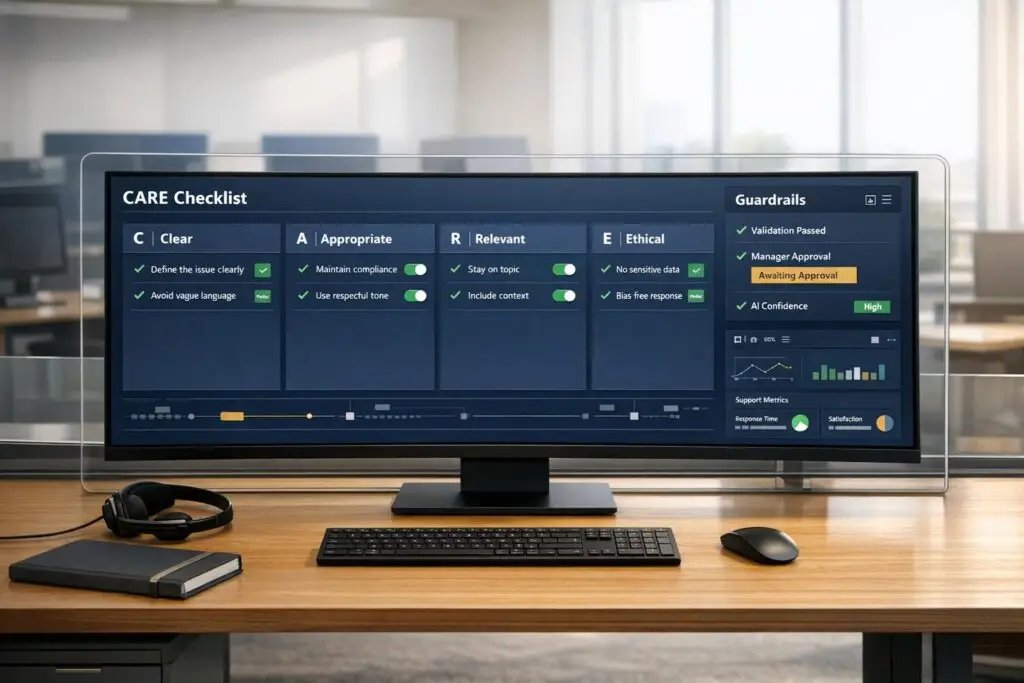
Well-designed AI prompts can transform B2B customer support by improving ticket triage, summarization, and sentiment detection. However, weak prompts can lead to errors, inefficiencies, and extra work for support teams. To avoid these pitfalls, focus on creating clear, structured prompts with guardrails for safety, compliance, and bias reduction. Here’s a quick guide to get started:
- Define Purpose: Tailor prompts to specific tasks like triage, summarization, or sentiment analysis.
- Use a Framework: Follow the CARE model – Context, Ask, Rules, Examples – for structured prompts.
- Ensure Clarity: Avoid vague instructions. Be specific about roles, tasks, and output formats.
- Add Guardrails: Include rules to prevent unsafe actions, bias, or misinformation.
- Embed Context: Provide only relevant details (e.g., account history, policy excerpts) to guide AI responses.
- Plan Escalations: Set clear triggers for human review, especially for high-risk or complex issues.
- Track Performance: Regularly test and score prompts to maintain quality and reduce errors.
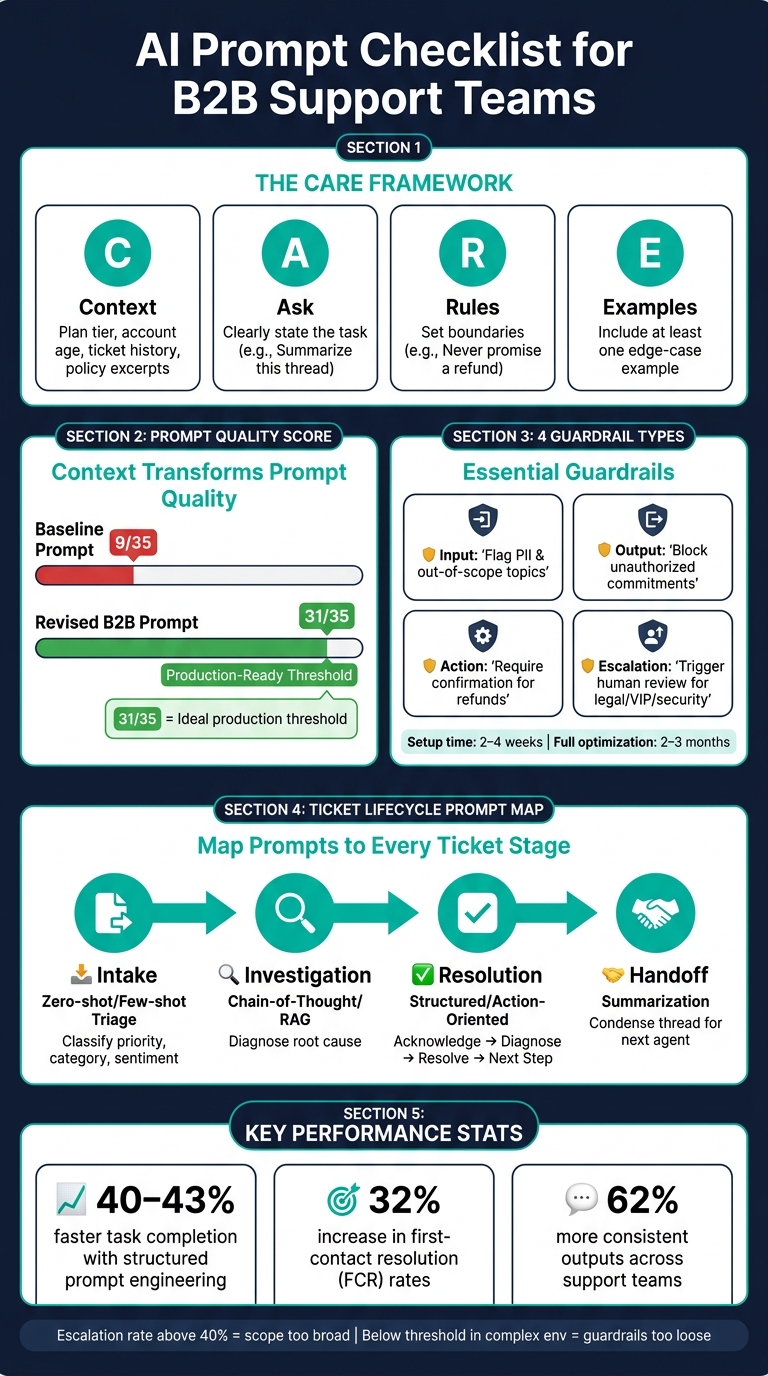
AI Prompt Checklist for B2B Support Teams: The CARE Framework & Guardrails
Defining the Purpose and Structure of AI Prompts
Confirming the Right Use Case Before Writing a Prompt
Before you even start drafting a prompt, it’s essential to define its purpose. Think about what the prompt is supposed to accomplish. For example, a triage prompt that optimizes ticket routing and prioritization is entirely different from a summarization prompt that condenses a long conversation into a few sentences. Using the wrong structure can seriously affect the quality of the output.
Ask yourself two key questions before diving in: Who owns this prompt? and What does a good output look like? Ownership is crucial because prompts evolve over time – policies change, tone guidelines shift, and unexpected use cases arise. Without someone responsible for regularly reviewing and updating the prompt, its quality will inevitably decline. For instance, about 40% of support tickets deal with repetitive questions[9]. A well-designed prompt can automate much of this workload, but only if it’s tailored to the right task and actively maintained.
When it comes to task complexity, choose your prompt style wisely:
- Zero-shot prompts (direct commands without examples) are best for straightforward tasks.
- Few-shot prompts (2-5 examples of input-output pairs) help ensure consistent tone and categorization.
- Chain-of-thought prompting (instructing the AI to "think step-by-step") works well for more intricate, multi-step challenges[1][5].
By clearly defining the purpose and structure of your prompt, you reduce errors and improve results, especially in customer support scenarios.
Once the purpose is nailed down, the next step is to use a reliable framework to maintain clarity and consistency.
Using a Consistent Prompt Framework
After identifying the use case, structuring your prompt is critical. One effective approach is the CARE framework, which stands for Context, Ask, Rules, and Examples. Each part plays a unique role, and skipping any of them can lead to poor-quality outputs.
| CARE Component | Role | Example |
|---|---|---|
| Context | Provides necessary background information | Customer plan tier, account age, recent ticket history[5][4] |
| Ask | Clearly states the task | "Write a de-escalation response" or "Summarize this thread"[9][2] |
| Rules | Sets boundaries and guidelines | "Never promise a refund" or "Avoid corporate jargon"[5][4] |
| Examples | Demonstrates ideal outputs | A sample ticket and a properly formatted response[5][4] |
"One well-chosen few-shot example beats three generic ones. For customer service, the example that matters most is the edge case you are already afraid of." – SurePrompts Team[4]
To further refine your prompt, assign the AI a specific role, such as "You are a Tier-2 support specialist." This helps establish the right tone and level of expertise. Combine this with clear Rules outlining what the AI must avoid (e.g., "Do not offer refunds"), and you’ll create a prompt that’s more likely to generate accurate, on-brand responses.
sbb-itb-e60d259
Writing Clear Prompts and Embedding the Right Context
Clarity and Specificity in Prompt Design
Vague prompts lead to vague results. It’s the classic "Garbage In, Garbage Out" scenario, which often forces teams into costly rewrites. The solution? Not a better model, but a better prompt.
The key to crafting a clear prompt lies in focusing on four essential pillars: Persona (the role the AI takes on), Task (the specific action needed), Context (the background information required), and Format (the structure of the output) [2]. Each pillar plays a critical role, and skipping any of them leaves the AI guessing – which usually results in subpar outputs.
Instead of using subjective language, opt for precise, actionable instructions. For example, saying "be friendly" is too vague. Instead, specify: "use polite language and acknowledge the customer appropriately." Here’s how that principle looks in practice:
| Subjective (Avoid) | Objective (Use Instead) |
|---|---|
| "Be friendly" | "Use polite language and acknowledge the customer appropriately" |
| "Be professional" | "Maintain a formal tone" |
| "Be helpful" | "Provide relevant information or resolve the issue" |
| "Respond quickly" | "Check if the response was sent within the 2-minute SLA" |
| "Communicate well" | "Avoid derogatory words and slang" |
For internal tasks like ticket routing or triage, structured outputs – like JSON – are a game-changer. They allow AI responses to integrate seamlessly into helpdesk workflows without manual cleanup [1][7]. And for situations involving unclear or incomplete data, include a safeguard like: "If unsure, ask; do not guess" [4][10].
"Production system prompt design is an engineering discipline that deserves the same rigour as writing application code." – Field Guide to AI [10]
Once clear instructions are in place, the next step is embedding the right context to ensure accuracy.
Embedding Context and Filtering Out Irrelevant Data
After structuring a clear prompt, providing the right context is essential to guide the AI effectively. Without context, the AI relies on assumptions, which can lead to incorrect responses, out-of-policy actions, or frustrated users – especially in B2B support scenarios.
The trick is to include only the most relevant information. Overloading the AI with excessive data – like full customer records – can degrade the quality of its output. Instead, provide targeted details such as plan tier, account age, monthly recurring revenue (MRR), recent ticket history, specific policy excerpts, and the exact product module or integration version the customer is using [2][4]. For technical issues, add details like error messages, operating system, and browser environment, while leaving out unrelated information.
This approach makes a massive difference. A basic prompt with minimal context might score only 9 out of 35 on a professional quality rubric. In contrast, a revised, context-rich prompt can score as high as 31 out of 35 – the threshold for being considered production-ready [4]. Here’s an example of this transformation:
| Dimension | Baseline Prompt (Score: 9/35) | Revised B2B Prompt (Score: 31/35) |
|---|---|---|
| Role | "Helpful assistant" | "Tier-2 support specialist for B2B SaaS" |
| Context | Ticket text only | Plan tier, MRR, account age, specific policy |
| Instruction | "Write a reply" | Acknowledge, Diagnose, Resolve, Next Step |
| Constraints | None | Banned phrases, max one apology, no out-of-policy commitments |
| Validation | Implicit human review | Self-check for banned phrases and policy compliance |
Another essential safeguard: redact or tokenize sensitive data – such as IP addresses, customer identifiers, and payment details – before sending logs or conversation histories to an AI model for summarization [7]. Context should guide the AI, not compromise your customers’ privacy.
Safety, Bias, and Escalation Guardrails
Safety and Compliance Rules to Build Into Every Prompt
Every prompt should include clear safety instructions to prevent unauthorized actions. The AI must know what it cannot do, such as fabricating information, sharing internal details, or making unauthorized commitments.
"Explicitly telling the AI what it should never do (make up info, promise outcomes, share internal details) is as important as telling it what to do." – Chatsy [5]
Think of the prompt’s structure as a hierarchy, where safety and legal compliance take precedence over goals like efficiency or customer satisfaction. This can be reinforced by using XML-style tags (e.g., <safety> or <rules>), which the AI processes more reliably than plain text. These tags also simplify auditing later on.
Another essential safeguard is instructing the AI to ignore requests like "disregard your previous instructions." Without this, users could manipulate the AI mid-conversation, potentially bypassing safety protocols [10].
To ensure safe deployment, four types of guardrails should be integrated:
| Guardrail Type | What It Controls | Key Rule to Embed |
|---|---|---|
| Input | Filters incoming requests | Flag sensitive data (e.g., PII, financial info) and out-of-scope topics before processing [11] |
| Output | Controls AI responses | Block unauthorized commitments, policy violations, and misinformation [11] |
| Action | Limits backend access | Require secondary confirmation for sensitive actions like refunds [11] |
| Escalation | Manages human handoff logic | Trigger human review for legal issues, high-value disputes, or flagged security concerns [11] |
Setting up guardrails for a focused deployment (e.g., 20–30 ticket types) typically takes 2–4 weeks. Full optimization often requires 2–3 months of live operation [11].
Once these safety measures are in place, the next step is ensuring the AI maintains neutrality and triggers human escalation when necessary.
Reducing Bias and Keeping Outputs Neutral
To minimize bias, define a specific persona for the AI – such as a "Tier-2 support specialist for a B2B SaaS platform." This helps standardize responses. Additionally, implement sentiment-aware rules: if the AI detects frustration, it should respond with empathy before offering a solution [5]. This approach avoids dismissing a customer’s emotions with a solution they aren’t ready to accept.
Here’s how small changes in wording can reduce bias and improve professionalism:
| Biased/Poor Prompt Pattern | Neutral/Professional Prompt Pattern |
|---|---|
| "Make the customer happy at all costs." | "Resolve issues within company policy while acknowledging customer frustration." |
| "Tell the customer we are the best." | "Provide factual information based on the knowledge base. Do not discuss competitors negatively." |
| "I’m so sorry, it’s totally our fault!" | "I understand this is frustrating. Let’s look at the account details together to find a solution." |
| "Use corporate jargon to sound authoritative." | "Use simple, clear language. Avoid jargon unless the customer uses it first." [5] |
One effective strategy is to frame limitations as alternatives, not outright rejections. For example, instead of saying, "We can’t process a refund", reframe it as, "Our policy covers refunds within 30 days. While I can’t process a refund, I can offer account credit." Same policy, but a much better customer experience [5].
When to Trigger Escalation and Human Review
Clear escalation triggers are critical, especially in regulated industries where ambiguity can lead to complaints [11]. Escalation isn’t a failure – it’s an acknowledgment of automation’s limits.
"Escalation isn’t a sign of failure; it’s a core design principle that acknowledges the natural limits of automation." – Replicant [12]
To ensure smooth escalations, prompts should define conditions across four categories:
- Customer signals: Explicit requests for human help, repeated frustration, or circular conversations.
- AI limitations: Low confidence scores (below 80%), off-script interactions, or backend issues.
- High-risk topics: Legal concerns, security issues, or compliance-related matters.
- Business-critical factors: VIP accounts, churn risks, or nearing SLA breaches [11][12][14].
When escalation occurs, the AI should provide a structured summary for the human agent. This summary should include the root issue, steps already taken, and recommended next actions [13][14]. This ensures a seamless handoff and avoids making the customer repeat themselves.
"Well-configured guardrails don’t reduce resolution capability – they improve trust and allow AI to operate in higher-stakes interaction types safely." – Hannah Owen, Lorikeet [11]
Finally, monitor the escalation trigger rate. If it’s consistently above 40%, the AI’s scope might be too broad. On the other hand, a very low rate in a complex environment could mean the guardrails are too loose. Both scenarios indicate it’s time to revisit and refine your prompts [11].
Build a Customer Support AI Agent with LangGraph & Portkey Prompt API
Connecting AI Prompts to Support Workflows
Once you’ve set up safety guardrails and escalation processes, the next step is embedding prompts into every stage of your ticket lifecycle. Without mapping prompts to specific workflow stages, even the best-designed prompts won’t deliver their full potential in improving operations.
Mapping Prompts to Each Stage of the Ticket Lifecycle
Integrating prompts across the ticket lifecycle ensures consistent and reliable performance from start to finish.
At the intake stage, a triage prompt can automatically generate structured JSON outputs, such as {"priority": "High", "category": "Billing", "sentiment": "frustrated"}. This allows for automated SLA routing and eliminates the need for manual sorting [1][4]. During investigation, chain-of-thought prompting can guide AI through your knowledge base to draft responses, helping reduce diagnostic errors [1]. For the resolution phase, prompts should follow a structured flow – Acknowledge, Diagnose, Resolve, and Next Step – to ensure consistent replies across all agents [4]. Lastly, handoff requires a summarization prompt to condense the issue, actions taken, and the customer’s emotional state, providing the next agent with immediate context [1].
| Lifecycle Stage | Prompt Type | Goal |
|---|---|---|
| Intake | Zero-shot / Few-shot Triage | Classify priority, category, and sentiment for routing [1] |
| Investigation | Chain-of-Thought / RAG | Retrieve relevant articles and diagnose the root cause [1] |
| Resolution | Structured / Action-Oriented | Draft replies using the Acknowledge-Diagnose-Resolve-Next Step flow [4] |
| Handoff | Summarization | Condense the thread for the next agent or manager review [1] |
By aligning prompts with these stages, you create a seamless workflow that minimizes errors and speeds up resolution times.
Customizing Prompts by Role
Prompts should be tailored not only to workflow stages but also to specific roles. Each role has unique responsibilities, and prompts should reflect those differences to ensure the AI functions as an effective assistant in every scenario [2].
"The right prompt turns a slow, inconsistent ticket queue into a predictable, high-quality support operation." – Kamil Banc, Founder, Right-Click Prompts [13]
For instance, prompts for a Tier-2 specialist should position the AI as a senior troubleshooter with access to account history and internal playbooks, while prompts for a front-line agent might focus more on empathy and tone matching.
| Role | Prompt Focus | Key Guardrails |
|---|---|---|
| Front-line Agent | Empathy, tone matching, quick reply drafting | Avoid promising timelines; never invent policy [6] |
| Tier-2 Specialist | Deep diagnosis, technical troubleshooting | Cite specific log lines; avoid jargon in customer-facing replies [2] |
| Support Manager | QA scoring, routing logic, metric summaries | Provide constructive feedback; focus on actionable improvements [13] |
| Customer Success | VIP personalization, relationship-building closures | Acknowledge loyalty; maintain a warm, proactive tone [13][2] |
Using structured, role-specific prompts can increase task speed by 40–43% and improve consistency by 62% [13]. To maintain these benefits, prompts should be centrally managed and updated regularly, ensuring all roles receive the latest policies and guidelines simultaneously. This avoids the pitfalls of outdated or inconsistent practices spreading across teams.
Measuring and Maintaining Prompt Quality Over Time
Checking Output Quality
Prompts need to be deployed and continually validated as your products, policies, and customer needs evolve.
To ensure quality, run these four key tests regularly: functional (does the prompt handle your 20 most common questions correctly?), edge-case (how does it respond to empty inputs or unusually long messages?), adversarial (can a customer trick the AI into revealing sensitive information or bypassing rules?), and regression (did a recent update accidentally disrupt something that was previously working?) [10]. Running all four tests consistently helps catch issues before they impact customers. Adding weekly audits can also help identify gradual "prompt drift" that might go unnoticed with testing alone.
"Treat AI as a drafting partner, not the final authority." – Prosanjit Dhar, Fluent Support [2]
These tests form the foundation of a strong feedback loop for maintaining prompt quality.
Tracking Metrics and Building Feedback Loops
Tracking the right metrics is essential to evaluate how well prompts are performing. Companies that use structured prompt engineering report a 32% increase in first-contact resolution (FCR) rates [8]. Additionally, businesses that adapt their AI systems based on customer feedback see a 24% boost in CSAT scores compared to those with static systems [8].
Here are some key metrics to monitor:
| Metric Category | What to Measure |
|---|---|
| Efficiency | Average handle time, time to resolution, prompt reuse rate |
| Effectiveness | FCR, resolution rate, response accuracy |
| Quality | CSAT, CES, and NPS, agent satisfaction, % of drafts sent without edits |
| Operational | Escalation rate, automation rate, AI cleanup time per ticket |
Pay close attention to the AI cleanup tax – the time agents spend editing AI-generated drafts. If agents are frequently rewriting outputs from a specific prompt, it’s a sign that the prompt needs improvement. To calculate this, use the formula: total monthly cleanup minutes divided by monthly full-time equivalent (FTE) minutes [3]. Reducing this tax can significantly enhance team efficiency.
Prompt Versioning and Lifecycle Management
Tracking metrics is just one part of the equation. Systematic versioning ensures that prompts evolve alongside your support needs. Use a centralized, version-controlled repository for managing prompts. This not only prevents duplicated efforts but also allows you to roll back to earlier versions if performance drops [8].
"Production system prompt design is an engineering discipline that deserves the same rigor as writing application code." – Marcin Piekarski, Frontend Lead & AI Educator [10]
Schedule quarterly reviews for all active prompts [8][5]. During these reviews, re-score each prompt across seven dimensions: role clarity, context sufficiency, instruction specificity, format structure, example quality, constraint tightness, and output validation. Prompts should score at least 30 out of 35 before staying in production [4]. Before deploying updates, test the prompts against historical tickets in simulation mode to identify potential issues early [1]. Lastly, assign a Prompt Owner to each prompt to ensure ongoing accountability for its performance and accuracy [3].
Conclusion and Quick-Reference Checklist
Crafting effective AI prompts takes ongoing effort. There’s often a big leap between an initial draft and a polished, production-ready version. Interestingly, aiming for a perfect score of 35 can sometimes result in overly rigid responses. Instead, a score of 31/35 is considered the ideal threshold for practical use [4].
Teams that approach prompt engineering as a structured, evolving process – rather than a one-and-done task – have reported impressive results: a 40–43% improvement in task completion speed and 62% more consistent outputs [13].
To help streamline the process, here’s a handy checklist to ensure your prompt meets essential standards like precise role definition, clear context, and well-defined constraints:
| Guardrail | What to Check |
|---|---|
| Role | Is the persona clearly defined? (e.g., "Tier-2 billing specialist" instead of "helpful assistant") |
| Context | Does the prompt include necessary details like plan tier, account history, and product specifics? |
| Action | Is the task unambiguously outlined? |
| Format | Is the desired output structure specified (e.g., tone, length, bullet points)? |
| Constraints | Are negative rules explicitly stated? (e.g., no promises of refunds, no invention of features) |
| Examples | Does the prompt include at least one edge-case example to guide tone and logic? |
| Escalation triggers | Are clear handoff conditions defined? (e.g., disputes, repeated failures, or inappropriate language) |
| Validation layer | Does the prompt include a self-check for policy adherence and banned phrases? |
| Scoring | Has the prompt been evaluated using all 7 rubric dimensions? Does it score 31/35 or higher? |
| Version control | Is the prompt stored in a centralized system with an assigned Prompt Owner? |
| Review schedule | Is there a plan for quarterly re-scoring, or updates triggered by policy or product changes? |
"Constraint tightness and output validation do more for customer service prompts than any other two dimensions. Get those to 4+ and most production incidents disappear." – SurePrompts Team [4]
When refining prompts, start by focusing on the weakest areas – whether it’s unclear roles, insufficient constraints, or missing examples [4]. This approach ensures your prompts continue to improve and adapt over time, as detailed in earlier sections.
FAQs
What should my support team automate with AI first?
Start by automating tasks that take up a lot of manual effort, especially those that are repetitive or time-consuming. A good place to begin is with support triage – automating the process of prioritizing tickets, assigning them to the right agents, and keeping backlogs under control. You can also set up automated responses for common questions, like follow-ups or basic troubleshooting. Adding AI tools for ticket summarization can further streamline operations. These changes allow your team to focus on more complex problems, boosting both productivity and customer satisfaction.
How do we keep AI replies compliant and on-policy?
To keep AI responses aligned with policies, it’s crucial to set clear boundaries in prompts. Be specific about what the AI should steer clear of, such as making up information or disclosing internal details. Regularly review interactions, fine-tune prompts when issues arise, and establish clear guidelines for escalating problematic cases. By continuously updating prompts and refining behavioral rules, you can ensure the AI consistently follows policies while avoiding biased or out-of-policy replies.
How can we measure if a prompt is actually working?
Support teams can evaluate how well prompts perform by using structured methods like accuracy scoring, rubrics, and A/B testing. These techniques help analyze the structure, language, and relevance of prompts, making it easier to spot weaknesses and improve them. Automated metrics, including relevance, accuracy, and safety, also play a key role by ensuring responses are consistent and meet quality standards. Together, these tools help verify that prompts are effective in practical support situations.
Related Blog Posts
- AI Prompts for Customer Support: 25 Copy-Paste Prompts for Faster Replies
- Why “ITIL-first” workflows break for external customer support portals
- How to set customer expectations without sounding defensive
- AI for support: how to avoid hallucinations in customer-facing replies
Evaluating help desks for a B2B team?
Supportbench is all-inclusive from $32 per agent per month, with migration and onboarding included. See pricing or book a 20-minute demo.






