Repeated questions in B2B support can drain resources and frustrate customers. Here’s the solution: Just-in-Time (JIT) Knowledge Surfacing. It delivers answers instantly, right where customers or agents need them, reducing ticket volume and improving efficiency.
Key Takeaways:
- Why It Matters: 60% of customers leave brands due to poor service. Repeated questions trap support teams in low-value tasks.
- How It Works: JIT integrates answers into workflows (e.g., chat, email) before tickets are created.
- Who Benefits: Customers get instant help; agents focus on complex issues.
- Steps to Implement:
- Identify and measure repeated questions.
- Surface knowledge at key customer and agent touchpoints.
- Automate workflows with AI for faster responses.
- Regularly update and optimize your knowledge base.
Metrics to Track:
- Ticket Deflection Rate: How often self-service prevents ticket creation.
- Recontact Rate: Indicates if content fully resolves issues.
- First Contact Resolution (FCR): Measures efficiency and customer trust.
Start small: focus on your top 10 recurring questions and automate responses. Over time, refine your system for maximum impact.
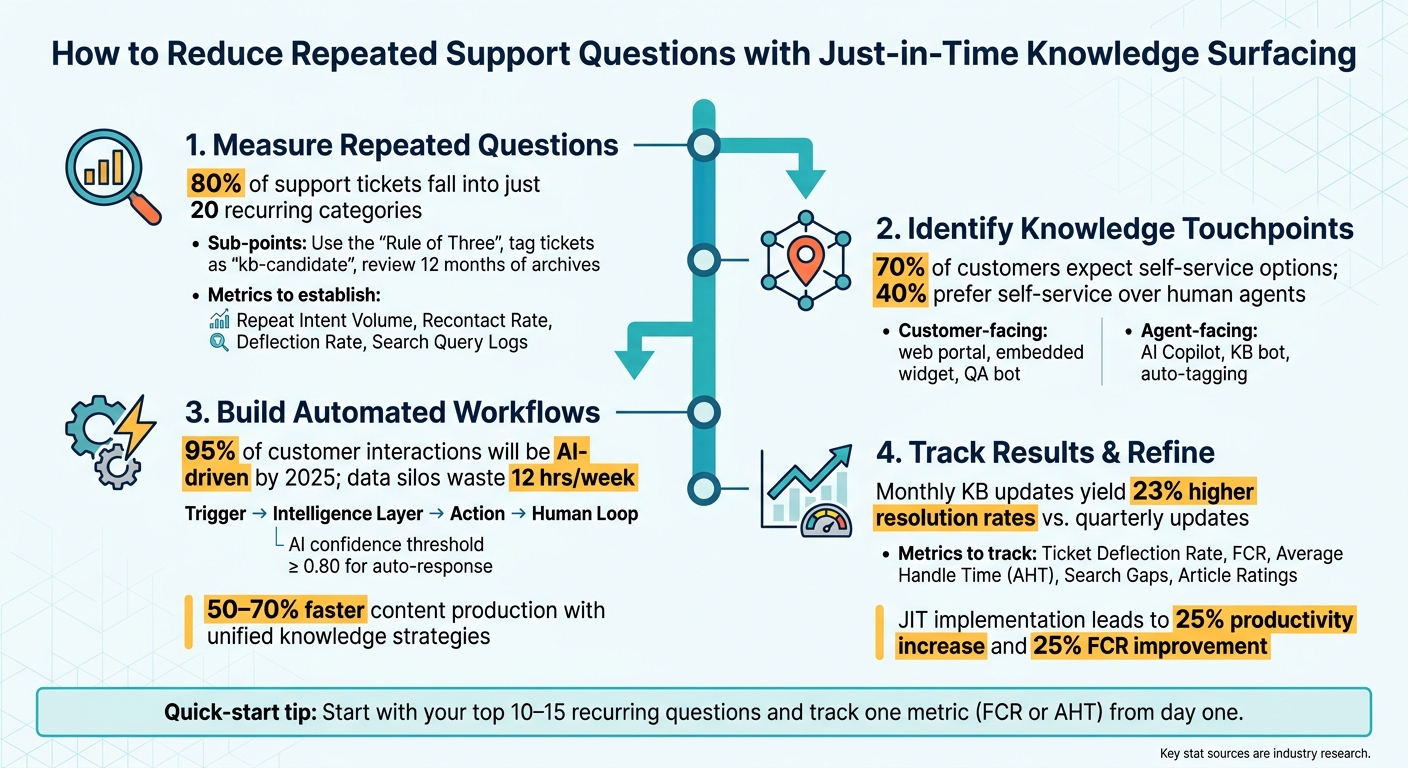
Just-in-Time Knowledge Surfacing: 4-Step Implementation Process
Step 1: Measure Repeated Questions Before You Act
Before making any changes, it’s crucial to understand exactly what you’re dealing with. Start by identifying and measuring recurring inquiries. Without knowing which questions repeat, how often they occur, and through which channels, you’re essentially working blind. The first step is to define what qualifies as a repeated question to guide your analysis.
How to Define a Repeated Question in B2B Support
A repeated question is any inquiry where different customers express the same intent, even if they phrase it differently. For example, “How do I change my password?” and “I forgot my login credentials” are essentially addressing the same issue.
A straightforward way to identify these is the "Rule of Three": if an agent manually writes the same response three times, that question qualifies as repeated and should have a permanent knowledge base article. Using this rule helps flag recurring questions quickly and effectively.
How to Measure and Analyze Repeat Inquiries
Start by reviewing the past 12 months of support ticket archives, chatbot logs, and internal wikis. Look for clusters of inquiries that share the same intent.
Instruct your agents to tag tickets with labels like "kb-candidate" or "repeat-intent" and document the exact phrasing customers use. This raw language is essential for AI tools to accurately identify intent later on.
Don’t forget to examine your search logs, too. Searches that return no results or lead to high bounce rates signal content gaps – areas where customers are looking for answers that your knowledge base doesn’t yet provide.
"Every ticket represents a question that needs an answer, a problem that needs a solution, and an opportunity to build a resource that serves everyone." – Intelligex [4]
Once you’ve grouped similar inquiries, it’s time to establish a baseline using key metrics.
Setting a Baseline with the Right Metrics
After identifying your repeat inquiries, you’ll need a baseline to measure future progress. These four metrics are particularly useful:
| Metric | What It Reveals |
|---|---|
| Repeat Intent Volume | The total number of tickets within your top 20 recurring categories. |
| Recontact Rate | How often customers return with the same issue after receiving an initial response. |
| Deflection Rate | How often a knowledge base interaction prevents a ticket from being created. |
| Search Query Logs | Which searches yield no useful results, highlighting content gaps. |
The recontact rate is especially insightful. If a customer views a knowledge base article but still submits a ticket within 24–48 hours, it suggests the content either didn’t fully address their question or wasn’t presented at the right time. Conversely, when a customer interacts with help content and doesn’t create a ticket, it’s considered a “silent success.” This is one of the clearest indicators that your knowledge base is effective.
Interestingly, in most B2B and subscription-based businesses, about 80% of support tickets fall into just 20 recurring question categories [3]. This concentration works to your advantage: by focusing on a small set of high-frequency issues, you can make a big dent in overall ticket volume.
Establishing this baseline is critical before determining the best opportunities to integrate knowledge into customer interactions.
sbb-itb-e60d259
Step 2: Identify Where to Surface Knowledge During Interactions
Now that you’ve established your baseline metrics, the next step is pinpointing where knowledge should appear during customer interactions. Not all touchpoints are equally impactful. The goal is to identify those critical moments when providing the right information can stop a ticket from being created – or save an agent from repeating the same response over and over.
Customer-Facing Knowledge Touchpoints
Customer touchpoints during the "Apply" and "Solve" moments – when users are actively trying to complete tasks or resolve issues – are particularly effective [5].
Here are three key areas where knowledge can make a difference:
- Web-based customer portal: A centralized space where customers can search for answers on their own.
- Embedded website widget: A tool that allows users to browse articles and raise tickets without leaving the page they’re on.
- QA bot: A conversational bot that uses structured FAQ content to answer customer questions. If it can’t provide an answer, it escalates the query to a live agent.
"The material presented needs to be just the right amount of information about just the right topic to help them solve or learn something right in front of them at the right time." – Bob Mosher, Co-developer of the 5 Moments of Need model [5]
The stats back this up: 70% of customers expect self-service options on a company’s website, and 40% prefer self-service over speaking to a human agent [6].
Next, let’s look at how agents can benefit from smarter knowledge delivery.
Agent-Facing Knowledge Touchpoints
Agents face their own set of challenges. During case creation and triage, they often rely on memory or juggle multiple tabs to find the right information. This not only slows resolution times but also increases the risk of errors.
AI Agent-Copilot tools solve this by scanning incoming tickets in real time and automatically surfacing relevant knowledge base articles, past case resolutions, and suggested replies – before the agent even starts typing. For instance, Supportbench’s AI Agent-Copilot integrates directly into the agent’s workspace, pulling insights from internal and external knowledge bases as well as case history. When drafting a response, agents can simply copy a suggested reply, tweak it for accuracy, and send it off – cutting down the time spent on repetitive tasks.
Agents can also choose to disable auto-display features if they find the suggestions overwhelming [7].
This naturally leads to the efficiency of AI-driven workflow automation.
Automating Knowledge Delivery with AI
AI automation takes customer and agent touchpoints to the next level by eliminating the need for manual searches. AI-powered platforms analyze behavioral signals, ticket content, and account history to deliver the right article at the right time – without requiring users to search explicitly.
For example, Supportbench’s AI Custom Knowledge Base Bot scans external-facing knowledge bases to provide conversational answers to customers, while the AI Agent Knowledgebase Bot does the same for internal teams. These bots don’t rely on perfect keyword matches; instead, they interpret intent, making them far more effective than traditional FAQ systems. This shift from keyword-based searches to semantic retrieval is what sets modern knowledge delivery apart [8].
| Touchpoint | Who It Serves | What It Does |
|---|---|---|
| Customer portal search | Customer | Surfaces articles based on search queries |
| Embedded website widget | Customer | Allows users to browse the knowledge base and raise tickets in one place |
| QA / conversational bot | Customer | Answers FAQ questions and escalates unresolved queries |
| AI Agent-Copilot | Agent | Suggests articles and replies during case handling |
| KB bot (internal) | Agent | Provides answers from the internal knowledge base |
| Auto-tagging and routing | Both | Directs customers and tickets to the right content or team |
The key is ensuring knowledge is seamlessly integrated into the tools users already rely on. This way, it becomes a natural part of their workflow – not an extra system they have to remember.
Step 3: Build and Maintain Knowledge Surfacing Workflows
Once you’ve pinpointed the key touchpoints for customers and agents, the next move is setting up automated workflows that consistently deliver the right information at the right time.
How to Set Up Automated Knowledge Surfacing Workflows
A workflow has four main components: a trigger, an intelligence layer, an action, and a human loop for unresolved cases [11]. Triggers can vary – examples include keywords in a ticket, a shift in sentiment, or a specific issue category. The intelligence layer, often powered by natural language understanding, processes the context. Then comes the action: suggesting an article, drafting a reply, or updating the CRM. If the system’s confidence in the solution falls below a certain threshold, the case is escalated to a human for review.
Supportbench’s workflow engine is designed to support this framework. It can automatically tag cases by type, assign them to the correct queue, and surface relevant knowledge base articles for agents – all without manual intervention. It even adapts dynamically with SLAs, tightening timelines when a customer’s renewal date is near, ensuring high-priority cases get the attention they need.
This method isn’t just about convenience – it delivers real results. A Microsoft study predicts that 95% of customer interactions will be AI-driven by 2025 [9]. Meanwhile, Forrester research highlights the cost of inefficiency, with data silos wasting 12 hours per week for knowledge workers [10]. Automated workflows help keep vital information readily available, integrated into the tools your team already uses.
Once your triggers are in place, the next challenge is maintaining the accuracy and relevance of your knowledge base.
Keeping Knowledge Base Content Accurate Over Time
An automated workflow is only as good as the content it provides. Outdated or irrelevant articles undermine trust and force agents to resort to time-consuming manual searches.
One effective strategy is to use resolved tickets as a source for updating your content. For instance, if a case requires a lot of back-and-forth before resolution, it often points to a gap in your documentation. Supportbench’s AI KB Article Creation tool simplifies this process by analyzing resolved tickets and drafting knowledge base articles – complete with a subject, summary, and keywords – for agents to review.
To ensure your content remains current, include version metadata in articles. This prevents the system from surfacing outdated instructions for features that no longer exist. For technical B2B products, it’s wise to set the AI confidence threshold at 0.80 or higher before allowing automated responses. Cases below this threshold should be escalated to an agent, along with the original query and the most relevant (but insufficient) results.
"Support tickets become knowledge improvement opportunities. AI identifies what content to create based on actual customer support requests." – MatrixFlows [12]
Adopting structured AI knowledge management can boost answer accuracy by up to 70% compared to traditional keyword-based systems. Companies that implement unified knowledge strategies also report 50–70% faster content production [12].
Manual vs. Automated Workflows: A Side-by-Side Comparison
Most teams use a mix of manual and automated workflows, but it’s crucial to know when automation is the better option. Here’s a quick comparison to help clarify:
| Feature | Manual Workflow | AI-Assisted Automated Workflow |
|---|---|---|
| Scalability | Linear – requires more staff as workload grows | Exponential – handles increased volume without extra hires |
| Effort | High – agents manually search, draft, and respond | Low – AI handles drafting and resolution |
| Response Time | Minutes to hours | Seconds |
| Consistency | Variable – depends on individual agent expertise | High – standardized with verified knowledge sources |
| Agent Role | Focused on resolving tickets | Focused on designing workflows and advocating for customers |
| Error Rate | Higher – prone to repetitive errors like data entry | Lower – machine learning ensures precision over time |
Manual workflows often come with hidden costs. For example, 62% of businesses report at least three inefficiencies that automation could address. On top of that, managers spend an average of 8 hours per week on manual data tasks [13]. Finding the right balance between automation and manual intervention is key to reducing repetitive tasks and maximizing team efficiency.
Step 4: Track Results and Refine Your Approach
It’s time to make sure your workflows are doing their job. By keeping an eye on the right metrics, you can see what’s working to reduce repeated questions and what still needs tweaking.
Key Metrics to Track
| Metric | Support Goal | What "Good" Looks Like |
|---|---|---|
| Ticket Deflection Rate | Scalability & cost reduction | Fewer tickets created per knowledge base session |
| First Contact Resolution (FCR) | Customer effort & efficiency | Higher FCR means less back-and-forth and increased trust |
| Average Handle Time (AHT) | Operational efficiency | Lower AHT indicates cases are resolved faster |
| Search Gaps | Content strategy & accuracy | Fewer unsuccessful searches signal comprehensive knowledge coverage |
| Article Ratings | Quality assurance | A high percentage of "Helpful" ratings shows effective content |
For instance, the ticket deflection rate compares the number of knowledge base sessions that don’t result in a support ticket to the total sessions [14]. Considering that around 81% of customers prefer solving problems on their own before contacting support [14], a strong deflection rate means your self-service content is hitting the mark. These metrics are your roadmap for making the right adjustments.
Using AI Insights to Find and Fix Gaps
Metrics are just the start. AI tools can help you dive deeper into content performance and pinpoint exactly where gaps exist.
One way AI shines is through predictive gap analysis. It highlights unsuccessful searches – those moments when customers looked for answers but came up empty-handed [14]. AI can also predict customer satisfaction (CSAT) before surveys even go out, helping you address dissatisfaction early.
Another useful feature is AI auto-clustering. It groups unsuccessful searches by topic, helping you prioritize fixes based on search volume and customer impact [14].
"A knowledge base with 50 well-structured articles outperforms one with 500 poorly organized documents every time – AI retrieval accuracy drops by 35% when content is redundant, contradictory, or poorly chunked." – BotHero [15]
Building a Continuous Improvement Process
To keep your workflows effective, you need to treat improvement as an ongoing effort. Simply tracking metrics once won’t cut it. Teams that consistently reduce repeated questions view this as a continuous process.
Here’s a reliable rhythm to follow: every week, review unresolved queries and low-confidence escalations to spot immediate gaps. Once a month, update outdated articles, remove content tied to discontinued products, and re-test the retrieval accuracy of your top 20 most common questions [15]. Companies that update their knowledge base monthly report 23% higher resolution rates compared to those who update quarterly [15].
A practical way to evaluate your knowledge base is to collect 50 customer questions and score AI responses: give 2 points for correct answers, 1 for partial, and 0 for incorrect ones. A score below 60% signals serious content issues that need urgent attention [15]. To streamline fixes, tools like Supportbench’s AI KB Article Creation can turn identified gaps into draft articles quickly, keeping your improvement process efficient and consistent.
Conclusion: Making Just-in-Time Knowledge Surfacing Work for Your Team
Once your processes are fine-tuned and key metrics are in place, it’s time to put your just-in-time (JIT) strategy into action. Repeated questions will keep surfacing until they’re addressed effectively. With the right system, you can stop answering the same queries over and over, freeing your team to focus on more complex, high-value tasks.
Key Benefits and Next Steps
JIT knowledge surfacing ensures that the right answers are delivered exactly when they’re needed, cutting down on customer search time. When implemented properly, it can lead to a 25% increase in productivity, a 25% improvement in first contact resolution (FCR), and a noticeable reduction in customer churn [16].
Start by identifying your top 10–15 recurring questions and creating concise, targeted content to address them [2]. From day one, track a single metric – like FCR or average handle time (AHT) – to measure the impact of your efforts [16].
As discussed earlier, assign clear content ownership and establish a regular update schedule to keep your knowledge base relevant. Think of it as a dynamic system that evolves over time. Leverage AI tools to identify content gaps automatically [17]. One team summed it up perfectly:
"AI makes good content great and bad content obvious. Focus on content quality before deploying AI capabilities." – MatrixFlows [12]
To get started, consider running a 30-day pilot program targeting your five most common ticket types. This short-term test will help demonstrate ROI and build momentum internally [1]. Use the pilot to showcase how ongoing optimization of your knowledge base can deliver measurable results. Once you’ve proven the value, gradually expand your automation efforts to cover more areas.
FAQs
What’s the fastest way to find my top repeat questions?
The fastest way to pinpoint your most common repeat questions is by leveraging AI-powered tools designed for knowledge base suggestions and proactive content recommendations. These tools work by analyzing customer interactions in real time, identifying frequently asked questions, and automating the retrieval of relevant information. This not only saves time and reduces manual work but also helps tackle recurring issues more effectively, streamlining your support processes.
Where should I surface answers to stop tickets before they start?
Proactively provide answers within your support channels to address questions before they turn into support tickets. Embed your knowledge base directly into your app, and include helpful links in onboarding emails, support replies, and product updates. This approach ensures customers can quickly find solutions on their own, cutting down on the need to contact support. By delivering answers where users are most active, you can streamline their experience and reduce repetitive inquiries.
How do I keep AI-surfaced answers accurate as my product changes?
Keeping AI-generated answers accurate as your product evolves means staying on top of your knowledge base. Make sure it includes all relevant resources – like documentation, help centers, API references, and product pages. Regularly update it and set up automated indexing for any new or changed content. This ensures the AI stays aligned with your product updates, minimizing the risk of outdated or incorrect information slipping through.