


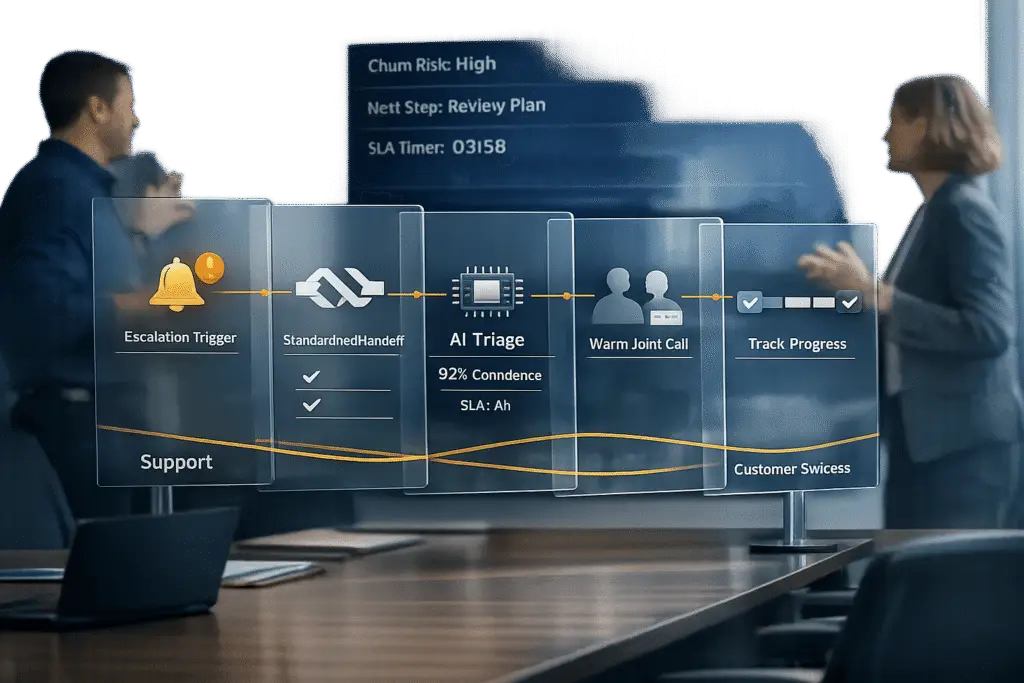
When a support ticket escalates into a potential relationship risk, the handoff between support and customer success (CS) teams can either save or lose the customer. The problem? Most handoffs are slow, unstructured, and frustrating for customers – 67% have to repeat their story, and 78% of critical context is lost. These gaps lead to delays, dissatisfaction, and churn, costing businesses $62 billion annually.
Here’s how to fix it:
- Identify risks early. Watch for signs like declining usage, unresolved issues, or negative Net Promoter Scores (NPS).
- Standardize escalation policies. Use shared criteria and tools to ensure alignment between teams.
- Streamline handoffs. Document issue details in a consistent format, use AI to triage cases, and conduct joint calls to reassure customers.
- Leverage AI. Automate risk detection, summarize context, and predict customer churn before it happens.
- Follow up. Use shared dashboards to track progress and maintain accountability.
A structured process reduces delays, preserves trust, and keeps customers engaged. Want to avoid the $62 billion mistake? Focus on clarity, speed, and teamwork during every handoff.
Seamless Handoffs: Eliminating Gaps in the Customer Journey
sbb-itb-e60d259
Set Clear Escalation Triggers to Spot Relationship Risks
Identifying relationship risks early starts with defining what "at risk" actually means. Without clear, documented escalation triggers, support agents might rely on guesswork or informal knowledge, which can result in high-value accounts being overlooked. A smooth handoff, however, can make customers 3.5 times more likely to stay engaged with your brand [4]. The following signs can help pinpoint when an account is in trouble.
"The goal isn’t ‘AI or humans,’ but reliable routing plus a high-quality handoff that reduces customer effort and protects outcomes."
– Ameya Deshmukh, EverWorker [3]
This highlights the importance of blending technology with human expertise for effective risk management. Modern systems focus on proactive measures, setting specific benchmarks to flag accounts before they churn [6]. Instead of waiting for complaints, your system should monitor quantifiable behaviors – like reduced login frequency, a Net Promoter Score (NPS) of 6 or below, or a lack of responsiveness. When combined with account details like high annual recurring revenue (ARR) or upcoming renewals, these triggers help ensure timely Customer Success (CS) involvement.
Signs That Point to Relationship Risk
Declining usage is one of the most reliable early warning signs. If a customer’s login frequency drops or their feature engagement falls below a healthy baseline – such as logging in every 3–4 days – it may indicate they’re not finding enough value [6]. As Kat Fisher, Head of Customer Success, explains:
"No usage = no value = big RED risk"
– Kat Fisher [6]
Unresolved issues are another red flag. If a customer repeatedly raises the same concern or if support agents start suggesting workarounds for core features soon after onboarding, it signals potential dissatisfaction [6].
Stalled communication is equally telling. If a customer stops replying to emails or calls, they could be avoiding a tough conversation about unmet expectations. Additionally, risks tied to security, privacy, fraud, billing disputes, or legal threats require immediate attention [3].
Finally, keep a close eye on NPS scores post-onboarding, especially during the handoff from implementation to regular support. This transitional period is often a high-stakes moment for building – or losing – trust [6].
When these risk indicators surface, a clear escalation policy ensures everyone is on the same page.
Build a Shared Escalation Policy
Having standardized escalation criteria across support and CS teams eliminates confusion and aligns efforts. Regular debriefs between these teams help establish shared risk criteria and ensure that critical information is communicated effectively. Andrew Marks, Co-founder of SuccessHACKER, stresses this point:
"It’s our responsibility to teach the Sales team [and other departments] what it is we need… because if we just expect them to know that, then we’re not solving the problem"
– Andrew Marks [5]
Document these escalation triggers in a shared, real-time CRM dashboard. This should include behavioral signals (like repeated unresolved issues or escalating customer frustration), business risk factors (such as high ARR or pending renewals), and operational flags (like SLA management breaches or missing context). Automation can also play a role – triggering tasks for the CS team when key risk thresholds are met, such as a drop in CSAT scores or missed milestones.
5-Step Framework for Support-to-CS Handoffs
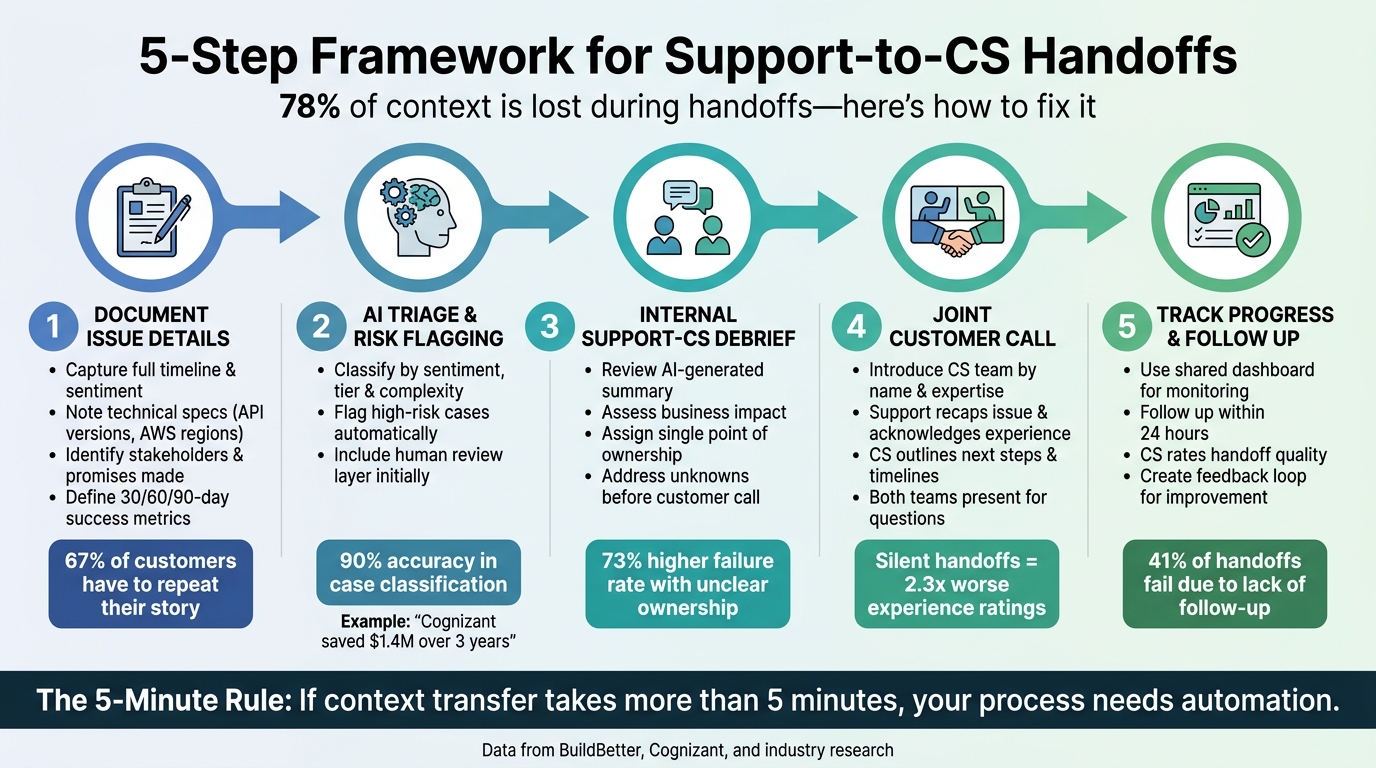
5-Step Support to Customer Success Handoff Framework
Transitions between support and customer success (CS) teams can often lead to miscommunication and frustration. In fact, 78% of context is lost during these handoffs, leaving customers feeling like they have to start from scratch [[1]](https://docs.buildbetter.ai/pages/Use Cases/cs/support-handoff). A structured process ensures both teams stay on the same page, and customers feel supported every step of the way. Let’s break down a framework designed to make this transition as smooth as possible.
Step 1: Document Issue Details in a Standard Handoff Form
Start by capturing all the details of the issue in a consistent format. This includes the entire timeline of events, the customer’s sentiment, and the overall business impact. Be thorough – note technical specifics like API versions, AWS regions, and a log of attempted solutions. This ensures the CS team doesn’t waste time repeating steps that have already been tried [[1]](https://docs.buildbetter.ai/pages/Use Cases/cs/support-handoff).
It’s equally important to identify key stakeholders. For instance, who’s the technical lead? Who’s the executive sponsor? Document any promises made, like resolution deadlines or planned updates. Finally, outline what success looks like for the customer over the next 30, 60, and 90 days [2]. This level of detail prevents customers from having to retell their story, a common pain point in 67% of escalations [[1]](https://docs.buildbetter.ai/pages/Use Cases/cs/support-handoff).
"The 5-Minute Rule: If context transfer takes more than 5 minutes, your process needs automation. Let AI do the heavy lifting." – BuildBetter [[1]](https://docs.buildbetter.ai/pages/Use Cases/cs/support-handoff)
If filling out the form manually becomes too time-consuming, consider automating the process. Automation ensures consistency while saving time. To emphasize the importance of documentation, tie its quality to performance evaluations [2]. This groundwork allows AI to step in effectively during the next phase.
Step 2: Use AI to Automate Triage and Flag High-Risk Cases
AI in customer support can play a huge role in streamlining the triage process. By analyzing behavioral and technical data, AI tools can classify cases based on factors like sentiment, account tier, and complexity [[1]](https://docs.buildbetter.ai/pages/Use Cases/cs/support-handoff).
For example, in 2024, Cognizant introduced an AI-powered triage system for a major US health insurer. This system used advanced recognition tools to achieve 90% accuracy in case classification. The result? They reduced their triage team from 20 full-time employees to just 5 within seven months, saving $1.4M over three years [9].
During early adoption, it’s wise to include a human review layer to refine the AI’s accuracy and confidence levels [10]. After triage, a quick internal debrief ensures everyone is aligned before moving forward.
Step 3: Hold an Internal Support-CS Debrief for Context Transfer
Before engaging the customer, the support and CS teams should hold a debrief. Use the AI-generated summary to review the issue’s history, assess its business impact, and address any remaining unknowns [[1]](https://docs.buildbetter.ai/pages/Use Cases/cs/support-handoff). This step is critical for clarifying open questions and assigning a single point of ownership – since unclear ownership increases the chance of failure by 73% [[1]](https://docs.buildbetter.ai/pages/Use Cases/cs/support-handoff).
Top-performing teams treat this briefing as non-negotiable before any customer-facing calls [2][8]. For particularly sensitive cases, create a dedicated collaboration channel to share the context package and loop in subject-matter experts. Once both teams are aligned, the transition to the customer can proceed smoothly.
Step 4: Run a Joint Call to Transfer Ownership to CS
A joint call is where the handoff becomes real for the customer. During this call, introduce the CS team member by name and expertise. This simple step builds trust and reassures the customer that they’re in good hands [[1]](https://docs.buildbetter.ai/pages/Use Cases/cs/support-handoff).
The support agent should recap the issue, acknowledge the customer’s experience, and explain why the CS team is taking over. Then, the CS representative should outline next steps, timelines, and communication protocols. Silent handoffs – where the customer isn’t informed – can tank experience ratings by more than double, so transparency is key [[1]](https://docs.buildbetter.ai/pages/Use Cases/cs/support-handoff). Having both teams present ensures any questions are addressed on the spot, setting the stage for a smooth transition.
Step 5: Track Handoff Progress with Shared Dashboards
The handoff doesn’t end after the call. Use a shared dashboard to monitor progress and schedule a follow-up within 24 hours to confirm the issue is under control. This dashboard should provide a unified view of the customer’s timeline, including all relevant activity data [[1]](https://docs.buildbetter.ai/pages/Use Cases/cs/support-handoff). Transparency like this helps prevent the 41% of handoffs that fail due to lack of follow-up [[1]](https://docs.buildbetter.ai/pages/Use Cases/cs/support-handoff).
Additionally, create a feedback loop where the CS team rates the quality of each handoff. This feedback helps identify recurring gaps and gives leadership a chance to address them [2][7]. With this approach, teams can resolve issues faster and more effectively [[1]](https://docs.buildbetter.ai/pages/Use Cases/cs/support-handoff).
Use AI for Predictive Escalation and Risk Detection
The best customer handoffs happen before customers even realize they need one. AI can spot early warning signs of relationship risks – sometimes days or even weeks before a customer voices frustration. This gives your team the chance to step in proactively. Instead of waiting for customers to escalate or threaten to cancel, AI keeps an eye on weak signals like declining confidence scores, shifts toward negative sentiment, or high-stakes issues like billing disputes or security concerns. These signals, when combined, prompt the system to flag the case for immediate attention from your CS team, ensuring a smooth transition from support to customer success as outlined earlier [3].
AI doesn’t overreact to isolated incidents. For example, a single negative comment won’t trigger an escalation. But if a customer rephrases the same question three times, shows frustration in their tone, and happens to represent an account worth twice your average MRR, the system knows it’s time to act. This method allows AI to predict churn risks with up to 90% accuracy, sometimes as far as 180 days in advance. It also cross-references support tickets with account data – like upcoming renewal dates or executive sponsorship flags – to prioritize cases that could impact revenue [3][12].
AI-Powered Predictive CSAT and CES Tools
Traditional CSAT surveys have a major flaw: submission bias. Only the happiest or angriest customers tend to respond, leaving you with incomplete data. AI, on the other hand, analyzes 100% of interactions, offering detailed context and actionable recommendations without waiting for surveys [13]. Tools like Supportbench’s AI Predictive CSAT and AI Predictive CES integrate directly into your case list, estimating customer satisfaction and effort levels – even if no survey was completed.
Customer Effort Score (CES) is a strong indicator of loyalty. Studies reveal that 96% of customers who experience high-effort service report disloyalty, compared to just 9% for low-effort experiences [13]. AI calculates CES by evaluating factors like repeated contacts, hold times, transfers, and the customer’s emotional journey. For example, if a customer reaches out three times about the same issue, AI flags it as a First Contact Resolution (FCR) failure, triggering a handoff to CS before frustration leads to churn [13].
AI also keeps an eye on "Critical Moments", identifying phrases like “I’m very disappointed,” “I want to close my account,” or requests to speak with a supervisor. These are clear signs of churn risk and should prompt immediate escalation [13]. By tracking how frustration builds during a single interaction, AI ensures that deteriorating sentiment is addressed before it’s too late. These predictive insights naturally tie into automated workflows, making handoffs smoother and more effective.
Automate Handoff Workflows with AI
When AI flags a high-risk case, it doesn’t just stop there – it takes care of the prep work too. Instead of dumping raw transcripts, AI generates a 200-word Context Package summarizing the customer’s situation, the issue at hand, attempted solutions, emotional tone, and what’s needed to resolve the problem [3][11]. This way, your CS team can hit the ground running.
AI can also streamline routing by sending cases to the right team based on category, severity, and account value. For instance, billing disputes from enterprise clients might go to a “Retention-ready L2” queue, while high-MRR accounts are flagged for human review on any complex issue [3]. Automated alerts – via Slack or SMS – can notify your team about escalations for high-value accounts, ensuring response times stay within critical windows, like 15 to 30 minutes for actively frustrated customers [11].
"The goal isn’t ‘AI or humans,’ but reliable routing plus a high-quality handoff that reduces customer effort and protects outcomes." – Ameya Deshmukh, VP of Customer Support [3]
Regularly reviewing escalated cases helps fine-tune AI’s handoff triggers. Sentiment, for example, can act as a multiplier – it shouldn’t trigger escalation on its own, but it can lower the threshold when paired with other risk factors, like high account value or an approaching renewal [3]. By 2029, it’s expected that agentic AI will handle 80% of common customer service issues autonomously, leaving the remaining 20% for seamless human intervention [3]. Integrating AI-driven insights into your handoff process ensures CS teams step in at the right time, fully equipped to preserve customer relationships and prevent churn.
Common Handoff Mistakes and How to Avoid Them
Even with advanced AI tools and structured workflows, handoffs can still go wrong. Surprisingly, the most frequent issues aren’t technical – they stem from process missteps. Recognizing these pitfalls can help safeguard customer relationships and reduce churn.
Delayed Escalation and Its Impact
One of the quickest ways to lose a customer is by delaying escalation. On average, such delays extend resolution times by 3.5 days and slash customer satisfaction by 43% [[1]](https://docs.buildbetter.ai/pages/Use Cases/cs/support-handoff). Often, the problem begins with the misuse of urgency labels. Over time, the "urgent" queue becomes diluted, burying genuinely critical issues [15].
Instead of relying on manual checks, implement systems that detect risks early. AI can help by flagging weak signals such as repeated customer loops, negative sentiment combined with high account value, or approaching renewal dates. Combining multiple signals is more effective than single-rule triggers. For instance, a combination like "Negative Sentiment + High-Value Account" should prompt faster escalation than sentiment alone [3].
Set clear escalation thresholds. If AI confidence drops below 40%, escalate automatically. For confidence levels between 40% and 60%, give customers the option to escalate. If confidence exceeds 60%, let AI handle the case but gather customer feedback [14]. Just as important as timely escalation is ensuring that all necessary context is transferred, which leads to the next issue.
Incomplete Context Transfer Between Teams
One of the biggest obstacles in effective handoffs is the lack of structured context. When your Customer Success (CS) team receives an unorganized transcript dump instead of a concise, structured summary, they waste time piecing the issue together. This not only delays resolution but also frustrates customers who have to repeat themselves [[1]](https://docs.buildbetter.ai/pages/Use Cases/cs/support-handoff).
Industry leaders stress the importance of context:
"The biggest mistake is escalating without context. If your human agents receive a transcript but not a structured summary… escalation increases handle time and customer effort." – Ameya Deshmukh, VP of Customer Support [3]
The fix? Standardization. Use a structured handoff form that captures key details like the customer’s goal, diagnostics already performed, technical environment, and the next recommended action. Better yet, leverage AI to generate a 200-word Context Package that includes a summary of the issue, sentiment analysis, attempted solutions, and business impact [[1]](https://docs.buildbetter.ai/pages/Use Cases/cs/support-handoff). If it takes more than five minutes to transfer context manually, it’s time to automate [[1]](https://docs.buildbetter.ai/pages/Use Cases/cs/support-handoff).
To improve further, create a feedback loop where your CS team rates the quality of handoffs they receive. This helps identify and address recurring gaps before they escalate into major issues [2].
Customer Confusion Over Ownership
Ambiguous handoffs often lead to confusion and a 73% higher failure rate [[1]](https://docs.buildbetter.ai/pages/Use Cases/cs/support-handoff). When customers aren’t informed about a transfer, they rate their experience 2.3 times worse [[1]](https://docs.buildbetter.ai/pages/Use Cases/cs/support-handoff). These "silent transfers" can erode trust, making customers feel like they’re being passed around without accountability.
To avoid this, always conduct warm handoffs. Introduce the new team member to the customer by name and expertise before the transition takes place. For example: "I’m bringing in Sarah from our Customer Success team. She specializes in enterprise integrations and will ensure this gets resolved quickly." This reassures the customer that someone remains accountable.
For high-risk cases, hold an internal briefing between the support agent and the Customer Success Manager (CSM) before involving the customer. This ensures alignment on prior commitments and prevents mixed messages [2]. Additionally, set clear wait-time expectations upfront. If queues are long, offer alternatives like a callback or email follow-up [14]. Addressing these issues improves collaboration across teams and strengthens customer trust, especially with high-value accounts.
Conclusion
Handoffs between support and Customer Success teams are make-or-break moments for customer relationships. When a technical issue escalates into something that puts the relationship at risk, how you transfer ownership can determine whether that customer stays loyal or decides to leave. By using well-defined handoff processes and AI tools, these moments can be turned into opportunities to strengthen trust. The key lies in three factors: early escalation policies, structured handoff frameworks, and AI-powered collaboration tools.
The numbers back this up. A smooth handoff doesn’t just keep customers happy – it also prevents major financial losses. In fact, poorly managed handoffs contribute to an estimated $62 billion in lost revenue annually across the industry [[1]](https://docs.buildbetter.ai/pages/Use Cases/cs/support-handoff).
The solution isn’t complicated, but it does require commitment. Start by setting clear escalation triggers that combine factors like negative sentiment, high account value, and renewal timelines. Use standardized tools, like a handoff form or AI-generated context package, to avoid losing critical information during the transfer. Make the transition personal by conducting warm handoffs – introduce the new Customer Success owner by name and highlight their expertise before the switch. As Adam Statti from RevPartners explains:
"The sales-to-CS handoff is where trust is either built or broken. Do it well or risk early churn" [4].
AI isn’t here to replace human judgment but to enhance it. Use AI to identify subtle warning signs, automate triage, and provide concise summaries so your team can focus on mending relationships [3]. By 2029, it’s projected that agentic AI will handle 80% of routine issues, allowing your team to focus on the 20% of cases that truly impact retention [3]. The goal is to create a system where AI and human expertise work together to reduce customer effort and ensure positive outcomes. This balance is crucial for maintaining trust during every handoff.
Consistency matters. 79% of customers expect seamless interactions across all departments [2]. By eliminating delays, preserving context, and ensuring clear ownership at every step, you’re doing more than resolving issues – you’re protecting revenue and building long-term trust with your customers.
FAQs
What should count as a “relationship risk” in our support queue?
A "relationship risk" refers to any issue in the support process that, if not handled properly, could damage the relationship with a customer. These risks might include unresolved concerns, poor communication during escalations, a lack of context when addressing issues, or visible signs of dissatisfaction that could lead to customer churn.
By spotting and addressing these risks quickly, businesses can safeguard their relationships with customers and preserve trust over time.
What should a handoff summary include to prevent the customer from repeating themselves?
A handoff summary needs to capture the key details: the issue’s history, the customer’s sentiment, the level of urgency, and the impact on the business. Including this information ensures the next team has a clear understanding of the situation, eliminating the need for the customer to repeat themselves. By offering thorough context, you help ensure a smooth transition and safeguard the overall customer experience.
How can AI handle escalation without misrouting high-value accounts?
To avoid misrouting high-value accounts, integrate AI with a context-aware escalation framework. This means having AI identify risk signals such as negative sentiment, repeated customer loops, or pressing issues. When escalation is necessary, ensure the full context – like conversation history, customer details, and prior AI actions – is passed along seamlessly. By setting clear thresholds and keeping a close eye on escalation accuracy, you can prioritize high-value accounts effectively while reducing unnecessary escalations. This approach safeguards both customer relationships and operational efficiency.






