


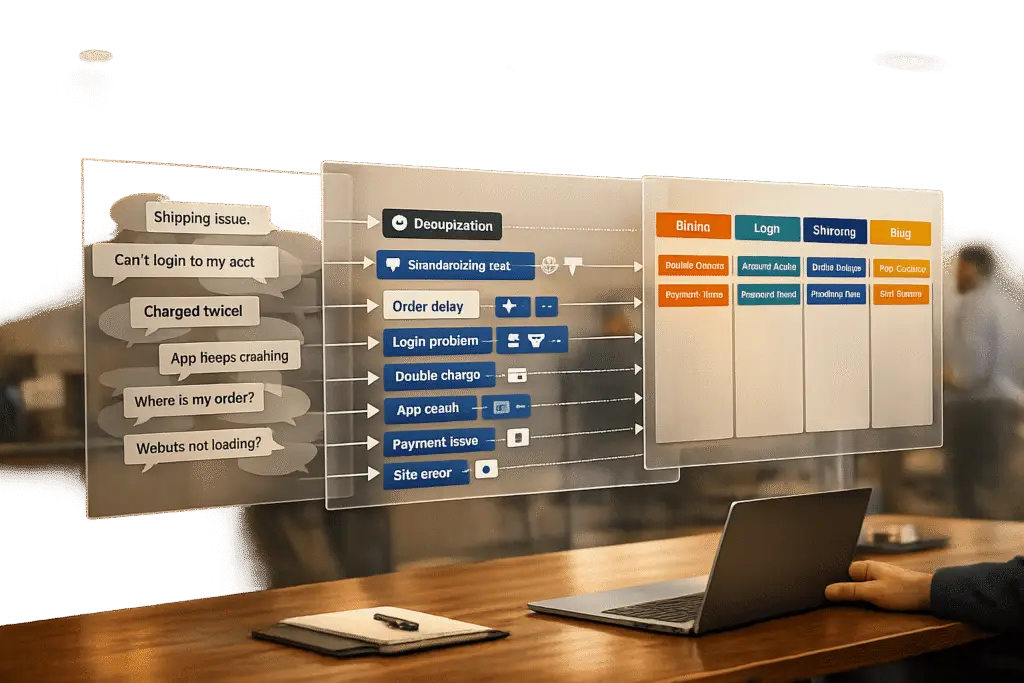
Support teams face a common challenge: Customers often describe the same issue in different ways, creating chaos in ticket routing, reporting, and AI automation. For example, "the app won’t load" and "I see a blank screen" might refer to the same problem but are expressed differently. This inconsistency leads to higher costs, slower resolutions, and frustrated customers.
The solution? Normalize messy customer language into clear, standardized categories. Here’s how to do it:
- Step 1: Gather and clean raw customer data from emails, chats, surveys, and tickets. Remove duplicates, HTML tags, and irrelevant details to create a unified dataset.
- Step 2: Build a simple, two-tier category system. Use broad "Topics" (e.g., Billing, Technical Issue) and detailed "Subtopics" (e.g., Login, Performance).
- Step 3: Preprocess text by normalizing characters, tokenizing, and grouping related words (e.g., "connecting" and "connection").
- Step 4: Leverage AI tools for category mapping and automated ticket routing. Combine rule-based tagging for simple cases with machine learning for nuanced queries.
- Step 5: Continuously test, validate, and refine your system. Use metrics, agent feedback, and periodic audits to keep categories relevant and accurate.
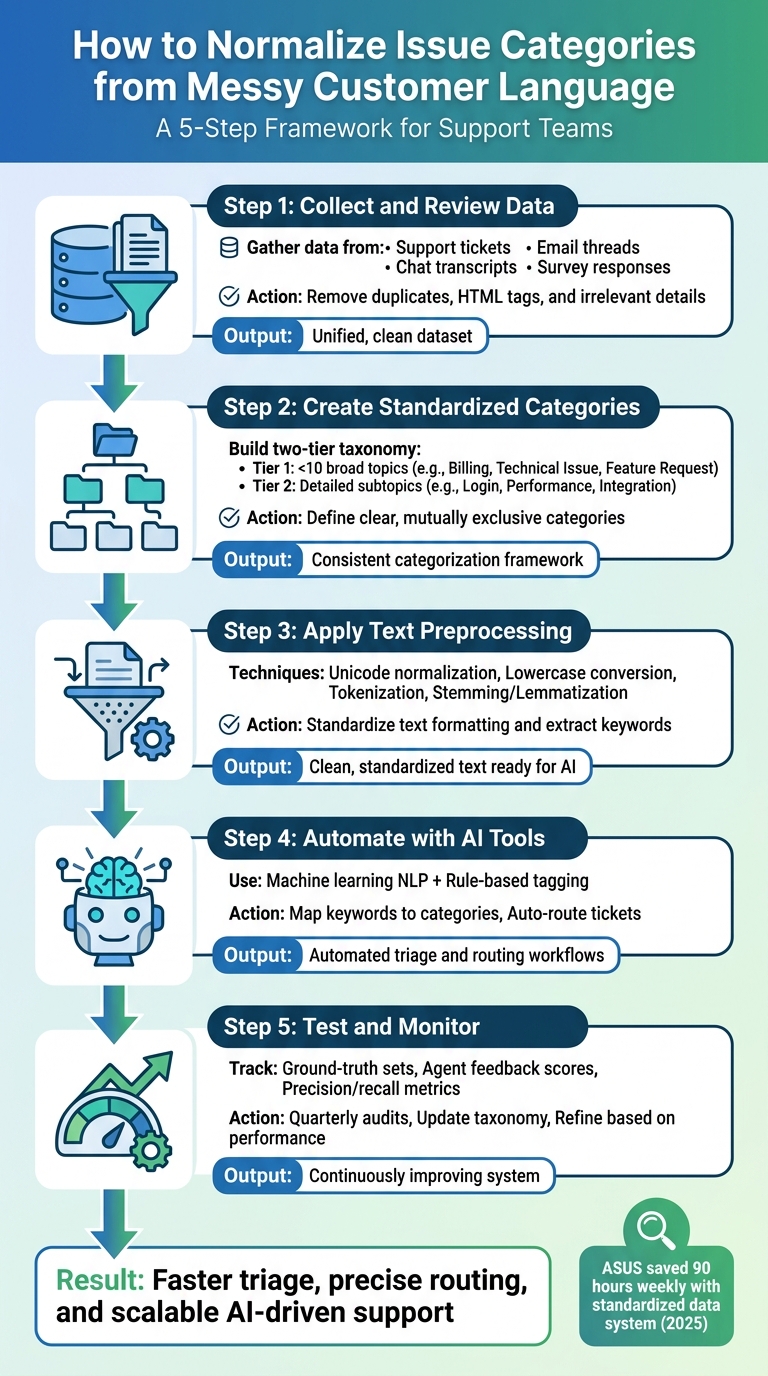
5-Step Process to Normalize Customer Support Issue Categories
How to Automate Customer Support Ticket Categorization using AI
sbb-itb-e60d259
Step 1: Collect and Review Unstructured Customer Language Data
Before diving into normalization, support teams need to gather raw customer language from all available channels. This collected data is the backbone of accurate categorization – without it, patterns remain hidden, and AI models won’t have the input they need to work effectively.
Identify Where Customer Language Data Lives
Customer language can be found across various channels, and each one offers unique insights into how issues are described. For example:
- Support tickets often contain detailed problem descriptions.
- Email threads reveal the full context of customer concerns, including forwarded messages and reply chains.
- Chat transcripts showcase real-time language patterns during live interactions.
- Survey responses capture unfiltered feedback, highlighting pain points and frustrations.
Pulling data from all these sources is critical because customers may describe the same problem differently depending on the channel. For instance, someone might type "login broken" in a live chat but provide a lengthy explanation in an email. This variety helps uncover root causes, identify recurring problems, and paint a full picture of support trends – all of which are crucial for AI-driven insights [1].
Consolidate and Clean the Raw Data
After collecting data, the next step is to combine and prepare it for analysis. Start by removing duplicates – a customer might report the same issue through multiple channels, like email and chat, which can distort the results. Strip out unnecessary elements like HTML tags, email signatures, legal disclaimers, and quoted threads.
Then, apply basic cleaning steps to standardize the dataset. Fill in missing fields where possible, fix obvious typos, and ensure consistent formatting across all sources. These steps turn unstructured data into a clear and reliable foundation, making it easier to spot patterns and apply categorization rules.
A clean, unified dataset is the cornerstone for creating standardized categories in the next step.
Step 2: Create a Standardized Issue Category System
After cleaning your raw data, the next step is to craft a category system that works seamlessly for your team. The aim isn’t to create an exhaustive list but to strike a balance between depth and efficiency. A well-structured taxonomy ensures accurate AI routing, provides actionable insights, and reduces the workload for your agents.
Define Clear, Specific Categories
Start by building a two-tier taxonomy. The first tier, "Topic" (Tier 1), should consist of fewer than 10 broad and mutually exclusive categories. These categories need to be stable and comprehensive enough that every ticket fits into one – and only one – category. Keeping Tier 1 concise avoids decision fatigue and ensures consistent tagging.
For example, Tier 1 might include categories like Technical Issue, Billing, Feature Request, Account Management, and Escalation. Then, add an optional "Subtopic" (Tier 2) for more detail. Under Technical Issue, subtopics could include Login, Performance, or Integration. This approach allows for detailed reporting while maintaining consistency, even as products or features evolve.
Avoid vague, catch-all categories like "Other" or "General Inquiry." Instead, standardize your terminology – pick a single term for each concept (e.g., use Billing consistently instead of switching between "Payments" or "Invoicing"). To ensure clarity, write a one-sentence definition for each category and subtopic. This helps your team apply tags consistently.
"If a tag doesn’t change how you handle a ticket or how you understand your support data, it’s adding noise instead of clarity." – Jake Bartlett, Writer, Swifteq [2]
Once your taxonomy is outlined, involve your team to validate and refine it.
Get Input from Support Agents and Stakeholders
A strong taxonomy doesn’t just benefit manual processes – it also boosts AI triage and routing. Collaborate with frontline agents and stakeholders to fine-tune your categories. Agents, who interact with customers daily, can provide insights into how customers describe their issues and flag areas where categories may be unclear or overlap. Meanwhile, leadership can help align the taxonomy with the key questions your support data needs to answer.
Regular audits are essential. Schedule reviews to merge similar categories, eliminate unused tags, and ensure the system evolves with your support needs. This collaborative process helps establish a shared vocabulary, streamlines AI integration, and minimizes inconsistent tagging – where different agents might tag identical issues differently.
In 2025, ASUS implemented a standardized data system that automated aggregation and saved the team about 90 hours weekly. Reports that previously required technical assistance were generated in minutes [3].
"The taxonomy is the strategy. Ticket tagging is just the execution." – Jake Bartlett, Writer, Swifteq [2]
Step 3: Apply Text Preprocessing Techniques
Now that you’ve built a unified dataset, it’s time to prepare the text for optimal AI performance. Preprocessing is essential for transforming raw, inconsistent input – like emails with embedded HTML, typo-riddled tickets, or poorly formatted messages – into clean, standardized data. Without this step, your system risks misclassifications, leading to more manual work for support teams.
Clean and Standardize Text Formatting
Start with Unicode normalization to ensure consistent character representation. For instance, the word "café" may appear differently depending on the source, but applying NFC normalization ensures these variations are treated as identical [4].
Next, convert all text to lowercase. This simple step ensures that terms like "Login", "LOGIN", and "login" are processed as the same word. Afterward, strip out any HTML tags, remove unnecessary whitespace, and tokenize the text to align with token-based processing used by large language models [4].
You’ll also want to apply stemming or lemmatization to reduce words to their root forms. This ensures that variations like "connecting", "connected", and "connection" are grouped under a single base term, "connect." Removing common stopwords – words like "the", "is", or "at" – can further refine the data by focusing on meaningful content. However, be cautious with emojis. Modern language models often interpret emojis as sentiment indicators, so removing them indiscriminately could affect sentiment analysis accuracy [4].
"Good preprocessing is invisible when it works. You only notice it when it is missing – when an agent chokes on an emoji, truncates a message mid-sentence, or treats ‘cafe’ and ‘café’ as different words." – CallSphere Team [4]
With standardized text in place, your next focus should be extracting relevant keywords and patterns. This process is a core component of AI in customer support.
Extract Common Keywords and Phrases
Once the text is cleaned, it’s time to identify the terms and patterns that matter most. Techniques like TF-IDF (Term Frequency-Inverse Document Frequency) can help prioritize keywords by their importance. Rare but meaningful terms – like "printer" in hardware-related tickets – can serve as strong signals for categorization, while overly common words are filtered out.
Lemmatization plays a role here too, ensuring that variations like "crashes", "crashed", and "crashing" are grouped under a single term. Additionally, regex normalization can standardize specific text formats, such as converting "v2.0" to "version_2_0" or normalizing URLs. This avoids creating fragmented categories caused by minor formatting differences.
For deeper insights, advanced word embeddings can capture semantic relationships between terms, recognizing that words like "printer" and "scanner" are contextually related. Regularly monitoring frequent terms also helps address concept drift – a situation where new products or emerging issues introduce unfamiliar vocabulary that needs to be categorized or updated [5].
Step 4: Use AI Tools to Automate Normalization
With your text cleaned and preprocessed, it’s time to scale your support operations by automating category mapping. This step builds on the groundwork laid in Step 3, using AI to transform language into actionable categories. Manual categorization may work in small-scale settings, but at scale, it quickly becomes inefficient. AI-powered natural language processing (NLP) changes the game by interpreting context and intent, rather than relying solely on keyword matching.
Map Keywords to Categories Using AI
Traditional keyword-based systems are often too simplistic. For instance, if a customer writes, "I don’t want a refund", a basic keyword rule might incorrectly tag it as a refund request. Machine learning-based NLP, however, uses statistical inference to grasp the real meaning behind the words [6][8]. With your cleaned text in hand, AI can analyze context and nuance, going beyond the limits of simple keyword matching.
The process involves techniques like tokenization, lemmatization, and feature extraction (using tools like BERT or TF-IDF) to capture the meaning of the text. Semantic analysis ensures accuracy by interpreting phrases in context. For example, "Where is my order?" is correctly categorized under "Track Order" rather than being lumped into a generic inquiry bucket [6][9].
"Developing reliable language models, especially for smaller languages and specific industries, is technically complex. It is the precision of research and development that allows the creation of solutions that offer human-like understanding and response in real-time." – Vytas Mulevičius, NLP Team Lead, Neurotechnology [9]
To optimize performance, use a combination of rule-based tagging for straightforward scenarios – like identifying order numbers or account IDs – and machine learning for more complex, nuanced queries. This hybrid approach strikes a balance between speed and accuracy, while maintaining simplicity in workflows [8].
Integrate AI into Triage and Routing Workflows
After mapping keywords accurately, the next step is embedding this intelligence into your support workflows. AI can automatically assign categories, route tickets to the appropriate teams, and apply tags based on normalized issue types. This eliminates the bottleneck of manual triage and ensures tickets are sent to the right specialist without delay. For instance, American Airlines boosted its call containment by 5% after upgrading its IVR system with NLP [10].
Modern platforms like Supportbench leverage AI automation to handle tasks like prioritizing tickets, auto-assigning issue types, and tagging cases without requiring manual intervention. This allows your team to focus on solving issues rather than sorting them. Over time, the system adapts, learning from new interactions and updating its understanding of emerging slang or product-specific terminology [7].
"For call centers, the benefit of NLP provides scalability and cost reduction. An automated agent never tires and can process thousands of requests simultaneously with little to no waiting time." – Julius Račiūnas, Business Development Manager, Neurotechnology [9]
The outcome? A support operation that scales effortlessly, maintains consistent responses even during high volumes, and routes issues with precision. This not only speeds up resolution times but also enhances customer satisfaction.
Step 5: Test, Validate, and Monitor Normalization Accuracy
Even the most advanced AI systems need regular validation. Without it, categories can quickly lose relevance as customer language, product details, and team workflows evolve. This step builds on earlier phases to ensure your system stays aligned with changing support needs.
Track Accuracy with Measurable Metrics
To maintain accuracy, start by creating ground-truth sets – manually verified samples of data that act as a benchmark for evaluating AI performance [1]. These sets should represent both common scenarios and rare edge cases to give a full picture of how well the system is working.
Use a two-level taxonomy for validation. The first level (Tier 1) addresses broad categories like "Technical Issue" or "Billing", while the second level (Tier 2) dives into specifics, such as "Login" or "Invoice." For instance, if a customer complains about an "invalid credentials" error, the system should tag it as "Technical Issue" (Tier 1) and "Login" (Tier 2). Even if the subcategory isn’t perfect, getting the main category right keeps the system useful.
In addition to technical metrics like precision and recall, agent feedback scores are invaluable. Your support team interacts with these categories daily and can quickly identify when the AI misclassifies issues or when a category no longer reflects actual usage [2]. Pay attention to manual overrides – frequent adjustments signal that your taxonomy might need updating.
When metrics show gaps or misalignment, use the data to refine your strategy.
Refine the Process Based on Performance Data
Implement a recurring tag audit schedule – either quarterly or biannually – to review how categories are being applied. Look for unused tags, overlapping categories, or vague labels like "Other" or "General Inquiry." Replace these with more specific and actionable tags [2].
Standardizing your terminology is key. Avoid using multiple terms for the same concept. For example, stick with "Billing" rather than mixing it with "Payments" or "Invoicing." Document these decisions in a tag glossary [2], providing clear one-sentence definitions for each category and subtopic. This glossary ensures both human agents and AI systems interpret tags consistently during quality checks.
"The taxonomy is the strategy. Ticket tagging is just the execution." – Jake Bartlett, Writer, Swifteq [2]
Focus your efforts on the 80% of tickets that represent the most common issues, rather than spending too much time on rare edge cases [2]. This approach maximizes the impact of your normalization process by improving accuracy and resolution speed where it matters most.
As customer language evolves – whether through new slang, updated product names, or shifting feature requests – your AI system should evolve too. Regularly retrain models, update category definitions, and integrate agent feedback to ensure your normalization process keeps pace with how customers actually communicate.
Common Mistakes in Normalizing Issue Categories (and How to Avoid Them)
When refining your normalization framework, it’s important to steer clear of common missteps that can derail your categorization strategy. Teams often run into predictable challenges, like overcomplicating their taxonomy or neglecting rare but crucial issues. Both can seriously impact the effectiveness of your system.
Creating Too Many Granular Categories
Adding excessive detail to your taxonomy can backfire. Overloading the system with too many tags often confuses agents, leading to inconsistent tagging and poor data quality. Faced with an overwhelming number of options, agents might choose tags randomly or rely on vague, catch-all categories. This makes it nearly impossible to analyze trends or extract actionable insights with custom data reports.
Another issue is inconsistent terminology. For instance, separating "Billing", "Payments", and "Invoicing" into different categories for similar issues can create unnecessary complexity, making data analysis more fragmented and less reliable.
To address this, keep your Tier 1 categories under 10[2]. Use a well-defined tag glossary and conduct quarterly reviews to eliminate redundant tags and consolidate similar ones. This simple approach ensures clarity and consistency across your system.
Overlooking Rare but Important Issues
Focusing only on the most common ticket types can leave critical but infrequent issues unaddressed. Scenarios like outages or escalations demand immediate attention, and lumping them into generic categories can disrupt workflows or even cause SLA breaches.
To handle this, avoid cramming rare edge cases into your main taxonomy. Instead, use dedicated metadata fields or routing rules to capture and manage these high-priority issues. A two-tiered system works well here: your primary taxonomy handles the majority of tickets, while automation or specialized workflows flag and address critical exceptions[2]. This ensures nothing important slips through the cracks.
Conclusion: Build a Foundation for Scalable, AI-Driven Support
Organizing issue categories turns chaotic data into a solid base for AI-powered support. By converting unstructured customer language into clear, standardized categories, you enable faster triage, more precise routing, and decision-making based on reliable reporting.
Start by collecting raw customer language and creating a concise taxonomy. Use text preprocessing to address inconsistencies, and let AI tools handle the complex task of mapping customer language to your categories. Regular monitoring keeps your system aligned with how customer language changes over time. This process sets the stage for scalable, AI-focused support operations.
The advantages are clear. Standardized categorization minimizes misrouting and ensures customers get consistent answers across all interactions [11]. Your agents spend less time guessing, AI tools train on uniform data, and leadership gains dependable insights into support trends.
Kick things off with 5–7 key issue categories, implement simple normalization workflows, and track improvements in routing accuracy and resolution times. Once you see results, expand your taxonomy and fine-tune your AI models. Over time, your system will become smarter and more efficient with each ticket it processes. The goal isn’t instant perfection – it’s creating a system that continuously improves.
A well-organized categorization framework is the backbone of cost-effective, AI-powered B2B support.
FAQs
How many issue categories should we start with?
Starting with 5 to 10 issue categories is a smart way to keep things manageable for support agents. This balance ensures the system stays consistent without becoming overly complex. The goal is to create a taxonomy that’s detailed enough to provide useful reporting insights but still straightforward for agents to use effectively. This method reflects industry best practices for designing normalization systems that improve support workflows.
When should we use rules vs machine learning for tagging?
Use rules when tagging tasks are straightforward, rely on clear criteria, and are based on specific keywords or patterns. They’re ideal for simple and consistent classifications that don’t require much interpretation.
On the other hand, choose machine learning for tagging scenarios involving complex, evolving, or varied language. AI models excel at handling unstructured or messy data, uncovering patterns, and improving accuracy as they process more information. In essence, rules are perfect for predictable tasks, while machine learning shines in more dynamic or nuanced situations.
How do we measure if normalization is working?
To determine if normalization is working, keep an eye on data quality metrics like completeness, consistency, and accuracy over time. Evaluate how AI performs in tasks like triage, routing, or reporting – are there noticeable improvements? Also, track operational metrics, such as lower error rates or greater efficiency. If normalized data leads to better AI reliability and smoother operations, it’s a good sign that the process is delivering results.






