


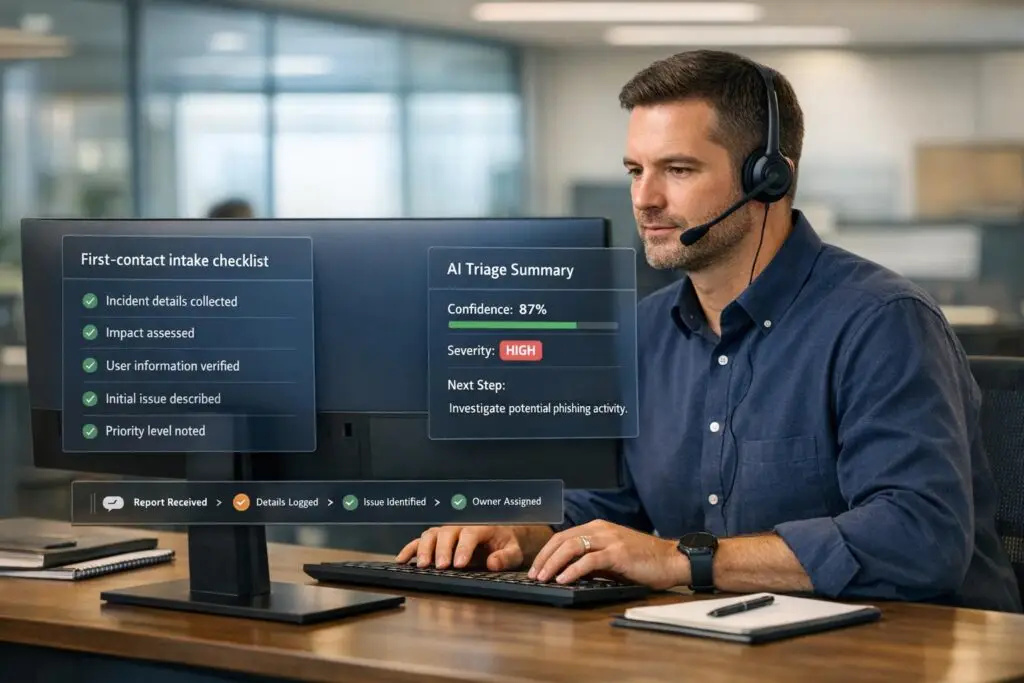
When a security incident happens, the first five minutes are critical. The questions you ask during this time can determine how quickly the issue gets resolved and how much trust you build with your customer. Here’s what matters most:
- Acknowledge the incident quickly: Responding within 5 minutes can reduce resolution time significantly. Silence, on the other hand, creates confusion.
- Ask targeted questions: Focus on gathering key details like the timeline, affected systems, observed evidence, and business impact.
- Document everything: Capture "Who, What, Where, When, and How" immediately to avoid missing critical information.
- Communicate clearly and professionally: Early updates and empathetic messaging build trust, even in high-stress situations.
Using structured processes and AI tools can make this intake process faster and more accurate. AI can automate tasks like sorting reports, analyzing risks, and providing real-time guidance, saving your team time and reducing errors.
Key takeaway: The right questions and a structured approach during the first contact can turn a chaotic situation into a manageable one.
Why First-Contact Questions Matter for Resolution and Trust
Getting the right details at the very start can turn days of troubleshooting into just hours. When your team gathers specific information upfront – like which systems are affected, exact timestamps, and observed symptoms – they can dive into solving the issue immediately instead of wasting time tracking down missing details later.
"A structured process allows your team to resolve incidents without wasting time on avoidable steps" [1].
On the flip side, vague or poorly targeted questions often lead to unnecessary escalations, costing up to 40 minutes of engineering time per incident [7]. Using outdated knowledge base articles can also result in "doc drift" – where confident answers seem right but are actually outdated by several revisions [7]. This not only delays resolution but also erodes trust. Well-crafted, targeted questions are essential for a strong, AI-supported incident response strategy.
How Accuracy Improves Resolution Speed
Accurate information intake is key to avoiding the dreaded "uncertainty loop" – those 10–15 minutes where everyone, from customers to internal teams, wonders if anyone is actually working on the problem [2]. Precise initial questions break this loop and speed up resolution, as better clarity means quicker action.
The trick is to ask questions that uncover what really happened, not just what might be assumed. Companies with advanced incident response systems see a 50% drop in mean time to resolution (MTTR) [5], thanks to well-designed intake processes.
Thorough documentation also plays a big role. Capturing the "Who, What, Where, Why, and How" ensures your team learns from incidents to prevent repeat problems [4]. This documentation becomes even more critical if legal or insurance matters arise, as relying on memory alone is both risky and inefficient.
Building Trust Through Professional Communication
Speed alone isn’t enough – how you communicate can make or break customer trust. Acknowledging the issue early on helps establish confidence. Customers need to feel assured that someone is actively addressing their problem, even if all the details aren’t yet clear.
Frequent updates and empathetic communication during intake can turn a high-stress security event into an opportunity to deepen customer loyalty [1]. Pre-written communication templates can help ensure your messages are clear, transparent, and legally sound [3]. On the other hand, vague or inconsistent messaging during this stage can permanently damage trust.
"The companies that survive security incidents are not the ones that never get hit. They are the ones that respond competently when they do." – Lorikeet Security [3]
sbb-itb-e60d259
What to Ask During Security Incident Intake
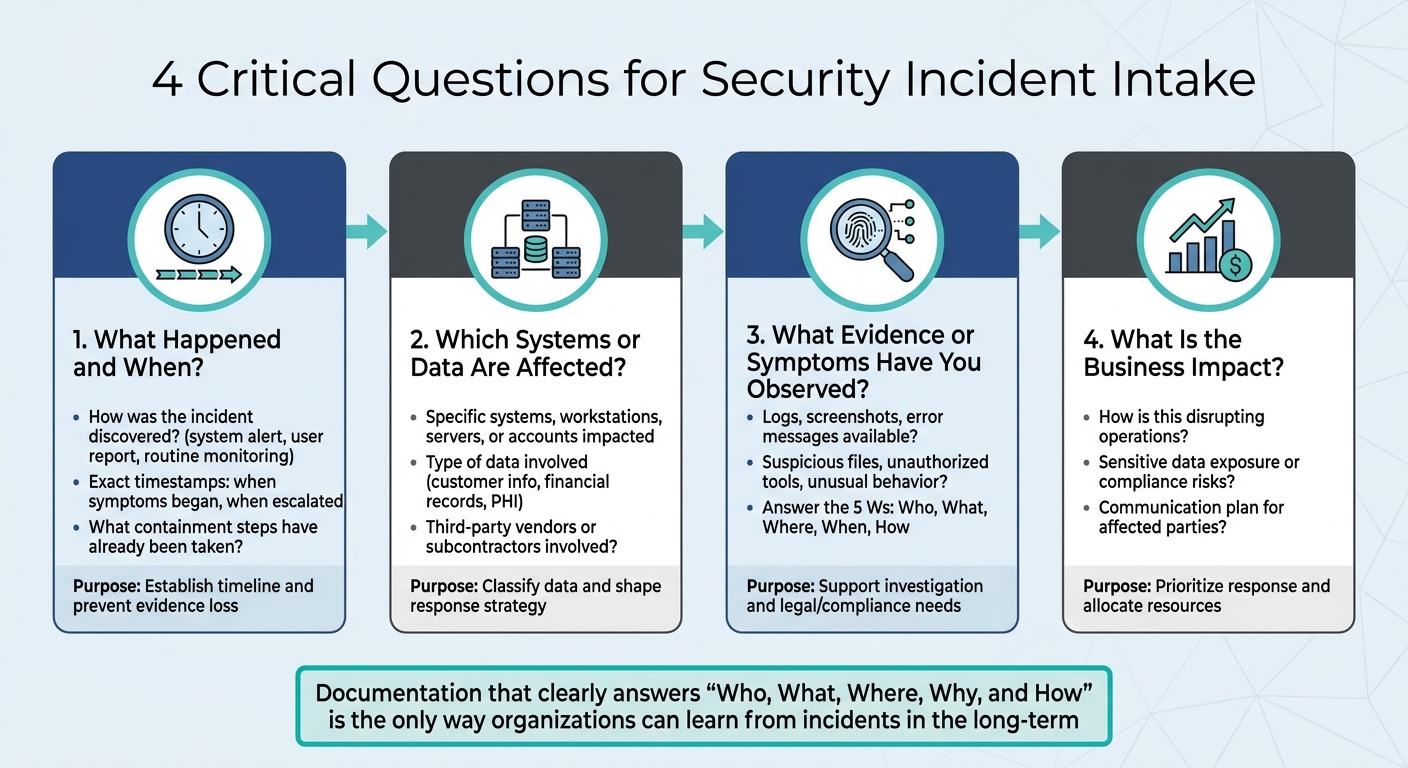
Security Incident Intake: 4 Critical Questions Framework
The first few minutes of handling a security incident can be the most critical. The questions you ask during this time can mean the difference between resolving the issue quickly or spending days searching for missing details. A focused intake process should cover four key areas: the incident timeline, affected systems, observable evidence, and business impact. These questions help create a clear incident profile, bridging the gap between initial data collection and actionable response steps.
What Happened and When?
Start by asking how the incident was discovered and when it was first noticed. Was it flagged by a system alert, reported by a user, or spotted during routine monitoring? Understanding the method of discovery can help determine whether the issue is isolated or part of a larger pattern.
Pin down exact timestamps for when symptoms began, when they escalated, and any other significant events. This timeline is essential for tracing the incident’s progression and identifying potential root causes. It also helps shape both the technical response and any necessary escalation. Additionally, check if any containment or remediation steps have already been taken. Knowing what actions the customer has attempted prevents duplication of efforts and ensures evidence remains intact [8].
Which Systems or Data Are Affected?
Clarify which systems, workstations, servers, or user accounts are impacted. Avoid vague answers – ask for specific details. For instance, if a database is affected, find out which database, which tables, and which user accounts accessed it recently.
You’ll also need to classify the type of data involved. Is it customer information, financial records, or protected health information (PHI)? This categorization is crucial for shaping your response strategy and addressing any regulatory requirements. If the incident involves third-party vendors or subcontractors, make sure to note that too, as coordination with external parties may be necessary [8][9].
What Evidence or Symptoms Have You Observed?
Once you’ve identified the affected components, gather evidence to support further investigation. Request logs, screenshots, and error messages immediately, as this data can disappear quickly. Ask about any suspicious files, unauthorized tools, or unusual system behavior that has been observed.
Focus on answering the 5 Ws: Who, What, Where, When, and How.
"Documentation that clearly answers ‘Who, What, Where, Why, and How’ is the only way organizations can learn from incidents in the long-term, and it is also an essential document for prosecution if the attacker is ever brought to justice" [4].
This kind of detailed documentation not only supports immediate troubleshooting but also serves as a valuable resource for legal or compliance purposes.
What Is the Business Impact?
Understanding the business impact is critical for prioritizing the response. Ask how the incident is disrupting operations, exposing sensitive data, or creating compliance risks. These answers help set response priorities and allocate resources effectively. A thorough assessment also reassures customers that their concerns are being addressed.
Additionally, inquire about communication plans. How are affected parties being informed?
"A well-formed incident response plan shows that a vendor is equipped to navigate security incidents and cybersecurity breaches effectively. The plan should include processes for incident detection, containment, remediation, and communication strategies for informing the affected parties" [9].
Knowing the status of customer communication helps you align your response efforts and avoid sending conflicting messages.
How to Structure the Intake Interaction
A well-structured intake process turns the first point of contact into an organized session for gathering essential details. The trick lies in balancing consistency and flexibility – using standardized methods while staying adaptable to changing threats. This ensures no critical information is missed while remaining nimble enough to respond during high-pressure situations.
Start with a checklist-based framework that covers the basics: identification, containment strategies, real-time coordination, compliance requirements, and clear communication practices [4]. These checklists should be designed with a tiered structure, prioritizing incidents by risk level. For example, cases involving Protected Health Information (PHI) demand far more scrutiny than those involving non-sensitive data [6]. This tiered approach ensures time isn’t wasted on minor issues, while high-risk situations get the attention they need.
Define roles ahead of time. Every team member should understand their responsibilities during the intake process to avoid confusion when the pressure is on [4]. Pair this preparation with the "5 C’s" framework: Change (adjusting to evolving conditions), Continuity (having backup plans for disruptions), Cost (optimizing resource use), Compliance (adhering to legal standards), and Coverage (addressing any gaps) [10].
"The gap between security that is present and security that is genuinely effective is defined by the degree to which these principles are not simply understood but embedded into every operational decision" [10].
Once roles and frameworks are in place, clear communication becomes critical. Use straightforward, precise language, and avoid making promises before fully understanding the incident’s scope. Premature assurances can backfire if later retracted, damaging trust [12]. Instead, direct customers to existing resources, such as internal FAQs or guidance documents, while your team works on resolving the issue [12]. Following the 7Cs of professional communication – Clarity, Conciseness, Correctness, Completeness, Courtesy, Concreteness, and Consideration – helps maintain professionalism [11].
Document everything. Capture details while they’re fresh to preserve institutional knowledge and identify patterns over time [4]. This documentation not only speeds up the current resolution but also helps prevent similar incidents in the future. Ensure intake scripts encourage detailed responses rather than simple yes/no answers. For instance, instead of asking if the customer has security training, ask them to specify the platforms they use, such as KnowBe4 [6].
This structured method sets the stage for incorporating AI-driven tools in later response phases, helping to streamline workflows and improve overall efficiency.
Common Mistakes to Avoid During Intake
Getting the intake process right is essential in AI-native B2B support operations. It lays the groundwork for efficient, compliant, and customer-focused incident resolution. However, even small missteps can derail the process and create larger issues down the line.
One common mistake is asking vague or overly broad questions. These types of questions often fail to produce actionable information. For example, instead of asking, "Did something unusual happen?" you could ask, "What specific error messages or alerts did you notice, and when did they first appear?" This kind of targeted questioning encourages customers to share the detailed information needed for effective troubleshooting.
Another issue is overloading intake forms or scripts with technical jargon. When customers are faced with complex terms or internal language, they may struggle to provide clear and accurate responses. Using simple, customer-friendly language ensures that questions are easier to understand, leading to better-quality responses and faster resolution.
Failing to capture critical details is another serious pitfall. Missing information can disrupt follow-up actions and even lead to compliance issues. For example, regulations like NIS2 require incident notifications within as little as 24 hours [13]. Incomplete intake data could result in missed deadlines and violations. It’s worth noting that in 2024, 68% of cybersecurity breaches involved human error [14], many of which were linked to incomplete or inaccurate initial reporting. To avoid this, comprehensive templates that prompt all necessary departments are essential to ensure no detail is overlooked.
Delays in documenting incident details can also create problems. It’s crucial to record information during or immediately after the first interaction. Waiting even a few hours can lead to the loss of critical evidence, such as logs that may quickly roll over [16]. Acting promptly preserves these details for analysis and resolution.
Finally, focusing solely on technical aspects while ignoring legal, HR, and communications considerations can lead to an incomplete response. As Gergana Karadzhova-Dangela and Thorsten Rosendahl from Cisco Talos emphasize:
"If you remain too focused on the technical aspects of handling an incident, you run the risk of creating an incomplete document" [13].
When personal data is involved, intake processes must also address regulatory notification requirements alongside system restoration timelines. Using standardized digital templates that prompt for all required fields across departments ensures consistency and thoroughness from the very first interaction. This structured approach is key to optimizing AI-assisted workflows in B2B support and maintaining compliance.
AI-Driven Workflows to Automate and Improve Intake
B2B support teams are facing mounting challenges, including rapid data breaches – occurring in less than 72 minutes [17] – and over 10,000 daily alerts. Analysts often spend 30–40 minutes per alert [19][20], making manual processes unsustainable. AI-driven workflows step in to handle routine tasks, provide instant context, and guide agents in real time.
The financial benefits are hard to ignore. Companies heavily relying on AI and automation save around $1.9 million per breach and reduce the breach lifecycle by an average of 80 days [17][18]. In January 2026, Eye Security reviewed 630 incidents and found that AI-enabled detection slashed Business Email Compromise (BEC) dwell times from 24 days to under 24 minutes. Analyst workload per incident also dropped significantly – from 19 hours to just 2 [17]. This marks a major transformation in how security teams handle incident intake.
AI for First-Contact Resolution Detection
Historically, resolving incidents on the first contact required seasoned analysts and time-intensive manual processes. AI has changed the game by analyzing risk, leveraging threat intelligence, and identifying historical patterns to deliver immediate decisions. It connects insights from siloed tools, performs "telemetry archaeology", and creates investigation timelines automatically [18]. This shift has led to tools that enable faster risk assessments and streamlined triage.
In 2026, Western Governors University (WGU) implemented an autonomous incident response pipeline using an AWS DevOps Agent. This reduced resolution times from about 2 hours to just 28 minutes – a 77% improvement in mean time to resolution (MTTR) [17]. The system identifies low-risk incidents for auto-remediation while escalating complex cases to human analysts, complete with pre-assembled context.
AI-powered enrichment tools gather external data, like threat intelligence and WHOIS records, alongside internal information such as user directory attributes and asset importance. Agentic AI takes this further by autonomously planning multi-step investigations, determining the scope of an incident, and assessing severity – all before a human analyst gets involved [17][18]. These capabilities integrate seamlessly into the initial intake process, ensuring faster, more efficient responses.
AI Case Summaries and Auto-Tagging
Security incidents generate overwhelming amounts of data – logs, alerts, reports, and telemetry. Sorting through this manually is time-consuming and prone to errors. AI-driven tools simplify the process by automatically classifying incidents based on severity, affected systems, and potential impact.
Natural Language Processing (NLP) plays a key role, enabling AI to interpret complex logs and user-submitted reports. For example, when a customer submits a plain-English security report, AI translates it into technical threat searches or structured data, cutting down resolution time [21]. In 2025, DXC Technology introduced a "7AI agentic SOC" layer that saved 224,000 analyst hours – equivalent to $11.2 million in productivity gains. This system eliminated repetitive Tier-1 playbooks and reduced both mean time to detect (MTTD) and MTTR by half [17]. Auto-tagging further streamlines the process by routing cases to the right teams instantly, avoiding delays caused by manual sorting.
By reducing false-positive rates by up to 90% [17], AI-driven detection ensures that analysts can focus on real threats. Combined with categorization tools, AI copilots make real-time incident handling even more efficient.
AI Agent Copilot for Real-Time Guidance
Even with automated triage, human analysts are essential for handling complex incidents. AI agent copilots enhance these interactions by offering real-time recommendations, contextual insights, and suggested next steps during live customer calls. These copilots rapidly search through past cases, internal knowledge bases, and external threat intelligence to provide relevant answers.
By April 2026, Carvana‘s CISO Dina Mathers reported that Torq‘s Agentic AI managed 100% of the company’s Tier-1 security alerts, allowing the team to scale without adding staff [22]. For more complex cases, the AI copilot drafts response suggestions, recommends containment actions, and highlights similar historical incidents. Grammarly, for instance, used AI investigation prompts to cut their security investigation time by 90%, ensuring consistent, high-quality analysis across their cloud environment [18].
These copilots integrate directly into an agent’s workflow. For instance, if a customer reports unusual account activity, the AI can instantly pull user directory attributes, recent authentication logs, and similar past incidents. It also suggests follow-up questions and provides plain-language explanations of technical findings, making it easier to communicate with non-technical users.
"Automate the routine, escalate the consequential." – ISACA Journal, 2025
This quote captures the essence of effective AI copilot systems. They handle high-volume, low-risk tasks like phishing triage, IOC enrichment, and ticket creation [17][19], while leaving critical decisions – such as containment of production systems – to human analysts [17]. The result? Faster resolutions, reduced analyst fatigue, and smoother customer experiences during every incident intake interaction.
Measuring Success with AI-Driven Metrics
To make the most of AI automation, it’s important to track the right metrics. These metrics can help you determine whether your team is resolving issues faster, collecting complete information upfront, and keeping customers happy. Below are some key metrics that offer insight into how well your AI-driven workflows are performing.
Intake Completeness and Accuracy is a critical metric. AI-powered ticket routing and prioritization helps agents structure and complete initial reports, cutting down on the need for manual follow-ups to fill in missing details [15]. Keep an eye on how often your team needs to contact customers for additional information. If this number decreases after introducing AI, it’s a strong indicator of success. Similarly, tracking First-Contact Data Accuracy ensures that all necessary information is captured correctly the first time.
Response and Resolution Speed is another area where automation shines. Look at how quickly your team responds to incidents from the moment they’re reported to the first contact, as well as how long it takes to fully resolve them. By reducing administrative tasks, AI can help your team move through these processes more efficiently [15].
Portal Utilization Rate measures how effectively customers are using your AI-powered intake system. Check the percentage of incidents reported through the AI portal compared to traditional methods. If adoption rates are low, it could point to usability issues, such as overly complex forms or unclear language. The FIRST PSIRT Services Framework highlights the importance of metrics in improving processes and tools:
"Metrics reporting does not define the requirements, but supports the program, helps determine the required resources, and may help identify places that need process/tool improvements" [24].
Compliance Adherence is especially important in regulated industries. For example, industries subject to HIPAA must meet specific deadlines, like the 60-day breach notification rule [23]. By December 2025, the Office for Civil Rights (OCR) had resolved over 98,000 cases, often through corrective action plans rather than financial penalties [23]. Monitoring compliance ensures your organization stays on track and avoids costly missteps.
Conclusion
Getting the intake process right is the key to resolving issues quickly and earning customer trust. The initial questions you ask – like what happened, when it occurred, which systems are affected, what evidence exists, and the business impact – set the tone for how efficiently your team can respond. These questions don’t just shape immediate actions; they also lay the groundwork for reducing risks over time.
But it’s not just about asking the right questions. The process itself needs to be straightforward. Think plain language, automated forms, and instant confirmations – all of which make reporting feel as easy as sending an email [15]. On the flip side, if the system is clunky or reports are ignored, things can spiral. As Resolver warns:
"If reports sit unanswered, employees will stop submitting them, and security risks will go unnoticed" [15].
A smooth intake process doesn’t just stop problems; it builds trust in your security measures.
This is where AI shines. Tools like AI-powered portals, automated triage systems, and real-time agent copilots transform manual tasks into seamless workflows. These systems ensure reports are complete, correctly categorized, and sent to the right team instantly. Plus, as mentioned earlier, automation not only speeds up the process but also cuts costs in a big way.
Metrics are the proof of success. By tracking things like report completeness, response times, portal usage, and compliance rates, you can see whether your intake process is working or causing headaches. Even small incidents matter – they’re often warning signs for bigger problems. As Noam Morginstin from Exigence puts it:
"Documentation that clearly answers ‘Who, What, Where, Why, and How’ is the only way organizations can learn from incidents in the long-term" [4].
When your intake process is clear and automated, every part of incident response becomes easier. The right first step makes all the difference – focus on simplifying and automating intake to keep customers safe and stop issues before they escalate.
FAQs
Who should own security incident intake in support?
Ownership of security incident intake is usually assigned to a dedicated security or incident response team, such as a Security Operations Center (SOC) or a security officer. These teams are responsible for tasks like triaging incidents, collecting essential details, documenting the events, and escalating issues when necessary. While support teams may contribute during the initial stages, the security team plays a critical role in maintaining a consistent and well-structured process, ensuring accountability throughout the incident management lifecycle.
What should we collect without destroying evidence?
During a security incident intake, it’s crucial to gather accurate, timestamped, and untouched data such as system logs, network activity records, and any relevant digital artifacts. Carefully record details about the incident, including the systems impacted and any steps taken in response. Avoid altering or deleting any data, as maintaining the integrity of evidence is essential for forensic investigations or potential legal actions.
How do we prioritize severity in the first call?
To address the severity of an incident during the initial call, it’s crucial to ask specific, focused questions. This helps gauge both the urgency and the potential impact of the situation. Start by clarifying the basics: "What happened?" and "Where did it occur?" Dig deeper to understand the scope, the systems affected, and the possible consequences. Taking a structured approach like this allows you to categorize the incident effectively and ensures your team can respond with the right level of urgency.






