


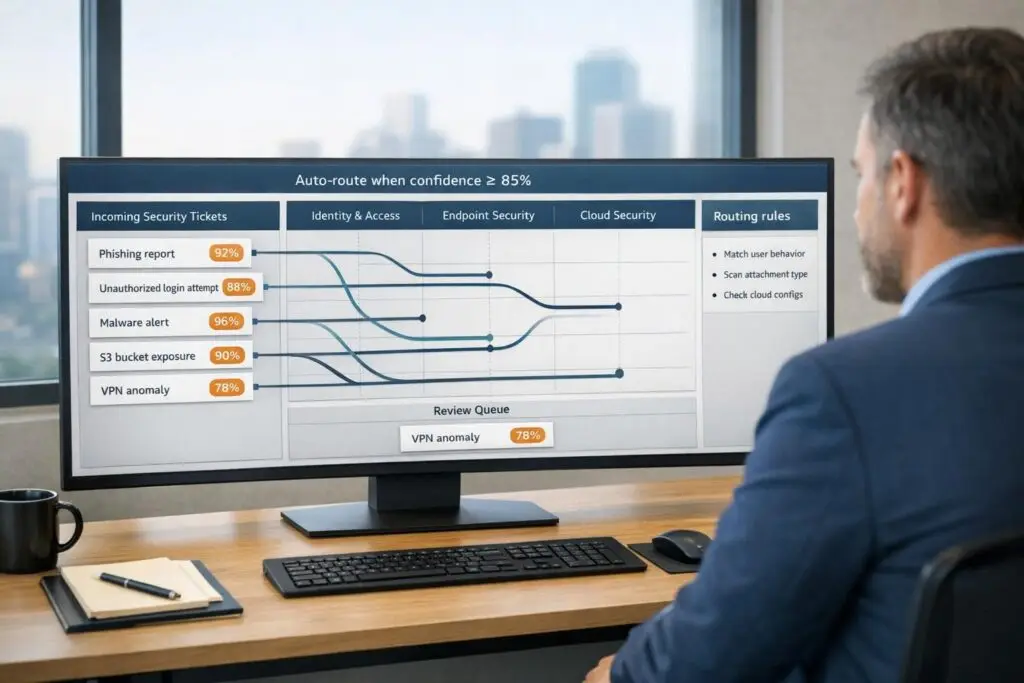
When security tickets are routed incorrectly, it can lead to delays, inefficiencies, and increased risks. Misrouting adds 4.2 hours on average to resolution time, costing teams handling 2,000 tickets monthly up to $329,000 annually. Manual triage is no longer sufficient, especially with 70% of security alerts being false positives and SOC analysts managing 10,000+ events per shift.
The solution? AI-driven ticket routing. It analyzes ticket intent in seconds, reducing resolution times by up to 50% and improving accuracy to 95%. Here’s what you need to know:
- Centralized Ticketing System: Use a unified platform with AI-powered triage, multi-label classification, and skill-based routing.
- Clear Security Categories: Start with 8–15 well-defined categories to improve classification accuracy.
- Data Standards: Train AI with consistent, high-quality tags and deploy in "shadow mode" to refine accuracy before full automation.
- AI Classification: Leverage AI to categorize tickets by type, priority, and sentiment with confidence scoring.
- Routing Rules: Combine AI insights with deterministic rules to assign tickets to the right teams.
- Automated Prioritization: Assign urgency dynamically based on keywords, sentiment, and business impact.
Teams can achieve 80% automation in the first month, scaling to 95% as the AI learns. This approach saves time, reduces costs, and allows teams to focus on critical security threats.
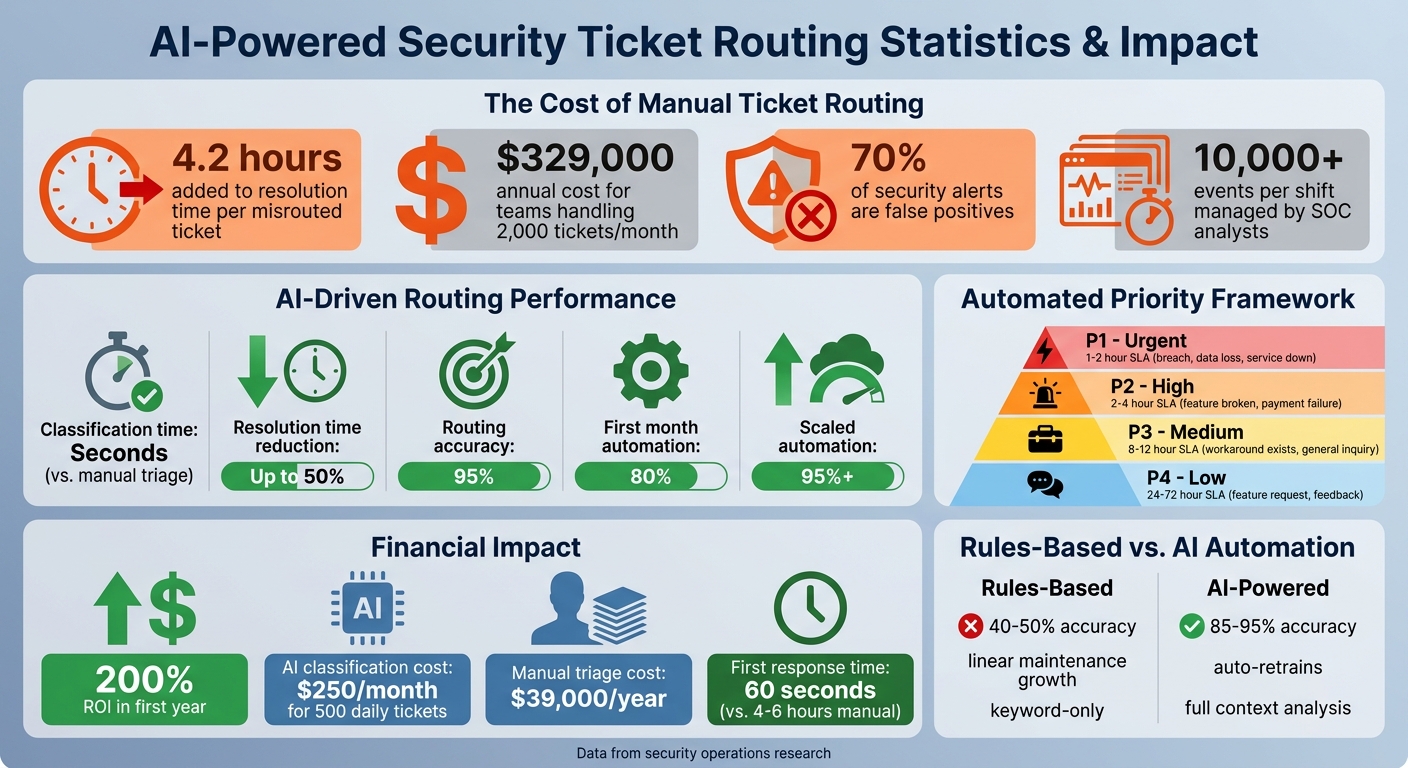
AI-Powered Security Ticket Routing: Key Statistics and ROI Impact
How to Automate Customer Support Ticket Categorization using AI
sbb-itb-e60d259
What You Need Before Setting Up Automated Routing
Automation can only succeed if you’ve got the right groundwork in place. Diving into automated ticket routing without proper preparation often leads to more inefficiencies, not fewer. While the prerequisites are straightforward, they’re critical for ensuring everything runs smoothly. Once you’ve got the basics covered, you can shift your focus to fine-tuning workflows, categorization, and data standards.
Centralized Ticketing System
A unified ticketing platform is a must-have. It should handle the complexities of security routing without requiring custom coding for every unique situation. For example, the system should support multi-label classification, which allows it to assign multiple labels to a single ticket while identifying the primary department for routing. This is crucial because security tickets often overlap departments – a locked account might need attention from both Security and IT teams at the same time [3].
Seek out tools with AI-powered triage and intent detection capable of analyzing ticket content in under a second [3][2]. A dynamic SLA engine is equally important, as it can automatically calculate different response deadlines based on priority and department. For instance, an urgent breach might need a 1–2 hour response window, while a general access query can wait 24 hours or more [3].
The system should also feature skill-based routing, ensuring complex vulnerabilities are directed to senior analysts while simpler tasks, like password resets, go to Tier 1 support [3][2]. Integration is key – your platform should sync with your existing security stack, CRM, and project management tools to keep data consistent across your organization [1][2]. Finally, no-code workflow builders are a game-changer, letting security teams design workflows and compliance checkpoints without relying on developers [1][2].
Defined Security Categories and Teams
Clear categorization is another cornerstone of effective automated routing. Start by creating a ticket intent taxonomy with 8–15 high-level, mutually exclusive categories [7]. Going beyond this range too soon can lead to inconsistent labeling, which reduces AI accuracy. Each category should represent a single, primary intent to minimize classification errors [7].
Some common security intents include Threat Detection & Response, Access Review, Vulnerability Management, Compliance Monitoring, and Incident Post-Mortem [2]. It’s also wise to set up a "Sensitive" category for high-risk issues like data breaches, legal threats, or account deletions. These cases often require stricter routing rules and manual oversight [7]. Map each category to the appropriate team or agent group, considering their expertise, workload, and availability [3][2]. This structured approach leads to faster, more precise routing and shorter resolution times.
"Ticket routing isn’t an admin task, it’s about risk control. When routing depends on humans scanning a queue, your risk depends on who is watching and when." – Mark Sherwood, CX Strategist and Support Operations Leader [6]
Data Quality and Tagging Standards
AI systems rely on historical data to learn. If your tags are inconsistent or incomplete, your automation will reflect those same errors. Accurate tagging not only trains your AI but also speeds up resolution times and reduces risk. Aim for at least 90% accuracy in classifying tickets within your top five categories before fully transitioning to auto-routing [3].
Set confidence thresholds for your AI, ensuring it only auto-routes tickets when its certainty exceeds a specific percentage – usually 70% or higher [3]. Tickets falling below this threshold should go to a manual triage queue for human review. Allow agents to correct tags quickly, feeding those updates back into the AI to improve its accuracy over time.
Begin with a "shadow mode" deployment, where AI classifiers run in the background for about two weeks. This lets you compare automated results against human decisions without risking ticket misrouting [3]. Most initial deployments achieve around 80% efficiency, with the potential to reach 95% or more as the system learns from exceptions [1].
How to Automate Security Ticket Routing
Implementing automated security ticket routing can save time and improve accuracy for your team. By combining a centralized system with well-defined taxonomies and AI capabilities, you can streamline this process effectively. Many teams achieve 80% automation within the first month, with accuracy levels reaching 95% or more as the AI learns from feedback [1].
Step 1: Use AI to Classify Security Tickets
Modern large language models (LLMs) excel at understanding ticket context, even when phrasing varies. For instance, whether a user writes "error 404" or "my thing won’t work", the AI identifies the intent behind the message [9].
Set up your AI to categorize tickets by type, priority (P1–P4), and sentiment. Use structured JSON outputs with fields like category, confidence, and reason [9][4]. The AI assigns a confidence score (from 0 to 1) to each classification. Most teams set an automation threshold between 0.75 and 0.85, automatically routing tickets above this score while sending lower-confidence cases to a human triage queue [9].
"AI classifies by meaning, not keywords: Large language models read the full context of a ticket, not just trigger words, and assign categories with confidence scoring." – Jesus Vargas, Founder, LowCode Agency [9]
To ensure the AI aligns with your business needs, provide 3–5 labeled examples per category and one-sentence definitions like "breach concerns", "MFA problems", or "compliance questions" [9]. Testing should confirm at least 85% accuracy before full deployment [9]. Once classification is reliable, set up routing rules for each category.
Step 2: Define Routing Rules for Security Categories
Routing rules blend deterministic logic with AI insights. For example, set hard rules like "If category is security, always route to the security team." Let AI handle confidence scoring and summaries [5][4]. Tickets in the security category should be treated as P1 minimum priority and sent directly to specialized teams or on-call engineers [5].
Map each category to the appropriate team based on expertise, workload, and availability [3][2]. Common security categories include:
account_accessfor login or MFA issuesdata_issuefor incorrect or missing datasecurityfor breaches, suspicious activity, and compliance concerns [5]
Start with straightforward scenarios – your "happy path" – before addressing edge cases [1]. Use a decision matrix to specify which incidents can be auto-tagged and which require human input, especially for high-impact actions like disabling accounts [4]. If workflows become too complex (over 10 decision points), break them into smaller, connected workflows [1]. Always configure the system to escalate cases with low confidence, even if severity seems minor [4].
Step 3: Automate Prioritization Based on Urgency
Automated prioritization ensures critical issues are addressed quickly. Use weighted scoring models to calculate a priority score (0–10) based on factors like urgency, business impact, customer tier, and SLA risk [7]. For instance, keywords like "breach" or "down" signal urgency, while follow-up messages or frustrated sentiment can elevate priority dynamically [5][7][2].
| Priority Level | Criteria Examples | Recommended Action/SLA |
|---|---|---|
| P1 – Urgent | Service down, data loss, security breach | Immediate Slack alert; 1–2 hour SLA |
| P2 – High | Feature broken (no workaround), payment failure | Support engineer; 2–4 hour SLA |
| P3 – Medium | Feature broken (workaround exists), general inquiry | Support queue; 8–12 hour SLA |
| P4 – Low | Feature request, general feedback | Self-serve suggestion; 24–72 hour SLA |
Set up real-time alerts for P1 tickets to notify teams via Slack or Teams instantly [5][1]. Before processing ticket text with LLMs, redact sensitive data to protect user privacy [4]. Configure prompts to return structured outputs like JSON with fields such as incident_category, severity_estimate, and confidence [4][3].
Step 4: Test Workflows and Analyze Results
Run your workflow in shadow mode for two weeks to compare AI decisions with manual routing [3]. Use a "golden set" of historical tickets to validate the AI’s performance against expert judgment [4][1].
Monitor metrics like classification accuracy, override rates, average routing time, and SLA management compliance. Track every AI-assigned category and confidence score – tools like Airtable or Google Sheets can help identify areas for improvement [9]. Misrouted tickets can add an average of 4.2 hours to resolution time, so precision is essential [3].
"Priority quality is queue quality. Teams that use AI to standardize priority levels can reduce confusion, protect SLA performance, and execute support work with far better consistency." – Layer 8 Labs [8]
Common Mistakes and How to Avoid Them
When implementing automated security ticket routing, it’s easy to stumble into pitfalls that can undermine both accuracy and efficiency. Rushing to deploy automation without refining support workflows first often leads to more problems than solutions. Below, we’ll explore some common missteps and ways to sidestep them.
Incomplete or Incorrect Routing Rules
Keyword-based triggers sound simple, but they can fall apart when customers use synonyms, make typos, or include multiple topics in one message. This approach requires constant manual updates and often misses the bigger picture [10][6].
Another issue is over-categorization. Starting with too many intent categories (e.g., more than 40) can confuse the AI and lower accuracy. A better strategy? Begin with 8–15 broad categories, then expand only when necessary [7].
"Fix the process first, then automate it. Automating an inefficient workflow just makes you inefficient faster." – Arahi AI [1]
To handle uncertainty, confidence thresholds can make all the difference:
- 85%+ confidence: Auto-resolve tickets.
- 60–85% confidence: Use assisted routing where humans confirm labels.
- Below 60% confidence: Send tickets to manual triage [10][3].
Neglecting exception handling can cause "silent failures", where critical tickets linger unnoticed. Always plan for edge cases so nothing falls through the cracks [1][3].
Failure to Update Workflows Regularly
Automation isn’t a “set it and forget it” solution. Security threats change, products evolve, and customer behavior shifts. Without regular updates, AI accuracy can drop within just three months [11].
Outdated workflows can add an average of 4.2 hours to ticket resolution times, erasing the benefits of automation. To avoid this, create a weekly review process to identify mislabeled tickets and feed those corrections back into the system [11]. For real-time issues, set up alerts in tools like Slack or Teams so your team can address routing exceptions immediately [1].
Additionally, auditing workflows against compliance standards like SOC 2 or ISO 27001 ensures your system stays aligned with current requirements [2].
Underestimating Training for Teams
Automation doesn’t replace skilled teams; it changes their role. Without proper training, agents may struggle with low-confidence tickets that require human judgment [11][3]. Teams also need to know how to provide feedback that improves the AI over time.
"The AI’s ceiling is set by the clarity of your taxonomy – garbage in, garbage out." – IrisAgent Team [11]
To prevent gaps:
- Define clear escalation paths to handle edge cases.
- Hold weekly sessions to review and correct mislabeled tickets [11][1].
| Metric | Rules-Based Automation | AI Ticket Automation |
|---|---|---|
| Accuracy Ceiling | 40–50% correct routing | 85–95% correct routing |
| Maintenance | Grows linearly; brittle | Retrains on new data; scales automatically |
| Input Handling | Keywords, regex, forms | Full content, history, sentiment, context |
| Misspellings | Often fails | Handles gracefully |
| Sentiment Awareness | No | Built-in |
Training also plays a key role in maintaining data quality. Automated tagging can save 30–90 seconds per ticket, but only if the team is equipped to correct errors and fine-tune the system. A well-trained team ensures that automation continues to deliver measurable improvements over time [11].
Conclusion
Automated ticket routing shifts support operations from a reactive approach to a proactive one, cutting first-response times dramatically – from 4–6 hours to less than 60 seconds[12]. By eliminating misrouted tickets, organizations save the additional 4.2 hours typically added to resolution times[3].
This automation ensures that best practices are seamlessly integrated into workflows, safeguarding institutional knowledge even when key team members leave[2]. With AI managing routine classification tasks in mere seconds, your team can redirect its focus to strategic decisions and tackling more complex challenges[1]. These efficiencies not only streamline operations but also free up critical resources to focus on higher-priority security initiatives.
The financial benefits are clear. Companies adopting automation for support routing report an average 200% return on investment within the first year[12]. Metrics show that teams achieve approximately 80% automation within the first month, scaling to 95% or more as the system refines itself by learning from exceptions. For a team handling 500 tickets daily, AI-powered classification costs less than $250 per month – far more economical than the $39,000 annual cost of manual triage[6]. This directly addresses inefficiencies like misrouted tickets and high labor costs, transforming what was once a bottleneck into a highly efficient, cost-effective process.
Supportbench offers a comprehensive solution, delivering AI-powered automation, skill-based routing, and escalation intelligence without the need for multiple tools. Starting at $32 per agent per month, you gain access to enterprise-grade features that grow with your team, including AI case summaries, auto-prioritization, sentiment detection, and even AI-driven KB article creation.
The real question isn’t whether you should automate your security ticket routing – it’s whether you can afford not to.
FAQs
What data do I need to train AI ticket routing?
To train AI for ticket routing, you’ll need a collection of sample tickets that include key attributes such as category, priority, sender information, and the content of the ticket. It’s also important to include historical data, like past routing decisions and their outcomes, as this helps the AI understand patterns and improve accuracy.
Structured data, such as tags or labels, can further enhance the training process by providing clear markers for classification. Beyond the data itself, make sure to include documentation of your current workflows and decision-making criteria. This additional context will guide the AI in learning how to classify and route tickets in a way that aligns with your organization’s existing processes.
How do I choose confidence thresholds for auto-routing?
To strike the right balance between automation accuracy and human oversight, set confidence thresholds carefully. A good starting point is setting thresholds at 85-90% for high-confidence predictions to be automatically routed. For cases with lower confidence, flag them for manual review.
Keep in mind, higher thresholds reduce the likelihood of errors but will lead to more manual reviews. On the flip side, lower thresholds allow for greater automation but come with a higher risk of misrouting. Regularly evaluate and adjust these thresholds based on your system’s performance and the level of risk you’re willing to accept. This approach ensures your routing remains as accurate and efficient as possible.
How can I handle sensitive or high-risk security tickets safely?
To manage sensitive or high-risk security tickets effectively, it’s crucial to set up automated workflows that include classification, prioritization, and escalation processes specifically designed for security-related situations. AI can play a big role here by classifying and routing tickets, ensuring that critical issues are flagged and sent to the appropriate teams without delay.
Set up rules to identify high-risk indicators, such as specific keywords or severity levels, and ensure these triggers are built into your system. At the same time, maintain strict governance, enforce access controls, and keep detailed audit trails to handle tickets securely while staying aligned with your organization’s compliance policies.






