


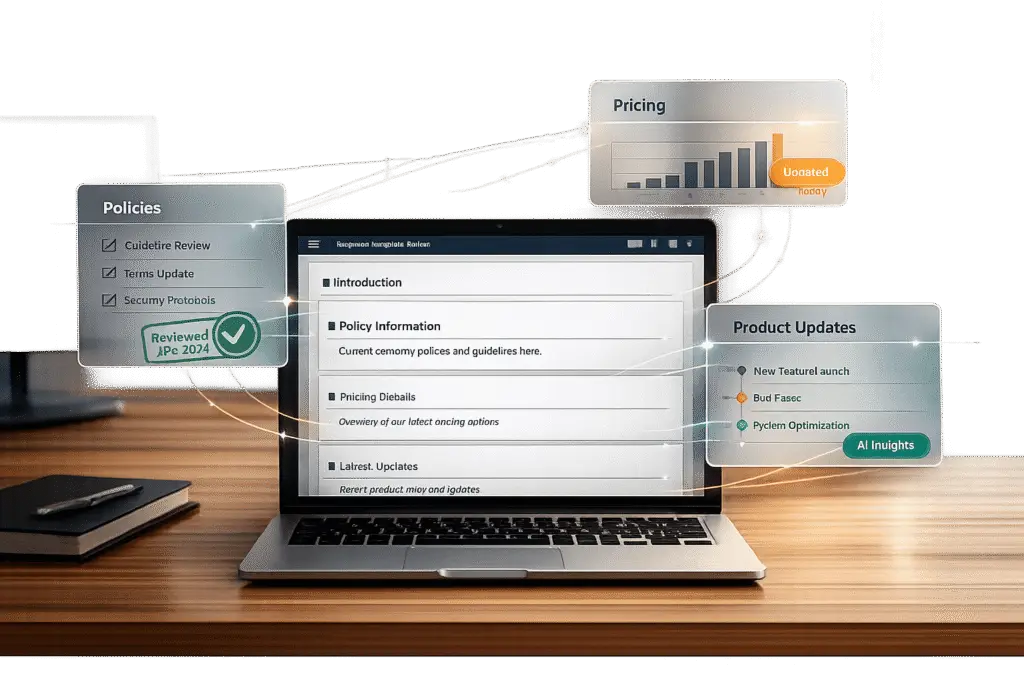
Response templates save time and ensure consistent communication, but they can quickly become outdated as businesses evolve. This can lead to misinformation, customer confusion, and trust issues. To keep templates accurate over time, focus on these key practices:
- Identify Common Questions: Analyze past customer interactions to find recurring issues. Group similar queries by intent and prioritize high-volume or high-impact questions.
- Design Flexible Templates: Use modular sections, placeholders, and conditional logic to make updates easier and responses more tailored.
- Leverage AI Tools: Automate updates, detect stale information, and connect templates to knowledge-centric solutions for real-time accuracy.
- Monitor Performance: Regularly review templates based on metrics like customer satisfaction (CSAT) and first contact resolution (FCR). Track edit rates to identify areas for improvement.
- Schedule Updates: Conduct quarterly audits and update templates after major changes like policy shifts or product launches.
Canned Responses Examples and How to use Canned Response
sbb-itb-e60d259
Finding the Right Customer Questions for Templates
To create effective templates, start by identifying patterns in customer questions. Analyze your last 500 support interactions from your busiest channel and group them by intent. For instance, while "Where is my order?" and "My tracking number isn’t working" are different queries, they both fall under the same intent: Order Status. Research indicates that 80% of customer inquiries usually fit into just 8–12 recurring patterns[8]. This means a small set of well-crafted templates can address the majority of your support needs. Dive into your ticket history to uncover these patterns.
Review Past Support Tickets
Your ticket history is a goldmine for understanding what customers ask most often. Use your helpdesk tools – like case summaries, activity logs, and tagging features – to spot common issues such as password resets, billing questions, or troubleshooting requests. Analyzing 90 days of multi-channel data can help you pinpoint these frequently asked questions.
To keep things organized, track recurring queries in a spreadsheet with columns for "Question", "Category", "Frequency", and "Priority." This structure helps you decide which templates to create first. It’s worth noting that support agents can spend 25–30% of their time simply searching for information[8] if template libraries become too unwieldy. For maximum efficiency, aim to limit your library to 20–30 templates.
Focus on High-Volume and High-Impact Questions
Not all customer questions carry the same weight. Sort your findings into three tiers based on how often they’re asked and their impact:
- Tier 1: These templates (5–8 total) should tackle your most common questions – those asked 20+ times per week. They typically account for 60–70% of all inquiries[8].
- Tier 2: Create 5–10 templates for issues that are more specific and emotionally charged, like refunds, complaints, or technical troubleshooting.
- Tier 3: Reserve 3–5 templates for rare but complex queries that arise monthly.
Pay special attention to questions that pop up during critical moments in the customer journey, such as returns, onboarding, renewals, or escalations. These interactions can significantly influence customer retention and revenue. As Jonathan Bar, Founder of Corebee, emphasizes:
"The biggest mistake I see support teams make with complaint templates is being vague about next steps. ‘We’re looking into it’ means nothing to a frustrated customer"[2].
How to Build Templates That Adapt to Change
Creating templates that can evolve with your business ensures that your communications stay accurate, even as policies or offerings shift. Whether you’re updating a return policy or introducing a new product, your templates should reflect these changes seamlessly. The key is to design flexibility into your templates from the very beginning.
Add Personalization and Modular Sections
Think of templates as a collection of modular pieces. Modular architecture breaks templates into distinct, self-contained sections – like headers, product details, or footers. This way, when something changes, like extending a return policy from 14 to 30 days, you only need to update the relevant module. The change then cascades across all templates using that block [12][13].
Personalization is another critical element. Placeholders like {{Customer Name}} or {{Order ID}} allow a single template to address thousands of unique situations while keeping a personal tone [6]. However, relying solely on placeholders can lead to errors, such as sending "Hi {{Name}}, your order {{Order Number}} is on its way." To avoid this, use fill-in fields that require agents to input data before sending responses [4].
One example of this approach in action: a travel agency that adopted modular email templates saw a 25% reduction in campaign build time [12]. To keep responses from feeling overly automated, enforce a "One Sentence Rule", requiring agents to add at least one personalized, hand-written sentence to every templated response [4].
Use Conditional Logic in Templates
Conditional logic transforms rigid templates into dynamic tools. Instead of juggling multiple templates for different scenarios, a single template with IF/THEN logic can handle various situations [7].
For example, you can set up seasonal variations that activate automatically. During November and December, templates could include holiday delivery delay notices, while tax season might trigger extended support hour messages [7]. For events that aren’t automated, use calendar reminders to manually activate or deactivate conditional sections, such as special hours for bank holidays [7].
Another powerful feature is guardrail logic. This ensures that sensitive topics, like refund requests or unclear customer inquiries, are flagged for human review before being sent [14]. Guardrails like these help maintain quality while still automating routine tasks.
Track Template Versions
Without version tracking, it’s hard to pinpoint why a template that worked last month is suddenly causing issues. Implement semantic versioning using a Major.Minor.Patch format (e.g., 2.4.1) to track updates [17]. Use patches for small tweaks, minors for structural updates, and majors for significant policy changes.
Keep a changelog within each template to document who made changes, when, and why [15]. Descriptive notes like "Updated refund window to 30 days" are far more useful than vague entries like "Fixed template" [17]. This log becomes an essential tool for compliance and troubleshooting.
Standardize your file-naming system to include details like the project name, document type, version number, and date. For instance: Refund_Template_v2.1_05-03-2026 [15][16]. Store templates in a centralized system, such as SharePoint or Google Drive, with editing permissions restricted to authorized personnel [15]. Schedule quarterly audits to review and update your entire library [6][2].
Using AI to Keep Templates Accurate
Keeping templates up-to-date can be a nightmare when you’re managing a large library. Manually tracking outdated policies or retired features across countless templates is exhausting – and unrealistic at scale. That’s where AI steps in, automating everything from creating templates to spotting errors before they ever reach your customers.
AI-Powered Template Creation and Updates
Imagine creating a polished template in just five minutes. AI makes that possible, cutting the time it takes to build a full library by as much as 85% [7].
The magic lies in a centralized knowledge base. Instead of updating templates one by one, you update the master source, and every linked template syncs instantly [7]. This eliminates the need for repetitive manual edits across your system.
AI also customizes tone and structure to fit specific situations. For example, a billing dispute requires a more formal tone than a straightforward how-to guide. AI adjusts the language and urgency to match the context, ensuring it’s appropriate for every scenario [20].
Now let’s explore how AI keeps templates accurate over time.
Real-Time Accuracy Checks with AI
AI doesn’t just help with creation – it ensures your templates stay accurate. One standout feature is staleness detection. The system flags content that hasn’t been reviewed recently or contradicts updated documentation, so you can fix it before customers notice [18].
"Outdated information is a uniquely insidious accuracy problem because it is invisible until a customer catches it, and by then the damage to trust is already done." – Twig [18]
AI also scans for restricted terms or pricing errors using rule-based checks [21]. Some platforms even use a secondary AI model, often called LLM-as-a-Judge, to review templates for accuracy, relevance, and tone consistency before they’re sent out [21]. These real-time checks are essential for keeping templates aligned with ongoing changes.
Connect Templates to Knowledge Bases
Linking templates to a live knowledge base turns them into dynamic tools rather than static documents. When your knowledge base updates – whether it’s a new feature, pricing change, or revised shipping terms – templates pull in the latest information automatically.
AI systems sync directly with platforms like internal wikis or documentation tools, so updates to help articles are reflected in responses almost instantly [18]. This ensures templates always match the most current policies or details.
This setup follows a modular approach. For example, a knowledge base hit rate above 85% – meaning 85% of AI responses cite sources from the knowledge base – is a strong indicator of success. Similarly, if agents only need to edit less than 20% of AI drafts before sending them, it shows the knowledge base is both reliable and thorough [19].
"The AI can only be consistent if the knowledge base is consistent." – Relay Team [19]
Platforms like Supportbench go a step further, offering AI copilots that pull from past cases and knowledge bases to suggest answers. This helps agents resolve issues faster and ensures they’re working with the most up-to-date information. By connecting templates to a centralized system, agents avoid wasting time searching through outdated files and can focus on delivering accurate, timely responses.
How to Monitor and Maintain Templates
Keeping templates up-to-date is crucial for ensuring their effectiveness. Regular monitoring helps avoid outdated information and maintains alignment with your design and AI integration strategies. By tracking performance and scheduling updates, you can ensure templates stay accurate and useful.
Measure Template Performance
To gauge the effectiveness of your templates, focus on key metrics. For example, Customer Satisfaction (CSAT) scores can reveal whether the tone and content resonate with users. Templates tied to higher CSAT scores are likely hitting the mark. Similarly, First Contact Resolution (FCR) rates above 65% indicate that templates are resolving issues without requiring additional follow-ups [23]. Personalized templates are particularly impactful, reducing follow-up messages by 34% compared to generic ones [8].
Another important metric is the edit rate, which shows how often agents need to revise AI-generated drafts. If agents are rewriting more than 20% of drafts, it could mean the templates or the knowledge base are outdated. An edit rate exceeding 40% should trigger an immediate review [23].
| Metric | What It Tells You | Target |
|---|---|---|
| CSAT | Whether the tone and content are helpful | Equal to or higher than baseline |
| FCR | If the template resolves issues in one touch | Above 65% |
| Follow-up Rate | Clarity of communication | 34% reduction with personalization |
| Edit Rate | How often agents rewrite before sending | Below 20% |
By tracking these metrics, you can quickly identify areas that need improvement and ensure your templates remain effective.
Set Up Regular Review Schedules
Template reviews should align with how often your business undergoes changes. Conducting quarterly audits ensures templates remain aligned with current policies and your brand’s tone. Additionally, schedule reviews after significant events like product launches or pricing updates [5][6]. These reviews complement your performance tracking efforts, helping maintain consistency and accuracy.
Assign a dedicated leader, such as a Support Ops manager or QA manager, to oversee template updates [22]. This ensures that when Legal revises refund policies or Sales adjusts pricing, templates are updated promptly to reflect these changes.
While scheduled reviews provide a structured approach, automation can handle the day-to-day checks more efficiently.
Automate Quality Checks with AI
Manual audits can be time-consuming and hard to scale, which is where AI tools come in. Use AI to flag outdated or conflicting information, ensuring templates stay accurate [7]. For instance, conduct weekly reviews of the five most-edited AI drafts to uncover recurring issues. If agents consistently make the same corrections, it’s a sign the source material needs updating [23].
You can also perform monthly random audits of 20 knowledge base articles and their associated templates [23][7]. AI copilots can help identify outdated or conflicting templates automatically, saving time and reducing the burden on your team. This proactive approach ensures your library remains accurate without requiring agents to manually verify every response.
Common Template Management Mistakes to Avoid
Managing response templates can be tricky for support teams. When done poorly, it doesn’t just slow down operations – it can also harm customer relationships and erode trust. To keep templates effective, it’s crucial to dodge some common pitfalls. Here are three mistakes that often lead to issues with template accuracy and customer satisfaction.
Relying Too Much on Fixed Templates
Templates that never evolve quickly become outdated as your business changes. If teams treat static templates as the final word rather than a starting point, customers will notice. In fact, 68% of customers can tell when they’ve received a templated response [8]. Jonathan Bar, Founder of Corebee, highlights this issue:
"The biggest mistake I see support teams make with complaint templates is being vague about next steps. ‘We’re looking into it’ means nothing to a frustrated customer" [2].
The key isn’t to ditch templates altogether but to view them as flexible tools within a modern B2B support toolset. Agents should adapt templates to fit the customer’s unique situation, factoring in order history, specific concerns, and other relevant details.
Skipping Regular Updates
Templates require consistent upkeep. Without routine updates, your responses can quickly become outdated. For example, information that’s accurate in January might reference discontinued services by mid-year. Sending outdated information can harm your brand’s credibility more than not using a template at all [8].
This issue escalates when template libraries grow bloated and disorganized. Agents may inadvertently send conflicting information, which can erode trust faster than almost any other misstep [4]. To combat this, assign a dedicated team lead or manager to oversee the template library. Without clear ownership, templates often go stale within just three months [4]. Regular reviews and updates ensure templates stay relevant and accurate [6][4].
Using Templates That Are Too Generic
Generic responses create a disconnect between your team and the customer. While 80% of CEOs think their companies deliver excellent customer experiences, only 8% of customers agree – often due to impersonal communication [3].
This problem is especially pronounced in B2B support, where 71% of customers expect personalized interactions and 76% demand consistency across departments [2][24]. A generic reply can feel dismissive, causing customers to disengage immediately.
To address this, focus on maintaining a library of 20-30 well-crafted templates instead of hundreds of overly specific ones that are hard to navigate [2]. Each template should include placeholders for key details like the customer’s name, their specific issue, technical information, and actionable next steps with clear timeframes [1][2]. If a template doesn’t allow for meaningful personalization, it’s likely too generic to serve its purpose effectively.
Static vs. Dynamic vs. AI-Enhanced Templates
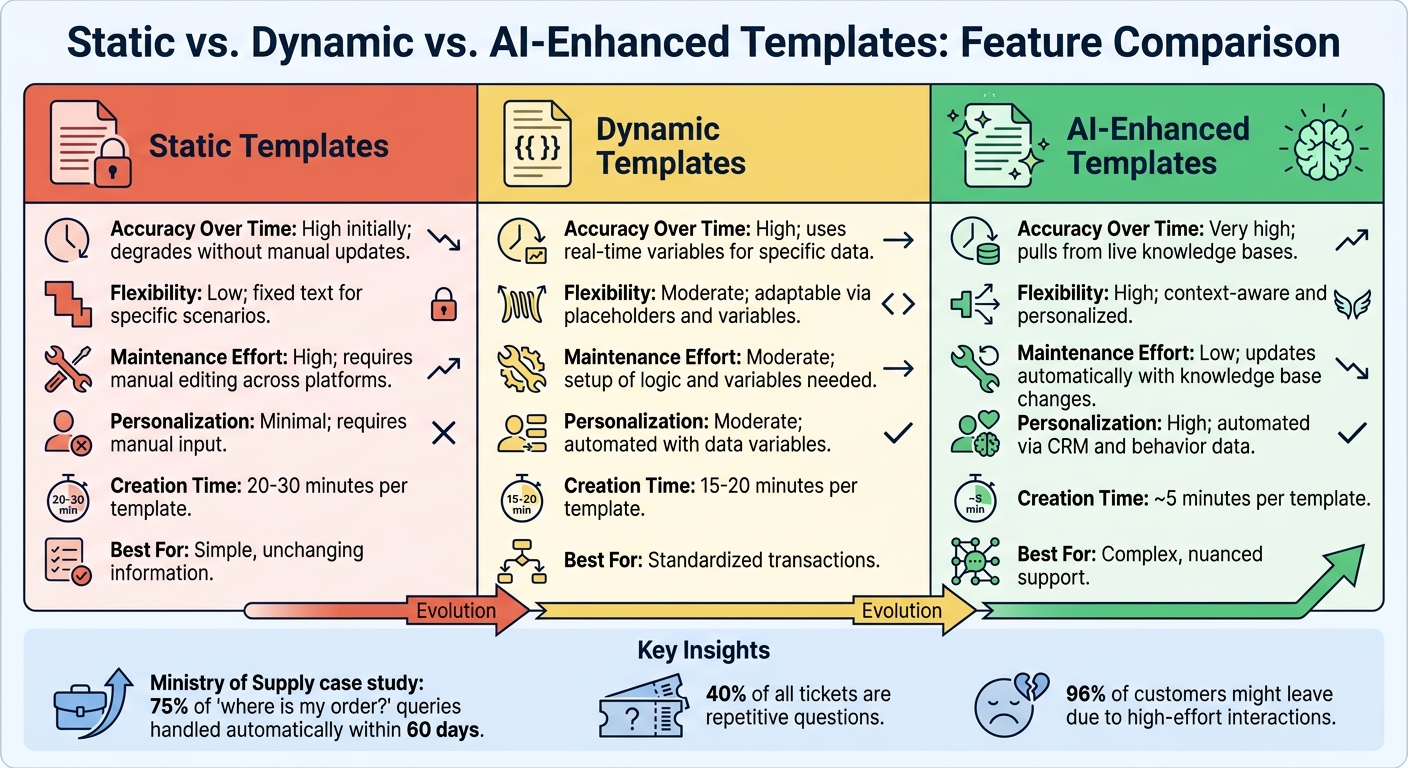
Static vs Dynamic vs AI-Enhanced Response Templates Comparison
Let’s break down the differences between static, dynamic, and AI-enhanced templates. Each type offers distinct levels of flexibility, personalization, and upkeep, so choosing the right one can save you from time-consuming manual updates.
Static templates are straightforward text blocks used without modifications. While they’re easy to create, they come with a major downside: every time something changes – like a return policy or product name – you’ll need to update the template across all platforms, whether it’s Gmail, your helpdesk, or Slack. This can quickly become a hassle and increases the risk of sending outdated information [25].
Dynamic templates take things a step further by incorporating variables like {{customer_name}} or {{order_number}}, which automatically pull data from your CRM. This makes them more personal without requiring agents to manually fill in details [10]. However, they’re still based on predefined logic and aren’t capable of adapting in real time. As Jordan Miller from Gorgias points out, if a tag like "Cancel Order" is used frequently but the associated macro isn’t, you might need to refine the template or add more variables to make it effective [10].
AI-enhanced templates go beyond static and dynamic options by pulling real-time data directly from a centralized knowledge base. For example, when Ministry of Supply introduced a 24/7 AI-powered customer agent in early 2026, it handled 75% of "where is my order?" queries automatically within 60 days [9]. The biggest advantage? You only need to update the knowledge base, and the changes are reflected everywhere, eliminating the tedious platform-by-platform updates required for static templates.
Template Type Comparison Table
| Feature | Static Templates | Dynamic Templates | AI-Enhanced Templates |
|---|---|---|---|
| Accuracy Over Time | High initially; degrades without manual updates [25] | High; uses real-time variables for specific data [10] | Very high; pulls from live knowledge bases [9] |
| Flexibility | Low; fixed text for specific scenarios [25] | Moderate; adaptable via placeholders and variables [10] | High; context-aware and personalized [9] |
| Maintenance Effort | High; requires manual editing across platforms [25] | Moderate; setup of logic and variables needed [10] | Low; updates automatically with knowledge base changes [9] |
| Personalization | Minimal; requires manual input | Moderate; automated with data variables [10] | High; automated via CRM and behavior data [9] |
| Creation Time | 20–30 minutes per template | 15–20 minutes per template | ~5 minutes per template [7] |
| Best For | Simple, unchanging information | Standardized transactions | Complex, nuanced support [7] |
This table highlights how each template type fits different operational needs and adapts to business changes.
For businesses handling high-ticket volumes, dynamic or AI-enhanced templates are especially useful. Repetitive questions – estimated to make up about 40% of all tickets – can be managed more efficiently with these templates [11]. In B2B settings, where 96% of customers might leave due to high-effort interactions, the speed and precision of AI-enhanced templates can significantly improve retention [9].
How to Keep Templates Accurate Over Time
Templates aren’t a “set it and forget it” kind of tool. As customer expectations and business policies shift, your support templates need to evolve too. Keeping them accurate means putting a system in place to ensure they’re always up-to-date and relevant.
The key here is to build on practices like maintaining a centralized knowledge base, scheduling regular reviews, using AI for automated quality checks, and creating a feedback loop with your support team. These steps ensure that your templates stay aligned with current needs.
Start by assigning a template owner – a team lead who takes responsibility for keeping the library current [4]. Without this role, it’s easy for updates to fall through the cracks because everyone assumes someone else is handling them.
Next, keep an eye on key support metrics. For instance, if agents frequently correct the same outdated information, it’s a sign that the master knowledge base needs immediate updates. This isn’t just a minor inconvenience – it affects customer loyalty. Research shows that 96% of customers who encounter high-effort service interactions become more disloyal, compared to just 9% in low-effort situations [9].
To stay ahead, set up a review schedule. Conduct monthly audits to ensure details like hours, pricing, and links are accurate [7]. Then, plan quarterly reviews to remove unused or redundant templates [4]. For time-sensitive changes, like holiday shipping delays or peak sales seasons, use calendar reminders to activate or deactivate relevant templates at the right time [7].
"The best templates aren’t static – they’re shared across your team, refined based on feedback, and updated as your product and policies evolve" [1].
The benefits of staying on top of template accuracy are huge. You’ll cut down on errors, deliver consistent messaging, and keep customers happy – all while reducing the manual effort for your team.
FAQs
How do I pick the first templates to build?
Start by creating templates for the most frequent customer inquiries your team encounters – things like billing concerns, troubleshooting steps, or account access problems. Develop templates that cover different stages of interaction, including initial responses, follow-ups, and escalations. By focusing on these high-volume scenarios, you can ensure your templates are practical and ready to use right away. This approach not only streamlines your team’s workflow but also improves response speed and consistency, leading to better customer experiences with less manual effort.
What’s the best way to stop templates from going stale?
To ensure templates stay current, leverage automated tools for syncing, identifying outdated content, and handling version control. Make it a habit to update templates regularly, incorporating changes from product updates, new policies, and user feedback. Collaboration is key – work closely with teams like product, engineering, and support to address any gaps before they become issues. Additionally, AI-driven tools can help by spotting outdated content and prompting updates, keeping templates accurate and aligned with organizational shifts.
How can AI verify template accuracy before sending?
AI leverages automated verifiers to ensure template accuracy by reviewing draft responses for compliance with company policies, factual accuracy, and proper language use. These verifiers work at lightning speed, analyzing drafts in milliseconds and identifying potential issues based on set risk criteria.
For drafts flagged as low-risk, approval happens automatically. However, higher-risk drafts undergo further review or are escalated to a human agent. This process ensures that responses are both precise and dependable before being sent out.






