


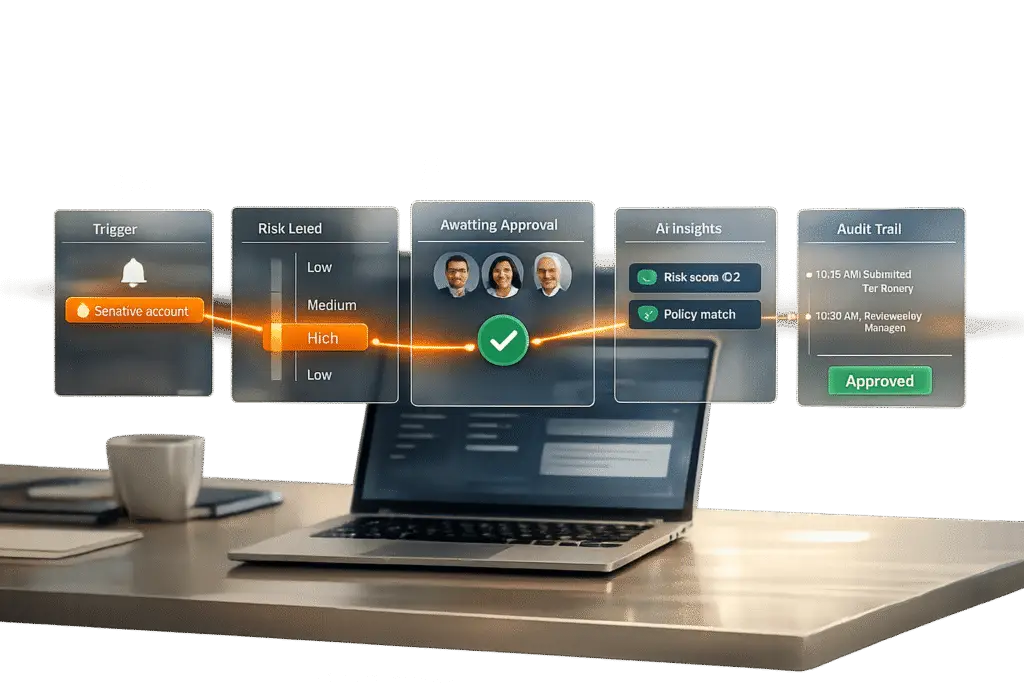
Managing sensitive accounts requires careful oversight to avoid costly mistakes. For high-stakes B2B interactions, a reply approval workflow ensures that responses are accurate, compliant, and professionally vetted. Here’s how to set one up:
- Identify sensitive accounts: Focus on accounts with high contract values, regulatory requirements, or elevated privileges.
- Set approval triggers: Flag actions like large financial transactions, account closures, or low-confidence AI responses for review.
- Define approval criteria: Use tiers of risk (low, medium, high) and confidence thresholds (e.g., 85%) to decide when human review is needed.
- Assign stakeholders: Route approvals to the right roles – managers, legal teams, or subject matter experts – based on risk level.
- Design workflows: Choose between sequential, parallel, or conditional workflows to balance speed and oversight.
- Leverage AI: Automate low-risk tasks, flag critical issues, and provide reviewers with context-rich case packets.
- Implement notifications and audit trails: Ensure timely approvals and maintain a detailed log of decisions for accountability.
Step 1: Identify Sensitive Accounts and Set Approval Triggers
How to Identify Sensitive Accounts
Not every customer account carries the same level of risk, which is why it’s important to define what makes an account "sensitive." This definition should be based on clear criteria like contract value, compliance requirements, or access to critical roles. These factors will shape your overall reply approval workflow.
For example, accounts tied to higher contract values, active escalations, or strict regulatory requirements (like those in financial services or healthcare) should automatically receive extra scrutiny. Similarly, accounts linked to elevated privileges – such as Global Administrators, Security Administrators, or Tier 0/Tier 1 roles – demand stricter oversight.
Many modern AI support platforms use a confidence threshold of 85% as a baseline. If the AI’s response confidence falls below this level, the response is flagged for human review – regardless of the account type [1].
Once you’ve established what qualifies as a sensitive account, the next step is to set clear triggers for when approvals are required.
Setting Up Approval Triggers
After identifying sensitive accounts, it’s time to define the specific scenarios that call for additional approval. These triggers are essential for creating a smooth, multi-step approval process that combines human oversight with AI chatbot efficiency.
Start by setting financial thresholds. For instance, transactions exceeding $100 for small accounts or $10,000 for enterprise accounts can automatically trigger a review [3][8]. Irreversible actions – like account closures, significant data changes, or bulk communications – should also be flagged for manual approval.
Another important step is to create a list of prohibited actions. This ensures that AI systems are restricted from drafting responses in certain areas, such as legal advice, medical recommendations, or policy exceptions, without human input [6]. Additionally, topic-specific triggers can complement confidence-based ones. For instance, a cancellation request might require approval no matter how confident the AI is in its response.
Finally, keep an eye out for cues that suggest higher stakes. Escalating frustration, mentions of legal action, or requests for management involvement should all trigger additional review. These emotional signals often indicate that the situation is more complex than it might initially appear.
sbb-itb-e60d259
Step 2: Set Approval Criteria and Assign Stakeholders
Creating Clear Approval Criteria
To maintain consistency and accountability, it’s essential to define measurable approval criteria within your support management system. Start by implementing a tiered classification system that organizes responses based on their level of risk:
- Tier 1: Low-risk actions, such as answering FAQs or checking order statuses, can often be automated without approval.
- Tier 2: Medium-risk tasks, like updating internal tickets, may only require notification with minimal oversight.
- Tier 3: High-risk actions, such as refunds, account cancellations, or irreversible changes, should always require human approval [5].
Confidence thresholds further refine this process. Most teams set a baseline confidence score of 85% to 90% for AI-generated responses. Responses scoring below this threshold are flagged for review, while those scoring above 90% to 95% can be sent automatically for standard accounts [1][10]. Athenic’s internal approval system, for example, processed over 400 requests weekly in August 2025, achieving a 94% approval rate and an average response time of 8 minutes. Outreach emails had a 97% approval rate with a quick 4-minute response time, while more complex tasks like bulk email campaigns saw an 83% approval rate and a longer response time of 2.1 hours [8].
In addition to confidence scores, topic-based criteria should be established. Integrating AI-driven sentiment analysis can further help identify emotionally charged interactions that require immediate human intervention. Certain categories – such as legal inquiries, billing disputes, security-related changes, or account closures – should always require human approval, no matter how confident the AI is in its response [1][3]. It’s also wise to maintain a "do not answer" list for sensitive areas like medical advice, legal counsel, or revealing private account data [6].
For financial decisions, set specific limits. For instance, refunds under $50 for standard accounts might be auto-approved, while those exceeding $50 – or $10,000 for enterprise accounts – should trigger a review [3][8]. These criteria should always be defensible and auditable. If a junior support agent wouldn’t be trusted to make a certain decision, the AI shouldn’t act autonomously either [6].
Assigning Key Stakeholders
Once approval criteria are established, assign the right stakeholders based on the risk level of each response.
For low-risk actions, direct managers often serve as the first line of review. Higher-stakes decisions, such as those involving enterprise accounts or large financial transfers, should route to department heads or executives with the authority to make binding decisions [13][14].
Specialized requests should go to subject matter experts. For example, financial transfers should be handled by those with financial authority, healthcare-related data by compliance officers, and technical escalations by senior engineers [2][3]. This role-based routing ensures that decisions are made by qualified individuals, reducing bottlenecks.
To further streamline workflows, use dynamic approvers. Instead of hardcoding names, assign roles like "Manager of the initiator", allowing the system to automatically route requests to the appropriate person based on the context [14]. For highly sensitive actions – such as bulk data exports or irreversible financial transactions – implement a dual approval system, requiring sign-off from two separate stakeholders [4].
Lastly, identify stakeholders who should be notified but don’t need to approve actions. These individuals, often included as CCs, help maintain transparency without slowing down the process [11][13]. This approach keeps communication open while ensuring oversight remains efficient.
Step 3: Build a Multi-Step Approval Workflow
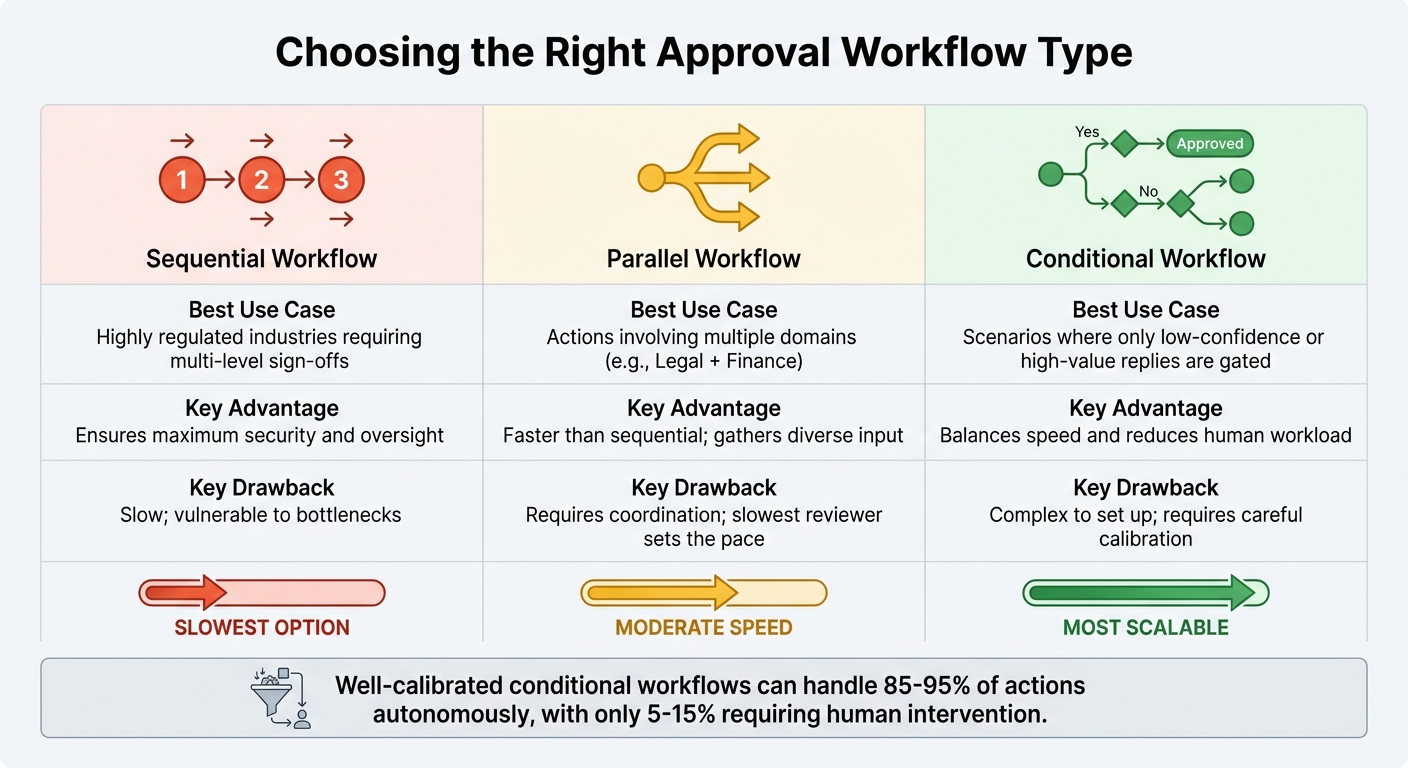
Comparison of Sequential, Parallel, and Conditional Approval Workflow Types
Designing Workflow Stages
After identifying sensitive accounts and assigning stakeholders, the next step is to design the approval workflow stages. These stages act as decision checkpoints, focusing on areas where mistakes could have serious consequences and recovery options are limited [15].
Start by incorporating risk classification. The AI system should categorize actions based on their impact and how easily they can be reversed. For example:
- Tier 1 actions (e.g., adding internal notes) can be executed automatically without approval.
- Tier 2 actions (e.g., updating ticket statuses) may follow a notify-and-proceed model, where stakeholders are informed but don’t need to approve.
- Tier 3 actions (e.g., refunds, account cancellations, or legal commitments) always require explicit human sign-off before execution.
The next phase involves draft preparation and context gathering. The AI drafts a response and compiles relevant information, such as CRM data, conversation history, and a reasoning summary explaining its choices. This context is crucial for reviewers to make quick, informed decisions. In fact, most manual approvals take less than 30 seconds [1].
Once the draft is ready, the workflow moves to a pending state. Pending actions are stored in a database, allowing the AI to continue handling other tasks without causing delays [5]. For highly sensitive accounts, you might need a multi-stage review process, incorporating sequential checks for policy compliance, legal concerns, or security. After the necessary approvals are obtained, the system retrieves and executes the action.
Every decision – along with details like the approver, edits, and timestamps – should be logged in an audit trail. This documentation supports ongoing improvements and aligns with the approval criteria established in Step 2. In well-optimized AI systems, only 5% to 15% of actions require human intervention [15], but those that do must be thoroughly documented for compliance and refinement.
This structured approach helps you determine the best workflow type for your operational needs.
Choosing the Right Workflow Type
The type of workflow you choose depends on your team’s structure, the nature of sensitive accounts, and how quickly decisions need to be made.
- Sequential workflows follow a fixed order, such as manager review, then legal sign-off, and finally, final approval. This approach is ideal for industries with strict regulations requiring multiple levels of oversight. While it provides maximum security, it’s also the slowest option. A single person can delay the entire process. To avoid bottlenecks, ensure workflows can escalate to backup reviewers or managers within a specific time frame – e.g., 30 minutes for urgent customer issues or 24 hours for internal matters [15][9].
- Parallel workflows allow multiple stakeholders to review different aspects of an action at the same time. For instance, a financial decision requiring both legal and managerial approval can be reviewed simultaneously. While this approach is faster than sequential workflows and draws on diverse expertise, it requires coordination and depends on the availability of all reviewers.
- Conditional workflows are the most scalable option. They use logic – like AI confidence scores, topic sensitivity, or customer tier – to determine the approval path. Low-risk actions can bypass approval entirely, while high-stakes actions trigger more stringent reviews. A well-calibrated system can handle 85% to 95% of actions autonomously, with higher rates potentially indicating overly cautious thresholds [15].
Here’s a quick comparison of the main workflow types:
| Workflow Type | Best Use Case | Key Advantage | Key Drawback |
|---|---|---|---|
| Sequential | Highly regulated industries requiring multi-level sign-offs | Ensures maximum security and oversight | Slow; vulnerable to bottlenecks |
| Parallel | Actions involving multiple domains (e.g., Legal + Finance) | Faster than sequential; gathers diverse input | Requires coordination; slowest reviewer sets the pace |
| Conditional | Scenarios where only low-confidence or high-value replies are gated | Balances speed and reduces human workload | Complex to set up; requires careful calibration |
You’ll also need to decide between synchronous and asynchronous approval methods. Synchronous workflows pause the AI entirely until a human responds, making them suitable for irreversible, high-risk actions like large refunds or account deletions. Asynchronous workflows, on the other hand, let the AI continue working on other tasks while the approval is queued. This prevents delays but can lead to outdated responses if approvals take too long [2][9].
To avoid problems with asynchronous workflows, set clear timeouts. For sensitive accounts, the default timeout should trigger a "safe fallback" action – like notifying the customer that their request is under review – instead of auto-executing [15].
Step 4: Use AI to Improve Efficiency and Accuracy
Once your workflow stages are in place, AI acts as the driving force that keeps the approval process moving smoothly, avoiding unnecessary delays. The main objective is to automate the initial triage so that only the most sensitive or complex messages require human attention. This automation fits seamlessly into the multi-step workflow, ensuring sensitive tasks are handled efficiently.
AI-Powered Flagging and Sentiment Analysis
AI tools can identify potential risks before a message even enters the approval queue. By using sentiment analysis and keyword detection, these systems flag critical issues like billing disputes, legal concerns, or account cancellations [6][1]. For example, if a message includes terms like "refund" or "lawyer", the AI automatically routes it to a human reviewer for further assessment.
The system also categorizes messages into risk tiers, as outlined in Step 3. This ensures that low-risk tasks don’t clog up the approval process, while high-risk situations get the attention they require.
To speed up decision-making, AI creates "case packets" for flagged messages. These packets compile all the necessary details, such as the customer’s original message, the AI’s draft response, inferred intent, risk labels, and relevant policy guidelines. With all this context in one place, most approvals can be completed in under 30 seconds [1].
"A response that arrives in two minutes and is correct is far better than one that arrives in 10 seconds and is wrong" – Forrester [1]
AI-Driven Escalation Predictions
AI doesn’t just flag messages – it also predicts which cases might escalate. By analyzing patterns like unresolved issues, repeated follow-ups, or high-stakes actions (e.g., large refunds), AI can identify situations that require immediate attention beyond what a confidence score alone might suggest [6][1]. For instance, if a customer repeatedly contacts support with increasing frustration, the AI can escalate the case to a senior agent or account manager before it turns into a bigger problem.
Escalation logic can be fine-tuned using AI confidence scores, specific topics (like billing or legal), customer profiles (such as high-value accounts), or conversation sentiment. A common practice is to set the confidence threshold at 85% – responses that meet or exceed this level are sent automatically, while those below are flagged for human review [1]. Over time, as the AI learns from human feedback, the need for manual intervention can drop significantly – from 40% to just 15% within three months [1].
The system continually improves through feedback. For example, actions that are approved without changes more than 95% of the time can transition from "approval required" to "auto-execute" [5][1]. This feedback loop not only boosts efficiency but also ensures the system maintains accuracy and compliance. By reducing manual approvals as AI confidence grows, the workflow becomes faster and more reliable, optimizing support operations without compromising on quality or safety.
Step 5: Set Up Notifications, Escalations, and Audit Trails
After designing a multi-step workflow, it’s essential to implement effective notifications and audit mechanisms. These features ensure smooth operations, maintain compliance, and keep everyone informed.
Configuring Notifications and Escalations
Notifications should only alert stakeholders when their input is genuinely needed. For instance, triggers like low confidence scores, sensitive topics, or high-value accounts can help avoid overwhelming users with unnecessary alerts [1][14]. Imagine a situation where the AI detects a keyword like "refund" or "lawyer" or flags a message with a low confidence score – this should immediately notify the assigned reviewer via email or mobile alert.
Streamlined notifications allow approvers to act directly within the alert interface. A well-designed interface that includes the draft reply, conversation history, and the reason for the flag can save time by eliminating the need to switch between systems. When reviewers have all the necessary context in one place, manual approvals can often be completed in under 30 seconds [1].
To prevent delays, set up auto-escalation rules. For example, if a response isn’t reviewed within two hours, the system could send a reminder, followed by an escalation to a supervisor after four hours [5]. Similarly, alerts can be configured to flag potential workflow issues, such as when the pending approval queue exceeds a specific threshold (e.g., 20 unresolved actions) [5].
For added transparency, use "CC" fields in workflow settings to notify non-approving stakeholders, like department heads, when a process begins or ends. This ensures they stay informed without being burdened with extra tasks [11][13]. These notification strategies align with earlier risk and stakeholder management steps, ensuring quick and informed decision-making.
Creating Audit Trails
Audit trails are essential for accountability, especially during audits or security reviews. They provide clear evidence that high-risk actions were properly authorized [4]. Each approval, edit, and rejection should be logged with details like the actor, context notes, and resolution [4].
To prevent misuse, link every approval to a policy snapshot and request hash, ensuring actions can’t be "replayed" without detection. Include a reasoning summary explaining why the AI flagged the action and which policy rule required human intervention [4][5].
Tracking key support metrics like median time-to-decision, common rejection reasons, and edit patterns can help refine the workflow. For instance, if data shows that certain responses are consistently approved without changes, those actions might be candidates for automatic approval instead of manual review. This kind of feedback loop not only improves efficiency but also ensures the system remains accurate and compliant over time [1][4].
Common Pitfalls and How to Avoid Them
Even the best-designed approval workflows can stumble if they unintentionally create obstacles. Issues like email overload, missing context, and approval fatigue can turn a system meant to enhance productivity into a frustrating bottleneck.
Preventing Approval Bottlenecks
One major issue is approval requests getting buried in overflowing inboxes, leading to missed deadlines and unhappy customers [13]. To address this, replace email-based approvals with a centralized dashboard. A single queue showing all pending requests makes it easier to stay on top of tasks [12][13].
Another common problem occurs when reviewers lack the full context of a request. Without the conversation history or necessary data, they waste time searching for information [13]. The fix? Provide single-click access to the full conversation history. Every approval interface should include all relevant threads, source documents, and clear "Approve/Edit/Reject" options. This setup streamlines decision-making. As Prefactor aptly put it:
"The system fails when it creates its own bottleneck" [2].
Approval fatigue is another hurdle. When low-risk, routine actions constantly require manual sign-offs, reviewers may rush through or even miss approvals [2]. Conditional logic can help here by filtering out routine replies based on factors like sentiment, topic, or deal value [1][7]. AI confidence scores offer another layer of efficiency – automating responses that meet a certain threshold, such as 85%, while routing only sensitive items for human review [1].
These strategies help ensure your approval process remains efficient and scalable.
Scaling Your Workflow
Once bottlenecks are addressed, the next step is scaling the workflow to handle growing demands. Building on AI-driven efficiencies, focus on prioritizing high-risk actions for human oversight while automating the rest.
Risk-based calibration is key. For example, tasks like financial transfers or production changes – where mistakes are costly – should require human review, while low-risk actions can proceed automatically [2][4]. In advanced AI systems, only 5–15% of actions typically need human input [15].
To further streamline the process, set up automated escalation paths. If a primary reviewer doesn’t respond within a set time (say, 15 minutes for customer replies), the system should escalate the request to a backup or manager [15]. Allowing approvers to delegate authority during vacations or peak periods also prevents workflow disruptions [2][7]. Finally, track metrics like median decision time and common rejection reasons. These insights help fine-tune thresholds and address emerging bottlenecks [12][7].
Conclusion: Building a Reliable Reply Approval Workflow
Creating a dependable reply approval workflow is crucial for protecting sensitive accounts while maintaining operational efficiency. By directing only the most critical 5–15% of high-stakes actions to human reviewers and automating the rest, you strike a balance between safety and scalability [15]. This approach reduces the risks of AI errors or tone issues (often exacerbated by sidestepping AI summaries) that could harm relationships or lead to compliance problems.
Start with a risk-based strategy: conduct 100% human reviews for the first 2–4 weeks to establish a baseline, then transition high-accuracy categories to auto-approval [10]. Confidence thresholds, such as 85%, help determine which responses require human oversight and which can be automated [1]. As Mark Cijo, an AI Agents Expert, explains:
"The approval system isn’t just a safety net – it’s a feedback loop that makes the agent better over time" [5].
Efficient approvals depend on context-rich interfaces. When reviewers have access to the full conversation history, the AI’s reasoning, and simple one-click options, most approvals are completed in under 30 seconds [1]. Mobile-friendly tools further streamline the process, enabling 68% of approvals to be finalized within 15 minutes [8].
Regularly monitor your metrics. If a category achieves an approval rate above 95%, it’s ready for auto-execution. On the other hand, a rejection rate of 20% or more signals the need to adjust your AI’s decision-making logic [15][5]. This ongoing evaluation not only improves efficiency but also strengthens your overall support operations.
FAQs
What’s the simplest way to start a reply approval workflow?
The simplest way to kick off a reply approval workflow is by implementing a draft-and-review process. Here’s how it works: agents create response drafts, which are then forwarded to supervisors for review. Supervisors can either approve or reject these drafts before they are published. To make this process seamless, set permissions so agents are limited to drafting, while supervisors get notified when their review is needed. This approach ensures that sensitive replies are both accurate and compliant, all with minimal effort.
How do I pick the right AI confidence threshold for approvals?
When deciding on an AI confidence threshold, think about the risk level involved and how you want to balance speed with accuracy.
For tasks with high stakes, like financial transactions or security measures, it’s best to set a higher threshold. This ensures the AI is highly confident before approving any action, reducing the chance of errors. On the other hand, for low-risk tasks, you can afford to use a lower threshold, which allows the process to be faster but still reasonably accurate.
It’s also important to keep an eye on key metrics, such as false acceptance rates. Regularly reviewing these metrics helps you fine-tune thresholds over time, ensuring compliance with regulations while keeping operations efficient.
What should an approver see in an approval request?
Approvers need access to the draft response prepared by the agent, along with any notes or comments left by earlier reviewers. They should also see details like who submitted the draft, review the necessary context, and make a decision to either approve or reject it. If they choose to reject, they should be able to provide feedback. Notifications should keep them informed whenever a draft is ready for their review.






