



Email vs. Portals: Why It Matters
Customers love email because it’s familiar, flexible, and fits their schedules. But for businesses, email can mean higher costs, slower resolutions, and overwhelmed support teams. Portals, on the other hand, reduce workloads and offer faster solutions but often frustrate users with poor design and extra steps.
Key Takeaways:
- Why customers prefer email: It’s easy, personal, and doesn’t require learning new tools.
- Portal challenges: Confusing navigation, accessibility issues, and extra logins drive customers away.
- The cost difference: Email support costs $15–$25 per ticket, while portal interactions cost less than $0.10.
Solutions to Balance Both:
- Optimize email workflows: Use templates, automation, and AI for faster responses.
- Improve portals: Make them user-friendly with clear navigation and mobile compatibility.
- Encourage portal use: Promote self-service for simple tasks while keeping email for complex issues.
The goal? Respect customer preferences while keeping support efficient and scalable.
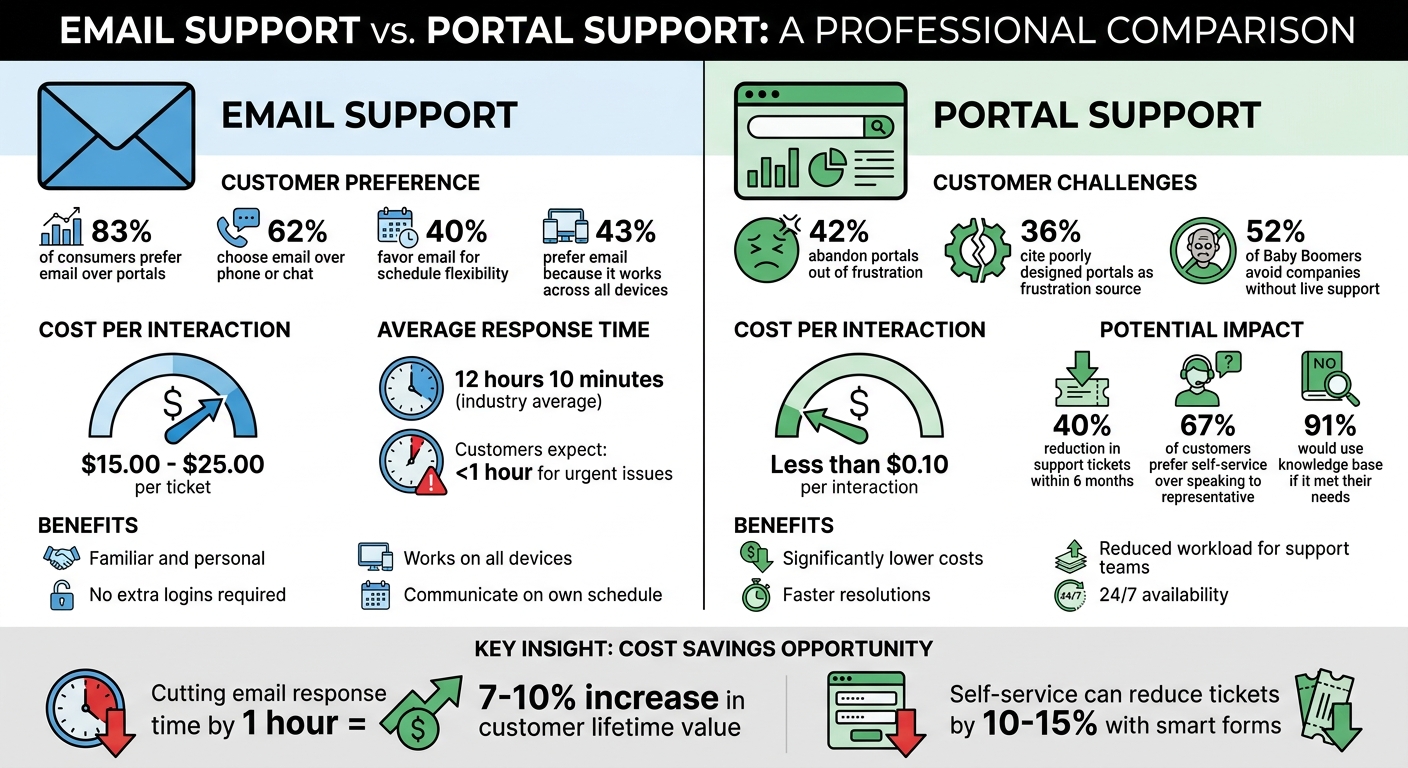
Email vs Portal Support: Cost Comparison and Customer Preferences
Why Customers Prefer Email Over Portals
Email Feels Familiar and Personal
Email is a tool most professionals rely on daily. It’s always open on their desktop, synced to their phones, and requires no extra effort to learn. This ease of use is a big reason why 83% of consumers prefer email over portals, and 62% choose it over phone or chat [2][3]. For customers, email offers direct and flexible communication without the pressure of real-time interaction.
"Email is the grounding factor in a shifting world of chatbots and video chat. While it can feel good to experiment, it’s important for your customers that you keep something steady and familiar." – Mercer Smith-Looper, Head of Support, Appcues [3]
One of email’s biggest draws is its flexibility. 40% of customers favor email because it lets them communicate on their own schedule [3]. Unlike phone calls or live chat, email doesn’t require immediate attention. There’s no waiting on hold, no risk of losing a conversation if they step away, and no need to rush through complex issues. This makes it especially appealing for B2B customers who need time to craft detailed responses or explain technical problems.
That said, while email’s familiarity makes it a favorite, customers often face challenges when using portals, which can feel less intuitive.
Common Barriers to Portal Adoption
Portals often fall short because of usability issues. 42% of customers abandon portals out of frustration [2]. Why? Common complaints include confusing navigation, small fonts on mobile devices, and the hassle of managing yet another username and password. In contrast, 43% of users prefer email because it works seamlessly across all their devices without requiring extra logins or downloads [3].
Portals can also feel restrictive compared to email’s open format. Customers often have to categorize their issues, navigate several pages, or deal with chatbots before reaching a human. This process can be especially frustrating for those with complex or technical problems. 36% of consumers cite poorly designed portals as a source of frustration, with complaints ranging from clunky navigation to accessibility challenges [2]. For many, email becomes the simpler, more reliable choice – even if it’s not the fastest option for support teams.
"Portals may aim to fix problems, but many fail in terms of user experience. People complain about confusing navigation, small font sizes, and clunky designs." – Sabrina McClune, Cybersecurity Researcher, Beyond Encryption [2]
Age demographics also play a role in this preference. 52% of Baby Boomers avoid companies that don’t offer live, one-on-one support options [2]. For them, and others who value human interaction, portals can feel like impersonal barriers rather than helpful tools. This disconnect not only discourages portal use but also creates challenges for support teams trying to balance efficiency with consistent customer service.
sbb-itb-e60d259
How to Optimize Email-Based Support Workflows
Email support can be both fast and effective when workflows are designed to minimize manual effort while maintaining a personal touch.
Create Standard Email Communication Protocols
Start by setting up clear guidelines for handling emails. Define response time goals based on the urgency of the issue, create a library of concise templates, and use automation to route emails based on subject keywords, customer tier, language, or agent expertise. Currently, the average response time across industries is 12 hours and 10 minutes, but customers often expect replies within an hour for urgent concerns [4]. This disconnect can lead to frustration and even lost revenue. Research shows that cutting response time by just one hour can boost customer lifetime value by 7–10% [4].
A 3-tier priority system can help categorize emails quickly:
- Urgent: Issues like payment problems or account access.
- High: Requests for refunds or inquiries about delays.
- Routine: General feedback or non-critical questions [4].
Automate routing to assign emails based on priority, keywords, or agent expertise. Use auto-acknowledgment emails to confirm receipt and set clear expectations for response times. This small step can ease customer concerns and reduce unnecessary follow-ups [6].
For efficiency, develop a set of around 20 high-quality templates that address the majority of common scenarios. These templates should include:
- Short paragraphs for readability.
- Numbered steps and bullet points for clarity.
- Follow-up instructions, such as what to do if a password reset link doesn’t work.
Aim for a friendly, focused tone that aligns with the customer’s communication style without sounding mechanical. Thinking two steps ahead – anticipating follow-up questions – can help resolve issues in the first reply, minimizing back-and-forth emails [4][5].
Once these protocols are in place, leverage AI to handle repetitive tasks.
Use AI for Email Triage and Ticketing
AI can take over time-consuming tasks like categorizing, routing, and drafting responses, freeing up your team to focus on more complex issues. For example, AI can handle around 80% of an email reply by pulling information from your knowledge base, leaving agents to refine the remaining 20% for a personal touch [4][6].
Platforms like Supportbench come equipped with AI-powered email triage tools. These tools automatically assign issue types, tag cases, and prioritize emails based on their content and sentiment analysis. They also generate unique ticket IDs, monitor service-level agreements (SLAs), and flag escalations without requiring manual input. By eliminating delays caused by emails sitting unnoticed in shared inboxes, your team can spend more time resolving customer issues and less time on administrative tasks [6].
Connect Your Knowledge Base to Email Workflows
Integrating your knowledge base with email workflows can make your support process even more efficient. With quick access to relevant articles, agents can avoid delays caused by searching for information [6]. AI tools can also suggest knowledge base articles based on the customer’s query or even auto-generate responses using existing documentation.
Supportbench’s AI Agent-Copilot, for instance, reviews past cases to suggest relevant articles. If recurring issues reveal gaps in your documentation, AI can generate new articles automatically, complete with a subject, summary, and keywords. This creates a feedback loop that keeps your knowledge base up-to-date while reducing repetitive inquiries over time.
Handling Escalations and Urgent Issues via Email
Managing escalations effectively is crucial for streamlining email workflows and controlling operational expenses. Let’s explore how to handle these situations with precision and speed.
How to Escalate Urgent Issues
When dealing with critical issues, having a structured approach is key. Start by setting tiered SLAs (Service Level Agreements) based on the urgency of each case. For instance, critical problems like payment failures or account lockouts might require a 1-hour initial response and a 4-hour resolution. In contrast, high-priority matters, such as refund requests, could follow a 4-hour response and 24-hour resolution timeline [8]. This ensures clarity and consistency in response times.
AI tools can play a major role here by assigning priority scores automatically. These scores take into account factors like account value, churn risk, and issue severity, ensuring urgent cases don’t get buried in queues [6]. Unlike traditional triage methods, AI-driven escalation systems focus on identifying urgency and risk indicators, such as language cues like "ASAP", "broken", or "emergency." This allows critical emails to be routed directly to the right specialist without delays caused by manual sorting.
For technical escalations, using a deterministic subject line structure can significantly reduce errors. A format like [Product v2.1.3] [Windows] [Error 500] enables regex-based routing, cutting down misrouting by 91% and reducing categorization time to under 2 seconds [8]. Additionally, when customers share logs or screenshots, encourage them to pre-filter data. For example, isolating keywords like "error" or "failed" can cut down irrelevant information by 92%, helping engineers diagnose issues faster [8].
Once escalation protocols are in place, the next challenge is ensuring that delays are avoided during follow-ups.
Preventing Slow Email Escalations
To avoid bottlenecks, focus on reducing delays in escalation follow-ups. Since 29% of follow-up emails add an average 2.4-minute re-engagement delay, automating reminders can help. These reminders can track pending threads and send alerts if a high-priority issue remains unresolved for 48 hours [8].
Be cautious about overusing "URGENT" labels. Mislabeling emails with high-priority tags can lead to alert fatigue, which studies show slows response times by 22% due to algorithmic deprioritization [8]. Instead, let AI tools analyze the tone and content of incoming emails. AI-driven sentiment analysis can identify frustrated customers early, giving your team a chance to escalate proactively. This is particularly important when 34% of customers are likely to switch brands over poor service experiences [7].
To further ease customer anxiety, send an immediate auto-acknowledgment. This reassures customers their issue is being addressed and reduces unnecessary follow-ups [6]. Pair this with AI-generated response drafts that pull from your knowledge base, allowing agents to focus on editing rather than researching. This approach speeds up resolution while maintaining high-quality responses [6].
Balancing Customer Preference with Operational Costs
Once you’ve streamlined email workflows and improved escalation processes, the next step is finding a balance between customer preferences and operational costs.
Catering to customer preferences doesn’t have to come at the expense of your budget. For instance, handling email support through human agents costs between $15.00 and $25.00 per interaction. Meanwhile, self-service portal interactions cost less than $0.10 each [9]. As Vik Chadha, Founder & CEO of AppDeck, explains:
"Without self-service, support costs scale linearly with customer count. Double your customers, double your support spend" [9].
The challenge lies in reducing costs while keeping workflows aligned with what customers want.
Encourage Portal Use for Self-Service Tasks
Start by identifying tasks that customers can handle themselves. Review recent support tickets to pinpoint common self-service needs, such as billing inquiries, order tracking, invoice retrieval, password resets, and account management [9]. Research shows that effective self-service portals can reduce support tickets by 40% within six months, significantly lowering costs [9].
The trick is to make the portal feel like a helpful shortcut rather than a frustrating barrier. Here’s how:
- Smart ticket forms: Use these to simplify processes and reduce ticket volume by 10–15% [9].
- Portal advocacy: Train your support team to promote the portal by including direct links in email signatures and responses.
- Clear "escape hatches": Ensure every portal page offers easy access to email or live chat support, so customers never feel stuck.
It’s worth noting that 67% of customers prefer self-service over speaking with a representative, and 91% say they’d use a knowledge base if it met their needs [9]. By improving self-service options, you empower customers while keeping costs under control.
Reduce the Cost of Email-Only Support
For customers who stick to email-only support, AI-driven automation can help manage expenses. Start by deploying AI agents to handle simple, repetitive tasks – like resending invoices or updating delivery dates. This allows you to offer 24/7 service without requiring manual triage.
To make this work:
- Focus on high-volume, low-complexity inquiries that AI can handle efficiently.
- Use analytics to track containment rates (the percentage of inquiries resolved by AI without human help).
- Monitor "zero-result" searches in your portal to identify content gaps. Filling these gaps can prevent future inquiries.
This approach creates a continuous improvement loop, ensuring your self-service tools remain effective while reserving email support for complex issues that genuinely require a human touch.
Conclusion
Balancing customer preferences for email with the need for efficient workflows is no small feat. Success lies in respecting these preferences while designing systems that keep your support team productive and costs manageable.
Customers often favor email for its convenience and familiarity. To adapt, consider leveraging AI tools for tasks like categorization, sentiment analysis, and automated initial responses. These tools allow you to maintain benefits such as tracking, automation, and analytics – all while allowing customers to stick with their inboxes. As Deon Nicholas, President of Forethought, explains:
"At Forethought, we believe you should meet your customers where they are. Whether they want to email, call, chat, or tweet at you, we believe your company’s customer experience team can provide top-tier support to all customers." [1]
The numbers back this up: 83% of customers prefer email, and nearly half resolve their issues through it [1][10]. Instead of pushing for change, use AI to handle repetitive tasks like sorting emails or generating quick responses, freeing your team to tackle more complex problems.
Modern platforms like Supportbench are designed to address this challenge head-on. They use omnichannel support tools to unify communication channels, automatically convert emails into tickets, and use AI to analyze sentiment and prioritize tasks [11]. This way, customers get the email experience they prefer, while your team benefits from the efficiency and insights usually associated with portal-based systems.
This strategy ensures your support operations scale effectively, delivering the experience customers want without driving up operational costs.
FAQs
When should we allow email instead of forcing the portal?
Email support works best for handling complex and nuanced issues that call for human judgment. Think of scenarios like contract negotiations, custom pricing discussions, or solving intricate problems – these often require a personal touch. Emails allow for tailored communication, keep a record of the conversation history, and offer the flexibility to respond at a convenient pace.
This format is also great for less urgent issues that need detailed, back-and-forth communication. Plus, with AI tools managing backlogs and speeding up response times, email becomes even more efficient. On the other hand, simpler tasks that users can handle themselves are better suited for self-service portals.
How can we turn emails into tracked tickets automatically?
To turn emails into tracked support tickets, you’ll need to set up an email-to-ticket system. Start by forwarding your support email address to a specific inbox within your ticketing platform. Then, activate automation rules so the platform can generate tickets from incoming emails. If your system includes AI-powered parsing, use it to automatically pull key details like customer information and priority levels. This helps ensure each email is properly structured and tracked, streamlining your workflow.
What’s the fastest way to cut email support costs without hurting CX?
To cut email support costs efficiently without sacrificing customer experience, consider leveraging AI-powered automation. These tools can manage routine inquiries and simplify responses, saving time and resources. Features like predictive satisfaction scoring, automated ticket summaries, and real-time data integration can significantly improve workflow. Focus on automating frequently asked questions, while leaving complex issues for human agents. This approach ensures a balance between cost savings and maintaining high-quality support.






