



Struggling to choose between best-of-breed tools and a unified platform for your support team? Here’s the bottom line:
- Unified platforms simplify operations by combining multiple tools into one system, reducing integration costs, and ensuring consistent data. They’re ideal for smaller teams, cost-conscious businesses, and those prioritizing AI-driven efficiency.
- Best-of-breed solutions offer specialized features tailored to specific needs but come with higher integration expenses and complexity. They work best for companies with unique requirements or industries with strict regulations.
Key Takeaways:
- Unified platforms save 40–60% on software costs for small teams and cut integration expenses by up to 35%.
- Best-of-breed systems provide advanced functionality but may require $15,000–$50,000 annually in integration maintenance for small companies.
- AI performs better with unified platforms due to seamless data access, enabling faster resolutions and improved customer satisfaction.
Quick Comparison:
| Aspect | Unified Platform | Best-of-Breed |
|---|---|---|
| Cost | Lower with consolidated subscriptions | Higher due to integration maintenance |
| Integration | Built-in, simple | Complex, middleware required |
| Flexibility | Tied to vendor ecosystem | Customizable, modular |
| AI Compatibility | Excellent with unified data | Limited by fragmented systems |
| Feature Depth | Broad functionality | Highly specialized |
Choosing the right approach depends on your team size, budget, and the importance of specialized tools versus simplicity. Let’s explore when each option makes sense. This decision is the first step in creating a seamless customer support management system that scales with your business.
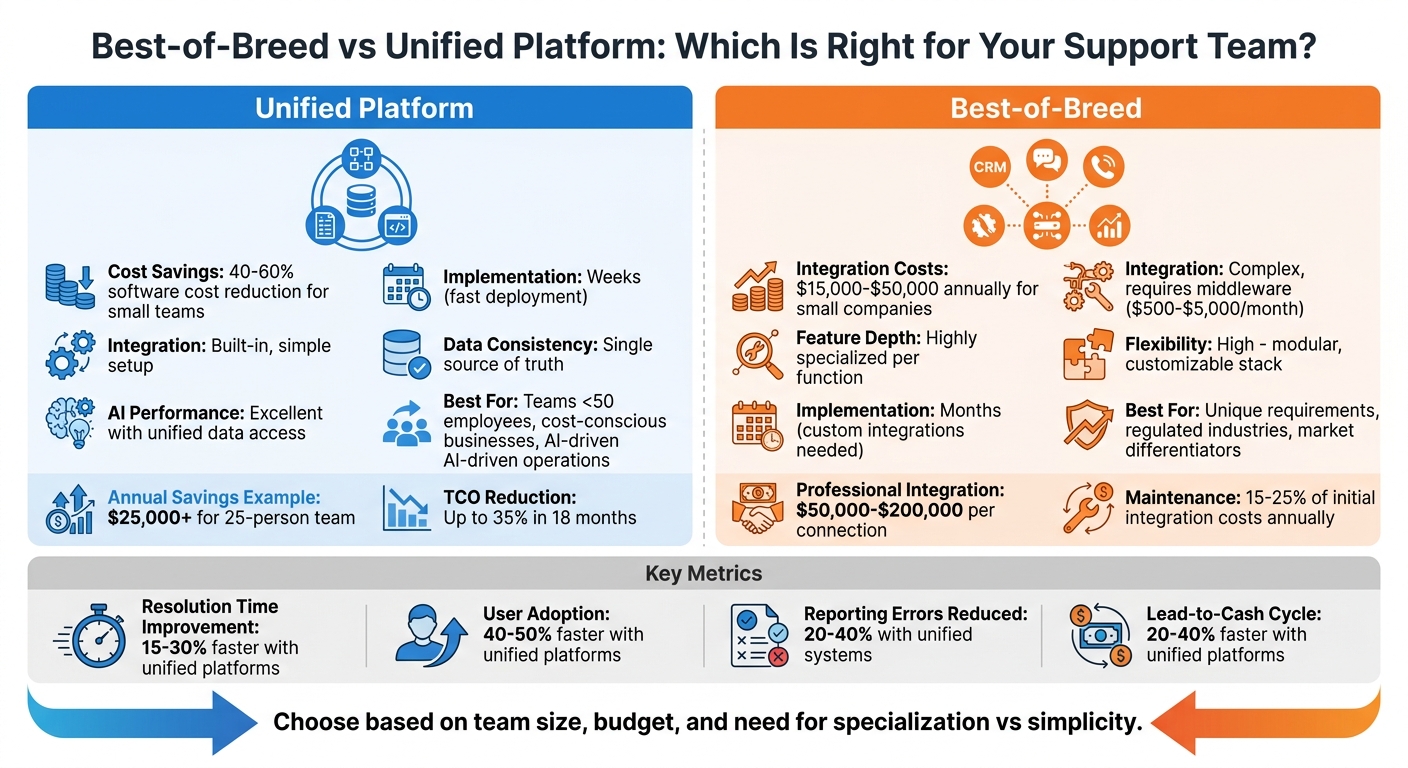
Best-of-Breed vs Unified Platform Comparison for Support Teams
The Modern SaaS Podcast (Episode 1) Best-of-breed vs. All-in-One Platforms – what’s a better choice?
sbb-itb-e60d259
Best-of-Breed vs. Unified Platforms: Core Differences
Choosing between best-of-breed systems and unified platforms boils down to a trade-off: flexibility versus integration. Best-of-breed solutions allow you to select specialized tools tailored to specific tasks, while unified platforms combine multiple functions into a single system with seamless data sharing. Each choice shapes how your support operations function.
What Are Best-of-Breed Systems?
Best-of-breed systems focus on specialization, offering tools designed to excel in a specific area. For example, you might use a dedicated helpdesk tool, a standalone CRM, and a specialized analytics platform – each chosen for its strength in its category. This modular approach enables businesses to build a custom tech stack that aligns with their unique workflows [6][4].
These systems provide deep functionality and the flexibility to swap out underperforming tools without disrupting the entire setup. This is especially important for industries with specialized requirements, like those needing certified compliance tools for pharma and medical device firms in regulated sectors [6][2].
However, integrating these systems can come with hidden costs. Middleware solutions like Zapier or Make might add $500–$5,000 per month in expenses [6]. Professional integration projects can cost $50,000 to $200,000 per connection point, with companies typically spending 15% to 25% of initial integration costs annually on maintenance due to API updates and system changes [5].
Now, let’s look at unified platforms, which take a different approach by bundling multiple functions into one system.
What Are Unified Platforms?
Unified platforms prioritize simplicity by consolidating tools into a single system with built-in integration. These platforms typically combine functions like support, CRM, and marketing into one environment, ensuring all tools work together seamlessly. A shared database keeps all data consistent, allowing updates to reflect across all functions instantly [6][4].
This setup creates a "single source of truth", eliminating discrepancies in customer data across systems. For example, support reps can access order details, inventory levels, and communication histories on one screen, enabling faster responses without switching between tools [5][4]. Companies using unified platforms also report 40–50% faster user adoption and 30–40% higher long-term usage rates compared to fragmented systems [2].
The downside? You’re tied to the vendor’s ecosystem. If the platform lacks a specific feature, adding an external tool can disrupt the entire system. Still, for many organizations, the ease of use and operational efficiency outweigh this limitation [4].
Comparison Table: Key Differences
| Dimension | Best-of-Breed Systems | Unified Platforms |
|---|---|---|
| Feature Depth | Highly specialized per function | Broad functionality across areas |
| Integration | Complex; requires middleware | Simple; built-in integration |
| Data Consistency | Difficult; prone to silos | Excellent; unified database |
| Flexibility | High; customizable stack | Moderate; tied to vendor ecosystem |
| Implementation | Slower; custom integrations needed | Faster; pre-integrated tools |
| Vendor Risk | Spread across multiple vendors | Higher dependency on one vendor |
| User Experience | Fragmented across tools | Consistent with a single interface |
| Cost Structure | Higher due to integration maintenance | Lower with consolidated subscriptions |
For small businesses, the cost differences are striking. Companies with fewer than 50 employees can save 40–60% in software costs by opting for unified platforms instead of best-of-breed stacks [6]. For instance, a best-of-breed setup for 25 users might cost around $3,378 per month, while a unified platform like Odoo Enterprise costs approximately $935 per month – leading to over $25,000 in annual savings [6].
These differences highlight the factors to consider when deciding which approach fits your operational needs.
When to Choose a Unified Platform
Unified platforms are an excellent choice when your primary focus is operational simplicity and achieving results quickly. If your team is bogged down by juggling multiple vendor contracts, dealing with data silos, or wasting time on complex integrations instead of focusing on customer service, consolidating your tools can make a huge difference. Let’s break down the benefits of using a unified platform.
Advantages of Unified Platforms
One of the standout benefits of unified platforms is how they eliminate the headaches of "integration hell." By removing the need for complex middleware and costly APIs, these platforms streamline operations. They allow seamless data sharing across tools like support systems, CRM, and knowledge bases, cutting down the inefficiencies caused by disconnected systems.
A unified platform also creates a single source of truth for customer data. With all information stored in one place, agents can instantly access order history, previous interactions, and other key details, minimizing the need for constant context switching. Companies that adopt unified platforms often see quicker user adoption and higher long-term usage compared to fragmented systems.
AI thrives in a unified environment. AI-native platforms can tap into comprehensive customer data, including CRM records, ticket histories, and knowledge base articles, rather than relying on fragmented or surface-level information. This deeper context allows AI to anticipate and prevent issues rather than just reacting to them. For AI-driven support teams, this streamlined approach is essential for delivering fast, cost-efficient service.
Unified platforms also simplify administrative tasks. By centralizing security, compliance, and contract renewals, they reduce the complexity of managing multiple vendors. In fact, by 2025, it’s estimated that 33% of organizations will have consolidated redundant applications to simplify operations [2].
Another major advantage is speed. With features like pre-built templates, pre-trained AI models, and no-code workflow tools, deployment times can drop from months to just weeks. This enables support teams to roll out automation without relying heavily on engineering resources [1]. Consolidating platforms can also lead to significant cost savings – IT operations costs can decrease by up to 35% within 18 months [2].
These benefits make unified platforms particularly effective for certain operational needs.
Use Cases for Unified Platforms
Unified platforms shine in specific scenarios. For smaller teams with fewer than 50 employees, they can cut total software costs by 40–60% compared to using a collection of specialized tools [6]. For instance, a 25-person company might spend between $15,000 and $50,000 annually just to manage the hidden "integration debt" of maintaining a fragmented system [6].
They’re also ideal for greenfield deployments. Starting fresh with a unified platform helps avoid the technical debt and data silos that often come with patching together legacy tools.
Organizations that prioritize AI and automation see particularly strong results. For example, in March 2026, Cynet, a B2B security company, adopted a unified platform and saw their CSAT score jump 14 points (from 79 to 93), achieved a 47% ticket deflection rate, and cut resolution times nearly in half [1]. Similarly, a mid-sized financial services firm consolidated its systems, reducing its application count from 127 to 34. This move eliminated 18 of 23 separate integrations and slashed annual integration maintenance costs from $4.2 million to $900,000 [2]. Over three years, GlobalCorp – a $19 billion manufacturing company – streamlined 247 legacy applications into a unified system, saving $75 million annually, cutting operating costs by 31%, shortening the sales cycle by 18%, and improving customer satisfaction by 22% [2].
If your team spends more time reconciling data manually than serving customers, or your CFO is pushing for clear ROI, a unified platform can eliminate inefficiencies. While there’s a potential risk of vendor lock-in, the operational benefits often outweigh this concern, especially for B2B support teams seeking to optimize their workflows and costs.
When to Choose Best-of-Breed Solutions
Best-of-breed solutions stand out by offering specialized capabilities that cater to specific needs, unlike unified platforms that focus on integrating multiple tools into one system. These solutions are particularly useful when your business requires advanced features that generalist platforms simply cannot deliver.
For example, if your support operations depend on complex SLA routing, real-time ROI forecasting, or scenario modeling, a unified platform’s built-in tools might fall short. Best-of-breed tools excel in these areas, but the real question is whether the added functionality is worth the effort and cost of integration [4][6].
The choice often hinges on market differentiation. If a particular function is central to your business’s success or sets you apart from competitors, investing in a specialized tool can pay off significantly. Take RTR Vehicles, for instance. In early 2026, they adopted an autonomous AI agent from AI Genesis to handle customer support. Over just three months, the system achieved an impressive 92% auto-resolution rate for inquiries like order tracking and fitment questions. This reduced their staffing needs from four full-time representatives to one part-time employee, saving over $15,000 in monthly labor costs and delivering a 6x ROI within the first 90 days [8].
Advantages of Best-of-Breed Systems
The biggest draw of best-of-breed systems is their depth of expertise. These tools are designed by specialists who focus on excelling in one area, providing solutions tailored to your specific needs [4].
Another major advantage is the ability to spread risk. With a best-of-breed approach, your operations rely on multiple vendors. If one tool experiences downtime or a security issue, the rest of your systems remain unaffected. This is a sharp contrast to unified platforms, where a single outage could disrupt your entire operation [4].
Rapid innovation is another benefit. Vendors in niche markets, such as fintech or healthtech, often roll out updates and new features faster than large enterprise suite providers. This agility helps you stay ahead in fast-moving industries [3][4].
Lastly, best-of-breed solutions offer modular flexibility. If a tool underperforms or a better option becomes available, you can replace it without overhauling your entire tech stack. This flexibility helps you avoid vendor lock-in, a common issue with unified platforms that require replacing everything at once if you decide to switch [3][4].
These advantages make best-of-breed systems particularly appealing to industries with unique needs, as illustrated in the use cases below.
Use Cases for Best-of-Breed Systems
Certain scenarios make best-of-breed solutions a more practical choice. For example, industries with strict regulatory requirements – such as healthcare (HIPAA), pharmaceuticals (FDA compliance), or finance – often need specialized tools to meet certification standards that generalist platforms cannot support [2][6].
In sectors with unique workflows, such as healthcare technology, businesses frequently lean toward best-of-breed systems. A survey found that 61% of companies in these industries prefer specialized solutions to address their specific regulatory and operational needs [7]. When a particular function is critical to your competitive edge, the improved quality of a specialized tool often justifies the additional complexity [6].
Companies with existing investments in tools and technical expertise also benefit from best-of-breed systems. If you already have a strong IT team and have invested heavily in certain tools, adding complementary solutions can be more practical than transitioning to a unified platform.
That said, it’s essential to consider the costs. A best-of-breed stack with 15 tools might require more than 50 integration points [3]. Maintaining just one integration – such as connecting a CRM to a marketing automation tool – can cost between $500 and $2,000 per month [6]. For a small company with 25 employees, the annual "integration tax" could range from $15,000 to $50,000, factoring in middleware tools, IT hours, and longer onboarding times [7]. While best-of-breed systems offer unmatched functionality, these hidden costs should be part of your decision-making process.
Decision Framework: How to Choose the Right Approach
This framework is designed to help you navigate the decision-making process for selecting the right platform. The choice boils down to three key factors: your operational needs, the total budget (beyond just licensing), and your priorities around AI and automation.
Evaluating Your Organization’s Needs
The first step is to take a close look at your team size and technical capabilities. If you’re a smaller organization – say, fewer than 50 employees with a limited IT team – a unified platform is often the better choice. Managing a best-of-breed stack comes with the headache of maintaining multiple integration points, which can quickly overwhelm lean teams. We’ll dive into the cost considerations of this in the Budget section.
Next, think about whether each function in your support stack is a market differentiator or simply a necessity [6]. If a feature gives you a competitive edge – like SLA routing for complex B2B accounts or compliance workflows tailored to your industry – a specialized tool may be worth the added complexity. On the other hand, if you’re dealing with standard operations like ticketing or knowledge base management, a unified platform can handle these efficiently without the need for extra integrations.
Data sensitivity and compliance requirements are another major factor. Industries like healthcare, finance, or pharmaceuticals often need specialized tools to meet strict regulatory standards [2][6].
Lastly, consider your growth trajectory. Integration breakdowns are a leading cause of data quality issues in fast-scaling companies [6]. For example, in 2025, a mid-sized financial services firm streamlined its operations by reducing its application count from 127 to 34. This consolidation eliminated 18 of 23 integrations and slashed annual integration costs from $4.2 million to $900,000 [2].
Once you’ve mapped out your operational needs, the next step is to align these with your overall cost structure.
Budget and Total Cost of Ownership
Licensing costs are just the tip of the iceberg. The total cost of ownership (TCO) also includes expenses for integration middleware, vendor management, and the ongoing maintenance of APIs – often referred to as "integration debt" [6][2].
For a small company with 25 employees, a best-of-breed stack typically runs about $3,378 per month ($40,536 annually). In contrast, a unified platform averages $1,235 per month ($14,820 annually), offering a 60% annual savings [6]. Integration costs alone can eat up as much as 40% of an IT budget [2]. Companies with fragmented SaaS stacks often spend two to three times more on manual data reconciliation compared to those using unified systems [2].
When assessing vendors, request itemized pricing for each module. This ensures you’re not paying for unused features bundled into enterprise packages [3].
The trend toward platform consolidation is accelerating. In 2025, 33% of organizations actively reduced redundant applications, up from 14% in 2023 [2]. A great example is GlobalCorp, a $19 billion manufacturing company that consolidated 247 applications and 106 SaaS subscriptions in 2025. By the third year, they had retired over 180 legacy systems, cutting their TCO from $240 million to $165 million annually – a 31% reduction, saving $75 million per year [2].
Beyond cost savings, the ability to integrate AI effectively is another critical factor, which we’ll explore next.
AI and Automation Priorities
For AI to deliver its full potential, it needs access to unified data. Fragmented integrations can limit AI’s ability to provide a complete picture of customer interactions [1][2].
Unified platforms serve as a single source of truth, which is essential for advanced AI capabilities like predictive customer satisfaction (CSAT), automated case prioritization, and ticket deflection. Best-of-breed stacks, on the other hand, often create data silos that restrict AI’s effectiveness [2][1]. If you’re looking to leverage AI for tasks like predicting CSAT or routing cases based on urgency, a unified platform is often a must [2].
It’s also important to understand the difference between AI-native platforms and legacy systems that simply "add on" AI features. AI-native platforms are built with features like intent understanding and contextual awareness from the ground up, delivering resolution rates of 70% to 92%. In contrast, bolted-on AI typically improves efficiency by just 20% to 40% [8].
For example, in February 2026, Cynet, a cybersecurity company, adopted Mosaic AI‘s unified platform for B2B support. The results? A 14-point boost in CSAT (from 79 to 93), a 47% ticket deflection rate at Tier 1, and resolution times cut in half [1]. These results were only possible because of the unified data foundation – a level of performance that fragmented systems can’t match.
When evaluating AI platforms, look for those that promise quick results. Pre-trained models that deliver outcomes in 30–60 days are far more practical than those requiring 6–12 months [1]. Also, ensure integrations are bidirectional, meaning they can update source systems rather than just pulling data. This is critical for enabling AI to take automated actions rather than just offering recommendations [1].
If your team has limited IT resources and aims to prioritize automation, a unified platform can simplify operations and provide the data foundation AI needs. However, if you have strong integration expertise and require highly specialized AI for niche workflows, a best-of-breed approach can work – though it comes with added complexity and cost.
Aligning Platform Choice with Measurable Outcomes
The platform you choose has a direct impact on your business results. The right system should lead to clear improvements in customer satisfaction, operational efficiency, and cost management. To gauge success, focus on metrics like data consistency, resolution speed, and long-term return on investment (ROI).
Performance Metrics to Monitor
One of the most important metrics to track is data consistency. Unified platforms help eliminate delays caused by synchronization issues, which often force agents to juggle multiple screens just to answer basic questions. This streamlined access to information can improve resolution times by 15% to 30%, as agents can view a complete customer interaction history in one system [5][9].
Another key metric is first contact resolution (FCR). When support teams have a full view of customer data – billing history, previous tickets, and product usage – they’re better equipped to resolve issues during the first interaction. However, best-of-breed systems often struggle with data silos and inconsistent integration quality, making this harder to achieve [9].
Keep an eye on reconciliation labor, which measures the time spent manually fixing integration errors or resolving duplicate records. If your team is spending too much time on data cleanup tasks, it’s a signal that platform consolidation might be necessary. Unified systems can cut reporting errors by 20% to 40%, offering a major advantage over fragmented modular setups [5][6][9].
Customer effort scores (CES) are also crucial. In multi-system environments, service reps often need to tell customers they’ll “call back” after navigating multiple tools to find answers. This increases customer effort and lowers CSAT, CES, and NPS scores [5].
Beyond these immediate metrics, it’s essential to evaluate how these improvements contribute to your long-term financial goals.
Achieving Long-Term ROI
ROI isn’t just about upfront costs. Companies relying on best-of-breed systems often face ongoing maintenance expenses equal to 15% to 25% of their initial integration investment every year [5]. For example, a $500,000 integration project could result in $75,000 to $125,000 in annual maintenance costs [5].
"What defines ‘better systems’ isn’t feature lists or marketing promises. It’s measurable outcomes: more reliable operations, easier adaptation over 3-5 years, clearer data, and lower total cost of ownership." – Joshua Daniel Samek [9]
Unified platforms can also speed up lead-to-cash cycles by 20% to 40%, improving cash flow and accelerating revenue recognition. For customer support teams, these systems simplify workflows by keeping the entire resolution process within a single environment [5][9].
Switching costs are another consideration. While unified platforms can lead to greater vendor lock-in, best-of-breed systems often accumulate technical debt, making future transitions more costly and complicated [6]. In contrast, standardized unified suites can lower total software spending by 20% to 30% [9].
Ultimately, the right platform is the one that minimizes churn, streamlines operations, and grows with your business – ensuring a strong ROI over time.
Conclusion
Selecting the right platform comes down to understanding your organization’s specific needs, budget, and future growth plans. Both standalone and unified systems address distinct operational challenges, but the trend toward consolidation highlights a key point: fragmented systems often introduce inefficiencies that even the best AI and automation tools struggle to overcome.
To make the right choice, evaluate whether your current infrastructure can handle the complexity of integration. Ask yourself: Can your team manage the integration demands? Does the platform help achieve critical goals like quicker resolutions, improved customer satisfaction scores (CSAT), and reduced total cost of ownership?
For most B2B support teams looking ahead to 2026, consolidation is the way forward. AI-native unified platforms break down data silos that slow automation, cut manual reconciliation efforts by 2-3x [2], and open the door to more advanced AI capabilities.
That said, a hybrid approach can be a smart compromise. By using a central hub for core operations and integrating specialized tools where they offer a competitive edge, businesses can maintain flexibility without sacrificing operational efficiency [4]. No matter the route you take, focus on platforms that deliver measurable outcomes within 30-60 days – not months or quarters [1]. And always think about scalability over short-term feature lists.
FAQs
How do I calculate true TCO beyond license fees?
When calculating the true Total Cost of Ownership (TCO), it’s essential to go beyond just the license fees. TCO should account for all direct and indirect costs tied to an asset throughout its lifecycle. This means considering factors like:
- Acquisition and setup costs: This includes purchasing the asset and getting it up and running.
- Maintenance and downtime: Regular upkeep and any potential disruptions that impact operations.
- Training and productivity: Costs for onboarding staff and any temporary dips in efficiency as they adapt.
Additionally, take a forward-looking approach by estimating multi-year operational expenses. Think about ongoing support, future upgrades, and the ability to scale as your needs grow.
Avoid focusing only on visible, "hard" costs. Unexpected changes or overlooked factors can significantly alter your long-term financial outlook. A thorough assessment ensures you’re prepared for the full financial picture over time.
When does a hybrid approach make the most sense?
A hybrid approach works well when you need specialized tools for complex tasks while sticking to a unified platform for simpler ones. This setup combines top-tier performance in critical areas with less hassle from integration challenges. It also offers a single, cohesive view of customer data and workflows. This method is particularly helpful when dealing with scattered data, expensive integration processes, or the need to quickly improve key functionalities.
What data foundation do AI-native support workflows require?
AI-driven support workflows thrive on a solid data foundation built with high-quality, unified, and real-time data. This means blending live transactional data with historical analytical data to enable precise and informed decision-making. Such a foundation not only supports scalability but also ensures smooth integration across various systems. Additionally, strong data governance is essential to uphold quality, security, and compliance – critical factors for dependable AI performance and measurable improvements in support operations.
Related Blog Posts
- Zendesk vs. AI Platforms: TCO Comparison
- How To Avoid Add-On Fees With AI Support Tools
- Tool Sprawl vs Unified Platforms: Key Differences
- Pylon alternatives for B2B support: what should you use as you scale?
Evaluating help desks for a B2B team?
Supportbench is all-inclusive from $32 per agent per month, with migration and onboarding included. See pricing or book a 20-minute demo.






