



Testing a new support tool? A 30-day pilot is the sweet spot. It’s long enough to gather meaningful data, yet short enough to stay focused. Here’s the game plan:
- Start with clear goals: Identify your team’s biggest pain points and set measurable metrics like response time, cost per ticket, and customer satisfaction (CSAT).
- Pick the right tool: Choose AI features that target repetitive tasks like password resets or order updates. Begin with tools that are easy to set up and integrate.
- Run the pilot in phases: Start with 20% of tickets in Week 2, monitor performance, and gradually scale up.
- Track performance weekly: Measure efficiency, accuracy, and customer experience. Adjust based on early data.
- Evaluate after 30 days: Compare results to baseline metrics. If ROI is strong (200%+), scale up. Otherwise, refine or reconsider.
Key metrics to watch:
- First Response Time (FRT): Aim for under 4 minutes.
- Cost per Ticket: Reduce by up to 40%.
- CSAT: Maintain or improve scores.
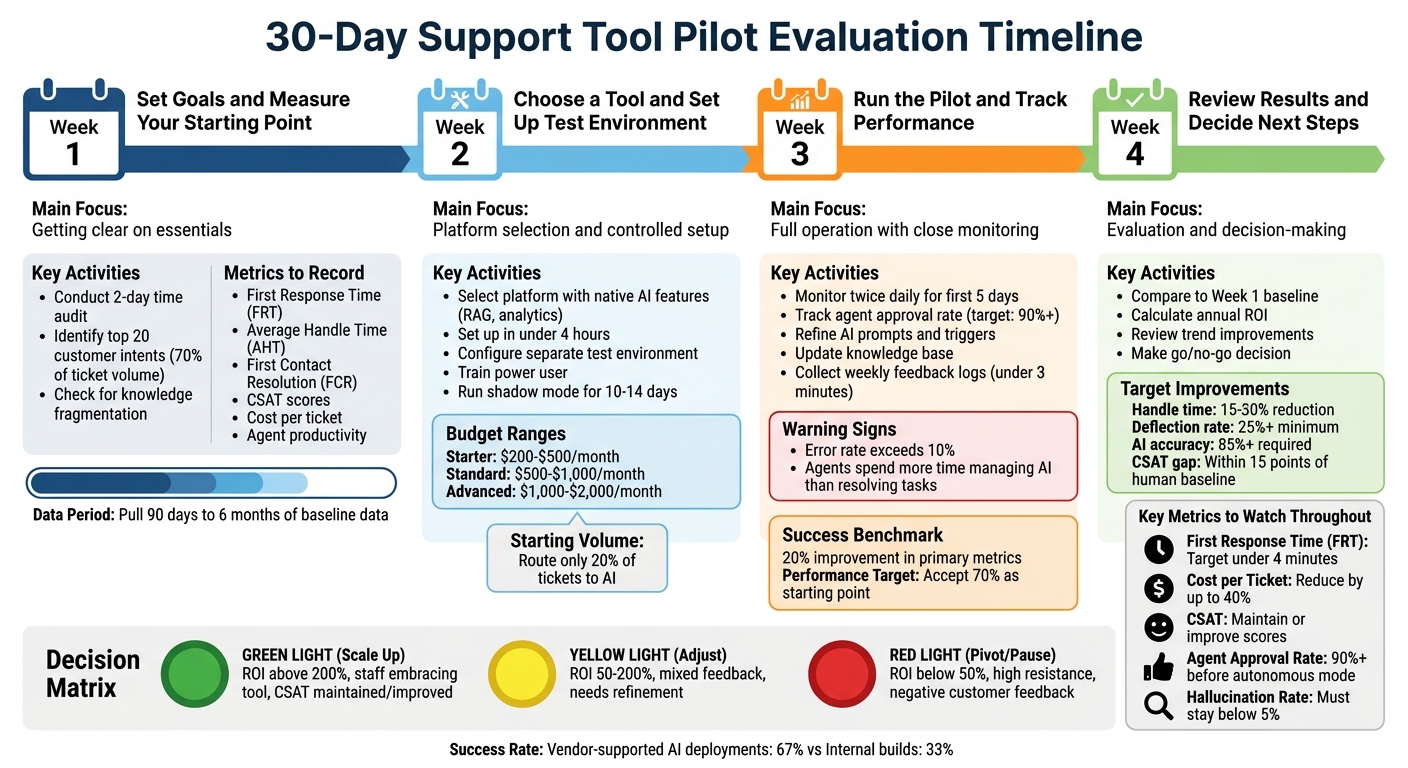
30-Day Support Tool Pilot Evaluation Process: Week-by-Week Implementation Guide
Week 1: Set Goals and Measure Your Starting Point
The first week is all about getting clear on the essentials. Before diving into any tool testing, you need to pinpoint what’s not working, decide how you’ll measure success, and establish a baseline. This groundwork ensures you can track progress accurately as you move through the pilot.
List Your Current Support Problems
Start by conducting a two-day time audit of your support team’s tasks. Track how much time is spent on activities like handling inquiries, entering data, routing tickets, or searching across systems for information[3]. Look for warning signs, such as tasks that consume over two hours daily, involve repetitive actions, require constant switching between contexts, or depend on other teams for information[3].
Next, focus on your top 20 customer intents – these are the most common questions that typically make up around 70% of your total ticket volume[5]. Examples include password resets, order status updates, billing inquiries, or basic troubleshooting. Also, check for knowledge fragmentation: are answers scattered across multiple documents, articles, or stuck in your agents’ heads? This slows down resolution times and creates inconsistent service[5].
A great example of this challenge comes from Domo in 2025. Their engineers were overwhelmed by hundreds of daily tickets and had to manually search through various resources for answers. This caused significant delays until they adopted an AI-driven workflow that streamlined these manual processes into quick, efficient reviews[7].
Quantify the cost of inefficiencies. For instance, if repetitive tasks take six hours per week at $50 per hour, that’s an annual cost of $15,600[3].
Pick AI Features to Test
Choose AI tools that directly target your pain points. If manual ticket routing is a time drain, explore automated triage and routing. If repetitive FAQs are overwhelming your team, try AI-powered chat or virtual assistants. If response quality is inconsistent, consider shadow-mode drafting, where AI generates responses for agents to review before sending[5][1].
To prioritize features, use an Impact vs. Feasibility matrix. Score each feature on a 1-10 scale for impact (time saved, revenue potential, or CSAT improvement) and feasibility (how pattern-based the task is and the quality of your existing digital records)[3]. When tasks score similarly, go for the ones that occur daily – you’ll get quicker feedback during the 30-day pilot[3].
"AI projects stall when teams lead with technology instead of outcomes, lack unified knowledge, and skip shadow-mode validation." – Christopher Good, EverWorker[5]
Keep it simple: test only two or three tasks that happen daily to keep your pilot focused and manageable.
Record Your Current Performance Numbers
Using the pain points you’ve identified, gather baseline metrics to measure performance. Focus on key areas like:
- First Response Time (FRT)
- Average Handle Time (AHT)
- First Contact Resolution (FCR)
- CSAT scores
Pull data from the past 90 days to six months to account for normal patterns and seasonal shifts[4][5][6].
Calculate your cost per ticket by considering agent salaries, software subscriptions, and maintenance costs[4]. Also, track agent productivity – how many tickets each agent resolves per hour or day. These figures will serve as your benchmarks when evaluating the pilot.
| Metric Category | What to Measure | Why It Matters |
|---|---|---|
| Efficiency | AHT, Cost Per Ticket, Tickets Per Agent/Hour | Highlights workload and cost-saving opportunities[4] |
| Quality | FCR, Escalation Rate, Response Accuracy | Ensures the tool delivers accurate results[4][5] |
| Experience | CSAT, Customer Effort Score, NPS | Tracks customer satisfaction and effort levels[4] |
Interestingly, fewer than 30% of customer service organizations have well-developed measurement frameworks for their AI initiatives[4]. This is a key reason why many pilots fail to prove their worth. Without clear starting metrics, it’s impossible to demonstrate improvement[4].
Once you’ve nailed down your baseline metrics, you’ll be ready to move on to selecting the right tool and setting up a test environment.
Week 2: Choose a Tool and Set Up the Test Environment
Now that you’ve set benchmarks from Week 1, it’s time to pick a platform that matches your goals and create a test environment. The focus this week is on making a well-informed choice and setting up a controlled pilot. The idea is to get the tool running in isolation so you can start gathering real data.
Look for Platforms with Built-In AI
When evaluating platforms, prioritize those with native AI features. Look for tools that support Retrieval-Augmented Generation (RAG) for accurate responses, handle actions like password resets or refunds, and include built-in analytics[5]. The platform should integrate seamlessly with your current help desk and CRM systems to automatically sync identity and order data[3][5].
It’s smart to choose tools that can be operational in under four hours[3]. This is especially important because nearly half (48%) of small-to-medium businesses find it challenging to pick the right AI tools due to limited technical expertise[3]. Limit your research to two hours, focusing on vendors that offer clear trial periods and straightforward pricing[3]. Also, make sure the platform includes human-in-the-loop controls, so agents can review, edit, or override AI-generated drafts before they’re sent to customers[5].
"The businesses winning with AI aren’t using the fanciest tools. They’re the ones that start small, measure everything, and scale what works." – Justin Dews, Partner, PathOpt[3]
When planning your budget, here’s what you can expect:
- Starter pilots: $200–$500/month for single-purpose automation with self-service setup.
- Standard pilots: $500–$1,000/month for 2–3 tools with light professional support.
- Advanced pilots: $1,000–$2,000/month for multi-tool ecosystems with custom integrations[3].
After selecting a platform, your next step is to set up a test environment that mirrors your live system as closely as possible.
Configure the Test Environment
Once you’ve chosen a tool, create a separate test environment that replicates your production setup without affecting live data. Use the insights from Week 1 to configure workflows for the AI features you plan to test. Start by training a tech-savvy "power user" to lead the pilot, troubleshoot issues, and ensure the setup works before involving a larger team[3].
Run the AI in shadow mode for 10–14 days to validate its outputs without impacting real customers[5]. Conduct basic smoke tests to confirm the environment is stable – check login functionality, navigation, and ticket routing[9]. Keep test data isolated from live systems, and avoid hardcoding sensitive information like API keys or passwords. Instead, use secrets management tools for security[10].
Start with a Small Percentage of Tickets
Begin the pilot by routing only 20% of your ticket volume to the AI[3]. Focus on the top 20 customer intents identified in Week 1, as these typically account for about 70% of your overall support volume[5]. Repetitive tasks like password resets, order status updates, or FAQ automation are ideal starting points[3][5].
Avoid critical workflows during this phase. If the system performs well for 48+ hours at the 20% threshold, you can gradually increase its scope to handle up to 50% of tasks[3]. This phased approach allows you to gather early data without overwhelming your team. It also lays the groundwork for detailed performance analysis in the weeks ahead.
Interestingly, vendor-supported AI deployments have a success rate of 67%, compared to just 33% for internal builds[3]. Starting small and focusing on measurable outcomes gives you the best chance of demonstrating value within your 30-day timeline.
Week 3: Run the Pilot and Track Performance
In Week 3, the pilot moves into full operation. This is when you begin using the tool with actual tickets, closely observing its performance, and making adjustments based on the data. The aim is to identify and address issues early, refine processes, and build confidence in the system before scaling up.
Monitor AI and Support Metrics
During the first five days, monitor your pilot twice daily to quickly catch and address any errors[3]. Pay close attention to the agent approval rate, which measures how often team members accept AI-generated drafts without making edits. A 90% or higher approval rate is essential before transitioning from shadow mode to autonomous support[8][5].
Focus on four key metric categories:
- Efficiency: Time saved per ticket, average handle time, and first response time.
- Accuracy: AI containment rate and resolution accuracy.
- Experience: Customer satisfaction, sentiment changes, and escalation rates.
- Technical performance: Confidence scores, match rates for suggestions vs. sent responses, and safety events[8].
Speed is critical – 88% of customers now expect faster responses compared to last year[8]. If the AI’s error rate exceeds 10%, or if agents spend more time managing the AI than resolving the original task, treat this as a warning sign and act immediately[3]. These metrics directly tie into your pilot’s ROI by highlighting improvements in response times and operational efficiency.
"Shadow mode accelerates trust – and creates training data for autonomy." – Ameya Deshmukh, EverWorker[8]
Use the data you gather to fine-tune the system in real time.
Make Changes Based on Early Data
Early performance data is your guide for adjustments. Refine AI prompts, triggers, and handoffs as needed[3]. If the AI struggles with common questions, update your knowledge base accordingly[1][6]. For situations where quality is lacking despite high deflection rates, tighten escalation rules based on factors like customer frustration, complex issues (e.g., billing or refunds), or the number of exchanges[1][6].
If your adjustments lead to performance dips, test changes with dummy data before rolling them out more broadly[3]. Aim for 70% performance as a starting point[3].
"The successful 5% of AI implementations accept 70% performance as a starting point, not failure." – Justin Dews, Partner, PathOpt[3]
Once adjustments are in motion, shift your focus to gathering feedback.
Collect Feedback from Agents and Customers
Instead of waiting for end-of-pilot surveys, use weekly logs to avoid recall bias and gather fresh, actionable feedback[11]. Keep these logs short (under three minutes) and track details like usage frequency, time spent, friction points, and satisfaction scores[11]. Including skeptics in your pilot group can be especially impactful – validation from skeptics often holds more sway with the broader team than executive endorsements[11].
For customer input, use in-app or website intercept surveys immediately after support interactions to capture real-time sentiment[12][13]. Give agents one-click feedback options to rate AI suggestions or flag knowledge gaps. This creates a quick improvement loop[5]. Review agent logs every Friday to identify participation drop-offs early in the process[11].
"Peer validation from credible skeptics is more influential on broader team adoption than any formal training or executive sponsorship." – MIT Sloan Research[11]
If your pilot doesn’t show at least a 20% improvement in primary metrics by the end of Week 3, it may struggle to deliver meaningful ROI within 12 months[11]. Use the data from this week to assess whether you’re on track or need to adjust your approach before the final review in Week 4.
sbb-itb-e60d259
Week 4: Review Results and Decide Next Steps
Now that you’ve spent weeks gathering data, making adjustments, and collecting feedback from agents and customers, it’s time to evaluate how well the tool fits your needs. After 30 days of testing, you need to decide whether the tool warrants full deployment, needs further tweaking, or should be replaced altogether.
Compare Pilot Numbers to Your Baseline
Start by revisiting the baseline metrics you established in Week 1 and compare them to your current results. Pay close attention to key performance indicators like average handle time, first-contact resolution, and CSAT (Customer Satisfaction) scores. Ideally, the tool should reduce handle time by 15–30% and achieve a deflection rate of at least 25% for inquiries resolved without human involvement [1][2].
Don’t just focus on the final numbers – look at the trends. For instance, a tool that starts with 70% accuracy but improves to 85% by Day 30 is usually more promising than one that peaks early at 82% and then stagnates [1].
Also, ensure that AI-handled ticket CSAT is within 15 points of your human-handled baseline [1][6]. If the gap is larger, it might signal that while tickets are being resolved faster, customers are left unhappy.
Calculate ROI and Evaluate Tool Performance
Once you’ve compared the metrics, it’s time to measure the financial and operational impact. Here’s a simple formula to calculate annual ROI:
(Hours saved per week × hourly rate × 52 weeks) – (annual tool cost + setup costs) [3].
For example, if the pilot saves 10 hours per week at $25/hour, the annual savings would be $13,000. Subtract $3,600 for the tool’s yearly cost and $1,000 for setup, leaving you with $8,400 in net savings. That’s a solid return on investment.
To guide your decision, use a decision matrix that builds on the goals you set earlier:
| Decision Signal | Green Light (Scale Up) | Yellow Light (Adjust) | Red Light (Pivot/Pause) |
|---|---|---|---|
| ROI Threshold | Above 200% | 50% – 200% | Below 50% |
| User Feedback | Staff embracing tool | Mixed feedback | High resistance/confusion |
| Performance | High accuracy; clear gains | Working but needs refinement | Ongoing technical issues; high error rate |
| Customer Impact | CSAT maintained/improved | Neutral impact | Negative customer feedback |
If the accuracy rate is below 85% or the hallucination rate exceeds 5%, that’s a red flag [1]. Similarly, if agents are spending more time fixing AI errors than the tool saves, the ROI won’t hold up as you scale.
Plan Your Next Move
Now, based on performance data and ROI, decide your next steps. You have three main options:
- Green Light: If the pilot achieves an ROI above 200%, strong staff adoption, and improved CSAT, scale up immediately. Gradually expand ticket volume from your pilot percentage to 50%, then 100% over the next 30 days.
- Yellow Light: If ROI falls between 50% and 200% or you’re seeing mixed feedback, refine the implementation before scaling. Pinpoint gaps – like issues with the knowledge base, escalation processes, or integrations – and extend the pilot another 60 days with clear improvement goals.
- Red Light: If ROI is below 50%, technical problems persist, or customer feedback is negative, it’s time to pause or replace the tool. Assess whether the problem lies with the tool itself or how it’s being implemented.
To avoid getting stuck in "pilot limbo", set a hard deadline for your decision at the end of Week 4 [1]. Document your findings, share them with stakeholders, and move forward confidently.
Conclusion
Summary of the 4-Week Process
A 30-day pilot is a powerful way to determine if a tool can bring measurable improvements to your workflow [11][2]. This process unfolds step by step: start by establishing baseline metrics, then move on to testing with a small sample of tickets, making real-time adjustments based on feedback, and finally, evaluating ROI to guide your decision. The key to success lies in setting clear and proactive benchmarks. Data shows that organizations failing to achieve at least a 20% improvement in their main metric within 60 days often struggle to reach meaningful ROI within a year [11]. With these insights, you’re better equipped to either scale your efforts or refine your strategy.
Moving Forward with AI-Powered Support
Now that the pilot data is in, your next moves will determine your long-term success. The numbers speak for themselves: 91% of small businesses using AI report revenue growth, with a 40% average boost in productivity for routine tasks [3]. But here’s the catch – success isn’t about having the most tools. It’s about using AI strategically to cut costs and enhance customer experience [5].
If your pilot delivered over 200% ROI and saw strong team adoption, it’s time to scale up using the workflow you’ve already tested [11]. On the other hand, if the results didn’t meet expectations, take the time to document your findings. Use what you’ve learned to either refine your approach or explore alternative solutions. Every insight gained during this process sets the stage for smarter decisions down the road.
This 30-day pilot isn’t just a test – it’s the starting point for building a faster, more efficient support system powered by AI. With data guiding your next steps, you can move forward confidently, leaving guesswork behind.
FAQs
What should I pilot first if my ticket volume is low?
If your ticket volume is manageable, consider starting with AI tools that streamline repetitive tasks and improve self-service options. Look for features such as chatbots that can address frequent questions, interpret customer intent, and boost satisfaction. This approach lets you evaluate the tool’s impact without putting too much strain on your team and can result in noticeable ticket reductions in as little as 30 days.
How do I prevent bad AI answers during the pilot?
To steer clear of unreliable AI outputs, it’s important to lay a strong foundation before you even begin. Start by setting clear goals, guardrails, and success criteria – this ensures everyone is aligned on what you’re trying to achieve.
Use a structured pilot plan to outline the project’s scope, objectives, and key performance indicators (KPIs). This plan acts as your roadmap, helping you stay on track and measure progress effectively. Regularly monitor the AI’s performance, establish evaluation checkpoints, and tackle any issues as soon as they arise.
Another critical factor? Clean and well-structured data. Poor-quality data can lead to inconsistent or inaccurate results, so make sure your inputs are reliable from the start. Throughout the pilot, conduct frequent testing and gather stakeholder feedback. This iterative approach will help you fine-tune the AI’s performance and improve outcomes as you go.
What data do I need to calculate ROI accurately?
To figure out the ROI of a support tool evaluation, start by collecting key data points. These include costs like license fees, implementation, and ongoing operational expenses. Next, measure productivity gains, such as reduced MTTR (mean time to resolution) or ticket deflection rates. Factor in cost savings, like decreased labor expenses, and track usage metrics, such as the number of automated tasks. Finally, assess customer satisfaction improvements, like higher CSAT scores or better resolution rates. Reviewing this data during the pilot phase can highlight the tool’s financial impact effectively.






