


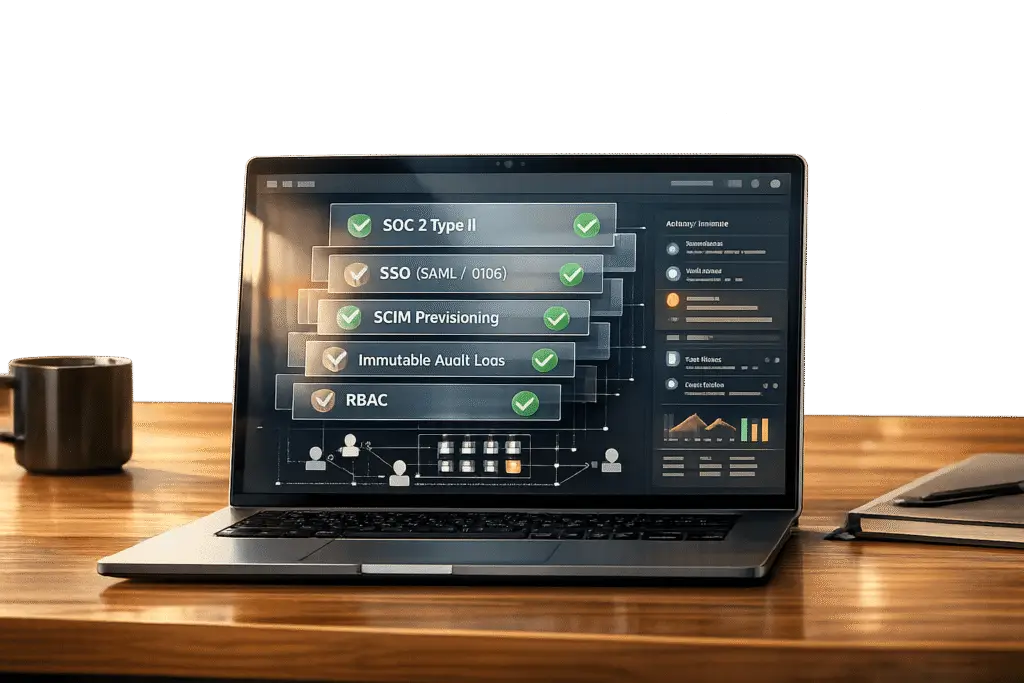
Security is now a dealbreaker for support tools. Enterprise buyers demand SOC 2 Type II certification, SSO, detailed activity logs, and RBAC. Without these, you risk losing deals or failing security reviews.
Here’s why these features matter:
- SOC 2 Type II: Verifies ongoing security control effectiveness.
- SSO (Single Sign-On): Centralizes authentication and simplifies user management.
- Activity Logs: Tracks actions for audits and incident investigations.
- RBAC (Role-Based Access Control): Limits access to only what users need.
With AI-driven operations, risks like “authorization drift” make robust security even more critical. This guide explains what to check when evaluating vendors, key questions to ask, and red flags to watch for.
SOC 2 Compliance: ALL The Essentials Simplified
sbb-itb-e60d259
SOC 2 Compliance: What to Verify Before You Buy
When it comes to ensuring robust security, verifying SOC 2 compliance is an essential step. For enterprise support tools, SOC 2 Type II certification is now a standard requirement. According to Gartner‘s 2024 Security Compliance Report, 78% of enterprise clients demand this certification from their service providers [8]. The distinction between Type I and Type II is critical: while Type I confirms that controls are properly designed at a specific point in time, Type II goes further, proving that those controls function effectively over an extended period, usually 6–12 months.
Check for SOC 2 Type II Certification
Start by confirming that the vendor holds a current SOC 2 Type II report – not just Type I. The report should address the required Security criteria and any additional Trust Services Criteria relevant to your organization’s needs. For example:
- Availability: To ensure uptime guarantees.
- Confidentiality: For managing sensitive data.
- Privacy: To safeguard personal information [5][6].
Make sure the audit period is up to date. If the report is more than a year old, ask for a bridge letter to confirm no major changes have occurred since the last audit [6]. Additionally, the audit itself must be conducted by a licensed CPA firm accredited by the AICPA [5][6]. Organizations with SOC 2 Type II certification reportedly experience 57% fewer data breaches [8].
Once certification is verified, the next step is to review the accompanying documentation.
Request the System Description and Control Matrix
The system description is a key part of the SOC 2 report. It outlines what was audited, including infrastructure, software, personnel, data, and processes [6][7]. Watch out for vendors who claim SOC 2 compliance but exclude the specific support tool from the audit scope [9].
Verify that the system description explicitly includes the support tool you’re evaluating. Double-check for consistency between the system description, the vendor’s privacy policy, and any service-level agreements (SLAs). Pay close attention to details like data retention policies, encryption methods, and incident response times [9].
The control matrix is another critical component. This section maps the Trust Services Criteria to the vendor’s internal controls and shows the audit’s test results. Focus on Section IV (Control Tests) to identify any "exceptions" – instances where controls didn’t perform as intended. As TeamBench highlights:
"Most startups that fail SOC 2 don’t fail because their security is bad – they fail because their documentation is incomplete, inconsistent, or outdated." [9]
If exceptions are noted, request a detailed remediation plan from the vendor [9].
After reviewing the documentation, ensure that the vendor’s current operations align with the audit findings.
Verify the Audit Report is Current
A SOC 2 Type II audit involves extensive documentation – often 50 to 100+ documents covering policies, procedures, and operational evidence [9]. The preparation process, including the observation period, typically spans 9–15 months [9].
Ask for dated evidence logs to confirm the vendor’s controls were active throughout the audit period. Examples include quarterly access reviews, change management records, and security training logs. Be on the lookout for gaps, such as a policy requiring quarterly reviews but evidence showing only annual reviews [9].
If the vendor uses subservice organizations, like AWS or Azure, they should provide a summary explaining how these third-party services are monitored. Ensure the documented infrastructure matches the vendor’s current setup – outdated references could signal lapses in oversight [9].
| Trust Service Criteria | Focus Area for Buyers |
|---|---|
| Security | Protection against unauthorized access (Firewalls, MFA, RBAC) |
| Availability | System uptime, disaster recovery, and incident monitoring |
| Processing Integrity | Accuracy and timeliness of data processing |
| Confidentiality | Protection of data designated as confidential (Encryption, Access Controls) |
| Privacy | Handling of Personally Identifiable Information (PII) |
SSO Integration: Authentication Requirements to Check
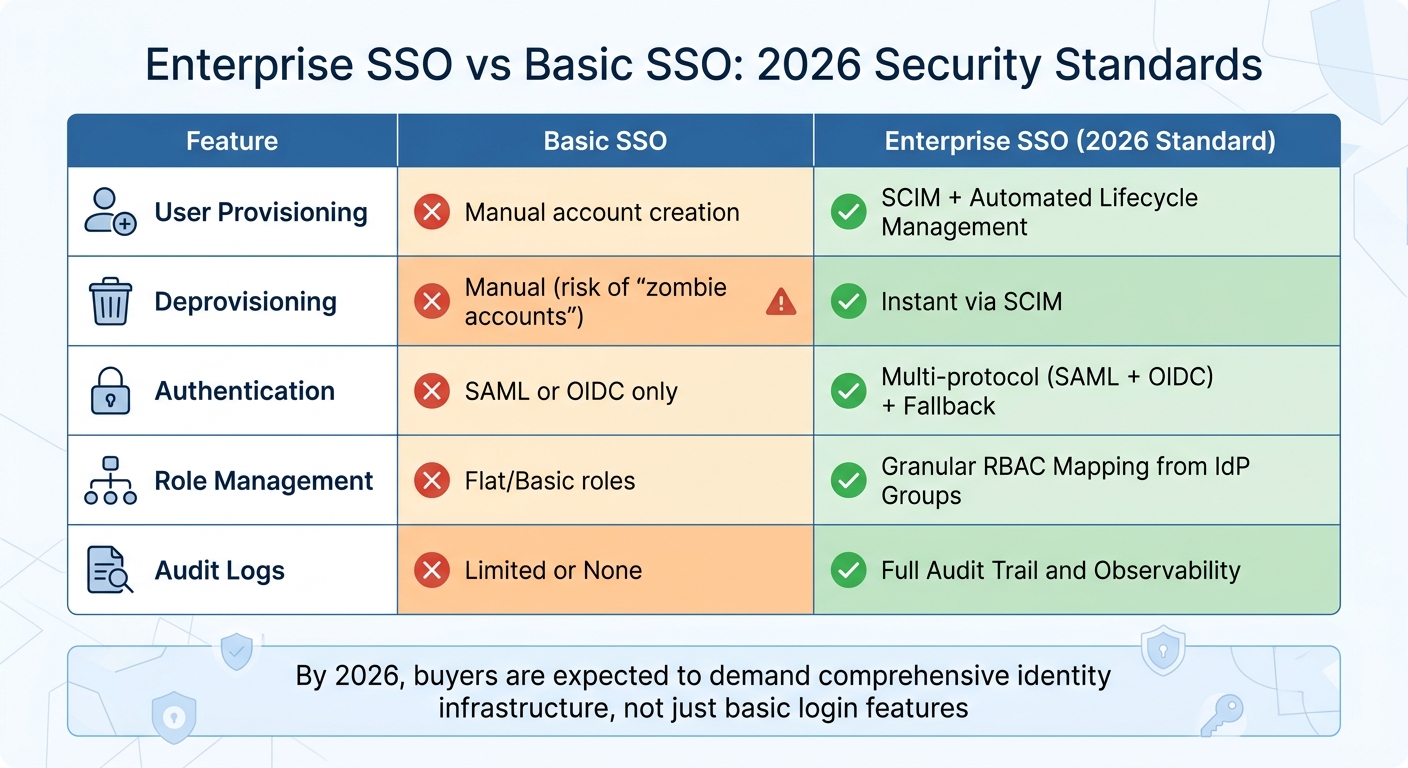
Enterprise SSO vs Basic SSO: 2026 Security Standards Comparison
Building on strong SOC 2 controls, integrating SSO (Single Sign-On) enhances the security of enterprise support environments. By centralizing authentication through your organization’s identity provider, SSO eliminates the need for employees to juggle multiple passwords. This approach not only minimizes security risks but also simplifies access management. By 2026, buyers are expected to demand a comprehensive identity infrastructure, not just a basic login feature [2].
However, not all SSO implementations are created equal. A poorly executed setup can introduce vulnerabilities instead of solving them. IBM‘s 2025 Cost of a Data Breach Report highlights this, noting that organizations with strong access controls saved an average of $1.9 million [12]. To avoid pitfalls, it’s essential to ensure the support tool integrates seamlessly with your authentication infrastructure and supports automated user lifecycle management.
Confirm Support for Your Identity Provider
Start by confirming that the tool integrates with your identity provider, such as Okta, Microsoft Entra ID, or Google Workspace. It should support SAML 2.0 or OIDC (OpenID Connect) for modern applications [2].
It’s important to distinguish between social login and federated SSO. Social login, like "Sign in with Google", places authentication control with the vendor, while federated SSO (via SAML or OIDC) keeps your IT team in charge of the identity layer [3]. As the 2Slides team explains:
"A common procurement error is conflating ‘Sign in with Google’ with enterprise SSO – they are different." [3]
Additionally, ensure the tool supports both SP-initiated (app-initiated) and IdP-initiated (identity dashboard-initiated) login flows to avoid login issues. The vendor should also require domain verification – typically through DNS TXT records – to confirm ownership of the email domain before enabling SSO. This step helps prevent unauthorized account takeovers [2].
Once compatibility with your identity provider is confirmed, assess the tool’s ability to automate user provisioning and deprovisioning.
Look for SCIM and Just-in-Time Provisioning
Automated provisioning is critical for managing user accounts efficiently. JIT (Just-in-Time) provisioning, combined with SCIM 2.0 (System for Cross-domain Identity Management), allows for seamless onboarding and immediate deprovisioning. This eliminates the risk of "zombie accounts" – inactive accounts that remain in the system after employees leave [2].
SCIM 2.0 handles the entire user lifecycle, including provisioning new users and instantly revoking access for departing employees. This is especially vital given the 37% rise in insider threats targeting HR and identity systems in 2024 [13]. For organizations with over 200 users, SCIM 2.0 is increasingly seen as essential [3]. Look for tools that support automated attribute mapping for user details like email, full name, and role assignments during provisioning and updates [2].
While automation is key, enforcing individual user accounts is equally important for security and accountability.
Ensure Individual Accounts Are Required
The platform must enforce individual user authentication and prohibit shared credentials. Shared accounts compromise accountability and make it impossible to track who accessed specific data, undermining audit trails [11].
This requirement aligns with SOC 2 compliance. As Apptension notes:
"If you think you will need SSO ‘later,’ you probably need it now. Retrofitting SAML into a product that mixed identities is painful." [1]
Ensure the system mandates unique accounts and prevents credential sharing. Additionally, check how the tool handles SSO failures, such as when your identity provider experiences downtime or certificates expire. A secure fallback mechanism – like Magic Links or OTP (One-Time Passwords) – should maintain individual audit trails even during outages [2].
| Feature | Basic SSO | Enterprise SSO (2026 Standard) |
|---|---|---|
| User Provisioning | Manual account creation | SCIM + Automated Lifecycle Management |
| Deprovisioning | Manual (risk of "zombie accounts") | Instant via SCIM |
| Authentication | SAML or OIDC only | Multi-protocol (SAML + OIDC) + Fallback |
| Role Management | Flat/Basic roles | Granular RBAC Mapping from IdP Groups |
| Audit Logs | Limited or None | Full Audit Trail and Observability |
Activity Logging: Building a Complete Audit Trail
After achieving SOC 2 compliance and integrating SSO, the next step in securing your platform is creating a robust audit trail. Audit logs are indispensable for investigating incidents, meeting compliance requirements, and ensuring accountability. As Yaro Labs aptly states:
"Audit logs are one of those features that nobody thinks about until they need them urgently – and then they don’t exist." [14]
A recent scan of OpenClaw instances revealed that 91.3% failed due to issues like missing authentication and nonexistent audit trails. Even more alarming, 42,665 exposed instances contained plaintext API keys [16]. For B2B tools managing sensitive customer data, insufficient logging isn’t just a compliance issue – it’s a serious business risk that can erode trust and cost deals.
Here’s how to ensure your platform handles these logs effectively.
Check for Centralized Log Collection
Your platform should log both customer actions and internal team activities using structured event types, such as subscription.plan_changed, instead of vague, free-text descriptions. This structure ensures logs are easily searchable and scalable [14].
Each log entry should include these critical details:
- Who: The user or system identity
- What Changed: The before-and-after states
- On What: The affected resource or entity
- When: A precise UTC timestamp with milliseconds
- From Where: The source, whether UI, API, or automation [14]
Without these elements, your audit trail lacks the depth needed for effective investigations. Additionally, the platform should offer a self-service interface that allows non-engineers to filter logs by account, actor, or event type. CSV export functionality is also essential for enterprise-level reviews [14].
Verify Log Retention and Protection
Logs must be retained for at least 12 months, with extensions to 24–36 months for industries with stricter regulations. They should be stored in append-only, tamper-proof storage to prevent unauthorized deletion or modification [14][15]. For instance, PCI DSS mandates a minimum 12-month retention period [15].
Yaro Labs emphasizes the importance of secure storage:
"Application-layer deletion means that a compromised admin account can cover its tracks, which defeats the purpose of the audit log." [14]
Deletion should only occur through automated, documented retention policies – not via manual application-layer actions [14]. Regularly verify that your log management system adheres to these policies. For example, claiming a 12-month retention policy while logs are auto-purged after 30 days is a clear compliance violation [15].
To add another layer of security, implement log ingestion monitoring. This system should issue alerts if log ingestion stops unexpectedly, a key control to detect if an attacker attempts to disable logging [15].
Look for Automated Security Alerts
Automated alerts are essential for identifying high-risk activities, such as bulk data exports, changes to permissions, or unusual account behavior [14][16].
For SOC 2 compliance, a common benchmark for brute-force detection is 5–10 failed login attempts within a 5-minute window [15]. Other critical alerts should include:
- "Impossible travel" logins – attempts from geographically distant locations within an unrealistic timeframe
- Unauthorized privilege escalations [15]
Check if the platform supports SIEM integration (usually available in Business or Enterprise plans). This enables your security team to centralize alerts and manage them effectively [16]. Use a tiered response system: critical alerts, like active breach indicators, should page an engineer immediately, while less urgent alerts can be reviewed weekly [15].
As SecurityDocs warns:
"A SIEM that nobody monitors is worse than no SIEM at all – it creates a false sense of security and fails the SOC 2 requirement for active monitoring." [15]
To stay prepared for audits, export summaries of alerts, evidence of retention compliance, and configuration changes quarterly [15]. This proactive approach can save you from scrambling when audit deadlines loom.
RBAC: How to Assess Access Control Features
Once you’ve established strong activity logging, the next crucial step in securing your support tool is implementing effective RBAC (Role-Based Access Control). This layer of security is a critical focus for SOC 2 audits, as access control issues are among the most common findings [10]. Poorly designed RBAC doesn’t just lead to compliance headaches – it opens the door to data breaches, which cost businesses an average of $4.4 million [12].
The problem is that many tools only offer basic roles like "Admin" and "User", leaving you stuck between over-permissive access and overly restrictive settings. This can result in unintended access, like a team member managing user accounts suddenly being able to view sensitive customer data they shouldn’t [17].
Here’s how to evaluate whether a platform’s RBAC is ready for enterprise use.
Check for Detailed Role Configuration
Effective RBAC relies on permissions that are defined by four key factors: Resource (what data or feature is being accessed), Action (e.g., read, export, delete), Scope (e.g., entire platform, specific team, or just their own items), and Condition (e.g., requiring MFA for sensitive actions) [1].
Look for tools that support resource-level permissions instead of broad, global roles. This prevents "role explosion", where you need to create dozens of static roles for minor variations in access [1][17]. For example, a "Support Agent" role should allow access to tickets but not enable exporting customer data or modifying billing settings.
In multi-tenant environments, roles should be tenant-aware. A user might be an "Owner" in one tenant’s account but have "Read-only Member" access in another. The platform should evaluate roles based on the specific tenant context [17].
Additionally, check for delegated administration capabilities. For instance, a Billing Admin should handle invoices and payment methods without accessing support tickets, while a Support Admin might onboard new agents but remain restricted from infrastructure settings [17]. As LoginRadius puts it:
"A role is less about enforcing hierarchy and more about defining responsibility. It is a contract that says, ‘These are the actions this user can perform inside this organization.’" [17]
Ensure that access controls are enforced server-side. If they only operate in the frontend, they can be bypassed. This enforcement should extend across all API endpoints and database queries. As Apptension warns:
"If your access control lives in the frontend, you do not have access control. You have a nicer looking incident." [1]
Ask vendors to demonstrate how their API validates permissions on every request, not just through the user interface.
Finally, assess how the platform reviews and updates role assignments over time.
Ask About Access Review Processes
SOC 2 compliance often requires quarterly reviews for critical roles and semi-annual reviews for standard roles to ensure permissions align with current job responsibilities [12]. These reviews should be simple and automated.
Advanced tools offer Symmetric RBAC, which provides clear visibility into how permissions map to roles and users. This transparency is essential for periodic recertification [12]. The system should log every role modification, including details like the role name, user, resource, timestamp, and approver [12].
Automated compliance tools can drastically cut down on recertification time, saving nearly 500 hours annually compared to manual processes [12]. Features like SCIM (System for Cross-domain Identity Management) can automate provisioning and de-provisioning of roles directly through your Identity Provider [18].
One common security gap occurs when employees change roles but retain old permissions. Ensure the tool can trigger access reviews during HR role transitions [10]. For employee departures, access removal should occur within 24 hours – immediately for involuntary terminations [10].
Also, check for time-boxed emergency access (sometimes called "break glass" accounts). These highly privileged accounts should be securely stored, used only during Identity Provider outages, and automatically expire with immediate alerts [1][10].
Lastly, confirm that these role controls integrate seamlessly with tenant isolation and data separation measures.
Verify Customer Data Separation
In multi-tenant support tools, tenant isolation is non-negotiable. The platform should use a centralized mechanism (like a tenantId filter) to enforce tenant scope in every database query, preventing accidental cross-tenant data access [1].
This enforcement must occur at the API and service layers, not just the UI. Ask vendors how tenant resolution is performed using authentication tokens and ensure server-side enforcement at every endpoint [1].
| Area | Warning Sign (MVP Shortcut) | What to Look For (SOC 2 Ready) |
|---|---|---|
| Tenancy | tenantId passed from client | Token-resolved tenant; enforced queries |
| RBAC | UI gating only | Server-side policy enforcement per endpoint |
| Privileged Access | Permanent Admin roles | Time-bound "break glass" or step-up MFA |
| Role Assignment | Manual/Ad-hoc | Approval-based with justification [12] |
For platforms with AI features, ensure that the AI respects the same RBAC and tenant boundaries as the rest of the application. Without this, the AI might pull and display data that users aren’t authorized to see [1]. This is especially critical given that 97% of organizations experiencing machine-learning incidents lacked proper access controls [12].
Ask vendors for a role-permission matrix. This document should map every role to specific actions across infrastructure, application, and data access. It serves as primary evidence for SOC 2 auditors and helps clarify what each role can do [10].
Implementing strong access controls and governance can save your organization an average of $1.9 million [12]. As Amit Gupta, Founder & CEO of Konfirmity, notes:
"Access control is one of the most visible aspects of SOC 2… Poorly managed permissions lead to incidents, fines and stalled sales." [12]
Questions to Ask Vendors and Warning Signs to Watch For
When evaluating vendor security, asking the right questions can help uncover issues early. This is especially crucial given that 78% of enterprise buyers require a SOC 2 report before signing contracts, as highlighted in Vanta‘s 2024 State of Trust Report [19]. Vendors who struggle to provide clear answers to these questions may signal potential risks.
Start by addressing SOC 2 compliance. Ask vendors, "Does your platform hold a current SOC 2 Type II certification, and can you share the latest audit report?" Always request the full Type II report, not just marketing materials or summaries. If the report is older than six months, ask for a bridge letter from the auditor to confirm that no significant changes have occurred [3]. Vendors offering only Type I reports or refusing to share full Type II reports should be avoided [3].
For SSO integration, confirm that the platform supports your identity provider, SAML 2.0/OIDC, and SCIM provisioning. Additionally, verify compatibility with both Service Provider–initiated and Identity Provider–initiated login flows [2][4]. Vendors requiring manual backend changes or lacking an admin UI for managing metadata are not suitable for enterprise environments [2].
On activity logging, inquire, "Can you provide a complete audit trail of all role changes and administrative actions? Are audit logs stored in immutable storage?" Also, ask, "What triggers automated alerts, such as repeated 403 errors or unusual login locations?" Vendors whose logs include raw request payloads, unredacted PII, or fail to log API-level actions fall short of enterprise audit standards [1].
These questions are critical for securing AI-driven, cost-effective support tools that align with enterprise security expectations. Below is a table summarizing key warning signs and their potential implications.
| Warning Sign | Why It Matters |
|---|---|
| Only has SOC 2 Type I | Demonstrates controls were only reviewed for a single day, lacking proof of ongoing reliability [19][3] |
| Stale Report (>18 months) | Without a bridge letter, there’s no assurance that controls are still effective [3] |
| An auditor’s qualified opinion | Indicates the auditor found deficiencies in the vendor’s security measures [19] |
| Refusal to share report | May suggest incomplete audits or significant security issues [3] |
| SSO only available on premium tiers | Creates a "security tax", forcing enterprises to choose between cost and protection [4] |
| Audit logs that contain raw request payloads or unredacted PII | Poses a high risk of data exposure and breaches [1] |
| UI-only access restrictions | API-level bypasses can undermine security controls [1] |
| No SCIM support | Delays in deprovisioning accounts can leave orphaned accounts vulnerable [4] |
Asking these questions and recognizing warning signs can help you identify vendors that align with enterprise-grade security requirements.
Conclusion
When evaluating support tools, it’s essential to verify that controls function effectively in a live production environment. For instance, SOC 2 Type II certification reflects consistent control effectiveness over a 6–12 month period. Features like Enterprise SSO (SAML 2.0/OIDC) offer centralized access control, while SCIM helps automate user deprovisioning, reducing the risk of orphaned accounts. Additionally, detailed audit logs support swift incident response, and properly implemented RBAC ensures permissions are enforced directly at the API layer [1].
As support tools integrate AI capabilities, these safeguards become even more critical. Ensure tenant isolation is rigorously maintained during data retrieval, and confirm your conversation data isn’t being used to train shared AI models [21]. As Apptension aptly warns:
"If you cannot prove tenant scoped retrieval, treat every AI answer as a potential data breach" [1].
It’s also wise to conduct technical proof-of-concepts to test AI safeguards and SCIM-based deprovisioning in real-world scenarios [1][20]. Be cautious of unverified marketing promises – always prioritize verified reports and documented controls. Vague or incomplete documentation should raise concerns. If a vendor cannot provide clear audit trails and evidence of compliance, it’s a warning sign. Staying vigilant against non-compliance can help you avoid significant costs down the line [3].
FAQs
What should I look for in a SOC 2 Type II report?
When reviewing a SOC 2 Type II report, focus on verifying that the controls were not only implemented but also operated effectively over a period of 6 to 12 months. Pay close attention to the detailed documentation, which should include:
- Policies and procedures outlining how the organization addresses critical areas like security, availability, processing integrity, confidentiality, and privacy.
- Controls and their implementation, showcasing how the organization manages risks and safeguards systems.
- The auditor’s assessment, which evaluates the effectiveness of these controls during the specified period.
This documentation provides a comprehensive view of the organization’s commitment to maintaining a secure and reliable environment.
What’s the difference between “Sign in with Google” and enterprise SSO?
"Sign in with Google" allows users to log in to websites and apps using their Google credentials. It works through OAuth 2.0, making it easy for people to access services without needing to create or remember separate passwords.
On the other hand, Enterprise Single Sign-On (SSO) is designed for organizations and focuses on security and efficiency. It uses protocols like SAML or OIDC to give employees access to multiple apps through a single login, managed by the company’s identity provider (e.g., Okta or Azure AD). This system also supports centralized management, user provisioning, and stricter security measures, making it a great fit for businesses that need to meet compliance standards.
How can I quickly tell if RBAC is enforced server-side (not just in the UI)?
To confirm that RBAC (Role-Based Access Control) is enforced on the server side, you need to ensure that permissions are checked in the backend, not just within the user interface. One way to test this is by attempting restricted actions through API calls or direct server requests using a role that doesn’t have the necessary permissions. If the server consistently denies these actions, regardless of UI restrictions, it indicates that RBAC is enforced server-side. Additionally, reviewing the system’s documentation or reaching out to your vendor can provide further clarity.






