



In customer support, prioritizing high-value accounts is essential, but it must be done without disrupting service for others. A VIP escalation lane ensures critical issues for key clients are handled efficiently through clear rules, defined workflows, and transparent policies. Here’s how you can create one:
- Set clear criteria: Use measurable factors like revenue, operational risk, and customer health scoring to decide who qualifies as VIP.
- Define workflows: Establish structured steps for handling VIP requests, from triage to executive involvement.
- Allocate resources: Reserve 15–25% of team capacity for VIP cases to avoid overloading standard queues.
- Leverage automation: Use tools to manage escalations, adjust SLAs dynamically, and track trends.
- Communicate policies: Ensure both teams and clients understand the rules to prevent perceptions of favoritism.
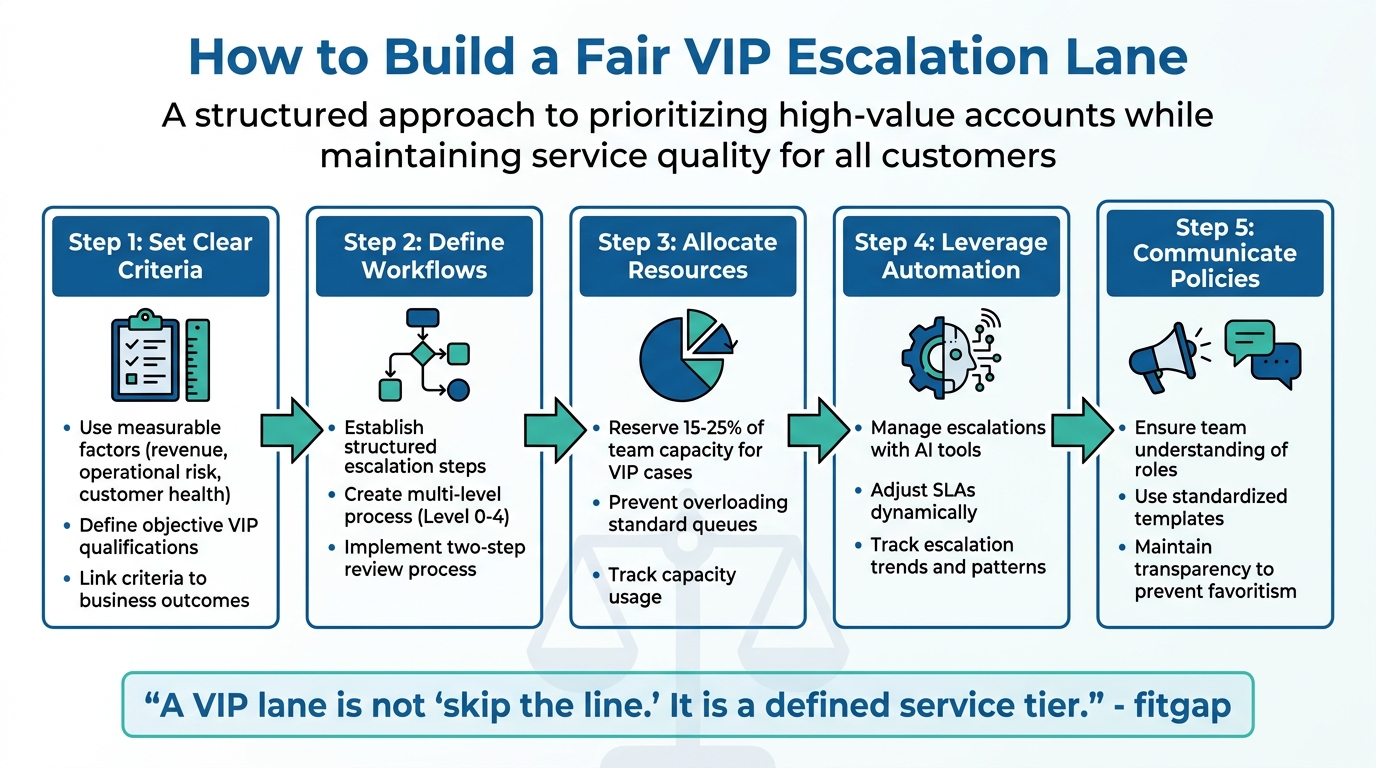
5-Step Framework for Building a Fair VIP Escalation Lane in Customer Support
Set Clear Criteria for VIP Escalations
To create a fair and effective VIP escalation process, you need objective criteria. Without clear rules, decisions can feel subjective, leading to accusations of favoritism, inconsistent service, and unnecessary chaos.
The key question is: What makes an account or issue urgent enough to skip the line? Your answer should be measurable, well-documented, and consistently applied. Once these criteria are defined, you can connect VIP status to tangible business outcomes.
Base Criteria on Business Impact
Start by focusing on financial value and operational risk – metrics that directly link to business priorities. These help justify why certain accounts or issues deserve faster attention.
For instance, Annual Recurring Revenue (ARR) and Annual Contract Value (ACV) are straightforward indicators. A $500,000 account with a critical problem clearly poses a greater financial risk than a $5,000 account with a minor feature request. This approach ensures you’re protecting revenue streams while maintaining fairness for smaller accounts.
But revenue isn’t the only factor. Consider the strategic importance of certain accounts. A mid-sized client might not have the highest ACV but could represent significant market potential, partnership opportunities, or industry influence. For example, losing a customer in a new market you’re entering could hinder future growth [3].
Severity-based criteria also play an essential role. Issues like outages, security vulnerabilities, executive deadlines, or revenue-critical disruptions demand immediate attention, regardless of account size [1]. The trick is to define these categories in advance, so your team isn’t left guessing.
Here’s how these criteria tie back to business outcomes:
| Criteria Category | Objective Metric | Business Impact Link |
|---|---|---|
| Financial Value | High ARR / ACV | Revenue Protection & Growth [2] |
| Account Health | Health Score < Threshold | Churn Prevention [2] |
| Operational Risk | Customer Outage / Security | Risk Mitigation & Trust [1] |
| Support Volume | Repeated/Unresolved Issues | CSAT, CES, and NPS & Retention [2] |
| Strategic Value | Partnership / Brand Importance | Market Share & Mindshare [3] |
To refine these triggers further, customer health scoring can provide even more actionable insights.
Use Customer Health Scoring
Customer health scoring builds on financial and risk-based metrics by offering a real-time view of account stability. By analyzing data like product usage, support history, and engagement trends, health scores can flag potential issues before customers escalate – or worse, churn [4][7].
For example, if a high-value account’s health score drops below 40 on a 100-point scale, that’s a clear signal to escalate. This approach removes guesswork and ensures decisions are driven by data, not personal relationships.
A well-designed health scoring model should weigh factors based on their impact on the business. For instance:
This weighting ensures that the most predictive factors – like usage patterns or unresolved issues – carry the appropriate influence.
Different customer segments may also require tailored criteria. For example:
- Enterprise accounts: Focus on executive engagement and quarterly business reviews (QBRs).
- Digital-first accounts: Emphasize feature adoption and login frequency [4][6].
"A health score that is three weeks old is not a health score. It is a history report." – Planhat [6]
Real-time triggers are essential. For instance, notify your team when a health score drops below 40 or declines by 15 points in a single week. Tools like Supportbench can automate this process, adjusting response targets dynamically when health scores drop or renewal dates approach. This ensures your team always knows which accounts need immediate attention.
Finally, validate your health scoring model quarterly. Compare predicted outcomes (like churn or renewal) against actual results. If low-scoring accounts aren’t churning – or high-scoring ones are leaving – it’s time to revisit your criteria [6][7].
sbb-itb-e60d259
Build a Clear Escalation Workflow
After defining who qualifies for VIP treatment and why, the next step is creating a workflow that ensures requests are handled efficiently and fairly. Escalation isn’t just about speed – it’s about being consistent, transparent, and managing team capacity effectively. Without a structured process, VIP requests can get lost in informal channels like direct messages or emails, creating unseen workloads and uneven task distribution.
Start by centralizing all VIP requests in a single ticketing system. Implement a two-step review process: first, confirm the request meets VIP criteria and is genuinely critical; second, assess team capacity to avoid overloading resources.
Automation can make this process smoother and more scalable. For example, critical cases like outages or security issues can automatically alert on-call staff, while less urgent VIP requests are sent to a dedicated review queue. Tools like Supportbench can dynamically adjust SLAs based on factors like account health or upcoming renewal dates, ensuring your team prioritizes the most urgent cases.
To maintain transparency, require a "VIP justification" field for every escalated ticket. This creates an audit trail and ensures accountability. Additionally, reserve 15–25% of your weekly support capacity for VIP work. This prevents disruptions to planned tasks or delays in meeting standard SLAs [1].
With a centralized and automated system in place, the next step is to outline escalation levels for better clarity and accountability.
Map Multi-Level Escalation Steps
A clear, multi-level escalation process ensures everyone knows their role at each stage, from initial triage to potential executive involvement. Without this clarity, teams can waste time debating responsibilities, and customers may experience inconsistent service.
Define escalation levels as follows:
- Level 0: Initial triage, where cases are tagged, categorized, and routed based on VIP criteria.
- Level 1: Frontline support handles standard VIP requests with enhanced SLAs.
- Level 2: Complex technical issues are escalated to specialized teams.
- Level 3: High-risk or strategically critical accounts are managed by duty managers or customer success leaders.
- Level 4: Executives step in for situations where business relationships are at stake.
Each escalation level should have clear triggers, such as a case being marked as "Escalated." This status should automatically notify the appropriate team, reset due dates based on VIP targets, and inform the customer about next steps. Well-defined stages ensure cases are handled promptly and consistently, with dynamic SLAs guiding response times at every level.
Set Dynamic SLAs for Consistent Prioritization
Dynamic SLAs allow you to prioritize VIP cases without neglecting commitments to other customers. Think of it as running two lanes: one for VIPs and one for standard requests. Both follow the same rules, but VIP cases move faster [9].
For instance, standard cases might have a 4-hour first response time and a 48-hour resolution target. VIP cases, on the other hand, could have a 30-minute first response during business hours and a 24-hour resolution target [1]. These enhanced SLAs don’t replace standard ones – they operate alongside them, ensuring all customers receive reliable service.
The "dynamic" part comes into play when SLAs adjust in real time. If a VIP account’s health score drops, the system can automatically tighten SLA targets to predict and reduce churn risk. Similarly, as a renewal date approaches, response times can shorten to ensure a positive experience during this critical period. Tools like Supportbench automate these adjustments, aligning targets with the current account context without requiring manual effort.
If VIP demand exceeds the reserved capacity, you may need to pause or postpone standard tasks. Tracking these trade-offs ensures transparency and accountability.
Communicate Escalation Policies Clearly
Transparency is what separates a fair VIP process from favoritism. When both customers and team members understand the rules, it’s easier to accept differential treatment. Without clear policies, even justified escalations can seem arbitrary.
Internally, make sure every team member knows their responsibilities at each escalation level. For example, clarify who handles Level 1 VIP cases, who is on call for Level 2 technical issues, and what conditions trigger escalation to the next level. Shared dashboards can help leadership monitor how VIP requests impact standard SLAs, providing visibility into trade-offs [11].
Externally, use standardized communication templates for common scenarios. For example:
- "Accepted as VIP": Confirm the assigned owner, next update time, and resolution target.
- "Not VIP but accepted (standard SLA)": Provide the standard SLA timeline.
- "Needs info": Request additional details like deadlines, business impact, or necessary approvals.
If a case doesn’t qualify for VIP status, explain why and outline what would have changed the outcome. Clear communication around criteria and escalation paths prevents perceptions of favoritism. In fact, organizations with well-defined escalation policies have reported up to a 23% increase in customer satisfaction scores [10].
Use AI for Fair and Efficient Escalations
With a structured escalation workflow in place, incorporating AI can greatly improve both fairness and efficiency.
AI removes the guesswork by applying consistent rules to every case. It evaluates factors like customer spend, sentiment, subscription status, and urgency to automatically assign priority levels. This creates a system that treats VIP and non-VIP cases equitably while ensuring critical issues get immediate attention [13].
A crucial aspect of this process is setting confidence thresholds. By using thresholds of 70–75%, low-confidence cases can be routed to human agents for review, maintaining accuracy [13]. For high-stakes issues – like safety, legal matters, or refund disputes – hard-coded rules ensure these cases are escalated regardless of customer tier. This approach ensures an urgent issue from a standard customer gets the same attention as a routine question from a VIP.
AI also tracks sentiment in real time. For instance, if a non-VIP customer expresses frustration or urgency, the system can escalate their case right away, preventing urgent matters from being overlooked [13]. As Conduit puts it, "The goal isn’t 100% automation. It’s making sure every guest gets the right response from the right source" [13]. Tools like Supportbench enhance this by automatically adjusting SLAs based on account health, renewal timelines, and case specifics.
Automate Case Prioritization and Tagging
Integrating AI into your workflow eliminates errors that often occur with manual tagging.
AI can automatically tag tickets using customer data, such as total spend, order history, and subscription details, while assigning priority levels ranging from Low to Critical [14]. This ensures consistent categorization and removes the risk of human error. For example, repeat customers typically generate 300% more revenue than first-time buyers, making automated VIP prioritization a logical step [14].
To fine-tune this system, test AI prioritization on historical tickets. This helps refine its tone and accuracy before going live [14]. Once operational, review flagged conversations weekly to identify gaps in your knowledge base, rather than assuming the AI itself is flawed [13]. This ongoing feedback loop allows the AI to improve over time while maintaining fairness across all customer tiers.
Generate AI-Driven Case Summaries
AI-generated summaries streamline handoffs and create a record for verifying fairness.
These automated summaries, along with activity logs, ensure smooth transitions when cases move from AI to human agents. By transferring full context to the next agent, handle times are reduced, and customer satisfaction improves [12][13]. For example, Supportbench automates this by generating summaries when tickets are opened, after each activity, and upon case closure.
These summaries also serve as an audit trail, helping managers verify that both VIP and non-VIP cases are handled appropriately. This transparency prevents perceptions of bias and ensures teams adhere to established escalation policies.
Monitor Escalation Patterns with AI Metrics
AI metrics provide valuable insights into escalation trends, benefiting both VIP and non-VIP cases.
One key metric is the Escalation Quality Score (rated 1–5), which measures the effectiveness of AI-to-human handoffs. Aim for 75% of escalations to score between 4 and 5, with less than 5% falling in the 1–2 range [15]. High-quality handoffs allow Tier 2 engineers to act quickly, while poor handoffs can delay resolution by requiring additional diagnosis.
Track Mean Time to Resolution (MTTR) separately for AI-resolved cases and those needing escalation. Typically, escalated cases with good handoffs resolve within 2–6 hours, while poor handoffs can extend resolution times to 12–48 hours [15]. Additionally, the Tier 2 Deflection Rate – indicating the percentage of cases resolved by AI without human intervention – is a key metric for measuring ROI [15].
Using natural language queries, managers can analyze escalation patterns by asking questions like, "What was the impact of VIP prioritizations on non-VIP resolution times last quarter?" [16]. This helps identify trends and adjust policies. As Amani Undru, BI & Data Strategist at ThoughtSpot, explains, "If your users constantly override AI suggestions despite good model performance, you have a trust or training issue, not a technical problem" [16].
Balance VIP Treatment with Equal Service
Providing a dedicated VIP lane is a great way to offer top-tier support, but it shouldn’t come at the expense of consistent service for everyone else. By building on structured VIP criteria and an escalation workflow, you can treat VIP support as a defined service tier rather than a chaotic "skip the line" shortcut. This requires careful planning, using data to ensure fairness, and empowering all customers with strong self-service tools. Here’s how to balance VIP perks with overall service quality.
Set Universal SLAs with VIP Enhancements
To ensure smooth operations, reserve 15–25% of your weekly capacity exclusively for VIP requests. Without this buffer, VIP tickets can consume up to 30% of your team’s resources, potentially causing delays for other customers. Each VIP ticket should pass through a two-step process: first, confirm it meets urgency criteria; second, check if capacity allows for handling it without disrupting other priorities. If VIP demand exceeds the reserved buffer, reallocate tasks strategically rather than letting the general queue suffer.
Keep a close eye on SLA performance across both VIP and standard customer segments. Tools like Supportbench’s dynamic SLAs can help maintain balance by adjusting timelines based on account health and renewal schedules. To ensure transparency, require triagers to document a "VIP justification" for every escalated ticket. This creates an audit trail and helps you monitor whether VIP treatment is being applied fairly. [1]
Offer Self-Service Options to Reduce Non-VIP Escalations
Self-service tools are a win-win: they empower customers to solve issues on their own while freeing up agents to focus on more critical tasks.
"The cheapest ticket is the one that never opens." – BlueTweak
In-form deflection is a great example – it displays relevant knowledge articles as customers type their requests, often resolving issues before a ticket is even created. Similarly, structured intake forms that capture important details like error messages or model numbers can lead to faster, first-contact resolutions. Keeping your knowledge base up-to-date is also crucial. Weekly content reviews and mirroring your live interface in documentation ensure accuracy, while automated workflows triggered by conditional intake forms reduce the need for manual triage.
By combining SLAs with robust self-service options, you can minimize standard escalations and keep your team focused on high-priority work. [17]
Conduct Regular Audits to Maintain Equal Treatment
Quarterly reviews of your escalation workflows are essential to avoid unintended service gaps caused by a VIP lane. Use AI simulation tools to test new VIP logic against historical ticket data, helping you predict potential impacts on existing SLAs. Real-time CRM lookups can verify VIP eligibility, while frequent overrides of AI recommendations might signal a need for better training or process tweaks.
Standardized response templates – like "Accepted as VIP", "Not VIP but accepted", or "Needs info" – can also streamline communication and reduce time spent on manual updates. These practices ensure that your VIP lane delivers value to high-priority accounts without compromising the experience for everyone else. [1][8][16]
Conclusion
A VIP escalation lane is a structured service tier with clear rules for eligibility, specific targets, and transparent processes. This ensures high-priority accounts get the attention they need without disrupting service for others. As fitgap aptly states: "A VIP lane is not ‘skip the line.’ It is a defined service tier." [1]
To make this work, base eligibility on measurable factors like business impact and customer health scores. Build workflows that include policy checks and capacity limits. Set aside 15–25% of your weekly workload for VIP tasks – this prevents these requests from overwhelming resources and causing missed SLAs for other customers. AI tools can play a big role here by automating CRM lookups, summarizing cases, and identifying escalation trends to tackle underlying issues.
Transparency and accountability are key to maintaining fairness in VIP escalations. All VIP requests should be tracked in a single system of record to ensure no tickets bypass the proper queue. Require triagers to log a "VIP justification" for every escalated case, and use shared dashboards to monitor how VIP handling affects overall service levels. Regular audits are essential to catch and address any unintended service gaps before they harm customer trust. By following these steps, VIP escalations can deliver business value without sacrificing fair and equitable service.
FAQs
How do I decide who qualifies as VIP?
To figure out VIP status, create clear and measurable criteria that show a customer’s value or importance. Focus on factors like annual spending, how often they make purchases, or their subscription level. Setting specific thresholds ensures consistency and avoids any confusion or bias that might come from unclear standards. This way, you can prioritize key customers while keeping the process transparent and fair.
How do I prevent VIP tickets from hurting standard SLAs?
To keep VIP tickets from affecting standard SLAs, it’s important to set up a structured process with well-defined workflows. Start by tagging and tracking VIP requests to maintain visibility and ensure they’re handled appropriately. Allocate some capacity specifically for high-priority accounts and use auto-routing to quickly escalate these tickets to the right teams. Regularly review SLA performance using shared dashboards to spot and address any imbalances. A clear, policy-based approach helps ensure VIP support improves service quality without disrupting the experience for standard customers.
How can AI escalate urgent non-VIP issues fairly?
To handle urgent non-VIP issues fairly, AI can be programmed to follow clear, predefined rules. Specific criteria – like the complexity of the issue, emotional tone, or situations that exceed the AI’s capabilities – can signal when human intervention is required. Additionally, AI can assess factors such as sentiment, urgency, and relevant keywords to prioritize cases without bias. With data-driven processes and consistent guidelines in place, these concerns can be managed quickly and fairly.






