



Support teams often deal with the same recurring issues – password resets, navigation problems, or onboarding challenges. Instead of just responding faster, the key is to fix the root causes. By analyzing historical ticket data, you can identify patterns, address underlying problems, and reduce ticket volume by 20–30% in just 60–90 days. For example, a SaaS company redesigned a confusing UI and cut related tickets by 95%, saving $120,000 annually. Here’s how to do it:
- Analyze ticket data: Look for patterns in 6–12 months of past tickets. AI tools can help group similar issues.
- Tag consistently: Use clear and structured tags to organize tickets effectively.
- Perform root cause analysis: Identify why issues occur using techniques like the "5 Whys."
- Leverage AI: Use AI to detect trends, route and prioritize tickets, and create self-service resources.
- Build a Known Error Database (KEDB): Document recurring issues and solutions for faster resolutions.
- Track results: Measure metrics like ticket volume, deflection rates, and support hours saved.
This approach not only saves time and money but also improves customer satisfaction by solving problems before they escalate.
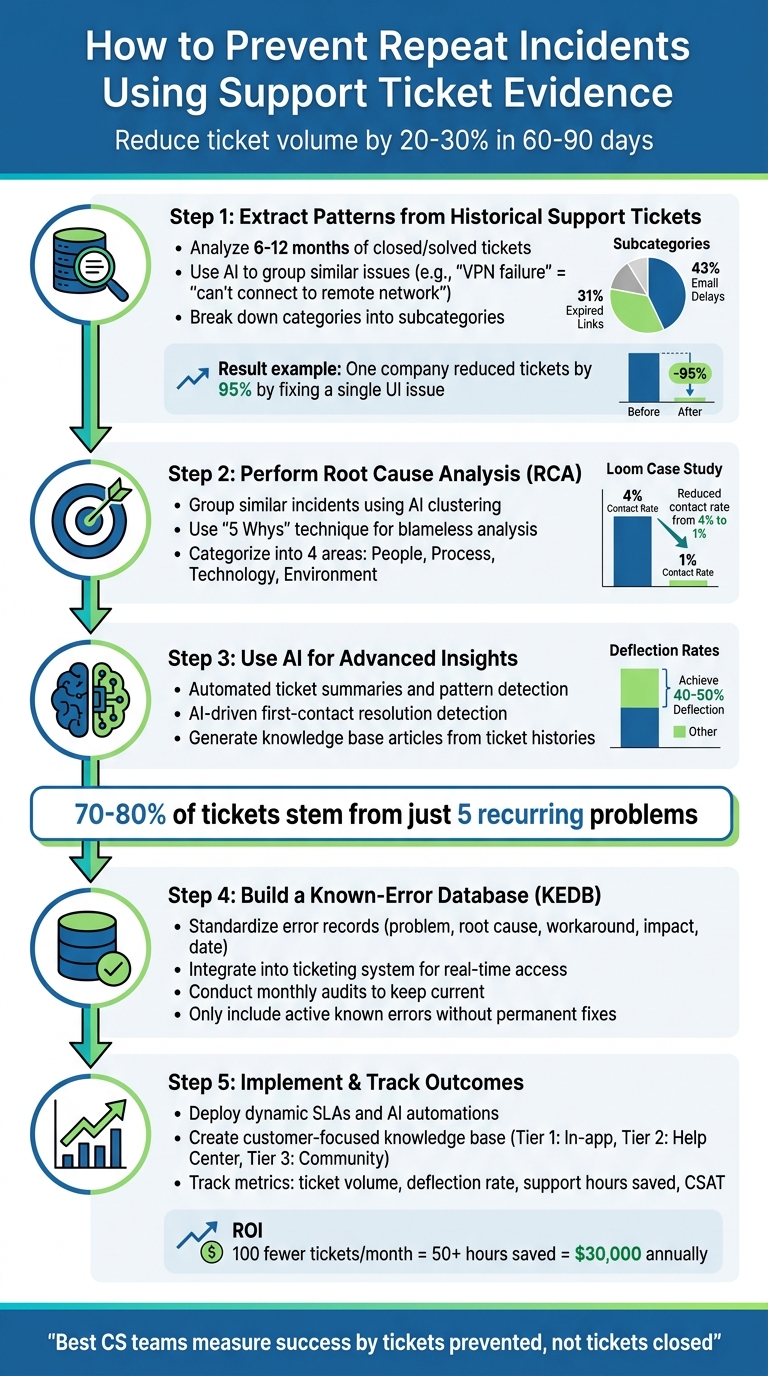
5-Step Process to Prevent Repeat Support Incidents Using Ticket Data
80% of Support Tickets Are Repetitive… Here’s the Fix
sbb-itb-e60d259
Step 1: Extract Patterns from Historical Support Tickets
Using historical ticket data, support teams can move from simply reacting to issues toward actively preventing them. The first step in avoiding repeat problems is analyzing past tickets to identify recurring patterns. To get meaningful insights, you’ll need at least 6 to 12 months of ticket history [[2]](https://docs.buildbetter.ai/pages/Use Cases/cs/ticket-analysis). Focus on "Closed" or "Solved" tickets since they provide both the problem and its resolution [[2]](https://docs.buildbetter.ai/pages/Use Cases/cs/ticket-analysis).
Find Recurring Keywords and Trends
Start by pulling key details from each ticket: Content (the ticket description), Author, Date, and Metadata (like tags, priority, and category) [[2]](https://docs.buildbetter.ai/pages/Use Cases/cs/ticket-analysis). This structure lets you spot recurring keywords and group similar issues. Keep in mind that customers often describe the same issue in different ways. AI-powered tools can help by recognizing semantic similarities – for instance, grouping "VPN failure" and "can’t connect to remote network" as the same issue [1][3].
Go deeper than just broad categories like "Password Reset." Break issues into subcategories to uncover root causes. For example, an AI analysis might reveal that 43% of password reset requests are due to email delays, while 31% are caused by expired links [[2]](https://docs.buildbetter.ai/pages/Use Cases/cs/ticket-analysis). This level of detail helps you focus your efforts where they matter most. You can also segment patterns based on customer type – analyzing new users versus experienced ones can highlight whether problems stem from onboarding or advanced feature usage [[2]](https://docs.buildbetter.ai/pages/Use Cases/cs/ticket-analysis).
This approach can yield impressive results. Take Marcus, Head of Support at a 50-person SaaS company, as an example. In late 2023 and early 2024, his team analyzed 5,847 tickets over nine months using an AI-driven tool. They discovered that 15% of all tickets stemmed from a single UI issue: a feature buried in a nested menu. By moving it to the main navigation, they reduced those specific tickets by 95% – from 892 to just 47. Overall, monthly ticket volume dropped from 650 to 480, a 26% decrease, saving the company $120,000 annually in projected hiring costs [[2]](https://docs.buildbetter.ai/pages/Use Cases/cs/ticket-analysis).
Once you’ve identified patterns, the next step is to ensure your tagging system is consistent.
Organize and Tag Tickets Consistently
For pattern detection to work effectively, your data must be clean and well-organized. Inconsistent tagging can make recurring problems appear as separate, unrelated issues because agents label them differently [1][3].
Create a structured tagging system with a clear hierarchy. Start with broad "Tier 1" tags (e.g., Product Issue) and add more specific "Tier 2" subcategories (e.g., Shipping Delay) [4]. Aim to keep your tags manageable – between 30 and 50. Too many options (e.g., 400+) can overwhelm agents, leading to inaccurate tagging, while too few (e.g., 5) won’t provide enough detail for actionable insights [4][6]. Use clear, specific tags like Payment_failed_paypal and avoid vague ones like "Other" to maintain data quality [4].
Standardize resolution codes across teams to track how tickets are closed and measure the success of preventative steps [1][3]. Build a tagging knowledge base that explains each category and when to use it, ensuring both new and experienced agents stay consistent [4][7]. You can also automate tagging based on keywords or email routing – for example, emails sent to billing@ can automatically be tagged as "Billing" [5][6].
Pro tip: Set aside 30 minutes on the first Monday of every month to review new tickets and compare trends with the previous month [[2]](https://docs.buildbetter.ai/pages/Use Cases/cs/ticket-analysis). This regular check-in helps you stay on top of emerging issues.
Step 2: Perform Root Cause Analysis (RCA)
Now that you’ve gathered and organized your data, it’s time to dig deeper. The goal here is to identify the root causes of recurring issues – not to assign blame, but to uncover actionable insights that can prevent future problems.
Group Similar Incidents for Analysis
Start by clustering tickets that share common traits. AI-powered tools can help identify patterns, such as recognizing that "can’t log in" and "access denied" often point to the same underlying issue [1] [9]. Group tickets based on metadata like tags, product areas, or customer accounts. You can also segment by user type. For instance, onboarding issues might be more common for new users (accounts less than 30 days old), while advanced feature bugs could affect power users more frequently [[2]](https://docs.buildbetter.ai/pages/Use Cases/cs/ticket-analysis).
To enhance your analysis, create a cross-system timeline to confirm patterns. For example, if there’s a spike in support tickets, correlate it with deployment timestamps to determine if a recent code change caused the issue [8]. This method is especially helpful when dealing with data from multiple platforms, as each may use different clocks or categorization schemes.
"The person who recognizes a pattern often isn’t the person who documented the previous incident. It’s someone who worked on a related problem in a different part of the stack." – Richie Aharonian, Head of Customer Experience & Revenue Operations at Unito [8]
Once you’ve grouped incidents – like "Password Reset" issues – use AI to drill down into specific causes. For example, you might find that email delivery delays or expired reset links are common contributors. This level of analysis not only uncovers root causes but also helps you design targeted solutions to reduce repeat incidents.
Use Blameless RCA Techniques
Blameless RCA focuses on identifying systemic failures by asking, "Why did the system allow this to happen?" Use neutral, non-judgmental language like "the process failed here" to keep the discussion constructive [10]. If the issue seems to stem from human error, dig deeper – human mistakes often point to larger systemic problems [11].
The 5 Whys technique is particularly effective here. Keep asking "why" until you uncover a fixable root issue, whether it’s a missing alert, a process flaw, or a product design problem. For instance, if customers struggle to find a feature, examine the UI layout and onboarding materials until you pinpoint a concrete solution [10] [11].
To organize your findings, categorize them into four key areas:
- People: Training gaps or unclear responsibilities.
- Process: Missing or outdated procedures.
- Technology: Bugs, technical debt, or system limitations.
- Environment: External factors like traffic surges or third-party dependencies.
This framework helps you spot recurring patterns across different types of incidents [11].
"By conducting RCA on customer conversations and building a comprehensive knowledge base, Loom reduced its contact rate from 4% to 1% – and the knowledge base now receives over 1 million visits per month." – Lauren Cunningham, Loom’s Customer Support Lead [12]
Step 3: Use AI for Advanced Insights
Once you’ve completed a root cause analysis, the next step is to leverage AI to turn ticket data into practical insights. Modern AI tools can process large volumes of support history quickly, revealing patterns that might be easy to miss otherwise.
Let’s dive into how AI-powered summarization and analysis can simplify ticket categorization and improve your support processes.
Automated Ticket Summaries and Pattern Detection
AI excels at using natural language classification to group tickets that describe the same issue in different ways[1][13]. For instance, it can recognize that "VPN failure" and "can’t connect to office network" are describing the same underlying problem. By analyzing six months of support history in just moments, AI identifies recurring themes and trends[[2]](https://docs.buildbetter.ai/pages/Use Cases/cs/ticket-analysis).
This technology categorizes historical ticket data into specific "signals" – like bugs, how-to questions, complaints, or feature requests. This categorization helps pinpoint recurring friction points[[2]](https://docs.buildbetter.ai/pages/Use Cases/cs/ticket-analysis). AI then creates a deflection priority matrix, which ranks issues based on their frequency, how easily they can be resolved through self-service, and the effort required to address them[[2]](https://docs.buildbetter.ai/pages/Use Cases/cs/ticket-analysis).
"We were drowning in tickets because we never analyzed WHY they were coming in. Our analysis showed that 60% of our support burden was self-inflicted and fixable. Complete game-changer."
– Marcus, Head of Support at a 50-person SaaS company[[2]](https://docs.buildbetter.ai/pages/Use Cases/cs/ticket-analysis)
To ensure the AI delivers accurate results, use consistent issue types and resolution fields across all platforms. Standardized metadata improves the reliability of AI models[1][13]. Also, focus your analysis on "Closed" or "Resolved" tickets, as these provide a full picture of the problem and its solution[[2]](https://docs.buildbetter.ai/pages/Use Cases/cs/ticket-analysis).
AI-Driven First-Contact Resolution Detection
Determining first-contact resolution (FCR) has traditionally been tricky, but AI changes the game. It can analyze conversation flows, follow-up patterns, and resolution quality to identify whether an issue was resolved during the first interaction. AI can even segment findings by user type, such as comparing new users (accounts under 30 days old) with seasoned power users. This segmentation allows you to create targeted onboarding materials or refine existing documentation[[2]](https://docs.buildbetter.ai/pages/Use Cases/cs/ticket-analysis).
Using these insights for AI-driven deflection strategies can reduce ticket volume by 20–30% within 60 to 90 days. Top-performing teams have achieved deflection rates of 40–50% for their most common issues[[2]](https://docs.buildbetter.ai/pages/Use Cases/cs/ticket-analysis). To keep improvements on track, conduct monthly audits by reviewing tickets from the previous month. This helps verify whether changes – like new knowledge base articles or product updates – are actually reducing tickets in specific categories[[2]](https://docs.buildbetter.ai/pages/Use Cases/cs/ticket-analysis).
AI doesn’t just stop at analyzing tickets – it can also turn resolved cases into self-service content that saves time for both customers and support teams.
Generate Knowledge Base Articles from Ticket Histories
AI can transform resolved cases into clear, actionable knowledge base articles in just seconds[14][15]. By pulling from ticket descriptions and agent-customer interactions, these tools ensure that no valuable context is lost when an issue is closed[16].
This method works especially well for recurring issues. AI can review multiple resolved tickets on the same topic and even include customer quotes to address common areas of confusion[[2]](https://docs.buildbetter.ai/pages/Use Cases/cs/ticket-analysis). It also detects regional language variations, grouping similar issues into a single, comprehensive article[[2]](https://docs.buildbetter.ai/pages/Use Cases/cs/ticket-analysis). Platforms like Supportbench include AI-powered knowledge base article creation as a built-in feature. When you identify a resolved case that offers a strong example of a problem–solution pair, the system generates a draft article complete with a subject line, summary, and keywords. These drafts help build a robust self-service library, reducing the need for future tickets.
While AI can handle the heavy lifting, it’s crucial to have a human agent review these drafts. This ensures the content aligns with your brand voice, maintains technical accuracy, and meets your quality standards before it’s published[15].
Step 4: Build a Known-Error Database
Once you’ve identified patterns using AI, the next step is to consolidate this knowledge into a known-error database (KEDB). This resource becomes your team’s go-to guide for resolving recurring issues quickly and efficiently.
A well-maintained KEDB transforms support workflows. Instead of approaching each ticket as a new challenge, your team can reference documented solutions and workarounds for previously encountered problems. To make this effective, focus on creating standardized records and embedding the KEDB seamlessly into your daily processes. This ensures it’s not just a static repository but an active tool your team relies on.
One critical rule: only include active known errors – issues without permanent solutions. Once a fix is implemented, archive or remove the entry to keep the database clear and easy to navigate [17]. This approach ensures your team always has access to relevant and actionable information.
Standardize Error Records for Clarity
Every entry in your KEDB should follow a standardized format. Include details like the problem description, root cause, workaround or solution, impact, and the date it was recorded [17]. This structure makes it easy for anyone on the team to understand and apply the information, regardless of who originally documented it.
Platforms like Supportbench can enhance this process by using AI to identify similar issues, even when users describe them differently [1]. However, starting with consistent documentation practices lays a strong foundation for accuracy and reliability.
Focus on capturing the "why" behind the issue, not just the "what" [[2]](https://docs.buildbetter.ai/pages/Use Cases/cs/ticket-analysis). For instance, instead of simply stating "password reset fails", provide deeper context: "Password reset links expire after 15 minutes, causing failures for users who don’t check email immediately." This level of detail helps your team address the root cause and develop better long-term solutions.
Integrate the KEDB Into Everyday Processes
For maximum impact, integrate your KEDB directly into your ticketing system. This allows for automatic updates, cross-referencing, and real-time access during ticket resolution. For example, when a new ticket is submitted, AI-driven triage can link it to existing known-error records and route it to the appropriate team [1]. This reduces resolution times significantly.
Your system should also prioritize issues based on historical data from the KEDB. If an error affects multiple customers or causes significant disruptions, those tickets should automatically be flagged as high priority [1]. This ensures your team focuses on what matters most, preventing critical issues from slipping through the cracks.
Regular maintenance is key. Conduct monthly audits of your KEDB to ensure workarounds remain effective and align with current configurations [[2]](https://docs.buildbetter.ai/pages/Use Cases/cs/ticket-analysis). Review new tickets from the previous month to verify whether past fixes have reduced similar incidents. This practice also helps identify emerging patterns that might require new entries in the database.
Encourage your team to actively contribute to the KEDB. Train them to document issues clearly and provide feedback for updates. Recognize and reward team members who consistently add valuable insights or improve existing records. This not only keeps the database robust but also fosters a collaborative culture of knowledge sharing.
Step 5: Implement Preventative Measures and Track Outcomes
Once you’ve gathered insights from your Known Error Database (KEDB), it’s time to put targeted fixes into action and evaluate their effectiveness. This step is all about validating whether your interventions make a measurable difference. Start by recording baseline metrics such as monthly ticket volume, average resolution time, support hours, and customer satisfaction scores. These benchmarks are critical for assessing the impact of your efforts. With this data, you can prioritize which issues to address first, focusing on those with the highest impact relative to the effort required. This approach lays the groundwork for assessing the success of your preventative measures.
Deploy Dynamic SLAs and AI Automations
Refined data can drive smarter, more dynamic processes. Traditional Service Level Agreements (SLAs) often treat all tickets equally, but not all issues have the same urgency. Dynamic SLAs adjust response times based on context – like whether a customer is nearing renewal or if an issue is affecting multiple users at once [1].
AI-powered automation takes this a step further by analyzing historical data to predict ticket priority. It flags high-priority issues automatically, ensuring they’re routed to the right team without delay [1][3].
To make this system even more effective, standardize your intake process with consistent categories and resolution codes across all teams [1][3]. This uniformity helps AI identify patterns more reliably and prevents recurring issues from falling through the cracks due to inconsistent labeling. For example, Supportbench’s AI can link tickets with varied descriptions to a common problem pattern, speeding up resolution times [1].
Create Customer-Focused Knowledge Base Resources
AI analysis doesn’t just help your team – it can empower your customers too. By using ticket data to identify the top 10 recurring issues, you can create a multi-tiered strategy to deflect repeat tickets [[2]](https://docs.buildbetter.ai/pages/Use Cases/cs/ticket-analysis):
- Tier 1 (In-App): Add tooltips and contextual help links exactly where users are likely to encounter challenges.
- Tier 2 (Help Center): Build FAQs and troubleshooting guides addressing the most common issues.
- Tier 3 (Community): Encourage user forums where customers can share solutions with one another.
The results can be impressive. Top-performing support teams have achieved deflection rates of 40–50% on common issues by implementing such resources [[2]](https://docs.buildbetter.ai/pages/Use Cases/cs/ticket-analysis). The secret? Base your content on real ticket data. Tools like Supportbench’s AI can even generate knowledge base articles directly from resolved tickets, pulling problem descriptions and solutions from your team’s interactions [1].
Measure the Impact of Preventative Efforts
After rolling out fixes, it’s essential to track their impact using clear metrics. Focus on the following:
| Metric | Purpose | Frequency |
|---|---|---|
| Ticket Volume by Category | Tracks whether specific fixes (e.g., UI updates) are reducing related tickets | Monthly |
| Deflection Rate | Measures how many potential tickets are avoided through self-service or product improvements | Monthly/Quarterly |
| Support Hours Saved | Calculates the time saved by preventative measures, showing ROI in team capacity | Monthly |
| Repeat Issue Frequency | Monitors how often the same root cause appears in different tickets | Real-time/Weekly |
| CSAT / Sentiment | Gauges how issue resolution and prevention affect customer satisfaction | Ongoing |
Regularly review ticket trends on a monthly basis, and conduct a deeper analysis quarterly to confirm improvements.
To put the savings into perspective, reducing 100 tickets per month could save over 50 hours of support time. At an average rate of $50 per hour, this translates to $2,500 in monthly savings – or $30,000 annually [[2]](https://docs.buildbetter.ai/pages/Use Cases/cs/ticket-analysis). These savings can then be reinvested into more strategic initiatives, allowing your team to focus on long-term goals.
Common Mistakes to Avoid When Preventing Repeat Incidents
Even the most dedicated teams can unintentionally contribute to recurring issues. Problems like inconsistent data handling, disconnected workflows, and poor review processes often get in the way of effective incident prevention. Identifying these missteps – and knowing how to address them – can help shift from reactive fixes to a proactive, preventative approach.
Inconsistent or Incorrect Ticket Tagging
Weak tagging practices can derail efforts to prevent repeat incidents. Overloading systems with too many unique tags or using vague categories scatters related issues, making it harder to spot trends. For instance, if agents tag similar issues with terms like "Billing", "Payments", and "Invoicing" interchangeably, it becomes nearly impossible to identify recurring patterns.
A better approach is to establish a two-tier taxonomy. Keep Tier 1 categories under ten clearly defined options, each with a simple one-sentence description. Use Tier 2 subcategories for more detail, but only when necessary. Regularly auditing tags can help eliminate redundancies, and AI tools can ensure consistency by applying tags based on clear, plain-language definitions.
"If a tag doesn’t change how you handle a ticket or how you understand your support data, it’s adding noise instead of clarity."
- Jake Bartlett, Writer and Customer Support Expert
Beyond tagging, isolated data practices can also stand in the way of effective resolutions.
Failure to Integrate Data Across Teams
When ticket data is scattered across different systems, vital insights often get lost. For example, when escalations jump between platforms, critical context may not follow. This lack of visibility can lead to multiple engineers unknowingly investigating the same root cause for separate incidents. The result? Unnecessary work, slower resolutions, and repeated problems.
Breaking down these silos requires integrating data across teams. Joint postmortems that bring together engineering, product, and customer support can help capture both technical details and customer impacts. Making a Known Error Database searchable by failure modes – like "Connection Pool Exhaustion" – can also speed up resolution by pointing teams to past solutions.
Overlooking Blameless Reviews in RCA
Even with a blameless approach to Root Cause Analysis (RCA), subtle biases can creep in. If the process suggests human error without creating a safe space for honest exploration, team members may hesitate to dig deeper. This often leads to surface-level findings that fail to uncover the true root causes.
Consider this: repeat incidents – those sharing a root cause with a previous issue within the past year – occur in 35% to 50% of cases. On top of that, fewer than 40% of action items identified during postmortems are completed within 90 days [18].
"If your repeat incident rate is above 30%, your postmortems are producing documentation, not learning. You’re writing the same root causes in new documents and calling it process."
- Root Cause, Stackademic
To truly embrace blameless reviews, start by building an objective timeline of the incident using logs, timestamps, and monitoring data. Avoid jumping to conclusions – accept "we don’t know" as a valid finding when evidence is lacking. Conduct these reviews within 24 hours while the details are still fresh, and track action item resolution as a way to gauge process improvement rather than individual performance. This approach can lead to meaningful changes that stick.
Conclusion
Preventing repeat incidents starts with viewing historical ticket data as more than just a record of past issues – it’s a powerful resource for identifying patterns and addressing root causes. By analyzing this data, conducting root cause investigations, and using AI-driven insights, support teams can shift from simply resolving tickets to tackling the underlying issues that generate them.
The results speak for themselves. Reviewing six months of support history can lead to a 20% to 30% drop in ticket volume within just 60 to 90 days [[2]](https://docs.buildbetter.ai/pages/Use Cases/cs/ticket-analysis). Interestingly, in many cases, 70% to 80% of incoming tickets stem from just five recurring problems [[2]](https://docs.buildbetter.ai/pages/Use Cases/cs/ticket-analysis). Fixing these high-impact issues can save over 50 hours of support time for every 100 tickets eliminated [[2]](https://docs.buildbetter.ai/pages/Use Cases/cs/ticket-analysis).
"The best CS teams measure success by tickets prevented, not tickets closed." – BuildBetter [[2]](https://docs.buildbetter.ai/pages/Use Cases/cs/ticket-analysis)
Tools like a Known Error Database, AI-powered automation, and tailored self-service options can transform support from reactive to proactive. These changes not only reduce ticket volumes but also create a more efficient and cost-effective support system. For instance, one company redesigned a problematic UI element and saw a 95% drop in related tickets, which contributed to an overall 26% reduction in ticket volume – delivering significant cost savings [[2]](https://docs.buildbetter.ai/pages/Use Cases/cs/ticket-analysis).
To keep this momentum, consistency is essential. Set aside 30 minutes on the first Monday of every month to review new data, track trends, and ensure that implemented fixes are working [[2]](https://docs.buildbetter.ai/pages/Use Cases/cs/ticket-analysis). Metrics like reduced ticket volume, improved customer satisfaction scores (CSAT), and faster resolution times can help demonstrate the return on investment (ROI) to leadership. When support teams actively connect ticket insights to product improvements, they don’t just resolve issues – they stop them from occurring in the first place.
FAQs
What’s the fastest way to pick the right tickets to analyze first?
The quickest solution is leveraging AI-powered tools to identify recurring issues and patterns in your support data. These tools can group similar tickets – even when descriptions differ – making it easier to zero in on repetitive, high-priority problems. By focusing on systemic issues or underlying causes, you’ll save time compared to manual reviews and ensure the most critical incidents are tackled first.
How do we design a tagging system agents will actually use consistently?
To build a tagging system that agents will consistently use, prioritize simplicity and clarity. Start by creating clear and standardized tags that strike a balance – neither too vague nor excessively detailed. Keep the total number of tags manageable to avoid overwhelming users. Provide training sessions to help agents understand how to use the tags effectively and why they matter. Incorporating AI tools can further streamline the process by suggesting or automatically applying tags. Finally, conduct regular reviews to ensure the system stays relevant and continues to meet your needs.
How can we prove ROI from prevention (not just faster ticket handling)?
To show the return on investment (ROI) from prevention strategies, focus on tracking key metrics like lower ticket volumes, reduced escalations, and faster resolution times. These numbers can paint a clear picture of how effective your efforts are.
For example, initiatives like "Known Issues" programs can play a big role in improving results. Measure their impact by monitoring deflection rates, escalation reductions, and customer satisfaction (CSAT) scores.
AI can also be a game-changer here. By analyzing recurring problems, it helps you tackle root causes, which ultimately leads to fewer repeat tickets. When you quantify these improvements, it becomes easier to highlight the broader benefits of prevention – beyond just quicker ticket handling. This shows how prevention contributes to smoother operations and real cost savings.






