


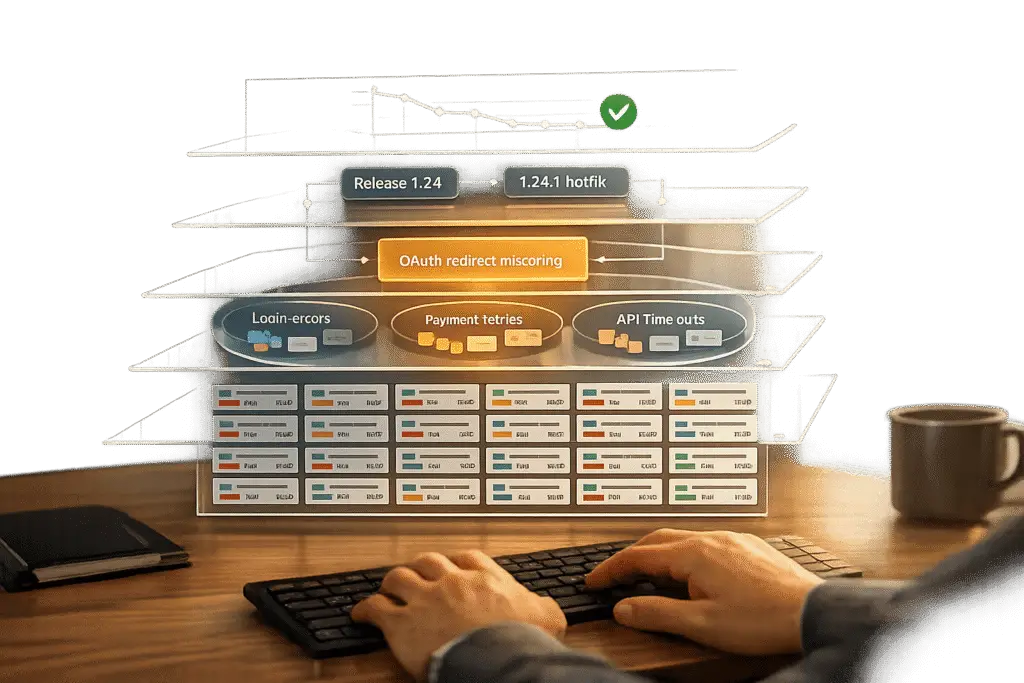
Recurring issues after software releases waste time, frustrate users, and hurt customer trust. Here’s how to fix that: Analyze your support tickets for patterns. By identifying common problems, you can tackle the root causes instead of repeatedly addressing the same complaints.
Key Steps to Spot Recurring Issues:
- Group similar tickets: Use AI tools to detect semantic similarities, even when users describe issues differently.
- Track patterns: Focus on recurring complaints like repeated error messages or frequent cancellation reasons.
- Leverage AI: Automate ticket routing and prioritization to save time to save time and prioritize fixes.
- Connect support with engineering: Link ticket insights to tools like Jira for resolving root causes effectively.
- Validate fixes: Monitor ticket trends after implementing solutions to ensure the problems are resolved.
Why it matters: 70%-80% of tickets often stem from just a few recurring issues. Solving these reduces ticket volume, improves user satisfaction, and saves resources.
AI in Ticket Management Explained | Automate Support Tickets with AI
sbb-itb-e60d259
What Are Recurring Issue Patterns?
A recurring issue pattern refers to an underlying problem that shows up repeatedly across different support tickets, even if they’re worded differently. For example, one user might report, "can’t log in", while another describes an "SSO timeout error." Semantic analysis often reveals both issues stem from the same authentication failure [1][5]. These patterns point to unresolved root causes that not only consume valuable resources but also frustrate customers [1][2].
How to Define Recurring Patterns
To uncover recurring patterns, start by grouping related tickets under shared problem statements. For instance, instead of treating "payment processing failed" and "transaction declined at checkout" as separate issues, combine them into a single category. Achieving this requires consistent use of resolution codes and standardized data fields across teams [1][2].
The key lies in semantic similarity, not just matching keywords. AI tools can identify when different phrases point to the same underlying issue, making ticket categorization and prioritization more consistent. This helps teams spot high-impact clusters early on [1][5]. To get a clearer picture, track recurrence not only by issue type but also by service, client, or customer segment. This approach can help you catch patterns before they grow into larger problems [1][5].
Signs of Recurring Issues
One major indicator of recurring issues is repeated error messages in system logs. For example, if multiple users encounter the same 429 API rate limit error, it’s a clear sign of a problem that likely requires escalation [1]. Another red flag is when customers consistently hit friction points, such as difficulties setting up custom integrations or issues with VPN connections [1][3].
Also, pay attention to patterns in cancellation requests. If several enterprise clients cite "missing SSO support" as their reason for leaving, you’ve uncovered a pattern that demands immediate attention from your product team [4]. Junu Yang, Founder of UserCall, captures the importance of these signals perfectly:
Support tickets are where users tell you what’s actually broken. Not what they say in surveys, not what they click in analytics, but what they couldn’t do, what frustrated them, and what went wrong [3].
How to Analyze Ticket Data for Patterns
Once you’ve identified recurring patterns, the next step is creating a solid process to analyze ticket data effectively. Digging deeper than surface-level metrics allows you to uncover connections that can highlight post-release issues before they snowball into major problems.
Collect and Normalize Data
Start by gathering detailed metadata from every ticket. Go beyond just the subject and description – include timestamps, customer segments (like Enterprise vs. SMB), service identifiers, and error messages [4] [5]. Focus your analysis on specific time frames, such as the first 30 days after a release, to better identify new trends [4].
Consistency is key when classifying data. Standardize categories and resolution codes across teams so recurring issues stay visible, even if handled by different support queues [1]. Use AI-powered natural language tools to group tickets with similar descriptions. For example, whether a user reports a "login error" or says they "can’t access their account", these can be linked as the same core issue [1]. Manual categorization slows things down, so automating data intake through APIs is essential to keep your analysis timely [1].
Finally, make sure you’re logging historical data to monitor patterns over time.
Build Historical Logs
Standardized data collection and well-maintained historical logs are the foundation of accurate trend analysis. Keep detailed ticket histories with clear closure notes. This information can train AI models to recognize "failure signatures", or common patterns of recurring issues. These signatures help your team apply quick fixes rather than wasting time rediscovering solutions.
Track how often issues recur, breaking them down by category, specific service, client type, and customer segment. This helps pinpoint clusters of high-impact problems [1]. When you spot a trend, connect it to real customer quotes or conversation snippets from your logs. This added context is invaluable for engineering teams working on fixes [3]. Once patterns are identified, link your findings to tools like Linear or Jira to tie support tickets directly to workflows for resolving root causes [4].
Find Trends and Connections
With normalized and historical data in place, you can start identifying trends and high-impact issues. Focus on ticket metrics within specific time windows – such as right after a release – to spot emerging problems early [4]. Monitor the frequency of certain categories, services, or client reports to prioritize the most disruptive recurring issues [1]. AI-based tools can speed up this process significantly, providing insights up to 10x faster than manual methods [3].
Leverage confidence scoring to help your team zero in on the most reliable data connections [1]. AI agents can flag patterns like "cancellation tickets mentioning SSO" or "API timeout errors" to reveal hidden churn risks or technical pain points [4]. By grouping related incidents under a common problem pattern, you can address the root cause rather than just putting out fires one ticket at a time [1] [3].
Using AI to Detect Patterns Automatically
Impact of AI-Driven Ticket Pattern Analysis on Support Efficiency
AI takes the heavy lifting out of manual pattern detection, making it faster and more efficient to solve issues.
Manually analyzing support tickets is slow and resource-draining. AI, on the other hand, can quickly group related issues and highlight the ones with the biggest impact. By leveraging natural language processing, AI tools can recognize the same underlying problem even when customers describe it in completely different ways [1][2].
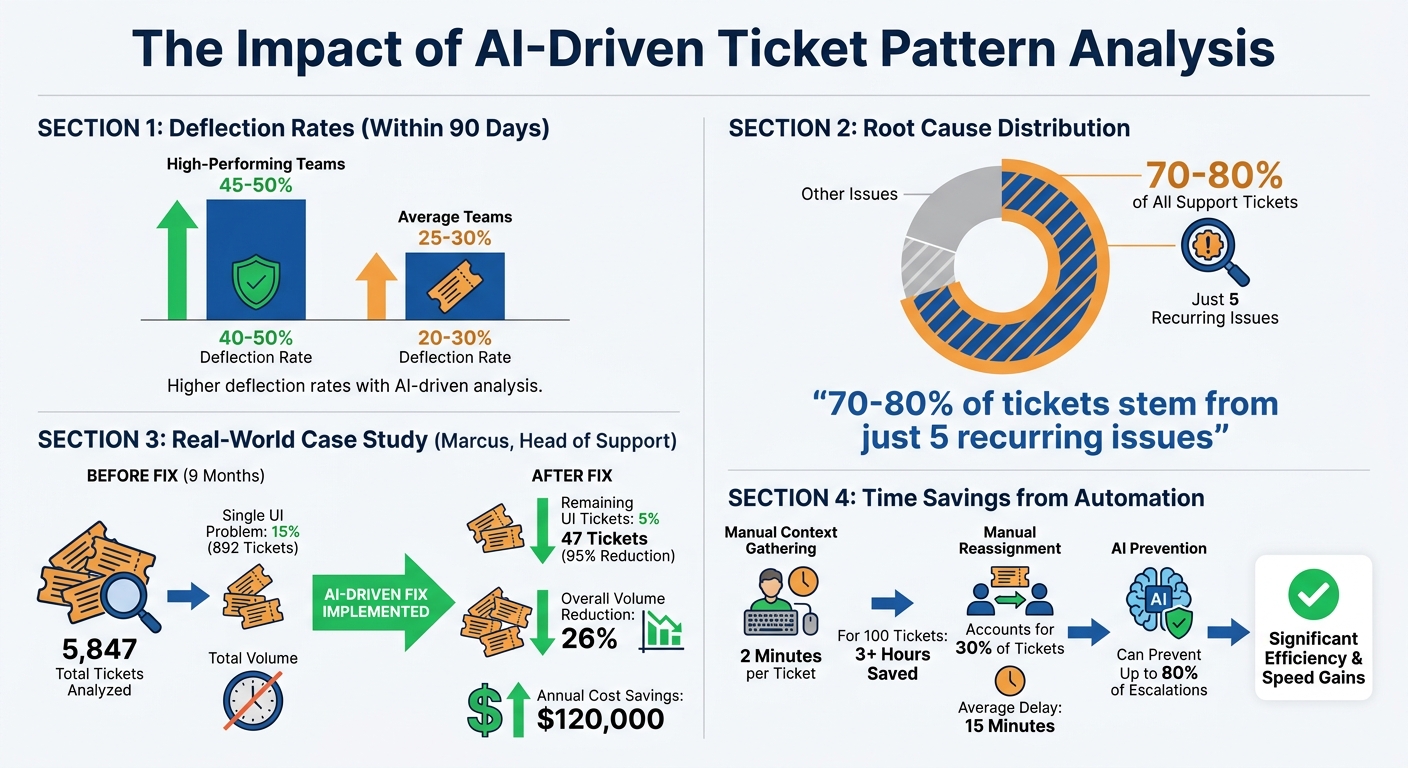
The impact is clear. High-performing support teams report deflection rates of 40% to 50% for their most common issues using AI, while average teams achieve 20% to 30% within just 90 days [[6]](https://docs.buildbetter.ai/pages/Use Cases/cs/ticket-analysis). Even more striking, 70% to 80% of all support tickets typically stem from just five recurring issues [[6]](https://docs.buildbetter.ai/pages/Use Cases/cs/ticket-analysis). With AI identifying these patterns automatically, you can address the root causes instead of resolving each ticket individually.
"We were drowning in tickets because we never analyzed WHY they were coming in. BuildBetter showed us that 60% of our support burden was self-inflicted and fixable. Complete game-changer." – Marcus, Head of Support [[6]](https://docs.buildbetter.ai/pages/Use Cases/cs/ticket-analysis)
Take Marcus, for example. As Head of Support for a 50-person SaaS company, he used AI to analyze 5,847 tickets over a nine-month period. Within just 60 days, the AI revealed that 15% of those tickets (892 in total) were caused by a single UI problem – a feature buried in a nested menu. By moving the feature to the main navigation, the company reduced those specific tickets by 95%, cutting them from 892 to just 47. This change lowered overall ticket volume by 26%, saving the company an estimated $120,000 annually in hiring costs [[6]](https://docs.buildbetter.ai/pages/Use Cases/cs/ticket-analysis). This kind of automated insight transforms how post-release issues are detected and resolved.
AI Pattern Recognition
AI tools go beyond basic keyword matching, using semantic mapping to group similar issues no matter how users phrase their complaints [2][5]. For instance, whether a customer says "can’t log in", "login broken", or "authentication failing", AI understands these all point to the same problem. It even distinguishes between UI confusion and actual technical bugs [[6]](https://docs.buildbetter.ai/pages/Use Cases/cs/ticket-analysis).
These systems train on historical ticket data, learning from detailed closure notes and verified outcomes to create "failure signatures" for common problems [1][5]. Once trained, AI can spot emerging patterns within hours of a release. It prioritizes these patterns by considering factors like historical frequency, potential disruption, and escalation risks [1][2].
Most platforms integrate directly with tools like Zendesk, Jira, or Intercom via API, pulling in real-time ticket data for ongoing analysis [1][5]. AI can also handle multilingual support, grouping similar issues across languages by detecting and translating ticket content [[6]](https://docs.buildbetter.ai/pages/Use Cases/cs/ticket-analysis). To further assist teams, each recommendation is assigned a confidence score, so you know which patterns are the most reliable [1][2].
Automated Ticket Routing and Escalation
Once AI identifies patterns, it can streamline ticket management through automated routing.
AI can route tickets to the right teams based on the issue type, customer segment, and historical resolution data. This eliminates manual reassignment – which accounts for up to 30% of tickets and adds an average of 15 minutes of delay per ticket [7].
By enriching ticket data with customer context, AI calculates a priority score (0–100) and assigns tickets accordingly [7]. For instance, a ticket from an Enterprise customer reporting a known bug would receive a higher priority than a general query from a trial user. This ensures critical issues are escalated immediately, while routine requests are directed to the right queue without manual effort.
The time savings are substantial. Gathering context manually – like checking CRM records, billing history, or usage data – takes about 2 minutes per ticket. For every 100 tickets, that adds up to over 3 hours of labor [7]. AI eliminates this step by pulling relevant data instantly. Additionally, by detecting patterns early, AI can prevent up to 80% of escalations by addressing systemic issues before they spiral into larger problems [7]. When AI groups related incidents under a common pattern, engineering teams can focus on fixing the root cause while support teams handle immediate customer concerns. This turns reactive support into proactive customer support.
How to Manage Recurring Issues
Effectively managing recurring issues goes beyond just identifying them – it requires digging deep into their origins and consistently validating solutions. Here’s how you can tackle this challenge.
Root Cause Analysis (RCA)
To address recurring issues, you need a structured and thorough approach. Start by ensuring consistency in how problems are documented:
- Standardize issue logging. Use consistent categories and resolution codes across teams. When similar problems are labeled differently, patterns can go unnoticed. In fact, 68% of organizations face challenges with fragmented testing and quality processes, leading to more defects slipping into production [8].
- Trace defects back to their roots. Link them directly to features, test cases, or user requirements. This ensures you’re solving the actual problem, not just its symptoms. It’s worth noting that fixing defects late in the development cycle can cost 15 to 30 times more than addressing them early on [8].
- Use AI for clustering tickets. AI tools can identify recurring "failure signatures" by grouping related tickets. This allows teams to spot systemic issues rather than constantly reacting to individual tickets [1][3]. As Layer8 Labs puts it:
Recurring support issues are usually a signal of unresolved root causes, not just high ticket volume [1].
- Create dedicated workflows for root causes. For the most common issue clusters, establish workflow automation processes that assign these problems to engineering teams for permanent fixes instead of temporary patches [1].
Once you’ve pinpointed the underlying issues, the next step is to validate that your fixes are working.
Monitor and Validate Fixes
After addressing the root causes, it’s crucial to confirm that your solutions are effective. Here’s how:
- Track metrics before and after fixes. Monitor ticket volumes by category, service, or customer segment to see if the recurrence rate has dropped. Use reports and visualizations to compare data pre- and post-fix [1][9].
- Group related tickets under common patterns. If new tickets continue appearing under the same pattern after a fix, the problem isn’t fully resolved. Real-time dashboards can help you quickly spot ongoing issues [1][9].
- Maintain detailed logs with closure notes. Accurate records not only validate fixes but also improve AI-driven summaries for future analysis. Improved visibility in QA processes can boost release efficiency by up to 30% [1][8].
Common Mistakes to Avoid
When managing recurring issues, there are some pitfalls to watch out for:
- Don’t rely on anecdotal evidence. Subjective feedback and basic tags don’t provide the full picture. As UserCall notes:
Every ticket is a signal but most teams never see the full picture [3].
- Avoid fixing symptoms instead of root causes. Addressing individual tickets without tackling the underlying problem keeps teams in a reactive cycle. This "queue debt" wastes resources and hides more critical engineering work [1][2][5].
- Don’t rely solely on manual RCA. Manual processes are slow and prone to errors, especially as ticket volumes grow. Automating pattern detection can help you spot trends faster [2][3].
- Ensure comprehensive data collection. Include all tickets – resolved and unresolved – and capture detailed closure notes. Pull data from all channels (email, chat, social media, etc.) to get a complete view of the issue’s impact [1][9].
Conclusion
Recurring issues after software releases don’t have to overwhelm your support team. By leveraging ticket pattern analysis and AI-driven workflows, you can transform the way systemic problems are handled. As highlighted earlier, this approach enables you to identify semantic connections across diverse ticket descriptions, group related issues automatically, and assign them to the appropriate teams for long-term fixes. The result? A shift from reactive problem-solving to proactive root-cause resolution – fewer repeat tickets, lower support costs, and streamlined ticket management.
This strategy lays the groundwork for a more proactive and efficient support system.
Key Takeaways
The best results come from combining structured data, AI-powered semantic detection, and focused root cause analysis workflows. Standardized data formats and detailed closure notes empower AI to recognize recurring patterns or "failure signatures" and predict high-impact problems. Automated routing and linking save technicians from redundant work, while tracking issue frequency across categories, services, and clients pinpoints areas that need improvement.
How to Get Started
Ready to put these ideas into action? Start here:
- Track repeat issues: Evaluate if your ticketing system is enough by using existing ticket data to identify recurring problems with the greatest impact. As Layer8 Labs puts it:
"If your service desk keeps solving the same tickets every week, start by implementing AI-powered detection and remediation workflows" [1].
- Automate classification and triage: Use API-driven tools at ticket submission to ensure consistent categorization from the start.
- Focus on key issue clusters: Develop formal workflows for your most common recurring problems. Platforms like Supportbench offer built-in tools for pattern detection and automated summaries, making it easier to turn raw data into actionable insights with minimal manual effort.
FAQs
What data do I need in each ticket to spot release-related patterns fast?
To spot patterns related to releases more effectively, make sure every ticket includes essential information: a clear issue description and summary, categorization and priority level, timestamp and release version, the product or component affected, details on customer impact, and extra metadata like location or team. Including these details supports faster pattern recognition and enables AI-driven workflows, making it easier to identify recurring problems and address them promptly after releases.
How can I tell if a spike is a real recurring issue or just noisy one-offs?
When support tickets start piling up, it can be tough to figure out if there’s a real problem or just a series of unrelated incidents. This is where AI-driven tools come in handy. These tools can analyze ticket patterns, grouping similar issues together and picking up on semantic connections between them.
By identifying trends, they help you quickly pinpoint recurring problems, often before they escalate. Over time, monitoring these patterns not only cuts down on manual work but also makes it easier to tell the difference between genuine concerns and isolated noise. This means fewer false alarms and a more efficient way to address customer issues.
How do I prove a fix worked using ticket trends?
To determine if a fix was effective, monitor key metrics both before and after making changes. Look for positive shifts such as a drop in ticket volume, fewer escalations, and increased customer satisfaction. Using AI to analyze ticket patterns can also help confirm whether the root cause was addressed. Signs of success might include fewer repeat tickets, reduced escalation rates, and quicker resolution times. These metrics offer solid proof of the fix’s impact.
Related Blog Posts
- How do you identify the top ticket drivers and turn them into a Product backlog?
- How do you create a “Known Issues” program that reduces tickets and escalations?
- How do you measure and reduce backlog reopens (and why they happen)?
- How to run a monthly “top drivers” review from ticket data
Evaluating help desks for a B2B team?
Supportbench is all-inclusive from $32 per agent per month, with migration and onboarding included. See pricing or book a 20-minute demo.






