



Release notes can reduce support tickets by up to 40% when done right. Here’s how:
- Address user confusion upfront: Write release notes in plain language, focusing on what changed, why it matters, and what users should do next. Avoid technical jargon or internal engineering terms.
- Use support data: Analyze common customer issues from tickets to prioritize updates that solve real problems. AI tools can help identify recurring themes quickly.
- Organize for clarity: Structure release notes with sections like New Features, Improvements, Bug Fixes, and Known Issues. Use bullet points, visuals, and concise summaries for easy reading.
- Tailor for different audiences: Customize notes for end users, support teams, and leadership by focusing on benefits, technical details, or business impact, respectively.
- Deliver effectively: Share updates through in-app notifications, email digests, and documentation portals. Highlight major changes prominently to ensure users see them.
Key takeaway: Well-written, user-focused release notes prevent confusion, reduce repetitive tickets, and improve customer satisfaction.
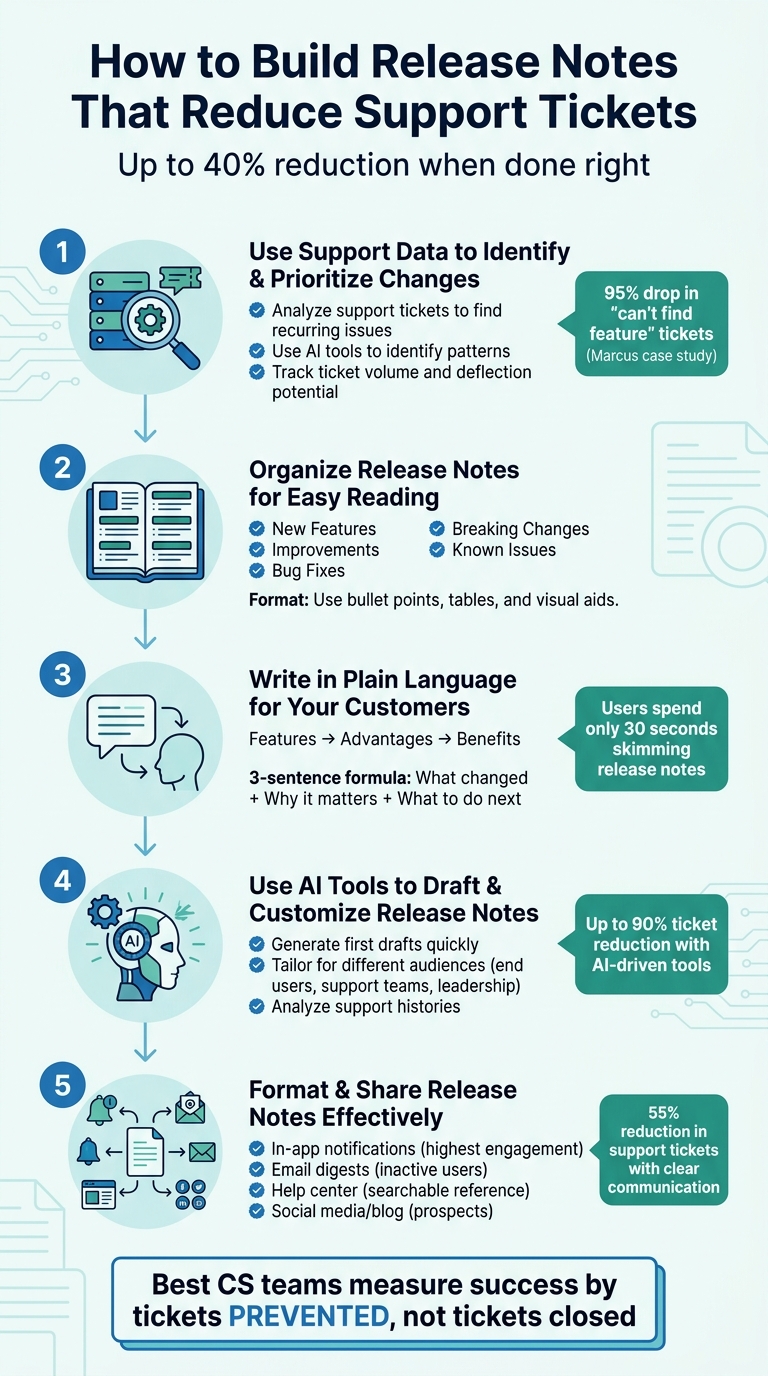
5-Step Process to Build Release Notes That Reduce Support Tickets by 40%
Release Notes: Best Practices and Real-life Examples
sbb-itb-e60d259
Step 1: Use Support Data to Identify and Prioritize Changes
When crafting release notes, focus on solving real customer problems – those that show up repeatedly in support tickets. Instead of listing every technical update or internal milestone, start by identifying the issues that confuse or frustrate users the most. Your support queue is an invaluable resource for spotting these pain points. Using AI tools can speed up the process, helping you zero in on updates that will have the biggest impact on reducing support inquiries.
Using AI to Find Common Customer Problems
AI tools excel at sifting through months of support ticket data to uncover patterns. To get the most out of these tools, you need to organize your ticket data with consistent tags like Theme (main topic), Component (specific feature), Intent (bug, gap, confusion, or workflow issue), and Severity (rated on a 1–5 scale) [8]. Once structured, AI can cluster thousands of tickets into actionable insights, showing which features confuse users, which workflows are breaking down, and which updates could prevent the most questions.
"Support tickets can be thought of as a repository of customer issues that need to be addressed in your product development roadmap. AI simply helps analyze and categorize these tickets in a standardized manner to identify recurring themes or patterns." – Typewise [8]
Take Marcus, for instance, Head of Support at a SaaS company with 50 employees. In 2025, he used AI to analyze 5,847 tickets collected over nine months. The analysis revealed that 15% of the tickets were tied to a single "hidden" feature users couldn’t locate. By moving that feature to the main navigation and updating release notes, the number of "can’t find feature" tickets plummeted from 892 to just 47 in 60 days – a 95% drop. This change also reduced total monthly tickets from 650 to 480, saving the company $120,000 annually in projected hiring costs [[7]](https://docs.buildbetter.ai/pages/Use Cases/cs/ticket-analysis). This example underscores how support data, when used strategically, can guide release note priorities and address customer needs effectively.
Platforms like Supportbench make this process even easier by offering AI tools that summarize cases, detect recurring themes, and highlight knowledge gaps. These platforms can also track documentation link rates, helping you identify when users aren’t finding answers in existing resources and where new release notes might be needed [5].
Once you’ve identified the most common issues, the next step is to prioritize them based on their potential impact on support volume.
Prioritizing Updates by Customer Impact
Not all changes are equally important. A backend performance tweak might be technically impressive but won’t help if it doesn’t solve a common customer issue. The goal is to focus on updates that address real pain points, such as making features easier to use, speeding up results, or simplifying workflows [3].
A Priority Matrix can help rank updates based on four factors: Ticket Volume (how many tickets the issue generates), Deflection Potential (the percentage of tickets that could be avoided with clear communication), Effort to Fix (Low/Medium/High), and ROI (hours saved per month) [[7]](https://docs.buildbetter.ai/pages/Use Cases/cs/ticket-analysis). Start with "High Impact, Low Effort" updates – like adding tooltips, in-app hints, or improving documentation. These straightforward fixes can significantly reduce ticket volume while improving the overall user experience.
"The best CS teams measure success by tickets prevented, not tickets closed." – BuildBetter [[7]](https://docs.buildbetter.ai/pages/Use Cases/cs/ticket-analysis)
To measure the effectiveness of your updates, track deflection metrics – the number of tickets related to a specific issue before and after your release. If users are still submitting questions about a new feature, it may mean the release notes need clearer instructions, better context, or more detailed in-app guidance. This data-driven approach ensures you’re not just reducing ticket volume but also improving the overall customer experience.
Step 2: Organize Release Notes for Easy Reading
After deciding which updates to highlight, the next step is ensuring customers can easily find and understand them. Dense text and technical jargon can frustrate users, pushing them toward support instead of helping them embrace new features. By organizing release notes effectively, you make it easier for readers to scan, understand, and act on the updates – while also cutting down on common customer questions and support tickets.
What to Include in B2B Release Notes
Every release note should answer these three key questions: What changed? Why does it matter? What should the user do next? To achieve this, structure your notes into clear, repeatable sections.
Start with a Release Summary at the top. This should be a quick, three-sentence snapshot of the update. Highlight the main improvement, explain the problem it addresses, and include a call to action. For example: "We’ve added bulk export to CSV. This saves you time when analyzing multiple reports at once. Try it now in the Reports tab." This gives readers the essential details in seconds.
Next, divide the main content into categories for clarity:
- New Features: Highlight brand-new capabilities or tools users can now access.
- Improvements: Focus on enhancements to existing features, such as faster performance or a refined user interface.
- Bug Fixes: Frame resolved issues positively, e.g., "Fixed login errors on Safari browsers."
- Breaking Changes: Detail critical updates that require user action, including clear migration steps and timelines.
- Known Issues: Mention current limitations, provide workarounds, and include estimated resolution dates.
Always include version numbers and release dates to make tracking easier. Use semantic versioning (e.g., major.minor.patch like 3.0.1) to indicate the scope of changes. For major updates, like a UI overhaul, lead with the go-live date, explain the reasoning behind the change, and specify if users need to take any steps.
Once your content is structured, focus on formatting it for quick scanning and comprehension.
Using Tables and Bullet Points for Clarity
With the content outlined, the next step is presenting it in a way that’s easy to digest. Bullet points work well for listing fixes or minor updates – keep each point short and direct. For more complex changes, tables can help. For example, a table comparing "Old Behavior" to "New Behavior" allows users to grasp changes at a glance.
"Users who read your release notes are typically your most engaged customers. Make it worth their time." – ReleaseGlow Team
Organize updates thematically rather than as a random list. For example, group changes by product area (like "Dashboard", "Search", or "Profile") instead of by technical ticket type. Use bold headers and ample spacing to keep the layout clean and prevent overwhelming readers. If an update requires more explanation, use progressive disclosure – start with a brief summary and link to detailed documentation for those who want to dive deeper. This way, both casual and advanced users get what they need without cluttering the main release note.
Finally, incorporate visual aids such as screenshots, GIFs, or annotated images to illustrate changes, especially for UI updates. Visuals often explain workflows more effectively than text, reducing confusion and making it easier for users to adopt new features without generating unnecessary support queries.
Step 3: Write in Plain Language for Your Customers
Once your release notes are organized, the next step is making them crystal clear for your audience. Overly technical language often leaves customers scratching their heads – and reaching out to support for clarification. To avoid this, focus on writing in plain language that highlights the "why it matters" for your users. In other words, emphasize outcomes instead of overwhelming them with implementation details.
Using the Features-Advantages-Benefits Framework
The Features-Advantages-Benefits (FAB) framework helps translate technical updates into meaningful customer benefits. Here’s how it works:
- Feature: What your product does – for example, "AI-powered lead scoring."
- Advantage: The practical outcome – like "reps prioritize the best leads first."
- Benefit: What the customer gains – such as "book more meetings and improve sales performance."
Take it a step further by describing the "after-state" – how the customer’s situation improves. For instance: "SDRs stop dreading Monday prospecting; pipeline grows" [10].
To make this actionable in release notes, try the "so you can" chain. Start with a technical change and keep adding "so you can" until it connects to a personal outcome. For example, instead of saying, "We refactored the ingestion pipeline", say, "Data uploads are 3x faster, so you can import records in minutes instead of hours" [10]. This approach shifts the focus from technical details to real-world results.
Remember, different audiences care about different things. Executives want high-level benefits like ROI, while end users need to know how updates make their work easier. For B2B SaaS, leading with what the user can do – like "log in with Face ID" – is far more relatable than vague promises like "enhanced security protocol" [9]. Once you’ve captured their interest, use feature details to back it up [10].
Throughout your release notes, use direct, customer-focused language to keep updates personal and engaging. For example, write "You can now export multiple reports at once" instead of "Bulk export functionality has been added" [1]. This puts the user first and makes the update feel relevant.
Avoiding Jargon and Complex Explanations
Ditch the technical jargon and focus on outcomes that everyone can understand. For example, instead of "Implemented real-time presence indicators via WebSockets", say, "See which teammates are viewing the same page as you" [1]. By shifting the focus from the technical process to the result, you make the information accessible to all users – not just the tech-savvy ones.
To grab attention quickly, put the most important details at the start. Studies show that users spend only about 30 seconds skimming release notes before moving on [2].
For major updates, use the 3-sentence formula: start with the headline improvement in plain language, explain the problem it solves, and finish with a clear call to action [4]. For instance: "We’ve added bulk export to CSV. This saves you time when analyzing multiple reports at once. Try it now in the Reports tab." This simple structure ensures readers immediately see the value without wading through technical explanations or lengthy paragraphs.
Step 4: Use AI Tools to Draft and Customize Release Notes
Drafting release notes manually can be a tedious process for support teams. AI tools simplify this by analyzing support data, pulling information from completed features, and generating clear first drafts in no time. The trick lies in giving AI the right inputs and then refining the results for different audiences. This approach not only speeds up the process but also ensures release notes are clear and relevant for various customer segments.
Using AI to Generate First Drafts
AI tools excel at creating concise first drafts by pulling data from project systems or support histories. A great example is Aha! Roadmaps‘ AI-powered release notes feature, introduced in October 2023. With just a few clicks, users can select features or epics, and the AI generates summaries by analyzing their names and descriptions. It even organizes updates by feature type. Claire George, Vice President of Marketing at Aha!, explains:
"Draft high-quality release notes in record time. Use AI to analyze a set of recently completed features, organize them by type, and summarize the benefits" [6].
Another tool, Supportbench’s AI Agent-Copilot, goes a step further. It reviews support case histories and knowledge bases to pinpoint updates that matter most to customers. By surfacing relevant documentation and drafting responses based on approved product knowledge, it eliminates much of the manual effort spent searching for and rewriting answers [5]. Instead of combing through ticket data, the AI identifies patterns in customer questions and highlights features that address common issues.
To get the most out of these tools, use outcome-focused prompts. For instance, instead of asking for "a list of completed tickets", you could prompt the AI with: "Summarize these updates for B2B admins, focusing on how each change saves time or reduces errors." You can also instruct the AI to flag unclear points for revision [2].
Tailoring Notes for Different Customer Groups
After generating a draft, refining it for specific audiences ensures the message is clear and relevant. AI can help create multiple versions of the same update, tailored to different groups. For example:
- External users: Focus on benefits and outcomes.
- Support and sales teams: Include links to specific tickets for additional context.
- Leadership: Provide high-level summaries emphasizing business impact [2].
Take a new bulk export feature as an example. End users might see a simple update like, "You can now export multiple reports at once – saving you time when analyzing data." Support teams, on the other hand, would get additional detail, such as, "This resolves tickets #1234 and #1456 from enterprise customers requesting CSV export." Leadership might receive a summary like, "Bulk export reduces manual work for power users, potentially increasing retention among enterprise accounts" [2].
Teams that adopt AI-driven tools for ticket deflection and maintain well-organized knowledge bases have seen ticket reduction rates nearing 90% [5]. However, the effectiveness of AI depends heavily on the quality of your documentation. Roop Reddy from Documentation.AI highlights this:
"AI does not replace support teams. It amplifies the quality of the knowledge it is given" [5].
To ensure the AI works effectively, structure your knowledge base by product components and workflows rather than relying on standalone pages. This allows the AI to interpret context more accurately and deliver better results.
Step 5: Format and Share Release Notes Effectively
Once your release notes are polished, the next step is to ensure they’re easy to find and understand. Combining clear formatting with a multi-channel distribution strategy makes your updates more accessible and can even help cut down on support requests.
Formatting for Easy Access and Use
Consistency is key when it comes to formatting release notes. Use a standard structure that includes a version number (e.g., 1.2.3, following semantic versioning), a release date (MM/DD/YYYY), and a brief summary. Group updates into categories like New (for features), Improved (for enhancements), and Fixed (for bug fixes) to make them scannable.
Keep updates concise – just 1–2 sentences per point. Use bullet points instead of lengthy paragraphs, and always lead with how the update benefits users. For instance, say "Save time with bulk exports" rather than "Added CSV export logic to the reporting module." For major updates, use a three-step approach: highlight the improvement, explain the issue it solves, and include a call to action like "Visit Settings to enable this feature now."
Visual aids, such as screenshots or diagrams, can make new workflows or UI changes easier to grasp. To avoid overwhelming the main notes, link to additional resources like knowledge base articles or migration guides for more technical details. Studies show that clear communication about updates and bug fixes can reduce support tickets by up to 55% [11].
For major updates or breaking changes, place these prominently at the top. Use warning banners or alert icons to emphasize deadlines and include step-by-step instructions for any required actions. Good formatting ensures your release notes are not only informative but also ready for effective distribution.
Choosing the Right Distribution Channels
Once your release notes are well-organized, it’s time to share them. A layered distribution approach ensures you reach all customer segments effectively. In-app notifications are particularly powerful because they catch users while they’re already engaged with your product. Use features like "What’s New" widgets, bell icon badges, or subtle slide-in notifications to deliver updates without disrupting workflows.
AnnounceKit highlights the importance of this approach:
"In-app delivery is the highest-engagement channel for release notes. Users are already in your product, already in context, and already paying attention." [1]
Email digests are another effective tool, especially for users who haven’t logged in recently. Sending these on a regular schedule and tailoring them to specific roles – detailed technical notes for admins and benefit-focused summaries for end users – keeps the content relevant. Publishing release notes in a help center or documentation portal creates a permanent, searchable resource that’s useful for customers and support teams alike.
| Channel | Best For | Key Benefit |
|---|---|---|
| In-App Widget | Active users | High engagement and contextual relevance |
| Email Digest | Inactive users | Personalized updates to re-engage users |
| Help Center | Self-service support | A permanent, searchable reference |
| Social Media/Blog | Prospects & Stakeholders | Showcasing product growth and momentum |
For changelog pages, use reverse chronological order so the latest updates are always at the top. For mobile apps, update the "What’s New" section in app stores with concise bullet points that highlight key changes. Consistently publishing release notes on a set schedule can help your customers develop a habit of checking for updates.
Common Mistakes to Avoid
Release notes can lose their effectiveness if they fall into certain traps. Two major missteps stand out: overwhelming users with technical details and failing to disclose known issues. While good release notes can reduce support tickets, these mistakes can have the opposite effect.
Including Too Much Technical Detail
One common problem is treating release notes like an internal engineering log. For instance, saying "Fixed bug in authentication middleware causing race conditions" focuses on the technical fix rather than the user experience. Instead, a clearer message like "Fixed an issue where you were occasionally logged out unexpectedly" communicates the impact in a way users understand.
The team at ReleaseGlow emphasizes this point:
"The teams that do it well (Linear, Notion, Stripe, GitHub) have something in common: they write release notes for users, not for the internal engineering log." [4]
Overloading release notes with technical jargon can confuse users, leading them to contact support for clarification. Keeping the language simple and user-focused not only improves understanding but also reduces unnecessary support inquiries.
Hiding Known Issues from Customers
Another mistake is failing to disclose known bugs. When users encounter an issue that isn’t acknowledged, they often reach out to support to confirm if it’s a broader problem. This lack of transparency can frustrate users and create duplicate tickets.
FlowGent explains the importance of openness:
"Knowing that a company is aware of an issue and working on it is far less frustrating than experiencing a problem in silence and wondering if you’re the only one." [12]
Being upfront about known issues can significantly lower support ticket volume. For example, Slack managed to cut related support tickets by 45% [13] to 70% [12] by openly communicating known bugs through status pages and in-app updates. When addressing a bug, include details like an estimated fix timeline and any available workarounds. For instance: "We’re aware that bulk exports are timing out for datasets over 10,000 rows. Our team is working on a fix expected by 4/30/2026. In the meantime, export in smaller batches of 5,000 rows." This approach reassures users, sets clear expectations, and minimizes "is this broken?" inquiries. Clear communication like this fosters trust and helps keep support workloads manageable.
Conclusion
Key Takeaways for Better Communication
Writing effective release notes can significantly cut down on support tickets. The key is to focus on the users, not the engineers. Explain why the changes matter and use simple, straightforward language to avoid confusion before it arises. As mentioned earlier, clear release notes don’t just reduce support tickets – they also build trust with users. Top companies in the industry get this: they prioritize user outcomes over technical details [4].
The process is simple. Start by analyzing support data to uncover common customer issues. Organize updates into themes for easy reading, and follow the "What, Why, Next" framework. AI tools can help you draft release notes quickly [4], but always tailor them for your audience – end users care about the benefits, developers need the technical details, and stakeholders want the big picture.
Formatting is just as important as the content. Use categories like "New", "Improved", and "Fixed" to group updates, and add visuals when they help illustrate changes. Transparency is crucial too – acknowledge known issues and offer workarounds to reduce follow-up questions.
How to Start Using These Methods
Here’s how you can put these strategies into action with your next release.
Start by reviewing recent support tickets to identify the main challenges your customers face. Use the three-sentence framework to summarize updates, swapping out technical terms for clear, outcome-driven language that resonates with users.
Create a consistent release note template and align it with your release schedule [1]. Assign a team member to oversee the final review and publication. Share the notes through in-app notifications, email, and your help center to ensure they reach all your customers. Remember, your most engaged users are already paying attention to these updates [4] – make them count.
FAQs
Which support ticket tags should we start using?
To make support more efficient, use tags that help prioritize, organize, and simplify incoming requests. Tags such as urgent, bug, feature request, question, account issue, and performance problem are particularly effective. They allow for quicker triage and help address recurring issues more efficiently. By aligning tags with common challenges or specific product areas, you also improve searchability and enable users to find answers on their own, which can ultimately lower the number of support tickets.
How do we measure if release notes are deflecting tickets?
To figure out if your release notes are cutting down on support tickets, start by tracking the ticket deflection rate. This metric reveals what percentage of customer issues are resolved using self-service tools like FAQs or knowledge bases. On top of that, AI tools can help by analyzing support interactions to spot decreases in repetitive questions. If you see high deflection rates, it’s a good sign your release notes are doing their job – answering common customer questions and easing the load on your support team.
What’s the best way to share release notes without spamming users?
Sharing release notes effectively can make a big difference in how users perceive updates. Instead of overwhelming users with unnecessary notifications, focus on targeted communication channels like in-app notifications, email summaries, or dedicated support portals.
To make these updates more meaningful, use AI tools to customize the content for different customer segments. This way, updates feel relevant and tailored to their needs.
It’s also smart to send updates selectively, based on user preferences or activity patterns. And remember, keep release notes short, clear, and easy to find. This approach not only reduces confusion but can also help cut down on support tickets.
Related Blog Posts
- How do you reduce “where is my ticket?” follow-ups with proactive updates?
- Drafting Release Notes: Using AI to Summarize Bug Fix Tickets
- How to reduce “where is my ticket?” emails using portal automation
- How to build a “known issues” section that reduces tickets without hiding support
Evaluating help desks for a B2B team?
Supportbench is all-inclusive from $32 per agent per month, with migration and onboarding included. See pricing or book a 20-minute demo.






