



When your support team faces the same issues repeatedly, a troubleshooting playbook can save time, reduce errors, and improve customer satisfaction. Here’s how you can create one that works effectively:
- Identify recurring problems: Use historical ticket data to find the most common and time-consuming issues. AI tools can help analyze patterns and group similar tickets.
- Document clear solutions: Write step-by-step guides for each problem, including symptoms, root causes, and resolution steps. Use plain language and add decision trees for complex scenarios.
- Standardize templates: Organize your playbook into structured sections for easy reference. AI can help automate updates and flag gaps in documentation.
- Test and refine: Simulate real-world scenarios to ensure the playbook works as intended. Use feedback loops to improve accuracy and efficiency.
- Automate workflows: Implement AI-powered ticket routing and prioritization, ensuring clear handoffs between AI and human agents to handle issues effectively.
- Monitor and update regularly: Track metrics like ticket deflection, resolution speed, and customer satisfaction to measure success. Update the playbook after incidents or product changes.
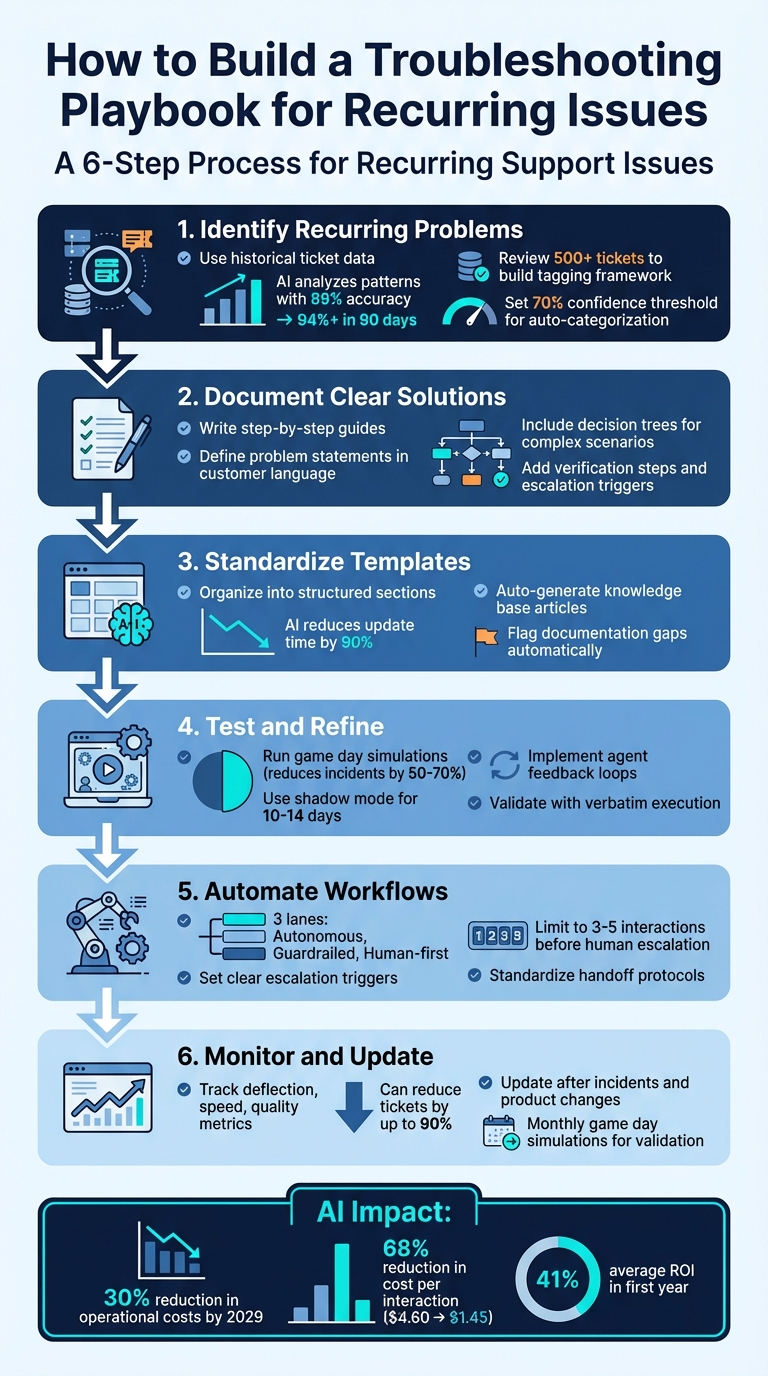
6-Step Process to Build an Effective Support Troubleshooting Playbook
Building an Intelligent Customer Support Chatbot with RAG: A Complete Guide
sbb-itb-e60d259
Step 1: Find Your Most Common Issues
To create an effective playbook, you need to identify the problems that consistently drain your team’s time and resources. Instead of relying on assumptions, use data to uncover the most frequent and resource-intensive issues.
Collect Data from Support Cases
Start by gathering historical ticket data from all your support channels – email, chat, web forms, and any other intake points. Normalize this data into a consistent format with fields like subject, body, customer ID, and metadata [9]. This standardized structure allows for easier pattern recognition.
Next, review at least 500 tickets to build a tagging framework. Define 4–6 intent categories, such as bug, billing, how-to, and feature request, along with 4 priority levels. This system provides your team – and eventually your AI – with a clear and consistent way to classify issues [9]. Ensure all teams use the same resolution codes. When different teams use varied terminology for the same problem, recurring issues can get buried in the data [7] [8]. With standardized data in place, AI can identify trends with greater accuracy [9].
Use AI to Analyze Trends
Once your ticket data is standardized, AI can analyze patterns with precision. Manual triage for a single ticket can take 15–30 minutes [9]. AI-powered triage systems, however, use natural language processing to understand the context of a ticket rather than relying on keyword matching. These systems typically start with 89% accuracy, improving to 94% or higher within 90 days as they adapt through feedback [9].
"Recurring support issues are usually a signal of unresolved root causes, not just high ticket volume." – Layer 8 Labs [7]
AI systems are particularly effective at grouping similar tickets, even when they’re worded differently [7]. For instance, "Can’t log in" and "Password reset not working" might point to the same underlying issue. Set a 70% confidence threshold, allowing the AI to only auto-categorize tickets it’s confident about. Tickets below this threshold are flagged for human review, helping identify new trends and refine the AI’s understanding over time [9]. Reclassifying these tickets ensures continuous improvement in accuracy, boosting both efficiency and cost savings [9].
The financial benefits of AI in customer service are hard to ignore. It can reduce the cost per interaction by 68%, dropping from $4.60 to $1.45 [9]. Companies implementing AI for support often see an average ROI of 41% within the first year [9]. For a mid-sized operation handling around 400 tickets per week, a custom AI triage system costs roughly $340 per month in API and compute expenses [9] – far less than the cost of hiring additional staff to handle the same workload.
Step 2: Document Problems and Solutions
After identifying your most common issues, the next step is to create structured documentation that your team can depend on. This documentation should outline each problem in detail, ensuring consistent and efficient resolutions. Focus on capturing the problem, its root cause, and actionable resolution steps.
Define the Problem and Root Cause
Start by writing a clear problem statement using the same language your customers use when describing the issue. For instance, instead of using technical terms like "UI rendering failure", stick to straightforward phrases like "dashboard won’t load." Then, list specific symptoms agents should look for, such as error codes, unusual app behavior, or performance issues. For example, instead of a vague "login issues", document something more precise like "Error 403 appears after entering the password, redirecting the user to a blank screen."
Include detailed environment information to help narrow down potential causes. This could be the device type, operating system version, browser, network conditions, or account permissions. For instance, a login problem on Safari 16 with macOS Ventura might differ greatly from the same issue on Chrome 110 with Windows 11. Additionally, describe the severity and impact of the problem – whether it’s a critical bug affecting all users or a minor inconvenience for a small group. This helps agents prioritize and decide when escalation is necessary.
For root cause analysis, move beyond symptoms to explore potential causes, starting with the most common. For example, a payment failure might stem from expired credit card details, an incorrect billing address, or a backend API timeout. Include diagnostic resources like logs, traces, or screenshots. Provide agents with discovery questions such as "When did the issue first occur?", "What action was taken before the error?", or "Has this customer reported the issue before?" These details pave the way for effective resolution.
Write Step-by-Step Resolution Guides
Break down solutions into clear, actionable steps. Each step should specify what to do and what outcome to expect. For instance, instead of saying "check the settings", provide precise instructions like: "Go to Settings > Notifications > Enable Alerts. A green checkmark should appear next to ‘Push Notifications.’" This clarity eliminates confusion and speeds up resolutions.
Decision trees can be a helpful tool for guiding agents through different scenarios. Use "If/Then" logic to streamline the process: "If the error persists after Step 3, proceed to Step 4; if resolved, confirm the fix and close the ticket." Always include a rollback plan in case the solution fails or creates new issues. For example: "If disabling the feature flag causes data sync problems, re-enable it immediately and escalate with the attached logs."
"Troubleshooting guides act as a single source of truth for resolving customer issues quickly and correctly." – Knowmax
End each guide with verification steps and escalation triggers. Verification might involve checking backend logs, confirming a successful transaction, or asking the customer to test the fix. This ensures the issue is fully resolved and prevents repeat contacts. Clearly define escalation triggers, specifying when to involve senior engineers and what details (e.g., logs, screenshots, timestamps) should accompany the escalation. By documenting these elements, your playbook becomes a dependable resource for consistent and efficient support.
| Element | Description | Purpose |
|---|---|---|
| Environment Details | Device type, browser, app version | Eliminates false leads early in the process |
| Validation Step | Verification of fix in backend logs or UI | Prevents repeat contacts and confirms resolution |
| Escalation Trigger | Conditions requiring senior engineer involvement | Ensures efficient handoff with required context |
| Rollback Plan | Steps to undo changes | Reduces risk if the solution causes further issues |
Step 3: Standardize Playbook Templates with AI
After identifying and documenting issues in the earlier steps, the next focus is creating consistency by standardizing your playbook for AI integration. While recurring problems may already be documented, maintaining up-to-date and reliable guides is the real challenge. Manual updates often fall behind, but AI can transform static documentation into dynamic resources that automatically stay current.
Unstructured documentation leads to inconsistent AI outputs and unnecessary effort. To avoid this, organize your playbooks around key areas like product features, components, and workflows. This approach creates a reliable source of information for both customer-facing bots and internal tools.
"The limiting factor is not AI capability. It is how product knowledge is documented, structured, and maintained." – Roop Reddy, Documentation.AI [2]
By structuring your playbooks effectively, AI can take over tasks like managing updates and identifying potential issues.
Use AI for Auto-Summaries and Knowledge Base Updates
AI can significantly reduce the time needed to update content – by as much as 90% [12]. A practical method is to have AI draft new playbook entries immediately after a ticket is resolved, capturing the solution while it’s still fresh.
Generative AI tools can even extract detailed instructions from video recordings of successful resolutions. These tools can include screenshots, transcripts, and step-by-step processes, ensuring that the expertise of senior engineers doesn’t stay locked in their heads [3]. For example, Supportbench’s AI analyzes case histories and automatically generates knowledge base articles, filling in fields like subject, summary, and keywords.
AI also helps identify gaps in your documentation. By analyzing frequently escalated or unresolved tickets, it can recommend updates to your playbook [12]. It can even flag sections for review when new product features are introduced or when resolution trends shift. This proactive system ensures your documentation stays accurate without requiring constant manual updates.
When using AI to draft updates, you can improve the output by fine-tuning your instructions. Specify the format you need (e.g., "List 10 bullet points" or "Create a table"), define the audience (e.g., "non-technical users"), and set clear timeframes for the data being analyzed [11]. These steps help ensure the AI delivers content that’s both relevant and easy to understand.
Add Predictive Issue Detection
AI doesn’t just maintain playbooks – it can also help prevent problems before they escalate. Predictive issue detection works by analyzing patterns across thousands of support interactions and comparing them with known failure trends. This allows your playbook to highlight high-priority issues before they escalate [3].
To maximize accuracy, include explicit decision logic in your AI-powered playbooks. Instead of vague instructions like "check if the system is slow", provide clear conditions such as: "If the error rate exceeds 5% for 3 minutes AND response time is greater than 2 seconds, restart the service" [3]. This level of detail ensures consistent handling of recurring problems across your team.
To implement this effectively, divide your AI playbooks into specific operational categories:
- Autonomous: Handles tasks that can be fully resolved without human involvement (e.g., password resets).
- Guardrailed: Manages issues but requires human approval for sensitive actions (e.g., refunds).
- Human-first: Focuses on gathering context and logging information before escalating high-risk or legal issues [4].
These categories ensure the right balance of automation and human oversight, depending on the situation.
By 2029, agentic AI is expected to autonomously resolve 80% of common customer service issues, leading to a 30% reduction in operational costs [4]. Teams that keep their knowledge bases structured and up-to-date for AI can reduce ticket volumes by as much as 90% [2]. The key to achieving these results lies in how well your playbooks are organized and maintained – something AI excels at when given the right framework.
| Playbook Lane | AI Role | Human Role |
|---|---|---|
| Autonomous | Handles complete resolutions (e.g., password resets). | None (monitoring only). |
| Guardrailed | Resolves but requires approval for sensitive actions. | Reviews and approves (e.g., refunds, exceptions). |
| Human-first | Gathers context, logs, and identity verification. | Takes over immediately for high-risk/legal issues. |
Step 4: Implement, Test, and Automate Playbooks
Creating a playbook is just the beginning. Ensuring it actually works when your team needs it is a whole different challenge. Without proper validation, even the most detailed playbooks can fall short during critical incidents.
Test Playbooks with Your Support Team
Before rolling out your playbooks, put them through their paces with verbatim execution and monthly game day simulations. These methods can reduce major incidents by as much as 50–70% [13]. Verbatim execution involves having team members follow the playbook step-by-step, exactly as written. This process helps identify unclear instructions, missing steps, or errors.
Game day simulations provide a safe way to practice and uncover issues before they affect customers. These mock scenarios ensure your team is ready for real-world challenges.
For AI-driven playbooks, consider starting in shadow mode for 10–14 days. In this phase, the AI drafts responses for agents to review and edit, rather than sending them directly to customers [5][14]. This trial period allows you to fine-tune the playbook and build confidence in its reliability.
Timing is key when creating or updating playbooks. According to Nawaz Dhandala of OneUptime:
"The best time to write a playbook is before the incident. The second best time is right after" [10].
By documenting steps immediately after an incident, you ensure accuracy while the details are still fresh, rather than relying on memory weeks later.
To keep playbooks evolving, implement a simple feedback system. Allow agents to rate AI-generated suggestions and flag any gaps they notice. This continuous feedback loop helps refine the playbook and ensures it stays relevant for recurring issues.
Once tested thoroughly, these validated practices lay the groundwork for reliable automation. Feedback from testing also helps define clear escalation triggers, which are essential for effective automation.
Automate Triage and Escalation Workflows
After testing, automation becomes the key to consistent playbook execution. It frees up your team to focus on more complex problems. However, automation needs clear escalation triggers – not vague guidelines. For example, instead of "escalate if the customer seems upset", use specific conditions like "escalate if sentiment analysis detects anger or legal threats" [4].
To streamline automation, organize workflows into three distinct lanes:
| Escalation Lane | Ownership | Typical Use Cases |
|---|---|---|
| Autonomous | AI-Owned | Status checks, password resets, basic troubleshooting |
| Guardrailed | AI + Human Approval | Refunds over a set amount, account changes, cancellations with exceptions |
| Human-First | Human-Owned | Security breaches, legal threats, executive complaints |
This structure balances speed with oversight. For instance, AI can handle simple tasks like password resets entirely on its own (autonomous lane). For more sensitive issues, like refunds, the AI drafts a response for human approval (guardrailed lane). Meanwhile, high-stakes cases like security breaches go directly to a human with all relevant context (human-first lane).
Standardizing handoffs is another critical step. Make sure every escalation includes a structured case brief with key details: a customer summary, issue classification, SLA tier, account context, steps already taken, and the recommended next action [4][3]. This eliminates the guesswork for agents and saves valuable time.
To prevent endless back-and-forth, set a limit of 3–5 interactions before escalating to a human [4]. This simple rule ensures customers aren’t left frustrated and helps catch edge cases that your playbook might not fully address yet.
Step 5: Monitor, Update, and Measure Success
Once you’ve built automated triage and escalation workflows, the next step is to ensure your playbook stays effective through continuous monitoring. In an AI-driven support environment, regular evaluation and updates are essential. A playbook is never static – your product evolves, customer behavior changes, and new challenges arise. Without ongoing updates, even the most meticulously crafted playbook can become outdated, leading to AI systems providing overly confident but incorrect responses [2][4].
Track Performance Metrics
To measure how well your playbook is performing, focus on four key areas: deflection, speed, quality, and update frequency.
- Deflection Metrics: Evaluate how effectively your playbook reduces manual ticket creation by tracking the ticket deflection rate and self-service resolution rate. Teams leveraging AI-driven playbooks with up-to-date knowledge have seen ticket reductions as high as 90% [2].
- Speed Metrics: Keep an eye on First Response Time (FRT), Average Handle Time (AHT), and Time to Resolution (TTR). These metrics indicate how quickly your team resolves customer issues.
- Quality Metrics: Assess accuracy and customer satisfaction by monitoring First-Contact Resolution (FCR), reopened ticket rates, and Customer Satisfaction (CSAT) scores. These reveal whether your playbook is providing effective and lasting solutions [1][2][5].
- AI-Specific Metrics: Track the match rate between AI-suggested responses and those actually used by agents, along with AI confidence scores. Consistently low match rates or confidence scores suggest your playbook may need updates or additional detail [4][5][16].
For update frequency, measure how often tickets reference current playbook content and how quickly updates are made after product releases. These indicators help identify when immediate updates are necessary [2].
Update Playbooks Regularly
Instead of relying on fixed schedules, set clear triggers for updates. For example, update your playbook immediately after incidents that expose gaps, after product or infrastructure changes, or when on-call engineers report confusion [6][10].
To maintain accountability, assign ownership of each playbook to specific team members. Include metadata like the last updated date, version number, and owner details to ensure seamless handovers if staff changes occur [1][6][10].
Use tools like failure bucket analysis to identify areas needing improvement. AI can categorize unresolved or escalated tickets, highlighting knowledge gaps or outdated procedures [15][16]. Drift detection is another valuable approach, where AI compares your playbook content to new product release notes, Slack discussions, or updated technical documentation [16].
Give agents a simple way to flag outdated or incorrect AI suggestions, such as a one-click feedback option. Review this feedback weekly, along with failure bucket data, to update macros and procedures promptly [5][15][16].
Finally, verify the accuracy and effectiveness of your playbook through monthly game day simulations. These tabletop exercises ensure that your processes remain reliable and haven’t been disrupted by recent product changes. After all, a playbook that worked six months ago might be dangerously outdated today [6][10].
Conclusion
Creating a troubleshooting playbook isn’t a one-and-done task – it’s an evolving process that keeps improving your support operations. By analyzing data to pinpoint common issues, documenting clear solutions, optimizing your support workflow with AI, and monitoring performance, you build a smarter system over time.
AI-driven playbooks can significantly reduce ticket volume – by up to 90% – and cut operational costs by 30% [2][4]. This means your support agents spend less time hunting for answers and more time tackling complex problems that need human expertise.
The real strength of this approach lies in how AI works alongside your team. As Roop Reddy from Documentation.AI explains:
"AI does not replace support teams. It amplifies the quality of the knowledge it is given" [2].
The effectiveness of your playbook depends on the quality of the knowledge you provide and how often you update it based on actual feedback. This ongoing improvement cycle is essential for refining and scaling your troubleshooting efforts.
Start small by focusing on the top 20 intents that account for 70% of ticket volume [5]. Test your playbook in shadow mode for 10–14 days before fully deploying it [5]. Over time, you can expand its scope, moving from those primary intents to more complex issues. The goal isn’t to achieve perfection immediately – it’s about building a system that speeds up resolutions, reduces mental strain on your team, and transforms every solved issue into a resource for future use.
FAQs
What should my playbook include for each recurring issue?
Your troubleshooting playbook should serve as a detailed guide for tackling recurring issues, breaking them down into symptoms, causes, and solutions. To keep everything consistent and easy to follow, use standardized templates for documenting each problem and its resolution.
Take advantage of AI analytics to spot patterns in issues and update the playbook regularly. This ensures it stays relevant and improves over time. Be sure to include clear escalation protocols for more complex cases and use metrics to measure how effective your resolutions are. This approach helps the playbook grow and adapt to your team’s evolving needs.
How do I decide what AI can handle vs. what must go to a human?
Deciding what tasks should be managed by AI versus those requiring a human touch boils down to evaluating the complexity, potential risks, and emotional elements involved in customer inquiries. AI shines when it comes to handling straightforward, rule-based, and data-backed tasks, like resolving common technical problems or processing basic transactions. On the other hand, situations that involve high stakes, emotional sensitivity, or ambiguity – such as intricate troubleshooting or escalated issues – are better suited for human agents who can provide empathy, sound judgment, and a deeper understanding of the situation.
What metrics show the playbook is working?
Key metrics to assess the effectiveness of a troubleshooting playbook include:
- Resolution time: How quickly issues are resolved.
- Downtime reduction: The decrease in system or service interruptions.
- Ticket volume and escalation rates: The number of tickets handled and how often they require escalation.
- CSAT (Customer Satisfaction Score): A measure of user satisfaction with the support provided.
- First response time: The speed of the initial reply to a reported issue.
- Knowledge base utilization: How often the knowledge base is accessed and used effectively.
These metrics provide valuable insights into how efficiently and consistently recurring problems are addressed, particularly when AI tools are used to streamline triage and documentation processes.
Related Blog Posts
- How do you create a “Known Issues” program that reduces tickets and escalations?
- How do you build a churn-risk playbook triggered by support signals (templates)?
- How to build a “known issues” section that reduces tickets without hiding support
- How to standardize troubleshooting without turning agents into scripts






