



Priority inflation happens when customers label non-urgent support tickets as "urgent", causing inefficiencies and chaos in workflows. This leads to delayed responses for critical issues, missed SLAs, and employee burnout.
To fix this, focus on:
- Clear Priority Levels: Use a structured system with defined tiers (e.g., Critical, High, Normal, Low) based on urgency, business impact, and customer value.
- AI for Triage: Automate ticket prioritization using AI tools to analyze content and assign accurate priorities.
- Customer Guidelines: Share clear examples of priority levels and set expectations to reduce misuse.
- Dynamic SLAs: Adjust response and resolution times based on ticket details like account type or urgency.
- Regular Audits: Monitor metrics like high-priority volume (target <20%) and priority override rates to refine your system.
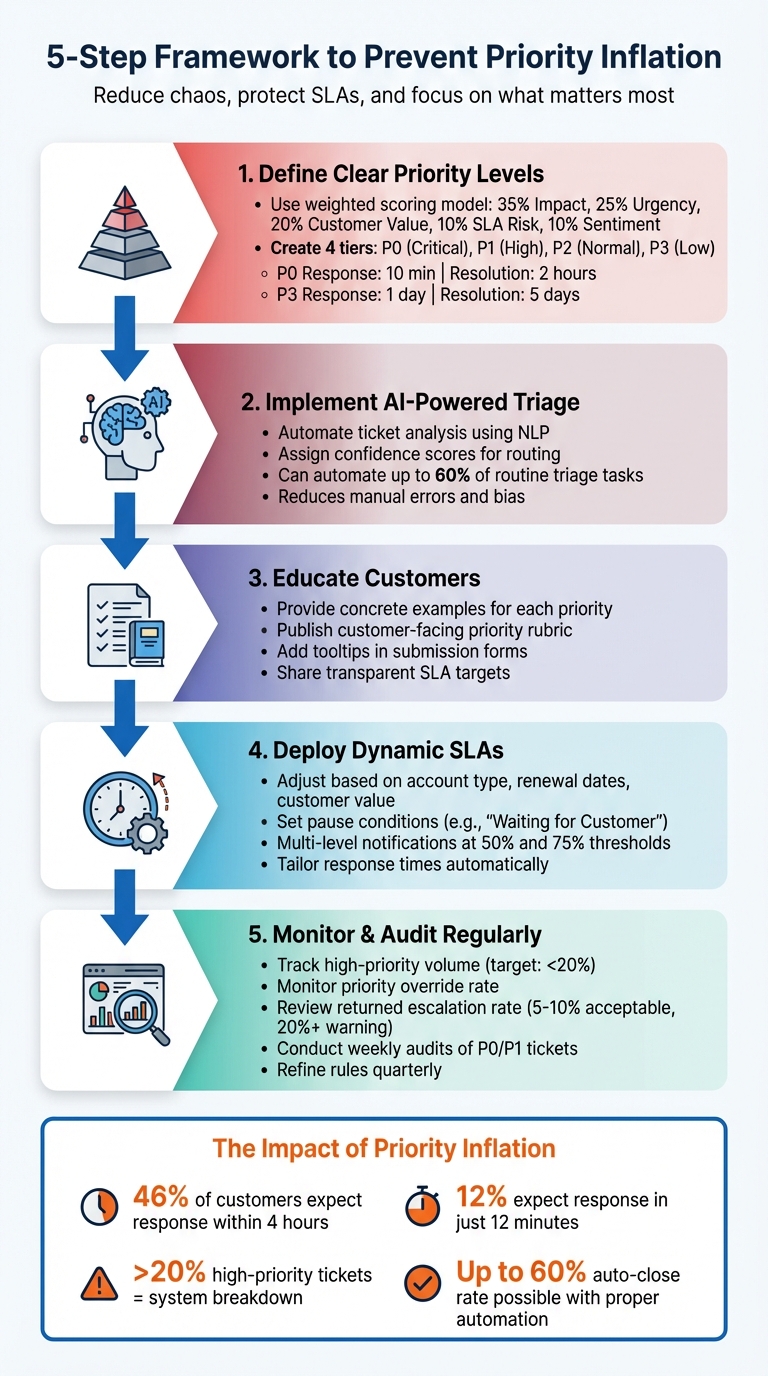
5-Step Framework to Prevent Priority Inflation in Support Tickets
What Priority Inflation Is and Why It Matters
How to Define Priority Inflation
Priority inflation happens when customers label non-urgent issues as urgent to get faster responses [6]. The problem stems from a lack of clear guidelines – customers tend to see their own concerns as the most important without considering the bigger picture [6].
This behavior can take various forms. Some customers resort to all-caps subject lines or aggressive language to grab attention [8]. Others may go as far as threatening negative reviews just to push their ticket to the front of the line [7].
Here’s a telling statistic: 46% of customers expect support teams to respond within four hours, and 12% want a reply in just 12 minutes [7]. These high expectations often pressure customers into inflating the urgency of their issues, even when it’s not justified.
The result? Misclassified tickets not only distort overall ticket volumes but also disrupt the smooth functioning of support operations.
How Priority Inflation Affects Support Operations
When priority levels are misclassified, it creates chaos in support workflows and reduces efficiency. Instead of focusing on genuinely critical issues, teams end up prioritizing the "loudest" tickets, which leads to queue churn. This means older tickets pile up, and SLA performance becomes inconsistent [2].
If more than 20% of tickets are marked as high-priority, actual emergencies can get lost in the shuffle [6]. AI-powered ticket routing and prioritization prevents manual triage from slowing down the intake process, dragging out resolution times [1]. On top of that, constantly dealing with inflated priorities increases cognitive strain on support teams, contributing to burnout and higher staff turnover [3].
sbb-itb-e60d259
How to Create Clear Priority Levels and Guidelines
How to Design Tiered Priority Levels
To prevent "priority inflation", start with a structured framework that evaluates urgency, sentiment, and business impact. This method ensures prioritization is based on measurable factors rather than subjective opinions[10].
Use a weighted scoring model to quantify priorities consistently. For example:
- 35% for impact
- 25% for urgency
- 20% for customer value
- 10% for SLA risk
- 10% for sentiment[9]
Once you have your scoring system, define clear priority tiers with specific examples and response targets:
- P0 (Critical): Reserved for major issues like system outages, security breaches, or blockers for strategic accounts. Response time: 10 minutes. Resolution time: 2 hours.
- P1 (High): Covers feature failures, payment issues, or high-value customers at risk of leaving. Response time: 30 minutes. Resolution time: 1 business day.
- P2 (Normal): Includes non-blocking bugs or general account tasks for standard customers. Response time: 4 business hours. Resolution time: 3 days.
- P3 (Low): For minor issues like how-to questions, feedback on documentation, or small suggestions. Response time: 1 business day. Resolution time: 5 days[9].
Incorporate operational signals to fine-tune priorities automatically. For instance, keywords like "leak", "breach", "can’t log in", or "broken" can trigger escalations. Other factors, such as payment failures, known incidents, or customer lifecycle stage, can also adjust priority levels dynamically[9][10].
After establishing this internal model, the next step is to communicate these standards effectively to your customers.
How to Develop Customer-Facing Guidelines
Once your internal prioritization system is in place, adapt it for customer use to ensure clarity and alignment. Start by offering concrete examples for each priority level in your submission forms. For instance, label "High" as a "significant feature failure" and "Low" as a "how-to question"[9]. Adding tooltips or brief descriptions can further clarify these distinctions for customers before they submit their requests.
Publishing a customer-facing priority rubric – like in a runbook – can help manage expectations. When customers see that P0 is strictly for security risks or total blockers, they’re less likely to misuse high-priority labels for routine issues[9][4].
Be transparent about SLA targets for each priority level. Explaining that higher-priority tickets get faster responses due to their business impact, not just to skip the line, encourages customers to classify their issues more accurately. This transparency builds trust and reduces unnecessary escalations.
For lower-priority issues, complement your guidelines with automated responses and links to Knowledge Base articles. This strategy can significantly reduce manual workload; teams have achieved up to a 60% auto-close rate by combining these tools with a well-maintained macro library and automated ticket routing rules[10].
Finally, audit P0 and P1 tickets weekly to ensure proper scoring and refine keyword-based rules as needed. Tracking override rates can also help identify areas where guidelines might need adjustments[9][10].
How to Use AI to Automate Ticket Triage and Prioritization
How AI Analyzes Tickets for Accurate Prioritization
AI leverages natural language processing (NLP) to quickly analyze ticket content, identifying user intent and categorizing issues with precision. It looks for objective indicators like urgency, impact, and the services or users affected. This systematic approach reduces the guesswork and bias often seen in manual triage.
By following clear, predefined rules, AI prioritizes tickets based on their actual business impact rather than subjective factors like tone or frequency of submissions. These models are trained using historical ticket data and validated outcomes, allowing them to differentiate between critical system failures and routine queries. Tools like Layer8 Triage even assign confidence scores, enabling automated routing when the model’s certainty is high. This method aligns with internal prioritization policies to ensure tickets are handled consistently and objectively.
"Priority quality is queue quality. Teams that use AI to standardize priority levels can reduce confusion, protect SLA performance, and execute support work with far better consistency." – Layer 8 Labs
To maintain accuracy, teams should regularly monitor override rates to pinpoint any gaps in the AI’s logic. Additionally, reviewing how AI-assigned priorities align with SLA performance on a weekly basis ensures that critical issues are addressed without delay.
Benefits of AI Automation in B2B Support
Once tickets are accurately classified, AI automation takes over to streamline workflows and reduce the errors caused by manual misclassification. By enforcing consistent standards, AI minimizes delays in triage, prevents backlogs, and ensures tickets are routed to the right teams immediately.
Platforms like Supportbench offer built-in AI tools for case priority assignment, specifically tailored to optimize support operations. These tools allow teams to implement AI-driven prioritization directly at the intake stage – without the need for costly add-ons or third-party integrations. The result? Faster ticket routing, reduced manual workload, and improved prioritization accuracy. This ensures SLA performance is upheld and that critical business issues receive the attention they deserve.
How to Implement Dynamic SLAs and Escalation Workflows
How to Configure Dynamic SLAs
Dynamic SLAs adjust based on the context of each ticket, ensuring that critical issues get faster attention. Instead of applying the same response and resolution times to all tickets, you can tailor SLAs to specific triggers like account type, renewal dates, or customer value.
Start by creating tiered time targets for different priority levels. For instance, P1 (Critical) tickets might need resolution within 1–4 hours, while P3 (Moderate) tickets could allow for a few days [12]. Then, set conditions to activate specific SLAs based on ticket details. For example, if a ticket comes from a high-value account nearing a renewal date, the system can reduce the response window from 4 hours to 1 hour automatically [11][13].
Supportbench’s SLA engine allows you to set these rules directly within the platform. You can also define pause conditions, such as stopping the SLA timer when a ticket is marked "Waiting for Customer", ensuring timers reflect actual working time rather than unfairly penalizing agents [11][13]. Additionally, set up multi-level notifications: reminders at 50% or 75% of the time limit and immediate alerts to managers when a breach occurs [13]. For internal or non-urgent tickets, consider a "No SLA" policy to keep them from clogging high-priority workflows [13]. These configurations naturally pave the way for structured escalation processes, allowing for smoother ticket management.
How to Build Multi-Level Escalation Paths
Dynamic SLAs work hand-in-hand with structured escalation workflows to ensure tickets are routed to the right people quickly and efficiently, removing the guesswork from escalation decisions.
To design effective escalation paths, base them on clear, objective criteria. Escalate only when agents lack the tools, information, or authority to resolve the issue [14]. Create distinct tiers: Tier 1 for general inquiries, Tier 2 for technical issues requiring specialized knowledge, and Tier 3 for complex problems involving subject matter experts or engineering teams [14]. Differentiate between hierarchical escalations (e.g., approvals up the chain) and functional escalations (e.g., lateral moves to technical teams for expertise) [14][8]. This approach avoids unnecessary prioritization of tickets simply to get faster responses.
"Escalation is more than moving issues up the chain. It’s about ensuring that the right eyes land on the right problems without overwhelming the system." – Alexandra Chaplin, Rootly [12]
Require agents to tag escalations with specific reasons like "security risk", "VIP", or "legal deadline." These tags create a trail for auditing and help identify patterns of misuse [8]. Use "Scope and Velocity" logic to determine ticket priority objectively – consider how many users are affected (Scope) and how fast the issue escalates in severity (Velocity) [8]. Finally, integrate your ticketing system with CRM and product databases so agents have the context they need to investigate before escalating unnecessarily [14].
How to Monitor and Audit Priority Assignments
Once you’ve set up dynamic SLAs and escalation workflows, the next challenge is to keep an eye on your priority system. Even the most well-thought-out frameworks can break down over time without proper oversight. Regular audits are essential to ensure the system reflects your business priorities and remains efficient. Without them, you risk priority inflation as teams find shortcuts or customers exploit loopholes.
Key Metrics to Track
Start by reviewing the distribution of priorities across your tickets. If more than 20% of your tickets are flagged as high-priority, your criteria might be too relaxed [6]. Ideally, most tickets should fall into medium or low priority, with only a small percentage being truly urgent.
Another essential metric is the priority override rate – how often agents manually adjust the priority level suggested by automation or AI. A high override rate may point to unclear guidelines or automation rules that need tweaking [1]. Break this data down by agent or team to spot patterns and identify areas for training. Similarly, track the returned escalation rate, which measures how often escalated tickets are sent back to the original agent due to an incorrect priority or missing details. Industry standards suggest a range of 5–10%, but anything above 20% signals deeper issues in your triage process [15].
"Your escalation problems are structural, not performance-based. You need metrics that expose breakpoints – the moments when information gets lost, when priority gets mistranslated." – Richie Aharonian, Head of Customer Experience, Unito [15]
Pay attention to SLA breach rates for high-priority tickets. If your critical queue breaches SLAs more often than standard tickets, it’s a clear sign that priorities are being inflated [15]. Lastly, analyze priority patterns by reporter or team. This can help identify customers or departments that consistently assign high priority, which may require targeted training or clearer guidelines to curb "priority creep" [16].
| Metric | Indicator of Inflation | Target Benchmark |
|---|---|---|
| High-Priority Volume | Percentage of tickets marked High/Critical | < 20% of total volume [6] |
| Priority Change Frequency | Frequency of priority changes during handoffs | < 5% of cross-tool escalations [15] |
| Returned Escalations | Tickets returned due to incorrect priority/info | 5–10% (Warning at 20%+) [15] |
| SLA Breach (Escalated) | Breach rate of high-priority vs. standard tickets | Within 5% of overall breach rate [15] |
Using these metrics as a baseline, you can dive deeper with AI tools to refine and enhance your monitoring efforts.
How to Use AI Insights for Priority Management
AI can uncover patterns and anomalies that humans might miss. For instance, platforms like Supportbench use predictive CSAT to highlight tickets where the assigned priority doesn’t align with customer sentiment. For example, a ticket marked "High" for a minor cosmetic issue can be flagged as a potential case of priority inflation [17].
Leverage AI confidence scoring to handle ambiguous cases. Tickets with low-confidence priority assignments can be routed to supervisors for review, while high-confidence tickets proceed automatically [1]. This ensures your team focuses on cases that need closer attention.
Track the priority override rate weekly and compare it to SLA performance. If high-priority tickets aren’t resolved faster than lower-priority ones, it’s a sign that your system is losing credibility due to priority inflation [1]. AI tools can also analyze the relationship between priority levels and resolution times, helping you spot where "urgent" tickets are being treated like routine ones. This often indicates that agents no longer trust the priority labels [16].
Finally, revisit your prioritization criteria every quarter. Use AI trends, customer feedback, and performance data to refine your rules and training materials. This ensures your system stays aligned with real business needs and avoids drifting into subjective or inconsistent application [17].
Common Mistakes to Avoid When Managing Priority Inflation
To make your priority system work effectively, it’s crucial to steer clear of some common pitfalls. One frequent issue is relying on vague criteria for prioritization – like giving preference to the loudest customer instead of basing decisions on actual business impact [1][2]. This approach can create a chaotic environment where the most vocal complaints take precedence, even if they aren’t truly critical. Another major stumbling block is falling into the "everything is urgent" trap, where labeling all tickets as high priority dilutes focus on the issues that genuinely need immediate attention.
Over-automating priority assignments is another mistake to watch out for. While automation can be a game-changer, starting too broadly can cause problems. Begin with straightforward, high-volume tasks – like password resets – and gradually expand your automation efforts [5]. Perhaps the biggest misstep is failing to conduct regular audits of your priority system. Without periodic reviews, outdated rules can lead to "priority inflation", where your system no longer aligns with current business needs [5]. For example, what worked six months ago may not address the demands of your evolving customer base or product priorities. Zsa Zsa, a Customer Service Agent at Influx, offers a practical lesson on this:
I learned that some types of tickets require immediate attention… such as requests to change an address, cancel an order, or make changes to an ongoing order. These issues must be addressed quickly before the status of the order changes [18].
Common Challenges vs. Best Practices
The table below highlights common pitfalls and the solutions that can help maintain an effective priority system.
| Common Pitfall | Best Practice Solution |
|---|---|
| Vague Criteria: Priority is based on how "loud" a customer is. | Impact-Based Rules: Use criteria like affected services, user count, and business impact to guide prioritization [1][2]. |
| Static SLAs: Treating all customers with the same urgency. | Tiered Recognition: Automatically escalate priority for VIP or "Platinum" client tiers [5]. |
| Neglecting Change Management: Resistance from technicians to new automated priority levels. | Engage Frontline Technicians: Involve support staff in designing workflows to ensure buy-in [5]. |
| Overlooking High-Frustration Signals: Emotional cues misplace tickets. | Automated Escalation: Implement AI-driven sentiment analysis to flag frustrated users for immediate human review [5]. |
These insights build on earlier strategies, offering a well-rounded approach to managing priorities. To ensure your system remains effective, track your priority override rate weekly and compare it to SLA performance. If agents are frequently overriding AI-assigned priorities, it’s a red flag that your automation logic needs adjustment [1][2]. Similarly, if high-priority tickets aren’t being resolved faster than lower-priority ones, your system’s credibility may be at risk. Establish feedback loops by gathering regular input from technicians on priority accuracy, and use this data to fine-tune your triage system quarterly [5].
Conclusion
Priority inflation isn’t just an inconvenience – it directly impacts your support team’s ability to safeguard revenue, hit SLAs, and keep morale high. When every ticket is labeled "urgent", the queue becomes chaotic. High-value issues get buried under routine tasks, and your team faces burnout from constant firefighting. The way forward involves three key strategies: setting clear priority definitions, leveraging AI-driven automation for ticket triage, and implementing workflows that ensure the right problems go to the right people. These steps not only simplify your process but also deliver measurable results.
AI plays a critical role by standardizing ticket priorities, which cuts down response times and reduces manual triage efforts. In fact, AI can automate up to 60% of routine triage tasks, aligning ticket scores with factors like business impact, urgency, customer value, and sentiment. This ensures SLA performance is protected while strengthening customer trust and relationships[9].
As industry leaders emphasize:
"Triage isn’t just speed – it’s matching the right problem to the right resource"[4].
This precision is what sets sustainable support teams apart from those stuck in constant crisis mode. Regularly audit misrouted tickets and tweak your guidelines to reflect changes in your product or customer needs. When your triage system mirrors real business priorities – not subjective opinions – you’ll achieve quicker resolutions, sharper agent focus, and customers who feel confident their critical issues will always take precedence.
FAQs
How do we stop customers from marking everything as urgent?
To avoid customers marking every ticket as "urgent", it’s essential to set clear guidelines on what truly qualifies as high priority. Educate your customers about the criteria for urgency – whether it’s based on the issue’s impact, the number of users affected, or the potential business disruption.
Incorporating AI-driven tools can also help. These tools analyze ticket details and classify them accurately, ensuring that priority levels align with your established criteria. Pair this with structured workflows that consider both the urgency and the overall impact of the issue.
By combining clear communication with automation, you create a system where prioritization remains consistent. This approach not only reduces the risk of over-prioritization but also ensures that genuinely critical issues get the attention they deserve.
What ticket data does AI need to prioritize accurately?
AI needs specific ticket data to prioritize tasks effectively. This includes details like the subject, a clear description, and urgency indicators – all of which are analyzed using natural language processing. It also takes into account factors like the users or services impacted, customer history, and predefined business impact rules. By using this information, AI can classify priorities consistently, streamline triage workflows, and minimize response delays – all while ensuring that the most critical issues get the attention they deserve.
Which metrics best reveal priority inflation quickly?
To spot priority inflation, keep an eye on metrics like the percentage of tickets labeled as high or critical priority. Also, analyze priority distribution trends over time, across teams, or within specific ticket categories. These patterns can reveal when too many tickets are being escalated without valid reasons. By identifying these trends, teams can work toward more balanced and effective prioritization.






