



Managing internal and external portals with a shared backend is about balancing efficiency with user-specific needs. Internal portals serve support teams, offering detailed tools for handling complex workflows. External portals focus on simplicity, enabling customers to find answers or resolve issues easily.
Key Points:
- Shared Backend: Centralizes data, reduces costs, and enables AI-driven features.
- Internal Portals: Built for speed and precision; designed for power users like support agents.
- External Portals: Prioritize ease of use for customers with intuitive navigation and self-service tools.
- AI Integration: Powers search, automation, and personalization for both portals, improving efficiency and user satisfaction.
Quick Tip: Start by analyzing your most common support queries to optimize both portals effectively. A shared backend enables tailored experiences without duplicating data, making support operations more efficient while catering to diverse user groups.
Internal vs External Support Portals: Key Differences and Features
How Internal and External Portals Differ
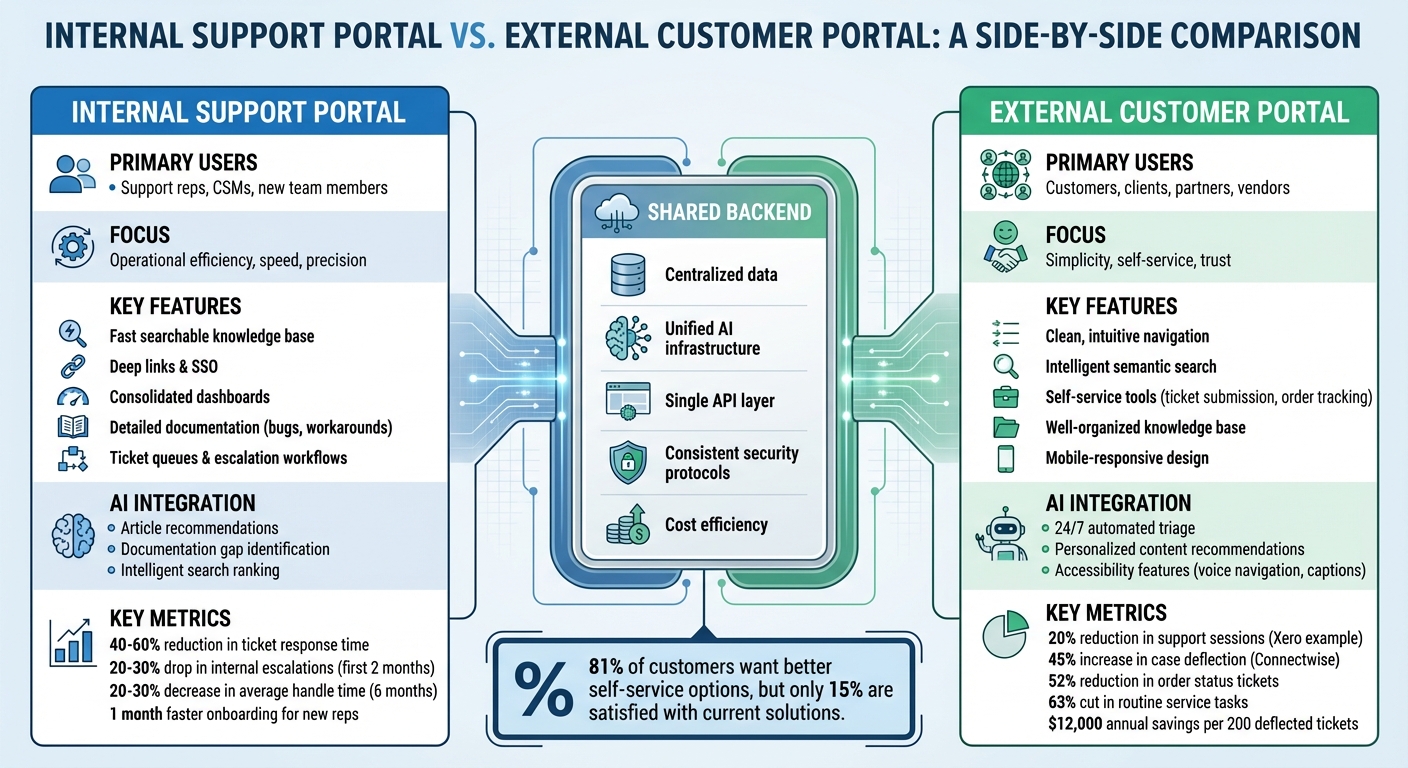
The distinction between internal and external portals lies in their purpose, user needs, and overall design approach. Internal users focus on efficiency and access to dense data, while external customers expect easy navigation and a polished experience that fosters trust [2][3]. As Raquel Piqueras, a UX Designer at Microsoft, explains:
Internal products might not get the same kind of public praise and press that external-facing apps enjoy, but their critical nature within large organizations can sometimes drive more interesting design challenges than you’d expect [1].
These differences shape how each portal is designed and operated.
Internal portals prioritize operational efficiency. For internal teams, speed and accuracy are essential. These portals often include features like ticket queues, escalation workflows, and tight permission controls to handle complex situations effectively. The internal knowledge base goes beyond public documentation, covering known bugs, workarounds, and undocumented behaviors that wouldn’t be appropriate for external users [4]. By integrating this knowledge base directly into the support inbox, organizations can cut the time between ticket creation and meaningful responses by 40–60%. Additionally, internal escalations typically drop by 20–30% within the first two months of implementation [4]. AI tools further streamline processes by automating ticket routing and reducing manual effort.
External portals, on the other hand, focus on simplicity and self-service. Customers rely on these portals for clear FAQs, ticket submission forms, and step-by-step guides that highlight the "happy path" for using a product [4]. The aim is to minimize the need for direct support by offering easy-to-navigate, searchable resources. Unlike internal documentation, external content avoids mentioning bugs or edge cases to maintain customer confidence [4]. AI-powered tools also enhance the self-service experience, helping users find answers quickly without needing to contact support.
Security and access controls are another key difference. Internal users, as trusted employees, have broad access to sensitive information such as standard operating procedures and troubleshooting guides [5][6]. In contrast, external users are granted access only to what’s necessary, like billing details, order statuses, or public-facing FAQs [5][6]. Internal portals require strict authentication and role-based access, while external portals often use simpler customer login systems [6].
While both portals share a unified backend for content creation, storage, search, and security, their front-end designs serve very different audiences. Internal systems are built for efficiency and handling complex workflows, whereas external portals are tailored to meet customer needs, like finding answers or tracking orders [3]. This dual approach ensures that both internal teams and external users have the tools and experiences they require [6].
sbb-itb-e60d259
1. Internal Support Portal
Primary Users
Internal support portals are designed to assist support representatives, Customer Success Managers (CSMs), and new team members. These users rely on the portal to access critical information that helps them resolve tickets quickly. Unlike external users, they need detailed procedural guidance, such as escalation processes and billing exception protocols, which shape the portal’s structure and features [4].
Key Features
At the heart of an internal support portal is a fast, searchable knowledge base. To streamline live interactions, support reps rely on uniformly formatted articles that follow a clear structure: Problem, Root Cause, and Resolution. Other essential features include deep links for quick navigation, Single Sign-On (SSO) for secure access, and consolidated dashboards for a comprehensive view. Internal documentation can also afford to be more candid, addressing practical workarounds and technical limitations directly [4][8].
AI Integrations
AI plays a major role in enhancing internal portals. It can recommend relevant articles based on ticket metadata, identify gaps in documentation by analyzing ticket topics, and flag recurring issues to prompt content updates. Search tools powered by AI rank results based on text relevance and quality signals, ensuring users find the most helpful information quickly [4].
Metrics and Outcomes
The benefits of these design elements are clear. By surfacing relevant articles directly within the support inbox, teams can cut the time between opening a ticket and providing a meaningful response by 40–60%. Internal escalations typically drop by 20–30% within the first two months of implementation. With regular updates, average handle time can decrease by 20–30% in just six months. For onboarding, new support reps achieve team-level escalation rates a full month faster when equipped with a robust knowledge base. To maintain trust and accuracy, it’s critical that at least 80% of articles are reviewed within a 90-day window [4].
2. External Customer Portal
Primary Users
External customer portals are designed with a different audience in mind compared to internal portals. Instead of focusing on operational efficiency and dense data, these portals cater to customers, clients, partners, and vendors who expect an intuitive and user-friendly experience – similar to what they encounter with consumer apps. Since the user base often has varying levels of technical expertise, the design must be lightweight, responsive, and functional across all devices [7]. This makes it essential to tailor both the design and functionality to meet their specific needs.
Key Features
The hallmark of a good external portal is simplicity and usability. Unlike internal tools that often display complex data and controls, external interfaces aim to provide a clean and straightforward experience [7]. Features like a fast, intelligent search function are critical. For example, semantic search can deliver direct answers, sparing users the frustration of combing through endless links.
Self-service tools are another priority. These might include options for submitting tickets, tracking orders, managing accounts, and navigating a well-organized knowledge base. To make the portal even more action-oriented, integration with external tools is key. This allows users to perform tasks – like creating tickets, updating information, or requesting changes – directly from the portal [9]. This approach ensures the portal remains user-focused while leveraging backend efficiencies.
AI Integrations
AI plays a transformative role in external portals. Automated triage systems and AI-powered assistants can handle routine troubleshooting tasks 24/7, escalating only the more complex issues to human agents. This addresses a common customer pain point: while 81% of users want better self-service options, only 15% are currently satisfied with what’s available [10].
Real-world examples highlight the impact of AI. In October 2023, Xero introduced Coveo Relevance Generative Answering to its customer portal. Within six weeks, there was a 20% reduction in search sessions needing further support [11]. Similarly, Connectwise saw a 45% increase in case deflection and a 28% boost in clickthrough rates after implementing AI-driven search and recommendation tools [11].
AI also enables personalization by analyzing user behavior and purchase history to offer relevant content or product recommendations. For instance, a pharmaceutical manufacturing portal used an AI engine to suggest tailored products, cutting time-to-production by 50% [12]. Additionally, AI improves accessibility by enabling features like automated screen reader compatibility, voice-activated navigation, and real-time captioning [10]. Despite the differences in front-end design, the same AI and data infrastructure can support both internal and external portals.
Metrics and Outcomes
External portals can significantly reduce operational workloads and costs. For example, they can cut routine service tasks by up to 63%, translating to savings of roughly $12,000 annually for every 200 deflected tickets [13]. A European logistics company demonstrated this in September 2025 by launching an AI-powered portal with real-time tracking and proactive delay alerts. Over six months, it reduced order status ticket volume by 52%, lowering support costs and improving customer satisfaction [13].
Given that 72% of customers are likely to leave after a poor self-service experience [11], tracking performance metrics is critical. Key indicators include the Ticket Deflection Rate (the percentage of users who resolve their issues without filing a ticket) and the Customer Effort Score (typically measured on a 1–7 scale). Content effectiveness can also be gauged by monitoring searches that yield no results or articles with low satisfaction ratings despite high views [13][14].
One example involves a mid-sized SaaS company that discovered 40% of its tickets stemmed from just ten common setup questions. By introducing an AI-powered in-app knowledge base in January 2026, they reduced tickets for these issues by 55% within three months [13]. These metrics underscore the importance of continually refining the portal to enhance both user experience and operational efficiency.
Benefits of a Shared Backend with AI
A shared backend architecture offers a way to achieve cost efficiency and streamlined operations that isolated systems simply can’t match. By allowing both internal support teams and external customers to access the same data layer, AI tools can scale effectively without duplicating infrastructure. This means support can expand significantly without requiring a proportional increase in staffing or cloud expenses. At the same time, this setup sets the stage for more advanced AI-driven capabilities.
Take AI-powered triage and routing, for example. With access to a complete organizational view, AI can go beyond generic responses and provide precise, actionable solutions. It can understand the connections between pipelines, services, and governance policies. A great real-world example: in March 2026, a major financial institution used this approach by integrating their AI with a Knowledge Graph that indexed these elements. By encouraging developers to "Ask Harness AI first", they managed to deflect 95% of internal platform support tickets over several months. This freed up their platform team to focus on improving architecture instead of constantly troubleshooting [16].
The same backend setup also enhances predictive analytics, benefiting both internal teams and external users. AI can automatically calculate metrics like predictive CSAT and CES for every interaction, pinpoint knowledge gaps, and create case summaries to help agents resolve issues faster. For instance, advanced platforms can resolve over 90% of email tickets in mere seconds, achieving up to 99.8% accuracy across more than 50 languages [15]. This level of automation reduces the workload for agents by 30–70% [15].
"AI scales support volumes exponentially without proportional agent cost increases, while reducing burnout and repetitive task load." – Crescendo.ai [15]
Modern platforms, such as Supportbench, use this shared backend architecture to enable features like AI-driven ticket summaries, predictive CSAT and CES scoring, automated knowledge base updates, and agent copilots. By aligning data flows across different functions, these platforms not only streamline operations but also deliver personalized user experiences for both internal and external audiences.
Advantages and Drawbacks
Internal support portals and external customer portals both bring value when built on a shared backend, but each comes with its own set of trade-offs that influence team efficiency and customer experience.
Internal portals focus on productivity and consistency. These portals are designed for frequent use by skilled team members, with an emphasis on speed. Faster deployments, quicker incident resolutions, and easy access to essential tools are their main strengths. However, this focus on centralization can lead to problems. Housing large volumes of documentation and operational logs without intelligent filtering or detailed role-based access control (RBAC) can overwhelm users and create security risks if sensitive data is unintentionally exposed [17]. These challenges highlight the differences when compared to external portal needs.
External portals emphasize simplicity and self-service. Customers expect an easy, intuitive experience. Clean navigation, straightforward interfaces, and self-service options are key to keeping them satisfied. However, maintaining this simplicity on a shared backend comes with its own hurdles. Strict access controls are essential to prevent data mix-ups, and heavy external traffic can strain the backend, potentially slowing down internal operations and affecting developer productivity [17].
"Internal users are likely to be power users – they’ll be doing the same tasks a lot, and they’ll get very good at learning whatever interface you give them. End users… will need more hand-holding from the design." – kastark, Stack Exchange [2]
The shared backend itself offers clear benefits, such as better resource allocation, centralized data management, and unified security protocols. But it also adds complexity. For example, search tools need to filter results intelligently: internal teams might require access to technical metadata, while external users should only see relevant help articles [17]. Additionally, features like audit logging, compliance monitoring, and automated security policies are essential for meeting standards like SOC 2 or ISO 27001 [17].
Modern platforms like Supportbench tackle these issues with tools like granular permissions, AI-driven search and sentiment analysis, and modular user interfaces that cater to different user groups without requiring backend changes. By treating internal and external portals as distinct experiences built on a shared foundation, companies can cut development costs while delivering customized, high-quality interactions for both employees and customers. Striking the right balance between these advantages and challenges is key to achieving cost savings and creating a smooth, AI-driven support experience across both types of portals.
Conclusion
Internal support portals and external customer portals may cater to different audiences, but they thrive when built on a shared backend. Internal portals focus on control, flexibility, and detailed data to help support teams resolve tickets efficiently. External portals prioritize simplicity, trust, and ease of use, offering customers a straightforward path to solutions.
A unified backend eliminates silos, cuts development costs, and keeps data consistent across both platforms. The trick is granting tailored access rather than duplicating data. Support teams need visibility into edge cases, known bugs, and escalation paths, while customers should only see polished workflows and straightforward solutions. Both groups benefit when ticket data, product details, and knowledge base content flow seamlessly through a shared API layer designed to meet their unique needs. These principles lay the groundwork for operational improvements.
For B2B companies looking to refine or launch these portals, start by auditing your top 20 ticket categories by volume and use those insights to create your first internal knowledge base articles by building a knowledge base that actually gets used [4]. Introduce multi-dimensional tagging – organizing content by product area, customer tier, and error type – to make information retrieval faster and more precise [4]. To avoid duplicated efforts and knowledge gaps, implement a RACI matrix to clarify ownership and responsibilities [18]. And above all, keep internal admin tools out of reach for external users – customers need quick, simple answers, not a system they have to figure out.
Modern B2B support operations thrive on AI and a unified backend. Tools like Supportbench offer solutions with granular permissions, AI-driven search capabilities, and modular interfaces that serve both internal teams and external users without requiring backend adjustments. By treating internal and external portals as distinct experiences built on a shared foundation, you can reduce development time, enhance security, and deliver personalized, high-quality interactions that improve both team efficiency and customer satisfaction.
FAQs
How do you prevent internal-only content from showing up in the customer portal?
To ensure that internal-only content stays hidden from the customer portal, implement role-based access controls (RBAC) and content filtering. These tools allow you to tailor access by displaying only customer-relevant information to external users while keeping internal content restricted to authorized personnel. By tagging or categorizing internal content, you can make filtering more effective, ensuring a clear divide between internal workflows and the customer-facing experience. This approach not only strengthens security but also helps maintain smoother operations.
What’s the best way to design search so agents get depth but customers get simplicity?
To meet the needs of both customers and agents, consider a layered search approach. For customers, focus on an interface that’s intuitive and delivers quick access to common, relevant solutions. On the agent side, provide tools like advanced filtering options, detailed search results, and access to extensive knowledge bases. This setup allows customers to find answers fast while empowering agents to handle more complex issues effectively.
Which metrics prove a shared-backend portal strategy is working?
To gauge whether a shared-backend portal strategy is working well, you can look at metrics like backend operation success rates (such as read/write success), system uptime, and error rates. These metrics are key indicators of how stable and efficient the system is, confirming that both portals are running smoothly while relying on the same backend infrastructure.






