


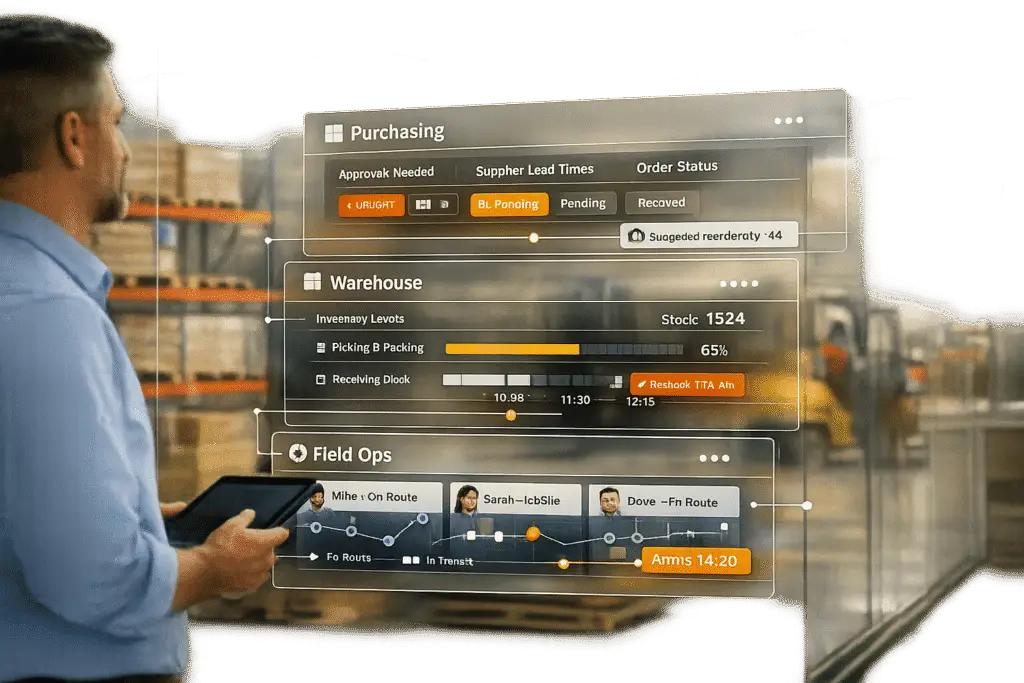
Customer portals aren’t just for customers anymore – they’re transforming how internal teams like purchasing, warehouse, and field operations work. By centralizing data, automating workflows, and integrating AI tools, these portals address common inefficiencies, such as manual data entry, approval delays, and disconnected systems. Key benefits include:
- For Purchasing Teams: Real-time order tracking, automated approvals, and streamlined vendor communication save time and reduce errors.
- For Warehouse Operations: Real-time inventory updates, faster order fulfillment, and reduced manual data entry improve accuracy and efficiency.
- For Field Operations: Mobile access to schedules and asset details, real-time issue reporting, and better office coordination enhance productivity.
AI-powered features like AI agent copilots, predictive metrics, and knowledge bots further simplify tasks, cut costs, and improve team collaboration. Companies like Wells Fargo and EchoStar Hughes have already seen massive time savings and productivity boosts by adopting these systems.
These portals create a single source of truth, reduce repetitive tasks, and connect teams across departments, making operations faster and more efficient.
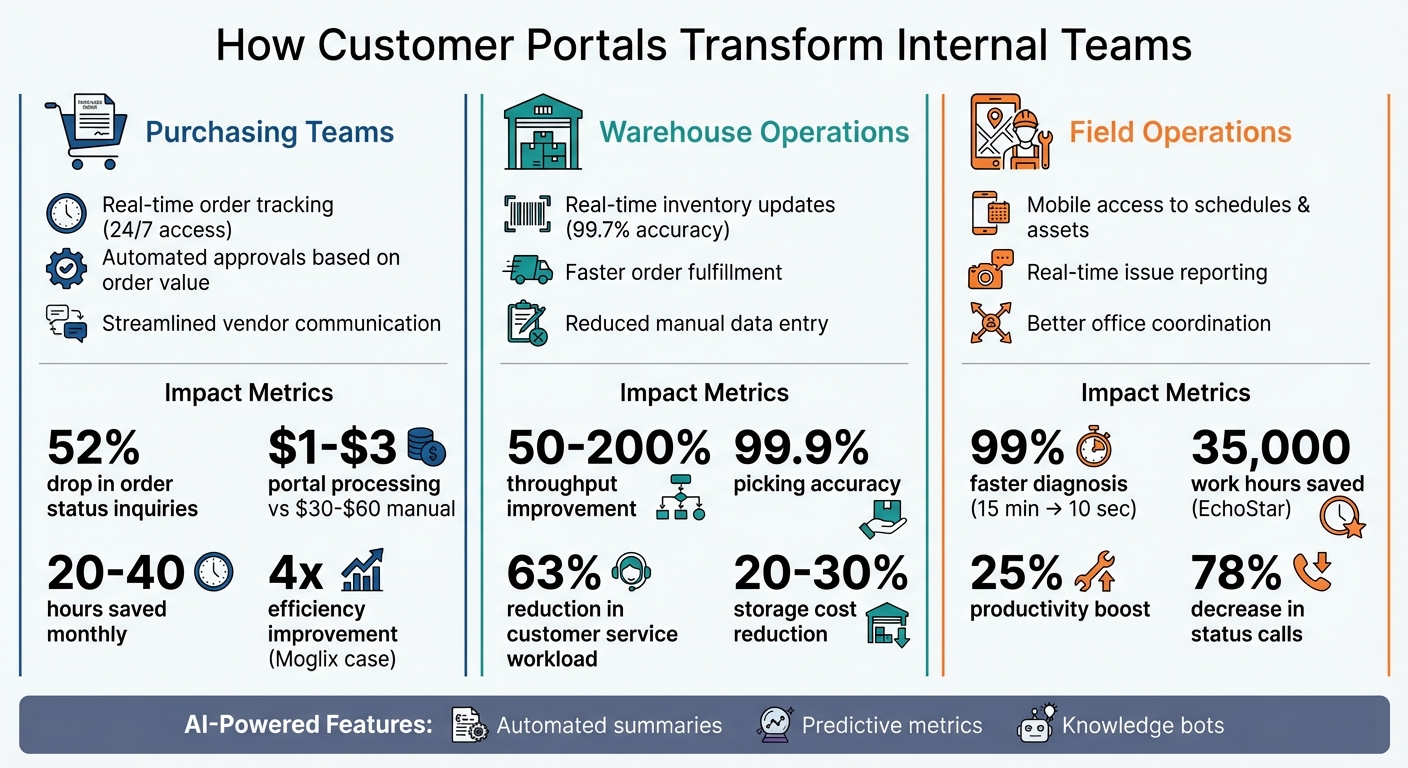
How Customer Portals Transform Internal Teams: Benefits for Purchasing, Warehouse, and Field Operations
Customer Portal for Distribution
sbb-itb-e60d259
Changes for Purchasing Teams
Purchasing teams often face interruptions from vendor calls, emails, pricing requests, and manual data entry, all of which eat into their productivity. An internal portal can centralize order data, streamline approvals, and simplify vendor communication, ultimately saving time and effort.
Better Order Visibility and Tracking
In traditional purchasing processes, checking an order’s status often involves phone calls and waiting for email responses. With a portal integrated into an ERP system, this hassle becomes a thing of the past. Purchasing managers can instantly access shipment updates, inventory levels, and carrier tracking numbers from a single dashboard – available 24/7 [5].
The results speak for themselves. A European logistics company implemented an AI-powered portal with real-time tracking and proactive delay alerts. Within six months, they saw a 52% drop in order status-related inquiries, as customers began independently checking delivery dates and rescheduling shipments [1]. Similarly, Domina, a Colombian logistics company handling over 20 million shipments annually, used Vertex AI and Gemini to automate delivery validation. This boosted real-time data access by 80% and improved delivery accuracy by 15%, eliminating the need for manual reporting [3].
Proactive alerts for delays, back-orders, and price changes further reduce time spent chasing information. Plus, the cost difference is striking: processing an order through a portal costs just $1 to $3, compared to $30–$60 for manual processing [5].
Faster Approval Workflows
Manual approval processes often slow things down. Purchase orders can get stuck in email inboxes, managers might lose track of spending limits, and even low-cost purchases may require the same lengthy approval steps as major expenditures. Internal portals solve this by automating approvals based on order value, departmental budgets, and AI-powered routing and permissions [5].
Take Moglix, an Indian digital supply chain platform serving over 1,000 manufacturing businesses. By deploying Vertex AI for generative AI vendor discovery, they improved their sourcing team’s efficiency fourfold, increasing quarterly output from approximately INR 12 crore to 50 crore [3]. Similarly, Cognizant developed an AI agent for legal teams using Vertex AI and Gemini, which assists with drafting contracts, assigning risk scores, and providing recommendations during procurement reviews [3].
Role-based access adds another layer of efficiency. Spending limits can automatically bypass manual intervention for routine purchases, while high-value orders are routed to the right approver. This not only speeds up cycle times but also reduces the need for back-and-forth emails, making vendor interactions smoother.
Automated Vendor Communication
Once approvals are automated, vendor communication becomes easier to manage as well. Purchasing teams often juggle multiple vendor interactions, from follow-ups to status checks and document requests. AI-driven portals take over these repetitive tasks, sending real-time alerts for shipment delays, back-orders, or inventory shortages – all without a single email [5].
Modern systems act as a bridge, simplifying communication. For instance, 43% of order requests start with a file attachment like a PDF or image quote [7]. AI tools can extract data from these documents and sync it directly with ERP systems, eliminating the need for manual retyping. This automation can save procurement teams 20–40 hours each month [7].
"AI systems can now take a supplier’s email, with attachments, Excel quotes, PDF invoices, and automatically extract and insert that data into your procurement system. Suppliers don’t have to change a thing." – Everett Frank, Cofactr [6]
Changes for Warehouse Operations
Warehouse operations, much like purchasing teams, can greatly benefit from internal portals that rely on real-time data and automation to streamline processes. With the constant demands of tracking inventory, meeting order deadlines, and maintaining accuracy, warehouse teams face a lot of pressure to perform efficiently. Internal portals help by replacing outdated manual workflows with tools that provide instant visibility and automation.
Real-Time Inventory Access
Traditional inventory tracking methods, like periodic counts and manual logs, often lead to errors and inconsistencies. However, a portal integrated with a scan-based Warehouse Management System (WMS) bridges this gap. It provides real-time unit counts for every SKU, across multiple locations, and even detailed storage information within each facility [8]. Modern portals also categorize inventory into specific states – such as available, allocated, picked, packed, damaged, quarantined, and inbound – allowing teams to make smarter decisions and avoid both stockouts and overstocking [11].
High-performing warehouses aim for inventory accuracy levels around 99.7%, a goal that becomes realistic with scan-based portals [10].
"What these real-time portals provide our customers is 100 percent visibility." – Maureen Milligan, G10 Fulfillment [9]
Another key feature of these portals is automated reorder alerts. When inventory drops below a set threshold, the system notifies teams immediately, helping them prevent backorders. Additionally, these portals verify scans to ensure cartons match ASNs, reducing errors before shipments leave the warehouse [8][9].
This level of real-time visibility creates the foundation for faster and more efficient order fulfillment.
Faster Order Fulfillment
Internal portals speed up order fulfillment by tracking every step of the process with timestamped milestones – from dock arrival to final packing. This eliminates guesswork and allows teams to act quickly when issues arise [9][11].
AI-powered tools for logistics further enhance efficiency by predicting delivery times (ETAs) and sending proactive alerts to address potential delays [14]. Supervisors can use task prioritization signals to tackle bottlenecks and make real-time staffing decisions [14].
The impact is clear. Warehouses using WMS tools often see throughput improvements of 50–200%, while digital tracking systems can push picking accuracy to an impressive 99.9% [12]. One logistics company in Europe cut its support ticket volume by 52% within six months of implementing an AI-powered portal with real-time tracking and automated alerts [1].
By reducing manual tasks, these systems not only improve speed but also boost accuracy, as highlighted in the next section.
Less Manual Data Entry
Manual data entry is a common source of errors and inefficiency in warehouses. Portals solve this problem by automating data synchronization across systems. For instance, when customers initiate returns through a self-service portal, the system automatically validates eligibility and generates labels. This prevents unauthorized returns and eliminates the need for warehouse staff to manually process return authorizations [13].
Order status updates are also automated. Instead of fielding endless "where is my order" inquiries, staff can rely on the portal’s real-time progress updates [11][14]. Tasks like shipping address corrections, invoice downloads, and account changes are handled directly within the portal, cutting down on manual input by support agents [1].
"You want everything to be scanned in the warehouse, nothing done on paper. You can lose a lot of money in this industry by having people ship stuff wrong, or store it wrong." – Connor Perkins, G10 Fulfillment [11]
Automated dashboards further reduce workload by surfacing metrics like on-time fulfillment and inventory accuracy. This eliminates the need for manual report creation and spreadsheet exports [11]. Transitioning to automated workflows can reduce customer service workloads by 63% and cut storage costs by 20–30% through improved space management [1][12].
Changes for Field Operations
Field operations teams often deal with challenges that office-based staff rarely face – like unreliable connectivity, unpredictable schedules, and the constant need for up-to-date information while on the go. Internal portals designed with a mobile-first approach and real-time synchronization are tackling these issues head-on, transforming how field teams interact with the office and complete their tasks.
On-Demand Access to Assets and Schedules
Field technicians frequently need instant access to critical information like equipment maintenance records, service documentation, and updated work schedules. Modern portals make this possible by delivering data directly to their mobile devices. Whether it’s asset details or job specifics, technicians no longer need to call the office for updates. For instance, when customers book or reschedule appointments through the portal, the system automatically updates technician calendars. It considers factors like real-time availability, skills, and part readiness, eliminating the manual coordination that often leads to scheduling conflicts.
These systems also incorporate SLA-aware booking logic, which ensures that only time slots meeting specific service commitments – like location or job type – are displayed [15][16]. This not only prevents overbooking but also ensures technicians can meet deadlines. Additionally, gate codes, access instructions, and customer-specific notes are included directly in the work ticket, giving field staff all the information they need without requiring office intervention [15][17]. This streamlined access to data lays the groundwork for better mobile reporting and seamless communication between field teams and the office.
Mobile Issue Reporting and Resolution
Mobile-optimized portals allow field teams to document issues, upload media, and update job statuses in real time – without needing to return to the office. The impact of these capabilities is clear across different industries. For example, Instalily, a prominent field service provider, integrated Google Cloud AI and Gemini 2.5 into its mobile portal. The result? Diagnosis time plummeted from 15 minutes to under 10 seconds, and overall workflow speed increased by an impressive 99% [3].
Similarly, EchoStar Hughes used Microsoft Azure AI Foundry to automate its field service processes. This move is projected to save 35,000 work hours while boosting productivity by at least 25% [2].
When customers upload photos or videos of issues during the booking process, dispatchers can ensure technicians arrive equipped with the right parts and information. This reduces the need for follow-up visits and improves first-time fix rates [17]. Plus, when field staff input data directly into the portal, it eliminates the risk of transcription errors that can occur when office staff manually enter updates. This real-time reporting capability enhances efficiency and reduces the chance of miscommunication.
Better Field-to-Office Coordination
Enhanced mobile reporting functions also improve field-to-office coordination by removing traditional communication bottlenecks. For example, when a technician completes a checklist or adds notes via the portal, the system updates immediately. This ensures that both the office and the customer have access to the latest information without requiring manual follow-ups [15][16].
The financial benefits of this streamlined communication are noteworthy. An HVAC distributor implemented a portal with real-time warehouse and shipping integration. Within three months, weekly order status calls dropped from 250 to just 55 – a 78% decrease – saving the company around $40,000 annually in labor costs [4].
By simplifying communication between field teams and office staff, these portals significantly improve operational efficiency. They reduce the need for manual coordination, speed up response times, and enable AI-driven support systems that can scale across various departments.
"Every minute your dispatchers spend confirming time slots or explaining delays is time they’re not solving bigger problems." – Peggy Xenos, Fieldcode [16]
Cross-Department Visibility and Efficiency
When purchasing, warehouse, and field operations teams work in isolation, important details often get lost along the way. Internal portals address this challenge by offering a single source of truth that everyone can access at the same time. By bringing communication together in one place, these systems remove the bottlenecks that slow operations and frustrate employees. They also fit smoothly into existing workflows, as shown by the examples of unified dashboards and AI-driven routing.
Unified Data Dashboards
Unified dashboards pull together data from purchasing, fulfillment, and field operations, replacing scattered spreadsheets and endless email threads. They also provide digital audit trails, ensuring accountability across teams. Instead of relying on constant manual updates, everyone can view real-time information in one shared location.
These dashboards have delivered impressive results. For instance, a major financial institution implemented an integrated system for 35,000 employees across 4,000 locations. This gave staff instant access to internal procedures and significantly cut response times. Similarly, Domina, a Colombian logistics company handling over 20 million shipments annually, adopted Vertex AI and Gemini in October 2025. The outcome? An 80% improvement in accessing real-time data and a major reduction in manual reporting tasks [3].
Digital audit trails also add clarity. They track who is responsible for each step as assets move between departments. For warehouse teams, this means knowing inventory levels and locations before field operations submit requests. For purchasing teams, it means checking order statuses without making endless phone calls.
AI-Driven Routing and Reporting
Unified dashboards lay the groundwork, but AI-driven routing takes things a step further by streamlining workflows. Instead of manually figuring out which team should handle a task, AI-powered systems analyze the data and send tasks to the right department automatically. For example, Gelato, a Norwegian software company, used Gemini models to automate ticket triage and prioritization to categorize customer errors. This improved ticket assignment accuracy to 90% and cut deployment times from two weeks to just one or two days [3].
Automated reporting also saves time by pulling together data from multiple sources instantly. AI tools can process hundreds of pages of technical documentation to answer internal questions quickly, freeing employees from repetitive research. EchoStar Hughes used Azure AI Foundry in July 2025 to automate field service processes and sales call reviews. This solution is expected to save 35,000 work hours and boost productivity by at least 25% [2].
"Using AI to streamline or automate repetitive, mundane tasks can allow your employees to dive into more complex, creative, and ultimately more valuable work." – Alysa Taylor, Chief Marketing Officer, Commercial Cloud & AI, Microsoft [2]
Together, unified dashboards and AI automation create a seamless flow of data across departments. Field technicians can update job statuses in real time, warehouse teams can adjust inventory instantly, and purchasing teams can see what’s needed without waiting for manual updates. This interconnected system transforms collaboration and makes cross-departmental workflows far more efficient.
AI Features in Supportbench Portals
Expanding on earlier improvements in order tracking and real-time data access, Supportbench portals now include AI-driven tools designed to streamline internal workflows. These built-in AI features simplify operations for teams across purchasing, warehouse, and field services by delivering the right information precisely when needed. Here’s a closer look at how these features enhance case management and knowledge access for internal teams.
Automated Case Summaries and Prioritization
Long ticket threads can slow down productivity. Imagine a warehouse manager trying to figure out why a shipment is delayed – they shouldn’t have to wade through dozens of messages to get answers. Supportbench tackles this issue with AI that condenses lengthy interactions into clear, concise summaries, providing instant context [18][20]. This proves especially helpful during cross-department handoffs. For example, when a field technician escalates an equipment issue to the purchasing team, an AI-generated summary ensures everyone is on the same page immediately.
"AI-powered case summarization is a game-changer for support teams, allowing them to quickly understand the context of a case without having to read through every single interaction." – Supportbench [18]
The system doesn’t stop at summarization. It also evaluates incoming messages to assign priority levels – Low, Medium, High, or Urgent – based on urgency and sentiment [19]. Auto-tagging further boosts efficiency by categorizing cases, ensuring each ticket reaches the correct department without delays [21].
Predictive Metrics (FCR, CSAT, CES)
Supportbench AI goes beyond summaries by forecasting critical performance metrics. Introduced in version 12.1 [22], predictive models now estimate key indicators like First Contact Resolution (FCR), Customer Satisfaction (CSAT), and Customer Effort Score (CES) using both historical and real-time data [23].
For warehouse teams, a low predicted FCR on order-related issues could signal gaps in internal documentation or inventory visibility. Field operations teams can use predicted CSAT scores to allocate senior technicians or extra resources to high-stakes service calls. Meanwhile, purchasing teams might notice patterns – like consistently high customer effort scores with specific suppliers – and use this data to inform better decisions. Additionally, AI sentiment analysis highlights frustrated stakeholders, enabling teams to address concerns before they escalate.
Customizable Internal Knowledge Bots
Searching for technical specs, procurement policies, or equipment manuals across multiple systems can waste valuable time. Supportbench’s AI-powered knowledge bots solve this by allowing teams to query the knowledge base using natural language [24]. For instance, a field technician might ask, “What’s the replacement procedure for Model X hydraulic pump?” and receive an instant, accurate response from internal documentation. Similarly, warehouse staff can quickly retrieve inventory procedures without needing input from senior employees.
These bots are highly configurable. Administrators can tailor them to meet specific team requirements [25]. Organizations can also ensure that bots pull information exclusively from internal knowledge bases, maintaining security for sensitive data while keeping it accessible to authorized users [25][26]. This setup reduces reliance on senior staff for routine questions, freeing up time for more complex tasks.
How to Implement and Optimize Portals
Rolling out a customer portal for internal teams takes careful planning and ongoing adjustments. The key to turning a portal into a game-changing tool lies in how well it’s executed and maintained.
Assess Current Workflows
Start by identifying repetitive tasks that slow down efficiency. Think about manual data entry in warehouse operations, endless email threads for purchasing approvals, or field technicians calling the office for equipment specs. According to Microsoft, automating these kinds of tasks can save employees an average of 9.3 hours per week [2]. For example, Hiscox, an insurance company operating in 14 countries, pinpointed bottlenecks in their claims processing and cut claim times from 1 hour to just 10 minutes by introducing AI-powered automation [2].
Before making changes, establish baseline metrics to measure progress. Track how long core tasks take now, such as the time spent locating inventory or completing approvals. Research shows that 66% of CEOs report measurable benefits from AI initiatives when they have clear before-and-after data [2]. Once you’ve got a solid understanding of your current workflows, configure the portal to meet the specific needs of each team.
Configure Role-Based Access
Using portals like Supportbench, you can set up role-based permissions to ensure team members only see the data they need. This minimizes distractions and helps them make quicker decisions. For instance, a warehouse manager logging in to view only inventory alerts, shipment details, and fulfillment requests will be able to focus better compared to dealing with a cluttered dashboard. Align access levels with your organizational structure to create smooth workflows where employees can complete tasks without unnecessary hurdles.
Integrate AI Features for Measurable ROI
AI integration should be a top priority during the initial rollout. Focus on straightforward use cases that deliver quick wins, like automated case summaries for handoffs, predictive tools to flag urgent issues, or knowledge bots that handle routine inquiries. The cost savings are clear: AI-powered resolutions typically range between $0.99 and $2.00, compared to $6.00 to $12.00 for human-handled tickets [27]. Plus, agents using AI tools can handle 14% more tickets per hour [27].
Take SA Power Networks as an example. In 2025, they launched an AI-powered portal for field technicians managing aging infrastructure. By allowing workers to query 50 years of asset history using natural language, they achieved a 99% success rate in identifying corroded poles and saved $1 million in just one year [28].
"Virtually any business process can be reimagined with AI, from marketing to supply chain operations to finance." – Alysa Taylor, Chief Marketing Officer, Commercial Cloud & AI, Microsoft [2]
Monitor KPIs with Built-in Dashboards
Once the portal is up and running, use built-in dashboards to track key performance indicators (KPIs) and ensure lasting ROI. Supportbench’s dashboards can help you monitor metrics like First Contact Resolution (FCR), average response times, and team-specific KPIs such as order fulfillment speed or field service completion rates. These dashboards are designed to be user-friendly, so team leads can access them without needing IT support.
Keep an eye on trends to spot what’s working and what’s not. For example, if warehouse teams are using the portal effectively but field operations are lagging, it might indicate the need for better mobile access. Similarly, if purchasing approvals are still slow despite automation, it may be time to revisit and tweak the workflow. EchoStar Hughes adopted this iterative approach, creating 12 production apps with Azure AI Foundry to automate field services [2].
Conclusion
Customer portals designed for internal teams are reshaping how purchasing, warehouse, and field operations function on a daily basis. By replacing manual processes with AI-driven workflows, these portals remove long-standing bottlenecks and improve collaboration across departments. This shift enhances visibility and streamlines operations. For instance, purchasing teams can automate vendor communications, warehouse staff gain access to real-time inventory updates, and field technicians can report issues instantly through mobile devices. The result? Tangible efficiency improvements.
The numbers back this up: AI-powered portals have been shown to reduce customer service workloads by 63%, while businesses adopting workflow automation report a 31% drop in operational expenses. Additionally, AI can enhance employee performance by as much as 40% [1][30]. These advancements translate into faster order processing, quicker approvals, and smoother coordination between field and office teams. A real-world example comes from EchoStar Hughes, which, in July 2025, utilized Microsoft Azure AI Foundry to develop 12 production applications for field services and sales call auditing. This move is projected to save 35,000 work hours and boost productivity by 25% [2]. These figures highlight the transformative potential of AI-powered portals.
The secret to achieving these outcomes lies in AI-driven tools like automated case summaries, predictive analytics, and internal knowledge bots. These features not only accelerate individual tasks but also create a shared data environment where teams can exchange real-time insights. This fosters quicker response times and greater operational efficiency.
"No matter who you are, we know that AI can make your job easier and better… Spending less time on that annoying, mundane work that takes you away from your clients." – Nick Mehta, CEO, Gainsight [29]
Supportbench makes these advancements accessible without requiring heavy IT involvement. Its combination of role-based access, AI automation, and integrated dashboards allows teams to start seeing returns on investment within weeks. By eliminating repetitive tasks, Supportbench enables teams to focus on higher-value work. Ultimately, these portals empower internal teams to operate faster, more cohesively, and at lower costs – delivering measurable results for modern, AI-driven B2B customer support systems.
FAQs
What should we automate first in an internal portal?
Automate repetitive tasks that drain time and resources. Start with ticket routing and categorization to ensure issues are directed to the correct teams without delay, which helps reduce response times. You can also automate responses to common inquiries, such as order status updates or password resets, slashing routine workloads by as much as 63%. These changes not only boost efficiency but also simplify workflows, freeing up your team to focus on tackling more complex challenges.
How do we integrate the portal with our ERP, WMS, and field tools?
Integrating your portal with systems like ERP, WMS, and field tools involves creating a smooth flow of data and enabling real-time communication. APIs play a key role here, offering secure ways to synchronize data across platforms. It’s also important to set up role-based access controls to manage permissions and ensure compliance with security standards.
For cloud-based systems, you can rely on cloud APIs or middleware to establish flexible and scalable connections. Additionally, setting up custom workflows and automating updates helps maintain accurate data while delivering real-time insights tailored to your operations. These steps ensure your systems work together efficiently and securely.
How do we measure ROI from portal + AI changes?
Tracking ROI starts with monitoring cost savings from fewer support tickets and reduced routine inquiries. For instance, if you eliminate 200 support tickets a month, each costing $5, that’s an annual savings of $12,000. Beyond direct savings, keep an eye on efficiency improvements. These could include quicker issue resolution, smarter resource use, and enhanced visibility across departments – benefits often driven by AI automation.
To measure success effectively, set baseline metrics before implementing changes. Then, compare those benchmarks over time to see how costs, resolution times, and customer satisfaction evolve.






