


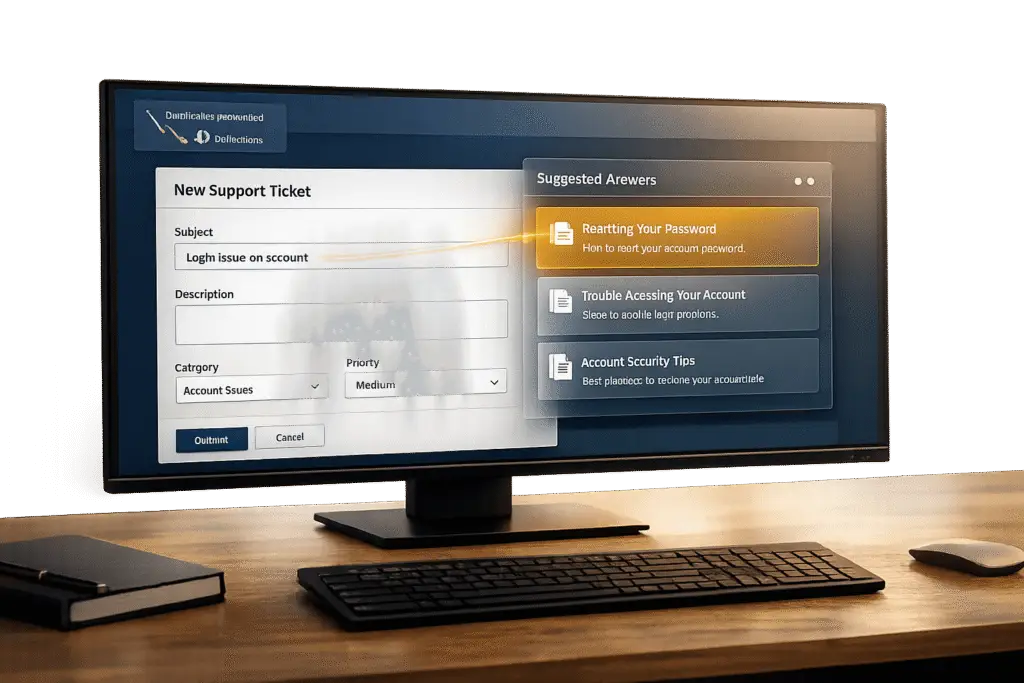
Duplicate customer support tickets waste time and resources, especially for small teams. Portal-side "suggested answers" can help by automatically providing relevant knowledge base articles based on customer queries, reducing ticket volume and improving efficiency. Here’s how it works:
- AI-Powered Suggestions: Detects customer intent and displays helpful articles in real-time, even before tickets are submitted.
- Building a knowledge base that is well-organized: Well-structured, regularly updated articles ensure accurate and relevant suggestions.
- Improved Self-Service: Meets customer expectations for quick, independent problem-solving, with 67% preferring self-service over contacting support.
- Cost Savings: Deflecting 200 tickets monthly can save up to $12,000 annually.
40% Ticket Deflection in 90 Days: A Playbook That Actually Works
sbb-itb-e60d259
How Portal-Side Suggested Answers Work
Portal-side suggested answers help customers find solutions before they even submit a ticket. By scanning subject lines and descriptions, the system instantly pulls up relevant knowledge base articles that might address the issue – eliminating the need for customers to wait for a response.
This system relies on two main components: a well-organized knowledge base and AI algorithms that interpret what the customer is asking. For example, if someone types "how do I reset my password", the system identifies the intent behind the query and displays the most relevant articles.
Timing is everything here. Around 48% of customers prefer self-service options before reaching out to a company [3]. By offering answers while customers are still describing their problem, portal-side suggestions provide a convenient and efficient way to resolve issues. This not only speeds up the process but also reduces the number of tickets that need to be handled manually.
Knowledge Base Integration
A strong knowledge base is the backbone of suggested answers, but it’s not just about having articles. The system must map articles to common customer questions and understand how topics are connected. This requires organizing articles into containers (like folders or spaces) and tagging them with metadata that links to specific customer concerns [2]. For instance, articles on billing, payment methods, and invoice downloads should all be recognized as relevant when someone mentions "payment issues."
The structure of your articles also matters. Greg DeVore, CEO of ScreenSteps, highlights the importance of clarity:
"If people can’t find the information they need, you probably buried it too deep into the article. You need to split the information into separate articles that address specific questions" [1].
Take the example of AcmeCRM, a SaaS startup. They found that 40% of their tickets were about inviting team members. By creating a clear, step-by-step article specifically for that task and integrating it into their auto-suggest system, they were able to cut related ticket volume by 60% in just one month [4].
Even the way you title your articles can make a big difference. Use titles that reflect the way customers phrase their questions. For example, "How to cancel your account" is far more effective than "Account Cancellation Policy" because it directly mirrors customer language [1][4]. This helps customers quickly see that the suggestion is relevant to their problem.
Real-Time AI-Powered Recommendations
AI takes suggested answers to the next level by understanding both the context and the intent behind a query. Instead of simply matching keywords like "login", AI can differentiate between issues like account access problems, forgotten passwords, or single sign-on setups. This ensures the suggestions are much more relevant.
Modern AI systems also improve over time. By learning from customer interactions, these systems refine their results to better match specific queries. High-performing setups can sync data as frequently as every 5 minutes, keeping suggested answers up-to-date with changes like pricing updates, new features, or revised troubleshooting steps [2].
The concept of "AI Teammates" is pushing this technology even further [5]. Instead of relying on a single bot, multiple AI agents work together. One might analyze the customer’s intent, another searches the knowledge base for the best content, and a third determines how to present it effectively. This collaborative approach leads to more accurate suggestions and can even handle more complex questions. It’s a step forward in creating a seamless, efficient system for resolving customer issues.
Step-by-Step Guide to Setting Up Suggested Answers
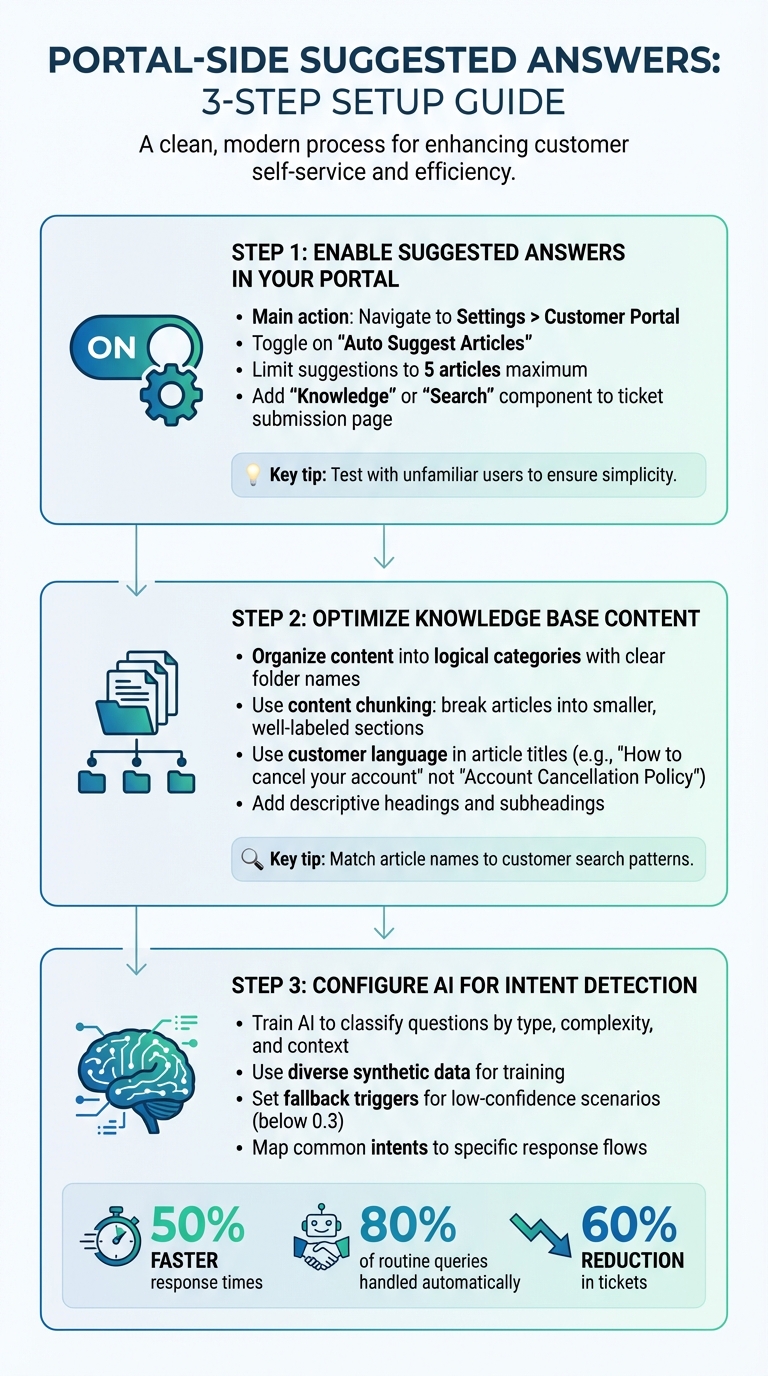
3-Step Guide to Setting Up Portal-Side Suggested Answers
You don’t need to completely overhaul your support system to get suggested answers up and running. The process revolves around three key areas: activating the feature in your portal, fine-tuning your knowledge base for relevance, and configuring AI to understand customer queries effectively.
Step 1: Enable Suggested Answers in Your Portal
Start by turning on the auto-suggest feature in your portal. Navigate to Settings > Customer Portal and toggle on Auto Suggest Articles [6]. Once activated, the system will automatically suggest relevant knowledge base articles as users type in their ticket subject line.
Keep the number of suggested articles limited to five. This helps prevent overwhelming users while still deflecting unnecessary tickets.
For better visibility, use your portal builder to add a "Knowledge" or "Search" component directly to the ticket submission page [7]. This ensures that suggestions appear exactly when and where customers need them. Test the setup with someone unfamiliar with your system. If they struggle to find the information quickly, simplify the layout. As Vivienne Chen from Assembly highlights:
"A clean layout helps clients find what they need without asking where to click" [8].
Once the feature is live, focus on refining your content to align with customer queries.
Step 2: Optimize Knowledge Base Content
The structure of your knowledge base plays a big role in how well the system can match articles to customer questions. Organize your content into logical categories with clear folder names and consistent file paths [8]. Use content chunking – breaking articles into smaller, well-labeled sections with descriptive headings and subheadings. This helps the AI pinpoint the most relevant parts of an article for each query [9].
Pay close attention to the language your customers use. For instance, if analytics show users searching for "how do I cancel", name your article "How to cancel your account" instead of something like "Account Cancellation Policy."
Once your knowledge base is streamlined, it’s time to configure the AI for better query understanding.
Step 3: Configure AI for Intent Detection and Content Matching
Modern AI systems can do more than match keywords; they can understand the intent behind customer queries. To set this up, train your AI to classify questions by type (e.g., definitional or procedural), complexity, and context [12]. Companies that implement intent recognition often see average response times cut by 50%, while handling up to 80% of routine queries without human involvement [10].
Use diverse synthetic data to train the AI on a wide range of intents, and establish fallback triggers for low-confidence scenarios (e.g., confidence scores below 0.3) to maintain accuracy [10][11][12]. Map common intents, such as "Order Status" or "Technical Support", to specific response flows. Ensure your training data covers all categories evenly to avoid bias toward high-frequency queries [10][11].
The results speak for themselves: RAG-based intent detection has delivered a 35% drop in irrelevant search results, a 50% boost in user satisfaction scores, and a 60% reduction in tickets caused by AI misunderstanding customer needs [12]. These improvements directly reduce duplicate tickets and make your support system more efficient.
Common Mistakes to Avoid with Suggested Answers
Even with the right tools in place, suggested answers can miss the mark if they aren’t continually monitored and improved. To reduce unnecessary support tickets, it’s crucial to steer clear of two major pitfalls: relying too much on outdated content and neglecting user feedback and analytics. Here’s a closer look at how these issues can undermine the effectiveness of embracing AI technologies for your support team.
Over-Reliance on Static Knowledge Base Content
Static knowledge base articles can quickly lose their relevance. If your suggested answers depend on materials that haven’t been updated in months, customers will notice – and they won’t be impressed. Outdated information doesn’t just fail to resolve issues; it erodes trust. To combat this, some systems now display "outdated" notices to encourage teams to refresh stale articles [16].
AI thrives on up-to-date content. When articles are outdated, they lack recency markers, which lowers AI confidence and makes them less likely to be selected [18]. With search volume expected to drop by 25% by 2026 as users increasingly turn to AI chatbots [20], keeping your content fresh is more important than ever.
To stay ahead, aim to update your knowledge base at least every quarter. Add "last reviewed" labels to every article so both users and AI can see when the content was last refreshed [17]. Structure your articles with clear, question-based headings like, “How do I cancel my subscription?” and follow up with concise answers. This format makes your content easier for AI to convert into snippets for responses [18][20]. For longer articles, include a short summary – around 50 words – to help AI quickly extract the most relevant information [17].
But keeping content updated isn’t enough if you ignore the insights provided by user feedback.
Ignoring User Feedback and Analytics
Without tracking how customers interact with suggested answers, you’re left guessing. Analytics are essential for spotting trends, addressing content gaps, and identifying product issues. Without them, support teams are forced to manually detect patterns, which slows down the entire process [14]. Worse, you might not even realize when a suggested answer is frustrating users.
Take Pluno, for example. They implemented an AI-powered QA tool that evaluates tickets using a 1–5 scale for criteria like "Answer correctness." Their "Ticket Insights" feature explains each score, while a "Debug Insights" tool in their Ticket Chat History dashboard shows the reasoning behind AI escalations and suggested replies [16].
Similarly, Plain introduced "Theme Digests", which uses AI to group support threads into themes. These insights are sent as weekly Slack updates, highlighting key patterns [14]. Use clickthrough data to identify what customers find useful and adjust the ranking of suggested answers accordingly [19]. In-app feedback loops are another great tool – allowing users to flag when an answer doesn’t seem right [14][15]. Tracking metrics like "AI Resolved" versus "Team Handled" can also help you measure how effective your AI is and pinpoint areas where human intervention is still necessary [16].
How Supportbench AI Features Improve Suggested Answers
Supportbench takes the strategies discussed earlier and supercharges them with advanced AI tools to keep portal-side suggested answers on point. Thanks to its AI Co-Pilot, the platform transforms resolved support cases into structured, actionable knowledge base articles. This ensures that suggested answers are grounded in real-world solutions rather than untested documentation.
AI-Driven Knowledge Base Article Creation
One standout feature is how the platform identifies and fills content gaps in your knowledge base. When an agent resolves a case involving a common issue or product update, Supportbench’s AI steps in to convert that interaction into a fully searchable article. It generates a subject line, summary, and keywords, distinguishing between internal and external content based on the level of technical detail. This process ensures that your knowledge base evolves naturally alongside your support team’s work.
Predictive Customer Satisfaction Insights
Supportbench also uses predictive tools like CSAT, CES, and NPS to gauge how effective suggested answers are in real time. If users give low scores, it signals that the content isn’t resolving their issues, often leading to duplicate ticket submissions. As NetworkNerd, an IT professional, emphasizes:
"It takes more of your time to merge tickets when a duplicate is submitted, thus delaying service" [13].
By quickly spotting and addressing problematic content, Supportbench reduces inefficiencies and improves the overall support experience. This predictive approach helps differentiate between users who’ve found their answers and those still struggling, enabling the system to either refine the content or escalate to a human agent before duplicates pile up.
AI Automation for Optimized Customer Experiences
Supportbench doesn’t stop at suggested answers – it streamlines the entire support process. Its AI automates workflows, prioritization, and tagging to align suggested answers with the user’s specific needs. The AI Co-Pilot analyzes conversation context and pulls from the full knowledge base to recommend the “next best response.” Features like intelligent tagging and priority detection ensure that users get the most relevant answers, while predictive First Contact Resolution (FCR) scoring and dynamic SLA adjustments allow the system to adapt on the fly.
What’s more, the platform includes an automated quality assurance tool that reviews every ticket for empathy, tone, and effectiveness. This ensures that suggested answers not only solve problems but also align with your brand’s standards. And the best part? It’s all ready to go out of the box – no need for complex rules or heavy IT involvement [21].
Conclusion
Portal-side suggested answers tackle a persistent challenge: duplicate tickets. By implementing the steps outlined earlier, you can monitor how often users find the answers they need versus submitting redundant tickets. Use this data to refine and improve your system over time. As Peter Drucker wisely said:
"You can’t manage what you don’t measure" [22].
Start by evaluating your customer support management system to see if they already include AI features. This approach minimizes effort and avoids the need for complex data pipelines. Then, set clear, measurable goals – whether it’s cutting ticket volume by a specific percentage or boosting first contact resolution rates. Without defined targets, it’s hard to gauge success.
Focus on data quality. AI systems are only as effective as the data they rely on, so ensure your knowledge base is clean and standardized before deploying suggested answers [24]. Martha Brooke’s advice is worth remembering:
"Optimization… is concrete and has a precise target. You know you’re optimized when you reach the point of diminishing returns" [23].
A practical benchmark? Allocate $0.01 to $0.03 for every dollar spent on staff and software to maximize your investment’s impact [23].
Also, establish governance from the start. Develop clear policies for data access, security, and human oversight, ensuring someone has the final say on AI-generated suggestions [25]. Whether you opt for "AI suggestions" (requiring user review) or "AI auto-populate" (automatically generated responses), make sure your team trusts the system’s accuracy. Add feedback mechanisms – like thumbs up/down icons – to collect insights on how well the system performs [26].
FAQs
How can I measure if suggested answers are reducing duplicate tickets?
To see how suggested answers affect duplicate tickets, focus on a few key metrics: duplicate ticket volume, ticket reopen rates, and repeated queries from the same customers. Compare these numbers from before and after introducing the feature to gauge its impact.
Another helpful step is setting up duplicate detection rules. Use identifiers like email addresses or subject lines to track and measure any reductions in duplicate tickets. By regularly reviewing these metrics, you’ll get a clear picture of how well the feature is working and where there’s room for improvement.
What knowledge base structure makes AI suggestions more accurate?
To make AI suggestions more accurate, organize your knowledge base into clear, well-defined content chunks that include enough context for clarity. Prioritize quality over quantity, ensuring the information is both relevant and regularly updated. Incorporating user feedback is key to keeping the data accurate and aligned with user needs.
When your knowledge base is well-structured and current, it helps AI provide more precise answers. This reduces the chances of errors, such as hallucinations, and improves the overall relevance of suggestions. A thoughtful approach to organization and content quality makes all the difference.
When should suggested answers escalate to a human instead of guessing?
When dealing with complex or unclear issues – or those requiring a personal touch – it’s best to involve a human. Escalation is also crucial if the AI can’t confidently provide a solution, the customer specifically asks for human assistance, or if frustration or emotional cues suggest a need for human intervention. This approach ensures that delicate or tricky situations are addressed properly, keeping customer satisfaction a priority.






