


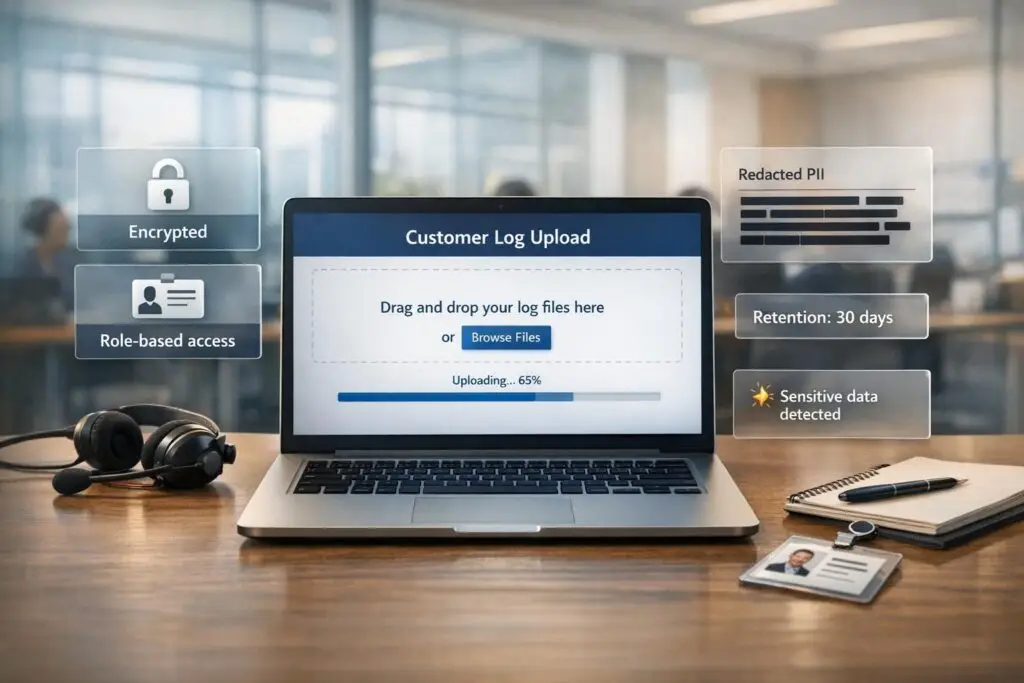
When customers report issues, collecting logs is crucial for diagnosing and resolving problems. However, logs often contain sensitive information like API keys, credentials, and PII. Mishandling this data can lead to security breaches, compliance violations, and loss of trust.
To securely collect logs, follow these key steps:
- Define what logs you need: Focus on relevant data to avoid unnecessary storage and compliance risks.
- Use secure tools: Opt for encrypted portals, presigned URLs, and cloud-native solutions like AWS S3.
- Restrict access: Implement Role-Based Access Control (RBAC) and audit trails to limit and monitor access.
- Sanitize logs: Remove sensitive data during ingestion using regex or allow-listing methods.
- Set retention policies: Align log storage durations with regulations like GDPR and HIPAA.
- Leverage AI: Automate tasks like detecting sensitive data, routing logs, and identifying anomalies.
Email attachments and unsecured forms are outdated and risky. Instead, secure upload portals with encryption, clear access controls, and user-friendly features ensure a safer and more efficient process. These practices not only protect data but also help meet compliance standards while improving operational workflows.
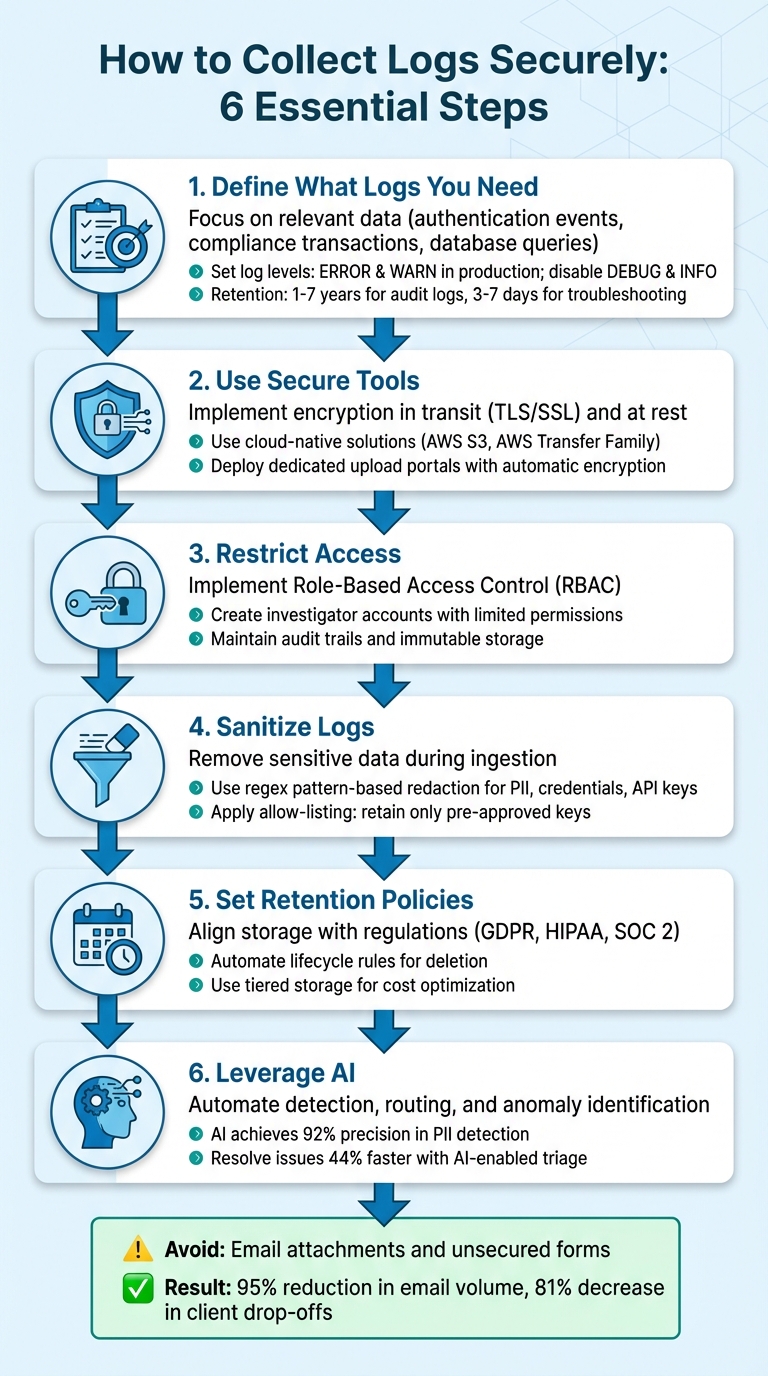
6-Step Framework for Secure Customer Log Collection
Enterprise-Grade AI: Securing Your B2B AI App with SSO & RBAC
sbb-itb-e60d259
Building a Secure Log Collection Process
Having a solid plan for log collection is essential to ensure you’re gathering the right data for the right reasons. Without it, you risk collecting irrelevant information, missing key details, or running into compliance headaches later.
Define What Logs You Need and Why
Start by identifying the logs critical to your operations. These could include authentication events, compliance transactions, database queries, and server commands – essentially, logs that answer the critical questions of who, what, when, and where [3][5].
To avoid drowning in data, configure log levels carefully. In production environments, enable ERROR and WARN levels to highlight urgent issues while disabling verbose levels like DEBUG and INFO, which can overwhelm your storage and inflate costs [4][6]. As Pulse Support aptly puts it, "The single most impactful log management decision happens at the source – before logs ever reach your pipeline" [6].
Retention policies are just as important. Security and audit logs often need to be kept for 1–7 years to comply with standards like SOC 2, HIPAA, or PCI-DSS. On the other hand, troubleshooting logs may only need to stick around for 3–7 days [6]. Holding onto logs longer than necessary can drive up costs unnecessarily. Once you’ve defined your needs, you can choose tools that help enforce these standards.
Select Secure Tools and Infrastructure
Choose tools that prioritize encryption – both in transit (using TLS/SSL) and at rest. Cloud-native solutions like Amazon S3 for storage and AWS Transfer Family for SFTP access offer secure and automated workflows [7]. These serverless options are also budget-friendly, as you only pay for what you use.
For customer-facing log collection, consider using dedicated upload portals. Features like branded interfaces, unlimited guest access (no account creation required), and automatic encryption can build trust and improve completion rates [2][8]. Some modern portals can even integrate directly into chat widgets, simplifying the troubleshooting experience and reducing the likelihood of upload abandonment [2].
The next step is to establish clear data ownership and access protocols to maintain security and compliance.
Define Data Ownership and Access Rules
Implement Role-Based Access Control (RBAC) immediately to restrict who can access centralized log data. Create investigator accounts with limited permissions to prevent unauthorized access and organize uploads by client ID to keep data isolated [1][9].
Audit trails are critical. Keep a record of all log access and use immutable storage to ensure forensic integrity [1][7][9]. For instance, Microsoft has increased its standard audit log retention to 180 days and, under its Secure Future Initiative, retains some logs for up to two years to support long-term investigations [9].
"Centralizing access to security logs transforms fragmented monitoring data into actionable intelligence." – Microsoft Secure Future Initiative [9]
Finally, set up lifecycle policies to manage older logs. Automatically move them to lower-cost storage tiers or delete them once they exceed compliance requirements [7]. This approach ensures you maintain a balance between security, compliance, and cost management.
Creating a Secure Customer Upload Portal
A secure customer upload portal is a critical step in protecting sensitive data while improving the efficiency of support operations. The aim is to design a system that prioritizes security without being overly complicated – ensuring customers won’t resort to sending unencrypted files via email.
Add Authentication and Access Controls
Start by implementing multi-factor authentication (MFA) using trusted methods like authenticator apps or hardware tokens. For automated uploads, use a device authorization flow to issue temporary bearer tokens. Enhance security further by enforcing session timeouts (15–30 minutes) and restricting connections to specific ports, such as Port 22 for SFTP or Port 80 for web uploads.
For instance, Red Hat’s Secure FTP service incorporates a "Hydra-SFTP" client. This setup requires users to visit a verification URI in their browser to grant permission, after which a bearer token is issued. This method strikes a balance between strong security and ease of use for technical users handling automated uploads.
Once access controls are in place, focus on validating and safeguarding the uploaded files.
Validate Files and Set Size Limits
Direct customer uploads to object storage using presigned URLs. This approach minimizes server load, avoids bandwidth bottlenecks, and prevents timeouts. Organize storage into raw, safe, and quarantine zones. Use background workers or serverless functions to handle virus scanning and file validation asynchronously before processing.
Go beyond checking file extensions – use file type sniffing to confirm that a .log file is genuinely a log file and not a disguised executable. Apply size limits early in the process, such as capping log file uploads at 100MB during presigned URL generation.
"An uploaded file is guilty until proven safe." – Sheikh Mohammad Nazmul H., Software Developer
Treat every uploaded file as a database record with clear statuses like pending, scanning, safe, or infected. Set lifecycle rules to automatically delete quarantined files or incomplete uploads to maintain storage efficiency and security.
Once the portal is secure and files are validated, the next priority is guiding customers through the upload process.
Give Customers Clear Upload Instructions
Even the most secure system can fail if customers find it confusing. Provide clear guidelines for file naming and formats to ensure smooth automated processing. For example, ask customers to prefix files with their case ID (e.g., 02855523_testreport.gz). Include features like real-time progress bars and status updates to reassure users that their uploads are successful.
Be transparent about retention policies, such as stating, "Logs are permanently deleted 30 days after upload." For technical users, offer tools like wrapper scripts that simplify authentication and upload commands. For example, Red Hat provides a script called uploadFileToSFTP.sh, which automates token generation and SFTP uploads on Linux and macOS, reducing the risk of manual errors.
Organizations that have adopted secure portals report significant improvements. For example, transitioning from email to secure portals led to a 95% reduction in email volume and an 81% decrease in client drop-offs [10]. BNP Paribas shortened onboarding time by 50% using encrypted portals for KYC collection, while Gogo Mediation reduced case filing time by 60% with automated document workflows [10].
Protecting Data Integrity and Meeting Compliance Requirements
Once you’ve secured the collection process and upload portal, the next priority is ensuring log integrity while adhering to compliance standards. Logs that can be altered or deleted without detection can’t serve as trustworthy audit records.
Verify Logs Are Authentic
One way to ensure logs remain untampered is by using SHA-256 hashing. This algorithm generates a unique fingerprint for every log file. Even the smallest change – like modifying one character – will create a completely different hash, making tampering immediately obvious. For added security, you can use digital signatures (combining SHA-256 with RSA) to confirm both the integrity of the file and its origin.
Another effective method is creating a hash chain, where each log entry includes the cryptographic hash of the previous one. If someone tries to alter or delete an entry, the chain breaks at the compromised point, pinpointing the issue. Modern systems can validate hundreds of thousands of events per second, so efficiency won’t be a concern. To further protect logs, store them in a remote system or a SIEM platform, which makes it harder for attackers to erase evidence. Additionally, enabling MFA Delete on storage buckets ensures that multi-factor authentication is required before any log can be removed.
Once authenticity is locked down, the next step is to sanitize logs to reduce liability risks.
Remove Sensitive Data from Logs
Storing sensitive information in logs can lead to serious risks. For example, in 2018, Twitter accidentally logged 330 million unmasked passwords in an internal log. Similarly, in 2021, DreamHost exposed 814 million records due to unencrypted monitoring files [11]. These incidents highlight how easily sensitive data can be mishandled. Moreover, 87% of consumers say they would avoid doing business with a company if they had security concerns [11].
To minimize these risks, use pattern-based redaction with regex to identify and remove sensitive formats like credit card numbers, Social Security numbers, and API keys. Fields such as password, auth_token, or session_id should also be removed using attribute-based redaction. For tighter control, adopt allow-listing, where only pre-approved keys are retained, and all others are discarded. Redaction should happen during ingestion to ensure sensitive data never enters storage, helping meet regulations like GDPR and HIPAA. Switching to structured logging with key/value pairs instead of plain text can also make automated scrubbing more efficient.
Finally, make sure your retention policies align with compliance rules and operational needs.
Set Retention and Deletion Policies
Regulations like GDPR Article 5(e) emphasize "storage limitation", meaning personal data in logs should only be kept as long as necessary. Similarly, HIPAA has specific retention requirements for health information, while SOX mandates keeping audit trails for financial reporting. Define retention windows – such as 30, 90, or 365 days – based on these regulatory requirements. Avoid indefinite storage, as it increases the risk of exposure in the event of a breach.
For audit logs, keeping records for 6–12 months strikes a good balance between compliance and forensic needs, as some breaches may not be discovered for months. Use automated lifecycle rules to delete logs once they expire, and consider tagging sensitive log data for routing to stricter storage buckets with enhanced monitoring and retention policies.
Using AI to Improve Log Management
Integrating AI into log management can drastically enhance both efficiency and accuracy. With hundreds or even thousands of logs being uploaded monthly, manual reviews simply can’t keep up. AI steps in to handle repetitive tasks, such as identifying risks, routing issues to the right teams, and spotting anomalies early. This allows support and security teams to focus on solving problems rather than spending valuable time on initial reviews.
Automatically Detect Sensitive Data
AI-powered tools combine regex pattern matching and Large Language Models (LLMs) to detect sensitive information like PII, credentials, and compliance risks. For instance, in 2024, Databricks introduced an LLM-based system called LogSentinel, which analyzed 2,258 labeled samples. It achieved an impressive 92% precision and 95% recall, cutting manual audit times from weeks to just a few hours [14].
"Dealing with massive datasets is not just about identifying and categorizing PII. The challenge also lies in implementing robust mechanisms to obfuscate and redact this sensitive data." – Amazon Web Services [13]
To minimize the risks associated with sensitive data, you can use ingestion-time redaction, which ensures sensitive information is removed before reaching storage. This approach aligns with GDPR and HIPAA’s "data minimization" principles. Alternatively, query-time protection allows raw logs to remain intact for audits while masking sensitive data during retrieval [12]. For added security, deterministic hashing can replace sensitive values with MD5 hashes (e.g., [REDACTED:12314HASH]), enabling secure searches without exposing the original data [12]. These automated methods streamline data classification and routing, ensuring compliance and efficiency.
Route and Analyze Logs Automatically
AI can also classify logs by severity, assign them to the correct team, and summarize critical details to speed up resolution. By leveraging Natural Language Processing (NLP), modern systems extract information like issue types, urgency, and sentiment from log metadata and customer interactions. They then assign dynamic priority scores based on factors such as SLA deadlines, account importance, and the technical impact of the issue [15][16].
Skill-based routing ensures logs are directed to the most qualified agents or engineers, taking into account expertise areas – such as API integrations or billing systems – and current workloads [15][16]. AI also helps by creating automated escalation packets that include summaries, root cause hypotheses, relevant logs, and reproduction steps [16]. These advancements lead to faster resolutions, with industry data showing that AI-enabled teams resolve issues 44% faster and save 45% of time spent on calls [17]. Additionally, AI-based triage systems in technical B2B support boast around 92% accuracy in categorizing and routing requests [18].
Monitor Logs for Patterns and Anomalies
AI is particularly effective at spotting unusual patterns in logs that might indicate security breaches or system malfunctions before users even notice. Tools like Amazon CloudWatch Logs use both managed and custom data identifiers to secure operational data while auditing log events [13]. Managed data identifiers detect common sensitive data types, such as account numbers and PII, while custom data identifiers allow for tailored regex-based detection to meet specific business needs [13].
Regular audits of interaction logs are vital for identifying unauthorized access or irregularities in data handling [13]. For example, slot obfuscation in conversational interfaces can mask sensitive data at the point of capture, logging only placeholders (e.g., {PhoneNumber}) instead of actual PII [13]. Proactive monitoring helps detect "near misses", such as repeated workflow failures or spikes in integration errors, before they escalate into full-blown outages [16][17].
Conclusion
Secure log collection plays a key role in protecting sensitive data, building customer trust, and improving B2B support operations. By encrypting data, applying strict access controls, and automating retention policies, businesses can safeguard information while staying compliant with regulations like GDPR, HIPAA, and SOC 2. These measures also simplify processes – customers can upload logs through secure self-service portals instead of using risky methods like email attachments [20]. Together, these steps form a solid foundation for security.
"Strong authentication security isn’t just a defense – it’s the foundation of user confidence and long-term success." – Aniket Bhattacharyea, Author [19]
The numbers are telling: 73% of perimeter breaches stem from weaknesses in web applications, and 66% of Americans reuse passwords across accounts [19]. These statistics highlight why sticking to best practices is non-negotiable.
Looking beyond the basics, integrating AI into log management can take security to the next level. AI doesn’t just strengthen defenses – it streamlines operations by identifying sensitive data, directing issues to the right teams, and detecting anomalies before they become major problems. This shifts log collection from a reactive chore to a proactive strategy, cutting resolution times and lowering support costs.
Maintaining secure workflows requires consistent effort. Conduct quarterly portal audits, schedule regular penetration tests, and gather customer feedback to uncover areas for improvement [20]. As threats evolve and compliance requirements grow stricter, businesses that continuously adapt their log collection processes will not only protect data but also safeguard their reputation [3].
FAQs
What’s the safest way for customers to upload logs?
The safest way for customers to share logs is by using secure file transfer methods that safeguard sensitive data. To achieve this, it’s a good idea to set up a secure portal that incorporates encryption, role-based access controls, and automated security measures.
Using protocols like SFTP or platforms that comply with recognized standards such as ISO 27001 or SOC 2 further enhances protection. These solutions ensure data confidentiality and integrity by leveraging encrypted channels, robust authentication, and continuous monitoring to guard against breaches.
How do we redact secrets and PII without breaking troubleshooting?
To protect sensitive data like secrets and PII without disrupting troubleshooting, automated redaction pipelines are key. These pipelines can strip out sensitive details – such as PII, API tokens, and credentials – before logs are stored or shared. Pair this approach with encryption and strict access controls to maintain both security and compliance.
In environments where privacy is a top priority, methods like pseudonymous IDs and metadata-first telemetry offer a way to safeguard sensitive information while keeping logs useful for analysis. These techniques strike a balance between data protection and operational needs.
How long should we keep customer logs for compliance?
The length of time customer logs should be retained hinges on both regulatory guidelines and internal policies. In most cases, a retention period of 6–7 years is recommended to ensure compliance and aid in security investigations. For instance, HIPAA mandates a minimum of six years for keeping audit logs tied to protected health information. However, other regulations may call for different timeframes. It’s crucial to align your retention practices with the specific standards that apply to your organization.
Related Blog Posts
- How do you set up a customer portal that supports role-based access and multiple customer teams?
- Audit Logs: Why They Are Non-Negotiable for Regulated Industries
- Customer portal design checklist for regulated industries (audit, RBAC, logs)
- How to handle attachments in a portal safely (viruses, PII, retention)






