


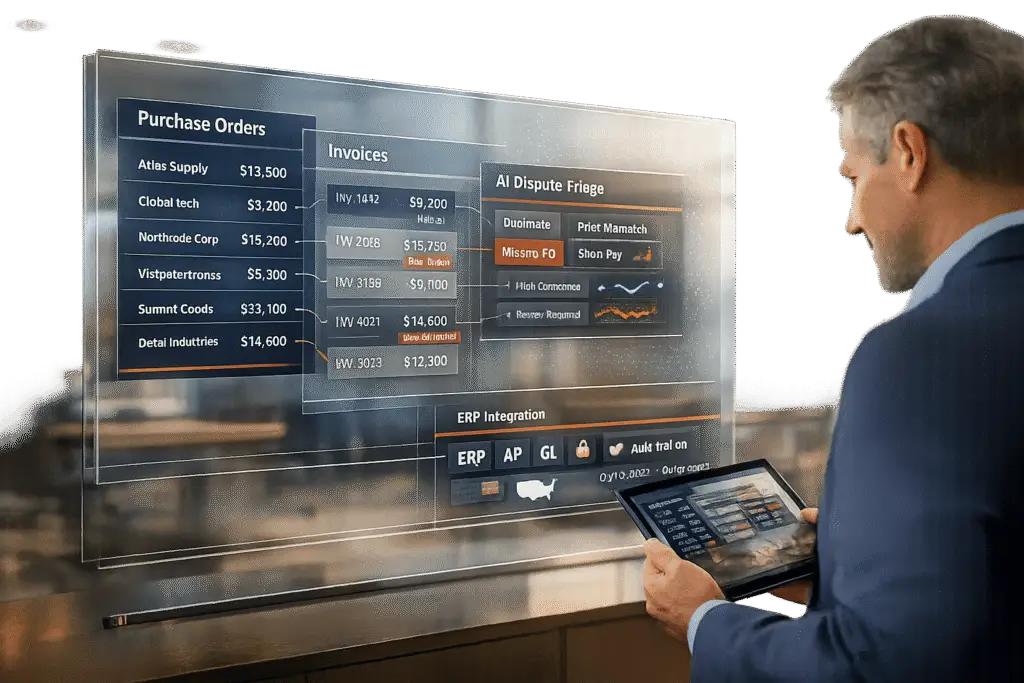
Handling purchase orders and invoice disputes manually is expensive and time-consuming. Manual processes cost $30–$60 per order, while automation reduces that to $1–$3. Additionally, 55% of U.S. B2B invoices are overdue, costing businesses around $39,406 annually in collections. A self-service portal can solve these issues by automating workflows, reducing errors, and improving efficiency.
Key Features for a Successful Portal:
- Purchase Order Management: Real-time order tracking, advanced search, bulk uploads (e.g., CSV), and customer-specific pricing.
- Invoice Dispute Resolution: Easy dispute submission forms, status tracking, line-level adjustments, and automated escalation workflows.
- AI in B2B support integration: Document matching, dispute triage, predictive escalation, and resolution summaries to cut processing time and costs.
- User-Friendly Design: Role-based access, clear U.S.-specific formats (e.g., dates as MM/DD/YYYY, currency as $1,234.56), and secure protocols like encryption and MFA.
AI-powered portals reduce invoice processing time from 15–20 minutes to 30 seconds and cut errors by 95%. Businesses adopting such systems see a 40–70% drop in support tickets and recover costs in 4–6 months.
A well-designed portal saves time, lowers costs, and meets modern B2B buyer expectations for digital, self-service solutions.
How to Manage Invoice Disputes with Automation and Empathy – Expert Tips
sbb-itb-e60d259
Understanding User Requirements for Purchase Order and Invoice Dispute Management
Before diving into portal design, it’s crucial to identify where your customers’ workflows are breaking down. Research shows that 55% of accounts receivable professionals find dispute management to be their biggest challenge [6][7]. On top of that, 99% acknowledge that disputes directly lead to late payments [6]. These aren’t just abstract statistics – they represent real costs and frustration for everyone involved. By addressing these issues, you can build an AI-driven, cost-effective support portal that truly meets user needs. Leveraging AI in customer support can further streamline these complex interactions. This foundation is vital for guiding user research and defining workflows.
Conducting User Research and Journey Mapping
Start by pinpointing where communication is failing. A revealing statistic: 35% of business leaders cite communication breakdowns as the main hurdle in collections [6]. To dig deeper, interview both your customers and support teams to uncover the key pain points. Common issues often include:
- Administrative errors, like missing purchase order (PO) numbers
- Disputes over deliverables, such as quality or scope
- Misalignment, where the person approving work isn’t the one processing payments [2]
Customer experience plays a huge role here – 84% of business and finance leaders say it’s critical in accounts receivable [6]. Your portal needs to do more than just function; it should promote collaboration and avoid feeling confrontational. Begin by analyzing how disputes are resolved today, often buried in email threads or scattered across siloed systems. Research can be time-consuming, especially when data is fragmented across ERPs, CRMs, and accounting platforms [6][7]. A well-crafted journey map will highlight where a centralized repository could make the biggest impact.
Identifying Core Workflows
Once you’ve mapped out the pain points, the next step is to translate those insights into clear, efficient workflows. Different users will have different needs. For instance, a purchasing manager might require full account visibility, while warehouse staff may only need access to order tracking [3].
Your portal should support workflows that:
- Provide real-time status updates to reduce repetitive payment inquiries
- Allow users to upload documents, such as proof of delivery
- Enable dispute initiation with standardized reason codes that automatically route issues to the correct team [6]
Addressing workflow friction is key. Manual data entry often leads to errors like pricing discrepancies, incorrect quantities, and duplicate invoices [4][5]. To tackle this, users should have tools to:
- Upload CSVs for bulk orders
- Access historical receipts directly
- Update payment methods without external assistance [1]
Automated status updates and clearly documented scopes of work can significantly cut down on billing conflicts [2]. The goal is to deliver workflows that emphasize transparency, self-service tools, and automated matching between purchase orders, invoices, and receipts. This approach not only simplifies processes but also builds trust with users.
Designing Core Features for Purchase Order and Invoice Dispute Management
Once you’ve mapped out workflows and pinpointed problem areas, the next step is to create a portal that simplifies purchase order management and resolves invoice disputes quickly. The aim? To eliminate endless back-and-forth communication. As highlighted earlier, automation can slash processing costs from $30–$60 per order to just $1–$3 [3]. This dramatic cost reduction underscores the value that modern portals bring. Let’s dive into the key features needed for both purchase order management and invoice dispute resolution.
Purchase Order Management Features
A well-designed portal should offer comprehensive order history and real-time tracking. Customers should instantly see details like what they’ve ordered, when it shipped, and its current status. This kind of transparency reduces the volume of "Where’s my order?" inquiries that often overwhelm support teams. Including advanced search and filtering options is also a must. Users should be able to search by PO number, date (MM/DD/YYYY format), dollar amount, or status (e.g., paid, pending, overdue).
For buyers handling large volumes, quick entry tools are a game-changer. Features like SKU lists, CSV uploads, and barcode scanning save time compared to navigating a retail-style interface. Additionally, the portal should integrate with your ERP system to display customer-specific pricing, such as negotiated contract rates and volume discounts. As Drake Q., Co-founder & CPO at Chatty, explains:
"B2B portals must reflect negotiated terms, volume discounts, and contract rates automatically – displaying standard public pricing to a B2B buyer destroys trust" [3].
To keep things user-friendly, implement role-based access control (RBAC). This ensures that each user sees only what they need. For example, a warehouse employee might only need shipment tracking, while a purchasing manager requires full account visibility and ordering capabilities. Lastly, real-time inventory visibility is crucial. Allow users to check stock levels before placing orders to avoid frustrating back-order situations.
Invoice Dispute Resolution Features
While order management focuses on efficiency and transparency, resolving disputes demands a structured, self-service approach. Start by replacing confusing email chains with a dispute submission form that’s easy to use. This form should allow customers to upload supporting evidence, such as photos of damaged goods, spec sheets, or signed agreements, to speed up the resolution process.
Transparency is key, so include dispute status tracking with clear visual indicators. For instance, flags or red highlights can signal that an invoice is under review. Offering line-level dispute options is equally important – it lets customers challenge specific items without rejecting the entire invoice, which can significantly speed up resolutions. A centralized communication log, complete with timestamps, ensures all buyer-seller interactions are documented for clarity and accountability.
Finally, set up escalation workflows to route disputes to the appropriate stakeholders automatically. For example, a $500 pricing issue might go straight to accounts receivable, while a $50,000 contract disagreement would escalate to the legal team [3][8]. This structured process replaces chaotic email threads with an organized, auditable system that helps resolve disputes faster while maintaining strong business relationships.
These essential features lay the groundwork for incorporating AI tools to further streamline operations and cut costs.
Using AI to Improve Workflows and Reduce Costs
Integrating AI into existing workflows doesn’t just streamline processes – it completely redefines them. Once the foundational portal features are in place, AI acts as a catalyst, transforming ordinary workflows into highly efficient systems. The results are striking: AI reduces invoice processing time from 15–20 minutes to just 30 seconds, while cutting costs per invoice from $12–$15 to as little as $1–$2 [10]. These aren’t small changes – they represent a major shift in how B2B support teams handle purchase orders and resolve invoice disputes. Here’s how AI makes this possible.
AI-Driven Document Matching and Dispute Triage
Modern AI systems excel at automating document matching between invoices and purchase orders, eliminating the need for outdated, vendor-specific templates. Advanced vision models and large language models (LLMs) can extract structured data from virtually any invoice format, regardless of layout, scan quality, or even handwritten elements. For instance, Mediaform, an Australian IT services company, implemented an AI-powered invoice-to-PO validation system in just one week in March 2026. This system now processes 200 purchase orders and 1,000 invoices monthly, seamlessly validating details like price, quantity, and address against their Business Central ERP [9].
One standout feature is fuzzy matching logic, which allows AI to reconcile documents even when the data isn’t perfect. Whether it’s truncated PO numbers, vendor name abbreviations like "SM" for "Santa Monica", or discrepancies in product descriptions, AI can handle it. For example, Erewhon, a grocery chain, processes 20,000 invoices monthly across 10 store locations using this approach. The system assigns a weighted match score based on multiple fields – PO number (40%), amount (30%), vendor (20%), and line items (10%). Matches with high scores are automatically approved, while low scores are flagged for manual review.
AI also streamlines dispute triage by tagging each issue with labels like "price-discrepancy", "quantity-mismatch", or "duplicate-invoice", and instantly routing them to the correct team. This eliminates the tedious task of manually sorting disputes. As one operations lead at a gas distribution company put it:
"The approval is all about the accurate extraction of the data. It has nothing to do with the content" [9].
With 96–99% extraction accuracy, AI far outperforms the 70–85% accuracy typically achieved by traditional OCR systems [11].
Predictive Escalation and Resolution Summaries
AI doesn’t just speed up dispute resolution – it also predicts potential escalations and simplifies decision-making with automated summaries. By monitoring approval times and case histories, AI ensures no case lingers unresolved. For example, disputes flagged with issues like "Amount_Mismatch" or "No_PO_Match" are automatically escalated if they remain pending beyond a set timeframe, such as 24 hours [12].
AI also generates resolution summaries that save reviewers from sifting through email threads and scattered documents. These summaries provide clear, actionable recommendations. For instance:
"5% over PO amount. Invoice includes $250 shipping not on original PO. Recommend: Approve and update PO" [10].
This approach significantly reduces review times. ACS Industries, for example, switched to an AI-driven workflow in early 2026 to handle over 400 purchase orders per week. Their previous UiPath implementation struggled with format variations, requiring excessive manual adjustments [9].
The overall impact is game-changing. Companies processing 500–1,000 invoices monthly can reduce manual labor by 60–70% and cut errors by 95% [11]. Additionally, AI enables businesses to capture early payment discounts on 85% of invoices, compared to just 15% with manual workflows [10]. These savings not only lower costs but also open up new revenue opportunities. This is the kind of efficiency modern B2B portals should strive to achieve.
Ensuring US-Localized and Secure User Experience
Creating a portal tailored for US-based users, while maintaining high security standards, is crucial for smooth B2B operations. In transactions involving purchase orders and invoices, even minor formatting errors can result in missed payments or financial losses. For instance, currency should always appear as $1,234.56 – using commas for thousands and periods for decimals – to avoid misunderstandings and costly mistakes [14].
Localization Considerations
Adopting US-specific formats ensures clarity in vital B2B exchanges. A simple misstep, like presenting dates as DD/MM/YYYY instead of the US standard MM/DD/YYYY, can create confusion. For example, "04/08/2024" would be read as April 8th in the US but August 8th in some European countries [13]. To prevent such issues, portals should:
- Format dates as MM/DD/YYYY
- Display monetary values as $1,234.56
- Use imperial units where applicable
Tools like JavaScript’s Intl.DateTimeFormat or Python’s babel can automatically apply these formats based on user locale settings [13]. This ensures consistency across all aspects of the portal, from invoice details to dispute timestamps, without requiring manual adjustments.
While localization helps eliminate transactional errors, strong security measures are equally vital for building trust.
Security Best Practices
US-specific localization not only reduces errors but also enhances communication clarity, complementing robust security protocols. For B2B portals managing financial data, security is non-negotiable. A multi-layered security framework is essential, incorporating:
- Data encryption to safeguard sensitive information
- Multi-factor authentication (MFA) for added login security
- Role-based access controls (RBAC) to limit data access by user roles
For payment processing, tokenization is critical to comply with PCI standards while protecting card details [15]. Billtrust, a company processing over $1 trillion in invoices annually for more than 2,400 clients, highlights the importance of:
"Critical security measures include encryption, multi-factor authentication, access controls, fraud detection systems, and regular security audits" [17].
Additionally, logging every portal interaction – complete with timestamps and IP addresses – ensures auditability. Centralized logs not only aid in resolving disputes but also demonstrate compliance with regulations like the CCPA [16][18].
Innovative methods like passwordless authentication (e.g., magic links) can significantly improve user adoption rates, reaching over 75% compared to 30–40% with traditional passwords [1]. This combination of user-friendly design and rigorous security can reduce support tickets by 40–70%, all while maintaining top-tier data protection standards [1].
Comparing Manual vs. AI-Enhanced Processes
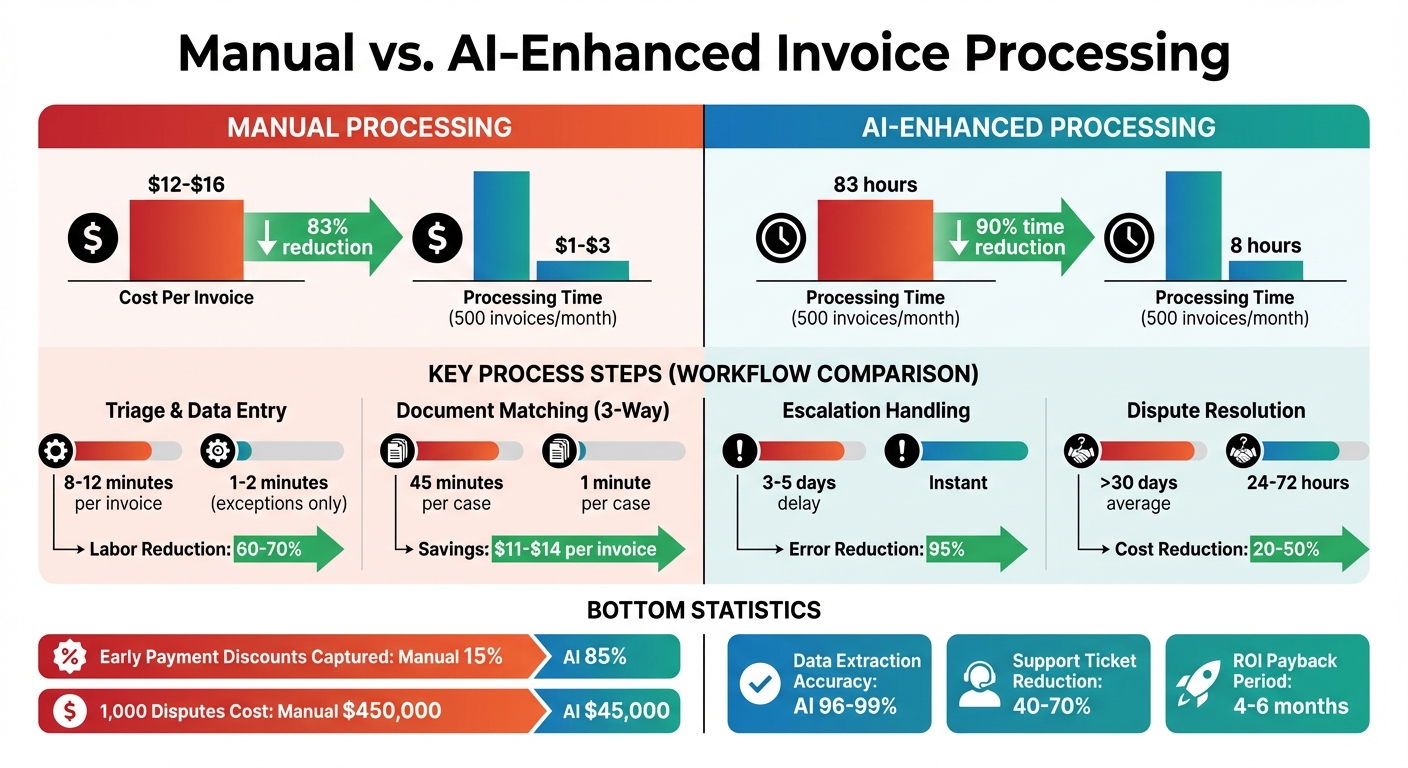
Manual vs AI-Enhanced Invoice Processing: Time, Cost and Efficiency Comparison
When you compare manual workflows with AI-enhanced ones, the numbers tell a powerful story. Take invoice processing as an example: manually handling invoices costs between $12 and $16 each, whereas AI-driven automation slashes that to just $1 to $3 [19][10]. For a company processing 500 invoices a month, this translates to 83 hours of manual work versus only 8 hours with AI. The efficiency gains here go far beyond time savings – they significantly cut costs and improve overall productivity [11].
Workflow Comparison Table
| Process Step | Manual Time/Effort | AI Time/Effort | Cost Savings |
|---|---|---|---|
| Triage & Data Entry | 8–12 minutes per invoice [11] | 1–2 minutes (exceptions only) [11] | 60–70% labor reduction [11] |
| Document Matching (3-Way) | 45 minutes per case [10] | 1 minute per case [10] | $11–$14 saved per invoice [10] |
| Escalation Handling | 3–5 days delay [11] | Instant [10] | 95% error reduction [11] |
| Dispute Resolution | >30 days average [19] | 24–72 hours for standard cases [19] | 20–50% operational cost cut [19] |
AI systems also unlock the ability to capture early payment discounts 85% of the time, compared to just 15% with manual processes [10]. The cost difference is even more dramatic when scaling: resolving 1,000 disputes manually can cost up to $450,000, while AI handles the same workload for about $45,000 [19].
Beyond these savings, AI eliminates the hours spent fixing human errors – estimated at 4–8 hours per week for manual teams [19]. This efficiency allows teams to focus on higher-value tasks like handling exceptions or improving vendor relationships [11][10]. Implementing scalable B2B support strategies with AI is particularly crucial as transaction volumes grow, making it a game-changer for modern B2B support teams.
Conclusion
A thoughtfully crafted portal that blends effective order management with AI-powered customizable portals can revolutionize your B2B support operations. Companies that adopt self-service portals report a 40–70% drop in billing-related support tickets [1], while order processing costs plummet from $30–$60 per order to just $1–$3 [3]. This shift frees up resources, enabling teams to concentrate on activities that drive revenue.
By pairing user-friendly design with AI automation, businesses achieve tangible gains. AI tools extract data with 96–99% accuracy, match documents in minutes rather than hours, and bring only exceptions to human attention [11]. Around-the-clock access to account pricing, live inventory updates, and dispute resolution tools not only reduces support tickets but also builds trust and confidence among customers.
"Sales reps spend more than one-quarter (26%) of their working hours on administrative tasks." – Forrester [3]
Your portal should eliminate inefficiencies like this. Ensure ERP integration to provide customers with real-time, reliable data [3], and implement passwordless authentication, which can lift adoption rates from 30–40% to over 75% [1]. Additionally, focus on features like SKU uploads for quick ordering, as B2B buyers prioritize speed over browsing [3].
The return on investment is swift – most mid-market companies see payback in just 4–6 months [11]. Over time, the benefits multiply. Self-service e-commerce already contributes to 34% of total B2B revenue [3], and this share continues to grow. Beyond cost savings, an AI-powered portal positions your business to thrive in the digital age, offering a scalable competitive edge that keeps customers happy while allowing your team to focus on strategic, value-added work.
FAQs
What integrations do I need with my ERP/accounting systems?
To handle purchase orders and invoice disputes effectively, it’s essential to connect your portal with your ERP or accounting system. This kind of integration allows for smooth data exchange and automation. Here are the key areas to focus on:
- Invoice Validation: Ensure invoices align with purchase orders and payment schedules.
- Dispute Management: Automate processes like triaging and escalating disputes.
- Payment Processing: Synchronize payment statuses and keep records up to date.
These integrations help maintain accuracy, simplify dispute resolution, and make payment management more efficient.
How should role-based access work for buyers, AP, and warehouse users?
Role-based access should match the specific responsibilities of each group to ensure smooth operations and secure workflows. For example:
- Buyers should have permissions to place and track orders, manage approvals, and check status updates.
- Accounts Payable (AP) users need access to review invoices, handle disputes, and process payments.
- Warehouse users require access to confirm goods receipt and view inventory-related order details.
By assigning permissions that limit users to their designated roles, organizations can maintain security, prevent unauthorized actions, and streamline processes. This setup also supports efficient workflows and leverages AI-driven tools for tasks like dispute triage.
What dispute reason codes and escalation rules should I start with?
When dealing with disputes, it’s smart to start by addressing common issues like pricing discrepancies, incorrect products, or invoice errors. These are the types of problems that pop up most often and can usually be categorized with specific reason codes for easier tracking.
For escalation rules, focus on setting up triggers for disputes that remain unresolved after a certain period or involve high-value amounts. These triggers ensure that important cases don’t fall through the cracks and are addressed promptly.
By organizing disputes this way, you can streamline triage, keep workflows running smoothly, and make sure critical issues get the attention they need without unnecessary delays.
Related Blog Posts
- Slack vs. The Customer Portal: Why Enterprise Clients Demand a Proper Dashboard
- Customizing Portals for Strategic Accounts: Why One Size Doesn’t Fit All
- How to choose a B2B customer portal that enterprise customers actually use
- Customer portal for manufacturing support: parts, serials, and asset history






