


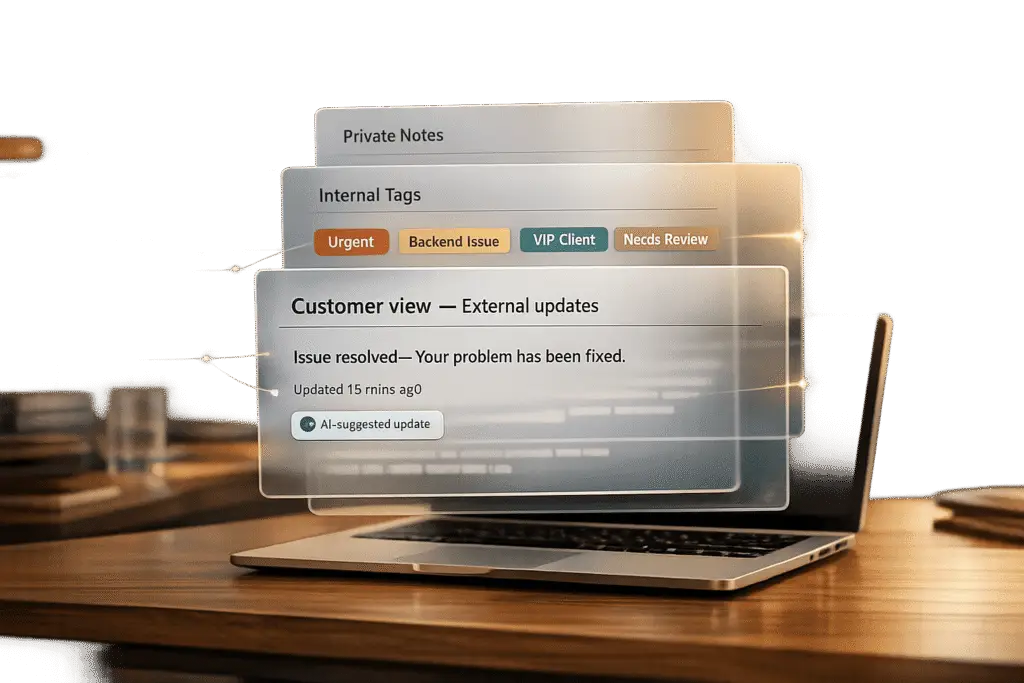
In managing B2B customer support, controlling what information is visible – both internally and externally – is critical. This ensures smooth teamwork, professional communication, and data security. The key tools for achieving this are private notes, internal tags, and external updates:
- Private Notes: Enable internal collaboration without exposing sensitive details to customers.
- Internal Tags: Categorize and route cases efficiently using AI-powered prioritization, reducing manual errors.
- External Updates: Share concise, customer-focused updates while safeguarding internal details.
Using platforms like Supportbench, teams can automate workflows with AI, streamline tagging, and configure role-based access to prevent visibility leaks. This approach balances internal context with clear, secure communication to customers.
Customer Portal Case Visibility: Managing Private Notes, Internal Tags, and External Updates
Setting Up Private Notes for Internal Teams
Private notes are a cornerstone of effective internal collaboration, allowing teams to share sensitive details – like debugging steps, customer health concerns, or renewal risks – without exposing this information to customers. The key challenge lies in ensuring these notes stay private while remaining accessible to the right internal teams.
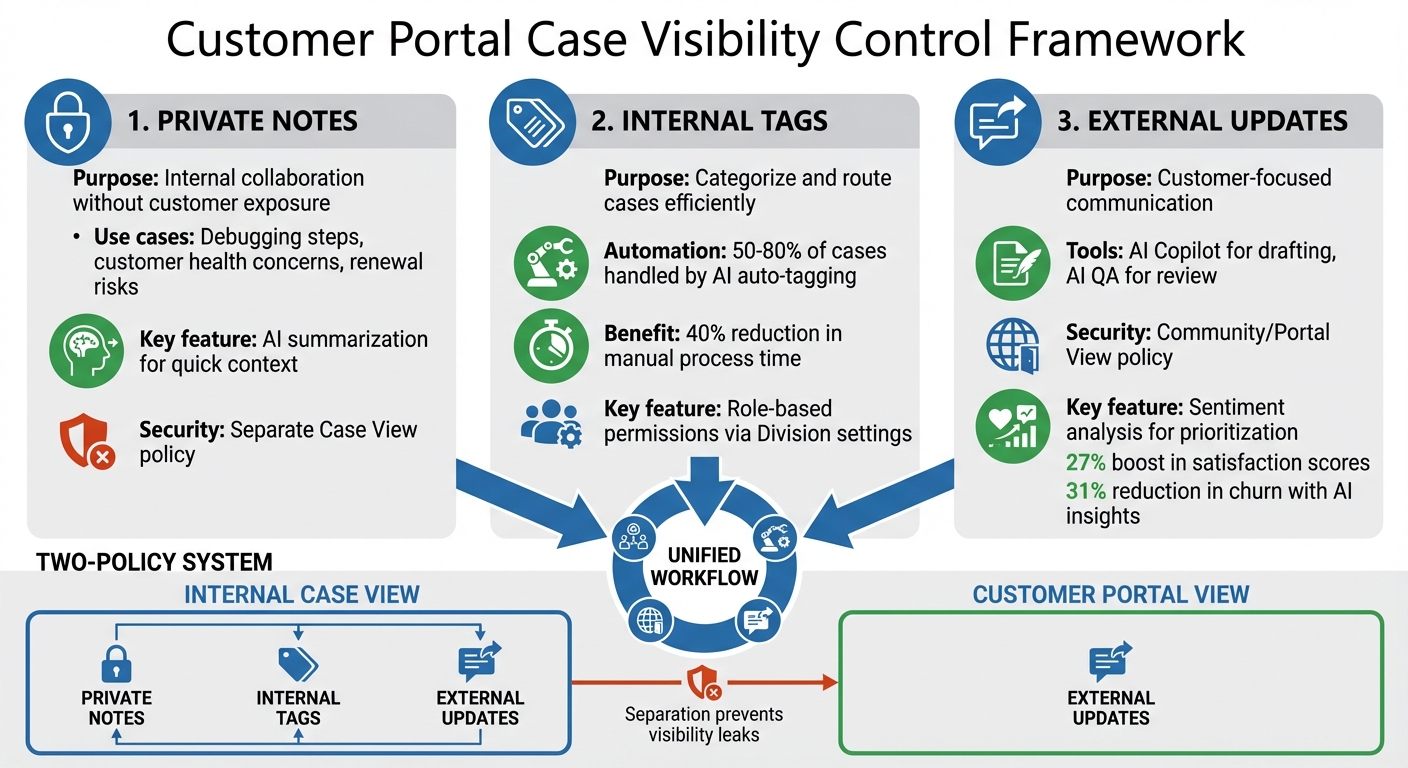
Supportbench tackles this challenge with Case Policies, which control what data is visible to different user groups. For internal teams, you can configure a "Case View" policy that includes private notes and AI-generated summaries. At the same time, a separate "Community / portal view" policy excludes these internal-only fields. This separation minimizes the risk of accidental visibility leaks while ensuring agents have the full context needed to handle complex cases effectively.
How to Add and Manage Private Notes in Supportbench
To get started, you’ll need to set up the right Case Policies. Go to Configuration > Cases > Policy and create a new policy with the type set to "Case View." In the "Fields to show" section, include the internal note fields. For added clarity, you can also include a "Visibility" field in the "Summary Fields" section, which gives agents a quick way to identify cases containing sensitive internal information [2].
To control access further, use the Division setting within the policy. For example, you can configure it so teams with higher clearance levels access more sensitive details, while teams with general access only see essential troubleshooting information [2]. Regularly audit these policies – especially after system updates or when new custom fields are added – to ensure internal-only fields remain hidden from customer views [2].
Once your policies are in place, consider using AI summarization to streamline how internal notes are used.
AI Summarization and Security Best Practices for Private Notes
AI summarization can transform how teams handle private notes by automatically generating concise overviews of internal discussions and comments. With Supportbench’s AI summarization tool, agents can quickly understand a case’s history without digging through long threads. To use this feature effectively, configure the summaries to appear in the "Summary Fields" section of your internal Case View policy [3][5].
To maintain security, ensure these AI-generated summaries are included only in internal policies and excluded entirely from the "Community / portal view" policy. This setup ensures agents have the necessary context – especially during escalations or handoffs – while keeping sensitive analyses hidden from customers [2].
Finally, audit your policies quarterly to confirm that internal-only fields, such as AI summaries, private notes, and custom fields like customer health scores, remain inaccessible in customer-facing views. Use Supportbench’s Division locking feature to restrict access further, ensuring only authorized teams can view critical details about accounts or escalations [2].
sbb-itb-e60d259
Using Internal Tags for Team Collaboration
Internal tags play a key role in organizing cases and simplifying team workflows. Unlike private notes, which provide detailed context, tags offer a quick way to categorize cases. This helps teams efficiently filter, route, and prioritize their workload. When set up properly, tags reduce manual labor and ensure cases are directed to the right team members at the right time.
However, keeping tagging consistent can be tricky. Manual tagging often leads to errors or missed cases. AI auto-tagging solves this by assigning tags based on case data, ensuring accurate categorization from the start. This lets teams focus on solving issues rather than managing administrative tasks. With this foundation, case routing and prioritization become much more effective.
Creating, Applying, and Automating Internal Tags
The first step is to establish a clear tagging system that aligns with your team’s workflows. For instance, your taxonomy might include categories like product areas, issue severity, or escalation status. Once defined, configure the Case Policy under Configuration > Cases > Policy to display these tags in the Summary Fields.
Displaying key tags in Summary Fields is a game-changer for visibility. It ensures agents can quickly access critical workflow details – like SLA status, case ownership, or escalation level – without needing to scroll through case details. For example, if your team uses a "Renewal Risk" tag, placing it in Summary Fields allows agents to immediately identify high-priority accounts.
According to Dr. Brian Scott Glassman, VP of Product Management at AInspire.ai, "AI auto-tagging can handle 50% to 80% of the most common cases." He emphasizes designing AI systems to "handle fifty to eighty percent of the most common workflow cases. Edge cases outside that range should be intentionally routed to human teams" [6].
This strategy not only minimizes manual effort but also ensures that complex cases are appropriately escalated for human review.
AI Automation for Tagging and Role-Based Permissions
Once your tagging system is in place, AI automation can take it to the next level. Much like AI summarization for private notes, AI-driven tagging ensures consistency and reduces errors in categorizing cases. In platforms like Supportbench, AI analyzes incoming case data to assign tags automatically. This guarantees uniform classification and can trigger specific workflows – such as escalations, evidence requests, or SLA updates – without requiring agents to intervene.
To enhance security, combine AI tagging with role-based permissions. Use the Division setting within Case Policies to restrict access to sensitive tags. For example, tags related to customer health scores or renewal risks can be limited to specific teams, ensuring only authorized personnel have visibility. This prevents unauthorized access while enabling effective collaboration.
Organizations leveraging AI for tasks like tagging have reported up to a 40% reduction in time spent on manual processes [7]. By automating tagging and applying role-based permissions, teams can focus on impactful work while maintaining strict control over sensitive information. A well-optimized tagging system is essential for secure and efficient support operations.
Creating External Updates for Customer Communication
External updates are a way to keep customers informed about the progress of their cases while safeguarding internal details. These updates aim to build trust and reduce follow-up inquiries by providing clear, actionable information. The challenge lies in maintaining transparency without compromising sensitive internal data.
Customers want to stay updated, but they don’t need to see internal notes, such as escalation paths or technical troubleshooting steps. By carefully configuring what customers can access before publishing updates, you ensure professional communication without risking accidental exposure of private information.
How to Publish External Updates Safely
The first step is setting up a dedicated "Community / portal view" policy in Supportbench. To do this, go to Configuration > Cases > Policy and create a policy specifically for customer-facing case views. This policy determines which data points customers can see when accessing a case through the portal [2].
Limit the "Community / portal view" policy to display only customer-relevant fields, such as Status, Resolution, and SLA. Exclude internal notes, tags, and escalation details [2]. At the top of the case, use the "Summary fields" section to highlight essential details like Contact, SLA, and Owner. This provides customers with a quick, clear snapshot of the case without overwhelming them with unnecessary information [2].
Before publishing updates, take advantage of Supportbench’s AI Copilot to craft concise, customer-friendly responses based on the case history [9]. This ensures updates focus on resolutions rather than internal processes. Additionally, Supportbench’s AI QA feature reviews outgoing communications for empathy, tone, and accuracy, helping prevent unprofessional or unclear messages from reaching customers [9].
For API-based updates, always set the published attribute to 1 for customer-facing updates. This ensures sensitive data remains protected [4]. Combined with role-based security, these measures help tailor customer views and prevent accidental data leaks.
Using Role-Based Security to Control External Visibility
Role-based security allows you to control what different customer segments or business units can see. In Supportbench, you can lock policies to specific Divisions, ensuring visibility rules are applied appropriately [2]. For instance, if you manage multiple product lines, you can create separate portal policies for each division so customers only see cases related to their specific products.
To keep the portal focused and relevant, disable unnecessary features like internal time-tracking or billable indicators through the "Options" tab [2]. Regularly audit your Summary fields to ensure they provide a professional overview of the case without revealing internal workflows [2].
Supportbench also offers AI-driven sentiment analysis, which detects customer frustration levels in real time. This allows your team to prioritize updates for at-risk customers and personalize their communication, helping to prevent churn [9][10]. By combining role-based security with AI insights, you can maintain strict control over customer views while delivering empathetic, timely updates that strengthen relationships.
Combining Private Notes, Internal Tags, and External Updates
The strength of case visibility controls lies in combining private notes, internal tags, and external updates into a unified workflow. When these tools work together, your team can collaborate effectively behind the scenes while keeping customers informed – without exposing sensitive information. The trick is setting up your system to handle all three simultaneously, so agents don’t have to worry about what’s visible to whom. This approach builds on earlier setup steps, ensuring smooth internal operations and secure communication with customers.
Supportbench uses distinct Case Policies to separate internal and customer-facing views. The internal policy includes all custom fields, internal tags, and private notes, while the customer-facing policy limits visibility to external updates only [2]. This setup ensures that when an agent adds a private note about an escalation or applies an internal tag for routing, those details are never visible in the customer portal.
Building Integrated Workflows in Supportbench
Combining private notes, internal tags, and external updates simplifies case management. Configure your policies to highlight important fields like SLA, Visibility, and Owner in the Summary Fields section. This ensures agents can easily track resolution deadlines and privacy settings [2]. Key workflow data remains front and center as agents add notes or tags.
AI tools can take much of the manual effort out of managing these elements. For instance, AI auto-tagging can assign internal tags automatically to trigger specific workflows or escalations [1]. If a customer mentions a billing issue, the system could tag it as "Finance" and route it to the appropriate team.
When cases move between departments, AI can generate private notes summarizing case history, so the receiving team gets the context they need quickly [3]. At the same time, AI sentiment analysis monitors customer updates in real time. If frustration is detected, the system can apply an "Escalation" tag and notify management with a private note [8]. This creates a smooth handoff process, allowing internal collaboration to stay behind the scenes while customers receive timely, polished updates.
Linking Dynamic SLAs and Escalations to Visibility Controls
Dynamic SLAs, when tied to visibility controls, enhance both efficiency and security. Supportbench allows you to pin SLA status to the case summary, enabling agents to monitor resolution targets alongside visibility settings in real time [2]. This is particularly helpful when SLA timers pause – like when a case status changes to "Waiting for Customer." During such pauses, the system can send external updates to manage expectations while keeping internal notes about delays private [11].
"SLAs are the promises the system helps you keep." – Heidi Neuhauser, September 2025 [12]
Visual SLA indicators – green for on track, yellow for nearing breach, and red for breached – help agents prioritize tasks by urgency [12]. If an SLA target is missed, automated escalation rules can notify higher-level support or launch corrective workflows [11]. These escalations include private notes and internal tags for precise tracking, while customers receive a professional external update outlining the next steps. By linking SLAs to visibility controls, you maintain service quality and transparency while safeguarding internal processes.
Common Mistakes and AI-Powered Solutions
Visibility controls often falter due to common configuration missteps. Some frequent issues include tag bloat, where teams create an overwhelming number of tags that confuse agents; inconsistent terminology, where agents use overlapping terms like "Billing", "Payments", and "Invoicing" interchangeably; and overusing catch-all categories like "Other" or "General Inquiry", which provide no real analytical value [13].
"If ticket tagging isn’t done strategically, it’s useless." – Jake Bartlett, Writer, Swifteq [13]
These problems are often compounded when agents rely on personal interpretation rather than standardized criteria, leading to inconsistent workflows and routing errors [13].
Preventing Visibility Leaks with Regular Audits
To tackle these tagging and visibility challenges, regular audits are essential. Schedule audits quarterly or bi-annually to clean up overlapping tags and remove unused ones [13]. During these reviews, ensure that your Case View and Portal View policies in Supportbench are configured to keep sensitive information – like internal escalation notes or financial data – hidden from customer-facing views [2]. Standardize terminology by selecting one term per concept and providing clear, one-sentence definitions for each category to align agent understanding [13].
AI-powered Data Loss Prevention (DLP) tools can also help. These tools use regex and Named Entity Recognition (NER) to scan messages for sensitive information, such as Social Security Numbers, credit card details, API keys, monetary values, and medical terms [14]. When rolling out new AI security rules, start with an "audit only" mode for one week to adjust false positive rates before activating blocking features [14].
Building on these audits, AI sentiment analysis can further refine case management and improve visibility.
Using AI Sentiment Analysis and Predictive Metrics for Better Control
AI tools go beyond data security by enhancing visibility through real-time emotion detection. For example, Predictive CSAT (Ai CSAT) analyzes 100% of customer interactions to forecast satisfaction scores based on emotional cues in transcripts. This eliminates the need for manual surveys, which often suffer from low response rates [16]. If AI detects frustration, it can instantly apply an "Escalation" tag and route the case to senior agents specializing in retention [16].
Topic-level sentiment analysis takes this a step further by breaking down customer emotions into specific categories like pricing, features, or reliability. This allows businesses to pinpoint which aspects of their service are causing dissatisfaction [15]. Supportbench’s automated content tagging leverages this data to assign internal tags automatically, triggering workflows or escalations without manual input [1][16]. Companies using these tools have reported a 27% boost in satisfaction scores by tailoring responses to customer moods and a 31% reduction in churn by identifying negative trends early [16].
"AI-powered sentiment analysis helps businesses quickly understand customer emotions by processing vast amounts of data… leading to better customer satisfaction and improved retention strategies." – CloudTalk [16]
To maximize the benefits of sentiment analysis, use a 1-5 sentiment scale (1: very negative to 5: very positive) to differentiate between mild dissatisfaction and critical frustration. Train AI models to recognize sarcasm to avoid misclassifying negative sentiment as neutral [15][16]. By combining sentiment insights with robust visibility controls, you can maintain service quality while protecting sensitive operations.
Conclusion
Effectively managing case visibility with private notes, internal tags, and external updates is key to safeguarding sensitive information while keeping customers in the loop. By maintaining separate policies for "Case View" and "Community/Portal View", you create an extra layer of security that minimizes the risk of unintentional data exposure [2][17]. This structured approach allows your team to collaborate efficiently on complex B2B cases without compromising internal confidentiality.
Platforms like Supportbench simplify this process with modern B2B support tools. Features such as AI-powered auto-tagging help organize and route cases automatically, while configurable summary fields make it easier to review cases quickly [1][2]. Summary fields – covering details like SLA status, ownership, and visibility settings – ensure your team has the critical information they need at a glance. This not only speeds up response times but also reduces manual work, lowering interaction costs while maintaining the high level of security required in B2B environments.
When private notes, internal tags, and external updates are aligned under unified policies, integration boosts both security and efficiency. Role-based access controls safeguard internal data, granting customers access only to the information they need [17]. Regularly auditing these policies ensures your visibility controls stay effective and adapt to the changing needs of your team.
FAQs
How do I prevent private notes from appearing in the customer portal?
To keep private notes hidden from customers in the portal, update your Case View policy to limit customer visibility. This ensures private notes are accessible only to your internal team. Also, modify portal permissions so customers can view only public comments. These adjustments safeguard sensitive information while maintaining internal access for your team.
What’s the simplest internal tagging system that still scales?
The easiest way to build a scalable internal tagging system is by keeping it simple yet insightful. Stick to 5–10 standardized tags like issue type, priority, or product category to maintain both consistency and depth. To make things even smoother, consider using AI-powered auto-tagging. This tech automates tag generation, cutting down on manual work while staying accurate. The result? A streamlined system that can handle increasing case volumes without overwhelming your team.
How can AI help write customer updates without leaking internal details?
AI leverages natural language processing (NLP) to craft customer updates that leave out sensitive internal information. With tools like automated summarization and content filtering, these updates are designed to be concise, easy to understand, and free of overly technical language. Additional features, such as sentiment analysis and tagging, help screen internal notes to ensure confidentiality while delivering clear and professional messaging. By automating this process, businesses can minimize risks and build trust, ensuring updates remain both accurate and secure.






