



Support teams waste 10–20 minutes per ticket piecing together context from emails, chats, and logs before they can even start solving problems. This "read-in" delay, also called the "context tax", slows down resolution times, increases costs, and frustrates both agents and customers. For B2B support, where cases are complex and long-running, this inefficiency is a serious problem.
Generative AI eliminates this delay by summarizing ticket histories in seconds, giving agents a quick, clear snapshot of the issue and next steps. This reduces Average Handle Time (AHT), improves SLA compliance, and frees agents to focus on solving problems instead of hunting for information.
Key Benefits:
- Time Savings: Cuts context-gathering time from 10–20 minutes to under 1 minute.
- Cost Reduction: Lowers operational costs by 20–40%.
- Improved Accuracy: AI-generated summaries reduce errors and ensure consistent context across shifts and escalations.
- Better Customer Experience: Faster responses and fewer missed details build trust and satisfaction.
By integrating AI-powered ticket summaries directly into workflows, support teams can handle complex cases more efficiently, reduce costs, and improve customer outcomes. If your team struggles with long ticket histories and repeated handoffs, AI can transform how you manage support operations.
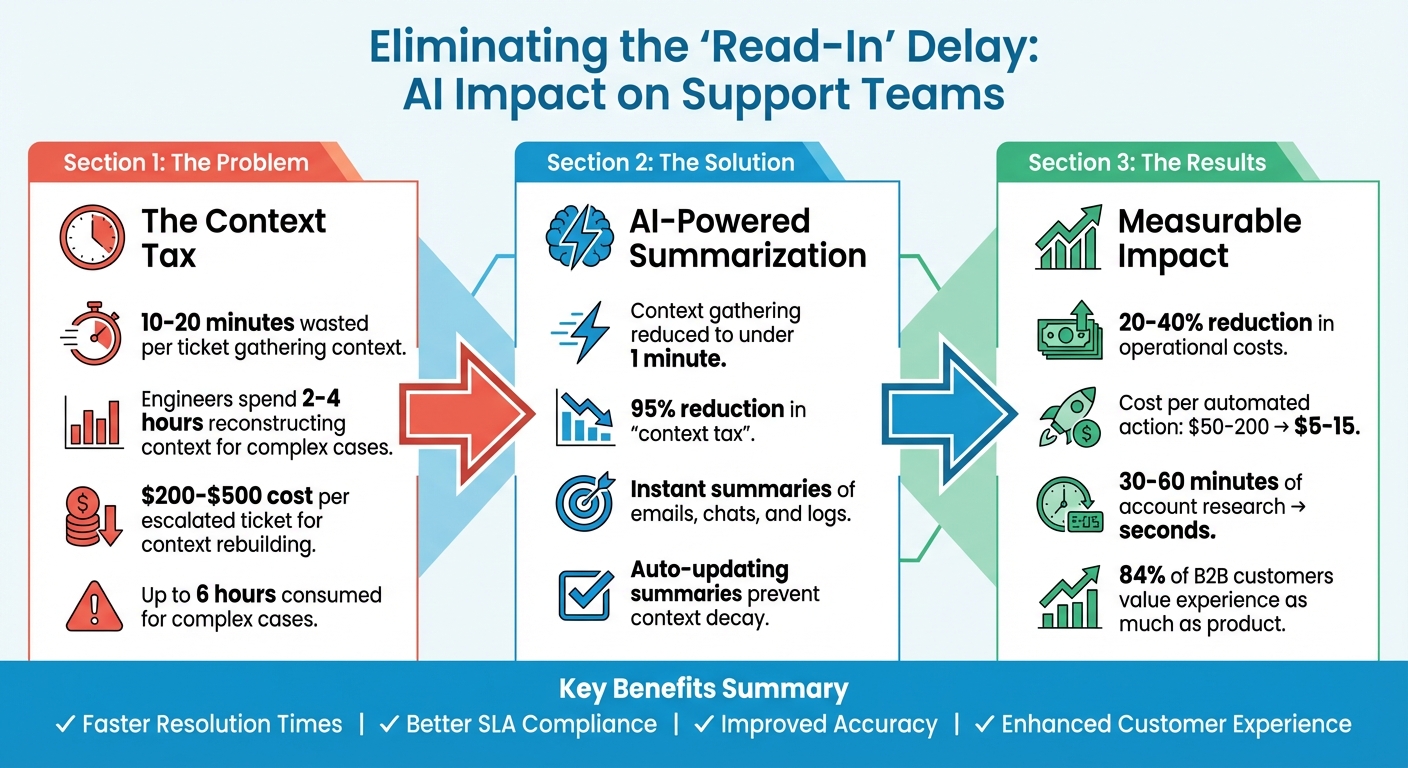
AI Ticket Summarization: Time Savings and Cost Reduction Statistics
How to Leverage AI Agents for Automated Customer Support Ticket Summarization
sbb-itb-e60d259
What Is the ‘Read-In’ Delay in B2B Support?
The ‘read-in’ delay, often referred to as the "context tax", is the time an agent spends digging through information before they can start solving a problem. This is especially challenging in B2B support, where cases often involve complex products and long-standing client relationships. Tickets can span days or even weeks, with agents sometimes needing 10, 15, or even 20 minutes just to understand the background[1]. Instead of jumping into problem-solving, this valuable time is spent searching for context.
This delay doesn’t just waste time – it adds stress for agents, increases average handling time (AHT), and risks missing service-level agreement (SLA) deadlines. When tickets get escalated or shift to a different agent, the process often starts over, creating even more overhead for knowledge transfer[1][3].
Why ‘Read-In’ Delays Slow Down Support Teams
The root cause of read-in delays is information overload. B2B support cases typically involve multiple stakeholders, a variety of tools, and extensive ticket histories. Agents must sift through all this to find the critical details, which slows down productivity and drives up costs.
Long-running cases make things even harder. For example, a ticket that’s been open for two weeks might include dozens of messages, attempted solutions, and internal escalations. Any new agent stepping in has to piece together the entire history. For enterprise accounts, this might also mean researching account details and usage trends, which can take anywhere from 30 to 60 minutes per interaction[5].
The financial costs are steep. Rebuilding context for escalated tickets can cost between $200 and $500 each and consume up to 6 hours for complex cases[4]. Engineers, in particular, may spend 2 to 4 hours reconstructing context from incomplete or outdated summaries[4].
But the impact isn’t just financial – it also affects trust. In B2B relationships, where 84% of customers say the experience is just as important as the product itself, delays and inefficiencies can erode confidence[6]. This is where generative AI steps in as a game-changer, offering a way to streamline ticket summarization and eliminate the read-in delay.
How Generative AI Fixes This Problem
Generative AI tackles the read-in delay by automating ticket summarization. Instead of manually piecing together details from various sources, agents receive instant, concise summaries that highlight the most important information.
The benefits are clear: speed, consistency, and scalability. AI doesn’t get overwhelmed or overlook details, even under pressure. It can analyze account histories, usage data, and contract terms to produce a detailed briefing in seconds – work that might take a human 30 to 60 minutes[5].
Modern AI tools go beyond simple recaps. They generate "Current State" summaries that outline the main issue, the last action taken, and the immediate next steps[1]. This ensures agents not only understand the situation but also know exactly how to proceed.
The cost savings are substantial. Auto-updating AI summaries can lower operational costs, improving cost-per-ticket metrics by 20% to 40%[4]. For automated interventions, AI can slash costs per action from $50–$200 down to just $5–$15[5]. Generative AI doesn’t just speed up support – it transforms it into a much more efficient and cost-effective process.
Benefits of AI-Generated Ticket Summaries
AI-generated ticket summaries streamline processes by cutting down the time agents spend reviewing case histories across speed, compliance, and scalability. This efficiency leads to reduced costs, quicker resolutions, and improved customer satisfaction.
Faster Resolution Times and Lower AHT
One of the standout advantages is the time saved. AI summaries condense the time it takes to understand complex case histories – from 10 to 20 minutes for cases with multiple emails, chats, and logs – to less than a minute[1]. That’s a staggering 95% reduction in the "context tax" that typically eats up valuable agent time.
With AI handling the heavy lifting of summarizing ticket histories, agents can focus on resolving cases faster and more effectively.
When tickets are handed off – whether between shifts or from Tier 1 to Tier 2 support – AI-generated "Current State Summaries" spotlight unresolved issues and next steps[1]. This eliminates the need for agents to reread lengthy histories, letting them hit the ground running.
These efficiencies not only speed up resolution times but also improve adherence to service-level agreements (SLAs), creating better outcomes for customers.
Better SLA Compliance and Customer Outcomes
AI summaries help agents respond faster and more precisely, reducing the risk of missed SLAs. This is particularly important for high-value B2B clients, where quick and accurate responses can make or break the customer relationship.
AI also enhances ticket triage and routing. Instead of relying on vague subject lines, it analyzes the actual content of inquiries to ensure tickets land with the right team from the start[1]. This reduces delays caused by misrouting, which can frustrate both customers and agents.
The result? Happier customers and more effective agents. By eliminating the need to sift through lengthy histories, agents can focus on providing thoughtful, comprehensive solutions. They’re less likely to miss important details or ask customers to repeat themselves, which improves the overall experience.
Handling Long-Running and Complex Cases at Scale
AI-generated summaries shine when it comes to managing complex, long-running cases. Manual processes often falter when cases stretch over days or weeks, but AI scales effortlessly. Whether a team is handling 10 intricate cases or 1,000, AI ensures consistency and efficiency.
For managers and QA teams, this means better oversight without being buried in details. Instead of reviewing every interaction, they can rely on summaries to monitor hundreds of cases at a glance[1]. This allows them to identify bottlenecks, coach agents effectively, and intervene before minor issues escalate into major problems.
AI also improves knowledge management by creating full case closure summaries that document the entire lifecycle of a ticket[1]. These summaries can serve as a foundation for knowledge base articles or future reference, turning resolved cases into valuable resources for preventing similar issues down the line.
For B2B teams managing accounts with long, complex histories, AI summarization isn’t just a helpful tool – it’s a game-changer for keeping operations efficient and avoiding information overload.
How to Implement AI Ticket Summarization
If you’re ready to streamline your support operations with AI-generated ticket summaries, these five steps will guide you through the process. The focus is on selecting the right platform, structuring your approach, and ensuring smooth adoption while building confidence in the results. Here’s how to make it happen.
Step 1: Choose an AI-Native Support Platform
Start with a platform that has built-in AI summarization features. For example, Supportbench includes AI ticket summaries, activity digests, and case closure documentation as standard options. This eliminates the hassle of juggling third-party tools and reduces concerns about data security across multiple vendors.
Data privacy is critical. Some providers, like SuperOps (via OpenAI), clearly state they don’t use customer data to train general AI models[2]. Also, look for platforms that display AI summaries directly in the interface – like in the sidebar – so agents can access them without switching between tabs or extensions.
Step 2: Create Effective Prompts for Accurate Summaries
The quality of AI-generated summaries often depends on the prompts you design. Clear, specific instructions can turn generic outputs into actionable insights. For instance, prompts should define the format, target audience, and relevant timeframes[7]. In B2B support, include key details like SLA status, customer health scores, renewal dates, and escalation triggers.
Using a structured framework like CAN (Context, Action, Needs) can help ensure summaries cover the customer’s environment, actions taken, and next steps[4]. Additionally, request inline citations for quick verification and set confidence thresholds to flag summaries requiring human review, especially for new or complex issues.
Step 3: Integrate Summaries into Workflows
To maximize the benefits, embed AI summaries into critical parts of your workflow. Configure automatic summaries for key stages like Initial Inquiry, Activity Updates, Current State, and Case Closure[1].
Continuous summarization is particularly useful – it updates context automatically with every change, avoiding what some call "context decay." As the Inkeep Team explains, "Manual summaries decay the moment a customer replies. The CAN report you wrote three messages ago no longer reflects reality"[4]. Make sure the AI accesses internal notes (not just public comments) to capture all troubleshooting details. Storing summaries in custom ticket fields can also help with reporting, views, and automation.
Step 4: Train Agents to Maximize AI Outputs
Train your team to use AI summaries effectively, especially for shift handovers and escalations. A feedback loop is essential to fine-tune accuracy[1]. Start with high-escalation queues to demonstrate the time savings – context reconstruction for escalated tickets can cost between $200 and $500 in engineering time per ticket[4].
Step 5: Track Metrics and Optimize the Process
Regularly monitor metrics to ensure AI summarization is delivering results. Key areas to track include:
- Adoption rates: How often agents use AI summaries.
- Time saved per ticket: Reduction in read-in time.
- Resolution speed: Lower Average Handle Time (AHT).
- Context reliability: Fewer tickets bounced back for missing information[4].
"AI Case Summarization is a practical application of artificial intelligence that delivers immediate, tangible value to busy support teams by breaking through information overload and accelerating workflows." – Eric Klimuk, Founder and CTO of Supportbench[1]
Use platform dashboards to identify which ticket types benefit the most from summarization and where additional refinement might be needed. Teams that implement continuous summarization often see cost-per-ticket reductions of 20% to 40%[4], making ongoing adjustments a smart investment.
Writing Effective Prompts for AI Summaries
Crafting clear and specific prompts can turn generic AI outputs into actionable insights, helping save time and avoid errors. The key is providing enough context for the AI to generate summaries that agents can trust and use right away. Tailoring prompts to different phases of the support cycle boosts efficiency and ensures the summaries meet operational needs. Below are examples of prompts designed to streamline ticket summaries.
Start by defining your audience and format. Make sure the tone matches your audience – whether it’s non-technical customers, executives, or engineers [7]. Specify the format you need, like bullet points or a structured layout with headers such as Issue, Customer Concerns, Proposed Solutions, and Urgency [9]. This makes summaries easier to scan, especially when agents are managing multiple tickets under strict SLAs.
Include sentiment and urgency evaluations. Prompts should explicitly ask the AI to assess customer sentiment and urgency [8][9]. For instance, instruct the AI to flag signs of frustration, highlight renewal deadlines, or note if the issue is blocking production. These details help prioritize cases and ensure critical issues are addressed promptly.
Set timeframes for relevance. When dealing with long-running tickets, specify a timeframe for the summary – like focusing on updates from the past week or actions taken since the last escalation [7]. As Glean puts it, effective prompts should be "given in conversational, natural language and include all necessary components to guide the AI" [7].
Prompts for New Ticket Summaries
When a ticket first comes in, the focus is on triage and routing. The summary should capture the main issue, the customer’s environment, and the business impact to ensure the ticket reaches the right team quickly.
Example prompt: "Summarize this new ticket in 3–4 sentences. Include: (1) the main issue or error message, (2) the customer’s environment (product version, integrations, user role), (3) business impact (e.g., downtime, blocked workflow, revenue risk), and (4) urgency level based on SLA tier and customer sentiment. If the customer mentions a deadline or renewal date, include that information."
This format ensures all critical triage details are included, helping avoid what Eric Klimuk calls the "context tax":
"This ‘context tax’ – the time spent just getting up to speed – directly impacts resolution times, agent productivity, and ultimately, the customer experience." – Eric Klimuk, Founder and CTO, Supportbench [1]
Prompts for Activity Updates
Activity updates should focus on progress and next steps, particularly during handoffs or escalations. The summary should highlight recent changes and any current blockers.
Example prompt: "Summarize the most recent activity on this ticket. Include: (1) the last action taken by the agent or customer, (2) any unresolved issues or blockers, (3) immediate next steps, and (4) whether the ticket is on track to meet its SLA. Begin with the most critical information."
This structure aligns with the Current State milestone [1] and helps prevent "context decay", where summaries become outdated as soon as a customer responds [4]. Leading with the most important details is crucial because, as Tony M. explains:
"AI reads your first sentence literally… AI summarizers struggle to distinguish essential information from interesting details." [10]
As the ticket progresses, prompts should be adjusted to capture ongoing developments and eventual outcomes.
Prompts for Case Closure Summaries
At the end of a case, the summary should provide a complete overview of the entire lifecycle. It should detail the issue, the steps taken, the resolution, and whether SLAs were met. This type of summary is invaluable for future reference, building a knowledge base, and post-case evaluations.
Example prompt: "Summarize this closed case as follows: (1) Issue: Brief description of the original problem. (2) Actions Taken: Key troubleshooting steps and solutions attempted. (3) Resolution: Final fix or workaround provided. (4) SLA Outcome: Whether the case met its SLA targets. (5) Customer Feedback: Any sentiment or satisfaction signals from the customer. Include inline citations for each claim so agents can verify details."
This comprehensive format ensures the summary is both thorough and easy to verify. Including inline citations allows agents to quickly reference source messages, fostering confidence in the AI-generated content. Additionally, these summaries can be adapted into knowledge base articles for recurring issues.
| Summary Type | Primary Focus | Key Prompt Elements |
|---|---|---|
| Initial Inquiry | Triage & Routing | Core issue, customer environment, business impact, urgency [1] |
| Activity Update | Handoffs & Progress | Last action taken, unresolved issues, immediate next steps [1] |
| Case Closure | Documentation & Knowledge | Full history, resolution, SLA outcome, customer feedback |
Common Mistakes and How to Avoid Them
Even the best AI systems can make serious errors, which is why strong safeguards are crucial. Research on AI-assisted documentation shows that 35% of common errors stem from fabricated details, while 25% come from repeated past mistakes [11]. Here’s how to tackle and prevent these frequent issues.
Preventing Inaccurate or Fabricated Details
AI doesn’t admit when it lacks information. Instead, it creates content that sounds convincing but may be completely false. A residency advisor explains:
"AI systems… do not say, ‘I’m uncertain.’ It hallucinations a plausible-sounding normal note" [11].
This becomes especially risky when AI reuses outdated or incorrect data – like old account details or obsolete product versions – and presents it as current.
To counter this, use human-in-the-loop verification with a checklist to double-check key points such as the main issue, actions taken, and deadlines. For sensitive data, like financial figures or compliance-related details, require manual confirmation before finalizing the summary [11]. If something in the AI-generated summary feels off, it’s better to rewrite it completely rather than patching it up, which can lead to conflicting information [11].
Errors can also arise from poor-quality audio or cluttered chat logs, which may result in inaccurate transcriptions that AI confidently summarizes. Surprisingly, the most polished notes can sometimes be the most misleading [11]. To minimize this, ensure clear communication during voice interactions by stating important details – like numbers, names, and dates – slowly and clearly.
Maintaining Accuracy for High-Stakes Cases
While general errors can be addressed with preventive measures, high-stakes scenarios need extra scrutiny. In critical cases, AI can be used to quickly provide context, but agents should double-check key details against the latest correspondence. Eric Klimuk, Founder and CTO of Supportbench, emphasizes:
"Accuracy is generally very high… However, like any AI, they aren’t infallible and might occasionally miss subtle nuances or misinterpret highly ambiguous language" [1].
Set confidence thresholds to flag summaries for review, especially in ambiguous situations [4]. For complex cases, use chain-of-thought prompting, which instructs the AI to explain its reasoning step by step before delivering a final summary [12]. This approach makes it easier to spot errors or inconsistencies.
Building Agent Trust in AI Outputs
Trust in AI systems hinges on transparency and verifiability. Inline citations – where agents can click on claims in the summary to trace them back to source messages – make it easy to verify AI-generated content [4]. Combine this with feedback loops, allowing agents to rate summaries and flag errors. This not only improves the AI over time but also gives agents confidence in the system [1].
Run simulations with historical tickets to test AI prompts [12]. Share these results with agents, especially for cases they’ve handled, to help them identify errors and build trust. A key piece of advice from experts is:
"AI notes are drafts, not truth. Never sign what you did not actually read" [11].
Start with small-scale rollouts in high-priority queues where the return on investment is most measurable [4]. Present AI as a tool for quick context building, not as a replacement for human expertise [1]. When agents see AI saving them 10–20 minutes of prep time on complex cases without compromising accuracy, adoption becomes much easier. By reinforcing trust with verifiable outputs, support teams can improve both efficiency and resolution speed.
Conclusion
The "context tax" is a hidden drain on your support team’s time, costing them 10–20 minutes per complex case just to sift through emails, chat logs, and internal notes before they can even begin solving the problem [1]. Generative AI tackles this issue head-on by condensing long case histories into concise summaries that agents can review in under a minute [1]. This change reshapes support workflows, enabling smoother handoffs, quicker triage, and more accurate escalations – without the mental strain of piecing together fragmented threads.
With AI-native tools offering "Current State" summaries, agents get a clear view of unresolved issues and immediate next steps instead of wading through past events. This approach is especially vital in B2B cases, which often stretch over weeks or months and require multiple handoffs across support levels, departments, or shifts. By removing the need for constant reconstruction, teams can focus on resolving issues faster and more effectively. This shift isn’t just about efficiency; it’s about creating a support strategy that drives measurable improvements in cost and productivity.
The benefits are clear. When agents spend seconds instead of minutes reviewing case histories, the cumulative time savings across thousands of cases lead to lower average handle times, better SLA compliance, and reduced cost-per-ticket. Just as importantly, it alleviates agent burnout by eliminating the exhausting task of deciphering dense logs and outdated manual notes that lose relevance as soon as a customer responds.
Supportbench integrates AI-powered ticket summarization directly into its platform – no need for costly add-ons or extra tools. From initial inquiry summaries that improve triage accuracy to real-time updates that streamline escalations, AI is built in to help B2B support teams scale efficiently while maintaining high-quality service. If your team is still spending 15 minutes per case on background review, it’s time to let AI take over the heavy lifting and eliminate the "read-in" delay once and for all.
FAQs
How do AI ticket summaries stay accurate as a case changes?
AI-generated ticket summaries maintain accuracy by continuously updating with the latest case details. Each time a customer interaction or internal note is added, the system regenerates the summary to reflect those changes. This eliminates the risk of outdated information that often comes with manual updates. As a result, support agents always have access to the most current context, even when cases are escalated or modified.
What data sources should AI include in a B2B ticket summary?
AI-generated B2B ticket summaries need to cover the following key elements:
- Public comments: These should capture the main issues, customer requests, actions taken, and final outcomes.
- Internal notes: If this feature is available, include essential internal context that might not be visible to the customer.
- Additional context: Bring in relevant details like recent updates or case specifics through prompts or integrations.
Including these elements helps create a well-rounded summary that accurately reflects the ticket’s history and current state.
How do you prevent AI from making up details in summaries?
To keep AI from making up details in summaries, set confidence thresholds and use carefully crafted prompts. By configuring AI policies, you can ensure it sticks to verified information and avoids inaccuracies. Another key approach is using AI tools that regenerate context with every ticket update. This keeps the data accurate by focusing on high-confidence information. Together, these steps help produce reliable and concise summaries without any made-up details.
Related Blog Posts
- How AI Improves Time Management in Support
- AI Prompts for Customer Support: 25 Copy-Paste Prompts for Faster Replies
- How do you reduce “where is my ticket?” follow-ups with proactive updates?
- Moving Beyond “Chat”: Why Asynchronous Ticketing Wins for Complex B2B Issues
Evaluating help desks for a B2B team?
Supportbench is all-inclusive from $32 per agent per month, with migration and onboarding included. See pricing or book a 20-minute demo.






