


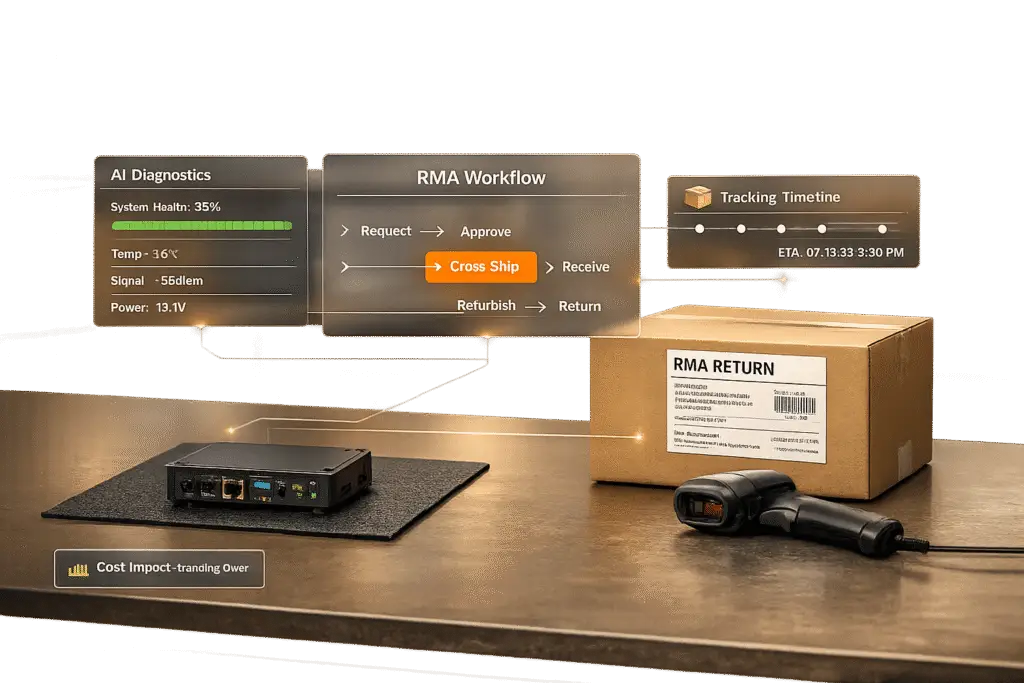
When hardware or IoT devices fail, the stakes are high – especially for businesses relying on uninterrupted operations. Managing Return Merchandise Authorizations (RMAs) and troubleshooting device issues can be time-consuming and costly. Here’s the key takeaway: proactive systems and AI tools can drastically reduce downtime, cut costs, and improve customer satisfaction.
Key Insights:
- Troubleshooting Time: Traditional methods take 18–25 minutes, while AI-driven tools reduce this to just 6 minutes (73% faster).
- RMA Costs: Processing a return can cost up to 66% of the product’s original price, making efficient workflows essential.
- Returns Impact: Returns account for $165 million per $1 billion in sales, highlighting the financial burden of inefficient processes.
- AI Benefits: AI improves First Contact Resolution rates from 45% to 78%, reduces escalations by 66%, and provides actionable insights to prevent recurring issues.
Solutions:
- Integrated RMA Systems: Connect RMAs with support platforms to streamline warranty checks, automate return labels, and improve visibility.
- Structured Troubleshooting Protocols: Use clear, step-by-step guides to validate issues and resolve problems systematically.
- AI-Powered Tools: Leverage AI for diagnostics, ticket routing, and real-time telemetry to cut resolution times and prevent unnecessary escalations.
- Automation in Returns: Automate tracking, shipping, and reporting to reduce errors and speed up the process.
By combining automation, AI, and structured workflows, businesses can transform RMAs and troubleshooting from costly inefficiencies into streamlined operations that keep customers happy and operations running smoothly.
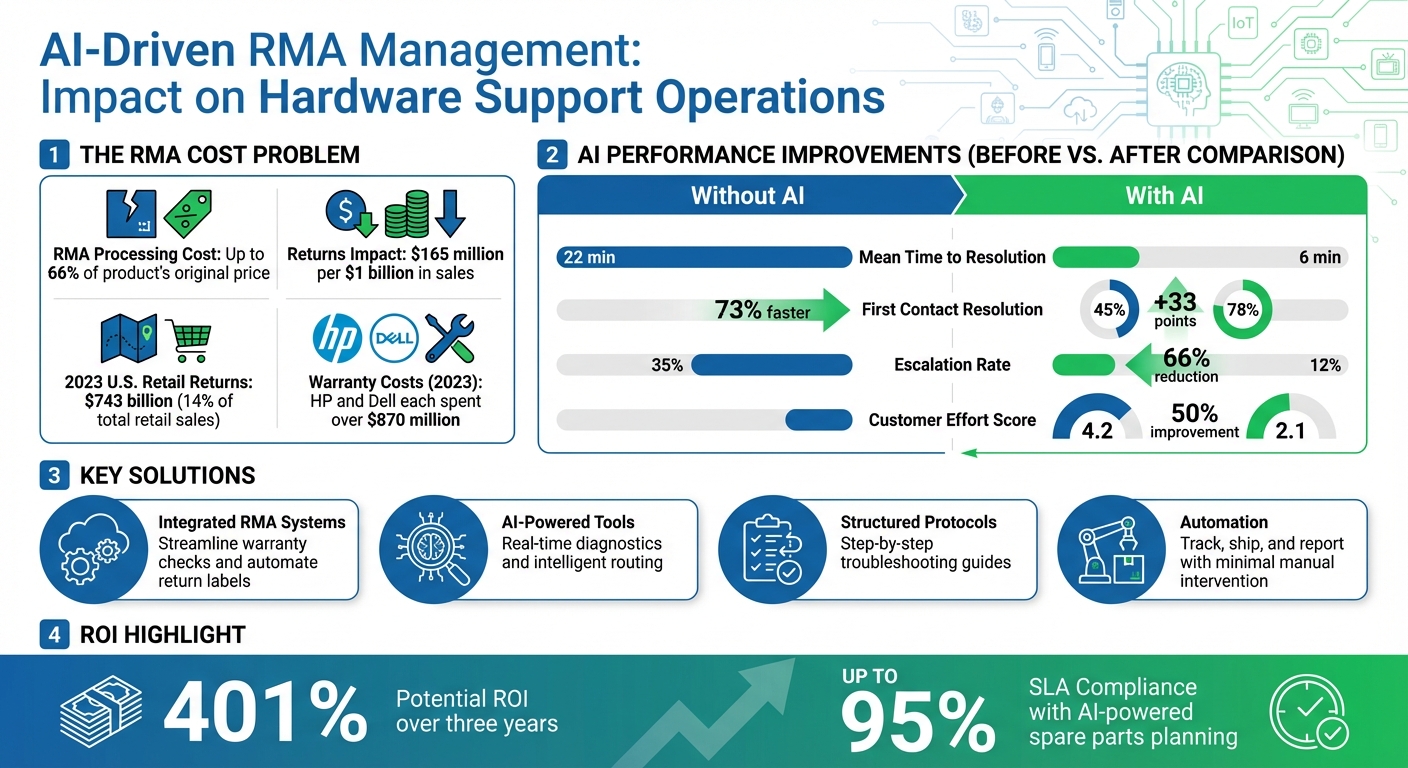
AI-Driven RMA Management: Key Performance Metrics and Cost Savings
Building Efficient RMA Workflows in Support Systems
A well-integrated system is what separates a smooth RMA process from a chaotic one. When workflows are scattered across spreadsheets, emails, or disconnected systems, delays, lost visibility, and rising costs are inevitable. In 2023 alone, U.S. retailers processed over $743 billion in returns, representing more than 14% of total retail sales [7]. For B2B hardware companies, where devices often cost thousands of dollars and downtime can disrupt entire operations, the stakes are even higher.
The key to addressing these challenges lies in bridging the information gap by integrating RMA systems with your support platforms. Here’s how connecting RMAs, verifying warranty details, and managing cross-shipping can streamline the process.
Connecting RMAs to Support Platforms
Integrating RMA processes directly into your support system creates a "central command system" [7][10]. This eliminates the need for agents to jump between multiple tools by connecting service teams, warehouse staff, and customer support in real time. For example, if a customer reports a failed router, the system can automatically verify the device’s warranty status, trigger an RMA based on pre-set conditions (like product type or keywords), and route the request to the right team for approval [8][10].
"RMA Management Software Is the Brain of your Service Workflow. It’s time you treated it that way!" – Janhavi Ghanekar [10]
By integrating tools like CRM, ERP, and inventory management systems, you gain full visibility into order history, stock levels for replacements, and automated processes like generating return labels or QR codes [7][8][9]. Self-service portals can further enhance the experience by allowing customers to initiate returns, specify reasons, and upload photos of damaged items. This information enriches support tickets with valuable context automatically [9][11]. Companies optimizing such workflows have reported a potential 401% ROI over three years [8].
Checking Warranty Status and Device Information
Verifying a device’s serial number is crucial for preventing fraud, confirming purchase history, and determining repair eligibility [13][6]. Integrated systems can instantly cross-check serial numbers against warranty databases, verifying details like start and expiration dates, service contract eligibility, and entitlement rules [13].
For companies like Cisco Meraki, this process includes strict verification steps. For instance, RMA requests must be initiated by authorized individuals (e.g., registered Organization or Network Admins). Additionally, for devices in specific states – like dormant or offline – a photo clearly showing the serial number is often required before processing [2]. Warranty terms can vary widely: while networking switches and routers often include "lifetime" warranties ending at the product’s End-of-Support date, outdoor access points might only offer a one-year warranty [2]. Standardizing data capture through integrated forms ensures the process runs smoothly, saving both customer and agent time [8].
Cross-Shipping and Priority Returns
For mission-critical hardware such as IoT sensors and networking devices, cross-shipping is a game-changer. This approach involves sending a replacement device before receiving the defective one, minimizing downtime [6]. To ensure efficiency, it’s important to include prepaid return labels or QR codes in the replacement package and ensure the packaging accommodates the returned device [6][3].
Infinera, a company managing 5,000 unique spare parts across 300 global depots, uses predictive AI tools within their RMA workflows to maintain a 95% SLA for mission-critical environments. This ensures parts are available for priority returns even before requests are made [12]. Similarly, Cisco Meraki ships advance replacement orders within one business day but enforces strict return deadlines: defective units must be returned within 10 calendar days of receiving the replacement. Customers failing to return devices within 30 days are charged the full list price of the hardware [2]. Automated reminders and financial penalties embedded in the workflow help maintain inventory and keep the process on track.
| Integration Type | Key Benefit for RMA | Impact on Support System |
|---|---|---|
| CRM Integration | Access to full order history and past interactions | Personalized service and faster issue resolution [7] |
| Inventory/WMS | Real-time stock updates for replacements | Reduced delays in restocking and shipping [7][1] |
| Shipping/Labels | Automated generation of return labels/QR codes | Fewer manual steps for agents and customers [8][9] |
| Finance/Accounts | Automatic credit note and refund generation | Faster refund cycles and improved cash flow tracking [10][11] |
sbb-itb-e60d259
Setting Up Device Troubleshooting Protocols
Before approving an RMA, effective troubleshooting can address many hardware and IoT issues, saving both time and money. Interestingly, 73% of consumers prefer to resolve product or service issues on their own [16]. By establishing clear protocols, support teams can validate issues, guide agents through consistent steps, and even use AI to speed up diagnosis. Combining these manual steps with AI tools creates a seamless process that blends human expertise with automated precision.
Creating Standard Troubleshooting Steps
Structured troubleshooting guides are key to ensuring agents approach issues systematically rather than relying on guesswork. Start by reviewing support tickets, help desk logs, and error reports to identify the most common hardware problems and service metrics. Once these patterns are clear, document the solutions in straightforward, step-by-step guides. A well-crafted troubleshooting guide should:
- Clearly describe the issue in user-friendly terms (e.g., "No power indicator light").
- Outline possible causes, followed by logical solutions in a step-by-step format.
- Start with simple fixes – like checking power cables or rebooting – before moving to more advanced diagnostics.
- Use direct, active instructions (e.g., "Hold the reset button for 10 seconds").
Before suggesting solutions, agents need to gather essential details: when the problem started, any recent software or network changes, and whether firmware updates were performed. For complex IoT systems, binary diagnostic paths can help narrow down the root cause. Visual aids, such as setup diagrams or screenshots, can make instructions easier to follow.
"No customer wants to try solutions blindly over and over, it’s more guessing than troubleshooting. Before sending a solution to the customer, validate the issue then respond."
– Eric Klimuk, Founder and CTO, Supportbench [15]
Always confirm the reported issue using log files, error messages, or firmware version details before offering a fix. For offline or dormant devices, requesting a photo of the serial number or specific components can help verify the issue. Regular updates to troubleshooting protocols are crucial to keep pace with new firmware releases or hardware updates. These steps lay the groundwork for integrating AI into the diagnostic process.
Using AI Tools for Troubleshooting
Once manual diagnostic processes are in place, AI can amplify troubleshooting efficiency. Traditionally, resolving complex hardware issues takes an average of 18–25 minutes [4]. AI, however, can analyze real-time data – like CPU usage, temperature, connectivity, and error logs – to quickly pinpoint issues such as thermal throttling or network delays.
When integrated with support platforms, AI tools leverage Natural Language Processing to classify ticket content accurately and flag urgent cases, such as "system down" or "production outage" scenarios. These tools also reduce escalation rates by 66%, as agents receive AI-driven diagnostic suggestions and one-click remediation options.
| Metric | Without AI/Telemetry | With AI/Telemetry | Improvement |
|---|---|---|---|
| Mean Time to Resolution (MTTR) | 22 min | 6 min | 73% |
| First Contact Resolution (FCR) | 45% | 78% | 73% |
| Escalation Rate | 35% | 12% | 66% |
| Customer Effort Score | 4.2 | 2.1 | 50% |
To successfully implement AI troubleshooting:
- Evaluate your hardware’s current data capabilities, such as system health metrics and connectivity, before investing in AI tools.
- Focus on metrics that align with your most common support challenges to ensure the best return on investment.
- Incorporate customer tier and value data into AI routing models to prioritize high-value clients.
- Continuously monitor AI-driven categorization and refine the system based on agent feedback.
Automating RMA Tracking and Reporting
Once troubleshooting protocols are established, the next hurdle is managing the physical flow of returned devices. Manual RMA workflows often hit bottlenecks because customers must email receipts for manual authorization. This slows down the process, increases operational costs, and erodes trust – one of the main reasons customers switch retailers [5]. Automation changes the game by offering real-time visibility, reducing manual errors, and generating insights from return patterns. This not only speeds up processing but also sets the stage for smarter decision-making.
Automating Inventory and Device Tracking
With efficient RMA workflows in place, automated tracking systems take things a step further by minimizing manual interventions and cutting down on errors. These systems track RMAs through various stages – Pending, Approved, In Transit, Shipment Received, and Done – providing real-time updates to everyone involved [18][19]. For hardware and IoT devices, serial number integration ties returns directly to order history and warranty details, reducing the risk of manual data entry mistakes [6].
Logistics also benefits from automation. Systems can generate prepaid shipping labels automatically and sync with major carriers like UPS, FedEx, and DHL. This integration provides live tracking updates, alerting warehouses about incoming shipments in advance [5][6]. Such features remove the uncertainty of unsupervised shipping and reduce "where is my return?" inquiries.
| Step | Manual Returns | Automated Returns |
|---|---|---|
| Intake | Customer emails support and waits for reply | Customer submits form; system auto-validates against order data [5] |
| Approval | Multiple email threads across teams | Auto-approval for standard cases; exceptions routed for review [5] |
| Shipping | Customer arranges shipping; no tracking | Prepaid labels auto-generated with live tracking [5] |
| Inspection | Warehouse logs via spreadsheets | Digital log in workflow; triggers automated disposition [5] |
| Refund | Finance notified late; delays | Triggered automatically with an audit trail [5] |
For critical IoT applications, automation enables cross-shipping – sending a replacement device immediately before receiving the defective one. This is supported by automated address verification from CRM systems [6]. Additionally, "RMA splitting" ensures salable items are returned to inventory in real time, while defective units are routed separately for repair or disposal [1]. This approach improves inventory accuracy and helps prevent stock shortages across multiple warehouse locations [19].
AI-Powered Reporting and Insights
Automation doesn’t stop at tracking; AI takes it further by turning raw data into actionable insights. Modern systems analyze return data across SKUs to pinpoint recurring issues, such as defective components or vendors with high return rates [20][14]. These insights can then be shared with manufacturing teams or used to renegotiate vendor agreements, helping to prevent future problems.
Key metrics like cycle time, exception rates, and SLA compliance are crucial to monitor [5][12]. Companies leveraging AI for spare parts planning and RMA management have reported achieving SLA compliance rates as high as 95% [12]. AI also identifies patterns in return reasons – like hardware failure, software glitches, shipping damage, or "no fault found" – to refine troubleshooting steps and reduce unnecessary returns [18][6].
Additionally, AI simplifies "Return to Vendor" (RTV) processes by interpreting vendor policies and automating credit reconciliation. This removes the need for manual spreadsheet tracking, which often leads to financial discrepancies and delays [1]. By standardizing inspection data through digital forms, warehouse teams can log item conditions that trigger workflows for refurbishing, recycling, or restocking [5], streamlining operations and cutting costs.
Common Mistakes in RMA and Troubleshooting Processes
Even with automation in place, RMA workflows can falter when teams overlook key steps or rely on outdated methods. Rushing to close tickets without addressing the underlying issues leads to recurring problems, draining resources and frustrating customers. Recognizing common missteps is essential to breaking these costly cycles. Two major pitfalls highlight how these errors play out in RMA and troubleshooting processes.
Skipping Root Cause Analysis
Quick fixes might seem customer-focused, but they often fail to address the deeper issue. For example, when support teams replace a faulty IoT device without investigating why it failed, the same defect is likely to appear in other units. This reactive approach creates a cycle of emergency fixes, consuming valuable time and labor resources [22][26].
"There always seems to be time to do the same job over and over again, but no time to make sure it is done right the first time by eliminating the actual cause of the problem." – Kepner-Tregoe [23]
Take BMW in 2025 as an example: the company used AI-powered root cause analysis to evaluate data from robotic arms during battery pack assembly. By pinpointing the true source of alignment errors instead of just replacing parts, they reduced alignment-related issues by 30% [25]. The distinction is clear – troubleshooting relies on trial-and-error, while root cause analysis is a structured effort to uncover the systemic flaws that allowed the problem to arise [24]. Skipping this step often leaves teams stuck in a loop, constantly battling symptoms without addressing the root conditions causing the failures.
Poor Escalation Handling
Static escalation rules can crumble under the pressure of high ticket volumes. Teams either escalate too many issues – overwhelming senior engineers with unnecessary alerts – or miss critical problems because outdated keyword definitions fail to align with how customers describe their issues [21]. This overload slows down the entire process, with senior staff bogged down in repetitive tasks and frontline agents defaulting to escalation out of uncertainty.
Another major challenge is the loss of context during handoffs. Each escalation increases the risk of missing key details, forcing customers to repeat themselves and significantly delaying resolutions. Without real-time device telemetry, agents rely on vague customer descriptions instead of concrete system data, leading to irrelevant troubleshooting steps. Companies that integrate device data – such as CPU usage, temperature, and connectivity status – have seen remarkable improvements. Escalation rates dropped from 35% to 12%, and the average resolution time improved by 73%, going from 22 minutes to just 6 minutes [4].
The solution lies in shifting the focus from managing escalation processes to preventing them. By equipping Tier 1 agents with the right tools, documentation, and context from the start, companies can minimize unnecessary escalations and ensure smoother resolutions. Addressing these common mistakes is essential to fully leveraging automation and AI insights in RMA management.
Best Practices for AI-Driven RMA Management
Building on earlier strategies for automation and troubleshooting, these practices leverage AI to make RMA management faster and more efficient. AI-powered platforms eliminate much of the guesswork and manual effort, transforming RMA processes into data-driven operations.
Using AI for RMA Triage and Escalation Prediction
Traditional systems often falter when customer issues don’t fit neatly into predefined categories. For instance, a customer might select "Quick Question" from a dropdown menu but describe a critical system failure in the ticket body. AI-driven triage solves this problem by using Natural Language Processing (NLP) and Machine Learning (ML) to interpret the actual content and context of return requests [17]. These systems can automatically identify key details like product names, error codes, and issue types [17][27].
"AI cuts through the noise to identify truly urgent issues requiring immediate attention, regardless of how poorly the initial request might have been phrased or categorized by the user." – Nooshin Alibhai, Founder and CEO of Supportbench [17]
AI also introduces smart routing, which matches complex technical issues – such as IoT protocol errors or API failures – with agents who have the right expertise and availability. This minimizes internal transfers and ensures tickets are handled by the most qualified person right away. By integrating CRM data, the system can prioritize high-value clients and even classify returned hardware conditions instantly, speeding up the triage process [1]. These advancements can shrink RMA processing times from days to mere minutes [1]. This streamlined triage is a critical step toward achieving first-contact resolution, which we’ll explore in the next section.
Improving First-Contact Resolution with AI
Getting issues resolved at first contact hinges on assigning tickets to the right agent from the start. AI plays a key role here by ensuring tickets are routed to the most capable agent immediately.
"AI routes the ticket to the best-equipped available agent or queue the first time. This minimizes internal transfers (‘ticket tennis’), reduces delays, and ensures customers connect with someone who can actually solve their problem faster." – Nooshin Alibhai, Founder and CEO of Supportbench [17]
Platforms like Supportbench enhance this process further with tools like AI Predictive CSAT and First Contact Resolution (FCR) detection, which analyze case histories to confirm whether issues are truly resolved on the first attempt [website]. By analyzing customer sentiment with AI – not just keywords – AI can spot cases with strong negative sentiment and trigger immediate escalations to specialized teams. This helps prevent SLA breaches and improves the overall customer experience [17]. Beyond solving issues in real time, AI also captures valuable insights from every interaction, enriching future support efforts.
Building Knowledge Base Articles with AI
Recurring issues present an opportunity to create self-service resources. Instead of manually drafting knowledge base articles, AI can generate structured documentation by analyzing case histories, including problem descriptions, troubleshooting steps, and resolutions [website]. This is especially useful during the launch of new hardware or IoT products. AI can quickly identify related terms and start collecting data on common post-launch issues, enabling faster updates to documentation [17].
AI also standardizes tagging across interactions, ensuring clean and consistent data for trend analysis [17][27]. This helps teams identify recurring defects and improve both product development and support documentation. By training AI to recognize key terms during new product launches, teams can gain real-time visibility into emerging issues and respond promptly with updated guides or proactive repairs [1][17]. This continuous feedback loop not only enhances troubleshooting but also drives better long-term support for hardware products.
Conclusion
Managing RMAs and troubleshooting hardware or IoT devices doesn’t have to be a drain on resources or a source of frustration for customers. The secret lies in integrating workflows, using AI for smarter triage, and bridging the gap in information with real-time device telemetry. Imagine support teams having access to CPU temperatures, error logs, and connectivity status before even speaking to a customer – that alone can improve resolution times by 73%, significantly boost First Contact Resolution rates, and reduce escalations dramatically [4].
AI takes these improvements a step further by transforming RMA processes from reactive cost centers into proactive operations. It ensures tickets are routed directly to the right specialist and automates tasks like intake and cross-shipping workflows [1]. Platforms such as Supportbench combine these features – AI-driven ticket routing, predictive CSAT, FCR detection, and automated knowledge base creation – into one solution, without the need for pricey add-ons or overly complicated integrations.
These advancements don’t just make operations faster – they also strengthen customer loyalty. Mishandled returns are one of the leading reasons customers switch brands [5]. When warranty claims and device issues are resolved on the first try with minimal effort from the customer, trust grows, and so do renewal rates. By shifting from manual, email-heavy RMA handling to automated, telemetry-first support, companies can move from reactive support to proactive excellence.
To reduce the strain of warranty claims and improve customer satisfaction, start by connecting your RMA workflows to your support platform, implementing real-time device monitoring, and using AI for triage and routing. In 2023, leading electronics companies like HP and Dell spent over $870 million each on warranty claims [28]. Smarter support operations are the first step to cutting those costs while keeping customers happy.
FAQs
What data is required to fully automate RMAs?
To fully automate RMAs from start to finish, you’ll need access to comprehensive data across the process. This includes:
- Device details like serial numbers, models, and specifications.
- Customer information, such as contact details and purchase history.
- Return eligibility, covering warranty status and return windows.
- Return reasons and descriptions of any defects.
- Supporting documentation, including proof of purchase, shipping details, and testing outcomes.
Having this data ensures smooth verification, efficient troubleshooting, and streamlined processing – all while cutting down on manual work.
How can I use device telemetry to prevent unnecessary RMAs?
Device telemetry plays a key role in cutting down unnecessary RMAs by offering real-time insights into device health. It allows support teams to keep an eye on critical metrics like system performance (CPU and memory usage), environmental factors (temperature and humidity), and connectivity status. Spotting early warning signs – like overheating or unusual spikes in resource usage – enables teams to act quickly. Whether it’s resolving problems remotely or scheduling timely maintenance, these proactive measures help reduce failures and eliminate the need for unnecessary returns.
Which RMA and support metrics should I track to prove ROI?
To show the ROI of RMA and support operations, it’s all about focusing on metrics that showcase efficiency, cost savings, and customer experience. Here are a few key ones to keep an eye on:
- Turnaround Time (TAT): This measures how quickly RMAs are processed from start to finish. Faster turnaround means happier customers and lower operational costs.
- Return Rate and RMA Volume: These metrics give insight into product reliability and the quality of your support services. A high return rate might signal product issues, while tracking RMA volume can help identify trends.
- Customer Satisfaction (CSAT) and Net Promoter Score (NPS): These scores provide a snapshot of how customers feel about their experience with your support team. High scores often lead to increased loyalty.
- Cost per RMA: This metric is all about cost efficiency. It shows how much you’re spending per return, helping you identify areas to cut costs without sacrificing quality.
- First-Time Fix Rate: A higher rate here means your support team is resolving issues on the first attempt, which saves time and boosts customer confidence.
By keeping these metrics in focus, you can clearly demonstrate the value and impact of your RMA and support operations.






