


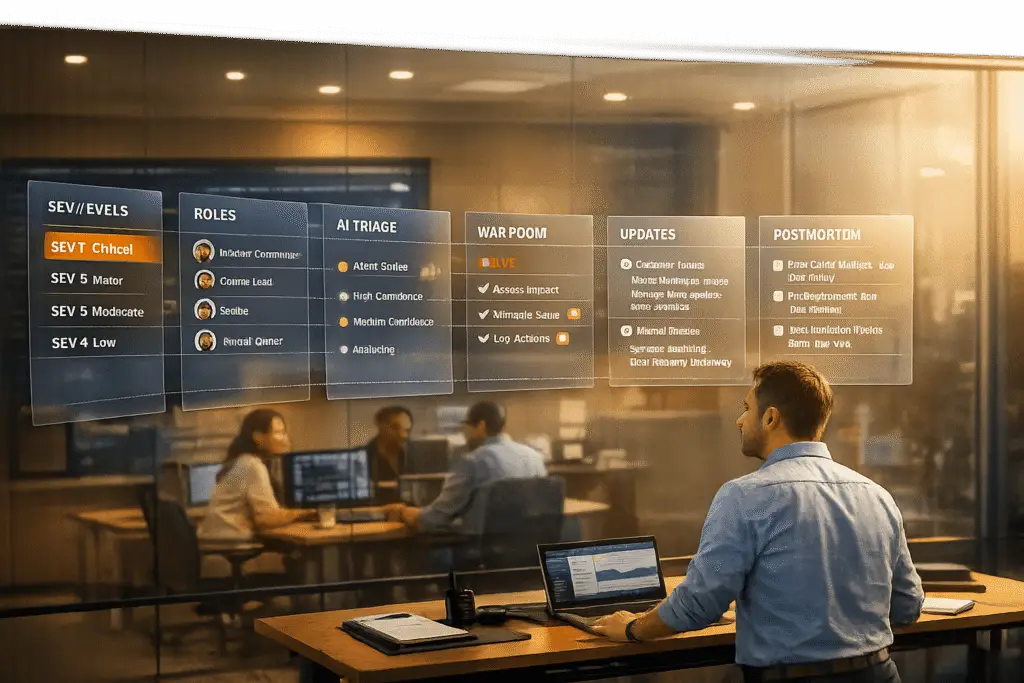
When outages occur, your support team becomes the direct line of communication between your company and its customers. While engineers focus on fixing the issue, support teams must manage customer expectations, reduce ticket volume, and maintain trust. Poor communication during just 30 minutes of downtime can lead to customer frustration, SLA scrutiny, and reputational damage.
Here’s how to manage outages effectively:
- Establish clear severity levels (SEV1 to SEV5) to prioritize incidents and align teams.
- Define roles like Incident Commander, Technical Lead, and Communications Lead to streamline response efforts.
- Leverage AI tools for triage and prioritization, reducing delays and manual effort.
- Proactively communicate with customers every 20–30 minutes during critical incidents to reassure them.
- Conduct postmortem reviews to identify root causes and prevent future issues.
Proactive communication and preparation are just as crucial as resolving the technical problem. This guide offers actionable strategies to handle outages with confidence, maintain transparency, and protect customer trust.
Incident Management for Beginners: Complete Guide
sbb-itb-e60d259
How to Prepare Your Support Team for Outages
Incident Severity Levels and Response Time Requirements
When outages strike, preparation is what separates a team that falters from one that performs effectively. To handle these high-pressure situations, your support team needs well-defined severity levels, clear roles, and automated processes that kick in immediately. By combining these elements with proactive communication, you can manage outages with precision and confidence.
Set Up Incident Types and Severity Levels
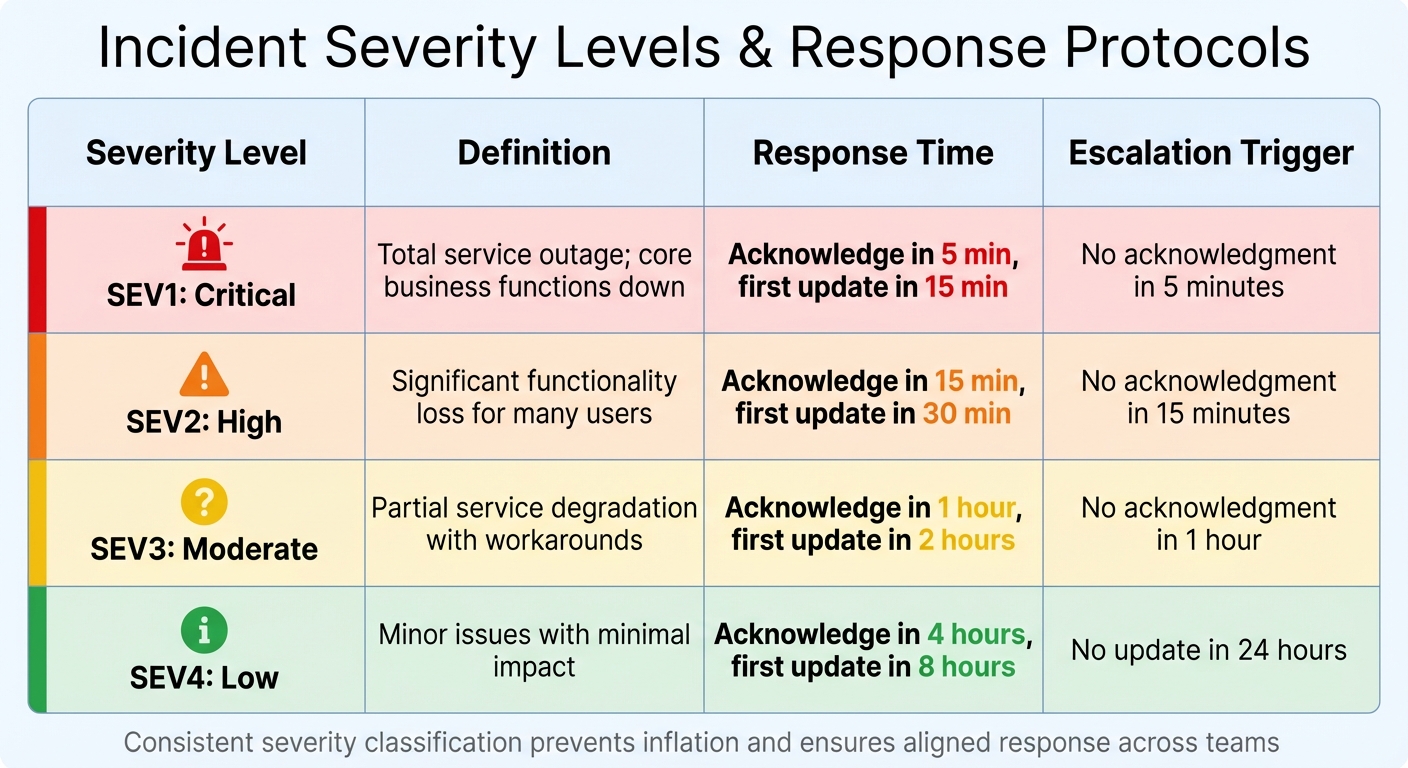
Using a five-tier severity model (SEV1 to SEV5) helps categorize incidents based on urgency and impact [5]. For B2B companies, this framework should also consider factors like revenue-generating features, enterprise customer impact, and SLA commitments [5]. Here’s a breakdown of severity levels and their corresponding response protocols:
| Severity | Definition | Response Time | Escalation Trigger |
|---|---|---|---|
| SEV1: Critical | Total service outage; core business functions down | Acknowledge in 5 min, first update in 15 min | No acknowledgment in 5 minutes |
| SEV2: High | Significant functionality loss for many users | Acknowledge in 15 min, first update in 30 min | No acknowledgment in 15 minutes |
| SEV3: Moderate | Partial service degradation with workarounds | Acknowledge in 1 hour, first update in 2 hours | No acknowledgment in 1 hour |
| SEV4: Low | Minor issues with minimal impact | Acknowledge in 4 hours, first update in 8 hours | No update in 24 hours |
This structure ensures a consistent approach to both technical resolution and customer communication during outages.
It’s important to avoid "severity inflation", where every issue is labeled as critical to get faster responses [5]. Regularly auditing classifications and sharing definitions with teams across Engineering, Support, and Leadership ensures everyone is aligned on what each severity level means for the business.
Assign Support Roles and Responsibilities
Clearly defined roles are essential for reducing confusion and speeding up resolutions during incidents. For SEV1 and SEV2 outages, assign these key roles:
- Incident Commander (IC): Manages coordination, escalation decisions, and tracks the incident timeline [6].
- Technical Lead: Focuses on diagnosing and resolving the issue, coordinating with engineering teams [6].
- Communications Lead: Handles updates to status pages, customer communications, and executive notifications [6].
- Scribe: Documents actions in real time to support post-incident reviews [6].
"In the heat of a P1, every minute spent crafting a polite status update for executives is a minute not spent fixing the root cause."
- Tom Wentworth, Chief Marketing Officer, incident.io [2]
For high-severity incidents, assign one person to handle technical resolution and another to manage stakeholder updates. Use separate communication channels – such as a dedicated Slack or Teams "war room" for technical responders and another for leadership updates. The Communications Lead should provide updates every 20–30 minutes during SEV1 incidents to maintain transparency and trust [2].
Use AI for Triage and Escalation
Once roles are in place, AI tools can streamline the process by automating key tasks, reducing errors, and speeding up response times. These tools can categorize and prioritize tickets based on urgency and impact, and track SLA deadlines. They also send reminders to agents or escalate issues automatically when needed.
Platforms like Supportbench offer AI features such as ticket summaries, case history searches, and workflows that route alerts based on severity. For example, a SEV1 incident might trigger an immediate notification to executives, while a SEV2 issue routes directly to technical leads. AI copilots can also pull relevant context from past cases and internal knowledge bases, freeing agents to focus on resolving the issue rather than gathering information.
"AI agents, connected to your monitoring stack, detect early signals like error spikes or failed API calls and trigger real-time alerts to affected users."
- Narayani Iyear, Content Writer, pagergpt.ai [7]
AI tools can reach over 90% accuracy in autonomous investigations and even suggest remediation steps [2]. However, always verify AI-generated content, especially for external communications. Large language models (LLMs) can have hallucination rates ranging from 3% (GPT-4) to as high as 27% in some systems [2]. To mitigate this, establish a human review process for customer-facing messages and train AI systems using internal resources like help center articles and documentation. Additionally, set clear escalation thresholds – for instance, automatically escalating a SEV1 incident if no acknowledgment occurs within 5 minutes [5]. This approach ensures consistent response times and eliminates guesswork, no matter who is on call.
How to Detect and Declare an Outage
When something breaks, every second counts. Delays in identifying and addressing outages can lead to lost revenue, diminished trust, and increased stress for your team. Top-performing teams aim to detect issues proactively – catching 80% of incidents before customers even notice. Detecting an issue in under a minute can significantly reduce its impact, while delays beyond 30 minutes can result in major outages and a loss of confidence [8].
Monitor Incoming Tickets with AI Sentiment Analysis
AI tools can help spot outage patterns before they escalate. Sentiment analysis, for example, scans incoming tickets for urgent language like "urgent", "broken", or "can’t access." If multiple tickets reporting similar issues appear in a short time, the system can alert your on-call engineers. Tools like Supportbench use AI to analyze spikes in ticket volume and shifts in sentiment, allowing your team to shift from reacting to problems to anticipating them.
In addition to ticket monitoring, synthetic monitoring plays a crucial role. By simulating user transactions – like API calls or logins – your team can detect failures before customers are affected [8]. Similarly, anomaly detection leverages statistical models to identify unusual patterns that might indicate deeper issues [8].
Assess Scope and Impact
Once an incident is detected, the next step is to evaluate its scope and consequences. Identify which services – such as APIs, dashboards, or webhooks – are impacted and determine which user groups are affected. Quantify the potential damage, including revenue loss, SLA breaches, and the volume of escalations. For example, a payment processing API outage would be classified as critical, while a slower response time for a minor reporting feature might indicate a less severe issue.
The Incident Commander (IC) is tasked with assessing this information and declaring the severity level. A severity matrix can guide this process. For instance, a SEV1 incident might require acknowledgment within 5 minutes and updates every 20–30 minutes [4].
Set Up a Centralized War Room
After confirming the scope, it’s essential to establish a unified response. For high-severity incidents, create a centralized communication channel – a virtual "war room" – where your team can collaborate in real time. Tools like Slack or Microsoft Teams are ideal for this purpose. Automating this process is even better. For example, when a SEV1 incident is declared, a script can automatically create a channel, invite the necessary responders, and provide key details like the incident ID, severity, affected services, and links to relevant runbooks or dashboards [9].
To maintain trust and reduce support ticket volume, the Communications Lead should provide updates to stakeholders every 20–30 minutes [2]. Automating integrations, such as linking your status page to your chat tool, ensures that declaring an incident immediately updates the public status without requiring extra manual effort [2].
"Technical excellence means nothing if customers feel ignored while your team scrambles silently."
- Nawaz Dhandala, Author [4]
How to Manage Communication and Triage During Outages
When your war room is active, your team must juggle two critical tasks: informing customers and addressing issues swiftly. If either of these falters, a manageable outage can quickly spiral into a trust-eroding crisis. Research highlights the stakes – 33% of customers will switch providers after a single downtime experience [12], and 48% will leave following poor service [15]. How you communicate and prioritize during these moments often matters as much as resolving the technical issue itself. Here’s how to ensure your team handles triage and communication effectively.
Prioritize Cases with AI Scoring
During an outage, support ticket volumes can skyrocket, making manual triage nearly impossible. AI scoring steps in to prioritize cases efficiently, analyzing factors like sentiment, account value, and SLA commitments. This ensures critical issues are routed to senior engineers, while related tickets are grouped into a single thread for streamlined handling.
A real-world example comes from Württembergische Versicherung AG, a German insurer. In September 2025, they partnered with Parloa to implement AI for routing 300,000 annual calls. Within just four weeks, call wait times dropped by 33%, thanks to accurate classification and routing. This same principle applies to outage management – AI can match complex cases to the most qualified agents based on historical data and current workloads, cutting down on delays caused by manual handoffs.
Supportbench offers a similar approach with its AI-powered triage. By clustering related tickets, it identifies patterns across incoming cases. For instance, if multiple customers report similar issues within a short time, the system groups these tickets and directs them to the incident response team. High-value accounts are prioritized, while routine noise – like chatbot fallback messages or IVR exits – is filtered out, allowing your team to focus on what truly matters.
Send Timely Customer Updates
Once triage is underway, timely communication with customers becomes the next priority. Customers expect acknowledgment within 10–15 minutes of detecting a service-impacting issue [3][2]. Even if you don’t have all the details, an early acknowledgment can prevent speculation and reduce ticket volumes by 40–60% [3], freeing your team to concentrate on resolving the issue.
Stick to a strict update schedule, especially for critical incidents (SEV1). Provide updates every 20–30 minutes, even if there’s no new information. Use clear, customer-focused language – for example, "You cannot log in to your account" – instead of technical jargon [2][15]. Address common concerns like data safety, and always include a timeframe for the next update [3][10][16].
Pre-written templates for different stages of an incident – Investigating, Identified, Monitoring, and Resolved – can save time and reduce decision fatigue during high-pressure moments [10][16]. Assign a Communications Lead to manage these updates, allowing engineers to focus solely on fixing the issue [3][15]. Automating updates through tools like Slack can also save 10–15 minutes per incident by syncing internal and public status changes [2].
| Severity Level | Update Cadence | Key Content to Include |
|---|---|---|
| SEV1 / Critical | Every 20–30 minutes | Symptoms, affected services, data safety reassurance, next update time [3][2] |
| SEV2 / High | Every 45–60 minutes | High-level root cause, actions being taken, estimated resolution time [3][2] |
| SEV3 / Medium | Every 1–2 hours | Partial impact details, affected user segments, monitoring updates [3][2] |
Speed Up Resolutions with AI Agent Tools
During outages, support agents need rapid access to solutions. AI Agent-Copilot tools streamline this process by analyzing past cases and knowledge base content to suggest resolutions, eliminating the need for agents to dig through documentation or escalate unnecessarily. This not only speeds up fixes but also reinforces the transparency established through earlier communications.
Supportbench’s Agent-Copilot, for instance, reviews historical cases and external knowledge bases to surface relevant answers. It can even auto-generate responses based on previous case data and suggest logical next steps. These features significantly reduce handling times by providing agents with the context they need upfront.
AI observability tools have proven their value, with retailers achieving up to 50% faster detection and resolution speeds [13]. In addition, embedded AI allows companies to resolve 77% of network software issues before customers even notice [14]. By equipping your team with AI tools for context-aware suggestions, sentiment-driven interventions, and skill-based routing, you shift from reactive firefighting to proactive problem-solving.
Post-Outage Recovery and Prevention
When the dust settles after a crisis, the real challenge begins. Jumping back into regular operations without analyzing what happened can lead to repeated failures. Top-performing teams handle post-outage recovery with a structured approach, aiming for a 100% postmortem completion rate for SEV-1 and SEV-2 incidents [17][18]. The purpose isn’t to point fingers but to strengthen systems and processes, reducing the likelihood or impact of future outages.
Run a Postmortem Review
Postmortem reviews should only take place once the system is stable. Trying to analyze an incident while still firefighting divides attention and risks incomplete conclusions [19]. Draft the report within 48 hours to avoid speculation and ensure accuracy [18].
The review should collect input from everyone involved and focus on system failures – not individual mistakes. As StatusRay puts it:
"If people fear blame, they’ll hide information. If they trust the process, they’ll share details that prevent the next outage" [17]
Use the "5 Whys" technique to dig deeper into the root causes. Keep asking "why" until you uncover a systemic issue rather than stopping at human error [17].
Document both successes and failures to highlight what worked well and to boost team morale after a stressful event [17][19]. Action items should be specific, with clear ownership, deadlines, and verification plans. Avoid vague goals like "improve monitoring." Instead, create actionable tasks such as: "Add alerting for connection pool usage > 80% on production database" [17]. High-performing teams aim to complete over 80% of action items within 30 days [17][18]. StatusRay cautions:
"A post-mortem without follow-through is a waste of time" [17]
The findings should immediately feed into updates for playbooks and documentation.
Update Playbooks and Knowledge Base Articles
Postmortem insights should directly improve your documentation. During the review, check if existing runbooks were misleading, incomplete, or missing [17][18]. Nawaz Dhandala from OneUptime emphasizes:
"The best time to write a playbook is before the incident. The second best time is right after" [6]
A good playbook includes metadata (version, owner, last updated date), severity classifications, diagnostic decision trees, and ready-to-use commands [6]. This minimizes cognitive load during high-pressure situations. AI tools can help by analyzing technical timelines and drafting summaries for knowledge base articles or customer updates [2]. Tom Wentworth, CMO at incident.io, explains:
"The solution isn’t ‘better discipline’ or ‘remember to update more often.’ The solution is treating communication like code: automated, templated, and reliable" [2]
Build a searchable library of incident patterns, symptom signatures (e.g., "5xx spike at edge"), and effective fixes [20]. Schedule regular reviews of playbooks – after major incidents, whenever infrastructure changes, or at least quarterly – to prevent outdated documentation [6]. Ensure every action item includes a plan to verify its success [20].
Well-maintained documentation and updated runbooks lay the groundwork for better monitoring and early detection of issues.
Set Up Monitoring and Health Scoring
Preventing future outages starts with clear visibility. Implement error rate monitors that track metrics and trigger alerts when thresholds are breached. For example, set alerts for error rates exceeding 5% over a five-minute window [11]. Monitor database connection pool usage and trigger alerts when utilization passes 95%, catching potential issues before they disrupt SLAs [6][20].
High-performing teams aim for a Mean Time to Detect (MTTD) of less than 5 minutes and a Mean Time to Acknowledge (MTTA) of less than 15 minutes [11]. To achieve this, link runbooks directly to alerts, so responders can quickly access the necessary steps [11]. Review alerts monthly to eliminate noisy or non-actionable notifications – every alert should require a specific response, or it shouldn’t page an engineer [11].
Conclusion
Outages happen – on average, three to five major disruptions occur each year [3]. The key to handling them effectively lies in preparation, clear communication, and leveraging the right tools. Teams that establish clear severity levels, assign roles, and prepare communication templates ahead of time can respond with confidence rather than scrambling under pressure.
Communication is just as critical as resolving the issue itself. A 30-minute outage without updates often creates more strain on support teams than the actual engineering work to fix it [1]. Proactive communication during incidents can reduce support ticket volumes by 40% to 60%, cutting down on follow-up inquiries [3]. Regular, timed updates also reassure customers that they haven’t been left in the dark, even when there’s no new information to share.
AI tools are changing the game for incident management. AI-driven sentiment analysis can detect potential issues before they escalate, AI-powered scoring helps prioritize the most urgent cases, and automated workflows eliminate delays that could add 10 to 15 minutes to the Mean Time to Resolution [2]. While AI assistants can achieve over 90% accuracy in investigating incidents and drafting updates [2], human oversight ensures communications maintain the right tone and empathy.
But the work doesn’t stop once the issue is resolved. Post-outage measures are just as important. Conducting a blameless postmortem within 48 hours, updating incident playbooks, and improving monitoring systems turn each incident into an opportunity for growth rather than repeating mistakes.
Supportbench brings all these strategies together in a single platform. With AI-driven tools for sentiment analysis, prioritization, and triage, teams can anticipate and manage incidents more effectively. Features like centralized case management, dynamic SLAs, and workflow automation ensure every team member is aligned for quick, coordinated action. Designed for complex B2B environments and long-term cases, Supportbench helps teams deliver reliable, AI-powered support that protects customer trust when it’s needed most.
FAQs
When should Support declare an outage?
When an incident is identified and confirmed, support teams should announce the outage as quickly as possible – ideally within 10 to 15 minutes. Timely communication is crucial to keep customers informed, manage expectations, and kick off response efforts. Declaring an outage early helps minimize confusion, reduces the number of incoming support tickets, and reinforces trust by being transparent during the situation.
What should we say if we don’t know the cause yet?
When an outage occurs and the cause isn’t immediately clear, it’s important to be upfront with your audience. Acknowledge the problem, let them know it’s being investigated, and promise to keep them informed. A quick message like, "We are aware of the issue and actively investigating," can go a long way in maintaining trust. Even if you don’t have all the answers yet, commit to providing regular updates, and remind your customers that resolving the issue is your top priority.
How do we use AI safely during incidents?
Using AI during incidents can be highly effective, but it’s essential to follow structured protocols that balance automation with human oversight. AI can handle tasks like triage and sentiment detection, helping to speed up responses. However, safeguards are crucial. These include having predefined escalation paths and continuous monitoring to ensure AI actions remain under control.
To reduce risks like misclassification, bias, or security vulnerabilities, align AI usage with established industry standards. This approach ensures that while AI enhances efficiency, it doesn’t lead to unintended outcomes or compromise safety.
Related Blog Posts
- How do you run incident communications during outages so customers stay calm?
- How do you build an incident management process for B2B support (not just engineering)?
- How do you build a customer-facing status page and incident comms playbook?
- How do you build a churn-risk playbook triggered by support signals (templates)?
Evaluating help desks for a B2B team?
Supportbench is all-inclusive from $32 per agent per month, with migration and onboarding included. See pricing or book a 20-minute demo.






