


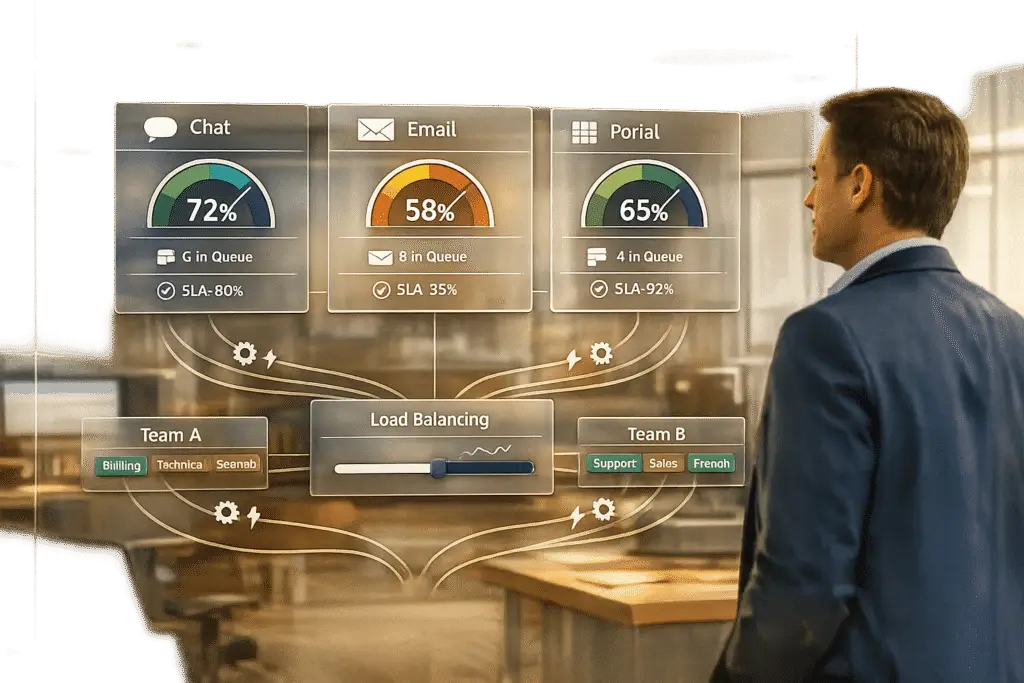
Omnichannel routing ensures customer support requests – via chat, email, or portals – are directed to the right agents, improving response times and reducing inefficiencies. Here’s what you need to know:
- Chat: Real-time, fast-paced, and requires immediate attention. Customers expect responses within seconds or minutes.
- Email: Asynchronous, allowing more time for detailed responses. Customers usually expect replies within a few hours.
- Portals: Handle diverse requests, from routine inquiries to urgent cases requiring specific expertise.
Traditional systems struggle with prioritization, often misjudging urgency or sentiment. AI-powered routing solves this by analyzing intent, sentiment, and context, assigning cases to the most suitable agents through strategic support level management.
Key Steps to Improve Routing:
- Set Capacity Limits: Define limits per channel to balance workloads.
- Automate Routing: Use AI to prioritize cases based on urgency, sentiment, and customer value.
- Skills-Based Assignments: Match cases with agents’ expertise to reduce reassignment.
- Monitor and Adjust: Track performance in real-time to avoid overload and ensure SLA compliance.
AI-driven systems also enable dynamic workload balancing, flagging stuck tickets and reallocating them to available agents. This approach reduces response times, prevents SLA breaches, and improves customer satisfaction.
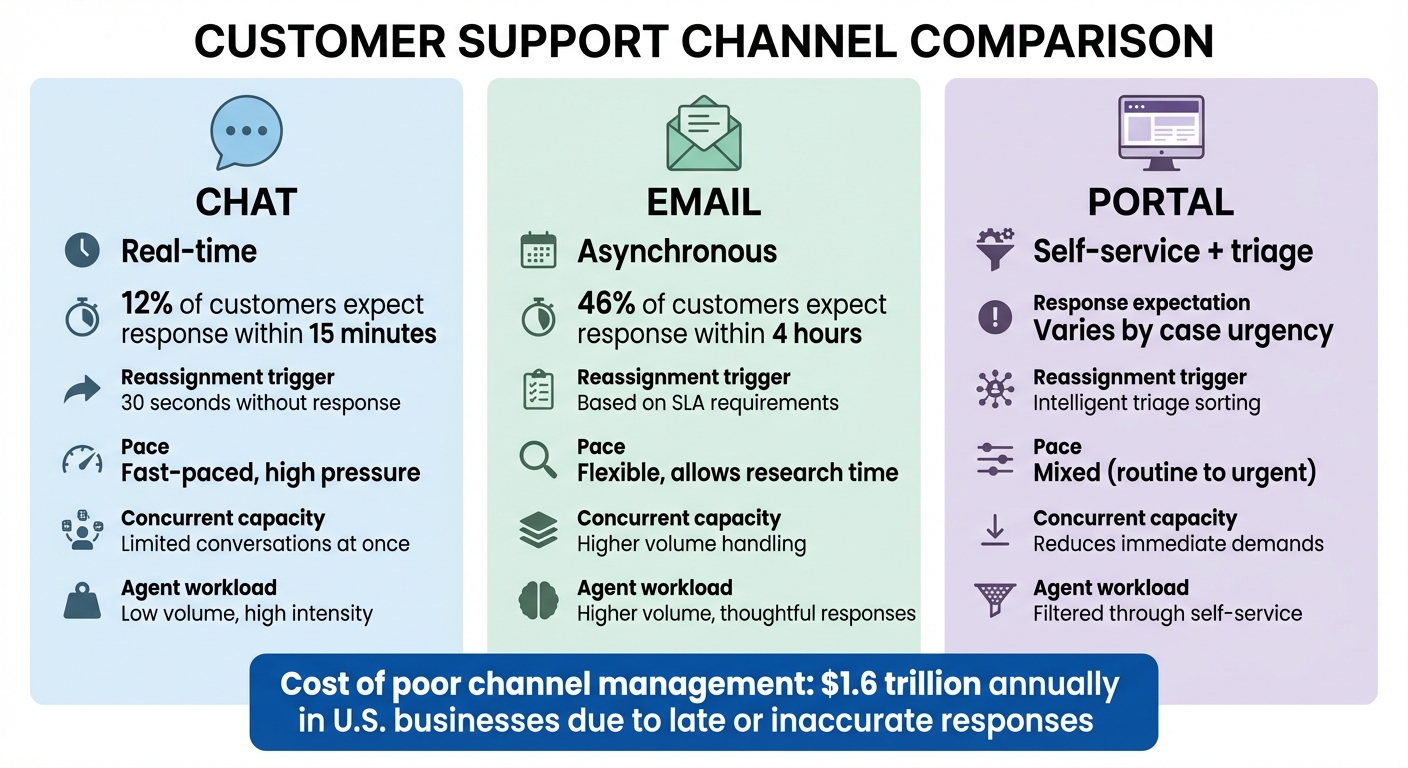
Chat vs Email vs Portal: Support Channel Comparison Guide
Omnichannel Routing Explained – Benefits & How it Works
sbb-itb-e60d259
How Chat, Email, and Portals Differ in Workload
Each support channel comes with its own pace and set of challenges, shaping how your team manages their workload.
Chat operates in real-time. Customers expect quick answers – 12% anticipate a response within just 15 minutes [2]. This creates a fast-paced environment where agents juggle a limited number of conversations at once. If an agent doesn’t respond within 30 seconds, chats are typically reassigned, keeping the pressure high.
Email, on the other hand, is asynchronous. It gives agents the flexibility to research and craft thoughtful replies. While 46% of customers expect a response within 4 hours [2], email’s slower nature allows agents to handle more cases, factoring in SLA requirements and the complexity of each issue.
Portals provide customers with self-service tools. These platforms let users submit cases, track progress, and access knowledge bases. Intelligent triage further helps by sorting routine questions from more urgent matters needing human attention. While this reduces immediate demands on your team, it’s still crucial to route portal submissions properly to ensure critical issues are addressed promptly.
Failing to manage any of these channels effectively can be costly. Late or inaccurate responses are estimated to cost U.S. businesses $1.6 trillion annually [2]. To avoid this, design routing logic that prevents chat overload, keeps email queues manageable, and ensures urgent portal cases get the attention they need.
How to Design Your Routing Logic
To design effective routing logic, start by understanding the unique demands of each support channel. For example, chat demands near-instant responses and allows only a few concurrent conversations, while email, being asynchronous, can handle higher volumes. Portals, on the other hand, can range from routine inquiries to urgent escalations, adding complexity to their management.
Step 1: Set Capacity Limits and Prioritize Cases
Define clear capacity limits for each channel based on their specific needs. Then, configure routing queues to prioritize high-impact cases, such as VIP escalations, critical product issues, or requests nearing SLA breaches. During peak hours, focus on chat to maintain quick response times. Shift attention to email and portal queues during quieter periods to ensure all channels are managed efficiently. This approach prevents chat from dominating agent resources while ensuring email SLAs are met.
As Nooshin Alibhai, Founder and CEO of Supportbench, explains:
"AI determines priority not just based on a selected field or a single keyword, but by analyzing a confluence of factors [including] sentiment analysis, urgency keywords, and customer value" [1].
Step 2: Automate Routing for Efficiency
A real-world example of effective routing comes from Wolseley Canada. In June 2025, Eilis Byrnes, Customer Service and Process Improvement Manager, implemented automated routing to manage 7,000–8,000 monthly support emails. By replacing manual sorting with rules based on case type and client profiles, they resolved overdue cases and gained better visibility into agent performance through real-time analytics [3].
Step 3: Use Skills-Based Routing
Assign cases to agents based on their expertise. Instead of blindly assigning work to the next available agent, route technical questions to product specialists and billing inquiries to finance-trained agents. AI and Natural Language Processing (NLP) can analyze the content and sentiment of each request, automatically matching it to an agent with the right skills. This eliminates the need for customers to navigate confusing menus and reduces internal transfers, ensuring they connect with the right person quickly [1].
Step 4: Monitor and Adjust in Real Time
Keep an eye on how work flows between channels throughout the day. For instance, if chat queues surge during lunch hours while email agents have lower workloads, temporarily reassign cross-trained agents to the chat channel. The goal is to maintain smooth operations across all channels, prevent any team from becoming overwhelmed, and ensure urgent cases are addressed promptly.
Using AI for Triage and Distribution
AI can significantly enhance how you manage omnichannel routing by turning unstructured data into clear, actionable insights.
AI-Powered Triage and Case Prioritization
AI takes customer messages from chat, email, and other portals and organizes them by extracting intent, sentiment, and urgency [4][5]. Instead of requiring agents to sift through every incoming request, AI identifies critical text signals like "outage" or "refund", evaluates customer details (e.g., VIP status or ARR tier), and considers operational risks like SLA breaches. This process scores and prioritizes tickets for quicker action [4][5].
Ameya Deshmukh from Everworker describes it well:
"AI triage support tickets by reading each new request, extracting intent and key details, estimating urgency and sentiment, then routing it to the right queue, agent, or automated resolution path." [4]
By summarizing key details – like Order IDs or error codes – AI reduces the workload for agents before they even review tickets [4]. Businesses that adopt AI ticket prioritization often see a 20–30% boost in SLA compliance or First Contact Resolution (FCR) rates [5]. A good starting point is automating 5–10 high-volume intents, such as password resets or billing inquiries, to refine accuracy before scaling up [4]. To ensure quality, set confidence thresholds so uncertain classifications are flagged for human review [4].
This data also supports dynamic workload balancing, enabling smarter ticket management in real time.
Dynamic Workload Balancing with Predictive Metrics
Once AI prioritizes tickets, dynamic workload balancing ensures teams stay efficient. AI systems monitor for "neglected" or "stuck" tickets – those assigned to unavailable or overloaded agents – and reassign them to someone who can handle them promptly [6]. You can even integrate customer feedback into the process: for example, tickets tied to low CSAT scores can be automatically reopened and routed to senior agents for priority attention [7]. This approach prevents burnout by spreading the workload evenly, ensuring no one is overwhelmed while others remain underutilized.
Reduce Manual Work with Automation
Automation works hand-in-hand with predictive metrics to streamline the process further. By using intelligent agent matching – based on skills, language proficiency, and current workload – AI minimizes unnecessary internal handoffs that frustrate customers and waste time [8][3]. It can also flag tickets with strong negative language, even if they lack explicit "urgent" markers, for faster escalation [8]. To avoid losing tickets that don’t meet specific AI routing criteria, set up default queues or escalation triggers. Tracking reassignment rates can help fine-tune your AI’s classification and routing logic over time [3][9].
Together, these tools reduce manual effort, improve efficiency, and create a smoother experience for both agents and customers.
Monitor and Improve Routing Performance
Keep an eye on key metrics like response times, resolution rates, and SLA compliance to measure how well your routing system is working. These metrics also help confirm whether AI categorization is accurately directing inquiries. Misclassifications can lead to delays and frustrate customers.
Real-time dashboards are essential for this process. Aim for 99.5% data completeness and 99.9% uptime to ensure you’re making decisions based on reliable information. Set alerts to trigger when performance nears 80% of SLA thresholds. For instance, if your SLA requires a response within 60 minutes, configure an alert at the 48-minute mark to avoid breaches [10]. This proactive approach allows you to step in before issues escalate.
It’s important to remember that AI routing isn’t a “set it and forget it” tool. As Nooshin Alibhai, Founder and CEO of Supportbench, emphasizes:
"AI isn’t ‘set it and forget it.’ Monitor the accuracy of AI-driven categorization, prioritization, and routing. Provide feedback to the system (if possible) and refine configurations based on performance and changing business needs." [1]
Once you’ve implemented solid AI triage and routing rules, continuous monitoring becomes essential to keeping your system efficient. Regularly review AI-generated tags and sentiment trends to uncover potential problems, such as tickets being sent to the wrong team or agents becoming overwhelmed. Use feedback from agents and customers to improve the system further. Shift human dispatchers from repetitive manual tasks to focusing on exceptions, quality control, and real-time adjustments to capacity.
Also, pay attention to reassignment rates and how often alerts are triggered. These insights can help you fine-tune your AI logic. To reduce noise, consider combining non-critical alerts into daily summaries based on historical data [10]. This approach helps streamline operations while maintaining oversight.
Conclusion
Providing effective support hinges on smart routing tailored to the specific needs of each channel. For instance, chat demands instant responses, email allows for asynchronous handling with clear prioritization, and portals ease agent workloads through self-service options.
The move from rigid, rule-based systems to AI-powered routing is transforming how support teams operate. As Nooshin Alibhai, Founder and CEO of Supportbench, explains: "AI is revolutionizing the operational backbone of support by bringing intelligence and context-awareness to ticket routing and prioritization. This isn’t just about incremental improvement; it’s about fundamentally optimizing how support work gets done" [1]. By incorporating context and sentiment, AI not only anticipates escalations but also ensures issues are routed accurately on the first attempt.
To apply these principles, start by defining capacity limits and aligning inquiries with the right expertise. Implement skills-based routing to connect customers with the most suitable agents, and enhance this system with AI triage and dynamic workload balancing, as outlined earlier.
Streamlining routing processes does more than improve response times – it also cuts costs. By reducing ticket transfers, automating triage, and avoiding SLA breaches, you can significantly lower expenses. In fact, global support teams have achieved up to an 80% reduction in ticket transfers by replacing manual rules with a unified AI-driven classification system [11]. This shift allows human dispatchers to concentrate on exceptions and quality assurance instead of repetitive categorization.
Think of your routing system as an evolving process that requires regular monitoring and fine-tuning. Use real-time dashboards and proactive alerts to track metrics like response times, resolution rates, and reassignment patterns. This ongoing optimization ensures your support remains efficient, cost-effective, and customer-centric.
FAQs
How do I set capacity limits for chat, email, and portal tickets?
Managing workloads effectively across chat, email, and portal tickets is crucial for maintaining smooth operations in your support platform. Here’s how you can do it:
- Chat: Set a limit on the number of conversations each agent can handle at the same time. This ensures agents can focus and provide quality responses without feeling overwhelmed.
- Email and Portal Tickets: Define maximum ticket limits per channel or per agent. This helps distribute the workload evenly and prevents bottlenecks in specific areas.
Some platforms also offer workload rules that automatically balance assignments. These rules can help maintain consistent service levels across all channels, ensuring no team or agent is overloaded.
What data is needed for AI to triage and route tickets accurately?
To make sure AI can handle ticket triage and routing effectively, you need to gather data that reflects the content, context, and priority of each request. Here’s what to focus on:
- Ticket content: The full text of the request helps analyze intent, sentiment, and the nature of the issue.
- Customer information: Details like profile, service tier, or interaction history aid in setting priorities.
- Issue details: Categories, types, or relevant keywords assist in accurate classification.
- Metadata: Information such as language, communication channel, timestamp, and agent availability ensures smoother routing.
How can I prevent urgent portal cases from getting stuck or missed?
To stay on top of urgent portal cases, leverage AI-powered triage and flexible routing rules. These tools help you prioritize cases by urgency, customer tier, or complexity, ensuring they land with the right agents based on skills and current workload. Keep a close eye on queues and tweak your routing rules as necessary to maintain quick and accurate responses. This strategy helps cut down delays, boosts precision, and keeps customers happy.
Related Blog Posts
- How do you design a support queue strategy (triage, routing, and ownership rules)?
- How do you decide which channels to offer (email/chat/phone) without creating chaos?
- Moving Beyond “Chat”: Why Asynchronous Ticketing Wins for Complex B2B Issues
- Multi-Product Support Strategies: Managing Distinct Brands Under One Roof






