



Audit logs are indispensable for maintaining compliance in regulated industries like finance, healthcare, and defense. These unchangeable, time-stamped records provide a clear trail of system activity, ensuring accountability and supporting investigations. Without proper logs, organizations risk hefty fines, data breaches, and compliance failures.
Key Takeaways:
- What are audit logs? Detailed, unalterable records of system actions, including who did what, when, where, and why.
- Why are they critical? They prove adherence to regulations like HIPAA, SOX, and GDPR, which impose strict data retention and security requirements.
- Consequences of non-compliance: Fines can reach millions of dollars, as seen in the $1 billion penalties imposed by the SEC and CFTC in 2022.
- AI-powered solutions: Automating log management reduces audit prep time by up to 70% and improves security by detecting anomalies in real time.
Audit logs are not optional – they’re a necessity for compliance, security, and operational oversight.
What Audit Logs Are and Why They Matter for Compliance
What Are Audit Logs?
Audit logs – also known as event logs or security logs – are unchangeable, time-stamped records that track every action within a system. They capture essential details like who accessed the system, what actions were taken, when they occurred, and where they happened. Key data points include timestamps, event names, user IDs, access methods, and device locations [3][7].
"Audit logs are compliance’s unsung heroes. They’re meticulous records of every action, event, and change that occurs within your system." – Alex Cawthorne, Log Locker [3]
What sets audit logs apart from standard system logs is their immutability. Once recorded, entries cannot be altered or deleted – not even by system administrators [6][11]. This feature makes them legally reliable and invaluable for forensic investigations into security incidents [5][11]. Audit logs provide a clear, unaltered timeline of events, which is crucial for uncovering what happened before, during, and after an incident [8].
Their reliability and unchangeable nature make audit logs a cornerstone of compliance efforts.
How Audit Logs Support Compliance
Audit logs play a critical role in proving adherence to security policies [3][7]. By documenting every transaction, they hold users accountable and help identify the source of errors or unauthorized actions.
"Without complete and reliable logs, intent and explanations carry little weight. Evidence does." – Gil Vidals, CEO, HIPAA Vault [8]
Failing to comply with regulations can be costly. Non-compliance costs businesses an average of $5.87 million annually [10]. Specific penalties include fines of up to €20 million or 4% of global revenue under GDPR and up to $1.5 million per violation category under HIPAA [9]. Audit logs provide the transparency needed for auditors, officials, and stakeholders to verify that operations were conducted properly and without unauthorized actions [7].
Retention requirements further emphasize their importance. For example, HIPAA mandates keeping logs for at least six years [8], while SOX requires a seven-year retention period [5]. Maintaining a detailed and defensible audit trail is not just a best practice – it’s a necessity for avoiding hefty fines and demonstrating compliance.
sbb-itb-e60d259
What Is Audit Logging? – Next LVL Programming
Regulations That Require Audit Logs
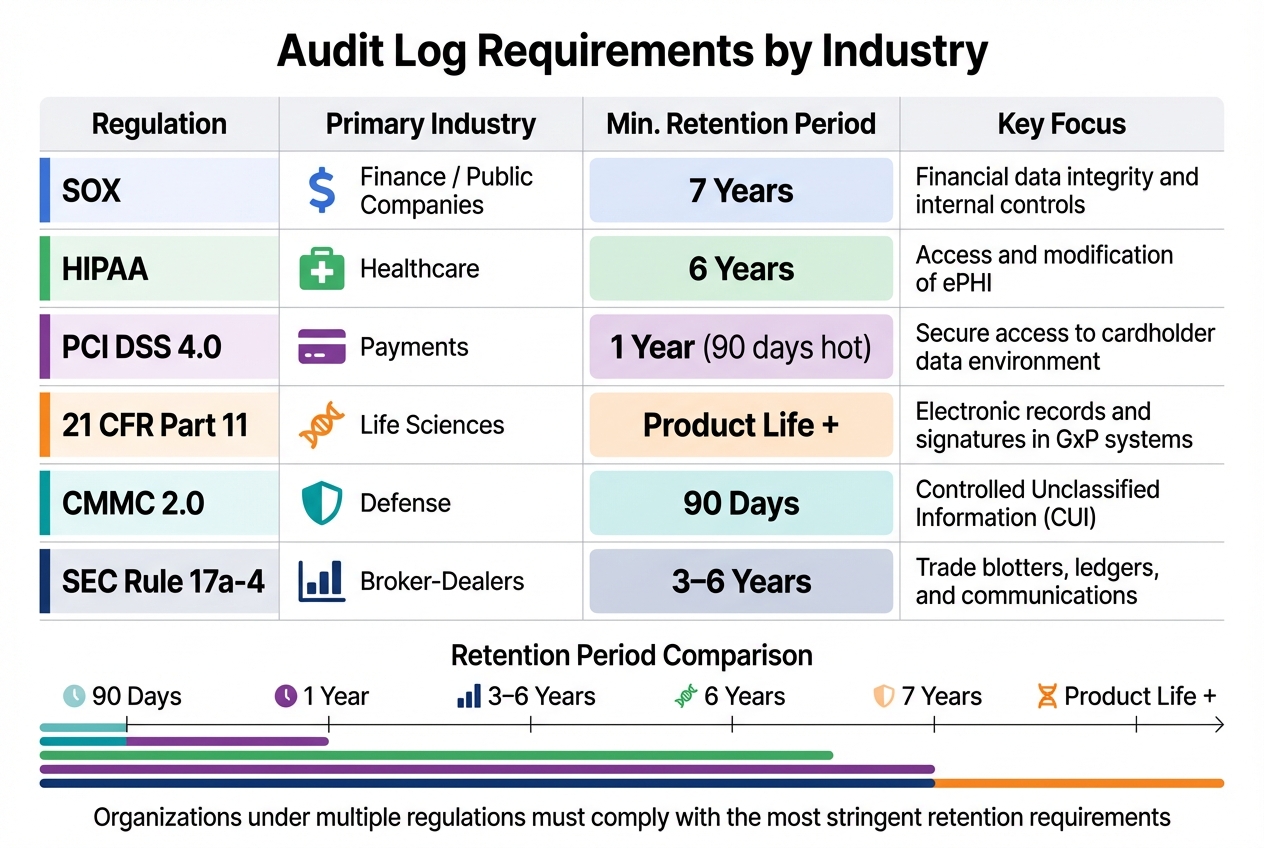
Audit Log Requirements by Industry: Retention Periods and Key Focus Areas
SOX, HIPAA, and Other Major Regulations
Audit log requirements often stem from regulations designed to protect data and manage risks. For example, HIPAA mandates systems with electronic Protected Health Information (ePHI) to have audit controls that track and examine activity [12][14].
SOX Section 404 focuses on public companies, requiring them to maintain audit trails for systems influencing financial reporting, such as ERP and access management systems. These logs must be retained for seven years [15][16]. Meanwhile, GDPR emphasizes the "storage limitation" principle, meaning personal data in logs – like usernames or IP addresses – can only be retained as long as necessary, and organizations must justify extended retention [16].
PCI DSS 4.0 requires maintaining 12 months of audit history, with the most recent 90 days readily accessible. Automated log review mechanisms are also a must [15][16]. Similarly, FDA 21 CFR Part 11 requires time-stamped, computer-generated audit trails to independently document operator actions that create, modify, or delete electronic records. The regulation states:
"Use of secure, computer-generated, time-stamped audit trails to independently record the date and time of operator entries and actions that create, modify, or delete electronic records." – 21 CFR § 11.10(e) [6]
For defense contractors, NIST SP 800-171/CMMC mandates audit logs for at least 90 days to monitor Controlled Unclassified Information (CUI) [16]. In the financial sector, SEC Rule 17a-4 requires records to be retained for three to six years, recently allowing audit-trail alternatives to traditional WORM (Write Once, Read Many) storage [16]. Notably, in 2022, the SEC and CFTC fined major financial institutions over $1 billion for failing to preserve audit trails of business communications conducted via personal messaging apps [1].
| Regulation | Primary Industry | Min. Retention Period | Key Focus |
|---|---|---|---|
| SOX | Finance / Public Co. | 7 Years | Financial data integrity and internal controls |
| HIPAA | Healthcare | 6 Years | Access and modification of ePHI |
| PCI DSS 4.0 | Payments | 1 Year (90 days hot) | Secure access to the cardholder data environment |
| 21 CFR Part 11 | Life Sciences | Product Life + | Electronic records and signatures in GxP systems |
| CMMC 2.0 | Defense | 90 Days | Controlled Unclassified Information (CUI) |
| SEC Rule 17a-4 | Broker-Dealers | 3–6 Years | Trade blotters, ledgers, and communications |
How Requirements Differ by Industry
Regulatory compliance varies widely across industries, shaping specific operational practices. In healthcare, the focus is on tracking access to ePHI. This involves monitoring login attempts, recording CRUD (Create, Read, Update, Delete) events, and capturing emergency "break-glass" access scenarios [18][19]. Providers are also required to generate reports detailing PHI access for patients upon request, covering up to six years. Given the healthcare sector’s vulnerability to ransomware attacks, identity-based audit logs are critical for spotting unauthorized activity.
In finance, regulations like SOX and PCI DSS are central. SOX ensures financial reporting integrity by requiring logs that track system changes affecting financial controls [5]. PCI DSS 4.0 focuses on payment security, mandating a full year of audit history with the latest three months easily accessible. Automated log reviews are emphasized, highlighting the importance of AI-driven solutions to handle the high volume of transaction logs. However, storing these logs for extended periods can lead to rising costs, making tiered archiving strategies essential [5][17].
For the pharmaceutical and manufacturing sectors, compliance with FDA’s 21 CFR Part 11 is key. This regulation demands time-stamped, computer-generated audit trails to ensure data integrity, aligned with ALCOA+ principles. Systems must undergo Computerized System Validation (CSV) to confirm that audit trails can’t be bypassed or disabled [6][13]. In 2024, the FDA issued warnings to several companies for failing to meet audit trail requirements, underscoring the need for strict compliance [6].
When businesses operate under multiple regulatory frameworks, the most stringent retention rules typically apply. For instance, a healthcare provider processing credit card payments must adhere to HIPAA’s six-year retention requirement, even though PCI DSS only requires one year [16].
How to Implement and Maintain Audit Logs
What Your Audit Logs Must Capture
Every audit log entry needs to address six key questions:
- Who performed the action (user ID, service account, or API ID).
- What action was taken (e.g., create, read, update, delete, or configuration change).
- When it occurred (use an ISO 8601 timestamp synced via NTP).
- Where it originated (source IP address, device ID, or terminal).
- Why it was performed (context or purpose behind the action).
- The Outcome (success, failure, or partial completion with error codes).
For data changes, logs should capture both the "before" and "after" values to enable accurate reconciliation. Use correlation or request IDs to tie together related events across applications, databases, and networks, ensuring a comprehensive trail for investigations. Logs should also document authentication methods (like MFA or API keys), failed login attempts, and privilege escalations, as these are critical for identifying security risks.
"An audit trail is the difference between guessing for hours and answering in seconds. It tells you who did what, when, from where, and what changed." – Jugal Thacker, CPA, CA [11]
Sensitive data should never be logged in plain text. Mask or tokenize information like credit card numbers, CVV codes, API keys, and personally identifiable information (PII) to comply with standards like PCI DSS and GDPR. If implemented correctly, automated logging can add less than 5ms of latency per request, making it practical even for high-traffic systems [20].
With these foundational elements in place, the focus shifts to implementing and maintaining these logs effectively.
Implementation and Maintenance Steps
Start by ensuring your logs are immutable from the outset. Use Write Once, Read Many (WORM) storage or features like AWS S3 Object Lock in compliance mode to prevent log deletion or modification during the retention period – even by administrators.
A breach in November 2025 involving a mutable PostgreSQL audit system resulted in a $2.3 million fine for deleted logs [2].
Centralize and standardize your logs by shipping them to a SIEM or log lake and adopting a consistent schema (such as JSON) for easier cross-system queries. Synchronize all system clocks with an authoritative NTP source, as even minor clock drift can undermine the credibility of your audit trail during investigations.
To protect log integrity, use cryptographic techniques like hash chains or Merkle trees, which make any unauthorized modifications immediately detectable.
Automate daily SIEM reviews for critical alerts and conduct weekly risk-based reviews for high-volume or emergency access events. Set up real-time alerts to flag log ingestion failures, queue backups, or attempts to disable audit controls. Regularly test your archived logs by performing restore drills to confirm they remain accessible and verifiable throughout their retention period. This ensures both compliance and operational readiness.
Common Mistakes to Avoid
Even with proper implementation, there are common pitfalls that can compromise your audit logs’ reliability and compliance.
One major error is failing to manage retention properly. For example, native account usage views often retain data for just 365 days, which falls well short of HIPAA’s 6-year and SOX’s 7-year retention requirements [5]. Use automated tiered storage, moving logs from "hot" storage (immediate access) to "cold" storage solutions like AWS S3 Glacier to meet compliance demands while controlling costs.
Unstructured logging – like simple string concatenation – makes querying a nightmare, forcing auditors to sift through enormous text files [21]. Instead, always use structured logging with semantic properties (e.g., JSON format) so logs can be indexed and queried efficiently using SQL or KQL. Additionally, avoid timezone inconsistencies by sticking to UTC timestamps. This ensures accurate incident timelines, especially for distributed systems.
"Disabling adaptive sampling is non-negotiable for compliance. Auditors don’t accept ‘we probably captured most authentication attempts.’" – Daily DevOps & .NET [21]
Another critical mistake is allowing system administrators to review their own activity logs. To maintain accountability, reviews should always be conducted by independent personnel. Lastly, don’t let your logs exist in silos. Integrate logs from third-party vendors and cloud providers to eliminate blind spots in your audit trail. These gaps can lead to compliance issues that regulators are quick to exploit.
How AI Improves Audit Log Management
Managing audit logs manually can be a huge drain on resources. Compliance officers often spend 60% of their time pulling data from scattered systems[26], and 60% of audits are delayed because records are incomplete or hard to access[22]. AI changes the game by automating these repetitive tasks and identifying threats that might otherwise go unnoticed.
Organizations using AI-powered audit trails report audits being prepared up to 70% faster[22]. Instead of spending weeks gathering evidence, AI tools continuously collect, organize, and standardize logs in real time. This not only saves time but also lays the groundwork for automated compliance reporting, simplifying the entire process.
Automating Compliance Reporting
AI systems integrate seamlessly with tools you already use – like ERPs, ticketing systems, and cloud log services – to automatically pull and standardize data. This eliminates the need for manual evidence collection, saving over 200 hours per audit cycle and reducing regulatory violations by 45%[23][26].
Unlike traditional methods that review only a small sample of transactions, AI reviews 100% of events in real time. It aligns your internal controls with specific regulations (e.g., HIPAA § 164.312(b)) and flags gaps or outdated policies as rules evolve. This continuous monitoring replaces outdated "snapshot" audits, which can leave organizations vulnerable between assessments.
"The future of governance, risk, and compliance is not just digital; it is autonomous." – Quantarra[27]
AI also solves the problem of inconsistent log formats across SaaS tools. By consolidating diverse logs into a unified view, AI makes it easy to track who has access to what across your entire tech stack[28]. Organizations that adopt compliance automation report a 30% to 40% drop in ongoing compliance costs[28]. These efficiencies not only speed up audit preparation but also strengthen the standards required in heavily regulated industries.
Using AI for Security Monitoring
AI doesn’t just streamline reporting – it also boosts security by analyzing log data for threats in real time. Using unsupervised machine learning, AI establishes a baseline for normal activity and flags anomalies, such as unusual data transfers, unexpected API calls, or access attempts at odd hours[25].
Neural networks detect recurring patterns in log data, while graph-based algorithms connect seemingly unrelated events to uncover complex attack chains – patterns that manual reviews could easily miss[25]. For example, AI can quickly link failed login attempts, privilege escalations, and unauthorized downloads across systems, providing critical insights within minutes.
To ensure log integrity, AI uses cryptographic methods like hash chains and Merkle trees. These techniques link each log entry to the previous one, so if someone tampers with entry #500, the chain breaks at #501, immediately signaling a breach[2]. This is especially important in industries like healthcare, where 90% of AI audit logs are estimated to fail rigorous compliance checks without such safeguards[2].
AI also creates "living audit trails" that capture not only what happened but why an autonomous system made a particular decision. This level of context – impossible to recreate manually – is vital for compliance in AI-driven environments[24]. Real-time alerts notify you the moment activity exceeds normal baselines, such as spikes in database queries or attempts to access restricted domains. With this, you can act quickly to contain threats before they escalate[24].
Conclusion
Audit logs are essential for ensuring accountability in industries where regulations are strict. They serve as legal proof that policies are actively enforced every day, which is critical to avoiding hefty fines like those recently issued under GDPR, SEC, and CFTC guidelines[1][4].
The expectations of regulators have shifted dramatically. Simply having policies in place is no longer enough – auditors now require solid, verifiable evidence[4]. Whether you’re dealing with HIPAA’s 6-year data retention rules, PCI DSS’s requirements for safeguarding cardholder information, or the EU AI Act’s penalties that can reach €35 million or 7% of global revenue[4], your audit logs need to be secure, detailed, and readily available.
"Auditors are trained to verify, not trust. When you claim you have AI governance, they will ask for evidence." – PolicyGuard AI[4]
As compliance standards grow more demanding, advanced technology plays an increasingly critical role. AI-powered tools have revolutionized audit log management, turning what was once a tedious task into a strategic advantage. Companies using automated audit trails can cut audit preparation time by as much as 70%[22]. By centralizing log data, using cryptographic methods to ensure integrity, and incorporating real-time anomaly detection, you create a system that regulators, investors, and partners can trust.
Now is the time to assess your audit log setup. Make sure it captures all essential details, uses tamper-proof storage, and supports automated reporting. Investing in a robust audit log system not only helps you avoid penalties but also streamlines audits and strengthens your overall security framework. Adopting AI-driven solutions for audit log management is no longer optional – it’s essential to meet today’s compliance challenges.
FAQs
What makes an audit log legally defensible?
An audit log can stand up in legal settings when it meets certain criteria: it must be tamper-proof, unchangeable, and time-stamped. Each action should be tied to a specific user or system, leaving no room for ambiguity. Additionally, it should include detailed context, such as before-and-after values, along with any relevant regulatory information. These elements work together to ensure clarity, accountability, and adherence to legal requirements.
How do we set the right log retention period across regulations?
When deciding on the right log retention period, start by identifying the regulations that apply to your industry, like HIPAA or PCI DSS, and their specific requirements. Opt for a retention period that aligns with the longest mandated duration – this could mean 6-7 years for healthcare or financial records.
Implement secure, automated logging systems to ensure these policies are consistently followed, reducing the risk of manual mistakes and managing storage efficiently. Make it a point to regularly review and adjust your retention policies to maintain compliance and control costs.
How can AI reduce audit prep time without weakening controls?
AI streamlines audit preparation by automating key processes and maintaining strict controls. With features like continuous monitoring, automated evidence collection, and real-time logging of actions and data changes, it ensures detailed, tamper-proof records that align with regulatory requirements. This approach not only reduces the risk of human error but also slashes preparation time by up to 70%, all while ensuring compliance and maintaining transparency.
Related Blog Posts
- What security requirements matter for Canadian public sector SaaS (ITSG-33 explained)?
- How do you evaluate “foreign access risk” when choosing a US vs non-US helpdesk?
- The Hidden Risks of Slack-First Support: Data Retention and Audit Failures
- Negotiating Support Software Contracts: Red Flags to Watch For






