


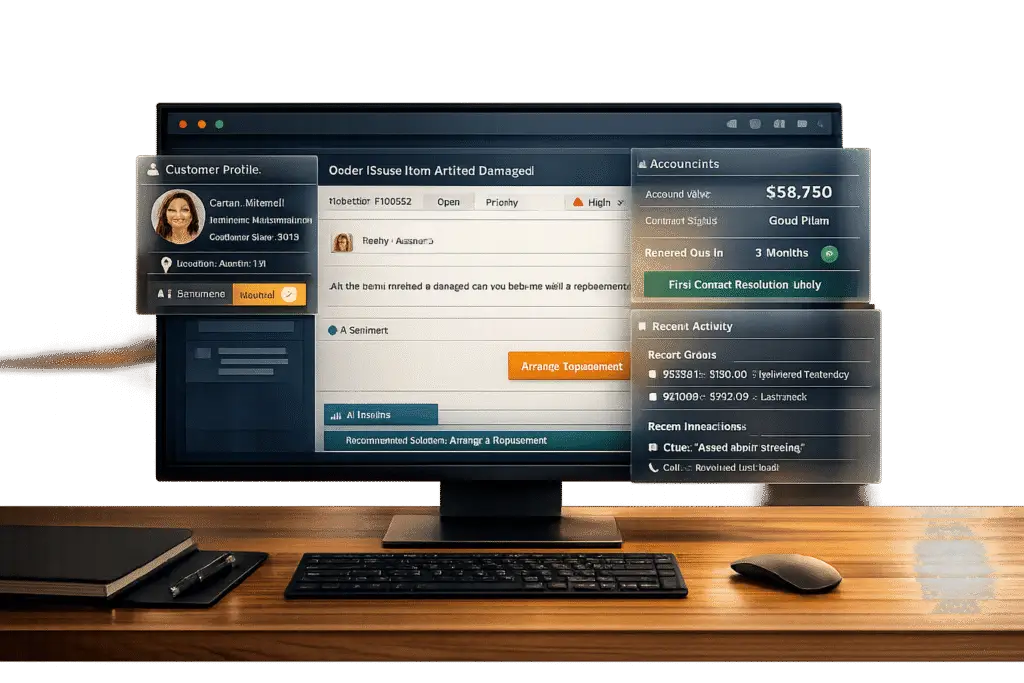
When support agents don’t have CRM data embedded in their ticket view, they waste time switching between systems, leading to slower resolutions and higher costs. Customers expect seamless service, but disconnected tools force them to repeat information, creating frustration. Integrating CRM data directly into the ticket view changes everything.
Here’s why it matters:
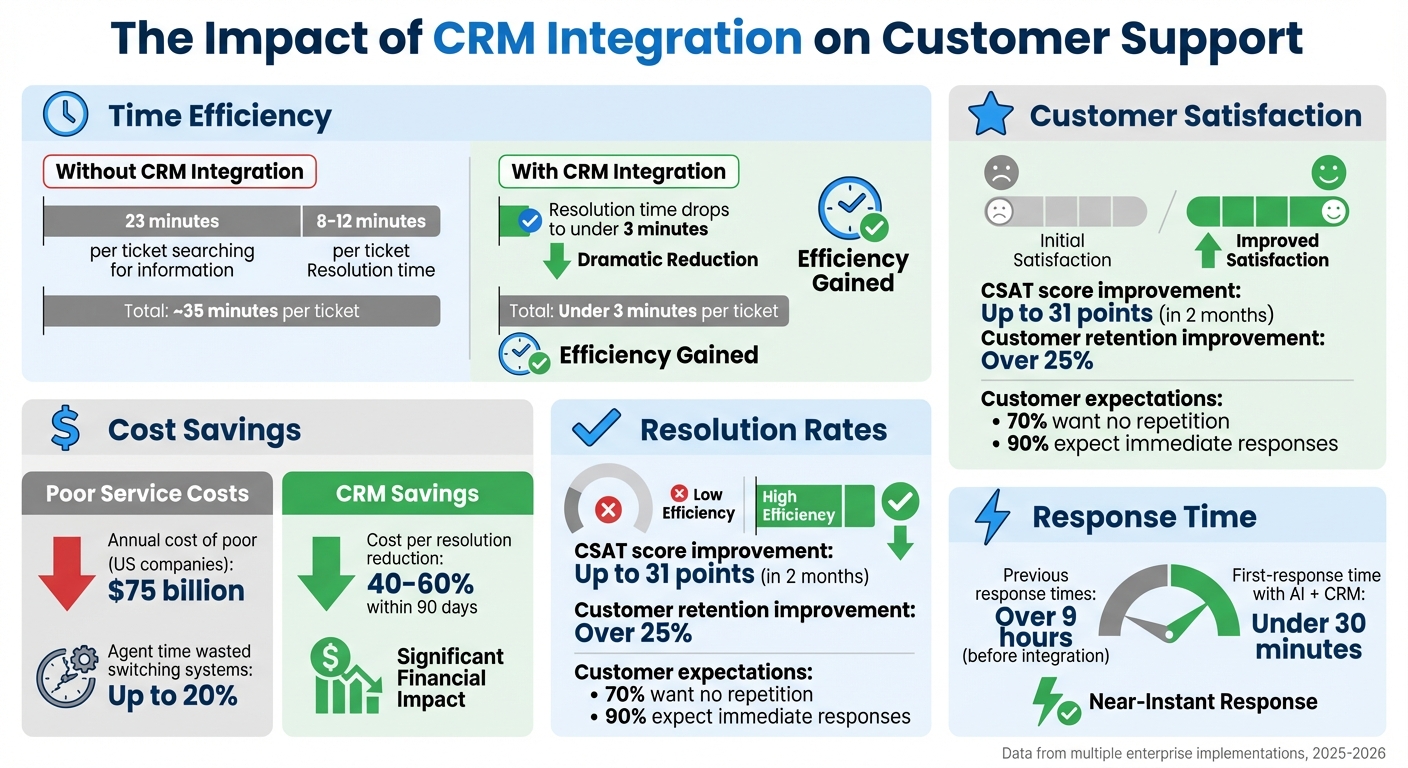
- Efficiency Gains: Agents spend up to 23 minutes per ticket searching for information. With CRM data in the ticket view, resolution times drop from 8–12 minutes to under 3 minutes.
- Cost Savings: Teams using CRM-integrated AI tools reduce costs per resolution by 40–60% within 90 days.
- Improved Outcomes: First-contact resolution rates increase from 20–30% to 55–70%, and ticket volume can decrease by up to 65%.
- Personalized Service: Access to purchase history and account details lets agents tailor responses, improving customer satisfaction scores by up to 31 points.
- Proactive Problem-Solving: CRM data helps spot customer churn risks and prioritize critical issues, especially for high-value accounts.
To achieve this, businesses need real-time CRM syncing, customized ticket views, and AI tools to surface relevant data automatically. The result? Faster resolutions, better customer experiences, and lower operational costs.
CRM Integration Impact on Support Metrics: Resolution Time, Costs, and Customer Satisfaction
How to Boost Sales Using CRM With Helpdesk Integration
sbb-itb-e60d259
Why Agents Need CRM Data in the Ticket View
Having CRM data directly in the ticket view lets agents focus on solving problems instead of wasting time searching for information. On average, agents spend 23 minutes per ticket hunting for customer details across various systems [4]. That’s nearly half an hour of inefficiency – time that could be better spent helping customers.
This inefficiency doesn’t just slow things down; it drives up costs. Without integrated CRM data, agents can lose up to 20% of their time switching between disconnected platforms [2]. On a larger scale, poor customer service is costing U.S. companies a staggering $75 billion annually [7]. These aren’t just operational hiccups – they’re direct hits to revenue and profitability.
"A ticket without context is just noise. A ticket with customer data is a conversation with a clear purpose and a defined business impact." – Resolution.de [7]
When CRM data is accessible, it transforms three key areas: resolution speed, personalized service, and escalation rates. Together, these improvements turn customer support into a strategic advantage rather than a cost burden.
Faster Case Resolution with Customer Context
Imagine this: an agent opens a ticket and immediately sees the customer’s purchase history, account tier, contract details, and past interactions. No need to ask the customer to repeat themselves. No need to toggle between systems. Everything they need is in one place.
With this streamlined process, ticket handling times drop significantly. Instead of spending 8–12 minutes on a ticket, agents can resolve issues in under 3 minutes when AI has access to CRM data [5]. First-response times can also fall below 30 minutes [2]. Key metrics like Annual Recurring Revenue (ARR), churn risk, and service level agreements (SLAs) allow agents to prioritize tasks that have the greatest business impact [7][2].
This context doesn’t just speed things up – it improves outcomes. First-contact resolution rates can rise from 20–30% to 55–70% [5]. Even if a ticket needs to be escalated, the full customer context is passed along, ensuring the next agent or developer can pick up seamlessly [9]. Customers don’t have to repeat their story, and issues get resolved faster.
Better Personalization and Customer Satisfaction
Today’s customers expect more than generic, transactional support. Over 70% of consumers want companies to collaborate internally so they don’t have to repeat their information, and 90% expect immediate responses [1]. By embedding CRM data in the ticket view, agents can address customers by name, reference past interactions, and tailor responses in real time [2].
This level of personalization delivers measurable results. Integrating AI with real-time CRM access can increase CSAT scores by as much as 31 points in two months [2]. Customer retention rates can improve by over 25% [8]. Automated access to customer details reduces friction, allowing agents to deliver highly tailored service. Beyond individual interactions, this approach also improves team collaboration and reduces the need for escalations.
Fewer Escalations and Better Team Efficiency
When Tier 1 agents don’t have access to critical details like order status or contract information, they often escalate issues unnecessarily [5]. This creates delays and drives up costs. By integrating CRM data into the ticket view, agents can resolve more issues on the spot. Currently, only 14% of customer issues are resolved through traditional self-service tools, largely because these tools lack access to backend CRM systems [5]. With CRM integration, agents can handle tasks like refunds or subscription updates without escalating.
The benefits go beyond individual tickets. Centralized CRM data helps support leaders identify recurring problems or product bugs, enabling proactive fixes that reduce overall ticket volume. AI-powered CRM tools have been shown to cut total tickets by up to 65% within eight weeks [2]. For technical teams, CRM-linked tickets provide clear, actionable information. For instance, if an Enterprise customer with $500,000 in ARR and a renewal date 30 days away is affected by a bug, engineering can prioritize the issue accordingly [7]. This focused approach minimizes back-and-forth communication and ensures resources are allocated to the most critical problems.
"Would you hire a human agent and not give them system access? The same logic applies to AI." – Hannah Owen, Lorikeet [5]
The financial impact is undeniable. Teams using AI agents with CRM access report a 40–60% reduction in cost per resolution within 90 days [5]. By combining fewer escalations, faster resolutions, and lower ticket volumes, support teams become leaner, more efficient, and better positioned to drive business success.
Key CRM Data Types Agents Need
To deliver top-notch support, agents need CRM data that’s not just informative but actionable. With the right insights at their fingertips, they can resolve issues faster and create a more tailored experience for customers. It’s the difference between a routine exchange and a meaningful conversation that addresses both immediate concerns and long-term goals.
Three key types of CRM data – account history, prior interactions, and stakeholder profiles – are essential for this level of service. These data points give agents the context they need to provide fast, personalized, and strategic support. For instance, companies that combine AI with CRM systems have reduced case resolution times from 7 hours to just 2 hours [11]. By embedding these data types directly into the ticketing system, agents can streamline their workflow and focus on what matters most: the customer.
Account History Overview
Account history offers a snapshot of a customer’s financial and operational relationship with the company. This includes details like purchase history, subscription plans, contract terms, renewal dates, and major account milestones. For example, if a customer holds a $50,000 annual contract that’s up for renewal, agents can see the urgency and handle the case with extra care [7].
But it’s not just about the basics. Behavioral data, like product usage patterns, website activity, and email engagement, helps agents anticipate customer needs. This proactive approach can prevent issues from escalating. In fact, well-organized customer data can increase revenue by 30%, and sales teams using such data close deals 23% faster [10]. Additionally, AI tools that manage CRM data can cut administrative tasks by 41%, giving agents more time to focus on customer success [10].
Prior Interactions and Case History
Having a complete record of past interactions – whether through emails, chats, calls, or tickets – ensures continuity. Customers don’t have to repeat their stories, and agents can quickly identify whether an issue is isolated or part of a larger pattern. For instance, if the same problem keeps cropping up, it might signal a systemic issue that needs escalation.
Feedback from past interactions, like low NPS scores or frustrated language in tickets, also provides valuable context. This allows agents to adjust their tone and approach, especially for accounts at risk of churn. Additionally, historical records prevent agents from repeating ineffective solutions, saving time for both parties. Interestingly, only 14% of customer issues are resolved through traditional self-service tools, often because these tools lack the necessary context to act effectively [5].
Stakeholder and Decision-Maker Profiles
Stakeholder profiles add another layer of insight by identifying the roles of key contacts, such as Decision Makers, Technical Contacts, or End Users. These profiles also include communication preferences and involvement in deals, allowing agents to tailor their approach accordingly [3].
For example, a ticket from a CFO reviewing a $50,000 contract renewal demands a different level of attention than a query from a junior team member [7][3]. Understanding these roles helps agents prioritize strategically and identify potential risks, like early signs of dissatisfaction from key stakeholders [4].
To make this data actionable, it’s crucial to integrate CRM panels directly into the ticketing interface. This eliminates the need for agents to juggle multiple systems. With professionals switching between applications over 1,100 times a day [12], embedding fields like "Customer Tier", "Renewal Date", and "Contact Role" into the ticket view ensures agents have the context they need without breaking their workflow [7][3].
How to Integrate CRM Data into Ticketing Systems
Bringing CRM data into your ticketing system creates a smooth flow of information, speeding up resolutions and improving support quality. With 91% of businesses with more than 11 employees already using a CRM [14], the question isn’t whether to integrate but how to do it effectively. This integration plays a crucial role in delivering the kind of support that can set your service apart.
The process involves three main steps: setting up real-time data connections, customizing the ticket view, and using AI to deliver the right information when it’s needed. Each step is vital. Done well, this integration can save up to 15 hours per week of manual data entry per employee [12]. Done poorly, it can lead to messy systems and outdated information. Start by ensuring reliable, real-time connections between your CRM and ticketing systems.
Real-Time Data Syncing with CRM Platforms
Real-time syncing relies on secure connections between your CRM and ticketing system. The best way to achieve this is through APIs, webhooks, or pre-built connectors [14][15]. APIs act as a bridge, enabling instant communication between systems whenever data updates.
Here’s how to set it up:
- Define your data mapping: Align fields like customer names, account IDs, and email addresses to avoid duplication or data loss [14].
- Set automation rules: Use event-based triggers (e.g., when a new lead is created) for immediate updates, or scheduled syncs for reporting data [14].
- Enable bidirectional syncing: Ensure updates flow both ways. For instance, if an agent updates a phone number in the ticketing system, it should reflect in the CRM automatically [14][3].
"Integrating your AI-powered helpdesk deeply with Salesforce isn’t just a technical task; it’s a strategic necessity. It’s about breaking down silos, empowering agents, and supercharging your AI capabilities." – Eric Klimuk, Founder and CTO, Supportbench [3]
Modern platforms are adopting API-first architectures to simplify these integrations [13]. For example, in August 2025, Shamrock Rovers football club partnered with Future Ticketing to implement an API-first, cloud-based platform. This allowed them to connect ticketing with their CRM, retail, and access systems, scaling operations for major events while improving real-time decision-making based on fan data [13].
For teams managing multiple systems, tools like MuleSoft or Workato (known as Integration Platform as a Service, or iPaaS) can handle complex integrations [15][3]. These tools are especially helpful when connecting several systems or applying advanced logic. However, always opt for native connectors first, as they are easier to maintain and optimized for specific platforms [3].
Customizing Ticket Views for Relevant Data
Once the data is synced, the next step is deciding what information agents need to see. Too much data can overwhelm them, while too little leaves them unprepared. The solution is to map key custom fields into the ticket view – details like customer tier, renewal dates, infrastructure specs, or recent account activity [3].
Role-based access controls play a big part here. Not every agent needs access to all data, and sensitive details (like financial information) should be restricted to specific roles [12]. For instance, a Tier 1 agent handling simple password resets doesn’t need to see the CFO’s involvement in a high-value contract, but an account manager addressing a renewal issue does.
To streamline the process:
- Audit your systems to identify manual data transfers and determine which fields need syncing.
- Prevent unnecessary data clutter by only syncing actionable information.
- Test everything in a sandbox environment to ensure field mappings and data transformations work as intended [12].
This setup eliminates the need for agents to constantly switch between tabs. They can access purchase history, prior interactions, and key stakeholder roles all within the ticket view. With this streamlined approach, AI tools can further enhance support by pulling in and contextualizing CRM data automatically.
Using AI for Data Retrieval and Contextual Suggestions
AI takes CRM integration to the next level by actively assisting agents. Instead of manually searching through account histories, AI tools can analyze the data and highlight what’s most relevant – like identifying a high-value customer or recommending a helpful knowledge base article. This reduces agent workload and speeds up resolutions.
Advanced AI systems use direct API integrations to both read and write CRM data [5]. This means AI can handle tasks like updating contact information, processing refunds, or modifying subscription tiers during a conversation. For example, in February 2026, Arbor, an energy company operating across 13 states, connected Lorikeet’s AI agent to their CRM and knowledge base. Within a week, the AI was operational, handling state-specific content and automating actions based on regional policies [5].
The shift from "deflection" to "resolution" is key. AI agents with CRM write access achieve first-contact resolution rates of 55-70%, compared to just 20-30% with traditional tools [5]. Average handle times drop significantly – from 8-12 minutes to under 3 minutes [5].
"AI support agents that query and update CRM data need direct API integrations into your operational systems – not just knowledge base access – to actually resolve customer issues." – Hannah Owen, Lorikeet [5]
AI also enables proactive support. In 2025, a Shopify merchant integrated AgentiveAIQ’s AI-driven support with real-time CRM access. Previously, 42% of their tickets required manual lookups across three systems, with response times exceeding 9 hours. After implementing the AI tool, first-response times dropped to under 30 minutes, and ticket volume decreased by 65% within eight weeks [2].
To make this work, ensure your AI tools support Model Context Protocol (MCP) and webhooks to inject live CRM data into AI prompts [2]. Choose platforms with no-code configuration options to map CRM fields like customer ID and purchase date without needing custom development [2]. For industries with strict regulations, set up clear audit trails to ensure all AI-driven actions follow established guidelines [5].
Common Challenges and Solutions for CRM-Ticketing Integration
Bringing CRM data into ticketing systems is no walk in the park. In fact, poor data quality is a major factor in 60% of failed CRM projects [2]. But here’s the good news: most of these hurdles can be tackled without breaking the bank or overhauling your tech stack. While the benefits of integration are clear, the process comes with its own set of challenges that demand precise solutions.
The biggest obstacles? Data silos that trap information in separate systems, information overload that leaves agents drowning in irrelevant details, and scaling costs that make growth seem out of reach. Each of these issues has its own fix, but they all share a common theme: smart design and automation. Let’s break it down.
Fixing Data Silos and Sync Delays
Customer data often gets stuck in disconnected tools like Salesforce or Stripe, forcing agents to juggle multiple tabs just to get the full picture. This "swivel chair" problem wastes up to 20% of agents’ time searching for scattered customer data [2]. And even so-called "real-time" integrations often come with 15-minute delays, leaving agents working with outdated info [6].
The solution? Bidirectional sync. Data updates should flow both ways so that everyone – whether in sales, support, or engineering – has access to the same accurate information [6]. For example, if an agent updates a phone number in the ticketing system, it should instantly reflect in the CRM, and vice versa.
Another common issue is inconsistent field naming across systems. One platform might use "High/Medium/Low" for priorities, while another opts for "Blocker/Critical/Major" [6]. To fix this, use normalization layers that translate different naming conventions into standardized terms like "ACTIVE" or "CLOSED." This simplifies automation and prevents confusion [17].
"The difference between data copying and context unification is control. Copying moves everything indiscriminately. Unification provides the precision to build exactly the context view your AI agents need." – Richie Aharonian, Head of Customer Experience & Revenue Operations, Unito [6]
Additionally, define field-level mappings for critical data points like account health scores or renewal dates. This ensures agents only see what they need, reducing clutter. Whenever possible, prioritize native connectors for better performance and lower maintenance [3].
Once you’ve tackled silos, the next challenge is managing the sheer volume of data.
Preventing Information Overload for Agents
Syncing every piece of CRM data into your ticketing system might sound like a good idea – until agents are overwhelmed with irrelevant details. The key is balance: provide enough context for agents to resolve issues quickly, but not so much that it becomes unmanageable.
One way to handle this is through role-based access control (RBAC). RBAC ensures that agents only see the data they need for their specific role. For instance, a Tier 1 agent handling password resets doesn’t need access to contract negotiation details meant for account managers [3].
Regular context audits can also help. Start by identifying which data is "critical" (like subscription status) and which is just "noise" (like internal sales rep details) [6][3]. Sync only the most essential fields – like Account Name, Tier, and Open Opportunities – and add more as necessary. Use conditional logic to tailor data visibility based on factors like account tier or ticket type. For example, enterprise tickets might display detailed technical specs, while standard tickets stick to basic account info [6].
Here’s a quick overview of strategies to manage information overload:
| Strategy | Implementation Method | Benefit |
|---|---|---|
| Context Audit | Review and categorize fields as "Critical" or "Irrelevant" | Reduces clutter and sharpens focus |
| Field-Level Sync | Map specific CRM fields to ticketing fields | Avoids dumping unnecessary data into tickets |
| AI Triage | Use AI to surface relevant CRM data for each ticket | Saves agents from manual searches |
| RBAC | Limit data visibility based on agent roles | Enhances security and reduces distractions for junior agents |
Some platforms use a "pass-through" model, where CRM data is displayed in the ticket view but not stored in the ticketing system. This approach keeps data clean and secure while still giving agents real-time context [17].
Scaling CRM Integration Cost-Effectively
Scaling your integration doesn’t have to drain your budget. With 91% of companies with 10 or more employees already using a CRM system [16], the infrastructure is likely in place – it’s just about connecting it efficiently.
For most businesses, native connectors are the easiest and most cost-effective option. These integrations are often free or included in your subscription and work out of the box with minimal setup [16][3]. If your needs are more complex, middleware platforms (like iPaaS) offer customizable workflows for $20–$500 per month [16]. Custom APIs, while powerful, should be reserved for unique enterprise requirements due to their high upfront and maintenance costs.
Here’s a quick comparison of integration methods:
| Integration Method | Cost | Complexity | Best For |
|---|---|---|---|
| Native Connectors | Low (often free) | Low | Standard workflows and popular platforms |
| Middleware (iPaaS) | Moderate ($20-$500/mo) | Moderate | Custom workflows across multiple apps |
| Custom API | High ($1,000s+) | High | Complex, enterprise-level needs |
AI-powered automation can also help cut costs. Teams using AI agents capable of taking action (not just deflecting tickets) report 40–60% reductions in cost per resolution within 90 days [5]. These agents can query and update CRM records via APIs, handling tasks like issuing refunds or updating account details without human intervention. For higher-risk actions, use dynamic gating to route decisions to a human [5].
To ensure your integration delivers value, set clear goals upfront. For example, aim to "reduce first-response time by 25%" or "increase VIP customer retention by 15%." This keeps your efforts focused on measurable outcomes rather than just technical features [16].
Conclusion
Having direct access to CRM data within the ticket view is a game-changer for modern B2B support teams. When agents can instantly view account history, subscription details, and past interactions – without the hassle of switching tabs – they save valuable time. This efficiency leads to quicker resolutions and the kind of personalized service that keeps customers coming back.
On the financial side, integrating CRM data can translate into major cost savings. Teams using AI agents with CRM access report 40–60% reductions in cost per resolution within just 90 days [5]. Additionally, first-contact resolution rates soar from 20–30% to 55–70% when agents – whether human or AI – can take action directly within the CRM [5]. For B2B support teams, where losing a single enterprise account can be costly, this level of efficiency and context is absolutely critical.
"The gap between tools that read your CRM and tools that write to it is the difference between deflection and actual problem-solving." – Hannah Owen, Lorikeet [5]
These results highlight the operational improvements that come with thoughtful CRM integration. To make it work, focus on a few key steps: implement bidirectional sync to ensure seamless data flow, choose native connectors to scale without breaking the bank, and use AI to bring up the most relevant details for each ticket. Instead of overwhelming agents with every CRM field, provide only the essential information they need to resolve issues effectively and strengthen customer relationships.
FAQs
What CRM fields should show on every ticket?
When it comes to managing support tickets, there are a few key CRM fields that should always be visible: account history, recent transactions, prior interactions, stakeholder profiles, and current status or entitlements. These details are crucial because they give agents the context they need to work efficiently.
With these fields at their fingertips, agents can quickly confirm the customer’s identity, revisit past conversations, and get a clear picture of their journey. This setup not only speeds up resolution times but also minimizes the need for escalations and helps deliver a more tailored and effective support experience.
How do you keep CRM data real-time in tickets?
To maintain real-time CRM data in support tickets, consider using AI-driven platforms that seamlessly connect with your CRM and support systems through APIs. This setup enables automatic, two-way data syncing, giving agents instant access to updated account histories, past interactions, and detailed stakeholder profiles.
Additionally, AI tools can extract and update CRM records directly from sources like emails and meetings. This minimizes the need for manual data entry, ensuring agents always have the most current information at their fingertips during customer support interactions.
How do you prevent agents from seeing too much data?
To keep agents from accessing data they don’t need, implement role-based permissions and access controls. These tools make sure agents can only view information that’s relevant to their specific role, while sensitive or unrelated data stays out of reach. This not only safeguards privacy but also helps cut down on unnecessary distractions.






