


Managing support for enterprise customers can be overwhelming without a clear system in place. Parent/child account hierarchies offer a structured way to organize corporate relationships, linking parent companies with subsidiaries and divisions. This setup helps support teams see the big picture, reduce errors, and handle issues more effectively.
Key takeaways:
- Parent/child structures map corporate entities, connecting tickets and data across subsidiaries.
- Companies with well-mapped hierarchies report 35% higher account penetration and 28% better expansion revenue.
- Common challenges include fragmented visibility, unclear ownership, and escalations that lack coordination.
- AI-driven tools simplify mapping, automate updates, and ensure data accuracy, especially during mergers or restructuring. Implementing a modern support CRM further centralizes this data for better visibility.
How to Map Parent/Child Accounts: Step-by-Step
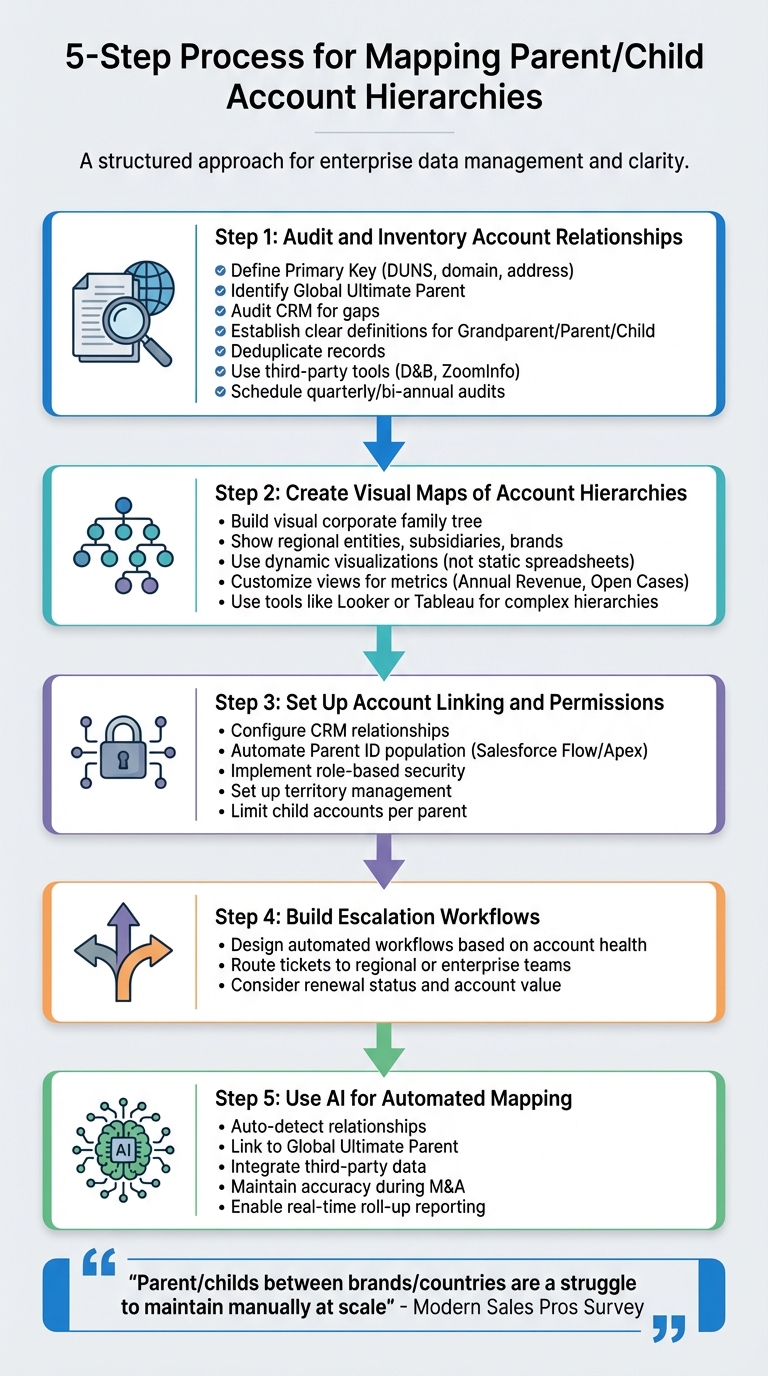
5-Step Process for Mapping Parent/Child Account Hierarchies
Creating a functional parent/child account hierarchy requires careful planning. Rushing through it can lead to fragmented records and operational headaches. Here’s a step-by-step guide to ensure your account relationships are mapped effectively.
Step 1: Audit and Inventory Account Relationships
Start by defining how you’ll identify and link accounts. Choose a consistent "Primary Key", such as a DUNS number, website domain, primary address, or product line [4]. Identify the Global Ultimate Parent, the top-level legal entity overseeing all subsidiaries [2]. Then, audit your CRM data to find any gaps where missing parent accounts could break the hierarchy [6].
Establish clear definitions for "Grandparent", "Parent", and "Child" accounts [4]. Map contacts and open opportunities within these tiers to ensure proper attribution. Use fields like "Account Site" to distinguish headquarters from regional branches [7].
Before linking accounts, clean up your data. Deduplicate records and use third-party tools like Dun & Bradstreet or ZoomInfo to identify related accounts missing from your CRM [5][6]. Regularly audit your data – quarterly or bi-annually – to capture changes from mergers, acquisitions, or restructuring [3]. As one professional from the Modern Sales Pros Survey put it:
"Parent/childs between brands/countries are a struggle to maintain manually at scale" [5].
Once your data is cleaned and relationships are audited, create a visual representation to spot hidden patterns.
Step 2: Create Visual Maps of Account Hierarchies
Visual mapping provides a clear view of your corporate family tree, showing how regional entities, subsidiaries, and brands connect to the global parent [2][5]. This clarity helps avoid ownership disputes and ensures support cases and opportunities are assigned to the right accounts [3][5].
Static spreadsheets and org charts can quickly become outdated. Modern tools offer dynamic visualizations that update automatically as relationships evolve. These platforms unify data across your organization, showing account health, open cases, and support history in one place. Customize views to highlight metrics like "Annual Revenue" or "Open Cases", making it easy to identify data gaps [7][6].
For complex global organizations, tools like Looker or Tableau can help manage multi-layered hierarchies effectively [8].
Step 3: Set Up Account Linking and Permissions
With your hierarchy mapped, configure account relationships in your CRM or support platform. Use automation tools like Salesforce Flow or Apex to populate the "Parent ID" field based on your chosen identifiers [6].
Ensure role-based security is in place. For example, enterprise managers should have visibility into child accounts handled by mid-market teams, while lower-tier users should be restricted from accessing sensitive parent data [3]. Implement territory management to reassign account ownership automatically when subsidiaries change market segments or are acquired [3]. To avoid performance issues, limit the number of child accounts assigned to a single parent [3].
Once permissions are set, establish escalation workflows to streamline support processes.
Step 4: Build Escalation Workflows
Design automated escalation workflows based on account health, renewal status, and value. These workflows should guide support agents on whether to route tickets to regional teams managing subsidiaries or escalate them to enterprise teams handling global accounts.
Step 5: Use AI for Automated Mapping
AI tools can simplify hierarchy mapping by automatically detecting relationships and tagging accounts [5][6]. These systems use unique identifiers to link accounts to the Global Ultimate Parent, ensuring all entities in a family tree remain connected – even if some parent accounts are missing from your CRM [6].
AI-driven mapping integrates third-party data to assign the correct Parent ID, reducing errors and maintaining accuracy during mergers, acquisitions, or rebranding [5][6]. These tools also prioritize escalations based on account health or renewal status and reveal opportunities for cross-sell and up-sell within complex hierarchies [5][6]. Additionally, real-time roll-up reporting across all accounts provides instant visibility into the entire corporate structure [5].
Here’s a comparison of manual versus AI-driven mapping to highlight the benefits of automation:
| Feature | Manual/Native Mapping | AI-Driven/Automated Mapping |
|---|---|---|
| Speed | Time-consuming "click and connect" [5] | Instant, automated linking [6] |
| Data Integrity | Prone to human error [6] | Improved accuracy with unique IDs [6] |
| Completeness | Links only existing CRM accounts [5] | Adds missing accounts from external data [6] |
| Maintenance | Difficult during mergers [6] | Automatically updates relationships [6] |
| Reporting | Limited roll-up capabilities [6] | Real-time, comprehensive reporting [5] |
Before automating, ensure your data is clean. Merge duplicate accounts and enhance your CRM with external data sources to fill in any gaps [5][6]. This will help keep your hierarchies accurate and complete.
sbb-itb-e60d259
AI-Native Tools for Managing Parent/Child Accounts in Supportbench
Supportbench is purpose-built for B2B organizations that need to manage intricate account hierarchies. Unlike platforms geared toward high-volume B2C support, it tackles the unique challenges of parent/child structures, such as long-term cases, multiple stakeholders, and renewal-focused relationships.
The platform brings together tickets, interactions, service levels, and account histories into a 360-degree customer profile. This unified approach means no more bouncing between tools or spreadsheets to understand how subsidiaries, regional offices, and parent accounts are connected. With everything in one place, support teams can easily track escalations across the entire corporate structure.
Dynamic SLAs adjust automatically based on customer tier, contract type, or specific account details. For example, if a high-value parent account is nearing renewal, the system can tighten response times across all associated child accounts. This ensures critical issues are addressed swiftly during key periods, reducing the risk of overlooked problems.
AI tools streamline account management tasks. The Customer Success AI Co-Pilot allows managers to ask natural language questions like, "Which child accounts have the highest escalation rates?" and get precise, data-backed answers without digging through hundreds of tickets. AI-powered health scoring identifies early signs of churn by analyzing sentiment, response times, and case volume across the hierarchy. Tools like auto-tagging and sentiment analysis reveal hidden patterns, such as growing dissatisfaction within a subsidiary, before it escalates to the parent level.
Role-based security ensures sensitive data remains protected. Enterprise managers can view child accounts handled by regional teams, while lower-tier users are restricted from accessing critical parent account data. Additionally, native integration with Salesforce ensures account hierarchies stay synchronized in real time.
Supportbench combines these AI capabilities with a suite of features designed specifically for managing complex parent/child account structures.
Key Features for Parent/Child Account Management
Supportbench’s multi-level company relationships feature links firms through parent-child connections, enabling hierarchy-based workflows and easier reporting. Instead of isolating subsidiaries as separate accounts, the platform aggregates data across the entire corporate structure for a clearer picture.
The Customer 360-Degree View centralizes all interactions, service levels, and account histories into a single profile. This eliminates the need to toggle between CRM systems, email threads, and spreadsheets, helping agents respond faster and more accurately.
AI-driven insights revolutionize how support teams work with account data. With GenAI capabilities, Customer Success Managers can query account information in plain language, bypassing the need for keyword-heavy searches or manual data gathering.
Automated account mapping and maintenance remove the hassle of keeping hierarchies up to date. AI handles ticket prioritization, keyword auto-tagging, and sentiment analysis across accounts. When mergers or acquisitions alter the corporate structure, the system updates relationships automatically, ensuring reports remain accurate.
SLA alerts proactively notify managers before deadlines are missed, safeguarding high-stakes contracts. For instance, if a child account’s ticket nears its SLA deadline and the parent account is flagged as high-value, the system escalates it to the right team without delay.
Eilis Byrnes, Customer Service Manager at Wolseley, shared:
"Our agents can now effortlessly manage thousands of emails daily, thanks to the platform’s ease of use and accuracy." [11]
Supportbench is trusted by over 9,000 businesses worldwide, tracking more than 35 metrics via KPI scorecards, including first response resolution and escalation rates [9][10]. The platform scales to meet the needs of organizations of all sizes, from small teams to enterprises managing 5,000+ agents.
Manual vs. AI-Driven Account Mapping
Maintaining account hierarchies manually involves constant auditing, tedious data entry, and frequent reviews to catch outdated relationships. As companies grow and subsidiaries evolve through mergers or restructuring, manual methods often fall short. Here’s a comparison of manual and AI-driven account mapping with Supportbench:
| Feature | Manual Account Mapping | AI-Driven Account Mapping (Supportbench) |
|---|---|---|
| Speed | Slow; requires manual auditing of CRM data. | Fast; AI auto-summarizes history and updates relationships. |
| Accuracy | Prone to human error and outdated records. | High; real-time syncing and sentiment analysis ensure precision. |
| Scalability | Limited; struggles with growing complexity. | High; auto-prioritization and routing handle volume effortlessly. |
| Searchability | Keyword-based; requires specific terms. | Natural language; AI delivers precise answers from past cases. |
| Reporting | Manual aggregation of data. | Automated; AI generates reports based on natural language queries. |
| Cost Efficiency | Labor-intensive and costly. | Saves time and reduces costs through automation. |
Supportbench’s pricing starts at $32 per agent per month (billed annually) under the Professional Plan, which includes Intelligent Support AI, customer health scoring, and KPI scorecards. The Enterprise Plan, priced at $100 per agent per month (billed annually), adds advanced permissions, unlimited custom roles, and a dedicated success manager [10].
These AI-powered features provide a strong foundation for managing complex account hierarchies effectively and efficiently.
Common Pitfalls and Best Practices
Even with the best tools, mapping parent/child account structures can fail if not managed carefully. One major issue is data accuracy – while 7 in 10 leaders believe their data is accurate, only 2 in 10 adopters and developers feel the same confidence [5]. To address these challenges, here are some practical approaches.
Avoiding Incomplete Data Mapping
Incomplete data mapping can create major blind spots, disrupting your support operations. If subsidiaries exist in your system without proper parent links, you lose visibility into the full corporate structure. This can lead to fragmented reporting, missed escalations, and incorrect health scores.
One major culprit? Manual linking. Rusty Jensen, Head of Global ISR Sales at Conga, explains:
"Relying on your sales organization to actually accurately create a hierarchy of accounts and maintain that data is a very unreasonable and very time-consuming request that will never materialize to what you want." [12][1]
To avoid this, standardize account names and types before building hierarchies. For instance, "Acme Corp" and "Acme Corporation" might refer to the same entity, but inconsistent naming disrupts automated linking [13]. Merge duplicates, implement naming conventions, and use third-party data sources like D&B or ZoomInfo to validate relationships outside your system [5][6].
Keep hierarchies manageable by limiting depth to 2–3 levels for most organizations [13]. Overly complex structures slow down reporting and create administrative headaches. Perform quarterly or bi-annual audits to account for mergers, acquisitions, or strategic changes [3]. Set up automated alerts to flag accounts missing parent/child links or those with excessive hierarchy depth.
Ensuring Role-Based Security and Data Isolation
Data accuracy is just one piece of the puzzle – security is equally critical. Mismanaging parent/child structures can expose sensitive data to the wrong users. For instance, enterprise-level managers need visibility into child accounts handled by regional teams, but lower-tier reps should not access sensitive parent account details [3]. Aligning roles properly prevents data leaks and balances workloads.
Data skew happens when a parent account links to too many child accounts, which can slow performance and reporting [3]. Similarly, ownership skew – where one rep manages too many child accounts – can lead to missed opportunities and burnout [3]. Distribute record ownership thoughtfully to avoid these pitfalls.
Start with Organization-Wide Defaults (OWDs) set to Private [14]. This baseline restricts default access to core objects like Accounts and Cases. Then, use role hierarchy alignment to grant access based on data needs, not just the HR org chart [3][16]. Apply the Principle of Least Privilege (PoLP) by starting with zero access and granting only the permissions each role truly requires [14][15].
Review access rights every 18–24 months, with quarterly checks for high-privilege users, to reduce the risk of permission drift [14][15]. Use dynamic actions to hide tools like the "Account Hierarchy" view from users who don’t need them [7].
Monitoring and Improving Over Time
Account hierarchies aren’t static – they require ongoing attention. Corporate structures change constantly due to mergers, acquisitions, and reorganizations. Without regular monitoring, even well-mapped hierarchies can become outdated and unreliable.
Leverage AI-driven insights to monitor domain names and firmographic changes, flagging when new subsidiaries should be linked to a parent account [12]. Automated tools can track field changes and restructure hierarchies in real time, preventing broken links [12].
Before rolling out changes globally, pilot updates with a small group or region to catch potential issues [13]. Monitor metrics like escalation rates, response times, and health scores to identify trends early.
Conclusion
Setting up parent/child account structures is a cornerstone of effective B2B support. When done correctly, it provides your team with a clear view of complex corporate hierarchies, prevents important issues from being overlooked, and ensures high-value accounts get the attention they deserve. The contrast between traditional manual methods and AI-driven solutions is striking: while only 2 in 10 people trust traditional CRMs to accurately link parent-child data [5], AI-powered platforms remove the guesswork by automating hierarchy updates in real time.
This kind of mapping improves resolution times, reduces stress for support agents, and builds stronger customer trust. Automated mapping also handles the challenges of mergers, acquisitions, and reorganizations without burdening sales and support teams with repetitive administrative tasks. As Cameron Barnes, Senior Manager of Marketing Operations at Cisco, explains:
"A lot less of our team’s bandwidth is focused on maintaining and double-checking the quality of our assignment routing. We are very confident in the assignments that we have in place" [12].
The strategies outlined here highlight how structured mapping not only clarifies account relationships but also simplifies escalation workflows, setting the stage for efficient and scalable support systems.
Supportbench is designed to tackle these complexities head-on. With features like multi-level escalation paths, context-aware prioritization, and automated roll-up reporting and prioritization across account hierarchies, it simplifies enterprise relationship management. Its AI capabilities ensure cases are routed to the right expert without requiring manual input.
To build on these strategies, start by auditing your data. Standardize naming conventions, automate account linking, and integrate AI to monitor changes, flag inconsistencies, and maintain accuracy as your customer base grows. The result? A support operation that scales seamlessly, safeguards key relationships, and delivers measurable ROI through lower overhead costs and higher customer satisfaction.
FAQs
What’s the best primary key for linking parent and child accounts?
When it comes to linking parent and child accounts, the ideal primary key is a unique identifier that clearly defines relationships within the account hierarchy. Some commonly used options include:
- Website: A company’s domain can serve as a straightforward way to establish connections.
- DUNS Number: This globally recognized identifier helps track businesses and their relationships.
- Primary Address: Using the main address ensures alignment and consistency across accounts.
These identifiers play a crucial role in maintaining accurate relationships and simplifying account management, especially in more intricate structures.
How deep should an account hierarchy be?
The structure of an account hierarchy should align with the organization’s complexity and specific needs. Keeping hierarchies straightforward helps maintain clarity and simplifies management. For larger businesses, it might be necessary to have multiple levels, such as parent, subsidiary, division, and department. It’s important to establish clear guidelines for these relationships and strike a balance between depth and usability. This approach prevents the hierarchy from becoming overly complicated while still supporting the company’s operational objectives effectively.
How do you keep hierarchies accurate after mergers or restructures?
To keep hierarchies accurate after mergers or restructures, it’s important to regularly review and update account data to reflect any organizational changes. Leveraging tools like automation or AI can help spot discrepancies and simplify the updating process. Once updates are made, validate and test the hierarchy to confirm everything is correct. Additionally, set up clear procedures for making updates and document all changes to ensure long-term accuracy and efficient account management.






