



"Free" tools like email, spreadsheets, and Slack might seem like cost-effective solutions for B2B support teams, but they come with hidden expenses that can drain time, money, and efficiency as your business grows.
Key Takeaways:
- Email: Leads to wasted time with manual processes, missed escalations, and lacks reporting tools.
- Spreadsheets: Create data silos, are error-prone, and don’t scale for growing teams.
- Slack: Lacks proper case management, has compliance risks, and disrupts productivity.
The Real Cost:
- Agents lose hours switching between tools, duplicating work, and searching for information.
- Inefficiencies increase ticket resolution costs and frustrate high-value customers.
- Free tools lack automation, analytics, and scalability, which are critical for B2B support ticketing.
Bottom Line: Investing in an AI-native support platform can save time, reduce errors, and improve customer satisfaction. While free tools seem economical upfront, their hidden costs far outweigh the price of a dedicated solution.
The Hidden Costs of Using Email for Support
Email might seem like the obvious choice for customer support – it’s already part of your daily routine, and your team knows it well. But when you use a shared inbox to handle B2B support cases, inefficiencies pile up fast. The manual work and constant juggling can drain your team’s time and energy.
Manual Work and Constant Context Switching
Handling support through email forces your team into repetitive, time-consuming tasks that could – and should – be automated. Agents spend hours manually labeling emails, forwarding threads, and copying information between Gmail, CRMs, and Slack. This constant back-and-forth between tools disrupts focus and slows down resolutions.
Here’s the kicker: knowledge workers spend 28% of their workday managing email [4]. And every time an agent stops what they’re doing to check their inbox, it takes an average of 23 minutes to fully refocus [4]. Even worse, 40% of their attention lingers on the previous task – a phenomenon called "attention residue." For complex B2B cases, this lack of deep focus directly impacts response times and overall productivity.
Duplicate Responses and Missed Escalations
Shared inboxes create confusion over who’s handling what. Without a clear system to assign ownership, multiple agents can respond to the same customer email at the same time. This wastes resources and risks confusing the customer with conflicting answers [1] [3]. On the flip side, urgent issues might go unresolved because everyone assumes someone else is taking care of it.
"Relying on email support via a single email box often leads to agents colliding with each other and redoing work that has already been done." – ITBE Staff [3]
The problem gets worse when customers don’t provide enough details in their first email. 40% of initial support emails lack critical information [3], forcing agents into endless back-and-forths just to gather basics like account numbers or software versions. For teams relying solely on email, 70% report this back-and-forth as a major challenge [3], and 65% of service desk managers say it’s difficult to assign tasks efficiently [3]. These coordination issues not only drive up costs but also frustrate your most valuable customers.
No Built-In Reporting or Analytics
Email doesn’t give you the tools to measure or improve your team’s performance. Without built-in reporting, tracking response times, resolution rates, or bottlenecks becomes a manual – and often inaccurate – process. In fact, 60% of support teams using email lack the ability to report on their performance [3].
"Email is a great tool for simple communication. However, it does not offer a way to track and report on activities and performance. Teams are not able to identify trends or areas that need improvement." – ITBE Staff [3]
Without clear data, it’s hard to make informed decisions. You can’t confidently justify hiring more staff, predict future support needs, or connect your support efforts to customer retention. Instead, decisions are based on guesswork, which is risky when enterprise clients expect reliable, top-tier service. These inefficiencies show that relying on email for support isn’t as “free” as it seems – it comes with hidden costs that can hurt your team and your bottom line.
sbb-itb-e60d259
The Hidden Costs of Using Spreadsheets for Case Tracking
At first glance, spreadsheets seem like a simple solution for managing customer cases. They’re easy to use, familiar, and already installed on most computers. But for B2B support teams using a specialized B2B helpdesk to handle tickets, escalations, and customer data, spreadsheets can quickly turn into a costly liability. What starts as a "free" tool often ends up draining productivity and resources in ways that are hard to ignore.
Data Silos and Version Control Problems
Spreadsheets scatter support data across multiple files, creating isolated data silos. One agent might track cases in their own document, another might maintain a separate file for escalations, and yet another might use a different sheet for customer contacts. This fragmented approach leads to chaos when it comes to version control.
Ever seen file names like "Final", "Final_v2", or "ACTUAL_Final"? Teams often waste hours digging through these "spreadsheet archaeology" projects to figure out which version is correct. This not only wastes time but also creates "data graveyards" where outdated information is stored but never used. The result? Real-time visibility into the support queue becomes nearly impossible, leaving teams in the dark when it matters most [7].
"Spreadsheets are error factories." – Sheppard Digital [5]
The consequences of these issues can be severe. For instance, in July 2025, a district council’s planning department struggled to manage application tracking across multiple spreadsheets. Missed deadlines were common until they switched to an online case management system costing $520 per month. The result? A 40% improvement in application processing times, with the system paying for itself in just six weeks [5]. Similarly, a housing association managing maintenance requests across separate spreadsheets faced duplicate work orders and inefficiencies. After adopting a $195-per-month workflow system, they reduced maintenance costs by 15% and increased tenant satisfaction by 25% [5].
These examples highlight how spreadsheet-based workflows not only waste time but also lead to costly mistakes.
Manual Updates Lead to Errors
Manual data entry is another major pitfall of using spreadsheets. Studies reveal that 88% of spreadsheets contain errors [5], and only about half of these mistakes are caught during manual reviews [8]. These aren’t just harmless typos – misplaced decimals, duplicated records, or outdated contact details can lead to serious problems like double-billing, missed SLA deadlines, or customers receiving conflicting information.
For B2B support teams, these errors can have ripple effects. Complex enterprise accounts often have strict service level agreements, and even one data entry mistake can result in missed escalations, inaccurate billing, or compliance violations. In fact, 45% of professionals report manual updates as their biggest challenge with spreadsheets, while 31% cite undetected errors as a key drawback [8].
Take the example of a medium-sized charity that spent an entire day each month reconciling donor data across three spreadsheets. With two staff members dedicated to this manual process, it drained valuable time. After switching to a donor management system for $104 per month, they automated the process and freed up their team to focus on grant applications. The result? An additional $19,500 in funding secured during the first year [5].
Spreadsheets Don’t Scale with Your Team
As your team grows and case volumes increase, spreadsheets simply can’t keep up. A system that works for five agents handling 50 cases a month becomes unmanageable when you’re dealing with 500 cases across multiple time zones. Instead of helping, spreadsheets create more work. Agents spend more time syncing data, chasing updates, and copying information between sheets than actually solving customer problems [6].
This is often called the "translation layer" problem [6]. For example, agents might need to manually convert a customer’s "Urgency" into an engineering team’s "Priority" level. These inefficiencies add up quickly. In a 10-person team, losing just 30 minutes per day to spreadsheet issues translates to 1,250 hours of lost productivity annually. At an average salary of $45,500, that’s about $28,438 wasted every year [5].
"If your organization is still running on multiple spreadsheets because ‘proper software costs too much,’ you’re not saving money – you’re hemorrhaging it in ways that don’t appear on any balance sheet." – Sheppard Digital [5]
The impact goes beyond numbers. Skilled agents end up doing repetitive, administrative tasks instead of focusing on strategic work. This not only lowers job satisfaction but also makes it harder to attract and retain talent. As one consultant puts it, working in this kind of environment is like being stuck in an "administrative dark age" [5].
These hidden costs make it clear: spreadsheets may seem like an easy choice, but they ultimately hurt your team’s efficiency and inflate operational expenses.
The Hidden Costs of Using Slack for Support
Slack is a great tool for internal communication, but when it comes to managing complex support cases, it falls short. Issues like accountability, compliance, and case management become major hurdles. What starts as an appealing "free" or low-cost option can quickly turn into a costly operational headache.
Lost Context and Message History Limits
Slack’s threaded conversations often make it hard to find key details in support cases. On the Free plan, things get worse – messages and files disappear after 90 days, making them unsearchable[9][10]. For teams handling long-term enterprise accounts, this lack of accessible history forces them to rely on external documentation to keep track of important context[11].
Another issue? Slack’s constant interruptions. Research shows that Slack can disrupt team members 8–12 times a day, with each interruption costing up to 23 minutes of focus[4]. For support agents juggling multiple cases, these interruptions lead to a noticeable drop in productivity.
Integration Problems and Compliance Risks
Slack’s integrations often fall short in providing the unified view needed for seamless case management. This forces agents to duplicate efforts across multiple tools just to piece together a complete case history.
Compliance risks add another layer of complexity. Sensitive customer data shared in Slack threads can scatter across various channels, leaving no clear audit trail. This "information fragmentation" can make compliance reviews or legal audits a nightmare[4]. Agents then have to manually decide which conversations need formal documentation, creating additional work and increasing the risk of regulatory violations. For industries with strict compliance requirements, this can lead to serious consequences.
These challenges also make retrieving past conversations unnecessarily difficult.
Difficult to Search Past Conversations
Slack’s search functionality doesn’t make things any easier. Its chronological chat format mixes critical decisions with casual conversations, creating what some call a "fragmented archive"[12]. This makes it incredibly time-consuming to find important details.
Studies show that knowledge workers spend about 30% of their time searching for information[12]. If even 20% of that time involves digging through Slack’s fragmented logs, it can add up to about 120 hours per person each year. For a 10-person support team, that’s a staggering loss of productivity – and a significant increase in labor costs.
To work around these limitations, teams often resort to calls or meetings to reconstruct case histories. These inefficiencies slow down resolution times and further strain resources.
Comparing Slack to Integrated Support Platforms
Here’s a quick look at how Slack stacks up against dedicated support platforms:
| Feature | Standard Slack | Integrated Support Platform |
|---|---|---|
| Accountability | Ad-hoc; messages easily missed | Formal ticket assignment and ownership |
| Context | Fragmented threads; manual search | Unified view of customer history and CRM data |
| Reporting | None; manual tracking required | Automated metrics (FRT, TTR, CSAT) |
| Scalability | Chaotic beyond 30–50 channels | Manages thousands of conversations via automation |
| Compliance | Risk of sensitive data in chat | Structured handling with retention policies |
While Slack is excellent for real-time communication, it’s not built for the structured workflows and compliance needs of B2B support. Using it as your main support tool often leads to inefficiencies that can quietly inflate operational costs over time.
Calculating the Real Cost of ‘Free’ Tools
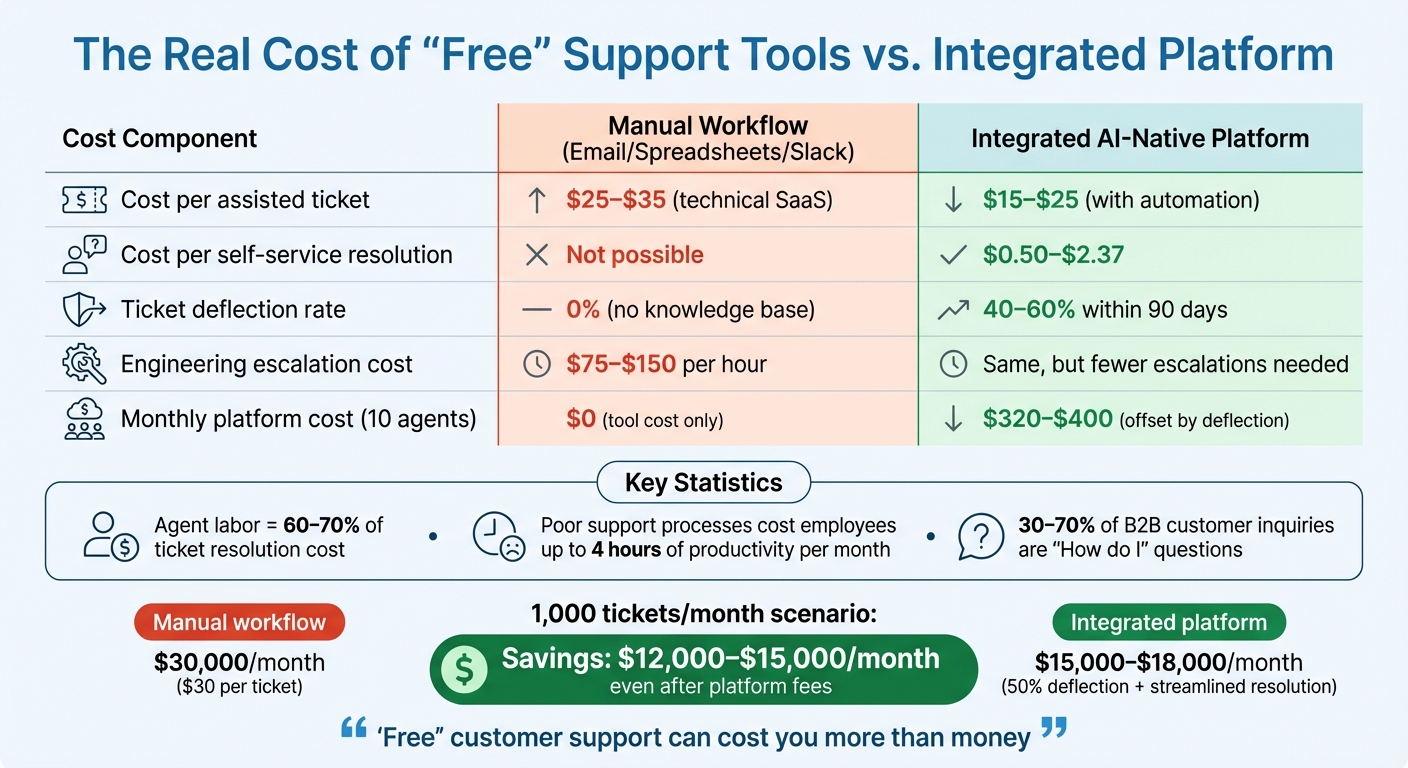
Hidden Costs of Free Support Tools vs AI-Native Platform Comparison
Free tools might seem like a budget-friendly choice, but they often come with hidden costs that can significantly impact your team’s efficiency and your bottom line. From wasted agent hours to lost revenue, these "free" solutions can end up being far more expensive than they appear.
How Much Time Agents Waste on Manual Tasks
Agent productivity takes a hit when processes rely on tools like email, spreadsheets, and Slack. These tools often require agents to perform repetitive, manual tasks that add little value to the customer experience. In fact, agent labor accounts for 60–70% of the cost of resolving a ticket [13]. Without automation or features like canned replies, agents spend hours retyping the same responses. Amanda Langford refers to this as "the single most time-sucking repetitive task" [1].
Take password reset requests, for example. If your team handled 487 such requests last month, chances are they’ll face a similar volume again. Without automation, agents must manually craft each response, wasting valuable time.
The inefficiency doesn’t stop there. In IT help desk environments, poor support processes can cost employees up to 4 hours of productivity per month [13]. Shared inboxes often lead to duplicate responses, further reducing efficiency and increasing frustration for both agents and customers.
How Poor Support Efficiency Affects Revenue
These inefficiencies don’t just waste time – they directly impact revenue. Lower productivity and longer response times can erode customer satisfaction, which is closely tied to revenue [2]. Free tools often lack robust tracking capabilities, making it harder to monitor satisfaction levels and address issues before they lead to customer churn.
"Keeping your hand on your customer satisfaction pulse allows you to take immediate action when the ratings are going down – before leaving you for a competitor" [2].
Slow processes and missed opportunities also hurt trust. For example, without proper categorization tools, important feedback like feature requests or bug reports can slip through the cracks. This oversight prevents you from creating a product roadmap that aligns with customer needs, which can further damage loyalty and retention.
Cost Comparison: Manual vs. Integrated Workflows
To better understand the financial impact, let’s compare manual workflows with an integrated platform:
| Cost Component | Manual Workflow (Email/Spreadsheets/Slack) | Integrated AI-Native Platform |
|---|---|---|
| Cost per assisted ticket | $25–$35 (technical SaaS) [13] | $15–$25 (with automation) [13] |
| Cost per self-service resolution | Not possible | $0.50–$2.37 [13] |
| Ticket deflection rate | 0% (no knowledge base) | 40–60% within 90 days [13] |
| Engineering escalation cost | $75–$150 per hour [13] | Same, but fewer escalations needed |
| Monthly platform cost (10 agents) | $0 (tool cost only) | $320–$400 (offset by deflection) [13] |
Let’s break this down further. If your team resolves 1,000 tickets per month at $30 per ticket using manual workflows, you’re looking at $30,000 in support costs. An integrated platform, on the other hand, could deflect 50% of these tickets through self-service while streamlining the rest, cutting costs to $15,000–$18,000 – even after accounting for platform fees.
"’Free’ customer support can cost you more than money" [2].
When you factor in agent wages, management overhead, and lost revenue from dissatisfied customers, free tools often turn out to be the most expensive choice you can make.
Moving to an AI-Native B2B Support Platform
Switching to an AI-native B2B support platform can address the inefficiencies and hidden costs discussed earlier.
Identify Your Current Pain Points
Start by reviewing all your support channels – email, Slack, spreadsheets, wikis – and identify where data flow breaks down [15]. These breakdowns often reveal issues like security risks (e.g., sensitive customer data stored in unencrypted spreadsheets), integration problems (when agents have to juggle multiple tools to resolve a single query), and knowledge silos (FAQs scattered across hard-to-find locations).
In B2B settings, 30–70% of customer inquiries are "How do I" questions that require detailed product knowledge [16]. If your team is constantly answering the same technical questions without a searchable knowledge base, you’re likely wasting valuable time. Consider how much time your agents spend on repetitive manual tasks – copying ticket details into spreadsheets, combing through Slack for past solutions, or resetting passwords over and over. These inefficiencies add up.
AI-native platforms are designed to handle unstructured data, meaning you can start using them even if your existing data is messy [14].
Look for Unified Platforms with Built-In AI
Legacy tools often add AI as an afterthought, which means they work best with structured data. AI-native platforms, however, are built from the ground up to process natural language and unstructured data [14].
"AI-native means the entire platform architecture was designed from the ground up with AI as the foundation – designed around natural language and unstructured data rather than rigid forms, fields, and predetermined workflows." – Jamie Bergmann, Mosaic [14]
Seek platforms that combine email-grade communication, SLAs, queues, escalations, and AI tools into one system. For example, Supportbench offers features like AI-powered ticket summaries, case history search, automated QA insights, and knowledge article creation – all included for $32 per agent per month. This eliminates the need to cobble together multiple tools or pay extra for essential AI features.
Focus on platforms with AI auto-triage capabilities, which can categorize and route requests with about 92% accuracy [15]. Also, ensure the platform supports human-in-the-loop workflows, letting agents review AI-generated responses before they’re sent to customers. This approach maintains technical accuracy while saving time on repetitive tasks. A unified system like this simplifies workflows and paves the way for measurable improvements.
Track Improvements in Speed and Customer Satisfaction
Measure key metrics like first response time, average resolution time, and cost per ticket. If you’re using a knowledge base to handle common queries, monitor your deflection rate to gauge how effectively it’s reducing workload.
Include CSAT surveys in your support emails to gather real-time customer feedback [1].
"Keeping your hand on your customer satisfaction pulse allows you to take immediate action when the ratings are going down – before leaving you for a competitor." – Amanda Langford, Groove Writer [1]
Evaluate agent productivity by tracking how many tickets each agent resolves and how much time they spend on manual tasks versus solving problems. Watch your escalation rates too – fewer escalations to engineering or senior staff indicate that your AI and knowledge base are doing their job. Keep in mind, about 84% of developers are already using or planning to use AI tools in their workflows [15], so your support team should be leveraging AI as well.
Better metrics mean cost savings and happier customers, underscoring the advantages of moving beyond free tools.
Conclusion: What "Free" Tools Actually Cost Your Business
The inefficiencies of so-called "free" tools can quietly drain your business resources. Tools like email, spreadsheets, and Slack may seem cost-effective at first glance, but their hidden costs – lost productivity, wasted time, and duplicated efforts – paint a very different picture. For a 50-person support team, the apparent cost might be around $30,000 annually, but the real cost, including inefficiencies like time spent searching for context, switching apps, and redoing work, can skyrocket to an estimated $4,092,000 per year. That’s roughly 136 times the price of a subscription-based solution [17].
"The hidden cost of tool sprawl dwarfs the subscription costs by 100x." – Stuart Leo, Founder, Waymaker [17]
These inefficiencies take a toll on both time and money. On average, knowledge workers spend 2.5 hours a day just searching for information across disconnected systems and switch between apps more than 300 times daily [17]. For a team of 50, this means you’re effectively operating with the productivity of only 34 employees. These numbers highlight the operational burden that "free" tools place on growing support teams.
The way forward is clear: success doesn’t lie in adding yet another tool to the mix. Instead, consolidating your support operations on a unified, AI-native platform is the smarter choice. Supportbench offers a solution that combines email-grade communication, SLAs, automation, built-in AI tools, and real-time analytics – all for $32 per agent per month. By centralizing your operations, you can reclaim lost time, improve efficiency, and deliver faster, more consistent B2B support.
FAQs
When is it time to stop using email for support?
When managing support inquiries becomes a headache – whether it’s tracking conversations, collaborating with your team, or handling an ever-growing volume of requests – it’s time to move away from email. These challenges typically arise as your support operations outgrow their small-scale beginnings, resulting in inefficiencies and slower response times.
How can I calculate the true cost of “free” support tools?
To figure out the real cost of "free" tools, you need to look beyond the surface. Sure, there are the obvious costs like employee salaries and any paid add-ons. But then there are the hidden expenses – things like the extra time spent on manual tasks, the disruptions caused by switching between tools, and the lack of clear, accessible data. These inefficiencies can quietly drain resources, leading to higher operating expenses, reduced productivity, and even unhappy customers. In the end, those "free" tools might cost you more than you initially thought.
What should I look for in an AI-native B2B support platform?
When selecting an AI-driven B2B support platform, focus on clear, upfront pricing that covers advanced AI capabilities without any unexpected fees. Opt for a solution that combines multiple support functions into a single, unified system. This helps minimize inefficiencies and reduces costs. The platform should handle tasks like ticket routing and self-service automation, adapt easily as your business grows, and integrate smoothly with your current systems. These features work together to boost efficiency, cut expenses, and improve customer satisfaction.






