



Scaling a support team using Slack can get expensive fast. Slack‘s per-user pricing model means costs grow significantly as your team expands. For example, a 200-person team on the Business+ plan spends $36,000 annually, while a 500-person team could face costs of $75,000 or more. Beyond subscription fees, hidden costs like setup, integrations, and administrative overhead can double your total expenses.
Key takeaways:
- Slack pricing tiers range from Free to Enterprise+, with Business+ costing $15/user/month.
- A 20% price hike in June 2025 added $9,000 annually for a 300-person team.
- Teams often face forced upgrades for features like SAML SSO, which increases costs.
- Limiting access to save money can hurt productivity, leading to duplicated work and slower ticket resolution.
To manage costs:
- Audit usage and deactivate inactive accounts.
- Negotiate discounts (15–35%) and consider annual billing for savings.
- Explore alternatives like Microsoft Teams or pricing models that scale better with team size.
Understanding the full cost of collaboration tools, including hidden expenses, is critical for effective planning and budgeting.
How Per-User Pricing Affects Your Budget as You Grow
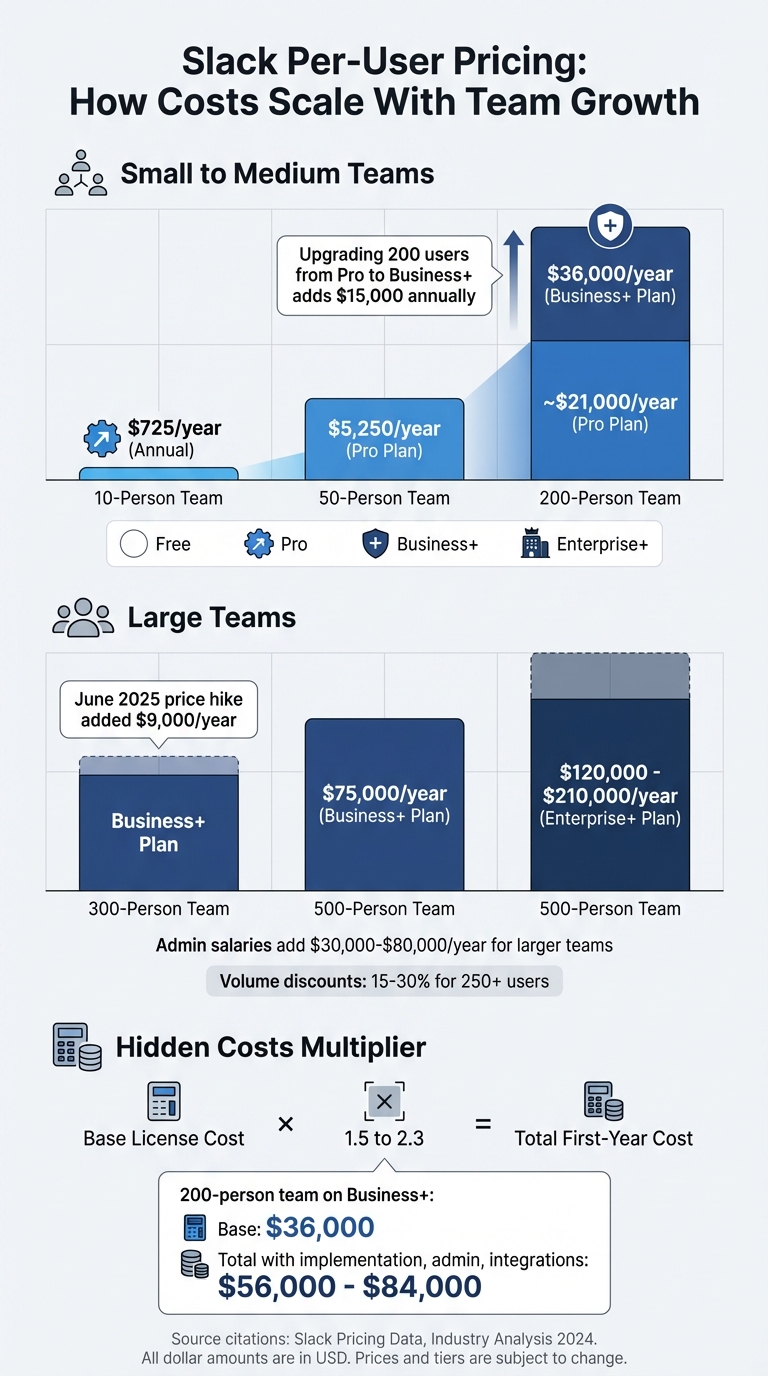
Slack Pricing Tiers Cost Comparison by Team Size
Cost Increases from 50 to 500+ Users
Per-user pricing can escalate quickly as your team expands. For instance, a small 10-person team using Slack’s Pro plan with annual billing pays about $725 per year, but a 500-user team on the Business+ plan faces costs of approximately $75,000 annually [6].
Growth often leads to shifting pricing tiers. A 50-person team might initially use the Pro plan at $8.75 per user per month (around $5,250 annually). However, upgrading to Business+ becomes necessary when even one team member requires advanced features. Since Slack mandates that all users be on the same tier, this upgrade could add $15,000 annually for a 200-person team compared to sticking with Pro [7].
And these license fees? They’re only part of the equation as team needs and complexities grow.
Costs Beyond the Monthly Subscription
The monthly subscription is just the tip of the iceberg. Implementation, maintenance, and administrative efforts can easily double your first-year expenses. For example, a 200-person team on Business+ with a base license cost of $36,000 annually could see total costs balloon to anywhere from $56,000 to $84,000 when onboarding, integrations, and ongoing management are included [2].
Larger teams often require dedicated administrators to handle tasks like channel governance, user provisioning, and permissions. Salaries for these roles can add anywhere from $30,000 to $80,000 annually. On top of that, integration costs for connecting Slack with essential support tools, along with potential storage overage fees (10GB per user on Pro or 20GB on Business+), further drive up the total cost of ownership.
Enterprise+ Pricing Changes After August 2024
Slack overhauled its top-tier offering in June 2025, replacing Enterprise Grid with the new Enterprise+ plan. This change bundled AI features, which previously cost $10 per user per month as an add-on, into the base package [2][8]. Existing customers were transitioned to the new plan upon their first renewal after August 17, 2025.
This restructuring means that even teams that don’t need advanced AI capabilities are now paying for them. Current estimates for Enterprise+ pricing range from $20 to $35+ per user per month, which translates to $120,000 to $210,000 annually for a 500-person team. While bundling simplifies billing into a single fee, organizations requiring features like HIPAA compliance, Data Loss Prevention, or multi-org governance are compelled to adopt the higher tier.
For teams exceeding 250 users, volume discounts of 15% to 30% are often negotiable, especially when aligning contracts with fiscal year-end discussions.
These pricing shifts emphasize the importance of evaluating both license fees and bundled features when planning for scalable growth.
sbb-itb-e60d259
How Per-User Pricing Creates Operational Problems
Slack’s per-user pricing model doesn’t just increase costs – it also forces teams to limit access, creating hurdles that disrupt everyday workflows.
Why Teams Limit Access to Save Money
Under Slack’s pricing, every additional seat adds to the bill. Slack charges for each "active" user – anyone who logs in within a 28-day period[1]. This puts managers in a tough spot: either pay for everyone who might need access or restrict seats to keep costs manageable.
These restrictions pile up quickly, creating operational headaches. For instance, many teams use Single-Channel Guests (a free option) to avoid paying for full seats. But these users can’t see the bigger picture or contribute to multiple workflows, leaving gaps in collaboration[1]. Upgrading to Business+ for features like SAML SSO for a 200-person team costs $15 per user/month – a 71% jump from the Pro plan – and adds about $15,000 annually. Faced with such expenses, many teams ration access.
Even the Free plan has its limits: a 90-day message history and a 10-integration cap, which often force teams to upgrade to maintain context and tool connectivity[5].
A striking example of these challenges occurred in September 2025, when the non-profit Hack Club faced a sudden demand from Slack’s sales team for $50,000 upfront and $200,000 annually. This shift to billing for every user, including volunteers, threatened to deactivate their workspace and delete 11 years of message history. After public backlash on Hacker News, Slack CEO Denise Dresser stepped in, calling it a "billing process oversight" and restoring their non-profit pricing[10].
These cost-driven restrictions don’t just create financial stress – they directly impact how teams operate, as outlined below.
The Cost of Restricted Access on Team Performance
Limiting access to save money often backfires, creating inefficiencies that ripple across the organization. Without full access, new team members lose critical historical context, often found in a comprehensive knowledge base, leading to duplicated work and more coordination meetings[9]. Support agents end up revisiting resolved issues, while managers schedule additional meetings to bridge knowledge gaps that full access could have prevented.
Restricting access to a core support team also complicates collaboration with engineering or product teams when complex issues arise. This leads to delays in resolving tickets, as conversations stall while waiting for input from someone who lacks access. Meanwhile, duplicated efforts increase because team members can’t see who’s already working on similar problems.
Slack’s co-founder Stewart Butterfield once described this issue as:
fragmented silos of inaccessible information
locked away in individual inboxes[9]. Without persistent channels and searchable history, teams resort to more status updates and stand-ups, further draining productivity.
| Challenge | Operational Impact | Root Cause |
|---|---|---|
| Context Loss | Repeated work and redundant questions | 90-day message history limit on Free plan |
| Tool Silos | Manual data transfers between apps | 10-integration cap on Free plan |
| Collaboration Bottlenecks | Delayed responses for complex issues | Limited seats for cross-functional teams |
| Security Risks | Shadow IT and compliance problems | High SSO costs ($15/user/month) |
When employees are denied official access due to cost, they often turn to unauthorized third-party tools. This "shadow IT" not only complicates workflows but also exposes organizations to security and compliance risks – risks that can far outweigh the cost of proper licenses. In the end, the effort to save on subscription fees often leads to higher expenses in the form of lost productivity, duplicated tasks, and operational inefficiencies.
Ways to Reduce Collaboration Tool Costs
If you’re looking to cut down on collaboration tool expenses, there are several practical strategies to consider. While Slack’s per-user pricing can add up, there are ways to optimize costs without sacrificing team efficiency.
Combine Tools to Eliminate Overlap
Take a close look at your current software stack. If your team already uses Microsoft 365 or Google Workspace, you might be paying for tools you don’t need. For example, Microsoft Teams is included in most M365 plans, and Google Chat comes with Workspace subscriptions starting at $7 per user/month[2]. Switching non-essential Slack users to these bundled tools can help reduce redundant costs.
Additionally, Slack now includes AI features in its Pro and Business+ plans. As of 2025, these plans offer features like summaries and huddle notes in Pro, and more advanced AI tools in Business+. This means you can drop standalone AI tools that duplicate these capabilities, saving up to $10 per user/month[2].
Once you’ve streamlined your tools, focus on refining access levels to cut further costs.
Use Different Access Levels for Different Roles
Not everyone on your team needs full access to the platform. Slack’s Fair Billing Policy only charges for members who log in within a 28-day period[1]. Regularly auditing and deactivating inactive accounts can significantly trim your expenses. You can also take advantage of Single-Channel Guests, which allow external collaborators or team members with limited needs to use Slack at no extra cost[1].
Before your subscription renewal, audit user activity over the past 30 days to identify inactive accounts and adjust seat counts accordingly[4]. For teams with fluctuating headcounts – like seasonal support teams – monthly billing might actually be cheaper than annual plans, even though annual billing typically provides a 17% discount[4].
Lastly, explore alternative pricing models that might suit your team’s growth better.
Consider Pricing Models That Scale Better
As your team grows, per-user pricing can become less sustainable. Some platforms offer alternative models that provide more predictable costs:
| Pricing Model | Mechanism | Best For | Predictability |
|---|---|---|---|
| Per-User (Slack) | Charges per active user | Small, stable teams | Low – costs increase with headcount |
| Per-Agent | Bills only frontline support staff | Support teams with many stakeholders | Medium – costs grow with support staff only |
| Scaled Platform | Offers tiered pricing based on team size | Growing B2B support teams | High – predictable tiers with discounts |
| Bundled Suite | Included with existing software licenses | Teams using M365 or Workspace | Highest – no extra cost |
For AI-driven B2B support teams, these alternative models can provide better scalability and cost management. Negotiating directly with sales teams can also lead to discounts – mid-market companies can often secure 15–25% off, while enterprises with over 1,000 seats may get 25–35% discounts[4]. Timing plays a role too; negotiating during Salesforce‘s Q4 (November through January) can work to your advantage, as sales teams aim to hit year-end targets[2].
On average, Slack buyers manage to pay about 14% below the listed price through negotiation[2]. Switching from monthly to annual billing cuts costs by 17%[4], and committing to a multi-year deal (2–3 years) can unlock additional savings of 15–30%, especially for Enterprise+ plans[2]. Don’t settle for the first offer – there’s often room to negotiate.
How to Calculate the True Cost of Your Collaboration Tools
Creating a Cost Model for Collaboration Tools
If you’re managing support teams, understanding the true cost of collaboration tools is a must. Subscription fees might look straightforward, but they’re just the tip of the iceberg. Hidden expenses can significantly increase the total cost of ownership (TCO)[3].
Start by identifying all cost drivers. For instance, a 50-person support team using Slack Business+ will spend about $9,000 per year on licenses alone. But that’s not the whole picture. Add setup time, managing channels, and dealing with the "SSO gate" – where upgrading from Pro at $8.75 per user to Business+ at $15 per user is necessary for SAML SSO. This pushes your first-year costs to somewhere between $14,000 and $22,000[2][3]. For teams exceeding 100 users, you’ll likely need to allocate partial or even full-time staff to handle permissions, compliance exports, and user lifecycle management[2].
Don’t forget integration costs. Consulting fees for configuring tools can add thousands of dollars annually, particularly for enterprise setups with more complex requirements[2].
Metrics That Show Real Value
Once you’ve mapped out costs, it’s time to measure the value your tools deliver. One key metric for support teams is cost per interaction. According to a Forrester study, companies using Slack for service teams saved $2.2 million by cutting average handle time by 17% and reducing ticket escalations by 24%[12].
Another helpful calculation is your annual coordination tax. Use this formula:
(Incidents or Tickets/Month) × (Staff per Interaction) × (Coordination Minutes + Documentation Minutes) ÷ 60 × (Hourly Rate) × 12. For example, using a fully loaded rate of approximately $150/hour, you can estimate how much coordination is costing your team annually[13].
Time savings also matter. Teams using Slack reported cutting meeting time by 50% and reducing email volume by 20%[11]. However, you’ll need to factor in interruptions. Studies show it takes about 23 minutes and 15 seconds to regain focus after an interruption, and a single unplanned context switch can drain up to 20% of an agent’s cognitive capacity[13]. If your tool causes more interruptions than it prevents, it could be costing you more than you think, no matter how affordable the subscription seems.
"The direct subscription or license cost of software is only a small fraction of the total cost of the software. This is usually called the TCO or total cost of ownership." – Brightwork Research & Analysis[3]
To get a clearer picture, build a three-year cost model instead of focusing on monthly fees. Since implementation and migration costs are front-loaded, a longer timeframe provides a more accurate comparison between tools[3][2]. Also, consider Slack’s Fair Billing Policy, which offers prorated credits for inactive users after 28 days. This can lower your actual costs compared to fixed per-seat pricing models[1].
Conclusion: Choosing the Right Collaboration Tool for Growth
What Support Leaders Should Keep in Mind
Per-user pricing might seem straightforward, but it can cause headaches as your team grows. Take this example: a 200-person support team using Business+ ends up paying $36,000 annually just for licenses, with costs increasing sharply as the team expands[2]. On top of that, cutting access to save money often leads to higher operational costs and slower collaboration. Plus, you might be stuck paying for features you don’t actually need – like SAML SSO, which comes only with the Business+ tier at $15 per user per month[2].
There are ways to save big, though. Switching from Slack Pro to self-hosted platforms like Mattermost or Zulip could save a 50-person team more than $26,000 over three years[14]. Another strategy? Start negotiating renewals 90 days in advance to secure discounts of 15–35%, and consider annual billing, which typically shaves off about 17% compared to monthly plans[4].
With these tips in hand, support leaders can make smarter decisions by creating a detailed, long-term cost model to calculate ROI.
Steps to Evaluate Your Options
To make the most of these savings strategies, start by auditing your actual usage. Export your active user list and figure out which tier-specific features your team truly needs. For instance, if you’re paying for Business+ but don’t use compliance exports or advanced AI, switching to the Pro tier could save you $6.25 per user each month[2]. Also, check if Google Workspace SSO meets your needs before upgrading just for SAML SSO[2].
Next, create a three-year cost model that factors in not just subscription fees but also hidden costs like setup, administrative time, and integration expenses. If your team size stays relatively stable, annual contracts can save money upfront. But if your headcount changes by more than 20% each year, monthly billing might be the better choice[4]. For organizations with over 1,000 users, negotiating custom rates can lead to significant savings[4].
The best collaboration tool for your team will depend on your growth plans and budget. If your team is growing rapidly and costs are spiraling, look for pricing models that don’t penalize expansion. If you stick with Slack, push hard in negotiations and use Fair Billing to recover credits for inactive users[1]. The goal is to find a tool that boosts your team’s performance while keeping costs under control, enabling efficient, AI-driven customer support that scales with your business.
FAQs
What costs should I include beyond Slack licenses?
When growing your support teams, it’s important to think beyond just the price of Slack licenses. You’ll also need to account for setup and training costs, which can add up quickly. There’s also the ongoing maintenance required for integrations and updates, as well as any extra fees for premium features like AI tools or automation.
On top of that, personnel costs play a big role. This includes not only salaries but also potential impacts on productivity. Don’t overlook indirect expenses either, such as data storage, security measures, and any inefficiencies that might crop up as your team expands. These hidden costs can make a bigger dent in your budget than you might expect.
When does it make sense to move tiers?
It’s logical to switch tiers when your team’s needs or expenses make it worthwhile. For instance, if your support volume or task complexity increases, upgrading may be the right move to access advanced tools like automation, AI capabilities, or stronger security measures. On the flip side, if your team’s activity slows down or you’re not making full use of advanced features, downgrading can help cut costs. Regularly assess the overall expenses and efficiency to ensure the tier matches your team’s objectives.
How do I measure Slack ROI for support?
To get a handle on Slack’s ROI for your support team, start with tools like ROI calculators. These can help you estimate cost savings from cutting down on emails, meetings, and other operational expenses.
Next, dive into metrics like Cost Per Ticket (CPT) – calculated by dividing your total support costs by the number of tickets resolved. But don’t stop there. Consider the qualitative perks, too, like quicker resolution times, happier customers, and a more efficient team.
By blending these numbers and insights, you’ll get a clearer picture of how Slack impacts both your budget and your team’s performance.






