


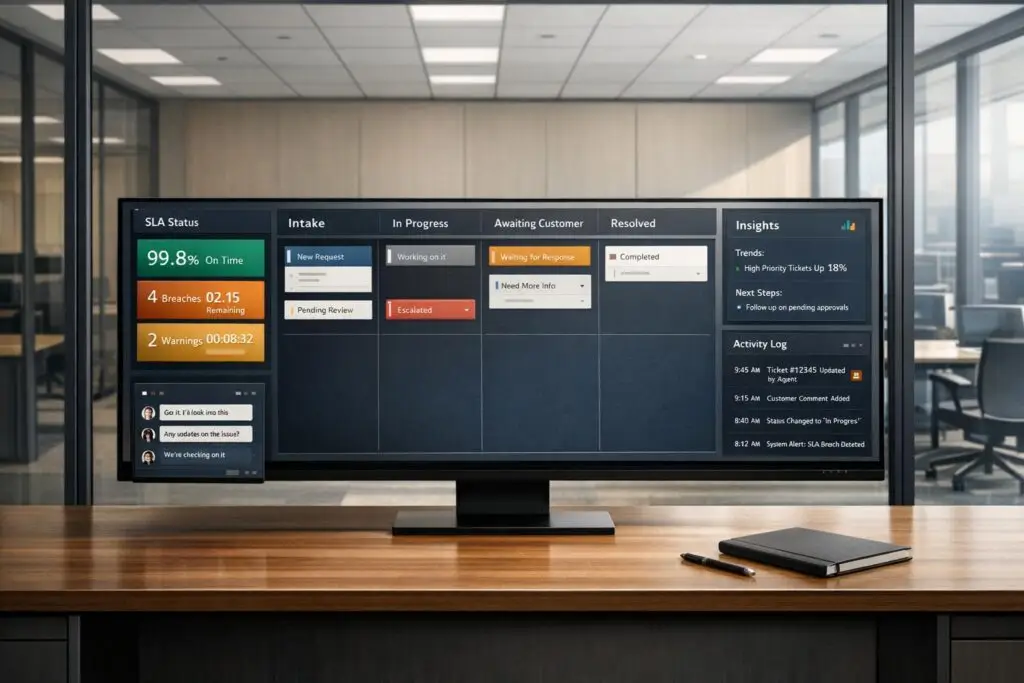
Slack is great for real-time communication, but it struggles with long-term tracking and structured workflows. For enterprise customer support, this can lead to missed messages, SLA breaches, and inefficient processes. Customer portals, on the other hand, offer structured workflows, automated SLA management, and centralized dashboards to handle complex support needs.
Key Takeaways:
- Slack Strengths: Real-time messaging, quick collaboration, and faster response times.
- Slack Weaknesses: Unstructured communication, poor issue tracking, and limited automation for long-term workflows.
- Customer Portal Advantages: Clear issue tracking, automated escalations, detailed audit trails, and AI-powered analytics and insights.
- Best Use Case: Use Slack for immediate collaboration, but rely on a structured customer portal for managing complex, multi-step resolutions.
Quick Comparison:
| Feature | Slack (Enterprise) | Customer Portals (Enterprise) |
|---|---|---|
| SLA Tracking | Manual or 3rd-party tools | Automated with alerts |
| Workflow Structure | Unstructured threads | Structured and centralized |
| Audit Trail | Fragmented history | Detailed, immutable records |
| AI Integration | Limited | Advanced automation & insights |
| Response Speed | High | Moderate |
Bottom Line: Slack is ideal for quick interactions, but customer portals deliver the structure and accountability needed for enterprise-level support.
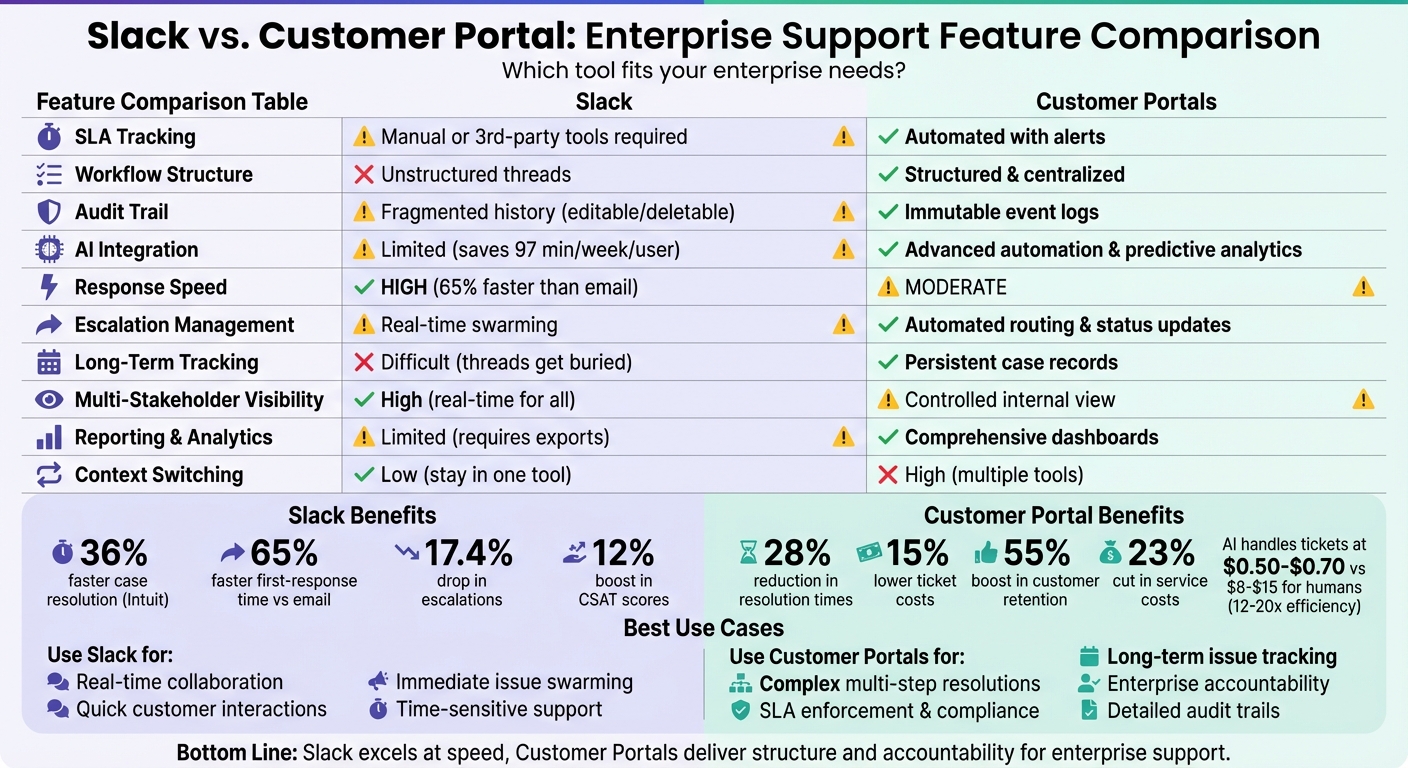
Slack vs Customer Portal: Enterprise Support Feature Comparison
Slack‘s Strengths and Limitations in Enterprise Customer Support
Strengths: Real-Time Communication and Tool Integrations
Slack shines when it comes to time-sensitive customer support. With Slack Connect, enterprise clients can join shared workspaces for secure, real-time collaboration. This setup allows for what some refer to as "white-glove" service, eliminating the delays of email and offering immediate access to support interactions [4][6].
One of Slack’s standout features is issue swarming. Here, agents can quickly bring in product experts through tools like Huddles or dedicated channels, enabling cross-functional teams to tackle complex problems without the need for traditional tiered escalations [4][6]. For example, Intuit reported a 36% faster case resolution and a 12% boost in customer satisfaction after adopting Slack to improve collaboration between agents and experts [4].
Slack also speeds up response times significantly. Conversational platforms, like Slack, can achieve 65% faster median first-response times compared to email-only workflows [7]. Teams using Slack have noted an average 17.4% drop in escalations and an 11% rise in CSAT scores [5]. Additionally, Slack’s channels and Slack Canvas serve as searchable repositories for internal processes, training materials, and past case resolutions [4][6]. The Workflow Builder, a no-code tool, automates repetitive tasks such as ticket triage and service requests, further streamlining operations [6][7].
While these features make Slack a powerful tool for real-time collaboration, its design reveals some challenges in managing more complex, long-term workflows.
Limitations: Missing Structure and Long-Term Tracking
Slack’s fast-paced design can falter when it comes to managing ongoing incidents. At its core, Slack is a messaging platform – a linear log of conversations – not a system built for tracking incident states or managing relational data [2]. Messages don’t include predefined fields for key details like status, severity, or role assignments. As a result, programmatic tools struggle to determine if an issue is resolved without relying on manual tagging or advanced natural language processing [2].
Latecomers to an incident face a tough challenge: piecing together the current state from unstructured messages, a phenomenon known as "Context Collapse" [2]. This lack of structure can lead to errors, such as manual timestamping yielding a 26% average recall error when compared to actual incident durations [2].
"Slack is a triumph of real-time communication, but it is an operational liability when used as a system of record for incident management." – Wireframe Today [2]
Slack’s API limitations also make it difficult to automate tasks like real-time archival or generating incident timelines. The constant switching between Slack and other tools, often called the "Toggle Tax", results in a 40% productivity loss for engineering and support teams [2].
Here’s a quick comparison between Slack’s capabilities and those of structured support systems:
| Data Attribute | Slack Message | Structured Support System |
|---|---|---|
| Primary Identifier | Temporal/Channel-scoped | Global and persistent (UUID) |
| State/Status | Implicit in text (requires NLP) | Deterministic Enum (triggered, resolved) |
| Severity | Subjective ("SEV1!!") | Strict Schema (SEV1, SEV2) |
| Audit Trail | Mutable (can be edited/deleted) | Immutable Event Log |
| SLA Tracking | Manual/None | Automated Timers |
Slack also struggles with assigning clear ownership in large channels. Without structured role assignments, accountability can become blurred, leading to longer Mean Time to Acknowledge (MTTA) [2]. Critical updates often get buried in sub-threads, making it harder for stakeholders to maintain situational awareness and slowing down investigations [2].
These limitations highlight why many enterprise support teams are moving toward centralized customer portals with structured dashboards that provide better long-term tracking and oversight.
sbb-itb-e60d259
Why Customer Portals Work Better for Enterprise Support
Centralized Workflows and 360-Degree Dashboards
Customer portals bring order to enterprise support by offering structured, persistent records – something linear messaging tools like Slack can’t match. Acting as a detailed playbook, these portals establish clear triggers, define roles, and set timelines for processes like onboarding and escalations [8]. Each interaction is tied to a unique identifier, ensuring that context is preserved across long-term engagements.
This setup allows multiple experts to collaborate on a case while maintaining a single owner for accountability. Contributions like file uploads, updates, or status changes are all linked to the case record. This means new team members can quickly get up to speed without sifting through scattered messages.
Poor workflow management can cost companies 20%–30% of their annual revenue [8]. However, structured tools like these portals can reduce resolution times by 28% and lower ticket costs by 15% [3]. Plus, they often include searchable knowledge bases, enabling customers to resolve simple issues on their own – a feature 90% of consumers now expect [10].
"A customer workflow solves [client management chaos] by providing a structured playbook for recurring interactions. From onboarding and billing to escalations, workflows make every process predictable, measurable, and easy to scale." – The Moxo Team [8]
Here’s how enterprise workflows align with portal structures:
| Workflow Type | Trigger | Key Actors | SLA Goal |
|---|---|---|---|
| Support Triage | Ticket submitted | Agent, Specialist | 2 hr response / 24 hr resolution [8] |
| Escalation | SLA breach | Manager, Sr. Engineer | 48 hr resolution [8] |
| Onboarding | Contract signed | CS Manager, Client | 10 business days [8] |
| VIP Servicing | VIP request | Relationship Mgr, Execs | 4 hr resolution [8] |
| Billing Dispute | Invoice disputed | Finance, Account Mgr | 5 business days [8] |
Beyond keeping workflows organized, portals also automate escalations to meet service level agreements (SLAs) consistently.
Better Escalation Handling and SLA Management
With automated escalation protocols, customer portals can flag and reassign cases as soon as SLAs are breached [8][9]. These predefined rules ensure no issue falls through the cracks, even in high-traffic communication channels.
The stakes are high: 33% of American customers say they’d switch companies after a single bad service experience [12], and 54% report having higher expectations than they did just a year ago [12]. During critical times, like contract renewals, portals can tighten SLAs dynamically to guarantee improved service.
Portals also empower agents with role-based thresholds, allowing them to make quick decisions – like issuing refunds within a set limit – without waiting for approvals [9]. High-tier accounts often benefit from white-glove service, targeting 4-hour resolution SLAs [8], while standard escalations aim for a 48-hour resolution to rebuild customer trust [8].
Detailed Reporting and Analytics for Decision-Making
Customer portals don’t just manage processes – they offer detailed analytics that enable better decision-making. For enterprise leaders, having access to real-time logs, compliance reports, and audit trails is crucial. Portals also use customer health scoring, based on support interactions, to help teams intervene before accounts churn. These insights can boost customer retention by 55% and cut service costs by 23% [12].
Each case includes fields like status, severity, ownership, and timestamps, creating a reliable event log for accurate reporting.
"You can’t protect what you can’t see." – Dr. Christine Izuakor, Senior Manager of Global Security Strategy and Awareness, United Airlines [11]
For B2B teams handling complex accounts and long support cycles, portals provide the comprehensive view that chat tools simply can’t match. They ensure no customer request is lost in what many fear as a "corporate black hole."
Slack for Beginners | Converting Slack into a Client Portal and Project Management Tool
Slack vs. Customer Portals: Feature-by-Feature Comparison
When it comes to B2B support, the choice between Slack and customer portals often boils down to a trade-off between speed and structure. While Slack excels at fostering rapid communication, customer portals shine in providing oversight and accountability. Let’s dive into how these platforms stack up against each other in critical areas of enterprise support.
Enterprise support isn’t just about quick responses – it’s about managing intricate, multi-step resolutions, adhering to service level agreements (SLAs), and ensuring everyone involved has the visibility they need. Slack’s strength lies in its ability to facilitate fast, real-time interactions, but it falls short when it comes to maintaining formal audit trails or centralized workflows. On the flip side, customer portals are built for long-term accountability, offering structured processes that Slack simply can’t match.
"Slack is faster, noisier, and less structured than email or tickets. Customers expect quick responses – sometimes even instant ones – but you lose the natural tracking you’d have in a helpdesk." – ClearFeed [14]
For example, in January 2026, Tinybird, a B2B company, reported a major improvement in their support efficiency by using Plain to manage enterprise Slack Connect channels. They cut their first response time from 1 hour to just 12 minutes and reduced total resolution time from 6 days to 2 hours [1]. This success came from combining Slack’s real-time communication with structured workflows that kept the process organized.
Comparison Table: Key Features and Capabilities
Here’s a closer look at how Slack and customer portals compare across essential features:
| Feature | Slack (Enterprise) | Customer Portals (Enterprise) |
|---|---|---|
| SLA Enforcement | Manual or requires 3rd-party tools | Built-in automated tracking & alerts |
| Escalation Management | Real-time "swarming" & emoji triggers | Structured routing and status updates |
| Workflow Structure | Conversational threads (can be messy) | Highly structured & centralized |
| Multi-Stakeholder Visibility | High (real-time visibility for both customers and agents) | Focused internal view with controlled external exposure |
| Audit Trail | Searchable history (can be fragmented) | Formal, timestamped record of all actions |
| Response Speed | High (chat-like expectations) | Moderate (ticket-based expectations) |
| Context Switching | Low (agents stay in the primary tool) | High (agents may switch between multiple tools) |
| Reporting & Analytics | Limited (often requires exports or integrations) | Comprehensive dashboards & custom reports |
| Long-Term Issue Tracking | Difficult (threads can get buried) | Excellent (persistent case records) |
| AI-Driven Automation | Saves 97 minutes weekly per user [13] | Predictive analytics, health scoring, auto-triage |
This breakdown highlights a core difference: Slack is all about immediacy and collaboration, while customer portals focus on structure and accountability. For teams handling complex, multi-stakeholder accounts, the structured workflows and robust tracking offered by customer portals can be a game-changer.
How AI Improves Customer Portal Performance
Customer portals truly shine when they integrate AI to power smarter operations. While tools like Slack are great for real-time conversations, they aren’t designed as support systems. Slack’s AI typically focuses on reactive tasks, like keyword or emoji triggers. In contrast, customer portals leverage structured data to predict issues, streamline workflows, and refine knowledge bases over time.
Predictive Analytics for Early Issue Detection
AI-driven customer portals excel at spotting problems before they escalate. A great example is label volume anomaly detection. If tags like "billing-error" or "API-latency" suddenly spike, the system flags these anomalies for immediate attention [1]. Companies like Clerk use this approach – when specific labels appear more frequently than usual, their product teams are automatically alerted to investigate potential bugs [1].
Sentiment analysis takes this a step further by identifying frustrated customers in real time. Instead of waiting for post-interaction feedback like negative CSAT scores, AI flags high-risk interactions as they unfold. This allows support teams to step in proactively and resolve issues before they snowball. According to Gartner, by 2029, agentic AI will autonomously handle 80% of common customer service problems [1]. But today, its real strength lies in addressing the other 20% – the complex cases that need human intervention before they spiral out of control.
Once issues are detected, automation steps in to supercharge response efficiency.
Automation for Faster, More Scalable Support
After identifying potential problems, automation transforms how support teams respond. AI agents can handle customer interactions for as little as $0.50–$0.70 per interaction, compared to the $8–$15 it costs for human agents – a 12–20x cost efficiency [15]. For example, in January 2026, n8n reported that AI was managing 60% of their support tickets. This allowed the company to handle a 20x increase in ticket volume without a proportional increase in staff [1].
"It’s the only way we can sustain our growth without hiring linearly. When I look at the reports, AI agents perform the work of 10 human agents at a fraction of the cost." – n8n Representative [1]
AI doesn’t just save money; it saves time. AI-generated case summaries, for instance, can reduce agent wrap-up time from 10–15 minutes to under 2 minutes [16]. These time savings are critical for delivering premium-level support without charging premium prices.
AI-Powered Knowledge Base Management
AI also plays a key role in ensuring customers can quickly access accurate and up-to-date information. Intelligent search features understand user intent, while AI automatically generates new help articles from resolved cases. For instance, if a complex issue required several back-and-forth exchanges to resolve, AI can transform that conversation into a structured help article – complete with a clear subject, summary, and relevant keywords.
AI continuously audits existing content to maintain accuracy and identifies gaps based on recurring customer questions [16]. If customers repeatedly ask about an undocumented topic, the system flags it for the team to address. This creates a self-sustaining loop where the knowledge base improves with every interaction, reducing the workload on human agents over time. Compare this to Slack, where similar information might remain scattered across countless message threads – searchable but never structured into reusable content.
These AI-driven features highlight why structured customer portals are essential for managing complex support environments effectively.
Conclusion: Choosing the Right Tool for Enterprise Support
Slack is fantastic for real-time collaboration, but at its core, it’s a messaging tool – not a full-fledged support system. Enterprise clients often need much more than quick chats. They require structured workflows, reliable audit trails, and dashboards that highlight actionable insights without wading through a flood of messages.
These limitations can make scaling up support operations challenging and unnecessarily expensive.
This is where customer portals step in as a powerful alternative. They centralize support processes, offer detailed role-based access controls, and leverage AI to automate and streamline workflows. Features like AI-driven sentiment analysis can identify potential issues before they grow, while AI-generated summaries and knowledge base articles help lighten the load for support teams. These functionalities are essential for meeting the complex needs of enterprise support.
That said, this isn’t about completely replacing Slack. Slack can still serve as a collaborative "view layer", but the backbone of your support system should be a structured portal. A portal ensures SLAs are met, escalations are tracked, and compliance-ready reports are generated. Tools like Supportbench provide this kind of enterprise-grade support infrastructure, offering centralized dashboards, SLA enforcement, and robust reporting – all for just $32 per agent per month.
If your team is spending more time navigating Slack threads than addressing customer issues, it might be time to rethink your support tools. Structured portals offer the clarity and efficiency enterprise clients demand to keep their operations running smoothly.
FAQs
When should we move a Slack request into a portal case?
When an issue requires structured workflows, long-term tracking, or involves multiple stakeholders and escalations, it’s best to transition a Slack request to a portal case. While Slack works well for quick conversations, a portal offers better visibility and accountability for handling more complex situations. This includes cases that need detailed reporting or collaboration across different teams. Using a portal helps maintain organization and ensures support operations can handle increasing volumes and complexities effectively.
What should an enterprise support dashboard track by default?
An enterprise support dashboard plays a crucial role in keeping tabs on the metrics that matter most for smooth operations and effective customer support. Key metrics to track include ticket volume, response and resolution times, customer satisfaction (CSAT), and first-contact resolution rates.
Beyond these, monitoring escalations, support backlog, and agent productivity offers valuable insights into overall efficiency. The goal is to maintain real-time visibility into operations, gather actionable customer feedback, and assess the health of your support processes. This approach helps teams stay proactive, address issues swiftly, and continuously refine their performance.
How can AI in a portal prevent SLA breaches and escalations?
AI integrated into a customer portal plays a key role in avoiding SLA breaches and managing escalations. By analyzing patterns, customer sentiment, and historical data, it can anticipate potential problems before they arise. This allows teams to respond proactively – whether it’s routing high-priority cases to senior agents or notifying managers about critical situations. Additionally, AI-driven automated workflows kick in to tackle risks early, ensuring service levels are upheld. The result? Better customer satisfaction and fewer escalations to worry about.






