


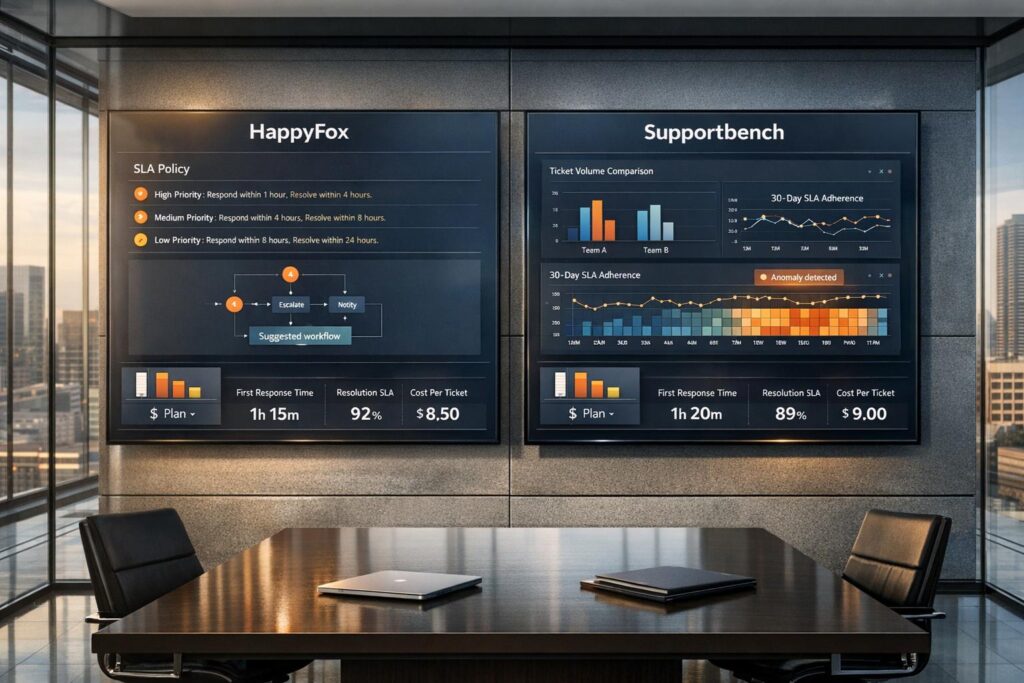
When deciding between HappyFox and Supportbench for B2B support, three key areas stand out: pricing, SLA management, and reporting tools. Here’s a quick breakdown:
- Pricing:
HappyFox charges per agent with tiered plans and costly add-ons for advanced features. For example, a 20-agent team on the Pro plan can cost over $1,780/month. Supportbench offers an all-inclusive plan starting at $32/agent/month, with no hidden fees for features like AI tools or workflow automation. - SLA Management:
HappyFox uses a structured SLA system with live timers and breach notifications. Advanced SLA tools require higher-tier plans or add-ons. Supportbench offers Dynamic SLAs, which adjust based on contract terms or customer data, making it better suited for enterprise teams with shifting priorities. - Reporting Features:
HappyFox provides pre-configured reports with limited customization and historical data retention tied to plan levels. Supportbench includes AI-driven reporting, natural language queries, and real-time dashboards in its base plan, offering deeper insights without extra costs.
Quick Comparison
| Feature | HappyFox (Pro Plan) | Supportbench (Professional Plan) |
|---|---|---|
| Base Price | $89/agent/month | $32/agent/month |
| AI Tools | Add-on ($1–$4/user) | Included |
| Workflow Automation | Add-on ($199–$1,999/mo) | Included |
| SLA Features | Standard timers | Dynamic SLAs |
| Reporting | Limited customization | AI-driven, real-time dashboards |
| 20-Agent Monthly Cost | $1,780+ (with add-ons) | $652.50 |
If you’re scaling a B2B team and need predictable costs, flexible SLAs, and advanced reporting, Supportbench offers better value. HappyFox may suit teams with simpler SLA needs but comes with higher costs as features scale.
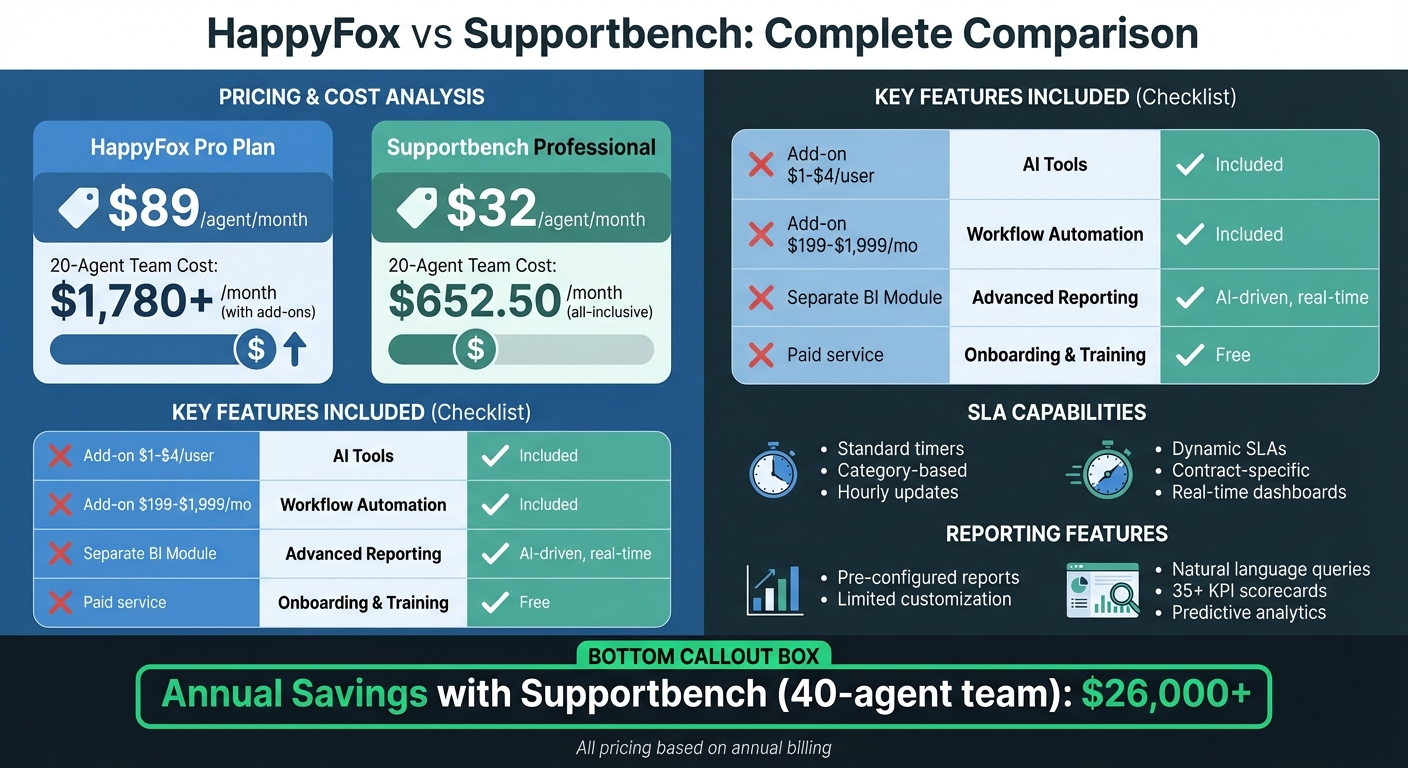
HappyFox vs Supportbench: Pricing and Features Comparison for B2B Support Teams
Pricing Comparison
When evaluating the total cost of a support platform, it’s essential to look beyond the advertised per-agent prices. For B2B teams handling complex accounts, the pricing model – whether all-inclusive or tiered with add-ons – can lead to significant differences in expenses as the team grows. Below, we break down the pricing structures of HappyFox and Supportbench and their implications for scaling B2B support teams.
HappyFox Pricing Structure
HappyFox uses a tiered pricing model with four plans: Basic ($21/agent/month), Team ($39/agent/month), Pro ($89/agent/month), and Enterprise PRO (contact sales). These rates reflect annual billing discounts ranging from 35% to 43% compared to monthly pricing. However, the Basic plan is limited to just five agents, making it unsuitable for larger teams. As a result, growing organizations often need to upgrade to the Team tier, which represents a steep 86% cost increase. Key features like Asset Management and Task Management are available only with the Pro plan at $89/agent/month.
HappyFox also charges extra for features such as workflow automation (workflow automation ($199–$1,999/month)99–workflow automation ($199–$1,999/month),999/month) and AI tools ($1–$4/user/month). Business Intelligence capabilities require custom pricing. For a 20-agent team, costs can quickly add up: $780/month for Team tier licenses, $199/month for workflow automation, and $20–$80/month for AI, bringing the total to nearly $1,000/month before even considering advanced reporting. These additional costs can significantly impact the platform’s affordability as the team scales.
Supportbench Pricing Structure
Supportbench offers a simpler pricing model with two tiers: Professional at $32/agent/month and Enterprise at $100/agent/month, both billed annually. The Professional plan includes essential B2B support features such as Intelligent Support AI (covering GenAI FAQ bots, activity summaries, and knowledge article creation), customer health scoring, dynamic SLAs, workflow automation, and detailed reporting – all without additional fees. Onboarding and training are also included at no extra charge.
The pricing scales predictably: the first 15 agents are billed at $32 each, with any additional agents charged at $34.50. For example, a 20-agent team would pay $480 for the first 15 agents and $172.50 for the remaining 5, totaling $652.50/month. Once a team reaches 60 agents, they automatically transition to the Enterprise tier, unlocking advanced features like Single Sign-On (SSO), white labeling, sandbox environments, and a dedicated Technical Support Account Manager. This all-inclusive model simplifies budgeting and avoids unexpected expenses as the team grows.
Pricing Comparison Table
| Feature | HappyFox (Team Tier) | HappyFox (Pro Tier) | Supportbench (Professional) |
|---|---|---|---|
| Base Price | $39/agent/month | $89/agent/month | $32/agent/month |
| Agent Limit | Unlimited | Unlimited | Unlimited (scales after 15) |
| AI Capabilities | Paid Add-on ($1–$4/user/month) | Paid Add-on ($1–$4/user/month) | Included |
| Workflow Automation | Separate Product ($199–$1,999/month) | Separate Product ($199–$1,999/month) | Included |
| Asset Management | Not Available | Included | Included |
| Advanced Reporting | Separate BI Module | Separate BI Module | Included (35+ KPI Scorecards) |
| Onboarding | Paid Migration Service | Paid Migration Service | Free Training & Onboarding |
| Email Support | 24/5 | 24/7 | 24/7 Digital Support |
| Phone Support | Not Available | Not Available | Enterprise Tier Only |
| 20-Agent Monthly Cost | $780 + Add-ons | $1,780 + Add-ons | $652.50 (All-Inclusive) |
As team sizes grow, the cost gap between the platforms becomes even more apparent. For instance, a 40-agent team on HappyFox Pro would pay $3,560/month for base licenses alone, compared to Supportbench’s $1,342.50/month – all features included. This translates to potential annual savings of over $26,000 with Supportbench.
sbb-itb-e60d259
SLA Capabilities Comparison
Managing SLAs effectively is a cornerstone for minimizing risks and controlling support costs, especially in AI-driven B2B environments. For teams handling intricate customer relationships, SLA management isn’t just about setting response timers. It requires tools that can adapt to contract-specific needs, shift with changing priorities, and provide clear performance insights. HappyFox and Supportbench take distinct paths in SLA management – one is structured and category-focused, while the other is dynamic and contract-oriented. Let’s break down how these platforms handle SLA management.
HappyFox SLA Features
HappyFox employs a straightforward four-step SLA setup: define objectives (like target percentages), set conditions, configure breach notifications, and establish work schedules. It measures five key time-based metrics: time to first response, ticket assignment time, response time to customer replies, response time to agent replies, and time to resolve tickets. This structured approach works best for teams with consistent SLA policies.
The platform enhances agent efficiency with a real-time countdown timer on tickets, helping prioritize tasks by deadline. Additionally, the "Excluded Status" feature pauses SLA tracking when a ticket is on hold, ensuring delays caused by customers don’t skew metrics. Reports update hourly, with a cap of 100 SLAs in the expanded reporting table.
Pricing-wise, basic SLA tools are available at $21/agent/month, but more advanced features like the SLA Performance Report and SLA Live Timer require higher-tier plans – Team ($39/agent/month) and Pro ($89/agent/month), respectively. Teams needing advanced SLA workflows must invest in the separate Workflows product, which ranges from $199 to $1,999 per month based on the number of workflows.
"Since switching to HappyFox, many of our managers and administrators enjoy the reporting widgets that focus primarily on SLA objectives, ultimately benefitting the business and our customers." – Joseph Feola, Vice President, Support Operations
Supportbench SLA Features
Supportbench takes a contract-first approach to SLA management. SLAs can be assigned based on customer contracts, license types, or even specific ticket attributes. This flexibility is ideal for enterprise teams managing varied service commitments.
The platform’s Dynamic SLA feature adapts SLAs in real time, adjusting requirements based on events like upcoming contract renewals. It also includes AI-powered sentiment analysis to proactively escalate urgent cases. This forward-thinking strategy helps prevent breaches before they happen, rather than just notifying teams after the fact.
Supportbench includes all SLA capabilities in its Professional plan ($32/agent/month) – no need for separate add-ons. It offers live performance dashboards, automated breach alerts, and integrates seamlessly with tools like Salesforce and Jira to ensure SLA management aligns with existing workflows. Multi-level SLAs are supported, allowing teams to set different priorities for various stages of a ticket’s lifecycle – critical for complex B2B support scenarios.
SLA Comparison Table
| Feature | HappyFox | Supportbench |
|---|---|---|
| SLA Customization Basis | Category, Work Schedule, Ticket Status | Customer Contracts, Licenses, Any Ticket Attribute |
| Tracked Metrics | 5 Time-Based Metrics | Any Data Point (Case, Company, Contact, Asset) |
| AI Integration | Separate Workflow Product ($199–$1,999/mo) | Native Sentiment Analysis & Predictive Analytics |
| Real-Time Tracking | Countdown Timer (Pro Plan Only) | Live Dashboards & Automated Alerts |
| Pause Functionality | Excluded Status Feature | Dynamic Recalibration Based on Events |
| Multi-Level SLAs | Single SLA Per Ticket | Multiple SLAs Per Case Lifecycle |
| Report Updates | Hourly (Max 100 SLAs) | Real-Time Performance Dashboards |
| Minimum Plan for Full Features | Pro ($89/agent/mo) | Professional ($32/agent/mo) |
| B2B Contract Alignment | Category-Based Grouping | Direct Contract-Specific Configuration |
The key difference lies in structure versus adaptability. HappyFox offers a standardized system suited for teams with uniform SLA needs, though advanced features come at a higher cost. Supportbench, on the other hand, delivers a more flexible, AI-enhanced solution tailored for teams managing diverse customer agreements – all at a lower entry price.
Reporting Features Comparison
Reporting plays a key role in understanding customer trends, anticipating potential issues, and making informed decisions. The difference between basic dashboards and advanced, AI-driven insights often determines whether a business is reacting to problems or proactively managing accounts. HappyFox and Supportbench approach reporting differently: one focuses on standardized operational metrics, while the other emphasizes flexible, AI-enhanced analytics designed for customer success. Here’s a closer look at how their reporting features stack up.
HappyFox Reporting Features
HappyFox offers a range of pre-configured reports that cover key operational areas like ticket inflow, agent activity, SLA performance, and ticket distribution. Users can apply filters – such as date ranges, categories, and custom fields – to refine these reports. Additionally, custom field reporting allows for more detailed ticket and contact classifications.
However, mobile access to these reports is restricted to users on the highest-tier plan. For advanced analytics, HappyFox provides a Business Intelligence feature that focuses on historical performance data, but it falls short when it comes to predictive analytics.
A Forrester TEI study found that HappyFox users achieved a 401% ROI over three years, and the platform boasts a customer satisfaction rating of 4.5/5. Users often highlight its operational efficiency. That said, its AI capabilities in reporting are somewhat limited. The AI Insights feature can analyze ticket data to identify recurring topics and suggest knowledge base improvements, but it does not extend to predictive metrics for customer success.
"I currently do a weekly report for my customer service team, to see how many tickets get solved, time they take etc. It has helped me assess them… to have them improve…. to compensate them with employee of the month etc." – James Chavez, Customer Service Manager, Sheikh Shoes
Supportbench Reporting Features
Supportbench takes a more dynamic approach to reporting, offering custom dashboards built from over 40 data points. Its standout feature is an AI-powered natural language query engine. This tool allows users to ask questions like "Show me the top 3 customers creating tickets this month" and receive instant visual insights. By eliminating the need for pre-configured reports, Supportbench gives support leaders the freedom to explore data as needed.
The platform also includes KPI scorecards that track over 35 metrics, providing a comprehensive view of performance at both agent and organizational levels. Its 360-degree customer overviews analyze performance across various support tiers, addressing the complexities of B2B relationships. Additional features like parent-child company structures, customer health scoring, and asset tracking enhance its reporting capabilities.
Unlike HappyFox, Supportbench integrates predictive analytics directly into its reporting. It can calculate CSAT and CES scores even without survey responses, offering deeper insights into customer sentiment. The platform also monitors 20 key agent performance metrics, such as First Response SLA Compliance, which is calculated as (Tickets Meeting First Response SLA ÷ Total Tickets) × 100. For teams that require advanced data access, Supportbench provides an optional Direct SQL Access feature, enabling real-time queries through external BI systems.
All of these reporting features are included in the Professional plan, priced at $32 per agent per month – no additional add-ons required. Supportbench holds a 4.4/5 satisfaction rating, with users praising its intuitive interface and comprehensive client management capabilities.
"Supportbench is amazing in how it gets things done… superior when it comes to resolving end-user difficulties." – Caitlyn Langston, Chief Technology Officer
Reporting Comparison Table
| Feature | HappyFox | Supportbench |
|---|---|---|
| Report Types | Pre-configured (Inflow, Agent Activity, SLA) | Custom Dashboards (40+ Data Points) |
| AI Integration | Topic Analysis & KB Recommendations | Natural Language Queries & Predictive Analytics |
| Predictive Metrics | Not Available | Predictive CSAT, CES, FCR Detection |
| Real-Time Data | Standard, scheduled reports | Live Dashboards & Direct SQL Access |
| Customization Method | Filters (Date, Category, Custom Fields) | Custom grouping, filtering, and natural language |
| B2B Features | Standard reporting metrics | Parent-child relationships, health scoring, asset tracking |
| KPI Tracking | Standard metrics | 35+ metrics with scorecards |
| Mobile Access | iPad App (Enterprise Plan Only) | Web-Based Real-Time Dashboards |
| Data Export | Standard options | Exportable reports & SQL Access add-on |
| Minimum Plan for Full Features | Enterprise (Custom Pricing) | Professional ($32/agent/mo) |
Decision Framework for B2B Support Leaders
Platform Strengths and Limitations
HappyFox provides extensive scalability and connects with over 50 platforms, including Salesforce, Jira, and Slack. Designed for large enterprises and IT services needing round-the-clock support, it boasts a 401% ROI over three years, as highlighted in a Forrester TEI study. This ROI is largely driven by workflow automation that reduces manual work. However, advanced features are split into separate add-ons, which can lead to unexpected costs as you scale. Additionally, lower-tier plans restrict reporting history to 1–5 years.
Supportbench, on the other hand, adopts an all-inclusive model tailored specifically for complex B2B needs. Its Professional plan, priced at $32 per agent per month, includes built-in AI-powered reporting, predictive CSAT/CES scoring, dynamic SLAs, and customer health scoring. It has earned a 4.9/5 rating on G2 and Capterra and features a Customer 360 view that integrates contracts, licensing, and product usage directly into the support interface. With its natural language AI reporting, leaders can ask questions like, "Show me top customers creating tickets this month", without relying on pre-configured reports. However, it carries a medium migration risk compared to HappyFox’s low risk rating and is better suited for complex B2B operations rather than high-volume B2C cases.
These differences highlight the key considerations B2B support leaders should weigh when selecting a platform.
Evaluation Criteria for B2B Teams
To make an informed decision, consider these evaluation factors based on each platform’s strengths and limitations:
Cost Predictability:
Account for the total cost, including any necessary add-ons. For teams requiring AI automation, advanced workflows, and in-depth reporting, HappyFox’s modular pricing can add up. In comparison, Supportbench offers a more predictable pricing model, with a modest increase of $2.50 per agent beyond 15 users, capped at $150 per agent.
SLA Flexibility:
Examine how service level agreements adapt to your needs. Supportbench offers dynamic SLAs that adjust automatically based on renewal dates or customer risk levels. In contrast, HappyFox employs a more traditional SLA setup with breach notifications. Dynamic SLAs can be particularly useful for accounts with varying levels of urgency and value.
AI-Native Operations:
Evaluate the role of AI in daily workflows. Supportbench includes features like predictive CSAT/CES scoring, automated knowledge base article creation from resolved cases, and sentiment analysis as standard. HappyFox’s AI capabilities, such as workflow automation, text summarization, and auto-tagging, are available only through its Workflows add-on. Choose based on whether you prioritize customer insights or process efficiency.
Integration Ecosystem:
Determine your need for seamless platform connectivity. HappyFox supports native integrations with a wide range of CRMs, HR tools, and dev-ops platforms, making it a good fit for businesses with complex, multi-system environments. Supportbench, while offering Salesforce synchronization and API access, focuses on delivering rich B2B context within a unified support experience.
Team Complexity and Case Duration:
Consider how each platform manages long-running cases involving multiple stakeholders. Supportbench’s Customer 360 view minimizes context-switching and speeds up resolution. While HappyFox can handle these scenarios using custom fields and asset management, it doesn’t provide the same level of built-in B2B relationship context.
FAQs
What add-ons should I budget for?
When planning for support operations, it’s smart to account for essential add-ons like AI tools, automation workflows, advanced reporting, integrations, and premium support. Keep in mind that many platforms charge extra for features such as sentiment analysis or custom integrations, which can cost anywhere from $1 to $4 per user per month, or even more. To keep costs manageable as your team expands, consider platforms that include AI and automation features as part of their standard package.
How do dynamic SLAs work in B2B contracts?
Dynamic SLAs in B2B contracts are service level agreements designed to adapt to changing scenarios, customer needs, or operational conditions. Unlike fixed SLAs, these agreements leverage tools like real-time monitoring, escalation workflows, and AI-driven analytics to predict potential issues and adjust commitments proactively. This approach helps set realistic service expectations, avoids overpromising, and maintains high performance standards – making it a great fit for the complex and ever-changing demands of B2B relationships.
Which reporting features drive customer health?
One of the essential tools for managing customer health is SLA tracking and analysis. These features allow teams to keep an eye on service level compliance and make adjustments to improve how services are delivered. Platforms like Supportbench provide a range of metrics, including customer health scoring, CSAT (Customer Satisfaction Score), NPS (Net Promoter Score), and CES (Customer Effort Score).
These metrics are more than just numbers – they help teams identify accounts that might be at risk, gauge overall customer satisfaction, and shape proactive support strategies. Together, these insights can strengthen customer relationships, build trust, and keep engagement levels high.
Related Blog Posts
- Which non-US helpdesk platforms include advanced SLAs, portals, and knowledge base without add-ons?
- Freshdesk total cost: what add-ons and plan upgrades do teams miss?
- HappyFox pricing vs value: what do teams outgrow first?
- Freshdesk vs. Supportbench: Why B2B Teams Outgrow Freshdesk’s Ticket Model
Evaluating help desks for a B2B team?
- Freshdesk vs Supportbench
- Jira Service Management vs Supportbench
- Salesforce Service Cloud vs Supportbench
Supportbench is all-inclusive from $32 per agent per month, with migration and onboarding included. See pricing or book a 20-minute demo.






