



In this article, we compare Kustomer and Supportbench, two platforms designed for customer support, focusing on their routing engines and data models. Here’s a quick summary:
- Kustomer: Combines rule-based and AI-enhanced routing, ideal for B2C operations with high ticket volumes. It uses a timeline-based data model for omnichannel interaction tracking but struggles with complex B2B needs like multi-stakeholder relationships.
- Supportbench: Built for B2B support, it uses AI-driven routing with Natural Language Processing (NLP) and sentiment analysis to prioritize tickets dynamically. Its Customer 360 view integrates contracts, licensing, and product usage data, making it better suited for long-term, complex cases.
Key Takeaways:
- Routing Engines:
- Kustomer uses rules and AI for keyword-based routing but has limitations with nuanced cases.
- Supportbench leverages NLP and real-time data for smarter routing, considering urgency, sentiment, and agent skills.
- Data Models:
- Kustomer relies on a timeline for tracking interactions but lacks depth for managing multi-stakeholder accounts.
- Supportbench provides an account-centric Customer 360 view, consolidating all relevant B2B data.
- Pricing:
- Kustomer starts at $89/user/month, with additional AI costs.
- Supportbench offers a flat $32/agent/month, including AI features.
Quick Comparison:
| Feature | Kustomer | Supportbench |
|---|---|---|
| Routing Method | Rule-based with AI refinement | AI-driven (NLP, sentiment analysis) |
| Data Model | Timeline-based (B2C focus) | Customer 360 (B2B focus) |
| B2B Support | Limited multi-stakeholder account management | Built-in multi-stakeholder account handling |
| Pricing | $89/user/month + AI fees | $32/agent/month (all features included) |
Bottom Line: If your team handles high-volume, straightforward tickets, Kustomer may work. But for complex, long-term B2B cases, Supportbench offers better tools and value.
Kustomer vs Supportbench Feature Comparison for B2B Support Teams
Kustomer Routing Engine: How It Works
Basic Routing Logic
Kustomer’s routing engine starts with straightforward, rule-based logic to assign tickets. For instance, tickets containing "Billing" in the subject line are directed to the finance team, while requests from "Premier" customers are escalated automatically. But as teams grow and ticket volumes rise, managing hundreds of rules can get tricky – especially when language nuances cause keyword-based triggers to fail. To address these challenges, Kustomer incorporates AI to refine and improve routing accuracy.
AI and Rule-Based Routing
Kustomer blends traditional rule-based systems with AI-driven automation powered by natural language processing (NLP) and machine learning. Instead of depending solely on exact keyword matches, the AI evaluates the ticket’s overall content and context to assign priority and route it appropriately. This ensures that critical issues, like production outages, are flagged even if the subject line is unclear.
The platform also uses skills-based routing, pairing tickets with agents who have the right technical knowledge or language proficiency, which minimizes unnecessary internal transfers. Additionally, it recognizes patterns like repeated follow-ups from the same account, dynamically adjusting priorities to ensure faster resolution for pressing concerns.
Routing for Multi-Stakeholder Accounts
For accounts with multiple stakeholders, Kustomer leverages CRM data to prioritize tickets from high-value clients automatically. To maintain efficiency, it tracks reassignment rates to identify and resolve potential routing problems. If issues arise, fallback mechanisms – like default queues or escalation triggers – ensure no ticket is left unassigned.
sbb-itb-e60d259
Supportbench Routing Engine: How It Works
Basic Routing Logic
Supportbench’s routing engine takes ticket routing to another level by combining rule-based logic with NLP-driven automation. From the moment a case arrives, it analyzes the ticket’s content, sentiment, and urgency. Unlike systems that rely on keywords in subject lines or customer-selected categories, this engine dives into the full message body. It pinpoints details like product names, issue types (e.g., bug reports or how-to questions), and even emotional tone. For instance, a customer reporting a "full production outage" without explicitly using the word "outage" will still have their case routed to the right team – something traditional keyword-based systems often fail to do.
The system also considers agent-specific factors like skill sets, language fluency, workload, and availability. For example, a ticket mentioning "SAML 2.0 errors" skips the general Tier 1 queue and lands directly with an integration expert. To keep things running smoothly, workload caps ensure that complex cases are spread across all qualified agents, avoiding bottlenecks and shielding senior staff from burnout.
AI-Driven Automation and Dynamic SLAs
Supportbench’s dynamic approach to SLAs sets it apart from static models. The system automatically adjusts service level agreements based on real-time account conditions. For example, if a high-value customer is nearing renewal or showing signs of dissatisfaction, SLAs are tightened, and their cases are prioritized. This prioritization draws on multiple data points, such as sentiment analysis, urgency keywords, customer tier from CRM data, and patterns like rapid follow-ups, to ensure the most critical tickets are handled promptly.
The routing engine also includes safety nets like fallback paths and overflow triggers. These ensure that tickets keep moving forward even if primary routing rules fail or agents hit capacity. This adaptability prevents cases from stalling during busy periods or when team dynamics shift unexpectedly. While dynamic SLAs tackle immediate needs, long-running cases require a different kind of attention.
Managing Long-Running Cases and Escalations
Supportbench doesn’t just focus on quick resolutions – it’s also designed to handle complex, long-term cases seamlessly. For B2B issues that stretch over weeks or months, the platform generates AI-powered activity summaries. These summaries condense lengthy email threads – sometimes spanning 50+ interactions – into clear, concise updates. This feature is a game-changer for new team members stepping into ongoing cases, as they can instantly grasp what’s been done, what’s pending, and the current status without wading through endless logs.
The system also excels in managing escalations. Multi-level escalation paths are both trackable and trigger-based, ensuring that high-priority issues from complex accounts are flagged and addressed across departments. A real-world example comes from Wolseley Canada, which adopted Supportbench in June 2025 to manage 7,000 to 8,000 support emails each month. By shifting from manual sorting to automated routing based on case type and client profile, the company resolved lingering issues faster and gained better visibility into agent performance and SLA compliance.
"The ticketing system assisted us in resolving instances that were long overdue and in providing the staff with a smooth platform experience." – Eilis Byrnes, Customer Service and Process Improvement Manager, Wolseley Canada
Kustomer Data Model: Structure and Gaps
Timeline-Based Data Structure
Kustomer organizes customer interactions into a timeline – a chronological feed that combines emails, chats, SMS, social media messages, and events like order history, shipping updates, and appointments. This setup provides a centralized view of all customer activities, making it easier for agents to track interactions.
The platform relies on Standard Objects (like Company, Customer, Conversation, and Message) and Custom Objects (known as KObjects) to handle specific business needs. For instance, businesses can use KObjects to track orders, reservations, or product registrations [18,19]. Built on an MVC (Model-View-Controller) framework, it allows administrators to customize the timeline’s layout and tailor Insight Cards in the "Details" section.
This customer-centric approach aims to create a complete picture of a customer’s journey, moving away from the traditional ticket-based model that often fails to meet modern B2B demands. Scott Gellatly, General Manager at itGenius, highlighted this shift:
"With Kustomer, we’re finally having real conversations with our customers. No ticket numbers, no robotic emails – just personal, human interactions."
Multi-Channel Data Consolidation
Kustomer’s framework brings together interactions from multiple channels – email, chat, SMS, and social media – into a single "Conversation" view. For B2C businesses, particularly in e-commerce, this means agents can quickly access a customer’s recent purchases, past support inquiries, and current issues without switching between systems.
However, the system faces challenges when dealing with many-to-many (M-M) relationships, which are common in B2B environments. For example, linking a single customer to multiple products or companies often requires creating additional "join" Klasses and configuring workflows manually. Although Kustomer includes a "Company" object to support B2B use cases, its design remains primarily one-to-many (1-M). This means a company can have multiple customers, but the platform still treats individuals as the primary focus. For more complex B2B needs – like managing contracts, licensing, and multi-stakeholder account hierarchies – Kustomer’s timeline lacks the depth to provide a comprehensive 360-degree customer overview.
Gaps in B2B Account Management
While the timeline and multi-channel consolidation are strengths, they don’t fully address the complexities of B2B relationships. In B2B scenarios, where multiple stakeholders from the same company interact with your business, the platform’s individual-focused design creates fragmentation. Interactions from multiple stakeholders at a single company are scattered across separate timelines unless manually linked or viewed through a Company Timeline [20,26].
Another issue arises with long-running B2B cases. The timeline can become cluttered, making it harder for agents to locate key details. Anne-Marie Traas, Fractional Head of Customer Success, observed:
"This CRM-like model can bog the agent down with too much information, teaching them to ignore it and possibly miss concurrent issues from the same customer."
For technical escalations that stretch over weeks or months, agents may find it difficult to retrieve important information buried within lengthy histories.
Technical limitations further complicate matters for large B2B accounts. For instance, search functionality only supports full-word matches, so searching for "test" won’t return results for "testRecord." Standard searches also exclude conversations or custom objects updated more than two years ago. Additionally, data stored in custom object "data" fields isn’t searchable or reportable, and record-fetching is capped at 10,000 records per request [23,24].
| Feature | Kustomer Limitation | Impact on B2B |
|---|---|---|
| Primary Object | Individual Customer | Makes it difficult to manage multi-stakeholder issues as a unified account [19,26] |
| Search | No partial matches; 2-year limit | Hard to locate specific technical details in older or complex cases [23,24] |
| Custom Data | Nested "data" fields not indexed | Custom fields like "Contract ID" may not be reportable |
| Timeline | 200 messages/notes cap | Long-running technical cases may exceed platform limits |
Supportbench Data Model: Structure and Advantages
360-Degree Customer Views
Supportbench pulls together past interactions, current concerns, and future needs into a single, detailed view of the customer experience. This matters because 56% of customers report having to repeat themselves when addressing issues.
The platform merges data from various sources – like CRM systems (company and contact lists, assets), support tickets, and internal conversations – into one streamlined dashboard. This dashboard includes essential details such as service level agreements (SLAs), product licenses, contracts, and Knowledge Centric Support (KCS) articles tailored to specific companies.
Eric Klimuk, Founder and CTO of Supportbench, explained:
"A 360-degree view aims to give you that ability, and even anticipate the problem before it arises."
To build this foundational view, make sure to sync at least three critical elements from your CRM: the company list, contact list, and company assets (like purchased products or services). You can also connect internal knowledge bases to specific configurations or implementation notes, which can significantly cut down resolution times for complex B2B issues.
From this baseline, you can further tailor the system with custom fields and integrations.
Custom Fields and Integration Options
Supportbench takes its unified customer view to the next level with flexible integrations and customizable fields. By combining contracts, licensing information, product usage, and history into one interface, it eliminates the inefficiency of jumping between multiple tools. Additionally, it offers role-specific portal access, ensuring that stakeholders only see the information and tickets relevant to their responsibilities.
Custom fields and integrated data allow SLAs to adjust automatically based on factors like renewal timelines, customer tiers, or risk indicators – removing the need for manual updates. The system is designed for operations teams, offering no-code tools to customize workflows and routing rules without requiring IT support.
For example, you can use custom fields to track agent certifications and match complex tickets to the most qualified team members, reducing the back-and-forth of unresolved issues. To ensure smooth ticket handling, you can also set up secondary queues or overflow triggers to keep tickets moving when primary routing rules aren’t met.
AI-Powered Context for Complex Accounts
Supportbench also uses AI to simplify and organize complex account histories. AI tools can summarize past interactions and activity logs instantly, giving new team members or agents a quick understanding of long-running cases without sifting through endless email threads.
The platform goes a step further by analyzing the tone and sentiment of incoming messages. It can detect frustration or anger even when customers don’t explicitly use “urgent” language. Additionally, AI predicts CSAT, CES, and NPS ratings before surveys are even completed, enabling leaders to make proactive decisions about account health.
AI prioritizes tickets by evaluating sentiment, urgency keywords, customer tier data, and patterns like rapid follow-ups. The built-in AI Copilot suggests the "next best response" based on case history and pulls relevant information from the knowledge base in real time.
Nooshin Alibhai, Founder and CEO of Supportbench, highlighted this impact:
"AI is revolutionizing the operational backbone of support by bringing intelligence and context-awareness to ticket routing and prioritization."
For instance, if AI detects a negative sentiment combined with high-tier customer data, it can trigger high-priority routing for at-risk accounts. And when AI flags rapid follow-ups, it signals escalating urgency that may require immediate managerial attention.
Direct Comparison: Kustomer vs. Supportbench
Comparison Table
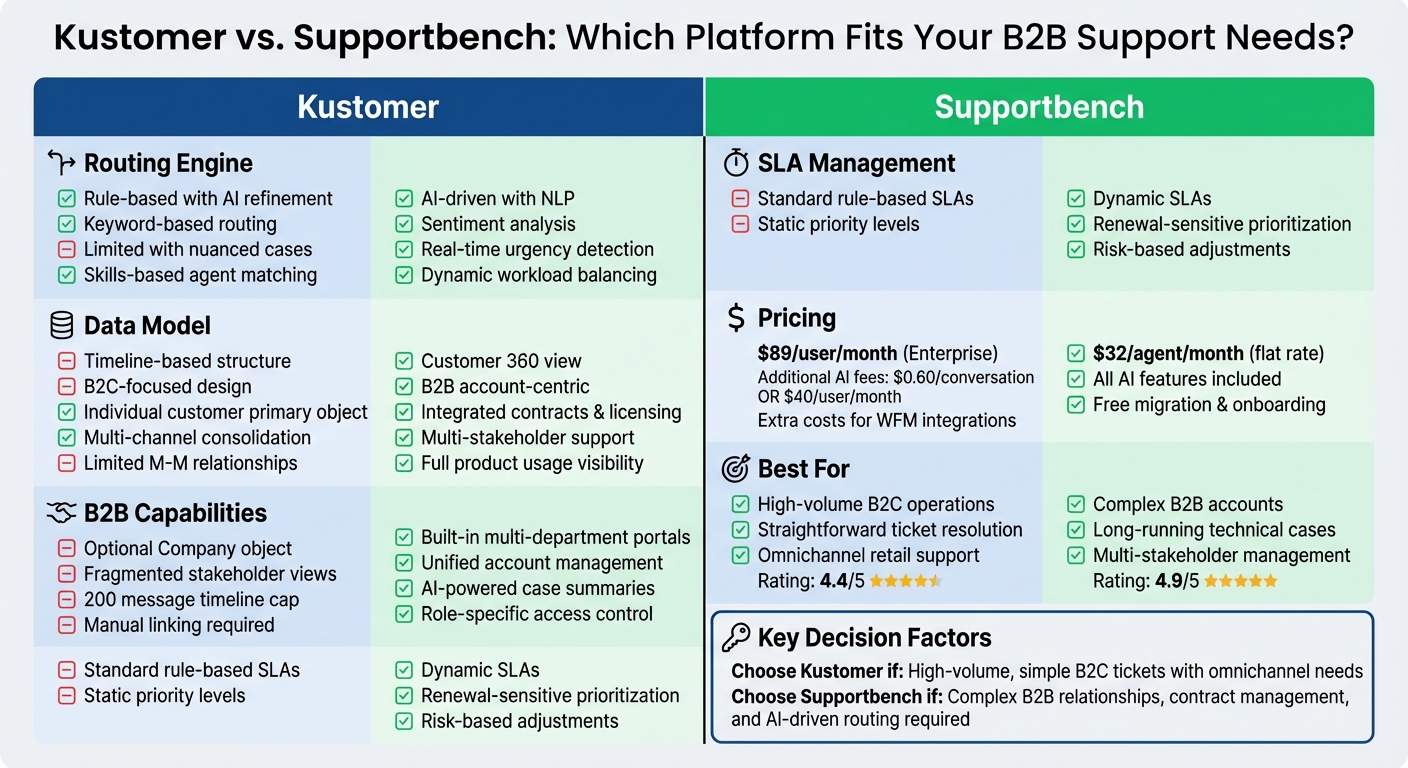
Kustomer and Supportbench take very different approaches to customer service management. Kustomer focuses on a unified timeline that treats every customer interaction as part of a continuous conversation stream. In contrast, Supportbench offers a Customer 360 view, prioritizing account-level context and enabling advanced technical workflow automation.
Routing is another area where these platforms diverge. Kustomer uses rule-based queues to assign tickets, while Supportbench leverages Natural Language Processing (NLP) to analyze content and sentiment. This AI-powered ticket routing also considers agent skills, language proficiency, and workload. For example, specialized B2B queries like API integration issues can be routed directly to certified specialists, eliminating the need for manual triage.
Nooshin Alibhai, Founder and CEO of Supportbench, highlighted the benefits of this AI-powered approach:
"AI routes the ticket to the best-equipped available agent or queue the first time. This minimizes internal transfers (‘ticket tennis’), reduces delays, and ensures customers connect with someone who can actually solve their problem faster."
When it comes to pricing, Kustomer’s Enterprise plan starts at $89 per user/month, with additional AI features available for $0.60 per conversation or $40 per user/month. Supportbench, on the other hand, offers a flat rate of $32 per agent/month, which includes all AI features. These differences in pricing and feature availability reflect the platforms’ distinct priorities, as outlined in the comparison table below.
| Feature | Kustomer | Supportbench |
|---|---|---|
| Data Structure | Unified Timeline (CRM-centric) | Customer 360 (B2B/Account-centric) |
| Routing Method | Rule-based queues & workflows | AI-driven (NLP, sentiment, urgency) |
| Primary Scalability | High-volume B2C/Enterprise | Complex B2B Accounts/Enterprise |
| B2B Customization | Optional "Company" object link | Built-in multi-department portals |
| SLA Management | Standard rule-based SLAs | Dynamic SLAs (renewal/risk sensitive) |
| Case Management | Optimized for rapid conversation resolution | Built for long-running, multi-stakeholder cases |
| Starting Price | $89 per user/month (Enterprise) | $32 per agent/month (all features included) |
Kustomer is highly rated for its enterprise analytics and omnichannel capabilities, earning a 4.4/5 rating in retail and IT environments. Meanwhile, Supportbench scores a 4.9/5 on G2 and Capterra, praised for its flexible workflows and seamless data integration in industries like financial services and IT operations.
One important consideration: Kustomer’s "Conversation Classification" AI tool was discontinued for new customers in August 2023. If you’re evaluating Kustomer, it’s worth confirming which AI features are still available to ensure they meet your needs.
Risks and Cost Factors
Kustomer’s Enterprise plan costs $89 per user/month, but additional fees for AI agents and the lack of native Workforce Management (WFM) tools can increase expenses. To address this, third-party integrations are often required, which not only add to the overall cost but can also impact performance at times.
Supportbench, on the other hand, offers a more straightforward pricing structure. At a flat rate of $32 per agent/month, it includes full AI capabilities, free migration, and onboarding. However, setting up complex workflows can be time-consuming and may require ongoing adjustments. As teams grow, failing to optimize workflows could lead to issues like misrouted tickets and agent fatigue.
Examples from earlier case studies highlight how Supportbench’s approach can simplify workflows without piling on hidden fees. These challenges with costs and configuration emphasize the importance of choosing the right customer support software that aligns with your long-term support goals.
To mitigate risks, plan fallback paths and overflow triggers during initial setup to minimize manual ticket reassignment during high-volume periods. For Kustomer, it’s essential to evaluate early investments in AI and WFM integrations. For Supportbench, dedicating time to build flexible routing logic upfront can reduce future maintenance as your team and service offerings expand.
Carefully weighing these risks and costs is crucial for B2B support leaders aiming to strike the right balance between operational efficiency and scalable, AI-powered customer service.
What B2B Support Leaders Should Evaluate
When deciding between platforms, start by examining your data model needs. If your support team requires visibility into contract values, renewal dates, licensing details, and product usage data alongside tickets, ensure the routing engine can access and act on that information. Supportbench utilizes a "Customer 360" view, integrating contracts and licensing, while Kustomer is built around a timeline-based structure. In B2B operations, this distinction can determine whether AI prioritizes tickets from accounts nearing renewal over those tied to long-term contracts.
Put AI to the test with messy, real-world tickets. Submit examples that include misspellings, technical jargon, or vague subject lines, as these can obscure critical issues. Supportbench employs Natural Language Processing (NLP) and Machine Learning (ML) to assess intent, sentiment, and urgency – going beyond simple keyword matching. If a system relies on exact keyword matches or struggles with industry-specific terminology, you might find yourself spending months fine-tuning brittle routing rules. Alongside testing input accuracy, keep an eye on how the system adapts by tracking reassignment metrics.
Reassignment rates should be your go-to metric for evaluating routing effectiveness. During trials, monitor how often AI-routed tickets are manually reassigned between agents. High reassignment rates suggest the routing logic may be missing key factors like agent skills, language capabilities, workload, or availability. For example, Wolseley Canada, which manages 7,000 to 8,000 support emails monthly, transitioned from manual sorting to automated routing based on case type and client profile. This shift, led by Customer Service and Process Improvement Manager Eilis Byrnes, sped up resolution times for long-standing issues.
Lastly, think about the overall implementation process. Evaluate the time and IT resources required. Supportbench implementations typically take weeks and don’t require ongoing IT maintenance, whereas other enterprise systems might take months and demand significant IT involvement. Beyond the monthly per-agent fee, account for setup costs, integration efforts, and potential extra charges for features like advanced SLA management.
Conclusion: Choosing the Right Solution
In an AI-driven support setup, matching your data model to your operation’s complexity is crucial. The right platform depends on whether your team handles intricate B2B relationships or more straightforward support tasks. If your operation involves managing enterprise accounts with multiple stakeholders, long-term cases, and renewal-focused priorities, your data model needs to show contract values, licensing details, and product usage alongside ticket history. Supportbench’s Customer 360 view integrates all of this directly into its routing engine, unlike timeline-based systems that often force agents to jump between tools to gather account information. This integrated approach lays the groundwork for advanced AI to improve ticket prioritization.
The quality of AI matters more than simply having AI features. Rule-based routing systems that depend on exact keyword matches often fail when customers use unclear subject lines or industry-specific terms. More advanced NLP and ML capabilities analyze factors like sentiment, urgency, and intent, making it easier to prioritize critical issues effectively. If your system frequently results in ticket reassignments or requires constant manual adjustments, it might be relying on outdated, rigid routing logic that struggles with the complexity of real-world tickets.
Implementation speed and overall cost are also key factors. Supportbench implementations are typically completed within weeks and don’t require ongoing IT maintenance. Its inclusive pricing model eliminates surprise costs. On the other hand, older platforms might take months to deploy and charge extra for features like dynamic SLA management, escalation tools, or AI-powered summaries. These additional costs can quickly exceed budgets, especially as your team grows. This makes evaluating both cost-effectiveness and deployment speed essential.
Start by conducting a workflow audit. Identify where tickets get delayed, how often they’re reassigned, and whether your team has visibility into agent workloads or SLA compliance. Examples from real-world use cases show how the right system can significantly improve efficiency within a year by automating routing based on case type and client profile. The right choice should streamline operations, reduce internal ticket transfers, and avoid unnecessary complexity.
FAQs
How can I test routing accuracy with real, messy B2B tickets?
To evaluate routing accuracy, begin by examining historical ticket data to spot patterns and frequent misrouting issues. Leverage AI tools such as natural language processing (NLP) to automatically categorize and tag tickets, which helps minimize human errors. Check the accuracy by sampling routed tickets for review, fine-tuning routing rules or AI models as necessary. Keep an eye on metrics like reassignment rates and resolution times to maintain reliable and efficient handling of even the most complex tickets.
What data do I need for a true Customer 360 view in B2B support?
Creating a comprehensive Customer 360 view in the B2B world requires combining data from multiple critical areas. These include firmographics (like company size and industry), contact information, transactional history (such as purchases and contracts), behavioral data (like how products are being used), and contextual insights (preferences and customer sentiment).
For this to work effectively, it’s essential to integrate data from all key departments – sales, support, marketing, and customer success. Beyond integration, maintaining high-quality data and ensuring real-time updates are equally important. These steps help ensure the insights generated are accurate and actionable, enabling better decision-making and customer engagement.
How can I reduce ticket reassignments without adding more rules?
To cut down on ticket reassignments without piling on extra rules, tap into AI-driven routing. By using tools like natural language processing (NLP), AI can analyze ticket content and context in real time. This allows it to categorize and assign tickets based on factors like intent, urgency, and customer profile. Plus, by constantly refining routing algorithms through AI feedback, you can boost accuracy even more. The result? Tickets land with the right agents right away, minimizing manual reassignments.
Related Blog Posts
- NLP for Ticket Routing: How It Works
- HappyFox alternatives for B2B: what platforms support complex workflows best?
- Help Scout alternatives for B2B teams: what to choose when you outgrow shared inbox
- Freshdesk vs. Supportbench: Why B2B Teams Outgrow Freshdesk’s Ticket Model
Evaluating help desks for a B2B team?
Supportbench is all-inclusive from $32 per agent per month, with migration and onboarding included. See pricing or book a 20-minute demo.






