



When your B2B team outgrows Help Scout, finding the right support platform is critical. Shared inboxes aren’t designed for complex accounts, multi-year contracts, or renewal-sensitive workflows. Here’s a quick breakdown of three top alternatives – Supportbench, Zendesk, and Freshdesk – to help you decide:
- Supportbench: Best for B2B teams managing high-value accounts. Offers a complete Customer 360 view, AI tools (like predictive analytics and sentiment analysis), and renewal-sensitive SLAs. Pricing starts at $32/agent/month with all features included.
- Zendesk: Great for large enterprises handling high ticket volumes. Advanced AI and custom workflows are available but often require expensive add-ons. Pricing starts at $19/agent/month, with higher tiers reaching $169/agent/month plus extra fees for AI tools.
- Freshdesk: Ideal for smaller teams with limited budgets. Provides basic automation and collaboration tools but lacks depth for complex B2B needs. Pricing starts at $15/agent/month, with advanced AI as a paid add-on.
Quick Comparison
| Platform | AI Tools | B2B Features | Starting Price (per agent/month) |
|---|---|---|---|
| Supportbench | Included at all tiers | Customer 360, renewal-sensitive SLAs | $32 |
| Zendesk | Paid add-ons required | Limited B2B focus, high customization | $19 |
| Freshdesk | Paid add-ons required | Basic ticketing, limited advanced features | $15 |
Key takeaway: Supportbench is the most B2B-focused option, offering advanced tools without hidden costs. Zendesk suits enterprises with large budgets, while Freshdesk works for smaller teams prioritizing affordability. Choose based on your team’s size, budget, and complexity.
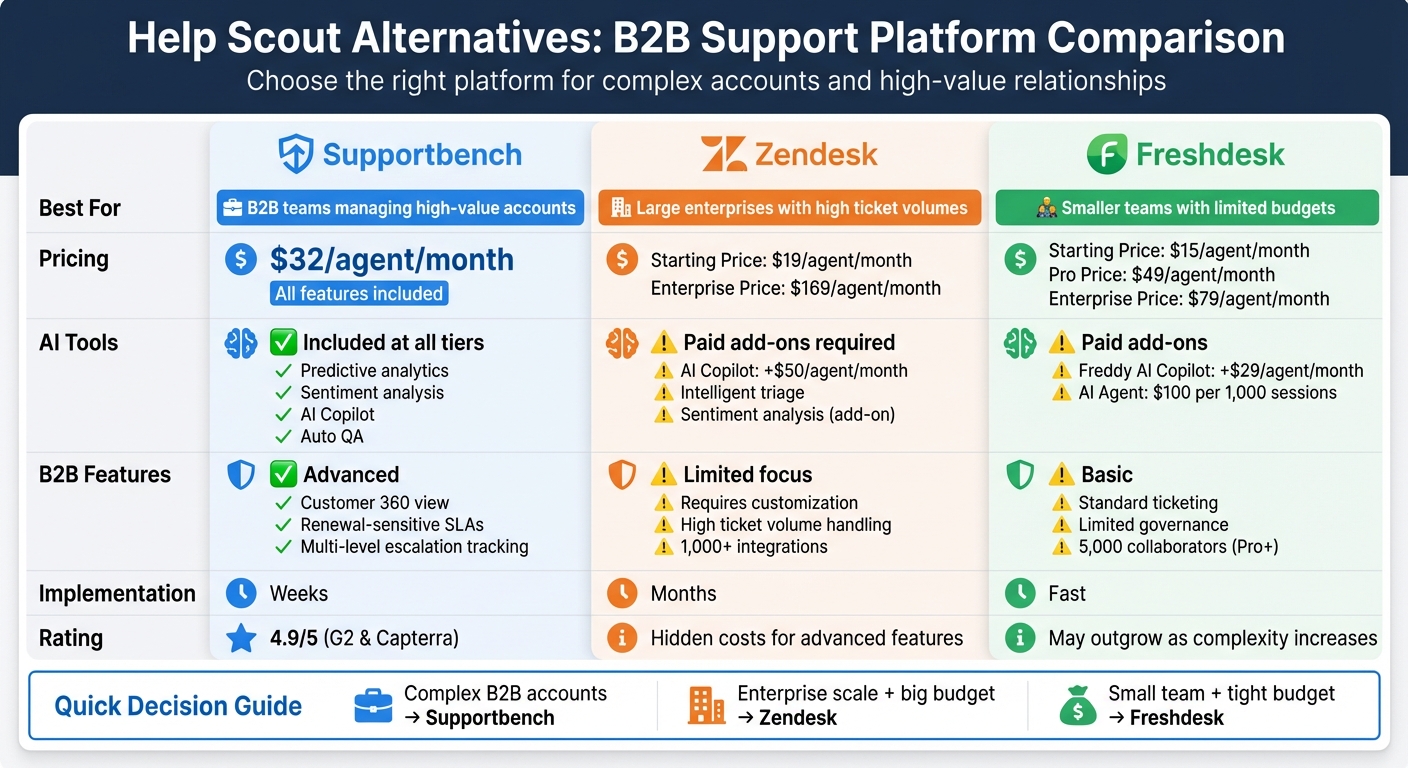
Help Scout Alternatives Comparison: Supportbench vs Zendesk vs Freshdesk for B2B Teams
10 Best Customer Service Software for 2025
sbb-itb-e60d259
1. Supportbench
Supportbench is tailored for B2B teams handling complex accounts, long-term cases, and renewal-driven relationships. It offers a Customer 360 view by integrating essential data – like contracts, licensing, product usage, and multi-stakeholder records – directly into the ticketing system. This setup eliminates the hassle of switching between tabs, giving agents all the context they need in one place.
The platform boasts an impressive 4.9/5 rating on both G2 and Capterra, with users praising its ability to manage technical products where relationship history is critical. Its "no IT required" approach allows operations teams to get the system up and running in weeks, not months. This design lays the groundwork for advanced automation and collaboration tools.
AI Capabilities
Supportbench provides enterprise-grade AI across all pricing tiers – no premium add-ons required. Its AI Copilot suggests replies, summarizes threads, and retrieves key information instantly, making it easier for new agents to handle complex accounts without digging through extensive histories.
The platform also includes automated quality assurance, which evaluates every ticket for empathy, tone, accuracy, and effectiveness. Predictive CSAT and CES scores analyze sentiment and emotion to forecast satisfaction before surveys even go out. Resolved tickets can be converted into KCS-aligned knowledge base articles with just one click, complete with auto-tagging and summarization.
"Supportbench stands out in AI by providing enterprise-grade automation at all levels. Its platform integrates predictive analytics, sentiment analysis, and SLA-driven workflows."
- Nooshin Alibhai, Founder and CEO of Supportbench
These AI-driven tools are designed to streamline B2B operations and enhance the management of complex account relationships.
B2B-Specific Features
Supportbench’s dynamic SLAs adapt automatically based on case details. For instance, when renewal signals or high-value account statuses are detected, response times tighten without requiring manual adjustments. This ensures that agents stay on top of critical cases while maintaining a full Customer 360 perspective.
The platform also offers multi-level escalation management system with built-in tracking, so agents know exactly how and where to escalate issues – no manual updates required. For multi-stakeholder environments, role-based portal access ensures B2B customers only see tickets and data relevant to their organization. Additionally, retention-focused analytics track customer health, churn risks, and sentiment trends, transforming support from a reactive service into a proactive retention strategy.
Pricing and Scalability
Supportbench uses an "everything included" pricing model, avoiding the surprise charges and feature gating often seen with legacy systems. Features like advanced AI, sentiment analysis, and dynamic SLAs are available at every tier.
Plans start at $32 per agent per month, with clear pricing designed to scale alongside your business. Free migration and onboarding help reduce upfront costs, and tools like KPI scorecards and cross-department visibility remain accessible as teams grow from small businesses to large enterprises.
2. Zendesk
Zendesk is a popular choice for high-volume support operations, especially among large enterprises managing intricate workflows. With its extensive customization options and over 1,000 third-party app integrations, it’s designed to handle complex customer service needs. However, its modular pricing model means that essential features for B2B teams – like advanced AI tools, AI-driven sentiment analysis, and workforce management – are often add-ons, which can drive up costs. This pricing structure directly impacts how its AI functionalities are accessed and utilized.
AI Capabilities
Zendesk’s AI tools are built to streamline routine tasks. For example, its intelligent triage system identifies customer intent, language, and sentiment, saving between 30–60 seconds per ticket. It also routes tickets to specialized agents based on sentiment, ensuring high-priority B2B accounts are escalated efficiently. For teams looking to enhance these capabilities, the Copilot add-on – priced at $50 per agent per month – offers features like Auto Assist, ticket summaries, and suggested replies. A case study from 2025 highlights how Catapult Sports leveraged AI Copilot to cut first reply times by 50% and reduce resolution times by 21%.
Zendesk’s AI models come pre-trained on billions of real customer interactions, eliminating the need for manual setup. Its quality assurance tools further help by monitoring interactions to flag churn risks or knowledge gaps. For instance, Buffer reduced time spent on manual quality checks by 50% using these tools. However, for B2B teams, the incremental costs associated with these advanced features may complicate efforts to create a seamless, all-in-one system for account management.
B2B-Specific Features
While Zendesk offers strong AI capabilities, its design presents challenges when addressing B2B-specific needs. Although the platform scales effectively for large enterprises, it wasn’t initially tailored for the complexities of B2B workflows. For example, while it supports multi-stakeholder collaboration, native integrations with tools like Slack or Microsoft Teams are often limited to basic notifications rather than enabling full two-way communication.
B2B teams managing tasks like renewals, entitlements, and asset tracking may find it difficult to achieve a complete Customer 360 view without relying on fragmented modules or third-party apps. The platform does excel in ticketing and SLA workflows for long-term issue resolution, but more advanced governance features – such as SLA configurations sensitive to contract renewals – often require higher-tier plans or custom setups. Additionally, the interface isn’t always optimized for real-time, cross-functional collaboration, which can be a drawback for teams with complex operational needs.
Pricing and Scalability
Zendesk uses a per-agent pricing model, which makes staffing costs predictable. However, advanced AI tools and other features like workforce management and quality assurance come as additional monthly fees, which can add up quickly. Below is a breakdown of Zendesk’s pricing:
| Plan Tier | Cost (per agent/month, billed annually) | Key Features |
|---|---|---|
| Suite Team | $55 | Ticketing, messaging, voice, one help center, Essential AI |
| Suite Professional | $115 | Multiple help centers, HIPAA compliance, SLAs |
| Suite Enterprise | $169 | Advanced reporting, dynamic workspaces, high scalability |
| Advanced AI Add-on | +$50 | Intelligent triage, sentiment analysis, proactive insights |
Zendesk’s scalability makes it appealing for large enterprises, particularly those with stringent compliance needs like HIPAA, SOC 2, and GDPR. However, smaller teams or organizations with tight budgets should carefully evaluate the total cost of ownership. For B2B teams, the reliance on modular add-ons can lead to escalating expenses, especially when managing complex workflows or integrating additional tools. This pricing structure underscores the importance of balancing functionality with budget constraints.
3. Freshdesk
Freshdesk stands out as a budget-friendly option for teams that have outgrown Help Scout’s limited automation features. Trusted by over 74,000 businesses worldwide, it caters to small- and mid-sized teams that need reliable ticketing and self-service tools without the intricacies of larger enterprise systems. Its straightforward interface is a key selling point – Sam Elshawarby, Manager of International Customer Services, shared, "It was easy for them to navigate through the system, find tags, merge tickets, etc.". This makes it an attractive choice for teams moving beyond basic shared inbox tools.
AI Capabilities
Freshdesk has embraced an "AI-first" strategy with its Freddy AI suite, which includes three core tools: Freddy AI Copilot (agent support), Freddy AI Agent (customer-facing automation), and Freddy AI Insights (analytics automation).
- Freddy AI Copilot prioritizes tickets using sentiment analysis and suggests relevant knowledge base articles.
- Freddy AI Agent autonomously resolves up to 80% of customer queries in under two minutes. Abdulrahman Althekair from UPayments noted, "The impact of the Freddy AI Agent has been transformative… it now resolves over 75% of conversations without the need for human intervention".
However, these advanced AI tools come with additional costs. The AI Copilot add-on is priced at $29 per agent per month, while AI Agent sessions cost $100 per 1,000 sessions after the first 500 free sessions.
B2B-Specific Features
Freshdesk offers several features tailored for B2B collaboration:
- External Collaborators: Up to 5,000 collaborators are included in Pro and Enterprise tiers, allowing seamless interaction with stakeholders.
- Internal Threads: Enable private discussions on tickets.
- Custom Objects: Available in the Pro tier, this feature lets teams track unique business data like specific projects for better decision-making.
The platform also includes standard SLA management and approval workflows for handling long-running issues, but it has limitations. For example, while it supports basic multi-level escalations and skill-based routing, it may not meet the complex governance needs of large-scale B2B operations. Building a comprehensive Customer 360 view – covering contracts, entitlements, and assets – often requires workarounds or third-party integrations. Teams with intricate workflows, such as those managing contract-sensitive SLAs or cross-functional coordination, might find Freshdesk’s capabilities restrictive over time.
Pricing and Scalability
Freshdesk follows a per-agent pricing model that grows with team size.
- The Growth plan starts at $15 per agent per month (billed annually).
- The Pro plan costs $49 per agent per month.
- The Enterprise plan is priced at $79 per agent per month.
For instance, a 50-agent team on the Pro plan would spend about $29,400 annually, excluding optional AI add-ons. Here’s a quick breakdown:
| Plan | Price (per agent/month, billed annually) | Key Features |
|---|---|---|
| Growth | $15 | Basic ticketing, customer portal, standard reports |
| Pro | $49 | Custom objects, advanced routing, 5,000 collaborators |
| Enterprise | $79 | Audit logs, approval workflows, skill-based assignment, HIPAA compliance |
| AI Copilot Add-on | +$29 | Sentiment analysis, ticket summaries, suggested replies |
| AI Agent Sessions | $100 per 1,000 sessions | First 500 sessions included |
Freshdesk appeals to growing teams with its enterprise-level security features, such as SOC 2 Type II certification, GDPR compliance, and IP whitelisting. However, some advanced tools, like sandbox environments for testing automation rules, are only available in the Enterprise tier. Additionally, the mobile app offers fewer features compared to the desktop version.
For B2B teams that need moderate customization and reliable automation, Freshdesk serves as a strong intermediate solution. But as operational demands grow, teams may find themselves needing to transition to a more specialized platform. These pricing and scalability details help paint a clearer picture of how Freshdesk compares to other platforms.
Comparison: Pros and Cons
Navigating the world of AI-native B2B support can feel overwhelming, especially when factors like multi-stakeholder coordination, renewal-sensitive SLAs, and a full Customer 360 view are non-negotiable. To make things easier, here’s a side-by-side look at how three popular platforms measure up in terms of pricing, capabilities, and scalability.
| Platform | AI Capabilities | B2B Features | Pricing Model | Ideal For |
|---|---|---|---|---|
| Supportbench | Enterprise-grade AI with tools like predictive analytics, sentiment analysis, automatic ticket summaries, and one-click knowledge base article creation. | Designed for B2B complexity with features like a full Customer 360 view, renewal-sensitive SLAs, and multi-level escalation tracking. | Starts at $32 per agent/month, with all features included and no hidden add-on fees. | B2B SaaS companies handling high-touch accounts, complex products, and long-running cases. |
| Zendesk | Advanced AI tools (e.g., Answer Bot and predictive insights) available but often tied to higher tiers or add-ons. | Handles high-volume operations but typically requires significant customization to fit B2B workflows. | Starts at $19 per agent/month for the Support Team plan; Enterprise tier costs $115 per agent/month, plus extra for advanced features. | Large enterprises managing massive ticket volumes with IT resources to handle custom configurations. |
| Freshdesk | Freddy AI suite offers basic automation, ideal for smaller teams. | Focuses on basic ticketing but struggles with governance and managing complex B2B escalations as teams grow. | Starts with a Growth plan at $15 per agent/month, Pro at $49 per agent/month, and Enterprise at $79 per agent/month. | Small to mid-sized teams looking for low upfront costs and straightforward ticketing functionality. |
Key Differences in Pricing and Implementation
The cost differences between these platforms become even more noticeable at scale. For instance, a 50-agent team using Zendesk’s Enterprise tier would spend around $69,000 annually – and that’s before factoring in AI add-ons. On the other hand, platforms like Supportbench offer a more predictable pricing model without hidden fees, while Freshdesk caters to smaller budgets but may lack the depth needed for larger, complex teams.
Implementation timelines also vary significantly. Zendesk deployments for enterprise use can take months, while Supportbench typically requires just a few weeks. For B2B teams juggling contract-sensitive SLAs, collaborative workflows, and customer health metrics, the platform’s architecture often matters as much as its price – especially when 74% of organizations report achieving ROI from AI within the first year of adoption.
The Bottom Line
Each platform has its strengths and trade-offs. Zendesk is built for massive scale but comes with higher costs and complexity. Freshdesk offers affordability and simplicity but may fall short for advanced B2B needs. Supportbench strikes a middle ground, delivering enterprise-level features without the hefty price tag or lengthy setup process. Ultimately, the best choice depends on your team’s specific requirements and priorities.
Conclusion
Choosing the right platform comes down to matching your support strategy with your operational goals and budget. For B2B SaaS businesses that manage long-term customer relationships, rely heavily on detailed contract and licensing data, and need AI tools without hidden fees, Supportbench is tailored to meet those demands. It offers enterprise-level features like sentiment analysis, predictive analytics to reduce churn, and a complete view of the customer – all with transparent pricing.
While other platforms might provide entry-level affordability or scalability, they often come with compromises. These can include limited AI capabilities, rigid SLA management, or challenges in coordinating across multiple stakeholders. As teams grow and B2B operations become more complex, these shortcomings can lead to higher costs and longer implementation times.
Ultimately, the best platform is one that fits your team’s size, budget, and operational complexity. Whether you choose Supportbench for its focus on high-touch B2B support or another tool that better suits your needs, the right choice will streamline your processes and support growth. This ensures your team can handle the demands of intricate B2B relationships while scaling efficiently.
FAQs
When should a B2B team move beyond a shared inbox?
When manual communication starts to feel more like a bottleneck than a solution, it’s time for a B2B team to consider moving past a shared inbox. This often happens when the volume of inquiries gets overwhelming or workflows become too intricate to manage effectively.
Key signs include the need for automation powered by AI, seamless collaboration across multiple stakeholders, or deeper account-level insights. Shared inboxes typically fall short in these areas – they lack organized ticketing systems, fail to provide clear visibility into customer history, and offer little to no automation. As your operations grow, these limitations can slow down your team and frustrate your customers. To maintain efficiency and meet customer expectations, adopting a dedicated support platform becomes a smart move for sustainable success.
What B2B data should a support platform include for a Customer 360 view?
A solid support platform needs to house essential data like customer and account details, support history, contracts or licenses, stakeholder roles, communication preferences, sentiment and health scores, escalation and SLA information, and relevant notes. Together, these elements create a detailed Customer 360 view, specifically designed for B2B support teams handling intricate operations.
How can AI reduce support costs without sacrificing quality?
AI helps cut support costs without sacrificing quality by automating repetitive tasks, allowing teams to dedicate their efforts to more challenging issues. Today’s AI systems can automatically resolve 40-60% of support tickets, slashing response times by as much as 97%. They also enhance customer satisfaction through features like intelligent triage and sentiment analysis. By efficiently managing large ticket volumes, AI reduces the cost per ticket by up to 50%, all while ensuring operations remain scalable and maintain high standards.
Related Blog Posts
- What’s the best alternative to Salesforce Service Cloud for B2B support teams?
- Pylon alternatives for B2B support: what should you use as you scale?
- Kayako alternatives for B2B support teams: what to choose and why
- What are the best Intercom alternatives for B2B support teams that need ticketing?
Evaluating help desks for a B2B team?
Supportbench is all-inclusive from $32 per agent per month, with migration and onboarding included. See pricing or book a 20-minute demo.






