


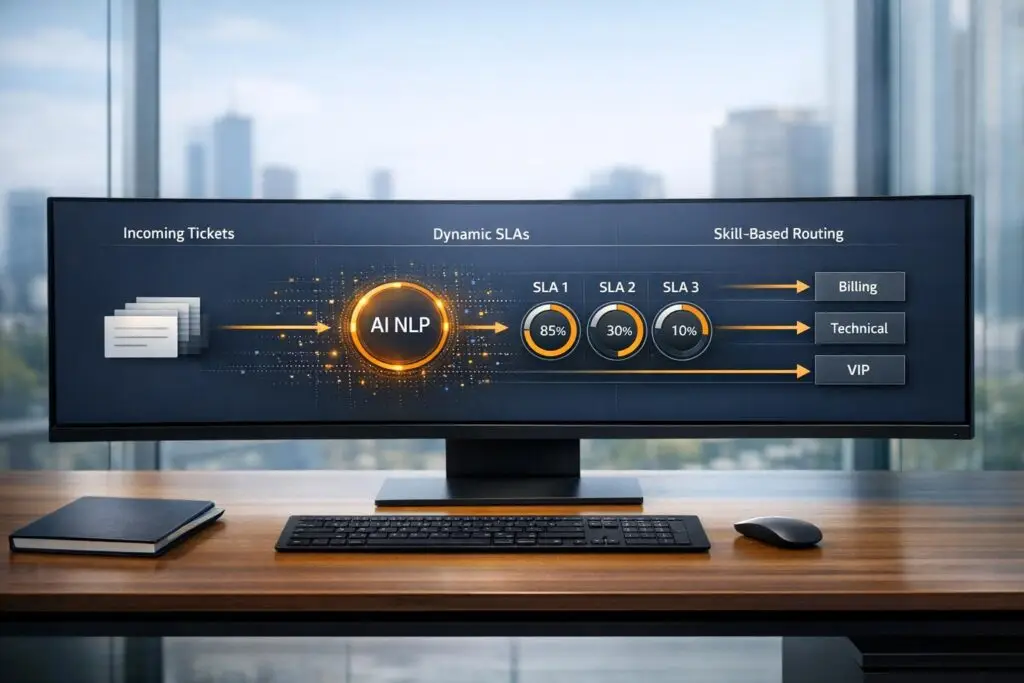
To modernize Kayako’s outdated automations, SLAs, and routing, shift to AI-driven tools that prioritize context over rigid rules. Here’s how:
- Automation: Replace keyword-based triggers with AI-powered Natural Language Processing (NLP) to understand ticket intent, urgency, and sentiment.
- SLAs: Move from static response times to dynamic SLAs that adjust based on ticket content, tone, and customer importance.
- Routing: Use AI to match tickets with the right agents based on skills, workload, and issue complexity, avoiding delays caused by manual assignments.
Modern platforms simplify workflows, reduce manual effort, and improve efficiency by automating repetitive tasks and ensuring tickets are handled correctly the first time. The transition involves auditing your current setup, testing new processes, and refining them based on performance insights.
Kayako‘s Core Features and Why Teams Migrate
How Kayako Automations, SLAs, and Routing Work
Kayako’s automation system is built around two main tools: Triggers and Monitors. Triggers act immediately based on events, like when a ticket is created or updated. On the other hand, Monitors run hourly, checking for things like SLA breaches through server crons. Together, these tools let teams manage both real-time actions – like assigning tickets as they come in – and delayed tasks, such as sending reminders for overdue cases.
When it comes to SLA tracking, Kayako measures three key metrics: first reply time (how quickly the initial response is sent), next reply time (time between staff updates), and resolution time (when the ticket is marked "Completed"). These SLA targets are predefined, based on fields like team assignments or ticket priority. For instance, a high-priority ticket for a VIP client might trigger stricter SLA requirements.
Routing in Kayako is powered by trigger-based rules that assign tickets to specific teams or agents. These rules rely on criteria like the email address where the ticket was sent, the customer’s form submission, or specific tags on the ticket. Some workflows involve "Collaborators", such as scheduling or technical teams, who add internal notes. When a collaborator updates a ticket, a trigger ensures it’s rerouted back to the main support team.
However, these systems depend heavily on exact matches in ticket data. If a critical issue isn’t described with the exact expected wording – or if there’s a typo – automations can fail entirely. Another challenge is timing. Monitors only execute once an hour, which means time-sensitive escalations could be delayed by up to 59 minutes. As Kayako Support explains: "There is no way to configure Monitors’ rules to run at a specific time. They are executed every hour through server crons and we don’t have control over its execution time".
Typical Migration Problems
These limitations often push teams to migrate away from Kayako. One of the biggest issues is how rigid and interconnected its automation rules are. As businesses grow and change, new ticket types or workflows require manual updates to existing automations, which can quickly become overwhelming. Administrators often lose track of how Triggers and Monitors depend on one another, creating fragile workflows where even minor changes can cause system-wide disruptions.
Another major drawback is the lack of contextual understanding in Kayako’s system. For example, a message describing a major system outage might be routed to a low-priority queue simply because it doesn’t include specific “urgent” keywords. These kinds of manual categorization errors reduce efficiency, waste agents’ time, and lead to inaccurate reporting. This makes it harder for leadership to understand ticket trends or pinpoint the root causes of recurring issues.
Kayako’s static SLA system is another obstacle. Its fixed response targets can’t adapt to the content, tone, or importance of a ticket. Pricing further complicates things: the Inbox plan doesn’t include SLA support, the Growth plan allows only one SLA, and only the Scale and Enterprise plans support multiple SLAs and custom business hours. Additionally, Monitors are capped at processing 1,000 tickets per hourly run, which can create bottlenecks for teams handling high ticket volumes.
When planning a migration, teams often struggle to export configurations and map their workflows to a new platform. The key is to carefully audit existing automations and document how they interact. For example, a trigger might change a ticket’s status, which then allows a monitor to send a reminder. Instead of manually recreating every keyword-based rule, teams should focus on the desired outcomes – like routing integration-related tickets to Tier 2 support – and leverage AI for smarter classification. Moving from rigid, keyword-dependent setups to intent-based, AI-driven workflows is the logical next step for modern support teams. This shift not only reduces operational friction but also positions teams to handle evolving customer needs with greater agility.
sbb-itb-e60d259
Preparing Your Migration to a Modern Platform
Auditing Your Current Kayako Setup
Before you begin migrating, it’s essential to map out your existing support workflows, conversation types, and customer needs. A simple flowchart can help visualize how tickets flow through your system, starting from creation all the way to resolution. This map will highlight areas where automation is already in place and, more critically, where manual work is bogging down your agents.
Take the time to document all active automations in your system. Kayako uses two types: immediate Triggers and hourly Monitors. For each rule, record its "Conditions" (like tags, status, or custom fields) and "Actions" (such as sending notifications or assigning tickets to specific teams). If your rule names are unclear or generic, now is a good time to rename them. For instance, instead of "Rule 1", use something descriptive like "2-hour SLA warning email".
Next, review your SLA (Service Level Agreement) targets. Note how these targets differ by priority level and whether they are based on business hours or calendar hours. Additionally, catalog any custom fields, particularly dropdown menus like "Outcome" fields, as these often trigger specific workflows. These details will need to be transferred to your new platform. Keep in mind that Kayako monitors are limited to processing 1,000 cases per hourly run, so workflows that handle high volumes may require real-time solutions.
| Audit Category | Elements to Document | Purpose |
|---|---|---|
| Triggers | Event type, channel, conditions, actions | Understand real-time routing and notification logic |
| Monitors | Time-based conditions, hourly actions | Identify reminder and escalation schedules |
| SLAs | Reply/resolution targets, business hours | Establish baseline performance expectations |
| Custom Logic | Tags, custom fields, form-based rules | Map unique data points for segmentation |
This audit will provide a clear foundation for transitioning your outdated workflows into a modern, AI-driven system.
Converting Legacy Workflows to Modern Processes
Using the insights from your audit, start identifying rules that are prone to failure – like those that depend on exact keywords or dropdown selections. These brittle rules should be at the top of your list for replacement with AI. Instead of manually recreating every keyword-based rule, focus on the overall goal. For example, if the aim is to route integration issues to Tier 2 support, let AI handle classification through Natural Language Processing (NLP).
Modern platforms can analyze the tone and content of messages, going beyond simple keyword matching. For example, a message about a system outage might currently be marked as low priority because it doesn’t include the word "urgent." AI can evaluate the entire message context to determine its true urgency. Similarly, look for repetitive manual tasks – like agents adding tags or updating status fields – and consider these for zero-code automation.
Pay special attention to workflows for high-value clients and critical issues. Context-aware AI can help prioritize these effectively. Also, document any cross-team workflows, making use of "Collaborator" accounts to ensure smooth transitions. The goal here isn’t to replicate your old system exactly but to replace rigid, keyword-based processes with intelligent workflows that understand customer intent – not just the words they type.
How to Recreate Kayako Automations, SLAs, and Routing
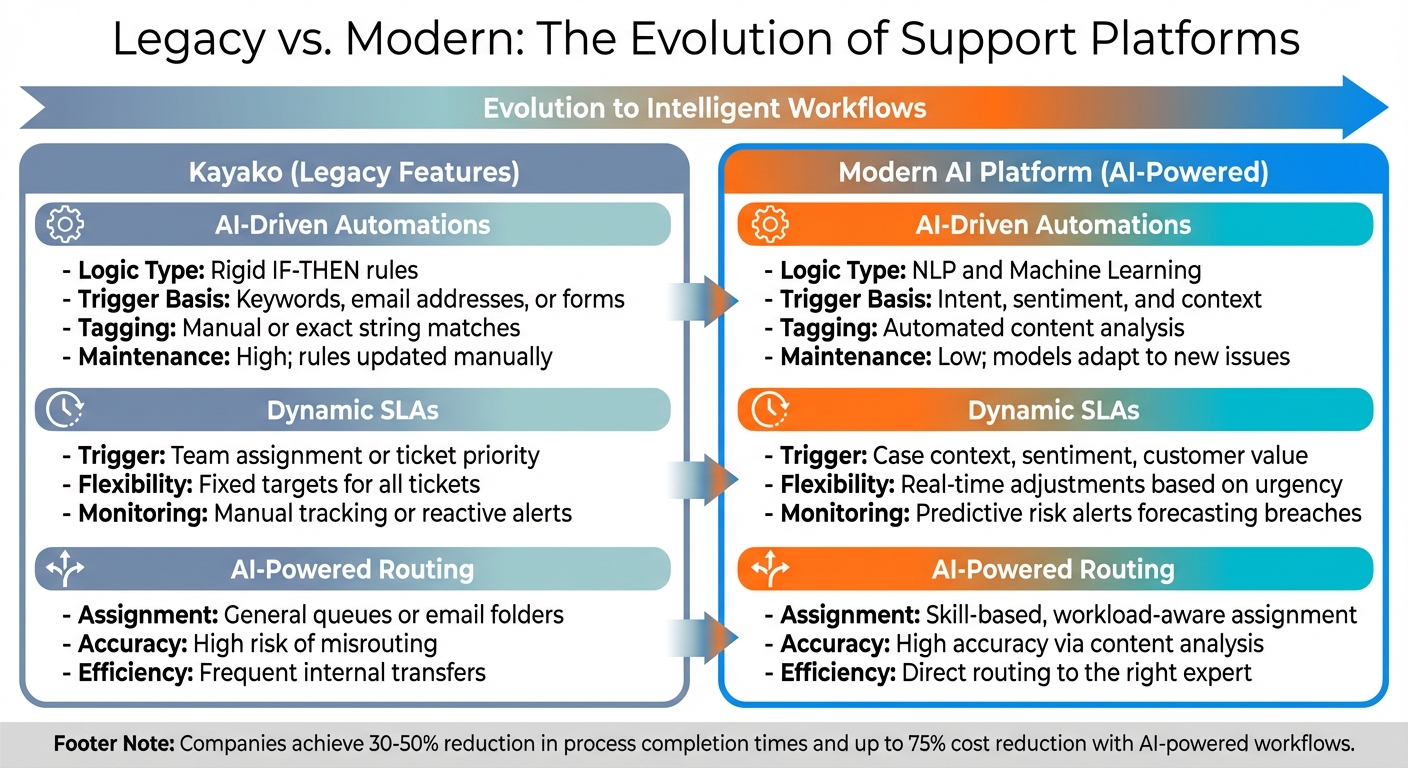
Kayako vs Modern AI Platform: Automations, SLAs, and Routing Comparison
Once you’ve completed your audit, it’s time to build modern tools that go beyond the rigid, rule-based systems of the past. This upgrade replaces manual processes with smarter workflows that adjust to customer needs and context.
Setting Up AI-Driven Automations
Instead of recreating each outdated rule, use AI to analyze ticket details – like the subject line and body text – through Natural Language Processing (NLP). This allows the system to automatically detect issue types, product mentions, and even customer sentiment, eliminating the need for manual tagging. For example, if a customer writes, "Can’t access the dashboard after the update", the AI can recognize it as a login issue linked to the recent release.
Using insights from your audit, design workflows where AI outputs trigger specific actions. For instance, if the system identifies negative sentiment in a message from a high-value customer, it can automatically escalate the ticket and route it to a senior agent. As Nooshin Alibhai, Founder and CEO of Supportbench, puts it:
"By moving beyond rigid rules, AI analyzes the content and context of incoming requests, enabling faster, more accurate, and vastly more efficient workflow management."
| Feature | Kayako (Legacy) | Modern AI Platform |
|---|---|---|
| Logic Type | Rigid IF-THEN rules | NLP and Machine Learning |
| Trigger Basis | Keywords, email addresses, or forms | Intent, sentiment, and context |
| Tagging | Manual or exact string matches | Automated content analysis |
| Maintenance | High; rules updated manually | Low; models adapt to new issues |
Configuring Dynamic SLAs
Once ticket categorization is automated, fine-tune your SLA rules to adapt to each ticket’s context. Kayako’s SLAs are static, applying the same response targets to all tickets in a queue, regardless of urgency. Modern platforms, however, adjust SLA targets dynamically. For instance, if a customer’s renewal date is near or the AI detects frustration in their tone, the system can shorten the response time from four hours to just one.
Set up SLA logic with clear conditions: "Applicable When" defines which cases the SLA applies to, "Success" sets the goal (like responding within two business hours), and "Pause" accounts for delays, such as waiting on customer feedback or third-party action. These modern systems also handle business hours, time zones, and holidays automatically, removing the need for manual calculations and reducing the chances of SLA breaches.
| Feature | Static SLAs (Kayako) | Dynamic SLAs (Modern) |
|---|---|---|
| Trigger | Team assignment or ticket priority | Case context, sentiment, customer value |
| Flexibility | Fixed targets for all tickets | Real-time adjustments based on urgency |
| Monitoring | Manual tracking or reactive alerts | Predictive risk alerts forecasting breaches |
Building AI-Powered Routing
Dynamic SLAs work best when paired with AI-powered routing, ensuring priority tickets are quickly assigned to the right expert. Kayako’s routing relies on email addresses or general queues, which often results in delays. In contrast, AI analyzes ticket content to match it with agents based on skills, language proficiency, and current workload. For example, agents can be tagged with expertise like "SSO/SAML Specialist" or "API Integration Expert", allowing the system to bypass general queues for technical issues.
AI also identifies urgency even when customers don’t explicitly state it. A message like "system down" can trigger high-priority routing, even if the customer marked the ticket as low priority. This context-aware approach ensures faster resolution times and spares customers the frustration of repeating their issue.
| Feature | Manual/Rule-Based Routing | AI-Powered Routing |
|---|---|---|
| Assignment | General queues or email folders | Skill-based, workload-aware assignment |
| Accuracy | High risk of misrouting | High accuracy via content analysis |
| Efficiency | Frequent internal transfers | Direct routing to the right expert |
Testing and Improving Your New Workflows
Creating your new automations, SLAs, and routing rules is just the start. The real challenge – and payoff – comes from making sure everything works smoothly and using AI-powered insights to fine-tune your system over time.
Running Parallel Tests
Before fully retiring your old Kayako system, run both platforms simultaneously for a trial period. For example, you can route 20–30% of your incoming tickets through the new system while the rest remain in Kayako. This lets you evaluate how AI-driven routing and prioritization stacks up against your existing rules without disrupting your entire operation.
Focus on testing scenarios that have caused issues in the past. For instance, if tickets about API integration were often misrouted to general support, check if the AI now recognizes technical terms and correctly assigns these cases to specialists labeled as "API Integration Expert." Keep an eye on metrics like First Contact Resolution (FCR) and the number of internal transfers to ensure tickets are reaching the right agents from the start.
You can also use a sandbox environment to test edge cases with historical data before going live. Load older tickets to see how the new system responds. This helps confirm whether the AI can accurately detect urgency in messages like "system down", even when customers don’t explicitly flag them as high priority. Clean up your system by removing outdated fields, redundant statuses, and duplicate accounts before running these tests.
Once your parallel testing confirms the system performs well, shift your efforts toward ongoing optimization.
Using AI Data to Refine Workflows
After successful testing, leverage AI insights to fine-tune your workflows. Modern platforms offer real-time dashboards that highlight what’s working and where improvements are needed. AI analytics can track sentiment changes during conversations, predict customer satisfaction before surveys are sent, and pinpoint recurring bottlenecks by issue type. This smooth transition from testing to live monitoring ensures your AI-driven support evolves with your business needs.
Track metrics like First Reply Time (FRT), Average Handle Time (AHT), and SLA breach trends to identify patterns. For example, if tickets with phrases like "can’t log in" repeatedly miss SLA targets, adjust your AI to prioritize and route these issues directly to technical specialists.
AI platforms also simplify quality assurance by automatically reviewing tickets for empathy, tone, and solution accuracy, eliminating the need for manual spot checks. If the AI misclassifies a ticket, provide corrective feedback to improve future accuracy. This feedback loop helps the machine learning model adapt and get smarter over time. As Nooshin Alibhai, Founder and CEO of Supportbench, puts it:
"AI isn’t ‘set it and forget it.’ Monitor the accuracy of AI-driven categorization, prioritization, and routing. Provide feedback to the system (if possible) and refine configurations based on performance and changing business needs."
Keep an eye on CSAT and CES scores to measure the impact of your workflows. If sentiment analysis shows spikes in frustration after certain automated responses, tweak your messaging or escalation triggers. Companies that actively refine their workflows often achieve a 30–50% reduction in process completion times and cut operational costs by up to 75% compared to manual processes.
Conclusion
Switching from Kayako to a modern, AI-native platform can be seamless when you take the right steps: auditing your current setup, transforming outdated workflows, and leveraging AI-driven automations, SLAs, and routing. The key is to view AI as a flexible, evolving tool that learns and improves over time, rather than as a rigid replacement for traditional IF-THEN logic.
By adopting AI-powered workflows, businesses can enjoy faster processes, reduced ticket handling, quicker connections to experts, and lower administrative burdens by eliminating complex, rule-based systems.
Nooshin Alibhai, Founder and CEO of Supportbench, highlights the impact of AI:
"AI-powered ticket routing and prioritization represent a significant leap forward… The result is a faster, more accurate, more efficient workflow that reduces operational costs, improves SLA adherence, minimizes customer effort, and ultimately delivers a superior customer experience."
Modern platforms also provide proactive insights, helping teams resolve issues early and continuously refine workflows.
This shift – fueled by ongoing testing and improvements – ensures support operations stay ahead of the curve. Moving away from legacy systems paves the way for smarter, more agile, and scalable support solutions.
FAQs
What should we migrate first: automations, SLAs, or routing?
Migrating SLAs first is a smart move because they set the groundwork for service expectations and a well-organized support process. Once SLAs are in place, you can introduce automations and routing to ensure they work seamlessly with the established framework.
How do we keep AI routing accurate and auditable?
To keep AI routing precise and easy to review, leverage natural language processing (NLP) and sentiment analysis to direct tickets based on factors like intent, urgency, and tone. Use dynamic SLAs and AI-powered escalation controls to make real-time adjustments while ensuring decisions are traceable. Maintain comprehensive logs of AI actions – such as how intent is detected and routing logic is applied – to support compliance, fine-tune models, and enhance clarity in support workflows.
What metrics prove the new workflows are working?
Key metrics to focus on are SLA compliance rates, breach rates, real-time SLA monitoring, and customer satisfaction scores such as CSAT (Customer Satisfaction Score) and CES (Customer Effort Score). Leveraging AI-driven insights can make a big difference here. These tools can predict trends and analyze performance, helping ensure workflows are optimized to boost both efficiency and service quality.






