


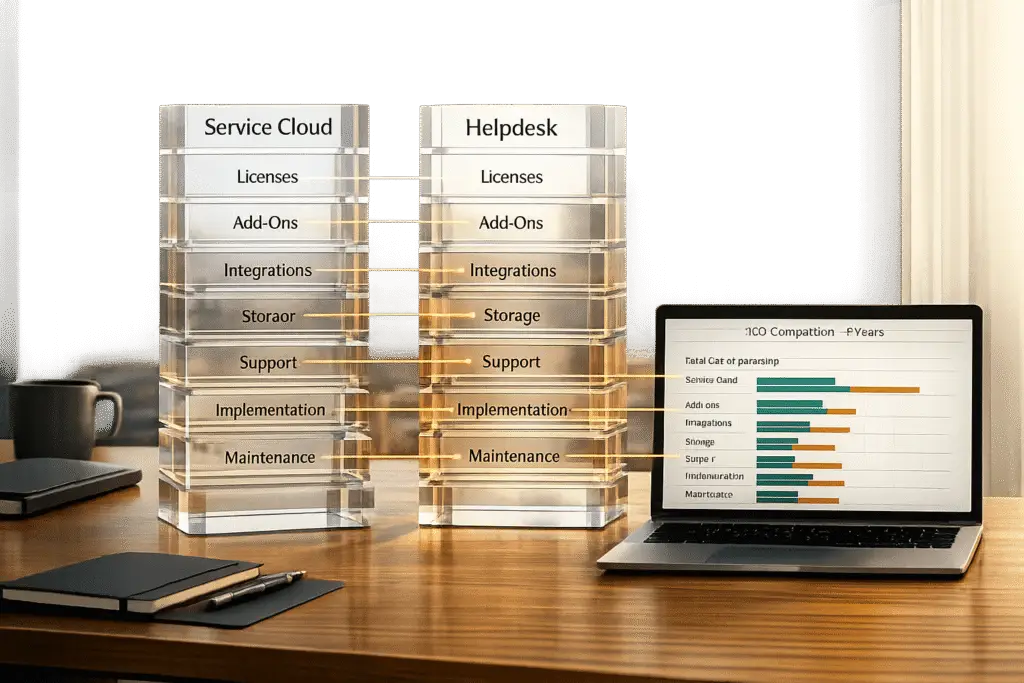
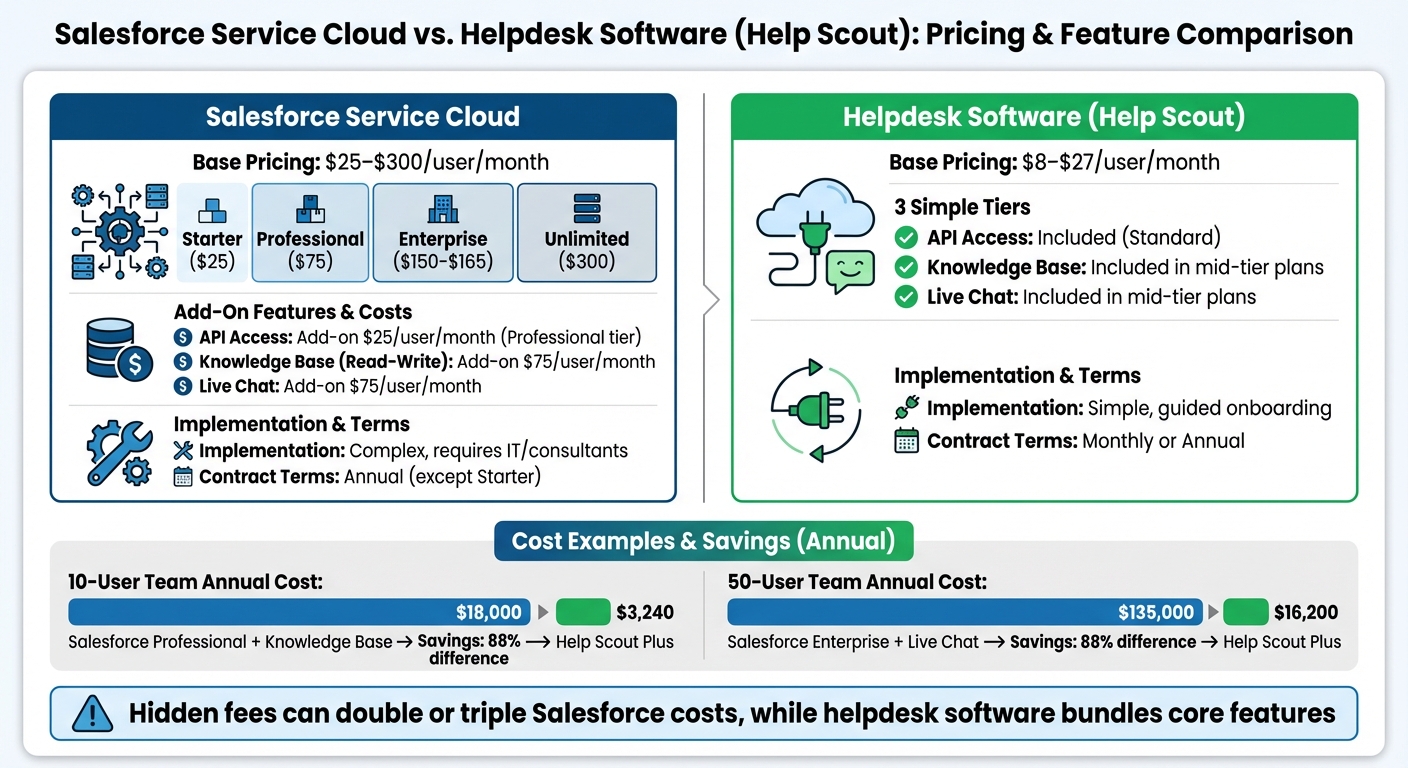
When comparing Salesforce Service Cloud and helpdesk software, the true costs often go far beyond the advertised prices. Salesforce’s pricing appears flexible, starting at $25/user/month and going up to $300/user/month, but hidden fees for essential features like API access or Live Chat can double or triple the expense. Helpdesk tools like Help Scout or Freshdesk offer simpler pricing, with plans between $8–$79/user/month, often bundling core features without extra charges.
Key takeaways:
- Salesforce Service Cloud: Advanced features, but high costs and complex setup. Add-ons like Knowledge Base ($75/user/month) and Live Chat ($75/user/month) can quickly inflate budgets.
- Helpdesk Software: Lower costs, faster setup, and predictable pricing. Mid-tier plans often include essential tools like ticketing, automation, and live chat.
Quick Comparison
| Feature | Salesforce Service Cloud | Helpdesk Software (Help Scout) |
|---|---|---|
| Base Pricing | $25–$300/user/month | $8–$27/user/month |
| AI Features | Add-on (varied costs) | Included in some plans |
| Live Chat | +$75/user/month (some tiers) | Included in mid-tier plans |
| API Access | Add-on ($25/user/month) | Standard |
| Implementation | Complex, often requires IT | Simple, guided onboarding |
For small or mid-sized teams, helpdesk software often delivers the tools needed at a fraction of the cost. Larger enterprises with complex needs might find Salesforce’s customization worth the expense, but the hidden fees and setup requirements should be carefully evaluated. Following best practices for implementing a new helpdesk can help mitigate these initial challenges.
Salesforce Service Cloud vs Helpdesk Software Pricing Comparison
Salesforce Service Cloud Pricing Explained What You Get for Your Money
sbb-itb-e60d259
Salesforce Service Cloud Pricing Breakdown
Salesforce Service Cloud offers a four-tier licensing structure, starting at $25 per user per month and reaching up to $300 per user per month. Each tier includes progressively more advanced features, such as enhanced case management, automation tools, and support options. However, keep in mind that these base prices often exclude add-ons that many teams will find essential. For the full tier-by-tier teardown — including Agentforce’s usage-based AI pricing and the negotiation levers — see our guide to how Salesforce Service Cloud pricing really works.
Pricing Tiers Explained
The Starter tier, priced at $25 per user per month, is aimed at small teams with basic support needs. It’s also the only tier available on a monthly basis; all other tiers require annual contracts. At $75 per user per month, the Professional tier introduces service contracts, entitlements, and customizable reports. However, API access comes at an additional cost of $25 per user per month for this tier.
The Enterprise tier, priced between $150 and $165 per user per month (recent estimates lean toward the higher end), includes features like API access, flow automation, and advanced case management. For teams requiring top-tier capabilities, the Unlimited tier costs $300 per user per month and includes premium benefits like 24/7 support, Premier Success plans, integrated Knowledge (read-write), and Live Chat.
| Feature | Starter ($25) | Professional ($75) | Enterprise ($150–$165) | Unlimited ($300) |
|---|---|---|---|---|
| Case Management | Basic | Advanced | Complex | Unlimited |
| APIs | No | Additional $25 | Included | Included |
| Knowledge (Read-Write) | No | Additional $75 | Additional $75 | Included |
| Live Chat | No | No | Additional $75 | Included |
| Support | Standard | Standard | Standard | 24/7 Premier |
Add-Ons and Hidden Fees
While the pricing tiers provide a broad overview, many features come as add-ons that significantly increase costs. For instance, Knowledge (read-write) costs an extra $75 per user per month, and API access for Professional users adds $25 per user per month.
Other expenses can include implementation and maintenance, which often require dedicated resources. Additional charges apply for premium support plans (like Premier and Signature Success Plans), extra storage, telephony integrations such as Service Cloud Voice, and usage-based AI tools like Agentforce. These unpredictable costs can make budgeting a challenge.
"The total cost of ownership can be high. The pricing is complex, often using usage-based pricing models that are hard to predict." – Stevia Putri, Marketing Generalist, eesel AI
Cost Examples: 10-User vs. 50-User Teams
To better understand the pricing, let’s look at two scenarios:
- 10-User Team: A team on the Professional tier would pay about $9,000 per year for base licenses (10 users at $75/user/month for 12 months). Adding the Knowledge (read-write) add-on would nearly double the cost to $18,000 annually.
- 50-User Team: Larger teams often choose the Enterprise tier for advanced features like API integration and automation. This results in base license costs between $90,000 and $99,000 per year (50 users at $150–$165/user/month for 12 months). With extras like digital engagement tools and premium support, the annual cost could rise to $110,000–$130,000, excluding deployment and administrative expenses.
These examples provide a clear picture of how costs can escalate, especially when compared to traditional helpdesk software.
Helpdesk Software Pricing: How It Works
Helpdesk platforms typically use a straightforward pricing model: per agent, per month. For instance, Freshdesk’s plans range from $15 to $79 per agent per month when billed annually, while Help Scout starts at $8 per user per month with annual billing. Most providers include core features – like email ticketing, basic automation, and standard reporting – in their mid-tier plans, ensuring essential tools are readily available without requiring expensive add-ons. However, like enterprise CRM modules, helpdesk software often comes with additional costs that aren’t immediately obvious.
Standard Pricing Models
Pricing tiers for helpdesk software are designed to cater to different business needs. Entry-level plans cover basic tools for ticket management, while higher-tier plans unlock advanced features such as collision detection, custom fields, or expanded mailbox support for larger teams. Opting for annual contracts typically saves 20% to 30% compared to monthly billing. Additionally, many vendors offer free trials – usually lasting 14 to 15 days – allowing businesses to test the platform in real-world scenarios.
"Help desk software pricing varies significantly based on the number of users, included features, and contract length." – Cem Dilmegani, Principal Analyst, AIMultiple
Hidden Costs in Helpdesk Software
While pricing models might appear straightforward, hidden fees can inflate your total costs by 20% to 40% in the first year. AI-powered features are a growing expense. For example, Freshdesk charges $100 per 1,000 sessions for its AI agent after the first 500 free sessions, and AI Copilot tools (like sentiment analysis and writing assistants) add $29 per agent per month.
Other hidden costs include integration fees and premium support plans. Some platforms charge extra for connecting to CRMs or other communication tools. Additionally, managing complex systems may require a dedicated administrator to handle triggers, automations, and SLA policies – expenses that can surpass the software subscription cost for smaller teams. These additional fees underscore the importance of carefully assessing the full cost of ownership before committing to a platform.
Side-by-Side Comparison: Salesforce Service Cloud vs. Helpdesk Software
Looking at license costs alone doesn’t tell the whole story. When you dive deeper into actual expenses, the cost differences between platforms become much clearer. Comparing Salesforce Service Cloud with helpdesk software like Help Scout reveals noticeable contrasts in pricing, included features, and setup complexity. Salesforce offers a four-tier subscription model, with prices ranging from $25 to $300 per user per month. However, many essential features are either locked behind higher-tier plans or require additional fees. On the other hand, helpdesk solutions like Help Scout follow a simpler, three-tier structure starting at $8 per user per month, with most core features already included in mid-tier plans.
Feature and Pricing Comparison Table
| Feature | Salesforce Service Cloud | Helpdesk Software (Help Scout) |
|---|---|---|
| Base Pricing | $25 – $300/user/month | $8 – $27/user/month |
| AI Features | Einstein AI (available in Enterprise tier and above) | Basic automation included |
| Knowledge Base (Read-Write) | +$75/user/month on Professional/Enterprise or included in Unlimited | Included in mid-tier plans |
| Live Chat | +$75/user/month on Professional/Enterprise or included in Unlimited | Included in mid-tier plans |
| API Access | +$25/user/month on Professional; included in higher tiers | Standard |
| Customization | High (Apex, Flow, Custom Objects) | Moderate (Workflows, API access) |
| Implementation | Complex (often requires consultants) | Simple (guided onboarding) |
| Contract Terms | Annual upfront (except Starter) | Monthly or Annual |
| Sandbox Environments | Available in Enterprise tiers and above | Not applicable |
The addition of extra fees significantly widens the pricing gap. For example, on Salesforce’s Professional tier at $75 per user per month, adding both Knowledge Base write access and Live Agent Chat costs an extra $150 per user per month. This effectively triples the per-user expense. In contrast, helpdesk platforms like Help Scout include these features in their standard mid-tier plans without additional charges.
Total Cost of Ownership: Real Numbers
When you factor in real-world costs, the value gap between these platforms becomes even more apparent. For a 10-user team subscribing to Salesforce’s Enterprise tier at $150 per user per month, the annual base cost is 10×$150×12 = $18,000. Adding Live Agent Chat at $75 per user per month increases the total by 10×$75×12 = $9,000, bringing the yearly cost to $27,000. And this doesn’t even include implementation costs.
In comparison, Help Scout’s Plus tier at $27 per user per month costs 10×$27×12 = $3,240 annually. That’s an 88% difference in cost for similar core functionality.
For larger teams, the cost disparity grows exponentially. A 50-user team on Salesforce’s Enterprise tier would pay 50×$150×12 = $90,000 annually. Adding Live Agent Chat raises the total to about $135,000 per year. Meanwhile, Help Scout Plus for 50 users costs 50×$27×12 = $16,200 annually. Even Salesforce’s Unlimited tier, which includes features like Chat and Knowledge Base, costs 50×$300×12 = $180,000 annually – showing just how steep the price difference can be.
These calculations focus solely on license fees, but operational expenses can further amplify the cost gap. Salesforce notes a 248% ROI over three years and a 30% boost in agent productivity, but achieving these results often requires full implementation of advanced features. Helpdesk platforms, meanwhile, offer lower operational overhead, with Help Scout boasting a 98% user satisfaction rating compared to Salesforce Service Cloud’s 97%.
For B2B support teams, the decision comes down to weighing the additional investment in Salesforce’s enterprise-level infrastructure, customization options, and CRM integration against the simplicity and affordability of helpdesk software. It ultimately depends on the team’s specific needs and the complexity of their customer support operations.
When Helpdesk Software Delivers Better Value for B2B Support
For many B2B organizations, finding a helpdesk solution that balances simplicity, cost-effectiveness, and robust features is key. These platforms often deliver enterprise-level tools without the hidden costs or heavy IT demands that some larger systems impose.
Main Benefits of Helpdesk Software
A standout feature of helpdesk software is flat, predictable pricing. Unlike Salesforce’s consumption-based AI model – which can lead to unpredictable monthly expenses due to charges per conversation or action – helpdesk platforms offer essential AI tools as part of their base price. Take Supportbench, for example: it includes features like predictive CSAT, auto-triage, sentiment analysis, and case prioritization for $32 per agent per month. This means growing ticket volumes won’t hit you with surprise fees.
Another major plus is the lack of IT dependency. While Salesforce often requires costly certified consultants and months of setup, helpdesk software allows for self-service integration. Tools like Slack, Confluence, or Google Docs can be integrated in just minutes. Kenneth Pangan summed up this difference when discussing Salesforce’s pricing: "The sticker price for the base model looks great, but that version doesn’t even come with air conditioning or power windows… That’s Salesforce in a nutshell". This ease of deployment is a stark contrast to the lengthy configurations typical of larger enterprise solutions.
Lastly, helpdesk platforms avoid steep price jumps. For instance, Salesforce’s pricing can spike by 400% when moving from a Starter to a Professional tier. In comparison, Supportbench increases by just $2.50 per agent after the first 15, making it easier for teams to scale without blowing their budgets.
B2B Teams That Benefit Most
Certain B2B teams stand to gain the most from these solutions:
- Fast-growing teams needing scalable tools without feature gaps or unexpected price hikes.
- Lean support operations that lack dedicated IT departments and need quick, hassle-free setup.
- Mid-sized teams (10–60 agents) requiring advanced tools like customer health scoring and multi-level SLA management but without the hefty costs of Salesforce’s Enterprise (around $150) or Unlimited (around $300) editions.
- Teams focused on flat-rate AI efficiency, ensuring ticket surges don’t lead to surprise monthly fees.
Hugh Dauterman, Data Operations Director, emphasized the value of an all-in-one platform: "Supportbench has supplied our group with a whole client control system. Because the whole thing is in a single platform, all are capable of control all conversation in a single area and feature complete oversight into each clients and group".
For B2B teams, the right helpdesk software delivers the tools they need without the financial and operational headaches of larger, more complex systems.
Conclusion: Choosing the Right Platform for Your Budget and Needs
When comparing platforms, the distinction is clear: Salesforce Service Cloud shines with its robust CRM integration and advanced workflows, but it demands both significant IT resources and a flexible budget. On the other hand, many helpdesk solutions offer predictable pricing and faster deployment, making them ideal for teams seeking efficient tools without the complexities of enterprise-level systems.
Start by evaluating your technical capabilities. If your organization has dedicated IT staff or the budget to hire certified consultants, Salesforce’s reported 248% ROI could make the investment worthwhile. However, if you’re looking for a solution that’s quick to implement and easy to use, helpdesk software is often operational within days, not months.
Focus on the features your team truly needs, not just the volume of options. For example, before committing to Salesforce’s Enterprise tier at $150 per user per month, determine if you actually require advanced field service tools or complex contract management. If your primary needs are email and ticketing, a helpdesk solution priced between $15-$35 per user per month might be more than enough.
It’s also worth noting that Salesforce’s Professional tier comes with additional fees for certain features, like Knowledge Base read-write access ($75 per user per month) and Web Services API access ($25 per user per month). In contrast, specialized helpdesk software can reduce total ownership costs by up to 42% and administrative expenses by 71% compared to Salesforce. As Maxim Orlovsky from Help Desk Migration aptly states:
"Selecting a help desk isn’t about choosing the ‘top’ – it’s about finding the right solution for your business".
Ultimately, your choice should align with your operational needs and budget. For teams with minimal IT support requirements, modern helpdesk platforms often provide better value. Meanwhile, organizations needing an integrated "360-degree view" across sales, marketing, and service should carefully weigh whether Salesforce’s premium pricing delivers enough operational benefits to justify the cost.
FAQs
What additional costs should you consider with Salesforce Service Cloud pricing?
When considering Salesforce Service Cloud, it’s crucial to factor in extra costs that might not be immediately obvious in the base subscription price. These could include charges for add-ons like advanced AI tools, analytics features, or custom integrations – elements that might be essential for achieving the platform’s full potential. Additionally, certain functionalities may only be available through separate licenses or higher-tier plans, which can significantly add to your expenses.
To steer clear of unexpected costs, take the time to thoroughly examine the pricing details, align them with your operational requirements, and calculate the total cost of ownership. This approach will help you understand all expenses related to scalability, advanced features, and long-term use.
What’s the cost difference between Salesforce Service Cloud and helpdesk software for small teams?
For smaller teams, helpdesk software often comes with a pricing structure that’s easier on the wallet and simpler to navigate compared to Salesforce Service Cloud. These tools typically have lower per-user fees and straightforward plans, making them an attractive option for businesses with basic support requirements.
On the other hand, Salesforce Service Cloud starts at $25 per user per month for its Professional edition, with costs rising as you add advanced capabilities like AI, automation, and customization. While the higher price reflects its ability to scale and adapt to complex needs, these features are often more beneficial for larger or fast-growing organizations. For smaller teams, helpdesk software might be the more economical choice for handling core support tasks.
What should you consider when comparing Salesforce Service Cloud to helpdesk software?
When deciding between Salesforce Service Cloud and helpdesk software, it’s important to weigh a few critical factors to find the right match for your business. Start with pricing and total cost of ownership. Don’t just look at subscription fees – factor in potential extras like add-ons or advanced features. Make sure the overall costs align with your budget and future growth plans.
Next, take a close look at features and scalability. Salesforce Service Cloud delivers powerful tools like AI automation, omnichannel support, and customizable dashboards – perfect for businesses with larger or more complex needs. On the other hand, helpdesk software often caters to smaller teams with simpler solutions, but it might fall short when it comes to advanced features or scaling up as your business grows.
Lastly, consider integration, customization, and long-term benefits. Salesforce stands out with its flexibility and AI-driven tools that adapt to evolving customer service demands. Meanwhile, helpdesk platforms tend to focus on quick setup and user-friendly interfaces. Striking the right balance between these factors will help you choose a solution that not only meets your current needs but also supports your business as it grows.






