



Salesforce Service Cloud is a popular choice for enterprise support, but many B2B teams find it too complex and expensive for their needs. If you’re looking for simpler, cost-effective alternatives, here are three standout options:
- Supportbench: Designed for B2B workflows, it offers transparent pricing (starting at $32/agent/month) with built-in AI tools and a 360° customer view. It simplifies account management and reduces reliance on third-party apps.
- Zendesk: Known for fast setup and extensive integrations, it starts at $19/agent/month but can become costly with add-ons. AI tools like Answer Bot improve efficiency but may require frequent updates to maintain accuracy.
- Freshdesk: A budget-friendly option (starting at $19/agent/month) with no-code setup and AI tools. Best for smaller teams, though it may lack advanced features for complex B2B workflows.
Each platform has strengths and weaknesses depending on your team’s size, technical expertise, and budget. Below is a quick comparison to help you decide.
Quick Comparison
| Platform | Starting Price (Monthly) | AI Features | B2B Workflow Support | Scalability |
|---|---|---|---|---|
| Supportbench | $32/agent | AI Copilot, automation | 360° customer view, SLAs | Scales to 1,000+ agents |
| Zendesk | $19/agent | Answer Bot, sentiment analysis | Organization management, SLAs | Scales with add-ons |
| Freshdesk | $19/agent | Freddy AI suite | Custom objects, ticketing | Ideal for small teams |
For B2B teams managing complex accounts, Supportbench offers the most tailored features at a predictable cost. If you’re focused on rapid deployment or integration flexibility, Zendesk might work better. Smaller teams with limited budgets may prefer Freshdesk for its affordability and ease of use.
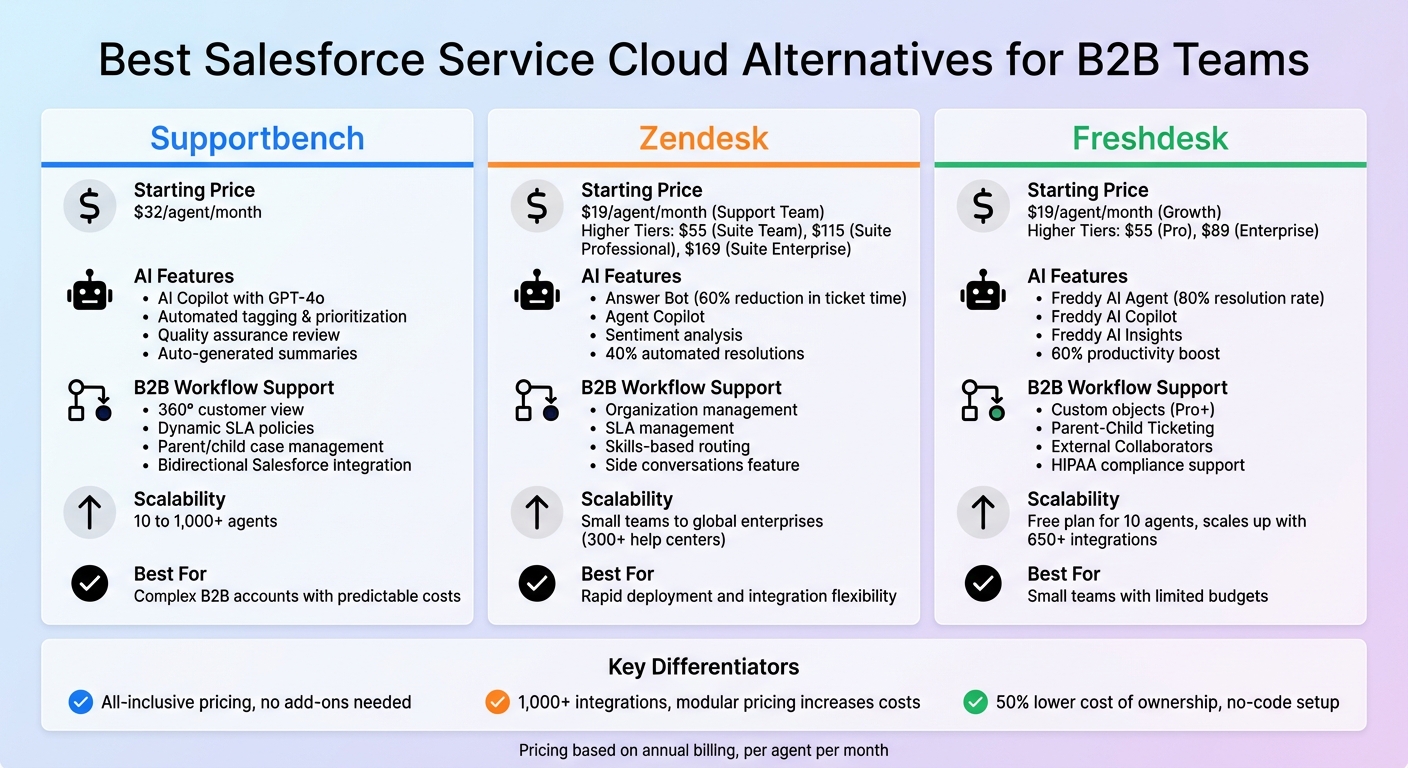
Salesforce Service Cloud Alternatives Comparison: Supportbench vs Zendesk vs Freshdesk
1. Supportbench
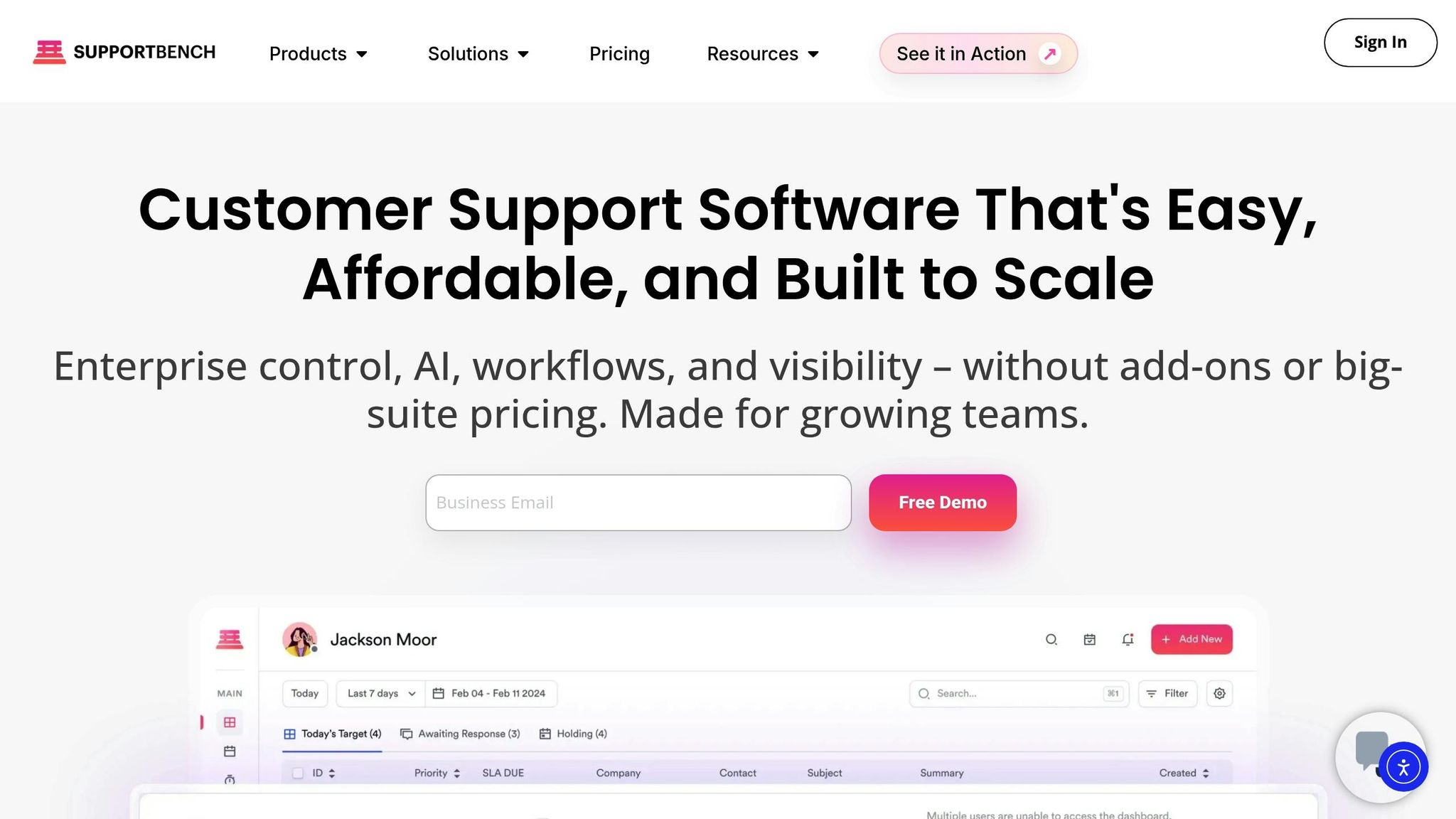
Supportbench tackles common B2B support challenges that traditional, complicated systems often fail to address. It’s a customizable communication and support platform that team leaders can implement independently, without needing IT assistance or outside consultants.
Pricing (US$/agent/month)
Supportbench keeps pricing straightforward, avoiding the pitfalls of modular add-ons. The Professional Plan starts at $32 per agent/month (annual billing) or $40 per agent/month (monthly billing). For more advanced needs, the Enterprise Plan begins at $100 per agent/month (annual) or $125 per agent/month (monthly).
The base rate covers the first 15 agents, with each additional agent costing $2.50 per month, capped at $150 per agent. Teams with 60+ agents are automatically placed on the Enterprise tier. There are no surprise setup fees or ongoing maintenance costs, and all advanced features are included from the start.
Beyond its predictable pricing, Supportbench sets itself apart with powerful AI-driven tools.
AI Capabilities
Supportbench integrates AI deeply into its platform, leveraging GPT-4o for smarter support. Its AI Copilot provides real-time suggestions tailored to each case, while its automation tools handle tasks like tagging, prioritizing, and triaging tickets based on factors like topic, customer value, or sentiment.
Quality assurance is also enhanced with AI, as it reviews interactions for tone, accuracy, and empathy. Additionally, the platform can automatically generate case summaries and support articles.
"Its AI prioritizes intelligently, reads tone and urgency, and guides following actions – real decision support, not surface-level automation." – Supportbench
These AI-powered features are seamlessly woven into the platform’s core workflows, making it a comprehensive solution for B2B support.
B2B Workflow Support
Supportbench doesn’t just rely on AI and pricing – it also simplifies key B2B workflows.
The platform provides a 360° customer view by consolidating account hierarchies, asset tracking, entitlement details, and historical sentiment into a single interface. Dynamic SLA policies adjust automatically based on customer tier, product line, or synced data from Salesforce. For example, SLAs tighten near account renewal periods to ensure top-tier customers receive priority service.
Supportbench also includes built-in B2B features like parent/child case management, case swarming, and multi-departmental approvals – capabilities that often require extra apps or higher-tier plans in Salesforce. Additionally, its bidirectional integration with Salesforce CRM allows sales teams to stay in their familiar environment while support teams benefit from a platform designed for high-volume communication.
Custom data tables further enhance functionality, enabling teams to track infrastructure details, login credentials, and training records directly within customer profiles.
Scalability
Supportbench is designed to grow alongside your team, scaling effortlessly from 10 agents to 1,000 without requiring major adjustments. One customer even managed 10,000 clients with just four agents, thanks to its robust automation and streamlined workflows.
"Using Supportbench has provided our department with a complete client management system. Since everything is one platform, we have a clear overview of all client and team interaction." – Jonathan Pasquel, Personnel Manager
sbb-itb-e60d259
2. Zendesk
Zendesk stands out as a platform designed to integrate AI and simplify workflows, offering quick deployment and powerful automation tailored for B2B support. Unlike Salesforce Service Cloud, which often requires a lengthy setup, Zendesk can be deployed in just a day, making it a practical choice for businesses focused on efficiency and adaptability to AI-driven operations[7,23].
Pricing (US$/agent/month)
Zendesk’s pricing structure provides options for varying needs:
- Support Team: Starts at $19 per agent/month (billed annually) for basic ticketing.
- Suite Team: Priced at $55 per agent/month, this plan includes omnichannel support tools (email, chat, voice, and social) and up to 50 AI-powered automated answers.
- Suite Professional: At $115 per agent/month, it adds advanced tools like multi-organization support and custom dashboards.
- Suite Enterprise: Starting at $169 per agent/month, it offers features such as custom roles, sandbox environments, and enhanced knowledge management. For monthly billing, the price increases to $219 per agent/month.
While Zendesk’s entry-level pricing is competitive, additional modular add-ons can increase the overall cost[7,9,20].
AI Capabilities
Zendesk leverages AI to optimize ticket handling and improve resolution times. Its system categorizes tickets based on intent, language, and sentiment, ensuring they reach the right agent[24,26]. The Answer Bot, powered by machine learning, handles routine queries, with some companies experiencing up to a 60% reduction in ticket handling time and automating 40% of ticket resolutions.
The Agent Copilot feature enhances productivity by summarizing conversations in real-time, suggesting replies from the knowledge base, and recommending next steps. Additionally, real-time sentiment analysis flags critical issues or triggers escalations, which is especially useful for managing high-value accounts[24,26]. However, the accuracy of these AI tools depends heavily on maintaining an up-to-date knowledge base, as outdated content can lead to errors in automated responses.
B2B Workflow Support
Zendesk is equipped with features designed for B2B needs, such as organization management, which groups users by company and allows contacts to be part of multiple organizations (available in Professional and Enterprise plans). The platform also supports SLA management and skills-based routing to ensure complex issues are handled by the right specialists.
The Side Conversations feature allows agents to initiate email or Slack threads within a ticket to consult with colleagues or external partners without exposing these discussions to customers. However, some teams have noted that Zendesk’s integrations with tools like Slack and Microsoft Teams feel less seamless compared to newer alternatives, often requiring agents to switch between platforms. Additionally, tasks like tracking renewals, entitlements, and asset management may necessitate third-party tools or juggling multiple interfaces.
Scalability
Zendesk is designed to scale with businesses, from small teams to global enterprises. Its Enterprise plans support up to 300 help centers and multiple brands under one account. Sandbox environments (up to two included in the Suite Enterprise plan) allow teams to test changes before rolling them out.
For example, Limeade, an employee well-being company, transitioned from Salesforce to Zendesk and grew its user base by 60% without increasing its support team. Similarly, Catapult Sports implemented Zendesk’s AI Copilot and saw a 50% reduction in first reply time and a 21% decrease in overall resolution time.
"Zendesk was selected because we had champions on the team who knew that it would be easier to administer, and it would give our clients and internal teams a better service experience faster than another solution could." – Kevin Barry, Vice President of Global Technical Services and Support, Degreed
3. Freshdesk
Freshdesk stands out with its lower cost of ownership – about 50% less than some competitors – and built-in tools that simplify B2B support. Unlike Salesforce, which often demands engineering resources or external consultants for setup, Freshdesk uses a no-code configuration approach, making it more accessible for teams.
Pricing (US$/agent/month)
Freshdesk offers straightforward pricing with clear feature tiers:
- Growth: $19 per agent/month for essential ticketing and customer portals.
- Pro: $55 per agent/month, introducing custom objects and multilingual support for handling complex B2B accounts.
- Enterprise: $89 per agent/month, featuring advanced tools like skill-based routing and approval workflows.
Omnichannel plans range from $29 to $119 per agent/month. Freshdesk also provides flexible AI pricing, allowing businesses to purchase AI Copilot for $29 per agent/month, but only for agents who require it.
AI Capabilities
The Freddy AI suite in Freshdesk is designed to enhance productivity and streamline customer interactions. It includes:
- Freddy AI Agent: Automates customer resolutions.
- Freddy AI Copilot: Assists agents in real-time with suggestions and guidance.
- Freddy AI Insights: Provides analytics for leadership teams.
These tools can drive impressive results, such as an 80% resolution rate with AI agents and a 60% boost in agent productivity. For B2B teams, Freddy AI Copilot offers features like sentiment analysis and writing assistance, enabling agents to craft polished responses quickly.
Take 7-Eleven, for instance – they reduced their ticket volume by approximately 100,000 through scenario automations. Allian Marie Sheila Dela Cruz, a Business Process Innovations Consultant, reported a 44% decrease in tickets originating from Facebook alone. Similarly, Hobbycraft uses Freddy AI chatbots to handle up to 30% of customer queries, allowing agents to focus on more complex issues. These examples highlight how AI-driven efficiency supports smoother B2B workflows.
B2B Workflow Support
Freshdesk offers several features tailored to B2B needs. Custom objects (included in Pro and Enterprise plans) help track intricate account relationships. Parent-Child Ticketing ensures that multi-stakeholder issues are broken down into manageable tasks across departments. Additionally, the External Collaborators feature allows third-party partners to consult on tickets without needing full system access.
"The main advantage we identified in Freshdesk was how easy it was to configure and to customize." – Vincent Laham, Marketplace Project Manager, Digitrips
Freshdesk also supports industries with strict compliance requirements. For example, Mahmoud Shehadeh, Director of Member Support at Hinge Health, shared:
"Freshdesk has helped us install more efficient workflows and processes while still maintaining HIPAA compliance. It has significantly improved workflow efficiency for agents and members." – Mahmoud Shehadeh, Director of Member Support, Hinge Health
These features make Freshdesk a strong choice for scalable and enterprise-ready B2B support.
Scalability
Freshdesk is designed to grow with your business, accommodating teams of all sizes. It offers a free plan for up to 10 agents, with tiered plans available for larger operations. The platform supports over 650 integrations and facilitates multi-brand management, enabling teams to create unique portals and knowledge bases for different business units.
With a G2 rating of 4.4/5 from more than 3,400 reviews, Freshdesk is frequently praised for its quick setup and user-friendly interface. However, some users have noted that highly complex and large-scale workflows may require more specialized solutions.
Comparison: Pros and Cons
This breakdown highlights the key advantages and limitations of three platforms – Supportbench, Zendesk, and Freshdesk – focusing on pricing, scalability, and their ability to support B2B workflows. Managing complex B2B customer accounts often requires thoughtful consideration of integration, cost structure, and scalability, and each platform approaches these challenges differently.
The choice between these platforms depends heavily on factors like team size, technical expertise, and budget. Here’s a closer look at how each solution aligns with these needs.
Supportbench provides straightforward, all-inclusive pricing that bundles AI, analytics, and SLA management from the start. This eliminates the need for add-ons, avoiding the "modular traps" common in older systems. It’s designed to scale seamlessly, accommodating teams from 10 to 1,000 agents without requiring major system overhauls. Its integrated 360° customer view connects renewals, assets, and entitlements directly into support workflows, making it ideal for post-sale B2B operations. However, its specialized focus may make it less appealing for teams seeking a more general-purpose ticketing system.
Zendesk stands out with over 1,000 pre-built integrations and quick implementation, making it a strong option for teams needing a fast setup. However, its modular pricing model can lead to unpredictable costs as essential features like AI, advanced analytics, or extra communication channels are added. For larger teams, Zendesk often requires dedicated administrators to manage its increasing complexity, and its dated interface and slower support response times can be drawbacks.
Freshdesk offers an affordable solution, including a free tier that works well for small teams. Its no-code configuration makes it easy to implement without requiring engineering resources. That said, it lacks the advanced SLA customization and post-sale workflow capabilities that enterprise-level B2B operations typically demand.
| Platform | Strengths | Weaknesses |
|---|---|---|
| Supportbench | All-in-one platform; integrated 360° view | Specialized for post-sale B2B; overly specific for simple needs |
| Zendesk | Quick deployment; extensive integrations | Costs rise with add-ons; fragmented B2B context |
| Freshdesk | Budget-friendly; no-code setup | Limited customization for enterprise B2B needs |
These comparisons help clarify which platform might be the best fit for managing complex, multi-stakeholder accounts. Supportbench stands out for teams handling intricate B2B workflows, offering a unified approach that minimizes reliance on third-party apps. Zendesk, with its vast integration options, suits organizations already invested in a broader ecosystem, though its escalating costs may pose challenges. Freshdesk appeals to smaller teams prioritizing affordability and ease of use, though it might struggle to meet the needs of more advanced workflows as businesses grow.
Conclusion
Evaluating alternatives for B2B support reveals a range of trade-offs, and the best choice depends on your team’s specific needs, budget, and growth plans. Supportbench stands out with its unified, AI-driven platform that simplifies complex post-sale management by integrating customer health, renewals, and asset tracking. With pricing starting at $32 per agent per month, it avoids the hidden costs and modular pricing pitfalls of older systems. Its built-in AI features can reduce operational costs by 30–40% – all without requiring pricey add-ons. Plus, the ROI speaks for itself: for every $1 spent on AI-powered customer service, Supportbench delivers $3.50 in returns, while slashing implementation timelines from weeks to days.
While some alternatives come with lower initial costs and faster deployment, they might lack the enterprise-level SLA and account management features critical for B2B operations. Other options cater to large enterprises with over 100 agents, offering extensive third-party integrations, but their pricing structures can lead to significant cost increases for teams with tighter budgets.
The trend toward AI-native platforms is gaining momentum, with AI expected to play a role in 95% of customer interactions by 2025. As B2B support continues to evolve, platforms designed with AI and account-centric management at their core will be key to improving efficiency and protecting revenue.
When deciding on a platform, think about your team’s size, growth trajectory, and the complexity of your customer relationships. If you’re handling multi-stakeholder accounts with strict SLA requirements and need predictive insights into customer health, Supportbench offers the tools and intelligence to drive retention and revenue – without the hassle of juggling multiple systems. Ultimately, the right choice will align with your goals for streamlined, AI-powered, and cost-effective B2B support.
FAQs
What makes Supportbench a great choice for B2B support teams?
Supportbench is built with B2B support teams in mind, especially those managing complex customer accounts and long-term relationships. Its AI-driven platform simplifies essential support tasks like ticket handling, automating workflows, and managing escalations. This helps teams save time and cut down on repetitive work.
With real-time analytics and detailed insights at the account level, Supportbench empowers teams to stay ahead of customer needs, anticipate trends, and craft solutions that fit each client’s unique situation. Its seamless integrations bring together customer data from multiple systems, ensuring support interactions remain consistent and personalized – key to building trust and loyalty.
Supportbench prioritizes adaptability, growth potential, and cost-effectiveness, making it a strong choice for businesses managing complex support operations in dynamic B2B settings.
How does Supportbench use AI to improve efficiency in customer support?
Supportbench uses AI to simplify customer support by automating repetitive tasks and boosting agent efficiency. One standout feature is its AI Copilot, which assists agents by:
- Understanding the context of tickets
- Suggesting precise responses
- Summarizing previous interactions
- Instantly retrieving relevant knowledge base articles
This not only speeds up response times but also ensures clear and consistent communication with customers.
The platform also applies AI for smart ticket routing. It prioritizes cases based on factors like urgency, customer value, or sentiment, and even adjusts SLAs dynamically when needed. Another helpful feature is its ability to create and organize knowledge base articles from resolved tickets, cutting down on repetitive work and making information easier to find.
With these tools, support teams can solve problems faster, provide tailored service, and work more efficiently – all while keeping operational costs in check.
What should B2B support teams look for in a customer support platform?
When selecting a support platform, B2B teams should focus on two critical aspects: ease of use and simple implementation. Managing accounts with multiple stakeholders and addressing long-term challenges can already be demanding. A platform with a user-friendly interface and quick setup can help your team save time and work more efficiently.
Look for features like AI-powered automation, omnichannel support, and escalation management to streamline your workflows and maintain top-notch service. Integrations with tools such as Slack or Microsoft Teams can also improve collaboration and keep your team aligned.
Finally, evaluate the platform for cost-effectiveness, scalability, and customization. Flexible pricing, the ability to grow alongside your business, and tailored workflows ensure the platform adapts to your team’s changing needs while offering lasting value.






