



Next-best action (NBA) workflows help support teams make smarter decisions by automating tasks like ticket routing, prioritization, and escalation. These workflows analyze customer data – such as emails or tickets – to recommend actions that improve efficiency and customer satisfaction. The key is to focus on practical solutions, not overhyped AI claims. Here’s how to implement NBA workflows step-by-step:
- Build an Action Library: Define common tasks (e.g., triage, routing, deflection) and tie them to business goals like reducing costs or improving resolution times.
- Centralize Data: Integrate tools like CRMs, ticketing systems, and communication platforms for a unified view of customer interactions.
- Use Scoring Models: Prioritize actions based on impact, urgency, and confidence to ensure agents focus on critical tasks.
- Embed Recommendations: Add actionable suggestions directly into agent tools to streamline workflows.
- Test and Optimize: Start with a small pilot, track metrics (e.g., resolution time, CSAT), and refine workflows based on results.
Focus on solving specific problems and delivering measurable outcomes. For example, companies like Wolseley Canada and Cynet reduced ticket handling times and improved customer satisfaction by automating routine processes and prioritizing high-impact cases.
Key Metrics to Track:
- Speed: Mean Time to Resolution (MTTR)
- Accuracy: Reassignment rates
- Customer Satisfaction: CSAT scores for high-risk cases
- Proactivity: Escalation rates
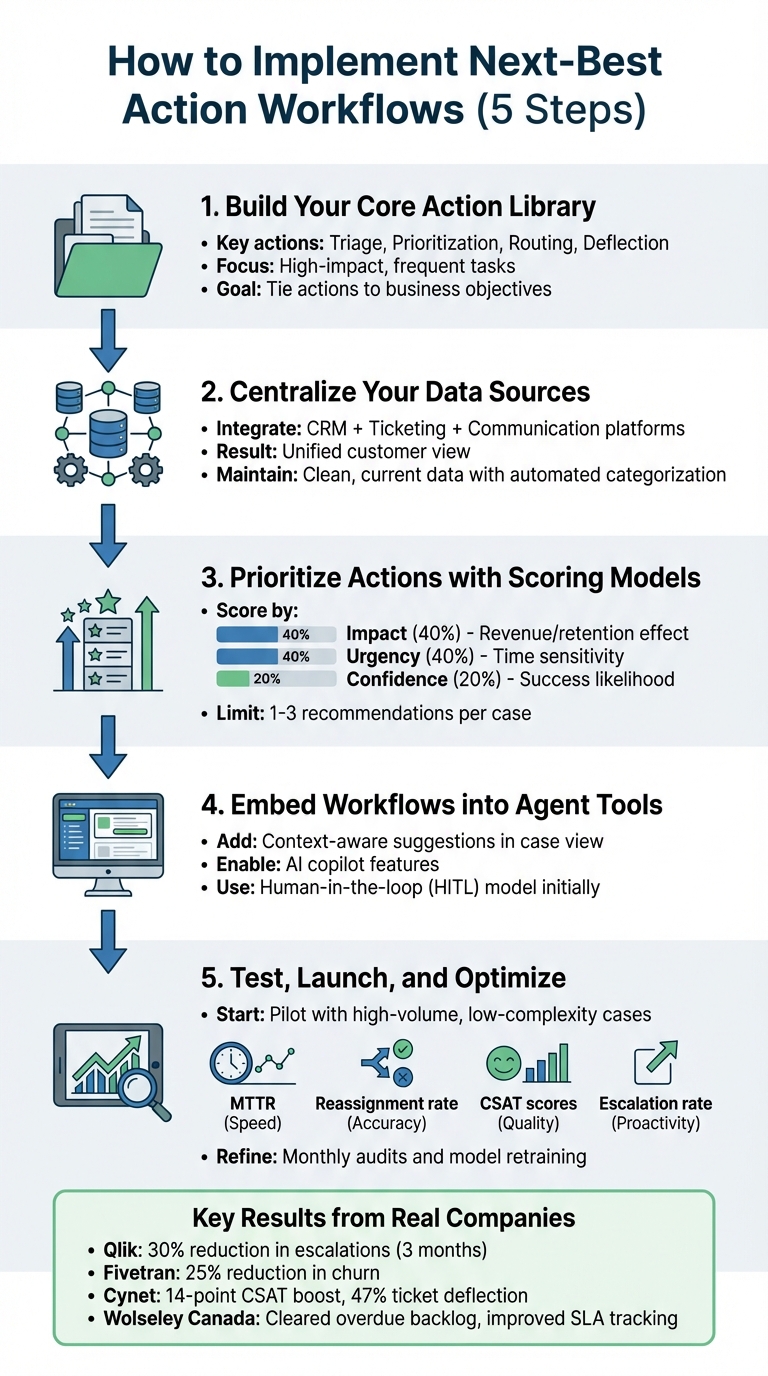
5-Step Process to Implement Next-Best Action Workflows for Support Agents
Step 1: Build Your Core Action Library
Identify High-Impact Actions
The backbone of any next-best action workflow is a centralized action library. Start by focusing on tasks that are frequent and straightforward – like account setup, basic troubleshooting, or onboarding assistance. These types of workflows are predictable, have clear outcomes, and can quickly improve efficiency.
Your action library should cover a variety of categories. For instance:
- Triage actions: Automatically gather missing information, such as requesting invoice numbers or error logs when customers submit refund requests.
- Prioritization actions: Use sentiment analysis to flag frustrated customers or highlight urgent keywords like "outage" or "system down" for immediate attention.
- Routing actions: Assign tickets based on agent expertise and past resolution success instead of relying solely on availability.
- Deflection actions: Redirect common issues to self-service options, helping to cut down on operational costs.
The goal is to focus on actions that deliver measurable results. Analyze your current ticket data to identify pain points. For example, which issues lead to the most follow-ups? Where do customers often leave out required details? What types of tickets tend to take the longest to resolve? These insights will help you pinpoint opportunities. If, for instance, 30% of billing inquiries require agents to ask for account numbers, you could automate a step to request this information upfront.
Once your library is defined, make sure every action serves your broader business objectives.
Align Actions with Business Goals
Every action in your library should tie directly to specific business priorities, ensuring your support operations are both efficient and impactful. For example:
- If cutting costs is your goal, focus on deflecting routine requests – like cancellations or refunds – to self-service portals.
- If you want to improve first-contact resolution, build triage actions that gather all necessary details before assigning tickets to agents.
- If customer retention is a priority, create escalation triggers for high-value accounts showing signs of dissatisfaction.
Connecting actions to business goals ensures your efforts yield tangible results and avoids wasting resources on low-impact automation.
It’s best to start small – choose three to five high-impact use cases rather than trying to automate everything at once. Set clear boundaries for each action. For instance, while an automated workflow might handle user permission updates, account deletions could still require human approval. Also, have fallback procedures in place to ensure tickets continue to move forward if automation fails.
sbb-itb-e60d259
Step 2: Centralize Your Data Sources
Create a Unified Data View
Bringing all your data together into a single view is key to giving agents the clarity they need for effective recommendations. This involves merging CRM, ticketing, and communication data into one interface. Without this integration, agents might act on incomplete information – like suggesting redundant fixes or sharing irrelevant resources.
Take the example of Honeylove in 2025. The fashion brand faced this exact challenge. Trevor Humphrey, their VP of Customer Experience, spearheaded an effort to bridge the gap between customer support and marketing data. He explained:
"A customer expects the brand to know who they are, what they’ve done, and how to communicate in a genuine way … There was a whole missing piece of data around the customer support experience that we didn’t have on the marketing side. Now those two sides of the business are aligned".
To achieve this, you’ll need to integrate various tools and platforms – like internal wikis (Confluence or Notion), product specs (Google Docs), communication threads (Slack), and historical tickets – into one seamless customer support management system. Pre-built connectors and one-click integrations can simplify this process, avoiding complex engineering work. Additionally, webhooks can fetch real-time data, such as pulling a live shipping status from Shopify when a customer inquires about an order, all without leaving the ticket view.
Another useful tool is AI-powered triage. By tagging messages with intent, sentiment, and urgency automatically, you’ll ensure more consistent and accurate data, especially during busy periods when manual tagging may fall short.
Once this unified data view is in place, the next challenge is keeping the information accurate and up-to-date.
Keep Data Clean and Current
Centralizing your data is just the first step – keeping it accurate is equally important. Outdated customer details, incorrect product specs, or poorly categorized tickets can lead to irrelevant recommendations or even mistakes. For example, in 2025, cybersecurity company Cynet consolidated scattered knowledge from Salesforce, Confluence, and Microsoft Teams. The result? They cut resolution times from a week to much faster turnarounds. By building AI agents trained on clean, unified data, they boosted their CSAT score by 14 points (reaching 93%), halved resolution times, and resolved 47% of Tier 1 tickets without escalation.
To maintain data quality, consider automating categorization with NLP tools instead of relying on manual tagging. Regularly retrain your AI models by feeding them resolved-case outcomes – this helps refine accuracy and reduces false positives. Frequent audits of routing rules and logic are also essential, especially as your business evolves. Without these updates, outdated rules can misroute tickets and frustrate both agents and customers.
Finally, use differential incremental sync to update only the records that have changed instead of syncing entire datasets. This avoids overloading your CRM, prevents hitting API limits, and keeps your centralized data view running smoothly without disrupting other users.
Step 3: Prioritize Actions with Scoring Models
Set Your Scoring Criteria
Once you’ve built a solid action library and have a clear, unified view of your data, it’s time to prioritize actions. Not all tasks are created equal, and deciding what needs attention first can make all the difference. This is where a scoring model comes in. By assigning scores to actions based on factors like impact, urgency, and confidence, you move beyond rigid IF-THEN rules. Instead, you can evaluate multiple signals at once – things like sentiment, customer tier, or interaction history.
For example, impact measures how much a specific action could affect your business. A ticket from a Premier account generating $500,000 annually clearly carries more weight than a general inquiry. Urgency, on the other hand, focuses on time sensitivity. This could be flagged by sentiment analysis or keywords like "system down" or "cannot log in." Finally, confidence reflects how likely a given action will succeed based on past outcomes.
Real-world success stories show how effective this approach can be. In 2021, Qlik, a business analytics platform, introduced an early warning system that prioritized cases using sentiment, urgency, and attention scores. The result? A 30% drop in customer escalations in just three months. Similarly, Fivetran, a data integration company, used natural language processing (NLP) to detect churn signals like "cancel" or "refund." By prioritizing these accounts, they achieved a 25% reduction in customer churn.
"AI determines priority not just based on a selected field or a single keyword, but by analyzing a confluence of factors." – Nooshin Alibhai, Founder and CEO, Supportbench
The key is understanding that different actions require different scoring priorities. For triage, urgency is paramount – critical outages need immediate attention. For escalations, impact takes center stage, especially when high-value customers are at risk. And for recommendations, confidence is critical, ensuring agents focus on the most effective solutions, which helps reduce overall handling time.
By using a structured scoring approach, you can fine-tune recommendations and make sure agents focus on high-value tasks.
Table: Scoring Factors Comparison
| Scoring Factor | Definition | Example Metrics | Weight Assignment |
|---|---|---|---|
| Impact | Measures the potential effect on revenue or retention. | Customer Tier (VIP/Premier), Account Revenue, Churn Risk Score. | High (e.g., 40%) |
| Urgency | Assesses the time-sensitivity of a request. | Sentiment Score (0-100), Keywords ("Outage"), SLA Deadline. | High (e.g., 40%) |
| Confidence | Reflects the likelihood that the suggested action will succeed. | AI Confidence Percentage, Historical Success Rate. | Medium (e.g., 20%) |
Limit Recommendations to Avoid Overload
Even the best scoring model can fall short if it overwhelms agents with too many suggestions. To keep things manageable, focus on providing 1–3 actionable recommendations per case. This way, agents can concentrate on the most critical next steps instead of wading through an endless list of options.
One way to achieve this is by filtering out suggestions with less than 75% confidence. Testing your scoring model in simulation mode using historical tickets can help refine the process without disrupting live workflows. Regularly retraining the model – ideally monthly – can also help minimize false positives, with some teams achieving an 86% reduction in false positives.
For example, Wolseley Canada handles 7,000 to 8,000 monthly support emails. In 2025, they implemented Supportbench to automate ticket routing and prioritization based on case type and client profile. This not only cleared long-overdue issues but also gave management greater visibility into SLA performance. As Eilis Byrnes, Customer Service and Process Improvement Manager at Wolseley Canada, explained:
"The ticketing system assisted us in resolving instances that were long overdue and in providing the staff with a smooth platform experience."
Step 4: Embed Workflows into Agent Tools
Add Recommendations to Case Views
A high-performing scoring model won’t make much of a difference if agents can’t easily access its insights. That’s why it’s crucial to embed recommendations directly into the tools agents use every day. Instead of making them jump between systems, bring actionable suggestions right into their case view.
Modern platforms provide context-aware suggestions that appear as action checklists within the ticket itself. For instance, when an agent opens a case, they might see prompts like "Request invoice number from customer" or "Escalate to billing team." These recommendations are based on real-time analysis of the ticket’s content and the customer’s history.
Intelligent triage pushes this further by analyzing intent, language, and sentiment as soon as a ticket is created. Imagine a customer writing, "I can’t log in and I’m extremely frustrated." The system can instantly route the ticket to a specialized queue and flag it for urgent attention. This approach ensures tickets reach the right expert on the first try, avoiding the dreaded back-and-forth that wastes time and frustrates customers.
Take Cynet, a B2B security company, as an example. In 2024, they implemented Generative AI in customer support to assist their reps by embedding recommendations directly into their case management workflow. Agents could access suggested actions without leaving their dashboard. The results? A 14-point CSAT boost (from 79 to 93), a 47% ticket deflection rate, and resolution times cut nearly in half.
Another helpful feature is automated internal notes. These notes can provide concise instructions or link to key resources right in the ticket view. For example, if a ticket goes unresolved after five replies, the system could suggest escalation or point the agent to a relevant resource.
With these embedded workflows, AI copilots can take efficiency to the next level.
Use AI Copilot Features
AI copilots are designed to supercharge agents by integrating directly into the activity editor. These tools assist agents as they draft responses, pulling from past cases, internal knowledge bases, and external resources to suggest the best course of action.
One standout feature is auto-generated responses. AI copilots can draft replies based on previous resolutions, allowing agents to quickly review and send them. For example, if a customer asks about refund timelines, the copilot can generate a response using the company’s standard language and past successful replies – saving agents from repetitive typing.
Sentiment guardrails add another layer of support. If the AI detects strong frustration in a message – phrases like "this is unacceptable" or "I want to cancel" – it flags the case for human intervention instead of sending an automated reply. This ensures sensitive cases are handled with the care they deserve.
Another time-saver is proactive information gathering. If a ticket is missing critical details, such as an order number or shipping address, the AI can automatically request this information before the case even reaches an agent. By the time the agent steps in, they have everything they need to resolve the issue quickly.
"The rise of agentic AI workflows doesn’t make your human agents obsolete – it makes them more valuable. By automating the predictable and procedural, you free up your team to focus on what humans do best." – Team Mosaic
To implement these tools effectively, start with a human-in-the-loop (HITL) model. This setup lets the AI suggest actions for agents to approve before they’re executed. It’s a great way to build trust and ensure accuracy, giving agents time to get comfortable with the system. Over time, as confidence in the AI grows, you can automate more routine tasks – like closing simple tickets or updating permissions – while keeping human oversight for complex or sensitive cases.
Step 5: Test, Launch, and Optimize
Start with a Pilot Segment
Now that your actionable recommendations are set up in agent tools, it’s time to test and refine. Start small with a pilot test focusing on a high-volume, low-complexity case type – like password resets, billing inquiries, or account administration. These cases are ideal because they carry lower risks and provide a steady flow of data for analysis.
Before going live, simulate your workflows using historical tickets. This allows you to see how the system would have handled past cases without affecting current customers. For example, if you have 1,000 past billing tickets, run them through your new workflow. This will help you spot misrouted cases, rule conflicts, or unassigned tickets.
One real-world example is Wolseley Canada, which used this method when implementing Supportbench to manage 7,000–8,000 monthly support emails. By automating ticket routing based on case type and client profile, they cleared a backlog of overdue cases and improved SLA tracking.
During the pilot, include holdout queues – control groups using the old manual process. This comparison will help you measure the impact of the new workflows on key metrics like resolution time and escalation rates. Start with a human-in-the-loop (HITL) model, where agents review and approve system recommendations before taking action. This approach builds trust and catches edge cases early.
Track Performance Metrics
Once your pilot is live, tracking the right metrics is critical to understanding how well your workflows perform. Focus on key areas like speed, accuracy, and customer satisfaction:
- Speed metrics: Monitor Mean Time to Resolution (MTTR) and First Response Time (FRT). Faster ticket resolution is a good sign your workflows are working. Some AI systems have shown a 28% improvement in MTTR.
- Reassignment rate: A high rate of manual overrides or reassignments signals that your routing logic needs tweaking. It might mean your scoring model or action triggers aren’t aligned with agent skills.
- Escalation metrics: Check how often cases are escalated and whether your system’s predictions about likely escalations are accurate. For example, Qlik reduced customer escalations by 30% within three months by using an AI-powered early warning system.
- Customer experience metrics: Keep an eye on CSAT scores, especially for high-risk cases. AI-prioritized workflows for these cases have been linked to an 18% improvement in CSAT.
- Agent adoption rates: If agents aren’t using the system’s recommendations, even the best workflows won’t make an impact.
Wait at least two weeks after launch to gather baseline data, then start building performance reports. During the pilot, conduct weekly checks to adjust for risks, and review SLA and CSAT trends monthly to catch issues early.
| Metric Category | Specific KPI | Purpose |
|---|---|---|
| Speed | Mean Time to Resolution (MTTR) | Measures overall efficiency gains |
| Accuracy | Reassignment Rate | Identifies misrouting or frequent reassignments |
| Proactivity | Escalation Rate | Evaluates prevention of high-risk issues |
| Quality | CSAT for High-Risk Tickets | Measures impact on frustrated customers |
| Adoption | Agent Utilization/Adoption | Tracks if agents trust and use recommendations |
| Business | SLA Compliance Rate | Ensures contractual obligations are met |
Refine and Scale Based on Results
Once you have performance data, use it to fine-tune your scoring models and recommendations. Feed resolved-case outcomes back into the system to improve accuracy. For instance, log whether a suggested action prevented escalation, resolved the issue, or failed – and let agents flag any misrouted tickets or ineffective suggestions. Regular retraining of the model helps reduce false positives and enhances performance.
Fivetran, a leader in automated data integration, followed this iterative process in 2021. By using Natural Language Processing (NLP) to detect dissatisfaction signals, they created a proactive workflow that flagged at-risk accounts. The result? A 25% reduction in customer churn.
"The ticketing system assisted us in resolving instances that were long overdue and in providing the staff with a smooth platform experience." – Eilis Byrnes, Customer Service and Process Improvement Manager, Wolseley Canada
Once your pilot segment is running smoothly, expand to other case types and customer groups. Transition from simpler tasks like account administration to more complex ones, such as technical troubleshooting or high-value account management. Schedule monthly audits of your routing rules and action libraries to ensure they remain aligned with your business goals, team structure, and product updates.
The aim isn’t to get everything perfect right away. Instead, focus on creating a self-improving system where each interaction refines your workflows. With the right metrics, feedback loops, and regular updates, your workflows will continue to deliver better results as your team and customer base grow.
Conclusion: Getting Started with Implementation
Key Takeaways
You don’t need to chase every AI trend or completely revamp your support operations to build effective next-best action workflows. Instead, focus on the basics: pinpoint high-impact actions that align with your business goals, centralize your data for a complete customer overview, and create scoring models that prioritize recommendations based on urgency, customer tier, and case complexity. Integrate these workflows directly into your agent tools so recommendations are easy to see and act on within the case view. Start small with a pilot segment, monitor metrics like MTTR (Mean Time to Resolution) and CSAT (Customer Satisfaction Score), and make adjustments based on real-world performance. This step-by-step approach ensures measurable, practical improvements to your support operations.
The ultimate goal is to create a system that gets smarter with every interaction – a feedback loop where every data point helps refine your decision-making. Begin with small changes, measure their impact, and expand on the strategies that deliver results.
How Supportbench Can Help
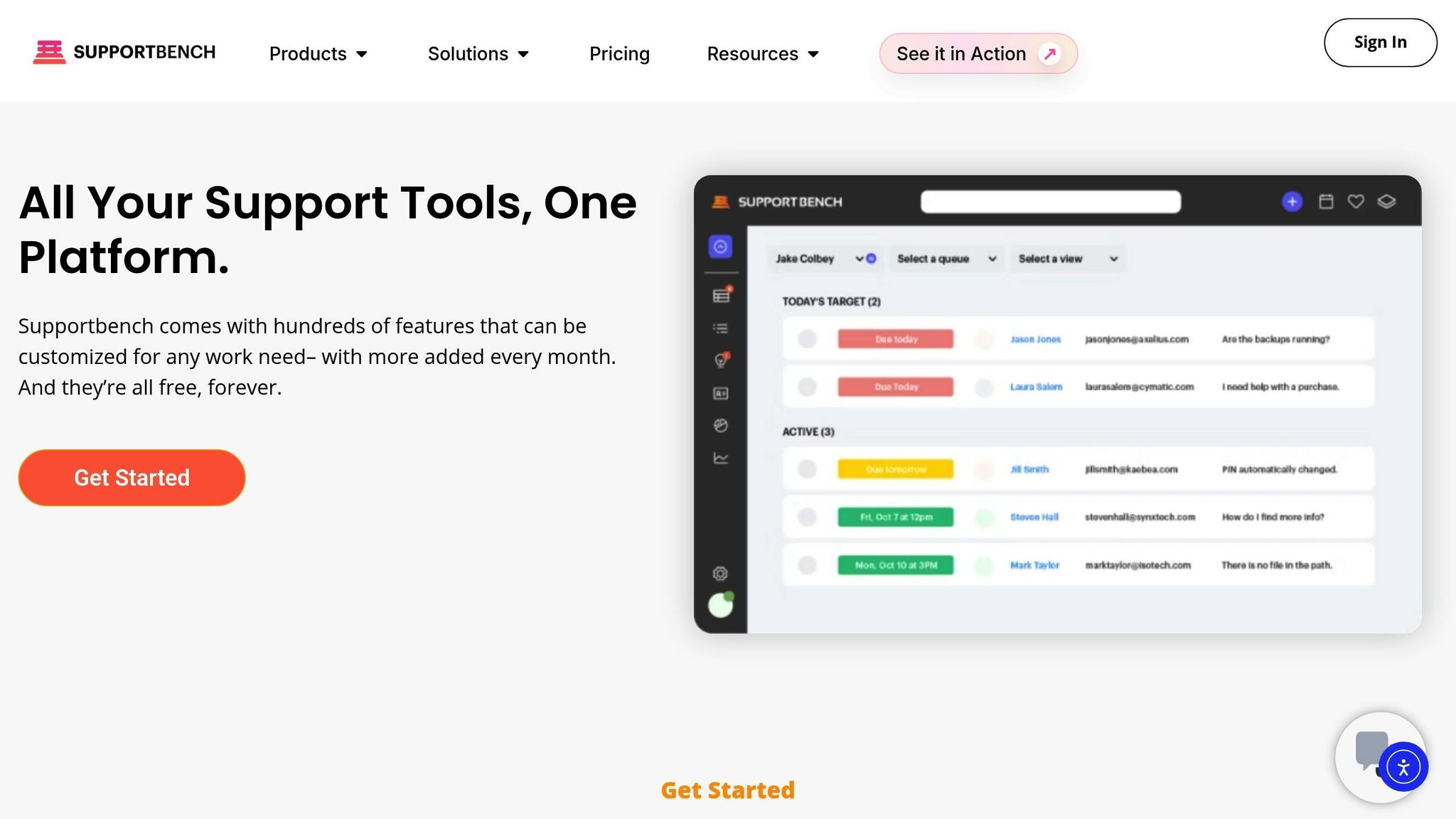
Supportbench offers tools designed to make implementing these principles easier and more efficient. Starting at just $32 per agent per month, the platform includes features like visual workflow builders, fallback logic, and real-time KPI dashboards. It uses AI-driven capabilities to analyze sentiment, urgency, and customer tier, ensuring cases are routed to the right agent with the right context.
For example, in February 2025, Michael Floyd, Director of Customer Support at Jenzabar, used Supportbench to automate case assignments and manage escalations. This allowed his team to concentrate on resolving technical issues for high-value clients rather than getting bogged down in logistics. Whether you’re handling hundreds or thousands of cases each month, Supportbench scales with your team, providing enterprise-grade automation without the hefty price tag.
FAQs
How can I make sure my next-best action workflows support business goals?
To align your next-best action workflows with business goals, start by setting clear objectives for your support operations. These might include reducing resolution times, improving customer satisfaction, or balancing agent workloads. These objectives act as the foundation for workflows that directly impact measurable key performance indicators (KPIs).
Use data and analytics to track and refine workflows as needed. For instance, tools like escalation prediction or ticket prioritization can help agents focus on high-priority issues that influence customer retention and revenue. Regular performance reviews are essential to adjust workflows as business priorities shift.
Collaboration is another key element. Encourage support, sales, and product teams to work together to ensure workflows align with the organization’s broader goals. Create feedback loops where agents and managers share insights to fine-tune processes. By combining well-defined objectives, data-driven adjustments, and cross-team collaboration, you can build workflows that enhance both efficiency and business outcomes.
What metrics should I track to measure the success of next-best action workflows?
To gauge the success of next-best action (NBA) workflows, it’s essential to track metrics that highlight both operational efficiency and customer satisfaction. Here are some key ones to consider:
- First-Contact Resolution (FCR): Measures how often customer issues are resolved during a single interaction, reducing the need for follow-ups.
- Resolution Time: Tracks how quickly agents can resolve customer concerns, emphasizing efficiency.
- Customer Effort Score (CES): Reflects how easy customers find it to resolve their issues, providing insight into the overall experience.
- Sentiment Analysis: Analyzes customer emotions and feedback to understand satisfaction levels.
- Escalation Rate: Shows how often cases are passed to higher-level support, which can indicate workflow gaps.
- Agent Utilization Rate: Evaluates how effectively agents are spending their time, helping to identify productivity trends.
- SLA Compliance: Monitors whether response and resolution times align with agreed service standards.
By regularly reviewing these metrics, you can pinpoint areas that need improvement, ensure your NBA workflows are aligned with customer needs, and demonstrate their measurable impact on both performance and satisfaction.
How can I integrate AI recommendations into my existing agent tools effectively?
To bring AI recommendations into your agent tools effectively, start by identifying where AI can make a difference. Look at areas like triage, escalation, or personalized responses – tasks where AI can save time or improve outcomes. Then, take a close look at your current workflows to figure out where AI-driven automation or suggestions can fit in. This might include routing tickets, troubleshooting issues, or pulling up relevant knowledge quickly.
From there, set up AI workflows with clear hand-off points to ensure smooth collaboration between AI and your existing systems, such as CRMs or ticketing platforms. This step may require configuring APIs or other integrations to enable real-time data sharing. Once the system is in place, it’s crucial to train your agents on how to use AI recommendations as part of their daily tasks to boost efficiency.
Finally, keep an eye on how the system is performing. Track metrics like resolution times and customer satisfaction to see what’s working and what’s not. Use this data to tweak prompts, fine-tune workflows, and make sure the AI is delivering results without adding unnecessary complexity.
Related Blog Posts
- NLP for Ticket Routing: How It Works
- AI Prompts for Customer Support: 25 Copy-Paste Prompts for Faster Replies
- How do you build an escalation framework that doesn’t overload Engineering?
- How do you design a support queue strategy (triage, routing, and ownership rules)?
Evaluating help desks for a B2B team?
Supportbench is all-inclusive from $32 per agent per month, with migration and onboarding included. See pricing or book a 20-minute demo.






