


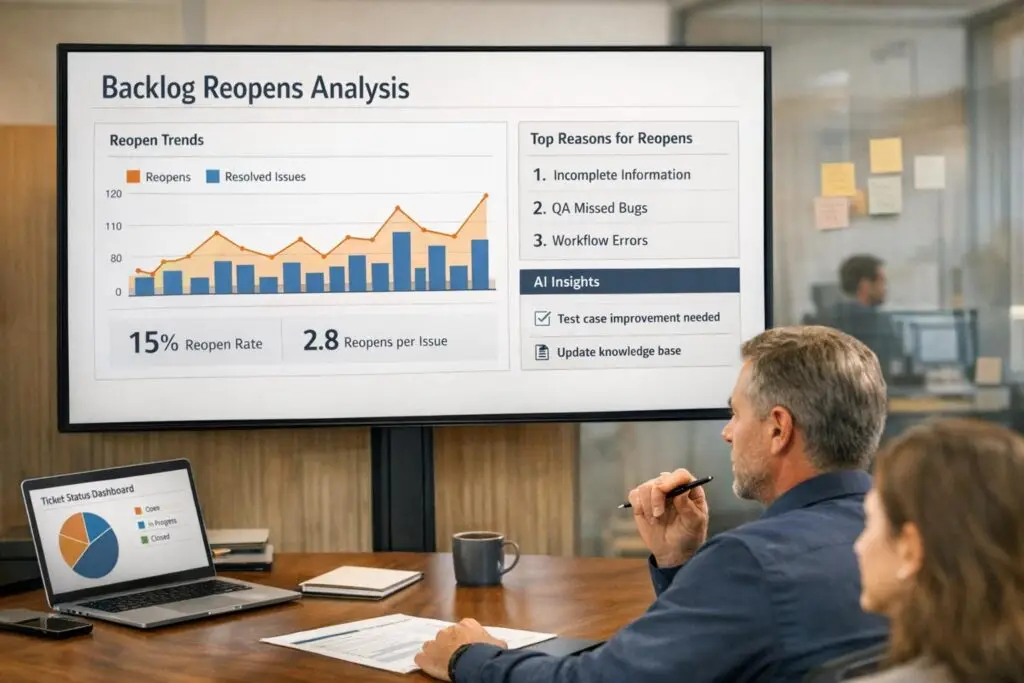
Backlog reopens occur when a ticket marked as "Solved" is reopened because the issue wasn’t fully resolved. This is often due to agents prioritizing speed over accuracy, misdiagnosing issues, or prematurely closing tickets. Reopens disrupt efficiency, increase costs, lower customer satisfaction, and risk losing customers – especially in B2B settings, where unresolved issues can jeopardize high-value contracts.
To measure and reduce reopens:
- Key Metrics: Track Ticket Reopen Rate, First Contact Resolution (FCR), and Escalation Rate. A good Reopen Rate is 2-5% for general teams, but B2B teams may see up to 10% due to complexity.
- Root Causes: Analyze ticket histories, identify misdiagnoses, misclassifications, or skill mismatches, and address workflow inefficiencies like ticket bouncing.
- Strategies: Train agents on thorough resolution techniques, improve ticket routing, and use automation for follow-ups. Update knowledge bases regularly to support agents and customers.
- AI Tools: Use predictive analytics to flag high-risk tickets, real-time sentiment analysis to detect dissatisfaction, and AI copilots to assist agents with case summaries and routing.
Why Backlog Reopens Happen
Common Causes of Reopens
Reopens often happen when agents prioritize speed over accuracy. In the rush to close tickets quickly, agents might provide incomplete solutions, leaving customers with unresolved issues that resurface later. This approach creates a cycle where the same problems keep coming back.
Another frequent issue is misdiagnosis. When agents lack critical details – like missing mandatory fields such as product category or issue type – they may misinterpret the problem. Tickets get marked as "Solved", but the underlying issue remains unresolved. Similarly, skill mismatches can cause trouble. When complex technical issues land with agents who lack the necessary expertise, they may only address surface-level problems, leading to quick failures and subsequent reopens.
Reopens can also occur when tickets are bounced between departments without a clear owner. This "hot potato" effect frustrates customers as their cases move from one team to another without resolution.
Another common cause is the practice of closing stale tickets prematurely, often to clear the queue. But as Christian Strunk, Product Manager, points out:
"If you inadvertently close a critical ticket, rest assured, it will resurface, and you can address it then".
While these challenges are common across all support teams, B2B environments face additional factors that significantly increase the likelihood of reopens.
B2B-Specific Factors
B2B support comes with its own set of challenges that make ticket resolution more complex and reopen risks higher. Unlike B2C, where a single consumer drives decisions, B2B involves multiple stakeholders within buying centers. A ticket may seem resolved to one contact, only for another stakeholder in the same organization to identify a lingering issue or raise a new requirement – prompting a reopen.
Technical complexity is another major factor. B2B solutions often need to integrate with legacy systems or require custom configurations. For example, a software solution might work perfectly in testing but fail in the client’s unique environment, such as a specialized parts management system. These integration challenges lead to reopens that are rare in simpler B2C scenarios.
The stakes are much higher, too. A single B2B customer can account for six or seven figures in annual revenue. Renewal pressures mean that unresolved tickets can jeopardize major contracts. Research shows that 87% of B2B buyers would reconsider their ongoing relationship with a company after a poor support experience. Unlike B2C, where individual transactions carry less weight, every reopened ticket in B2B can have serious financial consequences.
| Factor | B2B Support | B2C Support |
|---|---|---|
| Decision Making | Multiple stakeholders/Buying centers | Individual consumers |
| Product Complexity | High; requires onboarding, training, and customization | Low; designed for mass consumption and self-service |
| Reopen Risk | High due to complex integrations and long implementation cycles | Lower; typically resolved through standard protocols or refunds |
| Revenue Impact | Single customer can represent six or seven figures | Individual transactions carry less weight |
Lastly, misclassification is a significant issue in B2B support. For example, a quote request might be incorrectly categorized as an order status inquiry. This misrouting delays proper handling and often leads to reopens after the customer grows frustrated with the initial response.
Addressing these challenges is key to implementing effective metrics and AI-driven tools that can reduce the frequency of reopens.
How to Measure Backlog Reopens
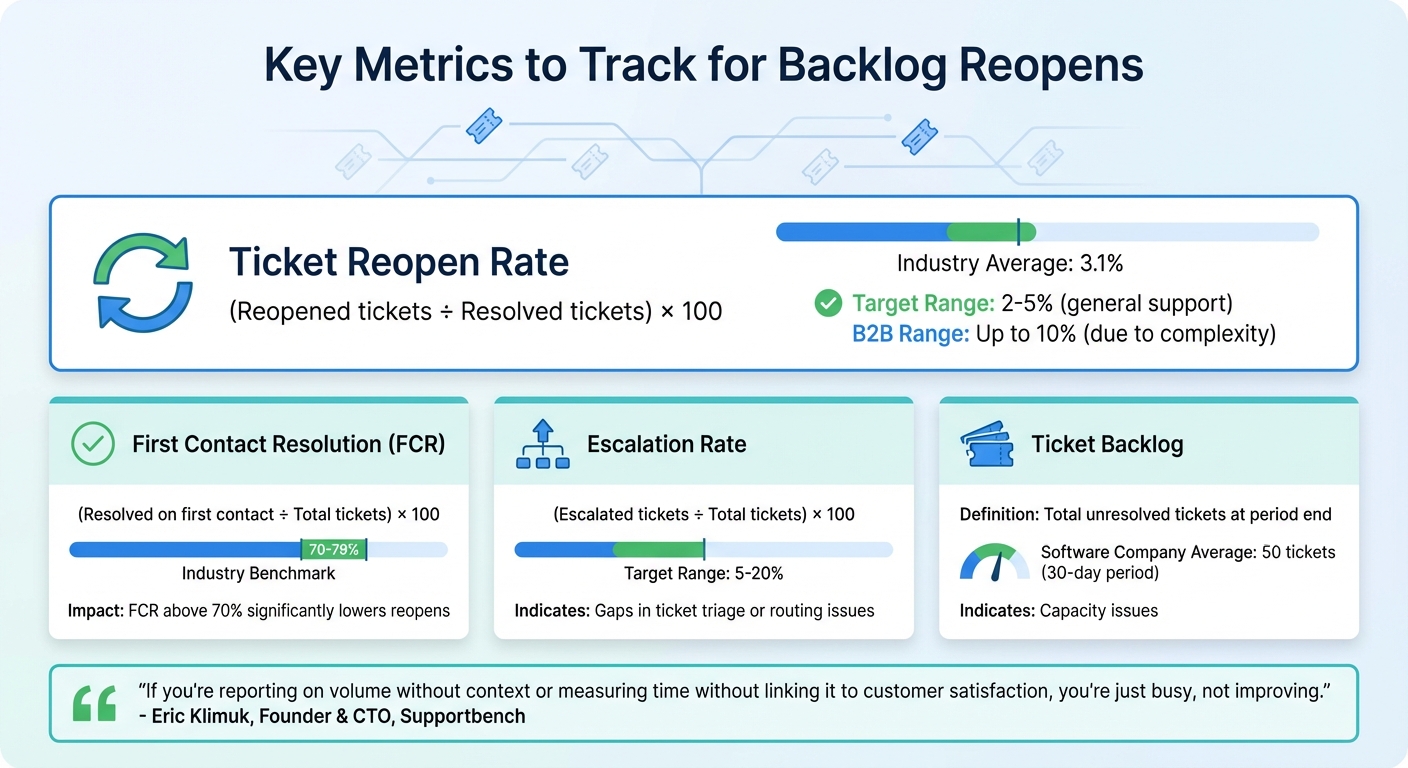
Key Metrics and Benchmarks for Measuring Ticket Reopen Rates in B2B Support
Key Metrics to Track
Understanding how to measure backlog reopens starts with focusing on the right metrics. The Ticket Reopen Rate is a critical measure of your resolution quality. To calculate it, divide the number of reopened tickets by resolved tickets, then multiply by 100. On average, this rate is 3.1%, according to a 2022 survey of 260 companies. While general customer support teams should aim for rates between 2% and 5%, more complex B2B environments might see rates as high as 10% due to technical challenges and involvement from multiple stakeholders.
Another key metric is First Contact Resolution (FCR), which tracks how often issues are resolved in the first interaction. Industry benchmarks for FCR generally range between 70% and 79%, though B2B teams often fall below this range due to the complexity of their cases. Hitting an FCR above 70% can significantly lower the chances of ticket reopens. Additionally, Ticket Backlog, which is the total number of unresolved tickets at the end of a period, can indicate capacity issues. For software companies, a 30-day unresolved backlog typically averages around 50 tickets.
The Escalation Rate is another valuable metric, highlighting gaps in ticket triage. If 5% to 20% of tickets are escalated, it may signal issues with initial routing or insufficient documentation. Finally, Next Issue Avoidance measures whether customers open new tickets for the same underlying issue, shedding light on the long-term effectiveness of your resolutions.
Eric Klimuk, Founder and CTO of Supportbench, emphasizes the importance of context when analyzing metrics:
"If you’re reporting on volume without context or measuring time without linking it to customer satisfaction, you’re just busy, not improving".
| Metric | Formula | B2B Benchmark |
|---|---|---|
| Ticket Reopen Rate | (Reopened tickets ÷ Resolved tickets) × 100 | 3.1% |
| First Contact Resolution | (Resolved on first contact ÷ Total tickets) × 100 | 70–79% |
| Escalation Rate | (Escalated tickets ÷ Total tickets) × 100 | 5%–20% |
These metrics provide a foundation for identifying patterns and improving resolution processes.
Using Analytics Tools
Once you’ve established these metrics, analytics tools can help you dive deeper into your data. Many modern platforms offer real-time dashboards that allow you to break down reopen rates by agent, product, priority, or channel. For example, if specific agents consistently show high reopen rates, it might indicate a need for additional training. Similarly, frequent reopens tied to a particular product area could point to gaps in documentation or feature issues that need to be addressed.
Cross-referencing reopen rates with CSAT scores can reveal whether unresolved issues are negatively impacting customer satisfaction. Analytics tools can also send automated alerts for tickets nearing SLA breaches, helping ensure they don’t fall into backlog. Additionally, platforms that rank tickets by sentiment scores allow you to focus on cases most likely to reopen, reducing the risk of escalation.
Step-by-Step Process to Identify Root Causes
Once you’ve established your baseline metrics, the next step is to dig deeper into the factors driving ticket reopens. This means going beyond surface-level data to uncover specific patterns, workflows, or communication gaps that contribute to higher reopen rates.
Segment and Analyze Reopen Data
Start by breaking down your reopen data across different dimensions to uncover trends. For example, segmenting data by agent and tenure can help identify potential training gaps or signs of agent fatigue. Newer agents might struggle with complex issues, while more experienced agents could rush through tickets to meet closure targets. Similarly, use custom fields to classify reopens by product area or service line – this can highlight whether certain features or services are consistently causing problems.
When analyzing sentiment or intent patterns like "software error", focus on identifying which categories have the strongest connection to reopens, rather than relying on broad AI interpretations. Another critical area to examine is group transfers – if tickets are bouncing between frontline agents and specialists before reopening, it could point to poor routing or unclear escalation processes. Ensure your dataset is robust enough to draw meaningful conclusions before acting on these patterns.
Once you’ve identified trends through segmentation, move on to reviewing the detailed histories of individual tickets.
Review Ticket Histories
Building on your segmented data, dive into ticket histories to pinpoint common closure mistakes. Examine the entire lifecycle of tickets to identify situations where agents might prioritize speed over quality – closing tickets too quickly to meet performance targets often leaves issues unresolved.
For example, in 2024, a Fortune 500 company in the food and beverage industry used Swish AI’s platform to analyze their ticket history. Initially, they believed their reopen rate was just 2%, based on traditional ITSM metrics. However, the analysis revealed a 14% "Repeated Incidents" rate. By spotting clusters of incidents from the same caller within a 3-5 day window, they made targeted improvements to their incident management process, which significantly reduced repeated tickets.
Look for interaction patterns that signal trouble. Tickets with high agent touch counts or frequent group transfers often indicate complex issues or insufficient agent training. Pay special attention to tickets with more than five agent replies – these should be flagged for manual review. Also, track sentiment shifts in the final interactions. Phrases like "considering alternatives" or "refund" can reveal dissatisfaction that wasn’t fully addressed before closure.
Collect Customer and Agent Feedback
After analyzing data and ticket histories, gather direct feedback from both customers and agents to uncover deeper issues. Enhance your CSAT surveys with root-cause driver questions that ask what influenced the rating. Options like "Technical accuracy", "Issue not fully resolved", or "Had to contact support multiple times" can provide actionable insights. Additionally, set up feedback macros so agents can flag recurring workflow challenges, inaccurate predictions, or frequently reported product issues.
Create triggers to alert managers immediately when a ticket receives a "Bad" or "Bad with comment" satisfaction rating, allowing for quick follow-up. Document qualitative feedback in internal notes and set alerts for tickets that hit a certain threshold of agent replies or reopens. Close the feedback loop in three ways: reach out to dissatisfied customers to clarify and resolve their issues, use real customer feedback in agent training sessions, and identify recurring "CSAT killers" each quarter. These insights can lead to updates in your knowledge base or adjustments to policies.
"Support conversations are one of the few places where customers are completely honest. They don’t hold back, they don’t sugarcoat, and they often reveal the truth that surveys and NPS scores never capture." – Swati Sharma, Zonka Feedback
sbb-itb-e60d259
Strategies to Reduce Backlog Reopens
Once you’ve identified the root causes of backlog reopens, the next step is to tackle them head-on with targeted strategies. These include better agent training, smarter use of automation, and an optimized knowledge base. Let’s dive into how these can make a difference.
Improve Agent Training and Closing Protocols
The first step to reducing reopens is ensuring that agents are equipped to resolve issues thoroughly. Training your team in Root Cause Analysis (RCA) helps agents dig deeper into problems, connecting the dots between seemingly unrelated tickets. This not only resolves the current issue but prevents similar ones from cropping up again, cutting down on overall ticket volume.
A focus on First Contact Resolution (FCR) is key. By combining RCA techniques with standardized closing protocols, agents can address issues fully on the first try. As Jhanell, Influx Delivery Manager, explains:
"The more knowledgeable agents are, the easier it is to handle a higher volume".
Time management is another skill worth emphasizing. Techniques like Time Blocking can help agents dedicate focused time to live queues, in-depth investigations, and backlog reduction.
Clear and consistent communication is also critical. Agents should set customer expectations by providing follow-up timelines and estimated resolution times before closing a ticket. This builds trust and reduces premature reopens. Using mandatory closure checklists ensures no steps are overlooked before marking a ticket as resolved. For more complex issues, encourage collaborative problem-solving or "swarming", where agents consult internal knowledge bases or involve senior engineers to find the best solution.
Regular updates – even when a full solution isn’t ready – go a long way in keeping customers informed and less likely to escalate issues. As Sohail Sarwar, PMP, puts it:
"Clear communication can prevent escalations, build trust with the customer, and avoid customer churn".
Use Automation for Follow-Ups
While training and protocols improve agent performance, automation can take care of repetitive tasks like follow-ups. For example, setting up automated workflows to send confirmation emails or surveys after a ticket is resolved ensures that the issue is genuinely fixed.
For B2B operations, automation can go even further. Implement proactive "silent account" check-ins, where AI triggers outreach for accounts that haven’t interacted with support in over 60 days. Sentiment analysis tools can flag negative interactions and alert Customer Success Managers (CSMs) for high-value accounts. For instance, if a sentiment score drops below –40, the system can automatically escalate the case to a senior agent or CSM.
Automation can also identify recurring issues. If the same problem occurs over three tickets, the system should escalate it to the product team for a permanent fix. The table below outlines common triggers and recommended responses:
| Volume Pattern | CS Action | Timeline |
|---|---|---|
| 3x spike in 7 days | Immediate executive sponsor check-in | Within 24 hours |
| 50% increase for 30 days | Schedule deep-dive meeting to identify causes | Within 1 week |
| Zero tickets for 60+ days | Proactive engagement campaign to check health | Within 1 week |
| Same issue >3 times | Escalate to product team for permanent fix | Within 48 hours |
These automated interventions not only save time but can also boost customer retention. Even a 5% improvement in retention can increase profits by over 25%.
Optimize the Knowledge Base
An effective knowledge base is a powerful tool for reducing reopens. Start by categorizing tickets by product area or issue type. If you notice high ticket volume in certain categories with little corresponding knowledge base coverage, prioritize creating content in those areas.
Keep the knowledge base updated with new features, product updates, and solutions to recurring issues. This helps both agents and customers find accurate information quickly, reducing unnecessary tickets. High-quality agent responses should be turned into templates or FAQ articles, making them easy to reference in the future.
Consider the example of Confluent‘s Technical Support team. In January 2026, they implemented an AI-powered search tool to unify their support systems. This reduced ticket investigation times by 5–10 minutes and improved response times by at least 5 minutes. The result? A monthly savings of over 15,000 hours and a 13% boost in team satisfaction.
To streamline processes further, require agents to select predefined categories before resolving a ticket. Use AI to summarize long, multi-threaded ticket histories into concise insights for the knowledge base. Linking specific FAQ articles in customer communications can also encourage self-service, further reducing ticket volume.
AI-Driven Solutions to Prevent Reopens
AI-powered tools are changing the game when it comes to reducing ticket reopens. These solutions focus on identifying potential issues early, improving resolution quality, and making support processes more efficient.
Predictive Analytics for Risk Detection
Predictive analytics uses AI to assess the likelihood of ticket reopens by analyzing factors like sentiment changes, response delays, and historical resolution data. For example, AI models can flag repeated incidents that traditional metrics might miss. In one case study, a Fortune 500 food and beverage company discovered that AI detected a 14% reopen rate – far higher than the 2% identified by traditional analytics.
These models analyze ticket language for signs of frustration, operational details like SLA compliance, and product usage patterns such as error spikes or gaps in feature adoption. With an accuracy rate of about 88% in identifying high-risk tickets, predictive analytics can significantly improve outcomes. Organizations using these tools have reported a 32% drop in escalation rates and a 28% faster mean time to resolution (MTTR). Additionally, AI reduces the time spent identifying risks by up to 86% compared to manual processes.
To get the most out of predictive analytics, it’s essential to retrain the AI monthly using resolved-case data, involve human oversight for low-confidence predictions, and maintain control groups to measure the impact accurately. These practices also set the stage for real-time sentiment tracking, catching potential issues as they arise.
Real-Time Sentiment and Intent Analysis
Natural language processing (NLP) enables real-time sentiment analysis, which detects emotions like frustration or sarcasm in ticket text – even when explicit urgency markers are absent. These systems continuously monitor interactions, allowing teams to intervene before a ticket closes unsuccessfully. Case studies show that this approach can reduce escalations by up to 80% while significantly improving customer satisfaction.
To make the most of sentiment analysis, integrate it with customer tiers. For instance, prioritize high-value clients showing signs of dissatisfaction. Automated workflows can also combine negative sentiment scores with SLA breach signals, ensuring tickets are routed to the right teams quickly. Given that 70% of a customer’s experience hinges on their perception of service, and 90% expect immediate responses, this integration is key to improving support responsiveness.
AI Copilots and Automation
AI copilots are transforming how agents handle tickets by offering real-time guidance and automating repetitive tasks. For instance, AI-generated case summaries condense long ticket histories into clear, actionable insights, helping agents avoid common errors like misdiagnosis. Intelligent triage systems further enhance efficiency by analyzing customer intent, language, and sentiment right at ticket creation, ensuring complex cases are routed to the appropriate specialists.
AI-driven automation has proven benefits: a 53% reduction in MTTR, a 30% drop in escalation rates, and a 28% decrease in resolution times, according to industry studies. For B2B scenarios, these tools can dynamically adjust SLA urgency based on factors like account value or contract terms, ensuring high-priority cases get the attention they need.
Automation also includes triggers for internal notes or activating AI copilots when tickets hit specific thresholds, such as after multiple agent replies. Additionally, implementing rules to flag tickets with negative sentiment for manager review before marking them as "Solved" can further reduce reopen risks. Together, these automated solutions work seamlessly with other strategies to ensure consistent and efficient resolutions.
Conclusion
Managing and reducing backlog reopens goes beyond just keeping your ticket queue in check – it’s about safeguarding customer trust and maintaining operational flow. When tickets reopen, customers often have to repeat themselves, which can chip away at trust and increase the likelihood of churn, especially in B2B relationships. On top of that, high reopen rates can inflate your Mean Time to Resolution (MTTR) and suggest that agents may be prioritizing speed over true resolution quality.
To address this, focus on three core areas: accurate measurement, root cause analysis, and proactive prevention. Start by tracking reopen percentages and analyzing patterns in your ticket data. Pinpoint recurring issues, whether they stem from knowledge gaps, training needs, or specific product challenges. With 50% of customers switching after just one bad experience, achieving first-touch resolution has never been more crucial.
AI-driven tools are proving to be game-changers in this space. For instance, in 2023, one major provider reduced escalation rates by 56% while keeping overall escalations below 2%. Another organization saw a 20% boost in CSAT and a 40% drop in SLA misses by adopting proactive support measures. These results were driven by technologies like predictive analytics, real-time sentiment monitoring, and automated workflows that help prevent unresolved tickets from closing prematurely. The outcome? Improved customer satisfaction and streamlined operations.
AI-powered ticket analysis is also transforming efficiency, cutting manual review times by 86% – from as much as 13 hours to just 1–2 hours. This shift allows teams to focus less on putting out fires and more on strategic improvements that address the root of recurring issues.
"When you optimize a bot for ending conversations, it will do that. When you optimize it for resolved outcomes, it starts acting like a service system." – Buzzi.ai
FAQs
How can B2B support teams reduce ticket reopens and why do they happen?
Ticket reopen rates in B2B support often spike due to incomplete resolutions, unclear communication, or unresolved core issues. To tackle this, focus on providing detailed and accurate solutions right from the start. Agents should follow structured troubleshooting steps, confirm the customer’s understanding, and ensure clarity in communication before closing any ticket.
Using AI-powered tools can make a big difference here. Features like sentiment analysis and escalation prediction help identify potential problems early on. These tools can flag unresolved concerns proactively, giving teams the opportunity to address them before tickets are prematurely closed. Additionally, intelligent triage systems can route tickets to the most suitable agents, cutting down on errors and incomplete solutions.
Equipping agents with an up-to-date, AI-supported knowledge base is another critical step. This allows them to quickly access reliable information, reducing the chances of providing incomplete or incorrect answers. By combining these strategies, B2B support teams can improve the quality of resolutions, lower ticket reopen rates, and boost overall customer satisfaction.
How can AI help reduce reopened cases in customer support backlogs?
AI can make a big difference in cutting down on reopened cases by creating smarter, more efficient workflows. For example, predictive models powered by AI can assess factors like customer sentiment, issue complexity, and interaction history. This allows support teams to identify cases that might reopen and address potential issues before closing them.
AI also improves case routing. It can automatically assign more complex problems to the right agents or teams, ensuring these issues are resolved thoroughly on the first try. On top of that, AI-driven knowledge management systems provide quick access to accurate and relevant information, reducing the chances of errors or incomplete resolutions that could lead to cases being reopened.
With these tools, AI enhances resolution accuracy, keeps a close eye on case quality, and enables timely problem-solving. The result? Fewer reopened cases and a better experience for customers.
Why is the ticket reopen rate typically higher in B2B support compared to B2C?
In B2B support, ticket reopen rates tend to be higher because the issues are often more intricate and require deeper investigation. These challenges frequently involve system-wide integrations, customized solutions, and multiple stakeholders, which makes achieving a complete resolution on the first try more difficult. This layered complexity increases the chances of partial fixes or recurring issues.
On top of that, B2B customers typically expect more thorough solutions. The stakes are higher, and the relationships are long-term, so they’re more likely to reopen tickets if their concerns aren’t fully resolved. This contrasts with B2C support, where issues are usually more straightforward and transactional, allowing for quicker and more definitive resolutions.
Related Blog Posts
- How to Measure Customer Support Performance in 2026: Key Metrics
- Top 7 AI Tools for Tracking Support Agent Performance and Competency
- How do you identify the top ticket drivers and turn them into a Product backlog?
- How do you manage backlog aging and prevent “zombie tickets”?
Evaluating help desks for a B2B team?
Supportbench is all-inclusive from $32 per agent per month, with migration and onboarding included. See pricing or book a 20-minute demo.






