


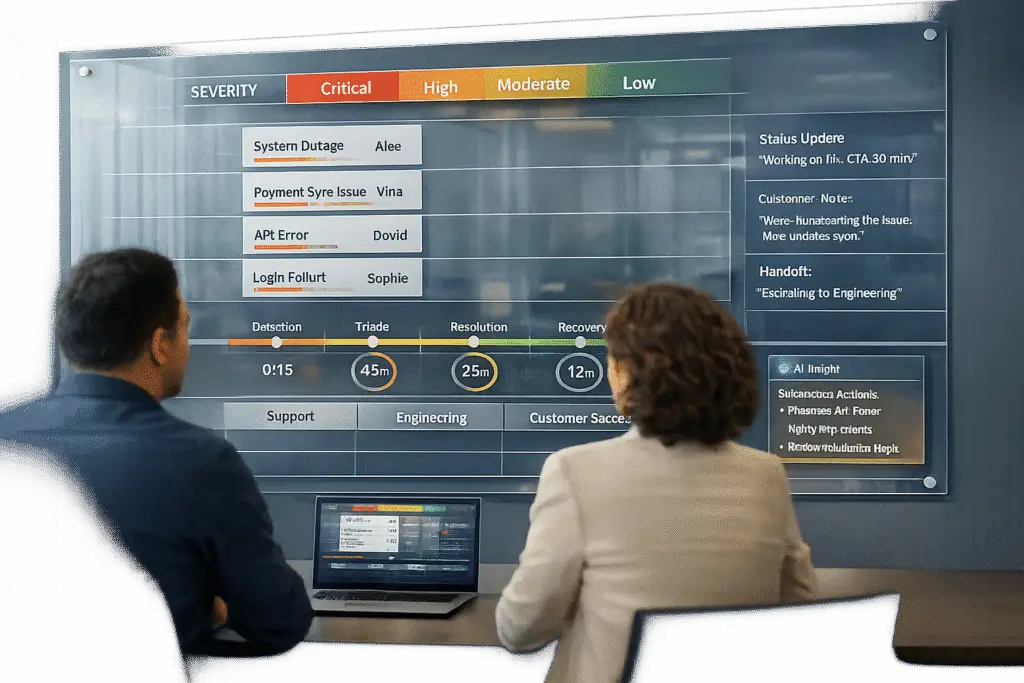
Building an incident management process for B2B support requires a structured approach tailored to the unique needs of business clients. Unlike B2C or engineering-focused processes, B2B support prioritizes relationship management, transparency, and addressing multiple stakeholders’ concerns. Here’s how you can create an effective process:
- Define Incident Scope and Severity Levels:
- Clearly distinguish incidents from routine service requests.
- Classify incidents by impact and urgency (e.g., outages, performance issues, security breaches).
- Use a severity matrix to prioritize incidents based on business risk and SLA requirements.
- Assemble Cross-Functional Teams:
- Assign clear roles such as Incident Commander, Tech Lead, and Communications Lead.
- Include business-focused roles like Customer Success and Business SMEs for client relationship management.
- Ensure collaboration across technical and non-technical teams.
- Map Out a Workflow:
- Follow a structured process: detection, triage, investigation, resolution, and post-incident review.
- Use tools to centralize communication and track progress in real-time.
- Establish Communication Protocols:
- Assign a dedicated Communications Lead to manage updates.
- Use internal and external status pages for clarity.
- Provide regular updates to stakeholders, even if no new developments occur.
- Implement Dynamic SLAs:
- Adjust response times based on account value, contract terms, or business impact.
- Use automation to manage SLA alerts and escalation triggers.
- Track and Improve:
- Monitor metrics like Mean Time to Detect (MTTD), Mean Time to Resolve (MTTR), SLA compliance, and customer satisfaction.
- Conduct blameless post-incident reviews to refine processes and prevent recurrence.
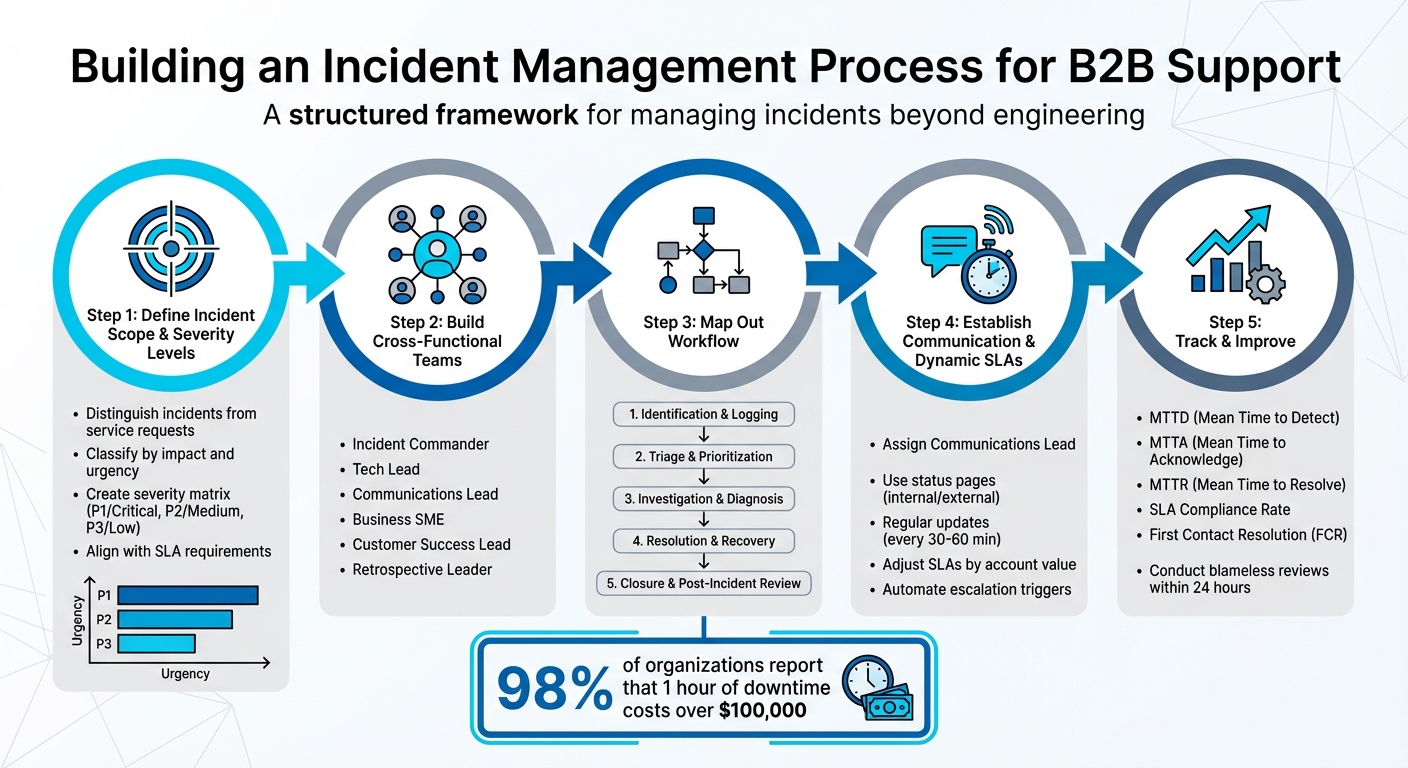
5-Step B2B Incident Management Process Framework
Incident Management Lifecycle Explained for Beginners
Step 1: Define Incident Scope and Severity Levels
To create an effective incident response process, you first need to define clear parameters for what qualifies as an incident. This distinction is crucial, as routine tasks like password resets or hardware upgrades fall under service requests, not incidents.
How to Classify Incidents in B2B Support
In B2B environments, incidents can be grouped into specific categories:
- Service outages: These are critical situations where the platform becomes completely inaccessible for customers.
- Performance degradation: Services remain functional but operate below acceptable standards, such as slow API response times that disrupt workflows.
- Security incidents: These involve breaches, unauthorized access, or leaks of sensitive data like personally identifiable information.
- Compliance or legal incidents: These pertain to violations of regulatory rules or contractual obligations.
- User or account issues: Problems that affect specific users or account setups fall into this category.
When triaging incidents, focus on impact and urgency. Impact measures how business operations and users are affected, while urgency determines how quickly the issue needs resolution. For example, a minor UI bug impacting one user is very different from a platform-wide outage costing a major client $300,000 per hour. Consider factors like the number of affected customer accounts, SLA penalties, and the criticality of the affected function to prioritize effectively.
These classifications help establish the basis for your severity matrix.
Build a Customer-Focused Severity Matrix
A well-designed severity matrix ensures that customer impact, urgency, and business risk are considered during triage, enabling swift and accurate resource allocation. Most organizations stick to three to five severity levels, but using three or four levels often improves speed and precision. For example, companies like Atlassian treat SEV 1 and SEV 2 incidents as top priorities, triggering immediate action from on-call professionals, while SEV 3 incidents are addressed during regular business hours.
| Severity Level | Affected Users/Systems | Business/Customer Risk | Typical Example |
|---|---|---|---|
| High (P1/Critical) | System-wide or large number of users | Major financial loss; SLA breach; security threat | Total service outage; data breach |
| Medium (P2) | Partial service or specific group of users | Moderate disruption; customer inconvenience | Performance degradation; specific feature failure |
| Low (P3) | Individual user or minor glitch | Minimal disruption; workarounds available | Minor UI bug; individual login issue |
Defining these severity levels in advance is critical to avoid delays during triage. Each severity level should align with the response and resolution timelines outlined in your Service Level Agreements (SLAs). It’s also vital to involve business leaders when setting these levels to ensure they reflect both technical and organizational priorities, as well as customer expectations. With 93% of service operations professionals emphasizing the need for greater efficiency, a well-structured severity matrix becomes an essential tool for maintaining order during incidents.
Step 2: Build Cross-Functional Incident Response Teams
After setting your severity levels, the next move is gathering the right team to tackle incidents effectively. For B2B companies, resolving issues goes beyond just technical fixes – it’s about managing customer relationships and safeguarding your brand. Consider this: 98% of organizations report that an hour of downtime can cost over $100,000, and 81% say it exceeds $300,000. With stakes this high, having a well-structured team with clear roles is non-negotiable.
Key Roles in an Incident Response Team
An effective incident response team combines technical expertise with business acumen. Here’s a breakdown of essential roles:
- Incident Commander: Also known as the Incident Manager, this person oversees the response from start to finish, ensuring processes are followed and keeping the team aligned.
- Tech Lead: A senior technical expert who identifies the root cause, determines necessary fixes, and leads the engineering effort.
- Communications Lead: Responsible for crafting internal and external updates, managing the status page, and keeping stakeholders informed.
- Business Subject Matter Expert (SME): Acts as a bridge between technical teams and business operations, ensuring business continuity and focusing on high-priority accounts during disruptions.
- Customer Success and Account Management: These teams handle proactive communication with key clients to minimize potential damage to relationships.
- Retrospective Leader: Facilitates post-incident reviews to identify areas for improvement without assigning blame.
| Role | Primary Responsibility | Department Source |
|---|---|---|
| Incident Commander | Overall coordination and process adherence | Support / Operations |
| Tech Lead | Technical diagnosis and service restoration | Engineering / DevOps |
| Communications Lead | Internal/External updates and status page management | Support / PR / Marketing |
| Business SME | Business continuity and emergency operations | Product / Business Ops |
| Customer Success Lead | Customer impact management and high-value account outreach | Customer Success |
| Retrospective Leader | Post-incident analysis and process improvement | Quality / Management |
"In an emergency response, it’s very important to be clear who’s in charge." – Atlassian Incident Management Handbook
How to Improve Collaboration Between Support and Other Departments
Strong collaboration is the backbone of a successful cross-functional team. Start by centralizing communication. Use a dedicated incident channel and a persistent video call link for real-time coordination. A shared live document can act as your single source of truth, tracking updates, decisions, and progress as the situation unfolds.
For customer-facing teams, label support tickets with the incident key. This allows for real-time visibility into customer impacts and enables targeted follow-ups. Integrating your CRM system is another game-changer. By pulling in data like contract details, account managers, and SLAs, responders can prioritize customers effectively. For example, in October 2025, payment processor Payfirma used Supportbench to handle 10,000 customers with just four agents. By leveraging intelligent workflows and CRM-integrated alerts, they cut resolution times by 50% and focused on high-value accounts.
It’s also important to set up a parallel track for business response. While engineers focus on technical fixes, non-technical leaders should manage customer relationships and brand perception. Clearly defined escalation paths help teams know when and how to involve specialized support or management. Finally, wrap up incidents with a blameless retrospective. Involve team members from support, sales, and engineering to uncover process improvements instead of pointing fingers. After all, 75% of customers are willing to spend more with businesses that consistently deliver great experiences, even during tough situations.
Step 3: Map Out the Incident Management Workflow
After assembling your cross-functional team, the next step is to create a clear, repeatable workflow for handling incidents – from the moment they’re detected to their resolution. Without a well-defined process, even highly skilled teams can struggle, leading to delays. In B2B support, where 98% of organizations report that an hour of downtime costs over $100,000, every wasted minute worsens revenue loss and customer dissatisfaction.
The 5 Stages of a B2B Incident Workflow
An effective B2B incident workflow typically follows five key stages:
- Identification and Logging: Issues can be detected through automated alerts or client reports. At this stage, it’s essential to record critical details, such as the timestamp, the person reporting the issue, and the affected services.
- Triage and Prioritization: Evaluate the incident’s urgency and impact on the business. Factors like technical severity, customer impact, and contractual obligations play a role here. For instance, a payment API failure during peak sales hours might be classified as a P1 incident due to its effect on enterprise customers. Having senior team members lead triage can cut resolution times significantly – from over 75 minutes to less than 25 minutes.
- Investigation and Diagnosis: This involves a deep dive to pinpoint the root cause. The Tech Lead might analyze system logs, telemetry data, and recent changes, coordinating with other teams as needed to isolate the problem.
- Resolution and Recovery: Once the cause is identified, the team implements a fix or workaround. This could involve deploying a hotfix, rolling back a recent update, or rerouting traffic. After applying the solution, services must be verified to ensure they’re fully restored.
- Closure and Post-Incident Review: Once customers confirm that services are back online, the ticket is formally closed. Within 24–48 hours, a blameless retrospective should be conducted to identify ways to improve processes. Skipping this step can lead to unresolved issues – 23% of tickets that are closed without proper verification end up being reopened.
"An incident is resolved when the current or imminent business impact has ended. At that point, the emergency response process ends and the team transitions onto any cleanup tasks and the postmortem." – Atlassian
Use AI Tools to Automate Workflows
AI tools can streamline every stage of the workflow, reducing delays and human error. For example, automated triage systems can quickly assess incidents, prioritize them based on business context, and route them to the right specialists. AI can even analyze ticket data to assign priority levels (P1 to P4) by correlating alert metadata with user impact and historical patterns.
During the investigation phase, AI tools can aggregate logs and surface relevant knowledge base articles, helping responders diagnose complex issues faster. Tools like Supportbench go a step further by automating triage, tagging cases, and capturing system data as soon as an incident is logged – eliminating delays caused by manual data entry.
Automation also improves response times. Intelligent routing and escalation tools can cut the mean time to acknowledgment (MTTA) by 50–70%, ensuring critical issues get the attention they need without unnecessary delays.
sbb-itb-e60d259
Step 4: Set Up Communication Protocols and Dynamic SLAs
Once your workflow is in place, the next step is ensuring clear communication and adjusting response times to match the impact of each incident. In B2B support, 75% of customers are willing to spend more with businesses that deliver a strong customer experience – even during service disruptions. This makes your communication strategy during incidents just as important as how quickly you resolve them.
Best Practices for Multi-Stakeholder Communication
B2B incidents often involve multiple groups – technical teams, account managers, executives, and even the customer’s leadership. Without a clear communication plan, teams might duplicate efforts, and key stakeholders could be left in the dark.
To keep everything running smoothly, assign a communications manager for major incidents. Their role is to handle all updates – both internal and external – so technical teams can stay focused on resolving the issue. Use a single, live incident document to track updates, decisions, and timelines. This eliminates confusion and prevents conflicting information from spreading across emails or chat platforms.
Set up different communication channels for different needs. For example, use internal status pages for technical updates and external ones for customer-facing information like impact and restoration timelines. Commit to a regular update schedule – every 30 to 60 minutes – even if there’s nothing new to report. This consistency reduces the flood of inquiries since stakeholders know when to expect updates.
Maintain clarity across all communication channels. Pre-draft templates for key incident states like "Investigating", "Identified", and "Resolved" to speed up responses and ensure consistency under pressure. When sharing updates internally, be transparent about what’s still unknown, such as saying, “Root cause currently unknown.” This helps reduce speculation and keeps everyone aligned.
With this communication framework in place, you’re ready to implement dynamic SLAs, which can further align your response efforts with business priorities.
How to Use Dynamic SLAs to Match Business Priorities
Dynamic SLAs take into account the varying risks and priorities of different incidents, ensuring your team focuses on what matters most. Unlike standard SLAs that treat all incidents equally, dynamic SLAs adjust response and resolution times based on factors like account tier, contract value, or how close a customer is to renewal.
One approach is to use multilevel SLAs with three tiers:
- Corporate-level SLAs: Cover general issues affecting all customers.
- Customer-level SLAs: Address issues specific to certain customer groups.
- Service-level SLAs: Focus on particular services in relation to specific customer groups.
For instance, you might promise a 15-minute response time to enterprise accounts with contracts over $100,000, 30 minutes for mid-tier accounts, and 60 minutes for standard accounts. Automated escalation triggers – set to activate when 75% of the SLA time limit has passed – can alert your team to intervene proactively.
AI tools can also help by automatically adjusting SLAs based on business needs. For example, they can shorten response times for accounts nearing renewal or for high-value customers.
In more complex environments, composite SLOs with weighting can be useful. Instead of treating all system components equally, assign weights based on their importance to the business. For example, in B2B e-commerce, payment processing might carry more weight (e.g., 0.6) than frontend performance (e.g., 0.4). During critical periods – like peak traffic times or renewal cycles – you can dynamically adjust SLA thresholds to reflect shifting priorities.
| SLA Type | Focus | Best Use Case |
|---|---|---|
| Customer-based SLA | Individual customer groups | High-value or "Platinum" accounts with tailored needs |
| Service-based SLA | Specific services for all users | Standard SaaS products with consistent delivery expectations |
| Multilevel SLA | Layered responsibilities | Complex B2B environments with varied account tiers or service levels |
Platforms like Supportbench offer renewal-aware SLAs, which automatically prioritize accounts nearing contract renewal or those showing signs of dissatisfaction. This ensures your team focuses on protecting key revenue opportunities while maintaining high service levels.
Step 5: Track, Review, and Improve Your Process
Creating a process is just the first step. The real challenge – and opportunity – lies in tracking its performance, learning from every incident, and refining your approach over time. Without tracking, recurring problems can slip through the cracks, and allocating resources effectively becomes a guessing game. By using clear metrics and structured reviews, you can leverage technology to keep improving.
Key Metrics to Track Incident Management Performance
To measure the effectiveness of your incident management process, focus on metrics that provide both speed and quality insights.
- Mean Time to Detect (MTTD): Tracks how quickly your team identifies an issue. Faster detection means less downtime.
- Mean Time to Acknowledge (MTTA): Measures the time between when an incident is reported and when a team member acknowledges it. It’s crucial for making customers feel heard.
- Mean Time to Resolve (MTTR): Shows how efficiently your team resolves incidents. While speed is important, rushing can lead to unresolved issues and reopened tickets.
- First Contact Resolution (FCR): Indicates how often issues are resolved during the first interaction. Higher rates mean greater efficiency and happier customers.
- SLA Compliance Rate: Tracks how well you meet service-level agreement timelines. Missing SLAs can erode trust and sometimes result in financial penalties.
- Incident Recurrence Rate: Measures how often similar issues resurface, signaling whether root causes are being effectively addressed.
- Reopen Rate: Highlights the percentage of tickets reopened after being marked resolved, which can point to quality gaps.
Don’t forget qualitative metrics like Customer Satisfaction (CSAT) and Customer Effort Score (CES) to gauge how users feel about your service. Lastly, calculate Cost per Incident – including staff time, tools, and downtime. With downtime costing over $100,000 per hour for 98% of organizations, understanding these costs is critical.
| Metric | Definition | Primary Goal |
|---|---|---|
| MTTD | Mean Time to Detect | Shorten the time between issue occurrence and awareness |
| MTTA | Mean Time to Acknowledge | Ensure customers feel supported quickly |
| MTTR | Mean Time to Resolve | Restore normal operations promptly |
| FCR | First Contact Resolution | Boost efficiency and customer satisfaction |
| SLA Compliance | Percentage of tickets meeting deadlines | Build trust and avoid penalties |
| Recurrence Rate | Percentage of repeat incidents | Address and fix systemic issues |
These metrics provide the foundation for analyzing incidents and driving meaningful improvements.
How to Conduct Post-Incident Reviews
Post-incident reviews are essential for identifying ways to improve. Schedule these reviews within 24 hours of an incident and include all relevant stakeholders. The goal is to learn, not assign blame.
Start by documenting the incident timeline, key factors, and root cause. Evaluate the actions taken during the response – what worked, what didn’t – and identify specific changes to improve processes, tools, or services. Assign follow-up tasks with clear deadlines and ownership to ensure accountability.
Take what you’ve learned and update your internal playbooks, runbooks, and even customer-facing knowledge bases. Use project management tools to track follow-up actions, and keep monitoring metrics like the Reopen Rate to see if further adjustments are needed.
Use AI for Continuous Optimization
AI can take your process improvement efforts to the next level by offering proactive insights and automation. AI tools can analyze telemetry and ticket data in real time to detect anomalies and predict potential issues. Machine learning models streamline triage by automatically categorizing incidents based on severity, urgency, and impact – reducing human error and speeding up response times.
Post-incident, AI can review data and conversation history to suggest process improvements or automatically update knowledge bases. Platforms like Supportbench even use AI to predict CSAT and CES scores, helping you anticipate customer sentiment before surveys are completed. AI can also measure First Contact Resolution (FCR) more accurately by analyzing case histories.
To get the most out of AI, maintain human oversight for high-stakes decisions. Start by applying AI to low-impact tasks, like ticket classification or knowledge base updates, and require human review for more critical decisions. With 90% of customer experience leaders predicting that AI will soon resolve 80% of issues without human intervention, setting up these systems now will prepare your team to scale efficiently without adding extra headcount.
Conclusion: Build a Scalable Incident Management Process for B2B Support
A well-structured B2B incident management process not only reduces costs but also fosters trust and adapts as your business grows. Considering that downtime can cost organizations over $100,000 per hour, the financial benefits of an organized approach are undeniable.
The five foundational steps – defining scope, building teams, mapping workflows, setting protocols, and tracking metrics – create a system that’s both efficient and repeatable. Collaboration across departments like support, engineering, and legal ensures everyone works together rather than in isolation. Meanwhile, AI automation takes over repetitive tasks like ticket triage and categorization, allowing your team to focus on more complex challenges that require human expertise.
Dynamic SLAs and cross-functional teams enhance your response efforts, while post-incident reviews help fine-tune your approach. By conducting blameless reviews within 24 hours of incident resolution, your team can learn from disruptions without fear of finger-pointing. Key metrics such as Mean Time to Detect (MTTD), Mean Time to Resolve (MTTR), and First Contact Resolution (FCR) provide actionable data to pinpoint inefficiencies and justify investments in automation.
With AI expected to handle 80% of issues in the near future, now is the time to lay the groundwork. Establish clear workflows, equip your teams with the right tools, and use data-driven insights to improve. These steps will help you maintain customer satisfaction during outages while keeping costs under control, ensuring your support operations grow seamlessly alongside your business.
FAQs
What are the key roles in a B2B incident management team?
A strong B2B incident management team thrives on clearly defined roles, which help tackle complex problems with precision and speed. At the heart of this process is the Incident Manager, who oversees the entire operation, ensures issues are resolved on time, and keeps communication flowing smoothly between teams.
Meanwhile, Technical Responders – often support specialists – dive into diagnosing and fixing the problem. To keep everyone informed, the Communication Lead takes charge of providing updates to stakeholders, ensuring clarity and maintaining trust throughout the process.
For incidents that are long-lasting or have a significant impact, Account Managers or Customer Success Managers step in. They handle client communications, manage expectations, and deliver updates to reassure customers. By assigning these roles and setting up clear escalation procedures, teams can resolve issues faster, reduce unnecessary escalations, and boost customer satisfaction.
How can AI improve incident management for B2B customer support?
AI is reshaping how businesses handle incident management in customer support, making processes smoother and more efficient. One of its standout features is intelligent prioritization and routing. AI can quickly analyze patterns, customer history, and other key signals to determine which issues need immediate attention. This means critical problems are handled faster, reducing both resolution times and customer frustration.
Another game-changing capability is context retention during escalations and handoffs. AI ensures detailed information is preserved throughout the process, so customers don’t have to repeat themselves when their issue moves between team members. This seamless transition saves time and improves the overall experience.
Beyond that, AI takes care of repetitive tasks, drafts responses, and offers real-time insights to support agents. By automating these routine activities, it allows teams to focus on more complex challenges, ultimately boosting productivity and improving customer satisfaction.
In short, AI simplifies the complicated, cuts down delays, and equips support teams to deliver faster, more effective solutions tailored for B2B needs.
What are the key metrics to measure the success of an incident management process?
To gauge how well your incident management process is working, it’s essential to keep an eye on a mix of time-based, quality, and customer-focused metrics. Start with Mean Time to Detect (MTTD), Mean Time to Acknowledge (MTTA), and Mean Time to Recover (MTTR) – these metrics reveal how efficiently your team responds to and resolves issues. Beyond that, track incident resolution time, incident recurrence rate, and customer satisfaction scores (CSAT) to measure both performance and the impact on your customers.
Don’t overlook the importance of analyzing the quality of your post-incident reviews and how effectively escalations are handled. Broader metrics, like service uptime, can also give you a clearer picture of your system’s overall stability over time. By regularly reviewing these metrics, you can uncover patterns, address problem areas, and refine your processes for better results.






