


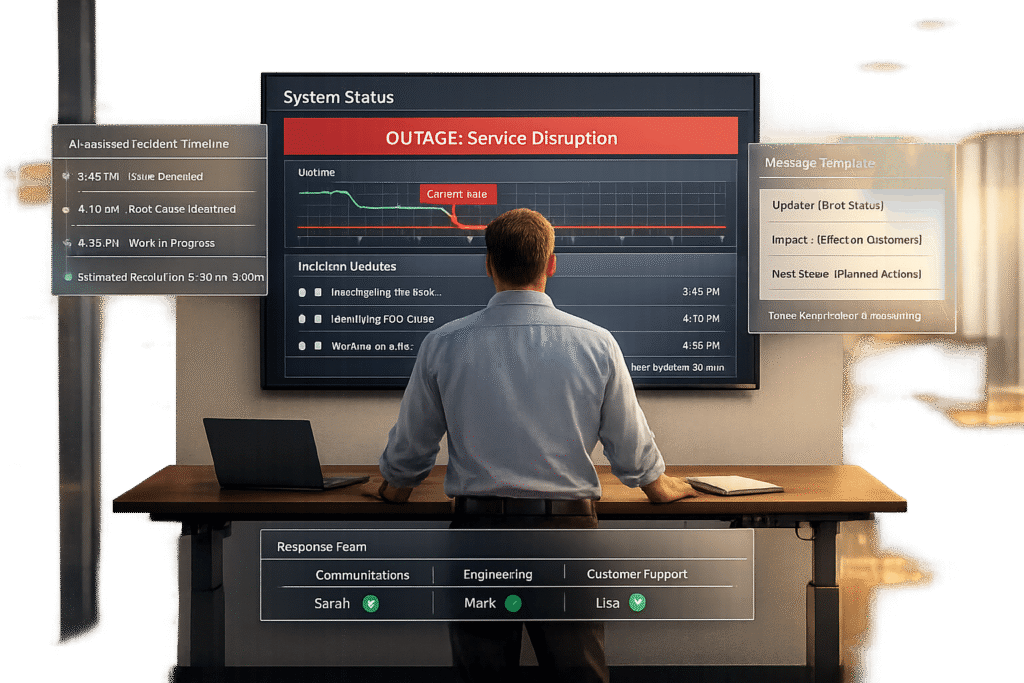
When a service outage occurs, how you communicate matters as much as fixing the issue. Customers need clear, timely updates to stay informed and reassured. Silence, delays, or mixed messages can erode trust, drive customers away, and increase support tickets. Here’s a quick guide to effective outage communication:
- Respond Fast: Notify customers within 10-15 minutes, even if details are limited.
- Be Consistent: Use a single source (like a status page) and align updates across all channels.
- Stay Empathetic: Use clear, non-technical language and acknowledge the inconvenience.
- Set Expectations: Provide regular updates (every 30-60 minutes) and include timelines.
- Plan Ahead: Assign roles, prepare templates, and segment customer lists for tailored communication.
- Leverage AI: Automate updates, monitor sentiment, and prioritize high-impact cases.
- Follow Up: Publish a postmortem within 72 hours, explaining the cause and prevention steps.
Outages are inevitable, but strong communication can build trust and loyalty instead of frustration. Start with a plan, stay transparent, and keep customers at the center of your response.
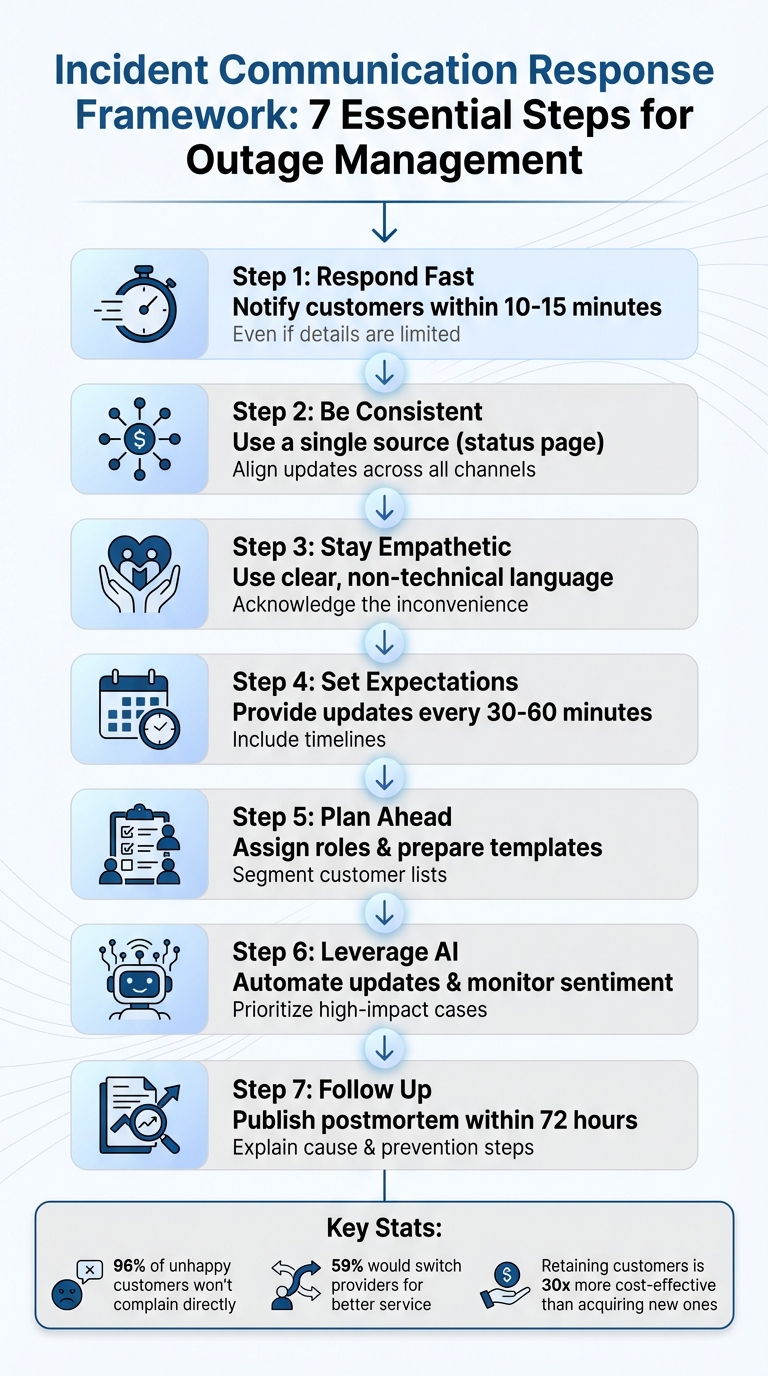
Incident Communication Response Framework: 7 Essential Steps for Outage Management
Incident Communication Best Practices Guide
Building Your Incident Communication Plan
Once you’ve identified common communication pitfalls, the next step is to create a well-structured incident communication plan. Having a strategy in place before an outage strikes is essential. When systems fail, your team must act quickly and in sync. A solid plan eliminates confusion and ensures everyone knows their responsibilities the moment an issue arises. This preparation establishes a framework for clear, calm, and consistent communication during any incident.
Assign Team Roles and Responsibilities
Defining roles ahead of time helps avoid confusion and delays when the pressure is on. Without clear responsibilities, teams can send mixed messages, frustrating customers even further. Your incident response team should cover at least five key roles:
- The Major Incident Manager (or Incident Commander) oversees the response, makes important decisions about the incident’s severity, and coordinates resolution efforts.
- The Communications Manager takes charge of external messaging, deciding on communication channels and crafting updates.
- The Customer Support Lead handles incoming tickets and ensures front-line agents have accurate, up-to-date information to share with customers.
- A Social Media Lead responds to customer concerns on platforms like Twitter/X.
- The Business Subject Matter Expert focuses on non-technical impacts, keeping executives informed about potential effects on revenue and reputation.
Google’s Site Reliability Engineering team captures the essence of the Communications Manager’s role:
"This person is the public face of the incident response task force. Their duties most definitely include issuing periodic updates to the incident response team and stakeholders (usually via email), and may extend to tasks such as keeping the incident document accurate and up to date".
To ensure coverage, assign one or two backups for each role. This way, there’s always someone available. Also, protect your technical team by routing all status inquiries through the Incident Commander or Communications Manager. This allows engineers to stay focused on resolving the problem efficiently.
Create a Single Source of Truth
A status page acts as the central hub for updates during an incident. It’s a trusted resource for both customers and internal teams, helping to reduce support tickets and prevent conflicting information from spreading. For maximum efficiency, connect your status page to monitoring systems so updates are automatic and real-time.
While you’ll use multiple channels like SMS, email, and social media to notify users, always direct them back to the status page for detailed and consistent information. Even if there’s no new development, post updates every 30–60 minutes to show your team is actively addressing the issue. Prepare message templates in advance for different stages of an incident – such as Investigating, Identified, Monitoring, and Resolved – so your communication is both timely and professional.
Segment Your Customer and Stakeholder Lists
With clear roles and a unified status page in place, targeted communication ensures that each group receives information tailored to their needs. Not every outage affects all users equally, so segmenting your communication lists is crucial. Use a five-group model to organize your updates:
- Core on-call team
- Front-line support staff
- Managers and executives
- General employees
- External customers
For external users, refine your segmentation further. Notify customers based on their geographic location or the specific application features they use. This avoids overwhelming unaffected users with unnecessary alerts. For B2B clients, provide detailed technical updates on affected services, while B2C users typically need only high-level impact summaries. Enterprise clients with dedicated environments should receive updates through private portals that reflect their specific infrastructure status, rather than your entire platform’s situation.
When sending updates, follow an inside-out approach: notify the core response team first to assess the situation, then inform support teams, executives, and finally external users. For critical alerts, reserve SMS to avoid overuse – irrelevant messages can lead users to unsubscribe quickly.
Communicating During Active Outages
When systems go down, time is of the essence. Customers are already frustrated, and prolonged silence only fuels their anxiety. Effective, real-time updates can help maintain trust, even in the midst of a crisis. By focusing on clear, consistent, and empathetic messaging, you can turn a challenging situation into an opportunity to demonstrate reliability.
Write Clear and Empathetic Messages
Outage communications should strike a balance between technical accuracy and compassion. A helpful approach is the "5 Cs" framework: keep your tone calm, ensure clarity about the issue, be candid about the situation, show compassion for the inconvenience, and maintain consistency across updates. Avoid confusing technical jargon – use simple terms like "Login functionality unavailable" so customers immediately understand the impact.
Every message should address key questions: What’s broken? Who’s affected? What’s being done? When will it be fixed? Always include information about data safety in your first notification. A great example is Facebook’s response to a 2010 outage:
"Early today Facebook was down or unreachable for many of you for approximately 2.5 hours. This is the worst outage we’ve had in over four years, and we wanted to first of all apologize for it".
This message acknowledged the issue, provided specific details, and expressed genuine accountability.
It’s important to remember that 96% of unhappy customers won’t reach out directly during an outage. Use empathetic language like "We understand how frustrating this must be" to validate their feelings rather than shifting blame. Maintain a serious tone – when your customers’ businesses are affected, humor or overly casual language can harm your credibility.
Use Pre-Written Templates for Speed
In the heat of an outage, crafting messages from scratch isn’t practical. Pre-written templates allow your team to respond promptly and consistently. As Shannon Winter from Atlassian puts it:
"It’s hard to write clear and eloquent updates when things are on fire and you’re under pressure. We recommend creating pre-written communication templates to help".
Prepare templates for different stages of an incident – Investigating, Identified, Monitoring, and Resolved. These should include placeholders for dynamic details like the affected service, the team working on the issue, and estimated update times. For example:
- Investigating: Acknowledge the disruption and confirm your team is working on it.
- Identified: Explain the root cause and what’s being done to fix it.
- Monitoring: Share what has been deployed and set expectations.
- Resolved: Confirm the issue is fixed, apologize for the impact, and, if applicable, link to a postmortem analysis.
Templates save time and ensure consistency across updates. They should also be flexible enough to evolve as the situation changes, allowing you to provide accurate, real-time information.
Set Regular Update Intervals
Silence during an outage can lead to speculation and frustration. Even if there’s no new information, customers need to know you’re actively addressing the problem. For major incidents, aim to provide updates every 30 to 60 minutes. Sam Lewis from PagerDuty emphasizes this point:
"Long silences will only frustrate your customers, even if they occur in the middle of the night. How are they to know, after an hour of silence, that there’s a human still awake and working on the issue?".
End each update with a clear timeframe, such as "Next update in 30 minutes" or "Status report by 3:00 PM EST". This not only manages customer expectations but can also reduce the influx of support tickets, as people know when to expect more information. Given that 59% of Americans would switch providers for better customer service, consistent communication can set you apart.
Always update within one hour during critical incidents. If there’s nothing new to report, say so: "We’re continuing to investigate the root cause and will update you again at 2:30 PM EST, even if we haven’t identified the issue by then." This transparency reassures customers that you’re engaged and committed to resolving the issue. Regular, disciplined updates also lay the groundwork for leveraging AI tools to further improve communication during outages.
sbb-itb-e60d259
Using AI to Improve Outage Communications
Handling outage communication manually can be a challenge, especially when dealing with a large customer base. It’s slow, prone to errors, and often struggles to keep up during critical moments. AI steps in to take over repetitive tasks, uncover key insights, and help teams respond faster and more effectively under pressure. When paired with a solid incident communication plan, AI tools can make your updates both quicker and more accurate. For instance, AI can evaluate customer sentiment, ensuring your messages are empathetic and tailored to what your audience needs.
Monitor Customer Sentiment with AI
Understanding how your customers feel is just as important as resolving the technical issue itself. AI tools can scan messages and social media in real time, flagging signs of frustration or confusion. This allows teams to fine-tune their messaging on the fly.
Take Atom Bank, for example. Partnering with Thematic, they used sentiment analysis to sift through feedback across various channels. This helped them pinpoint specific problems like "face recognition not working." By addressing these issues, they reduced contact center failures by 30% and achieved a stellar 4.7/5 rating on the App Store. As Thematic explains:
"Sentiment analysis just provides a signal. But if you get this signal fast and with low effort, you will have time to create the right strategy".
Another example comes from Tampa Electric (TECO), which used AI to analyze social media sentiment during hurricane season in late 2024. This effort, led by Jordan McDonald, Manager of Digital Customer Experience, gave the utility company valuable insights into customer needs during widespread outages, earning them a Bronze Outage Communications Award. With human validation, AI sentiment analysis can achieve accuracy levels as high as 96%.
Sentiment data can also reveal gaps in your communication. If customers repeatedly ask questions your status page doesn’t answer, it’s a sign that updates are needed. Post-resolution, you can analyze sentiment trends by region or customer group to refine your future communication strategies.
But AI’s usefulness doesn’t stop at understanding sentiment – it also simplifies routine updates.
Automate Routine Updates and Responses
When an outage hits, timing is everything. Studies suggest that the first communication should ideally go out within 5 minutes of identifying the issue. Manual methods simply can’t keep up with this demand.
Modern platforms now link monitoring systems to status pages, ensuring updates are posted almost instantly. As UpStat puts it:
"Status pages must reflect current reality, not cached states or manual updates delayed by human coordination overhead. When monitoring detects degradation, status should update within seconds".
AI-powered automation can send out updates across multiple channels – email, SMS, and push notifications – at the same time, minimizing delays and reducing the risk of errors. These tools also ensure updates follow your established schedule. For example, automated reminders can notify communication leads if no update has been posted within the required timeframe, typically every 30 to 60 minutes. Considering that retaining a customer is 30 times more cost-effective than acquiring a new one, automated communication becomes a smart investment in customer loyalty.
Prioritize Cases with Predictive AI
Not all customers or cases are equal during an outage. Predictive AI helps teams identify which customers need immediate attention by analyzing factors like churn risk, account value, or contract renewal dates.
For instance, Supportbench’s AI-powered tools provide real-time insights into customer satisfaction (CSAT) and effort scores (CES), even before surveys are completed. This allows teams to prioritize follow-ups with potentially dissatisfied customers. Similarly, churn predictors highlight at-risk customers, enabling proactive outreach during outages. Customer Success Scores further help teams focus on high-value accounts by tracking metrics like adoption and performance. AI tools can also tailor messages for enterprise clients or customers nearing renewal, ensuring they receive more detailed updates.
Supportbench also uses AI to streamline case management by automatically tagging and assigning cases, freeing up agents to focus on resolving issues. Dynamic SLAs that adjust based on customer context ensure consistent service when it’s needed most. By prioritizing high-impact cases, AI works hand-in-hand with your existing customer segmentation strategy to deliver better outcomes during outages.
Post-Outage Review and Follow-Up
When an outage occurs, rebuilding trust doesn’t end with resolving the issue – it requires a structured review process. This step ensures lessons are learned and future incidents are minimized.
Run a Postmortem Analysis
Digging into time-stamped logs and ChatOps data is key to piecing together an accurate timeline of the incident. This process not only identifies the technical root cause – whether it’s something like database connection pool exhaustion or an infrastructure failure – but also highlights any shortcomings in your team’s response.
Assign specific roles to guide the review. A Major Incident Manager can oversee the analysis, while a Communication Manager ensures findings are documented and shared effectively. From here, compile a list of corrective actions, such as adding new monitoring tools or refining escalation procedures. These steps should be prioritized to strengthen your system’s resilience.
A great example to follow comes from Facebook’s September 2010 outage. After 2.5 hours of downtime, a Facebook engineer published a 395-word technical summary on their engineering blog. It was a transparent explanation that acknowledged the error, detailed the cause, and shared a critical lesson learned about automated system failures. The engineer wrote:
"Early today Facebook was down or unreachable for many of you for approximately 2.5 hours. This is the worst outage we’ve had in over four years, and we wanted to first of all apologize for it. We also wanted to provide much more technical detail on what happened and share one big lesson learned."
This open approach helped Facebook maintain user trust during a crucial growth phase. Use your own postmortem to refine communication templates for future incidents. Additionally, consider running mock incident drills to strengthen your team’s readiness for real crises.
Share Lessons Learned with Customers
Tailor your communication to the needs of your audience. For B2B clients, a detailed root cause analysis (RCA) that outlines specific service failures is essential. Meanwhile, B2C customers generally prefer a straightforward summary of the incident’s impact and resolution. Aim to publish your postmortem within 72 hours of the outage to show responsiveness.
Maintain a professional tone – avoid humor or casual remarks, as these can downplay the seriousness of the situation. Take full accountability by addressing user impact, data security, and steps to prevent recurrence. As Sam Lewis from PagerDuty explains:
"Blaming external forces for your outage sends the message that you are not in control."
This is critical, especially since 96% of dissatisfied customers won’t voice their complaints directly, and 59% of Americans would switch to a competitor for better customer service. In your final "Resolved" status update, include a link to the postmortem or provide a timeline for its release. While internal reviews should dive into detailed technical logs, external reports should focus on clear summaries without revealing proprietary information. This transparency can further refine your response strategies.
Track Metrics for Future Improvements
Metrics like Mean Time to Acknowledge (MTTA) and Mean Time to Resolve (MTTR) are vital for evaluating your team’s performance. MTTA measures how quickly your team reacts to an alert, while MTTR tracks the time it takes to fully restore service. Both metrics directly influence customer trust and satisfaction.
Beyond technical data, analyze customer feedback by region and segment. This can reveal whether your updates addressed concerns effectively or left unresolved frustrations. Use this feedback to adjust your response plans, refine communication templates, and improve segmentation strategies for future incidents.
Additionally, track engagement metrics such as email open rates, status page visits, and customer support inquiries during the outage. These insights will help you fine-tune your communication approach for the next time an issue arises. By combining technical and customer-focused data, you can build a stronger, more effective incident response plan.
Conclusion
The way you handle incident communication can make or break your relationship with customers. Outages are inevitable, but what truly matters is how you respond when they occur. By focusing on preparation, clarity, and consistent follow-through, you can turn these challenging moments into opportunities to build trust rather than lose it.
Preparation is key. As Shannon Winter from Atlassian wisely notes:
"You wouldn’t wait until you felt the floor shake to buy an earthquake kit; don’t wait until an incident is detected to create a communication plan".
During an outage, quick acknowledgment is critical – aim to address the issue within 10 to 15 minutes. For major disruptions, provide updates every 30 to 60 minutes, ensuring your messaging remains clear and consistent across all communication channels.
AI tools can be a game-changer during crises, taking over repetitive tasks like automated status updates, sentiment tracking, and prioritizing cases. These tools allow your technical teams to focus on solving the issue while keeping customers informed. Regular updates also engage those customers who might not actively reach out but still want reassurance.
Once the issue is resolved, don’t stop there. Conduct a detailed postmortem within 72 hours, share the findings, and show how you’ll prevent similar incidents in the future. This transparency not only demonstrates accountability but also strengthens customer trust. And remember, keeping an existing customer is far more cost-effective – about 1/30th the cost of acquiring a new one.
Customers are more likely to forgive outages when they feel informed and respected. On the flip side, silence or dismissive communication can drive them away. A well-thought-out incident communication plan, built on proactive preparation and honest updates, can safeguard customer loyalty even during the toughest disruptions.
FAQs
How can AI improve communication with customers during service outages?
AI tools can transform how businesses handle communication during service outages by streamlining updates, maintaining consistency, and cutting down on manual work. These tools can instantly create and share real-time status updates across various platforms, ensuring customers stay informed without unnecessary delays.
On top of that, AI-powered sentiment analysis can assess customer emotions, allowing businesses to fine-tune their messaging tone to better address concerns. Automated workflows further enhance efficiency by escalating urgent issues to the right teams, ensuring quicker resolutions and reducing customer frustration. With AI, companies can provide faster, clearer, and more compassionate communication – essential for keeping customer trust intact during challenging times.
What are the key roles needed for effective incident response during outages?
An incident response team works best when each member has a clearly defined role, ensuring smooth communication and quick resolution during outages. Here are some of the essential roles to include:
- Incident Commander: This person takes charge of the entire process, making critical decisions and ensuring the team stays focused and organized.
- Technical Responders: These are the experts who dig into the technical issues, diagnose the root cause, and implement fixes.
- Communication Lead: Responsible for keeping customers and stakeholders informed with timely and clear updates.
Beyond these core roles, adding a few specialized positions can further improve the process:
- Stakeholder Liaison: Keeps internal teams and executives updated, ensuring everyone is on the same page.
- Sentiment Analyst: Monitors customer feedback to gauge how well communications are being received and identifies areas for improvement.
By assigning and defining these roles, companies can streamline their response efforts, minimize downtime, and maintain customer confidence, which is especially crucial in today’s fast-paced, AI-driven support environments.
How can businesses communicate effectively with customers after an outage to rebuild trust?
When a service outage happens, rebuilding trust starts with clear, honest, and proactive communication. Customers want to know three key things: what caused the problem, what was done to fix it, and what steps are being taken to prevent it from happening again. Acknowledge the inconvenience caused and emphasize your commitment to providing a more reliable service moving forward.
Keep your customers in the loop with regular updates. Use channels like email, social media, or a dedicated status page to share real-time information. Once the issue is resolved, send a follow-up message that recaps the situation and highlights any lessons learned. This not only shows accountability but also reassures customers that their concerns are being addressed seriously.
By focusing on openness, consistency, and accountability, businesses have an opportunity to rebuild trust and even strengthen customer loyalty, even during tough times.
Related Blog Posts
- Customer Service Phrases: 50 Helpful Scripts for Common Situations
- Customer Complaints Examples: How to Respond Without Losing Trust
- AI Prompts for Customer Support: 25 Copy-Paste Prompts for Faster Replies
- How do you build an escalation framework that doesn’t overload Engineering?
Evaluating help desks for a B2B team?
Supportbench is all-inclusive from $32 per agent per month, with migration and onboarding included. See pricing or book a 20-minute demo.






