


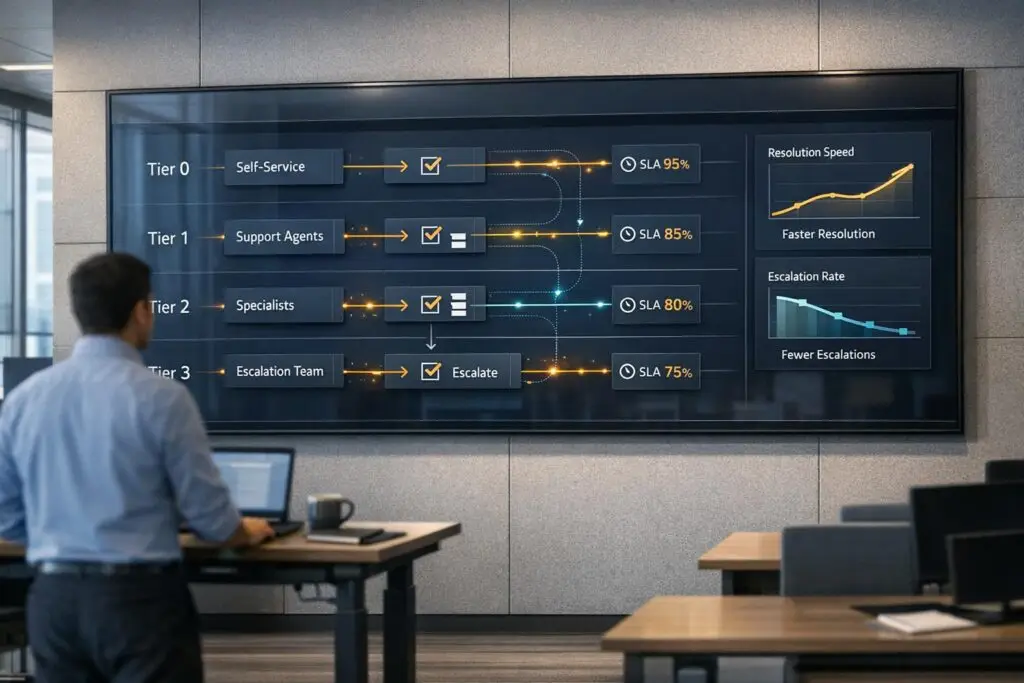
The key to building a fast and effective tiered support model is clarity, automation, and efficient handoffs. A well-structured system ensures that simple issues are resolved quickly, while complex problems are escalated to the right experts without delays. Here’s how you can achieve this:
- Define clear roles for each tier: Assign specific responsibilities to each level (e.g., Tier 0 for self-service, Tier 1 for basic troubleshooting, Tier 2+ for technical expertise).
- Use AI for automation: Automate repetitive tasks like password resets and leverage AI for ticket routing and triage to reduce manual effort.
- Streamline handoffs: Ensure smooth transitions between tiers with standardized procedures, detailed ticket notes, and clear escalation rules.
- Monitor and refine: Track metrics like First-Contact Resolution (FCR), Average Handle Time (AHT), and Customer Satisfaction (CSAT) to identify bottlenecks and improve processes.
For example, companies like Broadcom and Rapid7 have achieved faster resolutions by integrating AI tools, reducing workload on human agents, and improving ticket routing accuracy.
Want to speed up resolutions without sacrificing quality? Focus on automation, clear tier definitions, and continuous improvement.
How Tiered Support Models Work
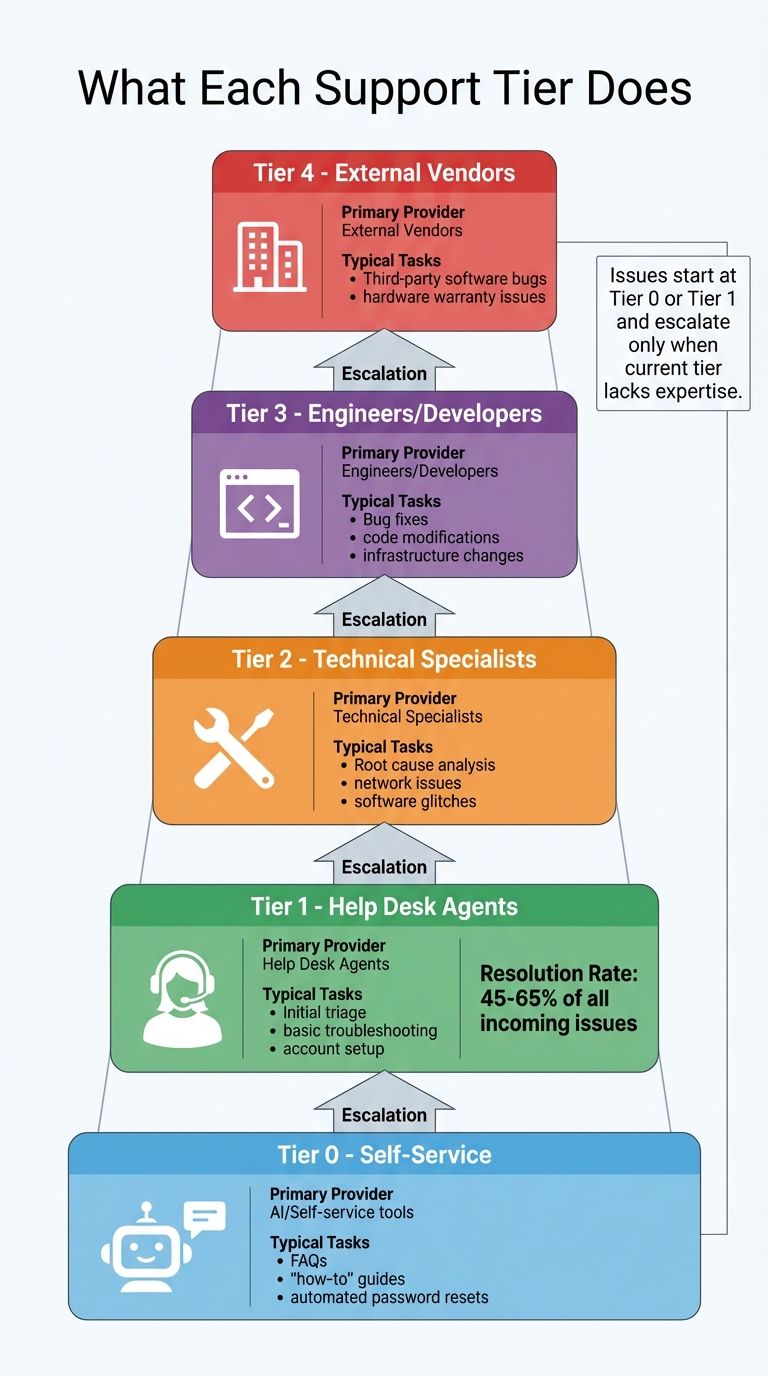
Tiered Support Model Structure: Roles and Responsibilities by Tier
A tiered support model is designed to streamline issue resolution by sorting problems based on their complexity. Straightforward queries are resolved quickly, while more intricate issues are escalated to experts with the necessary skills to handle them.
Every issue typically starts at Tier 0 (self-service) or Tier 1 (frontline agents). Escalation happens only when the current tier lacks the tools or expertise to resolve the issue. This setup ensures that routine tasks, like password resets, don’t occupy costly engineering resources, while customers with more complex concerns are directed to the right specialists without unnecessary delays.
This structure is particularly effective in B2B settings, where intricate product ecosystems and high-value accounts require advanced technical support. Assigning routine tasks to generalists allows specialists to focus on resolving critical, high-impact issues.
What Each Support Tier Does
Each tier in the model plays a specific role in addressing customer issues:
- Tier 0: This is fully self-service. Customers rely on tools like FAQs, knowledge bases, and AI chatbots to handle simple tasks, such as resetting passwords or setting up VPNs.
- Tier 1: The first human touchpoint. Help desk agents manage basic troubleshooting, account setups, and general product guidance. Typically, they resolve 45% to 65% of all incoming issues.
- Tier 2: Technical specialists step in here, handling more complex problems like software glitches, network issues, and advanced troubleshooting.
- Tier 3: Developers and system architects take over for mission-critical issues, such as code debugging, infrastructure-level fixes, and custom integrations.
- Tier 4: This tier involves external vendors or manufacturers. They address problems like proprietary software bugs or hardware failures under warranty.
| Support Tier | Primary Provider | Typical Tasks |
|---|---|---|
| Tier 0 | AI/Self-service tools | FAQs, "how-to" guides, automated password resets |
| Tier 1 | Help Desk Agents | Initial triage, basic troubleshooting, account setup |
| Tier 2 | Technical Specialists | Root cause analysis, network issues, software glitches |
| Tier 3 | Engineers/Developers | Bug fixes, code modifications, infrastructure changes |
| Tier 4 | External Vendors | Third-party software bugs, hardware warranty issues |
Why B2B Support Teams Use Tiered Models
The main advantage of a tiered model is its ability to allocate resources strategically. By assigning routine tasks to lower tiers, specialists are free to tackle more complex issues, making the system scalable as ticket volume increases.
When implemented well, tiered models also speed up resolution times. Tier 1 can handle simpler problems immediately, while more involved cases are routed directly to the appropriate experts, avoiding unnecessary back-and-forth. For instance, in June 2025, Broadcom implemented an AI assistant across its engineering, HR, and general support teams. This automation of Tier 0 and Tier 1 workflows resulted in an 88% autonomous resolution rate, significantly easing the workload on human teams and allowing them to focus on higher-tier challenges.
In addition to operational efficiency, tiered models create clear career progression paths for support agents, improving job satisfaction and retention. By resolving repetitive queries at Tier 0, companies also cut operational costs while maintaining high-quality service.
These advantages lay the foundation for building a faster, more effective tiered support system.
5 Steps to Build a Fast Tiered Support Model
Creating a tiered support model that ensures quick ticket resolution requires a structured plan. The idea is to establish clear roles for each tier and streamline ticket movement to avoid unnecessary delays. Start by evaluating your current ticket flow to identify areas that need improvement.
Step 1: Review Your Ticket Data
Dive into your historical ticket data to understand the types of issues your team handles. Categorize past tickets – billing inquiries, login troubles, bugs, or feature requests – and note how long each type typically takes to resolve. This will help you determine which issues Tier 1 can handle and which require more expertise.
Look for patterns in escalations to spot bottlenecks. For instance, if your team handles around 50 tickets daily with only two full-time agents, having three tiers might be necessary to keep things manageable. Repetitive, straightforward tasks like password resets are perfect candidates for Tier 0 self-service options.
Set clear resolution benchmarks based on past performance. For example, if Tier 1 agents spend over 20 minutes on certain issues without resolving them, those cases should automatically escalate. Don’t forget to include feedback from your frontline staff – they can offer insights that raw data might overlook.
Step 2: Assign Clear Responsibilities to Each Tier
Using your data, outline what each tier is responsible for – and what they aren’t. Creating "Do Not Handle" lists for every tier helps avoid overlap and prevents tickets from being bounced around. For example, Tier 1 should tackle general inquiries, leaving more complex technical issues for higher tiers.
Set up time-based escalation rules to ensure tickets move smoothly. For instance, if a Tier 1 agent can’t resolve an issue within 15 to 20 minutes, it should automatically escalate. Use custom "Escalation Reason" fields to refine these rules over time. Additionally, provide each tier with internal guides that include troubleshooting steps and clear escalation triggers. When higher tiers solve complex issues, document the solutions in your knowledge base so Tier 1 can handle similar cases in the future.
Step 3: Use AI to Route Tickets Automatically
Manual ticket routing slows down resolution. Instead, use AI-powered tools that leverage natural language processing to analyze incoming requests, understand intent, and categorize them based on content, urgency, and workload.
"AI agents for IT support change this dynamic. By resolving issues early, guiding users at the point of need, and giving agents real-time context, AI Agents eliminate IT ticket backlogs before they disrupt service." – Wizr AI
AI can also take care of high-volume, simple tasks – like password resets, software access requests, or basic account questions – keeping these out of human queues. Integrate your AI solution with platforms like ServiceNow, Jira, or Okta for seamless ticket handling and task execution.
Step 4: Create Standard Handoff Procedures
Standardizing how tickets escalate ensures a smooth handoff. Develop templates that require agents to include all attempted solutions, error messages, and customer details before escalating. Use internal notes or watcher functions so higher-tier agents can provide feedback once an issue is resolved. This collaborative approach not only speeds up resolution but also helps lower-tier agents learn how to handle similar cases in the future.
"Standardization decreases ambiguity for both the customer and employees. Without the need for stressful guesswork, your team can boost productivity and guarantee quality." – Freshworks
Step 5: Track Results and Make Adjustments
Monitor metrics like escalation rates, first-contact resolution, and average handling time for each tier to identify problem areas. For example, a spike in Tier 1 escalations might signal unclear responsibilities, inadequate training, or emerging product issues. Regularly review agent feedback to uncover friction points in your support process.
Revisit tier definitions and workflows every quarter to keep up with changing ticket trends and product updates. Also, track how often AI-routed tickets are reassigned – frequent reassignments could reveal gaps in the AI’s classification logic or training data .
Common Mistakes That Slow Down Tiered Support
Even the best-designed tiered support systems can run into roadblocks. These challenges often arise from overly complex structures, poor communication during handoffs, or mismatched team workloads. Let’s break down the common issues that can disrupt the flow of tiered support.
Too Many Tiers Create Confusion
Adding too many tiers to your support structure can backfire. Each new tier creates more handoff points, increasing the chances of lost context and delayed resolutions. A simpler model often works better. Most organizations should stick to two levels: Tier 1 for general inquiries and Tier 2 for more complex problems.
Nidhi Lohia from Hiver highlights this with a simple observation:
"A startup with 3 agents doesn’t need tiers – they need shared visibility".
Before involving human agents, consider implementing a Tier 0 self-service layer, like FAQs or automated chatbots, to handle routine questions and lighten the load on your team.
Weak Handoffs Between Tiers
Smooth handoffs are critical to maintaining efficiency. When handoff processes are unclear, customers often have to repeat themselves, leading to frustration and delays. The root issue usually lies in the system design, not human error. Richie Aharonian, Head of Customer Experience & Revenue Operations at Unito, explains:
"Something in your workflow’s architecture actively prevents information from traveling with the ticket as it moves between systems, teams, or states. The failures are structural, not human".
For example, if escalations arrive without logs, device details, or prior troubleshooting steps, higher-tier teams waste time retracing steps. To address this, use formatted context blocks or tools that sync data across systems. Set up mandatory handoff templates requiring agents to document attempted solutions, and encourage the use of internal notes so higher-tier teams can provide feedback that helps Tier 1 agents improve.
Unbalanced Team Sizes Across Tiers
An uneven distribution of team sizes can create bottlenecks. When one tier is overloaded while others are underutilized, response times suffer. Regularly monitor ticket volumes and backlogs for each tier to identify where adjustments are needed. For instance, if Tier 3 consistently has a growing backlog, it might signal a staffing shortfall or that escalations are being sent prematurely.
Tracking occupancy rates – the percentage of time agents spend actively working on tickets – can reveal which tiers are overburdened or underused. Make dynamic adjustments to agent assignments based on real-time workloads and expertise. Additionally, time-based triggers (e.g., resolving Tier 1 tickets within 15–30 minutes) can prevent agents from holding onto cases for too long. Automation at Tier 0 and Tier 1 also helps reduce the volume of simple tasks reaching higher tiers, keeping specialists focused on complex issues.
sbb-itb-e60d259
How AI Speeds Up Tiered Support Models
AI has transformed how support tickets are managed, making triage, routing, and escalation nearly instantaneous. Instead of waiting hours for human review, AI can analyze intent, sentiment, and urgency within seconds. This eliminates the need for manual classification.
The result? Tickets are routed to the right specialist on the first attempt. Predictive routing uses historical resolution data to determine the most efficient path, cutting down on the frustrating "ping-pong effect" where tickets bounce between teams or tiers. For organizations relying on manual classification, ticket reassignments are three times more common. In contrast, modern AI ticket classifiers boast 98.5% accuracy in categorizing support requests. This efficiency ensures tickets are routed quickly and accurately, setting the stage for faster resolutions.
AI Triage and Ticket Routing
AI doesn’t just analyze tickets quickly – it takes the next step by assigning priority and routing them where they need to go. As soon as a ticket arrives, AI reviews its content, identifies specific intents (like "VPN troubleshooting" or "billing error"), and ensures it reaches the right tier, skipping Tier 1 if a specialist is required. Dynamic SLAs adjust priorities automatically based on urgency or keywords, ensuring critical issues are addressed promptly.
In 2025, cybersecurity firm Rapid7 adopted Mosaic AI to manage over 7,000 complex support tickets monthly for its 500+ agents. By integrating AI into Slack and other core systems, the company intercepted, routed, and summarized tickets, achieving a 30% faster ticket handling time, a 35% increase in agent capacity, and maintaining a 95% CSAT score.
AI can also proactively collect missing details – like purchase order numbers or addresses – before a ticket even reaches an agent. This reduces delays caused by follow-up questions and enables faster "one-touch" resolutions.
AI Case Summaries and Predictive Scores
When tickets escalate, AI ensures that higher-tier agents have the full context they need. It generates case summaries that include previous interactions, attempted fixes, and links to relevant knowledge base articles. This eliminates the need for customers to repeat their issues, saving time for both parties. Predictive tools like CSAT (Customer Satisfaction) and CES (Customer Effort Score) help agents identify cases that might need extra care. Sentiment analysis even triggers automatic escalation for highly frustrated customers, routing them to senior specialists or managers.
In early 2024, Oracle‘s IT Employee Support team implemented an AI Service Desk powered by OCI Generative AI and Retrieval-Augmented Generation (RAG). Handling up to 5,000 tickets daily, the system achieved a 25–30% ticket deflection rate, redirecting roughly 3,100–4,000 tickets weekly by offering automated, step-by-step instructions through Slack. Sudhir Dureja, Senior Director, shared:
"With Generative AI powered self-service features in the AI Service Desk, we noticed ticket deflection rates of 25–30%."
Dynamic SLAs and Task Automation
AI goes beyond routing by improving resolution speed through dynamic SLAs and automation. Flexible SLAs automatically adjust priorities based on urgency and context, while task automation handles repetitive tasks before agents are involved. AI can execute multi-step processes, such as issuing refunds, updating CRM systems, or modifying subscription tiers, across various platforms.
For example, Databricks leveraged Moveworks‘ AI-first service desk to achieve 70% "no touch" resolutions, where tickets required no human involvement. Similarly, B2B security firm Cynet used Mosaic’s AI-native platform to automate Tier 1 support, leading to a 47% ticket deflection rate, a 14-point boost in CSAT (from 79 to 93), and significantly faster resolution times. Experts predict that by 2029, AI agents could resolve up to 80% of common support issues, allowing human agents to focus on refining and overseeing these systems instead of routine tasks.
Metrics That Show If Your Tiered Model Works
The right metrics can reveal whether your tiered support model is speeding up resolutions or creating delays. Key indicators like First-Contact Resolution (FCR), Average Handle Time (AHT), and Customer Satisfaction (CSAT) can highlight both successes and problem areas. Breaking these metrics down by tier provides actionable insights to fine-tune your approach.
First-Contact Resolution (FCR) Rates
FCR tracks how often Tier 1 agents resolve tickets without escalating them. Ideally, FCR should fall between 45% and 65%, meaning nearly half of all issues are resolved at the frontline. If your FCR is below this range, it could indicate that Tier 1 agents lack proper training, access to resources, or the authority to handle issues independently.
To improve FCR, consider setting a 15-minute limit for Tier 1 agents to either resolve or escalate a ticket. This prevents delays caused by agents spending too much time searching for answers. If FCR remains low, review your knowledge base and internal macros to ensure Tier 1 has everything they need to handle common issues effectively.
Average Handle Time and Escalation Volume
Looking at Average Handle Time (AHT) by tier can reveal where bottlenecks occur. For example, if AHT rises significantly in Tier 2 while staying stable in Tier 1, it could point to poor handoffs or gaps in specialist knowledge.
Another important metric is the escalation rate, or the percentage of tickets that move from Tier 1 to higher tiers. This shows whether Tier 1 is functioning as a true resolution layer or simply passing tickets along.
Pay attention to time-to-escalation, which measures how long a ticket remains in one tier before moving to the next. Long delays here often suggest flawed handoff processes. Automated SLA triggers can help by ensuring tickets are escalated promptly, preventing them from sitting idle in queues.
Customer Satisfaction (CSAT) and Retention
Breaking down CSAT scores by tier can pinpoint where the customer experience falters. Low scores in Tier 1 often signal rushed or impersonal responses, while poor scores in Tier 2 or 3 may indicate technical confusion or lengthy delays. To gather real-time feedback, send quick 1–5 scale surveys immediately after ticket resolution.
Beyond satisfaction, keep an eye on renewal rates and how ticket volume is distributed across tiers. If higher tiers like Tier 2 or 3 are handling more tickets than Tier 1, it’s a sign that your routing rules might need adjustment. Overloading specialists with tasks that should be resolved earlier points to a flaw in your tiering structure, not just a staffing issue. Fixing this can improve both resolution speed and overall customer experience.
Conclusion
A tiered support model works best when it advances tickets efficiently instead of cycling them back through the system. The secret lies in having well-defined tier structures that clearly outline responsibilities, AI-driven workflows to route issues to the right team members instantly, and ongoing monitoring to identify and address bottlenecks before they disrupt your team’s flow. Without these elements, you risk creating frustrating delays for customers and overloading your agents. This kind of streamlined design is especially important for teams managing intricate and high-stakes client relationships.
For B2B support teams handling complex product ecosystems and high-value clients, the margin for error is even smaller. You need tools specifically designed for sophisticated support needs – not outdated systems patched together with pricey add-ons. With nearly half of businesses spending $100 or more per hour on customer support, there’s no room for inefficiency.
Supportbench offers a solution that blends efficiency with affordability. Its features – like AI-powered triage, predictive CSAT scoring, dynamic SLAs, and automated case summaries – enhance the tiered support structure discussed earlier. All of this starts at just $32 per agent per month, with no hidden fees, restrictive feature tiers, or complicated IT requirements.
As Nidhi Lohia from Hiver emphasizes:
"The goal isn’t to create walls between support levels but to route issues to the right people at the right time".
By combining a well-thought-out tier structure with advanced tools, your team can scale its support capacity without needing to add more staff. This ensures quick resolution times, even as the complexity of issues continues to grow.
If your current system is slowing down resolutions, it’s a clear sign to reconsider both your support structure and the tools you’re using.
FAQs
How does AI improve ticket routing in a tiered support model?
AI transforms ticket routing in tiered support models by automating how tickets are classified, prioritized, and assigned. Using tools like natural language processing, AI scans ticket content – looking at keywords, context, and historical data – to figure out the right support tier and send tickets to the most qualified agents or teams. This automation reduces the need for manual sorting, speeds up response times, and ensures straightforward issues are handled at lower tiers, leaving higher-tier experts free to tackle more complex challenges.
AI also enhances escalated ticket handling by providing agents with detailed insights, like past interactions and technical specifics. This added context helps agents resolve issues faster and with greater precision. By spotting patterns and predicting urgency, AI prevents bottlenecks and ensures escalations happen smoothly. The result? Faster resolutions and consistently high service quality.
What should I avoid when setting up a tiered support system?
When building a tiered support system, there are a few missteps you’ll want to steer clear of to keep things running smoothly and ensure customers stay happy.
One major issue is having unclear roles and responsibilities across the tiers. If tasks and authority levels aren’t well-defined, it can lead to confusion, unnecessary escalations, and slower problem-solving. Every tier should have a clear purpose and scope to keep things moving efficiently.
Another frequent problem is skimping on training and documentation. Without proper preparation, agents may struggle to manage issues within their tier, which can cause delays and frustration for both them and the customers. Similarly, relying too much on manual processes for triage and routing can create unnecessary slowdowns. Using AI tools to automate these steps can help streamline workflows and improve response times.
Lastly, don’t overlook the importance of regularly monitoring and fine-tuning your support system. Over time, inefficiencies can creep in. By continuously reviewing your workflows, you can spot and address bottlenecks, keeping your system aligned with evolving customer needs.
How can I decide the right number of support tiers for my team?
Choosing the right number of support tiers is all about balancing efficiency with the complexity of customer issues. For many support teams, three to four tiers tend to work well. Each tier is designed to handle specific types of requests, categorized by their complexity and the level of expertise needed to resolve them.
For instance:
- Tier 0: Self-service tools like FAQs or AI chatbots, allowing customers to find answers independently.
- Tier 1: Handles straightforward issues, such as password resets or account access problems.
- Higher tiers: Focus on more advanced or specialized problems that require technical knowledge or in-depth troubleshooting.
When structuring your tiers, think about the volume and types of support requests your team handles, as well as the skill levels of your agents. Having too many tiers can slow things down, creating unnecessary delays. On the other hand, too few tiers might overwhelm your frontline agents with complex issues they aren’t trained to handle.
Starting with three tiers is a practical strategy. From there, you can adjust based on customer feedback and how well your team is managing workloads. The ultimate goal? Make sure each tier is staffed and equipped to resolve issues efficiently, minimizing bottlenecks and keeping the customer experience smooth.
Related Blog Posts
- What’s the best helpdesk for multi-tier support?
- What’s the best way to set up tier 1 / tier 2 / tier 3 support workflows in a help desk?
- What’s the best way to set up tier 1 / tier 2 / tier 3 support workflows in a help desk?
- How do you handle support for multiple products, tiers, or service levels in one help desk?
Evaluating help desks for a B2B team?
Supportbench is all-inclusive from $32 per agent per month, with migration and onboarding included. See pricing or book a 20-minute demo.






