



Leveraging a knowledge base for efficient customer support can significantly cut down support tickets by empowering customers to find answers on their own. Here’s how to do it:
- Analyze Support Tickets: Identify recurring issues from ticket data and prioritize creating articles for high-volume queries.
- Organize Content for Speed: Group articles by customer needs, use clear categories, and ensure a logical flow.
- Leverage AI: Use AI tools to draft articles from resolved tickets, improve search functionality, and maintain content accuracy.
- Apply Knowledge-Centered Service (KCS): Integrate documentation into daily workflows, ensuring content evolves with customer needs.
- Track Performance: Monitor metrics like ticket deflection rates, article usage, and search behavior to refine and improve over time.
Key Stats:
- 73% of consumers prefer solving problems independently.
- 90% expect self-service options.
- Companies like Degreed saved $1M annually by integrating AI into their knowledge base.
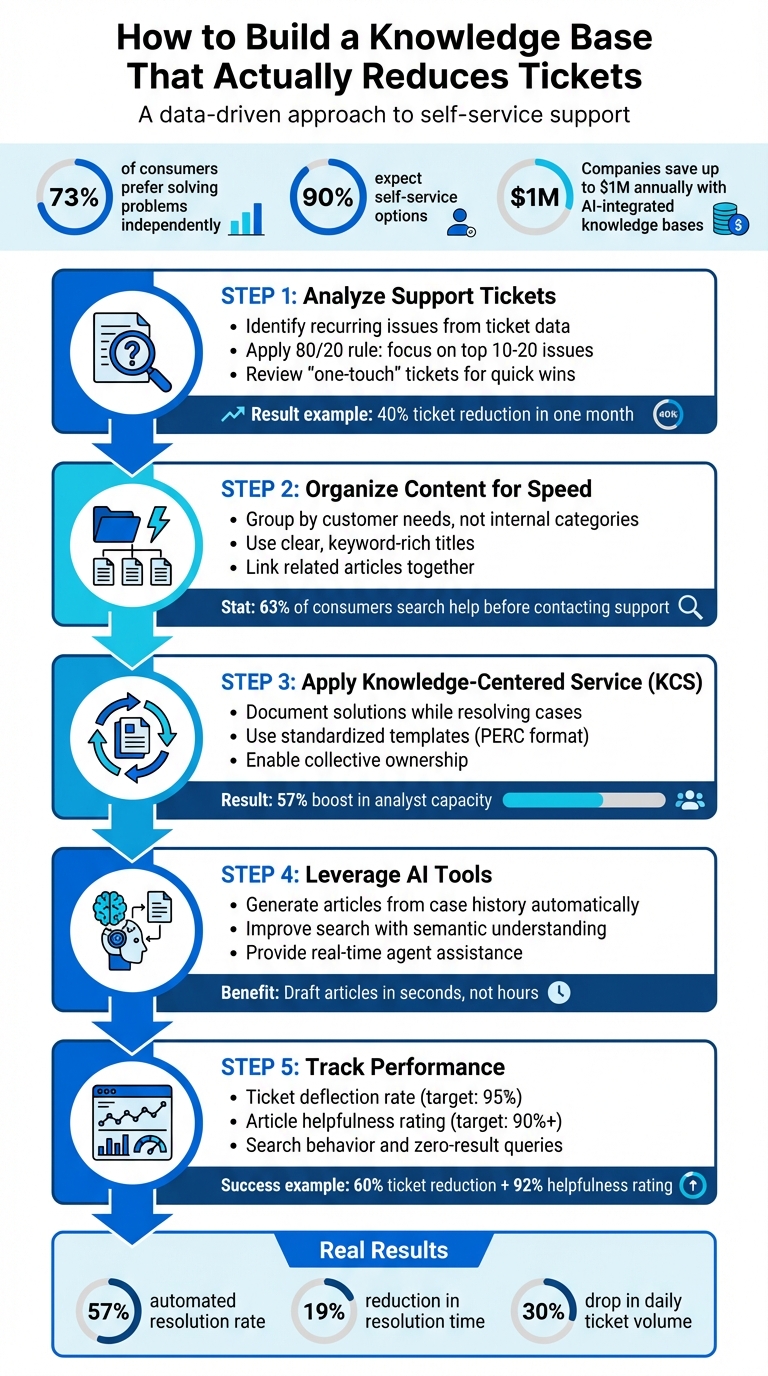
5-Step Process to Build a Knowledge Base That Reduces Support Tickets
How Leading Companies Reduce Support Tickets [Free Course]
sbb-itb-e60d259
Step 1: Review Ticket Data to Find Common Issues
Your ticket data holds the key to understanding your customers’ most frequent problems. By analyzing past support requests, you can zero in on the areas where guidance is most needed. This approach ensures your knowledge base focuses on resolving issues effectively, rather than overwhelming users with unnecessary content.
"The best way to do this is to analyze your tickets. They are the best record of your customer issues and pain points." – Jennifer Rowe, Zendesk Documentation Team
Use Data to Prioritize Content Creation
Start by organizing your tickets with custom fields. For example, adding an "About" or "Issue Type" dropdown allows agents to tag tickets consistently. This structured data eliminates the need to sift through endless conversations manually. Once categorized, focus on high-volume ticket groups to uncover the most common issues.
Pay special attention to "one-touch" tickets and repetitive canned responses. These are often simple questions like password resets or basic feature instructions – perfect candidates for self-service articles.
Take AcmeCRM as an example. In 2024, their support data showed that 40% of tickets were related to inviting team members. They responded by creating a step-by-step guide and integrating it into their chat auto-suggestions. The result? A 60% drop in related tickets within a month and a 92% helpfulness rating from users.
To work efficiently, apply the 80/20 rule: focus on the top 10–20 issues that account for the majority of your ticket volume. Additionally, compare ticket categories with handle time data to identify complex, time-consuming issues. Don’t forget to review help center search logs for queries that return "no results" – these gaps highlight opportunities for new content.
This method ensures your knowledge base is built with purpose, making it easy for users to find what they need quickly.
Keep Your Knowledge Base Streamlined
Once you’ve analyzed the ticket data, avoid the temptation to document every minor detail. Overloading your knowledge base makes navigation and search less effective. Instead, focus on the top 5% of issues to start. Use a shared spreadsheet to track recurring problems, set priorities, and assign content creation tasks. Regular agent feedback can help confirm which issues deserve attention.
Step 2: Organize Your Knowledge Base for Quick Access
An organized knowledge base is essential for helping customers resolve issues quickly without overwhelming your support team. With 90% of consumers expecting self-service options and 72% wanting immediate assistance, your setup must be both user-friendly and efficient. After identifying your high-priority content in Step 1, the next step is creating a structure that promotes fast and easy self-service. This is a critical phase in building a knowledge base that users actually find helpful.
Group Articles by Categories That Match Customer Needs
Instead of relying on internal classifications, group your content based on how customers interact with your product or service. Use the top issues identified earlier to guide your categories. For example:
- For SaaS platforms: Organize by product features or functional areas, such as "Integrations", "Account Settings", or "Billing."
- For eCommerce businesses: Group by common queries like "Orders", "Returns", or "Shipping".
Arrange articles in a way that mirrors the customer journey – starting with setup guides, followed by FAQs, and then advanced troubleshooting. This logical flow aligns with how users typically explore your resources. Keep in mind that 63% of consumers search your online help before contacting support, so your categories should use terms that customers understand instead of internal jargon.
To further enhance usability, link related articles together. This makes it easier for customers to find follow-up solutions they might not initially realize they need, reducing the chances of them submitting a new support ticket for related issues.
Make Content Searchable and Easy to Scan
Place your search bar prominently on every page. Many users prefer searching over browsing, so ensure it’s highly visible and functional. Use clear, keyword-rich titles like "How to Reset Your Password" instead of vague phrases like "Account Access".
Structure your content with readability in mind. Use:
- Short paragraphs with clear headings.
- Numbered lists for step-by-step instructions.
- Bullet points for quick, unordered information.
When introducing technical terms, define them within the text or link to a glossary. This approach not only helps human readers but also enables AI systems to process your content more effectively.
"If users can’t easily find answers in your KB, they might get frustrated and file tickets instead." – Jennifer Rowe, Zendesk Documentation Team
Keep each article focused on a single topic or task. This makes it easier for users to understand and helps AI-powered search tools retrieve accurate answers.
Use AI-Driven Templates to Maintain Consistency
Consistency across your knowledge base enhances usability and builds trust. Standardized templates ensure every article follows the same structure, making navigation simpler for users. Formats like PERC (Problem, Environment, Resolution, Cause) for troubleshooting or Question-Answer-Overview for FAQs can streamline your content creation process.
AI-driven tools, like those offered by Supportbench, can automate this process. These tools expand brief notes into polished, well-structured articles, saving time for your team while maintaining high-quality standards.
Additionally, a consistent format improves machine readability. When your knowledge base integrates with AI tools that deliver answers directly within platforms like Slack, Microsoft Teams, or your product’s interface, a uniform structure ensures accurate retrieval and synthesis of information. This setup not only simplifies navigation for users but also sets the stage for AI-powered content creation.
Step 3: Create and Update Content Using Knowledge-Centered Service (KCS)
Once you’ve got an organized structure in place, the next step is creating and maintaining content that evolves into a living, breathing resource. The best knowledge bases aren’t built through isolated writing projects – they grow organically from real-world support interactions. That’s where Knowledge-Centered Service (KCS) comes in. Instead of treating documentation as a separate task, KCS integrates it directly into the problem-solving process, ensuring your content reflects actual customer needs captured during live interactions.
KCS relies on a four-step "Solve Loop" process: Capture, Structure, Reuse, and Improve. This method ensures that every customer interaction enhances your knowledge base. Interestingly, many organizations find that up to 80% of support requests address issues that have already been solved elsewhere. By adopting KCS, companies have seen a 57% boost in analyst capacity, enabling teams to manage more tickets without needing additional staff.
Document Solutions While Resolving Cases
A key part of KCS is documenting solutions as you resolve cases. Agents should always begin by searching the knowledge base when a ticket comes in – not after the issue is resolved. This habit minimizes duplicate content and highlights articles that might need updates. When a solution is found, agents should document it immediately, capturing the customer’s language to ensure clarity and relevance.
Using standardized templates simplifies and speeds up this process. For example, technical issues can follow a PERC format (Problem, Environment, Resolution, Cause), while FAQs might use a straightforward Question-Answer-Overview structure. These templates ensure articles are comprehensive yet easy to scan.
"Knowledge creation happens as a byproduct of solving problems, not as extra work." – Guru
To keep things organized, a simple flagging system – like tags or custom fields in your ticketing system – can help agents mark cases that require new articles or updates to existing ones. This ensures nothing slips through the cracks while allowing agents to stay focused on solving customer issues. Over time, this habit of proactive documentation keeps your content fresh and continuously evolving.
Keep Content Current with Regular Updates
A knowledge base is only as good as its accuracy. Outdated content can undermine its usefulness, which is why KCS emphasizes collective ownership. Every agent plays a role in maintaining the knowledge base’s health. When agents use an article to resolve a case, they should update it immediately if they spot inaccuracies or flag it for expert review. This approach keeps content relevant for both customers and AI tools.
KCS’s "Evolve Loop" takes this a step further, refining content based on real usage patterns and feedback rather than arbitrary schedules. Some modern platforms, like Supportbench, even use AI to draft knowledge base articles directly from case histories. Agents can then refine and approve these drafts as part of their regular workflow, eliminating the bottleneck of relying on a small group of writers to keep up with documentation demands.
Regular audits are also essential. By analyzing metrics like bounce rates or article usage, you can identify content that’s outdated, underperforming, or redundant. From there, decide whether to update, merge, or retire those articles to keep your knowledge base in top shape.
Step 4: Use AI to Build and Maintain Your Knowledge Base
AI takes the heavy lifting out of creating and managing your knowledge base. Instead of spending countless hours drafting articles or manually updating outdated content, modern AI tools can handle it in moments. These tools can draft articles, spot content gaps, and fine-tune search results, allowing your team to shift their focus to solving customer problems instead of battling documentation backlogs.
By integrating AI into your workflows, you can speed up content creation and keep your knowledge base up to date without needing to expand your team. AI simplifies documentation by transforming resolved tickets into polished articles, identifying outdated information, and ensuring customers and agents can quickly find the answers they need. This seamless integration ensures efficient, self-service support becomes a natural part of your operations.
Generate Articles from Case History Automatically
AI tools can analyze resolved tickets to identify recurring issues and automatically draft knowledge base articles. These tools group similar tickets, remove sensitive personal data for privacy, and create structured drafts complete with titles, categories, and content.
Agents can also trigger AI to generate drafts directly from their notes. For example, when an agent resolves a particularly useful case, they can instantly convert it into a full help center article. This process transforms scattered notes into polished, customer-friendly content in seconds, ensuring documentation happens while the details are still fresh.
"Zendesk tools enabled us to quickly recognize a large increase in ticket volume, identify the cause, and create steps to mitigate the problem." – David Schroeder, Senior Manager of Service Support, Unity Technologies
However, always have subject matter experts review AI-generated drafts before publishing. While AI is excellent at structuring content and spotting patterns, it can sometimes miss the mark – especially with articles that are too short (under 100 words) or overly long (over 500 words). A quick human review guarantees accuracy while still saving significant time compared to writing from scratch.
Improve Search Results with AI
AI doesn’t just create content – it also makes finding that content easier. Traditional keyword-based search often falls short when customers phrase their questions differently from your article titles. AI-powered semantic search bridges this gap by understanding the intent behind a query, not just the exact words. This means customers can find the right article even if they use conversational or imprecise language, reducing frustration and lowering ticket volume.
Generative search goes a step further by synthesizing relevant content into a complete, conversational response. It ensures that both users and AI tools can quickly extract the information they need. This approach aligns with how customers naturally look for help, significantly improving their self-service experience.
For support agents, AI copilots provide real-time assistance by surfacing relevant knowledge base articles as they work on tickets. These tools scan past cases, internal documentation, and external resources to suggest the most helpful content, enabling agents to resolve issues faster and making onboarding smoother for new team members. Platforms like Supportbench even allow AI copilots to pull from both internal and external knowledge bases, eliminating the need for agents to manually search while assisting customers.
To get the most out of AI-enhanced search, ensure your content is clear and actionable. Place key concepts within the first 75 words of an article and use action-oriented titles. This helps AI tools deliver accurate results quickly, reinforcing the goal of reducing ticket volume and improving customer satisfaction.
Step 5: Track Performance and Improve Over Time
Creating a knowledge base is just the starting point. The real impact comes from consistently measuring its performance and making improvements. Without tracking key metrics, it’s impossible to know what’s working and what’s falling short. The goal is to focus on data that highlights both successes and gaps, so you can take action quickly.
Start by setting up a routine for performance reviews. Monthly audits are a great way to gather enough data to identify trends before problems escalate. During these reviews, pay close attention to metrics tied to ticket deflection and customer satisfaction. These insights allow you to connect your knowledge base updates to measurable outcomes. This ongoing process ensures your knowledge base stays aligned with your evolving products and customer needs.
Measure Ticket Deflection and Article Usage
Tracking how well your knowledge base performs is essential, especially when it comes to ticket deflection and article engagement. Ticket deflection rate is a key metric – it shows how many potential support requests are resolved through your knowledge base without needing agent involvement. A strong self-service portal can resolve up to 95% of user issues independently. If your deflection rate isn’t meeting expectations, dig into which topics are still leading users to contact support after reading your articles.
Search behavior is another important area to monitor. If users are repeatedly refining their search terms or abandoning searches, it might mean your article titles or tags don’t match the language they’re using. Keep an eye on zero-result searches to identify missing content, and review these gaps regularly to address them.
Don’t forget about direct user feedback. The “Was this article helpful?” prompt at the end of articles provides valuable insights. Articles with a helpfulness rating below 90% should be updated immediately. Additionally, compare how often articles are viewed against the number of follow-up tickets submitted. If users are reading an article but still reaching out for help, it could mean the content is unclear, incomplete, or not addressing their actual issue.
Analyzing one-touch tickets can also reveal opportunities for improvement. These tickets often involve simple issues that could be addressed through better self-service articles. For example, one company reduced tickets related to a common issue by 60% in just a month by creating a clear, step-by-step guide. The article also received a 92% helpfulness rating.
Find Missing Topics and Fix Weak Content
To keep your knowledge base effective, use data like search logs and ticket trends to identify gaps. Reviewing the top 100 ticket tags from the past month can help you spot new customer issues that need documentation. Focus on ticket categories with both high volume and long resolution times – these are often complex problems that could benefit from better resources.
For instance, a fintech company noticed a high number of onboarding-related tickets. They created a “Getting Started” section with video walkthroughs and troubleshooting guides. As a result, onboarding tickets dropped by 40%, and 80% of users resolved their issues on their own.
If popular articles are still leading to follow-up tickets, enhance them with visuals like screenshots, GIFs, or short videos. These additions can make complex steps easier to understand and reduce confusion.
Using tools like Supportbench can simplify this ongoing improvement process. These platforms offer built-in analytics to track metrics like ticket deflection, article usage, and search effectiveness – all in one place. AI-driven insights can automatically highlight content gaps and underperforming articles, enabling your team to act quickly. This ensures your knowledge base remains up-to-date and effective as your products and customer needs evolve.
Conclusion
Creating a knowledge base that genuinely reduces support tickets involves more than just publishing articles. It begins with analyzing ticket data to pinpoint the most common and pressing issues. From there, content needs to be organized in a way that makes it simple to search and skim. Using structured templates and following Knowledge-Centered Service (KCS) principles ensures your team captures solutions as they arise, embedding them into your system for future use.
But there’s more. AI is changing the game for knowledge base management. With advanced tools, you can now generate articles directly from case histories, refine search results by interpreting user intent, and even spot content gaps before they snowball into higher ticket volumes. For example, companies like Humi and Qualia have seen impressive results: a 57% automated resolution rate, a 19% cut in full resolution time, and a 30% drop in daily ticket volume after adopting AI-powered knowledge tools.
Keeping your knowledge base effective means tracking its performance regularly. By combining this data with routine content updates, your knowledge base becomes a dynamic resource that grows and adapts alongside your products and customer demands.
And let’s not forget the customer experience. AI-driven systems now deliver fast, precise answers – no waiting in queues or wading through long articles. Considering that 90% of consumers expect self-service options and 72% want immediate assistance, maintaining a responsive, up-to-date knowledge base is crucial for meeting today’s customer standards while keeping costs under control.
FAQs
How does AI enhance the performance of a knowledge base?
AI takes a knowledge base to the next level by turning it into a constantly evolving, self-updating resource. It can study customer behavior and analyze support trends to pinpoint content gaps, suggest updates, or even create them automatically. This ensures the information remains current, accurate, and useful over time.
On top of that, AI integrates smoothly with support channels, helping customers find answers independently. This not only cuts down on support tickets but also speeds up resolution times and improves customer satisfaction. With AI, businesses can keep their knowledge base efficient and ready to grow alongside their needs.
What is Knowledge-Centered Service (KCS) and how can it improve your knowledge base?
Knowledge-Centered Service (KCS) is a structured approach to creating and managing knowledge as an integral part of customer support. It turns everyday support interactions into a treasure trove of reusable information that both customers and support agents can access to solve problems more effectively.
When you adopt KCS, your knowledge base evolves into a living, breathing resource that mirrors the actual challenges your customers face. This means fewer support tickets, as customers can find answers on their own, and agents are armed with accurate, up-to-date solutions. The result? Quicker resolutions, happier customers, and lower support expenses. Plus, KCS shines a light on recurring issues, giving your team the chance to tackle root causes and drive meaningful, long-term improvements.
How can I tell if my knowledge base is effectively reducing support tickets?
To gauge how well your knowledge base is working, keep an eye on the ticket deflection rate – this metric shows the percentage of customer issues solved through self-service, without the need for a support ticket. When your knowledge base is well-tuned, it can cut ticket volume by as much as 40%.
Other important metrics to track include:
- Content engagement: How often customers view and use your articles.
- Article performance: How helpful individual articles are to users.
- Ticket trends: A decline in repetitive or common questions over time.
By keeping tabs on these numbers, you can ensure your knowledge base is not only improving operational efficiency but also boosting customer satisfaction.
Related Blog Posts
- How AI Cuts Knowledge Base Costs for B2B Support Teams
- How Knowledge Base Integration Improves First-Contact Resolution
- How to Build a Knowledge Base for Ticket Deflection
- What Is a Help Desk? Definition, Benefits, and Real Examples
Evaluating help desks for a B2B team?
Supportbench is all-inclusive from $32 per agent per month, with migration and onboarding included. See pricing or book a 20-minute demo.






