



Customer support teams are under pressure. Ticket volumes have surged 20% since the pandemic, yet budgets remain tight, making it impossible to hire more staff. The solution? Self-service powered by AI.
Here’s the deal:
- Self-service can cut support costs by 25–30%.
- 69% of customers prefer solving issues themselves.
- But only 9% of users succeed due to outdated tools.
AI-native platforms like Supportbench fix this. They automate updates, predict issues, and handle routine queries – saving time and money. Klarna’s AI chatbot, for example, replaced the workload of 700 agents in 2024.
Want to scale support without adding staff? Build a system with:
- Organized knowledge bases tailored to user roles.
- AI-powered search that understands intent.
- Metrics tracking like ticket deflection and CSAT.
The key is leveraging AI for efficiency, keeping content updated, and measuring ROI. Done right, self-service isn’t just cost-effective – it improves customer experience.
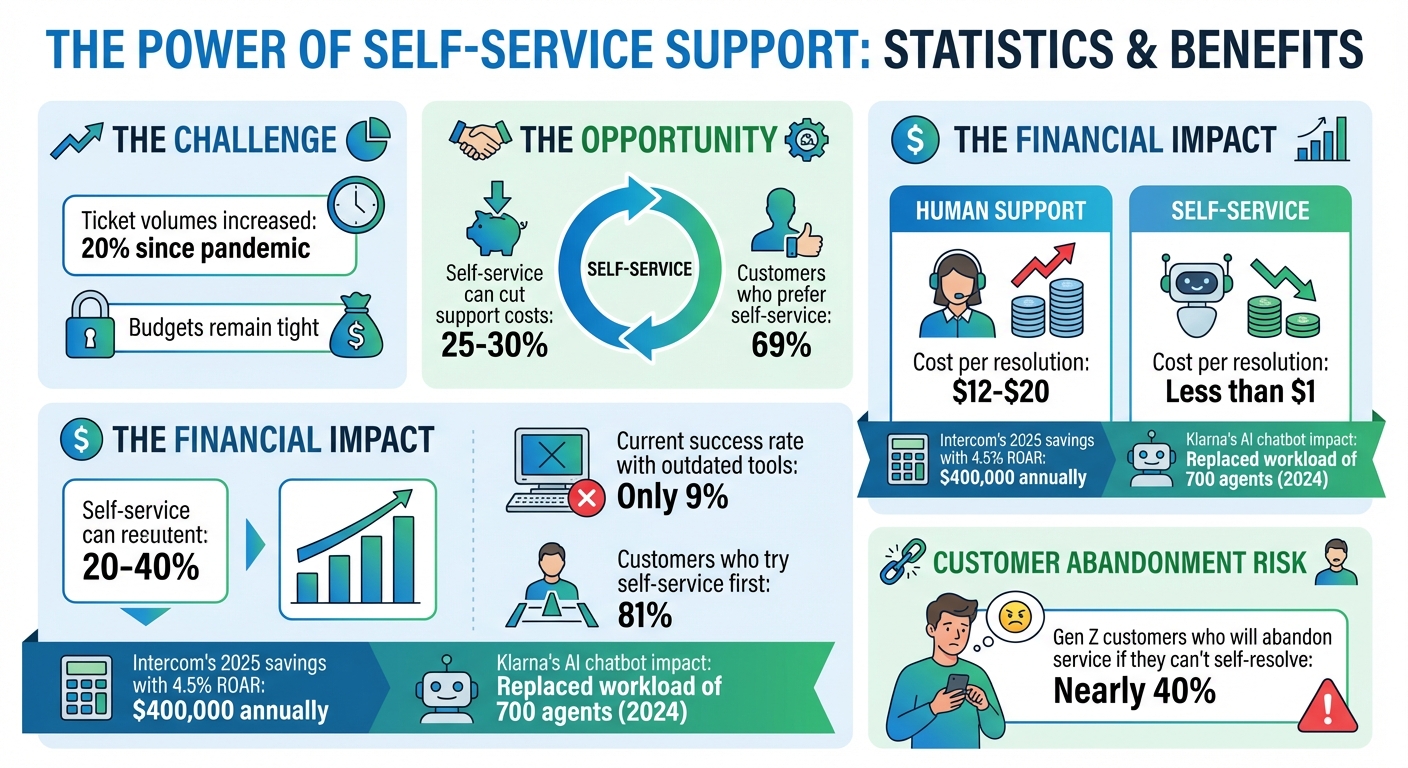
Self-Service Support Statistics and ROI Impact
Core Components of B2B Self-Service
Creating an effective B2B self-service system relies on three key elements: a well-organized knowledge base, smart search capabilities, and clear performance tracking.
Knowledge Bases and Customer Portals
A knowledge base serves as a central repository for troubleshooting guides, product manuals, and frequently asked questions. For B2B organizations, it’s crucial to structure this information thoughtfully – grouping content by product lines, features, or specific use cases rather than just dumping articles into one big library. Different user groups often have varying needs. For example, end users might look for straightforward how-to guides, while administrators require more technical documentation covering integrations or security details.
Customer portals take this a step further by offering role-based access. A finance manager, for instance, might use the portal to find billing and invoice-related resources, while a technical user could need API documentation or updates on system status. These portals also act as a one-stop shop where users can track support tickets, view account details, and access training materials – all without needing to jump between platforms.
Keeping this content up to date can be a challenge, especially as products and features evolve. However, AI-powered platforms can simplify this process by automating updates and suggesting changes based on customer interactions and search patterns. Tools like Supportbench (https://supportbench.com) are specifically designed for complex B2B environments, combining knowledge management with AI-driven analytics to ensure your self-service system remains relevant and effective.
Once you’ve built a solid knowledge base and tailored portals, the next step is ensuring users can quickly find what they need through intelligent search.
AI-Powered Search and Contextual Help
Traditional keyword-based searches often fall short, especially when users don’t know the exact terms to search for. AI-powered search overcomes this by interpreting intent. For instance, it understands that phrases like "can’t add new project" and "project creation not working" describe the same issue. By analyzing sentiment, user behavior, and dozens of other factors, these systems can surface the most relevant articles – sometimes before the user even finishes typing.
Contextual help and AI chatbots further enhance the experience by offering on-demand support directly within the interface. Instead of forcing users to leave the product to hunt for answers, the system displays relevant documentation right where it’s needed. For straightforward issues like password resets or account access problems, chatbots can resolve the matter instantly. If the problem is more complex, the bot can escalate the case to a human agent, providing all the necessary context to ensure a seamless handoff. Interestingly, 81% of customers try to solve problems on their own before reaching out to support.
With these tools in place, the next step is to measure their effectiveness and identify areas for improvement.
Metrics for Measuring Self-Service Performance
Tracking the right metrics is essential to understanding how well your self-service system is working. One key metric is the ticket deflection rate, which measures the percentage of support requests resolved entirely through self-service without needing human intervention. For instance, if your deflection rate is only 20%, it might indicate gaps in your content or chatbot logic.
Another important metric is the escalation rate, which shows how often self-service attempts fail and require human assistance. High escalation rates can point to problems like chatbots misunderstanding user queries or missing information in the knowledge base. Monitoring search trends and failed searches also helps prioritize areas for content improvement .
Customer satisfaction (CSAT) specifically for self-service interactions is another valuable indicator. Adding simple tools like a "Was this helpful?" button to articles can provide quick feedback on the user experience. The financial benefits of self-service are clear: resolving an issue through human support typically costs $12 to $20, while self-service resolutions cost less than $1. By tracking these metrics, you can demonstrate the return on investment (ROI) and pinpoint where further improvements are needed.
sbb-itb-e60d259
Building an AI-Powered Self-Service Strategy
Creating a self-service strategy that works takes more than just setting up a knowledge base. You need clear goals, the right mix of tools, and a well-defined team structure. Success hinges on thoughtful planning and execution.
Setting Clear Objectives and Goals
Start by defining what success means for your organization. For many B2B companies, it’s about cutting costs, improving resolution rates, and keeping customers coming back. The financial benefits are clear – self-service can slash support costs by 25–30%.
But it’s not just about saving money. Self-service can also influence customer retention and renewal rates, especially in businesses where long-term contracts depend on high-quality support. You’ll know it’s time to expand your self-service efforts when support tickets outpace your customer base, customers expect help across multiple time zones, or service quality becomes inconsistent across different segments.
Set measurable goals to guide your efforts. For instance, aim for a 4.5% Rate of Automated Resolution (ROAR). In 2025, Intercom hit this target and saved around $400,000 annually. While your specific target will depend on your customer base and product complexity, having a clear benchmark keeps your team focused.
Selecting Self-Service Channels
Not every self-service channel fits every situation – choosing the right tool for the right job is key. For example:
- Knowledge bases work well for high-volume, straightforward "how-to" questions and can be set up in 1–3 months.
- AI chatbots are great for handling repetitive queries around the clock, cutting response times by an average of 3X. However, they take 2–4 months to deploy effectively.
- Training portals are better suited for helping customers master complex products, though they may take 3–6 months to build.
A smart approach combines multiple layers of support: proactive support to anticipate issues, self-service for quick answers, and human support for more complex problems. Align these channels with your customer journey. For instance, use "Getting Started" guides during onboarding, FAQs for activation, and troubleshooting content for ongoing support.
AI can make these channels even more effective. Triage bots, for example, can gather key details – like whether an issue is billing-related or technical – and route requests to the right team automatically. Platforms like Supportbench integrate these AI capabilities directly into the self-service experience, eliminating the need for costly add-ons or complicated integrations.
Don’t forget to include an option for customers to reach a human agent. Research shows that nearly 40% of Gen Z customers will abandon a service issue if they can’t resolve it themselves.
Once you’ve selected and optimized your channels, make sure your team is set up to manage them effectively.
Establishing Ownership and Collaboration
Even with clear goals and the right channels, self-service initiatives can falter without proper ownership. Assign a Knowledge Manager to lead the strategy, oversee the project, and secure the necessary resources. This role ensures the initiative remains a priority, even amid competing demands.
Collaboration across teams is also essential. Support agents should contribute to and update knowledge base content in real time – a practice aligned with Knowledge-Centered Service (KCS). Product and Engineering teams need to address recurring issues identified through ticket analysis, focusing on fixing root causes instead of merely documenting workarounds. Meanwhile, Customer Success teams should track metrics like customer loyalty and retention to highlight support as a key driver of value.
Here’s how roles can be clearly defined:
| Role | Primary Responsibility | Key Collaboration Partner |
|---|---|---|
| Knowledge Manager | Leads strategy, manages resources | Support/Operations |
| Support Agents | Update articles during ticket resolution | Product/Engineering |
| AI Trainer | Refines bot responses based on FAQ patterns | Product/Engineering |
| Strategy Owner | Sets ROI goals, measures ticket deflection | Finance/CFO |
| Community Manager | Moderates forums, identifies user-driven solutions | Customer Success |
A cross-functional approach ensures self-service becomes a company-wide effort, improving the overall customer experience. As Isabel Larrow aptly put it:
"With AI, we’ve been able to fundamentally change our support strategy. For users adopting our unpaid products, we take an AI and self-service first approach, allowing us to provide instant and scalable support to this group".
Using AI to Create and Maintain Your Knowledge Base
A knowledge base is only as good as the information it provides – accurate, up-to-date, and genuinely helpful. AI steps in to simplify the process, turning your support history into a dynamic, self-updating resource.
AI-Assisted Article Creation
AI can take resolved support cases and transform them into ready-to-use knowledge base articles. By analyzing past interactions, it identifies successful solutions and drafts articles that reflect the exact language customers use, not internal jargon. This eliminates the need for manual drafting while ensuring the content resonates with your audience.
For instance, if customers often submit tickets with phrases like "Cannot create project", AI-generated articles will mirror that wording instead of technical terms like "Project initialization error". This alignment makes the content more relatable and easier for users to find.
The process involves human-in-the-loop machine learning: AI creates the initial draft, but subject matter experts review it for accuracy before it goes live. Tools like Supportbench streamline this workflow by flagging valuable cases for article creation and generating drafts that agents can refine in just minutes. This approach speeds up content production without compromising quality.
Once the articles are ready, AI can also tailor them to meet the specific needs of B2B customers.
Adapting Knowledge Base for B2B Requirements
Managing documentation for different product versions or customer tiers can be a logistical headache. AI simplifies this by tracking which articles apply to specific versions and automatically surfacing the right content based on a customer’s current setup. This ensures customers aren’t stuck following outdated instructions that no longer apply.
AI also enhances the visual aspect of your knowledge base. It can generate and embed annotated screenshots, GIFs, and videos, providing step-by-step guidance that’s easy to follow. By showing rather than just telling, you can cut down on confusion and speed up issue resolution.
With these tailored features in place, AI continues to refine your knowledge base through ongoing feedback.
Continuous Improvement Through AI Feedback
Even the most well-maintained knowledge base can become outdated as products evolve and customer needs change. AI helps by monitoring how customers interact with your content, identifying weak spots, and suggesting improvements. It tracks metrics like article views, unhelpful ratings, unresolved ticket issues, and searches that yield no results.
For example, if 50 customers search for "SSO setup" and find no relevant article, AI flags this as a gap in your content. Similarly, if an article prompts users to escalate to a human agent or is abandoned halfway through, AI can predict it’s not solving the problem and mark it for revision.
AI sentiment analysis also plays a role, analyzing customer interactions to spot trends and predict where adjustments are needed. As Gartner points out:
"Customer service leaders must improve the timeliness and fidelity of self-service content by integrating knowledge management that is enhanced by AI-enabled automation".
This feedback loop ensures your knowledge base stays relevant and effective, reducing the manual workload for your support team while keeping customers satisfied.
Measuring ROI and Scaling Self-Service
For self-service to be successful, it must generate measurable financial results and demonstrate a clear return on investment (ROI), all while building a support system that can grow with your business. To achieve this, you need well-defined metrics and a commitment to continuous improvement.
Key ROI Metrics
Tracking the right metrics is essential to understanding the financial impact of self-service. These indicators reveal how effective your system is at reducing costs and improving efficiency.
One essential metric is the Rate of Automated Resolution (ROAR), which measures the percentage of customer issues resolved entirely through self-service, without requiring human assistance. For example, in 2025, Intercom achieved a 4.5% ROAR, saving the company approximately $400,000 annually. Even small gains in this area can lead to significant cost reductions.
Other important metrics include the ticket deflection rate and cost per resolved issue. Self-service solutions tend to cost far less per interaction compared to agent-handled support. Additionally, customers often prefer resolving issues themselves, which further boosts ROI.
Beyond operational savings, metrics like Customer Satisfaction (CSAT) and Customer Effort Score (CES) reveal whether your self-service tools are actually meeting customer needs. In B2B settings, these scores are especially important because they tie directly to customer retention and renewal rates. If customers struggle to find answers, they might look for alternatives.
| Metric | What It Measures | Business Impact |
|---|---|---|
| ROAR | % of issues resolved without human involvement | Reduces support costs and minimizes staffing needs |
| Ticket Deflection | Volume of tickets avoided | Frees agents to focus on complex, high-value tasks |
| Cost per Resolved Issue | Cost comparison between self-service and agent-led support | Highlights ROI and operational efficiency |
| CSAT / CES | Customer satisfaction and effort scores | Drives retention, loyalty, and long-term customer value |
AI-Driven Analytics and Optimization
AI does more than automate responses; it helps you stay ahead of potential customer issues. By analyzing data like sentiment, response times, and other signals, AI can predict outcomes for metrics like CSAT and CES. This allows you to address weak points in your self-service system before they negatively affect customer relationships.
AI also identifies trends in user behavior. For instance, if many users search for a specific topic but don’t find helpful content, that’s a clear signal to create or update resources. Tools like Supportbench integrate these capabilities, flagging high-risk interactions and suggesting improvements without requiring extra IT work.
The goal is to move from reactive problem-solving to proactive optimization. AI can highlight underperforming articles, ineffective chatbot responses, or common points where users abandon the self-service process. This transforms your support resources into a dynamic system that gets better with each interaction.
Continuous Improvement Process
A successful self-service strategy relies on constant refinement. Start by setting baseline metrics for key indicators like ticket deflection and CSAT before rolling out new tools. Without these benchmarks, it’s hard to prove ROI.
Incorporate feedback loops into your process. Regularly review data like article ratings, search trends, and chatbot containment rates. If customers frequently rate an article as unhelpful or abandon it midway, AI can flag it for revision. Isabel Larrow, from Anthropic’s Product Support Operations, highlights this shift:
"With AI, we’ve been able to fundamentally change our support strategy. For users adopting our unpaid products, we take an AI and self-service first approach, allowing us to provide instant and scalable support to this group. Addressing volume in this way lets us hire more intentionally and scale our team in a more cost effective way."
Conduct quarterly audits of low-traffic content. Articles that don’t deflect tickets or engage users should either be improved or removed. Use AI to identify high-volume, low-complexity issues – like password resets or order tracking – and prioritize these for automation. This ensures your self-service evolves alongside customer needs, rather than becoming outdated.
As your business grows, this continuous improvement process becomes a long-term advantage. Companies that consistently measure, optimize, and iterate on self-service strategies report a 25–30% reduction in support costs, all while maintaining higher customer satisfaction. This approach reinforces the AI-driven foundation that enables scalable and cost-effective B2B support.
Conclusion
Scaling B2B customer support no longer means adding more staff as ticket volumes grow. Thanks to AI-native platforms, support operations can now be streamlined with automation woven into every step. Companies achieving the best outcomes are those that track ROI, refine their processes, and use AI to anticipate issues before they escalate.
Switching from outdated helpdesks to AI-native platforms like Supportbench eliminates inefficiencies such as fragmented systems and hidden costs. By integrating AI into case management, knowledge creation, and customer insights, these platforms enable support teams to function with just 20-30% of the staff traditionally required. This approach provides clear financial and operational benefits, allowing businesses to cut down on staffing needs without compromising service quality.
Automation takes care of repetitive tasks, freeing up skilled agents to tackle more complex and impactful issues. AI handles the routine tickets that dominate support queues, while agents focus on challenges that directly influence customer retention and revenue. Tools like Supportbench even leverage sentiment analysis and over 40 data signals to predict potential escalations, shifting the focus from reactive support to proactive solutions.
AI-native self-service has become the cornerstone of scalable, modern B2B support. For organizations managing intricate customer relationships and renewal-driven models, self-service is no longer optional – it’s essential for staying competitive. The key to success lies in adopting AI-driven tools, monitoring critical metrics, and constantly improving your strategy.
If you’re struggling with legacy systems or finding it hard to scale without adding more staff, it’s time to consider AI-native platforms. The benefits are clear: measurable ROI, proven technology, and a competitive edge that can set your business apart.
FAQs
How does AI enhance self-service support systems for B2B organizations?
AI is transforming self-service support by turning static content into a more interactive and user-friendly experience. With AI-powered chatbots and virtual assistants, customers can ask natural-language questions and quickly receive the most relevant knowledge base articles. This not only reduces the time spent searching for answers but also boosts first-contact resolution rates. On top of that, machine learning ensures knowledge bases stay up-to-date by analyzing support tickets, tagging content, and updating articles – completely removing the need for manual updates.
AI also brings a personal touch to customer support. It tailors solutions based on factors like a customer’s product usage, contract details, or past issues. Through sentiment analysis, AI can even detect signs of dissatisfaction and automatically escalate critical cases to human agents for immediate attention. Routine tasks such as ticket triaging, prioritizing requests, and predicting customer satisfaction are also automated, freeing up support teams to tackle more complex challenges without needing to expand their workforce.
When these AI tools are combined into a single platform, B2B organizations can cut operational costs, improve customer satisfaction, and scale their support systems efficiently – all while keeping operations streamlined and cost-effective.
What are the most important metrics to measure the success of a self-service program?
Measuring the success of a self-service program means keeping an eye on key metrics that reveal both how satisfied your customers are and how efficiently your operations are running. Here are some of the most important ones to track:
- Self-service adoption rate: This shows the percentage of customer interactions that start with tools like knowledge bases or chatbots. A higher rate suggests your content is easy to find and useful.
- Deflection rate: This measures how many tickets are resolved through self-service without needing help from a support agent. It’s a great indicator of how much workload your program is taking off your team.
- First-contact resolution (FCR): This tells you how often customers solve their issues on the first try using self-service. A higher FCR often means happier customers.
- Customer satisfaction (CSAT) and effort score (CES): These survey-based metrics reveal how satisfied customers are with the self-service tools and how simple it was for them to find a solution.
- Time-to-resolution: This tracks how long it takes for customers to fix their problems using self-service. Shorter times usually point to a well-designed and efficient system.
Platforms like Supportbench make it simple to track these metrics in real time. By doing so, support teams can fine-tune their self-service options, cut costs, and offer a better customer experience.
How does AI-powered search improve the self-service experience for customers?
AI-powered search turns a simple knowledge base into a smart, conversational tool that delivers precise answers in no time. By grasping the intent behind a user’s question, it connects them to the most relevant content – be it an article, a how-to video, or a step-by-step guide. This helps users solve problems faster and improves first-contact resolution rates.
What’s more, this technology tailors results by factoring in details like the customer’s product usage, account level, or previous interactions. This means users get information that’s directly relevant to their needs, cutting down on frustration and boosting satisfaction. On top of that, AI-driven search takes routine queries off the plate of support teams, allowing them to concentrate on more complex challenges. The result? Greater efficiency and cost savings.
Related Blog Posts
- 10 Ways to Reduce Support Ticket Response Time
- 7 AI Tools That Improve Customer Support Efficiency
- How AI Cuts Knowledge Base Costs for B2B Support Teams
- AI vs. Legacy Tools for Account Management
Evaluating help desks for a B2B team?
Supportbench is all-inclusive from $32 per agent per month, with migration and onboarding included. See pricing or book a 20-minute demo.






