



Which is better for customer support – live chat or email? The answer depends on your needs. Live chat is faster, ideal for quick fixes, and allows agents to handle multiple customers at once. Email, on the other hand, is better for detailed, complex issues that require thorough documentation and multi-party collaboration.
Key Takeaways:
- Live Chat: Real-time responses, best for simple queries, but lacks depth and session history.
- Email: Slower, but excels in handling technical problems and maintaining a permanent record.
Quick Comparison:
| Feature | Live Chat | Email Support |
|---|---|---|
| Response Time | Seconds to minutes | 1 to 8 hours |
| Best For | Quick, simple fixes | Complex, multi-step issues |
| Documentation | Session-based, temporary | Permanent, searchable trail |
| Agent Workload | 2–6 chats simultaneously | One case at a time |
| Cost per Interaction | $3–$4 | Lower overall costs |
Both channels have strengths. The choice isn’t about one over the other – it’s about using the right tool for the right problem. Modern platforms now combine both channels for a smoother, more efficient support experience.
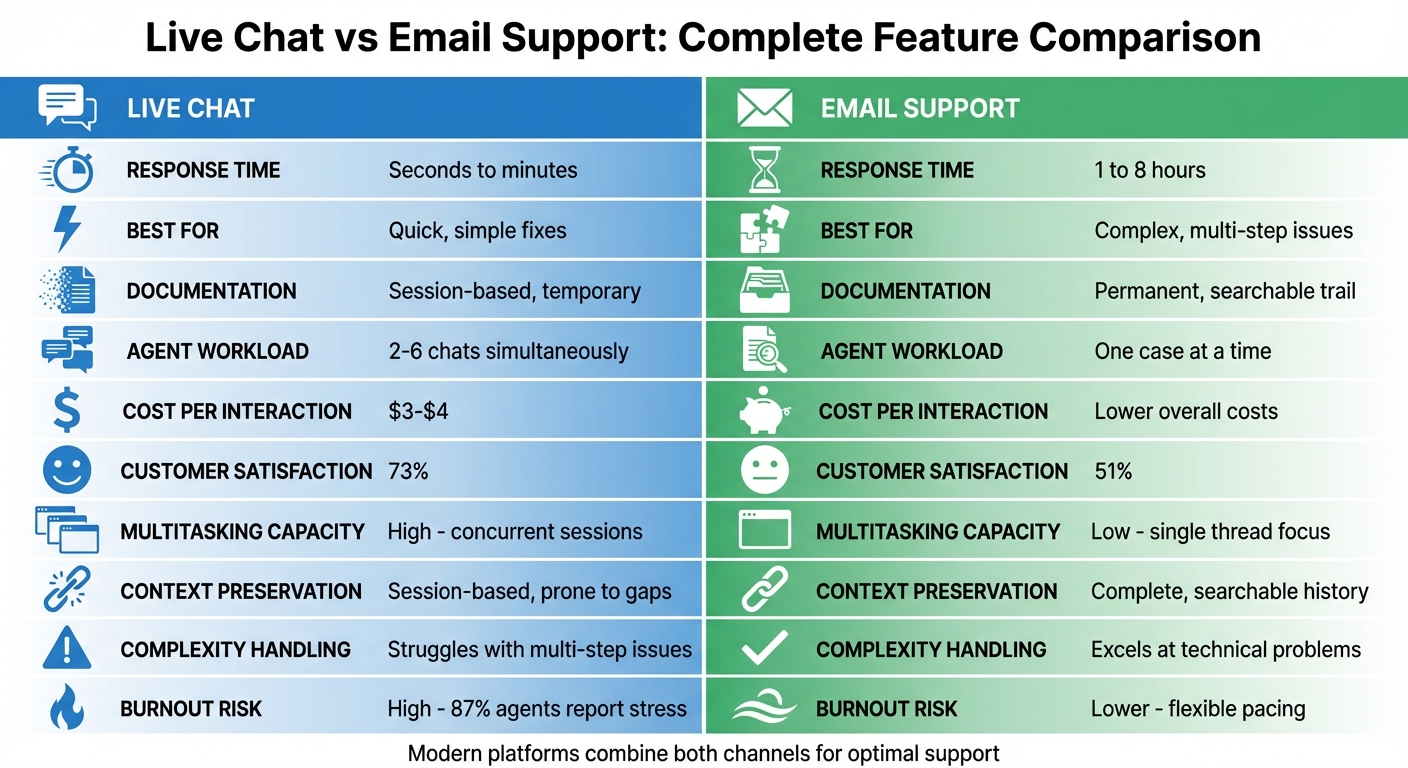
Live Chat vs Email Support: Complete Feature Comparison
Speed vs Depth of Resolution
Live Chat: Real-Time Responses with Limited Depth
Live chat provides responses within seconds to minutes, making it a go-to option for quick tasks like resetting passwords, clarifying billing questions, or addressing simple how-to inquiries. It shines in situations where immediate answers are needed, acting as a triage tool to resolve straightforward issues without delay.
But this speed comes at a cost. Agents often juggle two to six conversations at once, which can compromise the quality of support for more complex problems. The real-time nature of live chat leaves little room for in-depth research or coordination with other teams. As Martin Hill-Wilson, Founder of Brainfood Extra, explains:
"When the customer thinks ‘I bet they’re talking to five people at a time,’ the experience diminishes".
Additionally, live chat sessions are often temporary and lack a lasting record. This limitation can be a major drawback for troubleshooting that requires ongoing analysis or involves sharing detailed information like code samples or screenshots. For these scenarios, email often proves to be a better fit, offering more thorough and lasting support.
Email: Slower Response, Greater Detail
Email operates on an asynchronous model, with responses typically taking 1 to 8 hours. While this might feel slower compared to live chat, it offers agents the time needed to dive into research and troubleshooting. Agents can consult internal resources, collaborate with engineering teams, and craft detailed, well-thought-out replies – all without the pressure of a customer waiting in real time.
This makes email the preferred channel for handling complex issues. It’s especially effective for cases that require technical details, multi-day problem-solving, or sharing step-by-step instructions and attachments like code snippets. Unlike live chat, email creates a permanent audit trail, which is crucial for B2B environments where issues can span weeks and involve multiple team members. In these cases, the priority isn’t just speed but also depth, accuracy, and accountability.
Speed vs Depth: Side-by-Side Comparison
Here’s a quick look at how live chat and email stack up against each other:
| Feature | Live Chat Support | Email Support |
|---|---|---|
| Response Speed | Seconds to minutes | 1 to 8 hours |
| Resolution Depth | Limited; best for quick fixes | High; suited for technical research |
| Communication Style | Synchronous and conversational | Asynchronous and structured |
| Documentation | Session-based (may disappear) | Persistent audit trail |
| Complexity Handling | Struggles with multi-step issues | Excels at complex/technical problems |
| Agent Focus | Handles 2-6 conversations simultaneously | One case at a time for greater focus |
This comparison highlights the trade-offs between speed and depth, helping businesses choose the right channel based on their specific needs and customer expectations.
Customer Effort and Experience
Live Chat: Quick Solutions, But Not Always Ideal for Complex Issues
Live chat is a fantastic tool for handling simple, transactional questions like resetting a password, checking an order status, or clarifying a billing item. It delivers instant responses without the hassle of drafting a formal email or waiting hours for a reply. Plus, customers can multitask while chatting, making it a go-to option for straightforward inquiries.
That said, live chat can struggle when the situation gets more technical. For example, sharing code snippets, detailed screenshots, or long URLs can be tricky. These critical details can easily get lost in the rapid back-and-forth of a chat session, often forcing customers to repeat themselves. This becomes especially frustrating in B2B settings, where multiple stakeholders or technical documentation are often involved. Help Scout highlights this challenge:
"Email is great when there are technical issues to convey or identity verification needs. Live chat isn’t well-suited for screenshots, sending along code, or sending URLs that can quickly get lost in the flow of conversation".
In cases where thoroughness is more important than speed – like resolving complex issues – live chat’s limitations can create unnecessary friction. For AI-driven B2B support systems, these challenges can directly impact operational efficiency.
Email, however, steps in as a strong alternative for these more intricate scenarios, offering a structured way to address detailed and multi-party issues.
Email: Building Trust Through Detailed Records
Email’s strength lies in its ability to create a reliable audit trail. Every message becomes part of a searchable and shareable record, which is essential for B2B environments. Whether it’s technical troubleshooting, billing disputes, or compliance matters, having a clear history of what was said and when is crucial. This "paper trail" isn’t just a convenience – it’s often a necessity for long-term accountability.
Unlike live chat, email allows customers to provide detailed information without the pressure of real-time interaction. They can attach multiple files, loop in relevant team members, and take their time crafting a thorough request. This asynchronous approach lets them send their inquiry and get back to work while waiting for a response.
While live chat boasts a 73% satisfaction rate compared to email’s 51%, the gap narrows significantly in complex B2B scenarios where precision and documentation are more important than speed. Email’s ability to support multi-party coordination and detailed exchanges makes it a vital tool for modern customer support systems. When platforms integrate live chat and email seamlessly, they can offer the best of both worlds.
Agent Workload and Productivity
Live Chat: Juggling Multiple Conversations Under Pressure
Live chat gives agents the ability to assist multiple customers at the same time, boosting the number of issues they can resolve in an hour. Typically, agents handle 4–6 chats simultaneously, which significantly increases their productivity. But this efficiency comes at a cost: real-time pressure. Customers using live chat expect lightning-fast responses – 28% anticipate a reply in under five minutes. This creates a constant mental strain as agents juggle multiple conversations while searching for solutions. Interestingly, studies reveal that customer satisfaction tends to drop when agents manage more than 2–3 chats at once. This relentless demand can take a toll, with 87% of agents reporting high stress and 59% being at risk of burnout.
Email: Slower Pace, Better Focus
Email operates on an asynchronous model, allowing agents to concentrate on one issue at a time. This gives them the breathing room to research, consult resources, and even collaborate with technical teams. While this method reduces immediate stress and allows for more thoughtful, detailed replies, it also means email support lacks the scalability of live chat. As Jack Harrison-Sherlock, Senior Continuous Improvement Lead at Vend, puts it:
"Email can be a really unproductive channel for support, with significant delays due to collaborative ticket sharing and context switching".
Despite its slower pace, email minimizes burnout risk and is excellent for preserving detailed audit trails. This makes it particularly effective for complex B2B issues where accuracy and thoroughness outweigh speed. These contrasting approaches offer a clear lens through which to evaluate how agent workload differs by channel.
Agent Workload: Comparing Live Chat and Email
The table below highlights how the unique characteristics of each channel shape agent productivity and customer experience:
| Feature | Live Chat Support | Email Support |
|---|---|---|
| Multitasking Capacity | High (2–6 concurrent sessions) | Low (Focus on one thread at a time) |
| Work Pacing | Synchronous / High pressure | Asynchronous / Flexible pacing |
| Agent Productivity | High (Multiple resolutions per hour) | Moderate (Detailed, single-focus work) |
| Burnout Risk | High (Constant demand for speed) | Lower (Time for research and detail) |
| B2B Suitability | Best for quick triage and simple fixes | Best for complex, technical issues |
Cost, Scalability, and Context Preservation
Live Chat: Lower Costs, But Challenges with Continuity
Live chat stands out for its lower cost per interaction compared to traditional phone support – around $3–$4 per chat versus $6–$7 for phone calls. This cost advantage comes from the ability of agents to manage multiple conversations at once. On average, agents can juggle 2–3 chats, while highly skilled agents might handle as many as 4–6 simultaneously.
Despite these cost benefits, live chat’s session-based nature can create continuity issues. Once a session ends, the conversational history disappears, making follow-ups less seamless. Tara Ramroop, Senior Manager of Content Marketing at Zendesk, explains it well:
"The primary difference is that live chat is session-based – once the conversation is over or you solve an issue, the conversational history disappears from the customer’s end".
This lack of persistent history can lead to operational inefficiencies. Customers may have to re-explain their issues, and agents might not have access to prior interactions, which can result in duplicated efforts. While live chat excels in cost efficiency and multitasking, its challenges with continuity make it less ideal for scenarios requiring detailed historical context.
Email: Asynchronous Flexibility with Permanent Records
In the B2B world, email reigns as the most cost-effective support channel. It requires minimal infrastructure – just a shared inbox or ticketing system. Unsurprisingly, 92% of companies offer email support. Its asynchronous nature allows it to scale effortlessly across time zones while maintaining a permanent, searchable record – a crucial feature for handling complex B2B issues.
For organizations navigating technical challenges, multi-stakeholder coordination, or compliance requirements, email’s comprehensive audit trail is invaluable. Every attachment, screenshot, and troubleshooting note is stored and easily retrievable. This detailed documentation is essential for resolving intricate issues and verifying past communications. Additionally, email simplifies identity verification over time, which is particularly important for sensitive or high-stakes transactions.
This structured and scalable approach makes email a go-to solution for B2B environments, especially when managing multi-day or highly technical cases.
Cost and Scalability: A Quick Comparison
| Feature | Live Chat Support | Email Support |
|---|---|---|
| Cost per Interaction | $3–$4 (lower due to multitasking) | Lowest implementation cost |
| Agent Capacity | High (2–6 concurrent chats) | Lower (one thread at a time) |
| Scalability Model | Concurrent sessions | Asynchronous across time zones |
| Context Preservation | Session-based; prone to gaps | Complete, searchable thread history |
| Audit Trail | Limited; requires specific logging | Native; permanent documentation |
| B2B Suitability | Best for quick triage and simple queries | Best for complex, technical, multi-day issues |
Modern AI-driven platforms are now addressing these gaps by combining live chat’s cost efficiency with email’s robust context preservation, offering a more seamless support experience.
sbb-itb-e60d259
Handling Complex or High-Impact Issues
When tackling intricate B2B challenges, it’s crucial to use communication channels that can handle extended investigations and the involvement of multiple stakeholders.
Live Chat: Ideal for Quick Responses, Not Long-Term Solutions
Live chat shines when it comes to initial triage and quick problem-solving. It’s perfect for addressing straightforward issues like password resets, basic troubleshooting, or account inquiries. Agents can quickly clarify details, assess urgency, and direct the issue to the appropriate team. Its real-time nature is a major advantage for these types of interactions.
But when it comes to resolving prolonged or complex B2B problems, live chat falls short. Its synchronous format requires both parties to be online at the same time, and session history often disappears, forcing customers to repeat themselves if the issue spans multiple sessions. WhosOn highlights this limitation:
"The real-time nature of [live chat]… doesn’t allow as much time for an agent to work out an answer before replying to a customer".
Live chat also struggles to handle detailed technical discussions. Code snippets, lengthy URLs, and detailed logs can easily get lost in the rapid back-and-forth, making it less effective for in-depth troubleshooting. Without persistent documentation, ongoing collaboration becomes cumbersome. For complex B2B scenarios that require days or weeks to resolve, email offers a more practical solution.
Email: The Go-To for Complex, Multi-Stakeholder Issues
Email is tailor-made for handling intricate and high-impact challenges. Its asynchronous nature gives support teams the time they need to conduct in-depth research, consult with other departments, and craft thoughtful responses. This is especially important for technical issues that demand input from multiple parties, such as engineering, legal, sales, or the customer’s own IT team.
What sets email apart is its ability to facilitate seamless multi-stakeholder collaboration. Agents can CC relevant individuals, forward detailed threads, and attach critical documentation – screenshots, invoices, technical specs – all within a single, easily searchable conversation. This creates a comprehensive audit trail that’s invaluable for accountability and compliance. As Trengo notes:
"Email support works best when you need structure, detail, and time to respond thoughtfully. It’s ideal for complex or technical issues that require screenshots, attachments, or step-by-step instructions".
For B2B companies managing key accounts or renewal-driven relationships, email’s ability to maintain a permanent, accessible record ensures no detail is overlooked. Every interaction is documented and searchable, eliminating the frustration of customers having to repeat their history. When resolving issues that involve multiple stakeholders or stretch over weeks, email remains the most reliable option for preserving context and ensuring progress. This underscores the need for AI-powered platforms that combine the strengths of both email and live chat to meet the demands of modern B2B support.
How Modern Platforms Unify Live Chat and Email
Support teams often face a major hurdle: fragmented tools that force them to juggle multiple channels separately. Traditional helpdesks were originally designed for ticketing and routing, with AI and chat features tacked on later as an afterthought. This patchwork approach creates silos, where agents constantly switch between tabs, manually piece together customer histories, and ask customers to repeat themselves – frustrating for both sides.
AI-native platforms take a completely different route. They combine email, live chat, social media, and SMS into one seamless, chronological timeline. This means customer context is preserved no matter which channel they use. For example, if someone starts a conversation in live chat and follows up via email days later, the agent sees the entire thread in one place. No more searching, guessing, or backtracking. This unified approach not only simplifies workflows but also allows AI to enhance the speed and quality of customer interactions.
These modern platforms use AI to handle up to 80% of repetitive queries across both chat and email by tapping into a shared knowledge base. For more complex questions, the system routes the issue to a human agent – complete with the customer’s full interaction history – so the customer never has to repeat themselves.
Legacy Tools vs AI-Native Platforms
The core difference between legacy tools and AI-native platforms lies in their architecture. Legacy systems treat AI as an optional feature, while AI-native platforms are designed with generative models at their core. In other words, AI isn’t just an add-on – it’s the engine driving every interaction. As Lisa Popovici from Siena AI puts it:
"Legacy help desks are trying to bolt AI onto old codebases, while AI-native platforms are built around generative models from day one."
Legacy tools often come with basic integrations, like status fields and canned responses. In contrast, AI-native platforms can pull data from multiple systems, apply complex business rules, and execute workflows across chat and email without manual effort. They even maintain structured memories at the customer level, so a conversation in chat feels like a natural continuation of an earlier email thread.
For B2B teams handling complex, multi-stakeholder issues, this means less time spent searching for context and more time solving problems. Features like teammate tagging, conversation assignment, and shared notes make internal collaboration smooth. Take Reed & Mackay, a global travel management company, as an example. When they switched to a unified platform in 2025, they boosted their customer satisfaction score to 97%, thanks to AI-powered workflows and complete interaction histories.
Platform Capabilities: Side-by-Side Comparison
| Feature | Legacy Helpdesk Tools | AI-Native Platforms |
|---|---|---|
| Channel Management | Separate tabs for email and chat | Unified timeline for all channels |
| Context Sharing | Manual; agents search past tickets | Automatic; full history and AI summaries |
| Automation | Rule-based decision trees | Generative AI that understands intent |
| AI Integration | Add-on or external plugins | Built-in as the foundation |
| Efficiency | High manual effort; repetitive tasks | AI-suggested replies and task automation |
| Availability | Limited to agent hours | 24/7 AI responses |
| Maintenance | High; frequent updates needed | Low; AI improves continuously |
These capabilities don’t just streamline operations – they also lead to serious cost savings. AI-driven platforms can lower operational costs by 60%–70% and handle up to 90% of routine queries without human intervention.
Choosing the Right Support Mix for Your Team
Picking the best mix of support channels depends on your business model, customer needs, and available resources. For most B2B teams, email is the foundation of support. It’s especially effective for small teams or businesses dealing with technical products that require detailed explanations, code snippets, or documentation. Email offers the flexibility needed for in-depth troubleshooting, making it a reliable starting point for building a well-rounded support strategy.
Live chat, on the other hand, shines as a triage tool. It works particularly well on high-intent pages like pricing, billing, or checkout, where urgent questions can directly impact conversions. This is especially true for businesses that follow a product-led growth model. However, live chat requires active staffing and is better suited for handling quick, straightforward inquiries. If 24/7 availability isn’t feasible, make sure to clearly communicate your business hours to manage customer expectations. By combining live chat and email, you can create an integrated support system that balances speed and depth, improving both efficiency and continuity.
By 2026, the focus will shift away from choosing between "live chat vs. email" to adopting an omnichannel approach where both channels work together seamlessly. Jon Daniels, Technical Support Engineer at Zendesk, highlights the value of this integration:
"Live chat is one of the most thorough channels when it comes to context and data – next to email support".
Modern support platforms now unify these channels, allowing customers to start with live chat for quick answers and transition to email for more detailed follow-ups – without having to repeat themselves.
AI technology also plays a pivotal role in shaping the ideal support mix. Advanced AI platforms can handle up to 80% of repetitive chat queries and even assist with sorting complex emails. This frees up human agents to focus on solving high-stakes problems in the B2B space. For example, in 2025, the financial service platform Opay implemented an omnichannel solution that unified chat, phone, and email. The result? A 90% customer satisfaction rate and a 20% reduction in operational costs. This level of efficiency becomes possible when support channels are treated as complementary tools rather than competing options.
To make the most of your support mix, train your team on the unique demands of each channel. Live chat requires a conversational tone and the ability to manage multiple sessions at once. Email, on the other hand, calls for structured, professional communication and the patience to collaborate with various stakeholders. The goal isn’t to favor one channel over the other but to use each where it excels, while unified AI-powered platforms ensure a seamless experience across all channels.
FAQs
What’s the best way to integrate live chat and email support for seamless customer experiences?
To make live chat and email support work seamlessly together, think of them as two sides of the same coin rather than separate communication channels. The key is using a modern platform that brings everything – chat transcripts, email threads, and even attachments – into one shared case history. This way, agents can jump between channels without forcing customers to repeat themselves, creating a smoother and more cohesive experience.
AI tools can take this integration to the next level by summarizing live chat sessions into clear, concise email updates, suggesting logical next steps, and handling repetitive tasks like creating tickets or routing inquiries. Pair this with a unified inbox where agents manage both live chat and email in one place, and you’ll see improved efficiency, consistent SLAs, and the ability to scale support without needing to grow your team.
By combining shared histories, AI-powered summaries, and automation, businesses can deliver the speed and convenience of live chat for quick resolutions while leveraging the thoroughness of email to address more complex, multi-layered issues. This approach not only enhances the customer experience but also helps prevent agent burnout by streamlining workflows.
What should B2B support leaders consider when deciding between live chat and email?
When deciding between live chat and email for B2B support, it’s important to consider the strengths and challenges of each. Live chat shines when quick responses and real-time interaction are needed. It’s perfect for addressing straightforward questions or offering immediate assistance. That said, it often requires more agent availability and may not automatically log detailed case histories unless paired with additional tools.
Email, by contrast, is better suited for tackling complex issues that might involve multiple steps, detailed explanations, or collaboration among several stakeholders. It’s also more flexible for customers, allowing them to reply at their convenience while maintaining a clear, traceable record of the conversation.
For most B2B teams, blending both channels is the way to go. Use live chat to handle quick questions and build rapport, while relying on email for more intricate problems that need thorough documentation. The good news? Modern AI-powered platforms can integrate these channels seamlessly, offering shared case histories and automated summaries to help teams maintain speed and depth without overwhelming agents.
How do AI-powered platforms improve the efficiency of live chat and email support?
AI-driven platforms are transforming live chat and email support by simplifying workflows and cutting down on repetitive tasks. Real-time AI tools can condense long conversations or email threads into brief, clear case notes, ensuring agents understand the context without wading through every message. These tools also recommend relevant knowledge base articles, autofill responses, and assign tickets to the appropriate specialist, freeing up agents to tackle more challenging issues.
By consolidating all communication channels into a unified case history, AI removes silos and gives agents a complete picture of customer interactions. Predictive analytics further enhance operations by helping teams balance workloads, anticipate busy periods, and fine-tune staffing needs. With routine tasks automated and AI insights guiding decisions, businesses can resolve issues faster, maintain a comprehensive understanding of customer needs, and boost overall efficiency.
Related Blog Posts
- 10 Ways to Reduce Support Ticket Response Time
- Zendesk vs Freshdesk vs Supportbench: Which Support Platform is Better and for who in 2026?
- 7 AI Tools That Improve Customer Support Efficiency
- How to Measure Customer Support Performance in 2026: Key Metrics
Evaluating help desks for a B2B team?
Supportbench is all-inclusive from $32 per agent per month, with migration and onboarding included. See pricing or book a 20-minute demo.






