Want to speed up bug fixes? Start with better bug reports.
Poorly written bug reports waste time, frustrate engineers, and delay issue resolution. A clear, structured bug report can cut down on back-and-forth communication, reduce triage time by up to 50%, and improve collaboration between support and engineering teams.
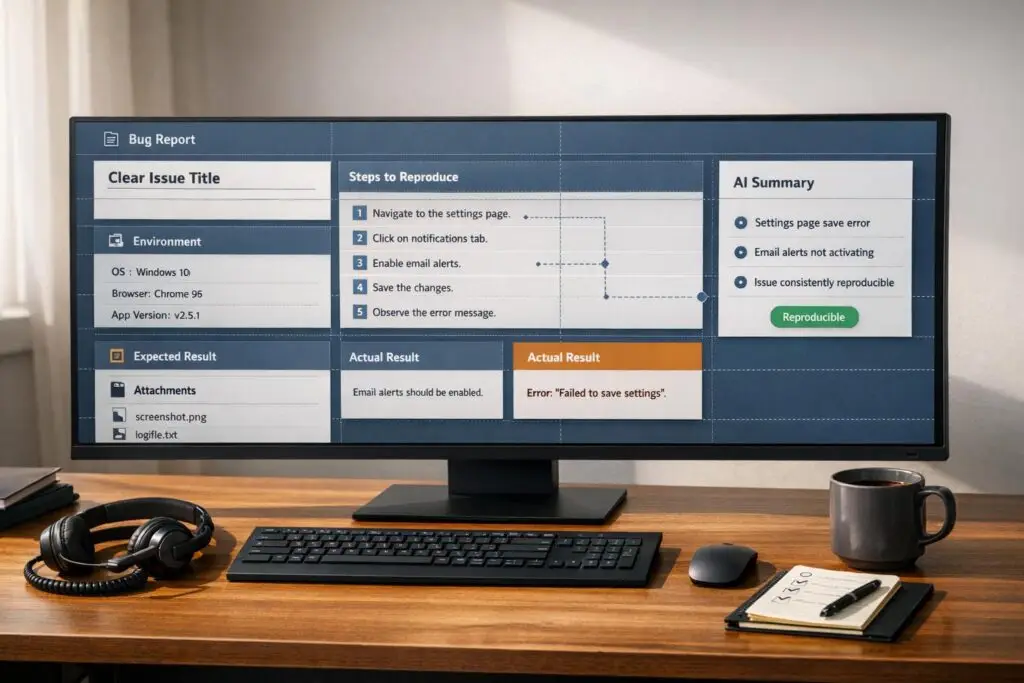
Here’s what every great bug report needs:
- A clear title: Use
[Component] + Descriptionformat (e.g.,[Login] Google SSO fails with 2FA enabled). - Step-by-step reproduction instructions: Include numbered steps starting from a neutral state.
- Environment details: Include OS, browser, app version, and any relevant settings.
- Expected vs. actual behavior: Use a side-by-side format to highlight the issue.
- Supporting evidence: Add screenshots, videos, or logs (redact sensitive data).
By following a structured template and leveraging AI tools to summarize tickets, categorize issues, and suggest reproduction steps, teams can eliminate confusion and resolve bugs faster.
Keep reading to learn how to write bug reports engineers will appreciate and how AI can simplify the process.
Bug Report To Make Your Developers Happy | Bug Reporting As Software Tester
sbb-itb-e60d259
Common Mistakes in Support-to-Engineering Bug Reports
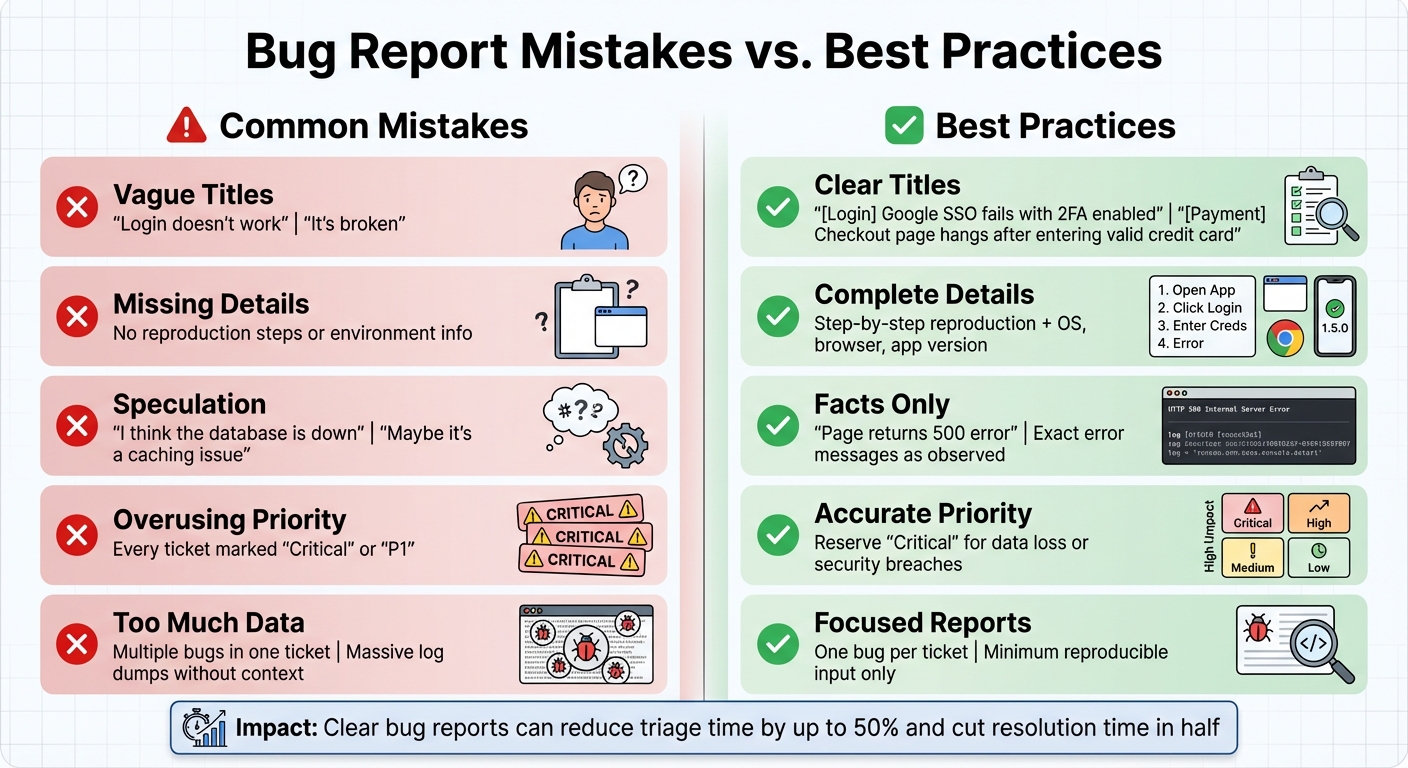
Common Bug Report Mistakes vs Best Practices for Engineers
Even with the best intentions, teams can inadvertently slow down engineering productivity. The difference between a bug that gets resolved in hours versus one that lingers for days often boils down to a few recurring mistakes. These missteps turn simple fixes into time-consuming detective work, draining efficiency on both sides.
Vague or Unclear Descriptions
One of the biggest obstacles to quick fixes is unclear or overly generic bug descriptions. Titles like "Login doesn’t work" or "It’s broken" force engineers to open each ticket and dig through lengthy explanations just to figure out the problem. This delays triage and makes prioritization harder. Instead of subjective or ambiguous phrasing, describe the observable behavior. For example, say, "Page returns a 500 error" rather than "Something is wrong with the page."
"A bug report is a technical document, not a complaint form."
Another common issue is including unverified theories about the cause of the problem. Speculations like "I think the database is down" or "Maybe it’s a caching issue" can muddy the waters. Engineers need factual details about what happened, not guesses about why it happened. A better approach? Stick to the facts – report error messages or behaviors exactly as observed – and, if necessary, add theories in an "Additional Notes" section.
Missing Steps to Reproduce or Environment Details
When bug reports lack clear reproduction steps or environment details, engineers often hit a dead end. These "cannot reproduce" situations waste time and lead to frustrating back-and-forth exchanges [2][4]. Without a detailed, step-by-step guide and specifics like browser, operating system, device, app version, permissions, and feature flags, engineers might never be able to replicate the issue.
Reproduction steps should start from a neutral state and include every action needed to trigger the bug. Missing this information can add 20+ minutes of unnecessary detective work for engineers – time that could have been spent fixing the issue. Some bugs only occur under specific conditions, like a particular browser version or user role, so leaving out these details risks the bug going unresolved.
Too Much Information Without Priority
Providing too much data can be just as problematic as providing too little. Bundling multiple bugs into one ticket, for instance, creates confusion and makes tracking fixes a nightmare. Similarly, dumping massive log files or lengthy JSON payloads without context buries the key issue in irrelevant details. On top of that, if every ticket is labeled "Critical" or "P1", it diminishes the meaning of these labels, undermining trust and disrupting sprint planning.
Here’s a quick guide to avoid these pitfalls:
| Common Mistake | What to Do Instead |
|---|---|
| "It’s broken" | Clearly state what breaks (e.g., "Submit button is unresponsive") |
| Overusing "Critical" priority | Reserve "Critical" for severe issues like data loss or security breaches |
| Speculation or guesses | Stick to facts; add theories in an "Additional Notes" section |
To keep bug reports actionable, file one bug per report and focus on the "minimum reproducible input" – only include the essential steps and data. Use a consistent severity scale based on the actual impact of the issue, not just perceived urgency. This helps engineers spend their time solving problems instead of deciphering tickets.
What Engineers Need in Bug Reports
When it comes to fixing bugs, engineers thrive on clear, concise, and actionable information. A well-structured bug report eliminates guesswork, letting engineers focus on reproducing the issue, pinpointing the problem, and implementing a fix. Here’s what a great bug report should include to make that process as smooth as possible.
Clear and Short Title
The title is the first thing engineers notice in a bug report, so it needs to be precise and informative. A good title summarizes the issue in a way that highlights what happened, where it occurred, and under what conditions. Think of it as a quick diagnostic tool.
Using the [Component] + Description format can make titles much more effective. For example:
| Poor Title (Vague) | Specific Title |
|---|---|
| "Login doesn’t work" | "[Login] Google SSO fails when user has 2FA enabled" |
| "Payment bug" | "[Payment] Checkout page hangs after entering a valid credit card" |
| "App crash on mobile" | "[Mobile] App crashes when uploading images larger than 5MB" |
Whenever possible, include specific error messages or codes directly in the title, like: [Checkout] 'Apply Promo Code' button returns 500 error on Chrome 120.
Steps to Reproduce and Environment Details
Reproduction steps are the backbone of any bug report. Think of them as a recipe – each step should guide the engineer toward recreating the exact conditions under which the bug occurs. Start from a neutral state (e.g., "Clear browser cache" or "Log in with a fresh test account") and use numbered, precise actions. Avoid vague instructions like "click around."
For example: "Navigate to Products > ‘Blue Widget’ (SKU #4521) > Add to Cart."
Beyond steps, include detailed environment information to help engineers understand the context. Critical details include:
- Operating system (e.g., macOS Sonoma 14.2)
- Browser version (e.g., Chrome 121.0.6167.161)
- Device type (e.g., iPhone 14 Pro)
- App/build version (e.g., v2.5.1 Build 1034)
- User role or plan level (e.g., Pro Plan)
- Active feature flags (if applicable)
Also, specify whether the bug is consistent or intermittent (e.g., "Occurs 3 out of 5 times").
| Environment Detail | Why It Matters | Example |
|---|---|---|
| Browser & Version | Some browsers handle code differently. | Chrome 121.0.6167.161 |
| OS & Version | OS variations can affect resource management and UI rendering. | macOS Sonoma 14.2 |
| App/Build Version | Ensures testing matches the exact code version. | v2.5.1 Build 1034 |
| User Role/Plan | Different permissions may trigger unique code paths. | Pro Plan (Enterprise) |
| Device Type | Mobile and desktop environments may behave differently. | iPhone 14 Pro |
If certain data inputs trigger the bug, simplify them to the smallest reproducible version (e.g., a 500KB JSON payload or a specific image size).
Expected vs. Actual Behavior
Clear communication about the gap between what should happen and what actually happens is essential. The easiest way to present this is with a side-by-side table:
| Expected Behavior | Actual Behavior |
|---|---|
| Clicking "Submit Order" displays an "Order Confirmed" page. | Clicking "Submit Order" returns a 500 error. |
This format eliminates confusion and helps engineers quickly grasp the issue.
Supporting Evidence: Screenshots, Videos, and Logs
Visual aids and logs are invaluable for diagnosing issues. Annotated screenshots, short videos, and detailed logs can save hours of back-and-forth. For example:
- Screenshots: Highlight the broken UI element or error message.
- Videos: Record multi-step interactions or timing-related behaviors.
- Logs: Include exact error messages, stack traces, or network failures.
For distributed systems, provide information like API status codes, worker logs (e.g., Redis timeouts), or database states.
"Most teams don’t have a bug quality problem – they have a communication problem. A clear report with a screenshot and reproduction steps can cut resolution time in half."
- Radim Hernych, Founder, Ybug [2]
Always redact sensitive information, such as tokens, cookies, or personal data, before sharing logs or screenshots. If you can’t share specific data, describe its structure instead (e.g., "500KB JSON with 2,000 items in an array").
Support-to-Engineering Bug Report Template
Template Overview
A well-structured bug report can transform user complaints into actionable tasks for engineering teams. Here’s what your template should include:
- Summary/Title: Use the
[Component] Descriptionformat for clarity. - Environment Details: Specify OS, browser, app version, device type, and any relevant flags.
- Steps to Reproduce: Lay out clear, numbered steps starting from a neutral state.
- Expected vs. Actual Behavior: Provide a side-by-side comparison of what should happen versus what actually happens.
- Impact and Priority: Indicate how often the issue occurs, its severity, and its urgency for the business.
- Supporting Evidence: Add annotated screenshots, videos, or console logs to back up the report.
This structure ensures both support and engineering teams communicate effectively, speeding up resolution by eliminating misunderstandings.
How to Use the Template
Follow these steps to make the most out of the template:
- Start with a clear title in the
[Component] - [Issue]format. For example:[Checkout] - 500 error after applying promo code. This helps engineers quickly understand the problem without opening the ticket. - Accurately fill in environment details, such as the browser version (e.g., Chrome 125), operating system (e.g., macOS Sonoma 14.3), app version, and environment (e.g., Production, v2.5.1 Build 1034).
- Write reproduction steps as a numbered list, beginning from a universal starting point (e.g., the login screen). Always include test data when relevant, like "Navigate to Products > Blue Widget (SKU #4521) > Add to Cart."
- Use a simple two-column format for the Expected vs. Actual Behavior section to clearly show the discrepancy.
- Quantify the issue in the Impact/Priority section. Mention the number of users affected (e.g., "2,000 paid users"), how often it occurs, and the business risk.
- Attach visual evidence, such as annotated screenshots pointing out the issue, videos showing the problem in action, and console logs with error messages. Redact any sensitive information.
Here’s an example to illustrate how to complete the template effectively:
Example: Completed Bug Report
Title: [Dashboard] Analytics widget fails to load for Pro Plan users on Safari 17
Environment: macOS Sonoma 14.3, Safari 17.2, Production (app.supportbench.com), v3.1.2 Build 2045, Pro Plan
Steps to Reproduce:
- Log in with Pro Plan credentials (test account: pro-user@example.com)
- Navigate to Dashboard > Analytics
- Wait 10 seconds for widgets to load
Expected Behavior: Analytics widget displays revenue chart and ticket volume graph within 3 seconds.
Actual Behavior: Widget shows spinning loader indefinitely. Console error: Failed to fetch: 401 Unauthorized from /api/analytics/summary. Network tab shows request timing out after 30 seconds.
Impact/Priority: High Priority / Major Severity. Affects approximately 1,200 Pro Plan users. Intermittent – occurs 7 out of 10 times. No workaround available.
Attachments: Annotated screenshot showing blank widget area, screen recording of 45-second wait time, console log with full stack trace.
This example demonstrates how a well-documented report gives engineers all the details they need to replicate and resolve the issue on their first attempt, significantly reducing the time spent on back-and-forth clarifications.
Using AI to Improve Bug Reporting in Supportbench

Creating clear and structured bug reports has always been a challenge, but AI tools are transforming this process for support teams. Instead of wasting time manually copying customer complaints, categorizing issues, and hunting for context, AI automates these repetitive tasks, ensuring engineers receive the details they need without extra effort from support agents.
AI-Powered Case Summaries
Supportbench’s AI dives into entire ticket histories – sometimes spanning dozens of back-and-forth messages – and distills them into concise, actionable overviews that highlight the core issue. These summaries automatically identify key themes, technical details, and customer sentiment, giving support agents a ready-to-use summary.
The AI-generated summaries can be directly inserted into the "Summary" or "Description" fields of bug report templates. By analyzing customer descriptions, the system extracts the expected versus actual behavior, saving agents from rephrasing the same information. However, it’s essential to review these summaries for technical accuracy before sharing them with engineering teams. This step ensures trust and prevents critical details from being overlooked. Additionally, AI streamlines categorization and prioritization, further simplifying the process.
Automated Categorization and Priority Assignment
AI takes a deep dive into case content, analyzing urgency-related keywords and customer sentiment to automatically classify issues into categories like UI bugs, API errors, or performance problems. It also ensures reports are routed to the correct engineering team. If a customer conveys significant frustration, the system can trigger an automatic priority escalation to address the issue promptly and reduce the risk of churn.
The AI doesn’t stop there – it evaluates the impact of the issue based on the conversation’s context. Developer Nova Elvaris explains, "Impact helps triage without a meeting" [1]. This approach reduces subjective disagreements between departments and ensures engineering backlogs are focused on high-impact issues, separating critical blockers from minor glitches.
AI-Driven Knowledge Base Integration
AI also taps into your AI-powered knowledge base to define "Expected Behavior" in bug reports, eliminating ambiguity about what the correct functionality should look like. By converting vague complaints into detailed, reproducible experiments, the system provides engineers with precise reproduction steps and relevant technical context.
The AI goes further by cross-referencing known environment constraints, such as specific OS versions or app runtimes, to suggest the minimum reproducible input. This ensures engineers have clear, actionable details while avoiding the inclusion of sensitive information. To maintain privacy, the AI can be configured to automatically redact sensitive data – like tokens, cookies, or personally identifiable information – before logs are attached to bug reports [1]. When sensitive data can’t be shared, the AI offers a workaround by describing the "shape" of the data (e.g., "~500KB JSON, contains 2 arrays"), giving engineers enough context without compromising confidentiality.
These AI-driven tools enhance the structured bug reporting process, making reports more precise and actionable for engineering teams.
Conclusion: Better Bug Reports with Structure and AI
The real challenge teams face isn’t just bugs – it’s how those bugs are communicated. A poorly written bug report can waste 20 minutes or more of a developer’s time, just trying to figure out what’s wrong [3]. That’s valuable time lost to avoidable back-and-forths, unclear descriptions, missing environment details, or vague phrases like “it’s broken.” A well-structured report cuts through this confusion, saving time and effort.
Using structured templates transforms unclear complaints into actionable, reproducible issues. These templates encourage clarity by including essential elements: concise titles, detailed reproduction steps, clear expected-versus-actual outcomes, and supporting evidence. As Nova Elvaris puts it, “Good bug reports are precise. They can be short if they include the right variables: what you expected, what happened instead, how to reproduce, in which environment, and with what inputs” [1].
AI tools take this a step further. Platforms like Supportbench use AI to simplify bug reporting by summarizing lengthy ticket histories into clear overviews, automatically categorizing and routing issues, and pulling in knowledge base insights to define expected behavior. These features complement structured templates by optimizing support workflows and reducing the manual effort required to clarify reports.
Better bug reports mean faster resolutions, fewer frustrating “cannot reproduce” scenarios, and smoother collaboration across teams. When the quality of your bug reports improves, so does the entire process – from quicker fixes and stronger team trust to a sharper focus on solving impactful engineering problems.
FAQs
What severity scale should we use?
When reporting bugs, it’s essential to use a consistent severity scale that reflects the bug’s impact on the system. A commonly used scale includes these levels:
- Critical: Issues that cause system crashes or complete failures.
- Major: Problems that disrupt core functionality but don’t crash the system.
- Minor: Bugs that affect non-essential features or workflows.
- Trivial: Cosmetic issues, like typos or minor UI glitches.
Adding a severity field to your bug reports helps your team prioritize fixes effectively and ensures clear communication with engineering. Just make sure the severity levels are clearly defined and tailored to fit your team’s specific workflows.
How do we handle bugs engineers can’t reproduce?
When engineers can’t replicate a bug, providing thorough context can make all the difference in resolving the issue. Start by documenting the environment where the bug occurred – this includes details like the operating system (OS), browser, device type, and network conditions. Be specific about the steps you took leading up to the problem, and clearly outline the difference between the actual behavior and the expected behavior. Don’t forget to mention any preconditions that might have influenced the issue.
To make your report even more useful, include supporting materials like logs, screenshots, or video recordings. These can be especially helpful for intermittent issues or bugs tied to specific environments. Finally, make it clear that the bug is non-reproducible so engineers can focus on identifying patterns or root causes without wasting time trying to replicate it unnecessarily.
What data should we redact from logs and screenshots?
When writing bug reports, it’s crucial to remove any sensitive or personally identifiable information. This includes details like:
- Passwords
- API keys
- User credentials
- Names
- Email addresses
- Phone numbers
- Other confidential data
By stripping out this information, you help safeguard privacy and prevent unintentional exposure of sensitive details during the bug reporting process.
Related Blog Posts
- How do you create an “Engineering handoff” template that speeds up bug fixes?
- Why Engineering Hates Your Slack Support Channel: Structuring Bug Reports
- How to triage bug reports via portal forms (steps, logs, environment capture)
- Bug report intake checklist: what to require from customers to speed resolution